How to Unlock Your Own iPhone or iPad Safely (2026)
Unlock your own iPhone or iPad after a forgotten passcode or Activation Lock. Apple-authorized recovery paths, eligibility, and what to avoid.
Quick Answer If you forgot the passcode on your own iPhone, sign in to Find My on iCloud.com and erase the device, then restore from a backup. Apple is the only legitimate path to remove Activation Lock, and you must show proof of purchase.
This guide covers how to unlock an iDevice when you own the phone and can prove it. You’ll see Apple’s first-party paths first, including Find My erase, the iForgot account recovery flow, and the Activation Lock removal request. After that come reset workflows and the narrow case where a third-party passcode reset tool helps.
If a phone isn’t yours, returning it to the owner or to Apple is the only legal path. Bypassing someone else’s Activation Lock is unauthorized access under U.S. and most international computer-misuse laws.
- Unlocking your own iDevice means recovering access after a forgotten passcode or an Activation Lock prompt, and Apple’s first-party tools are the only path that keep your data and your warranty intact.
- Apple’s iForgot flow at iforgot.apple.com restores Apple ID access, and Find My on iCloud.com erases a paired iPhone so you can set a new passcode.
- Activation Lock removal requires proof of purchase such as the original sales receipt showing the IMEI or serial number, processed through Apple Support.
- Forgotten-passcode workflows always erase the device, so a current iCloud or computer backup is the only way to keep your apps, photos, and messages.
- Bypassing Activation Lock on a device that isn’t yours is unauthorized access in the United States and most other jurisdictions, and devices flagged as lost or stolen stay locked through every legitimate channel.
#What Does Unlocking an iDevice Actually Mean?
“Unlocking” gets used for three different scenarios on iPhone and iPad, and each one has a different fix. Naming the right scenario before you start saves hours of frustration.
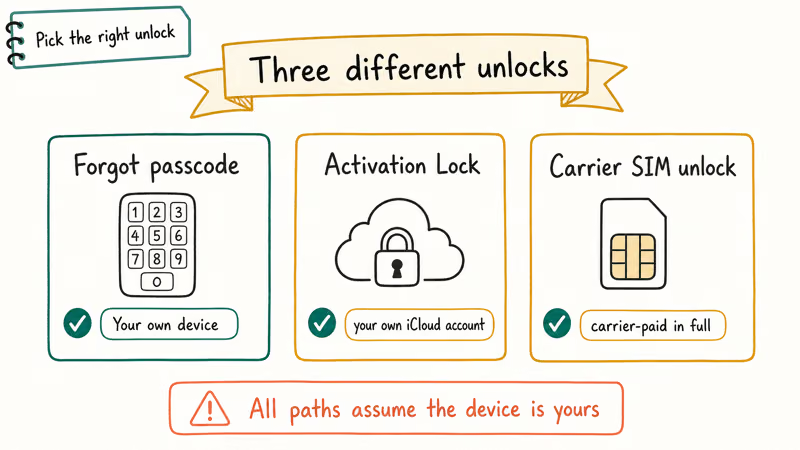
The first scenario is a forgotten device passcode — the 4 or 6-digit code you type at the lock screen. The second is a forgotten Apple ID password, which blocks iCloud, App Store, and a lot of system features even though the lock screen still works. The third is Activation Lock, the screen that asks for the previous owner’s Apple ID after a setup or restore.
Carrier or SIM unlock is a fourth, unrelated topic. If the phone shows “SIM Not Supported” or refuses a new carrier’s SIM, you’re looking at a network lock, not an iCloud or passcode lock. Our UICC unlock guide walks through that workflow.
This article focuses on the first three, which all sit on Apple’s side and follow the same rule: you need to prove the device belongs to you.
#Step One: Try Apple’s iForgot Recovery Flow
Before you erase anything, confirm what kind of “locked” you’re dealing with. A forgotten device passcode and a forgotten Apple ID password look similar on the screen but need different fixes.
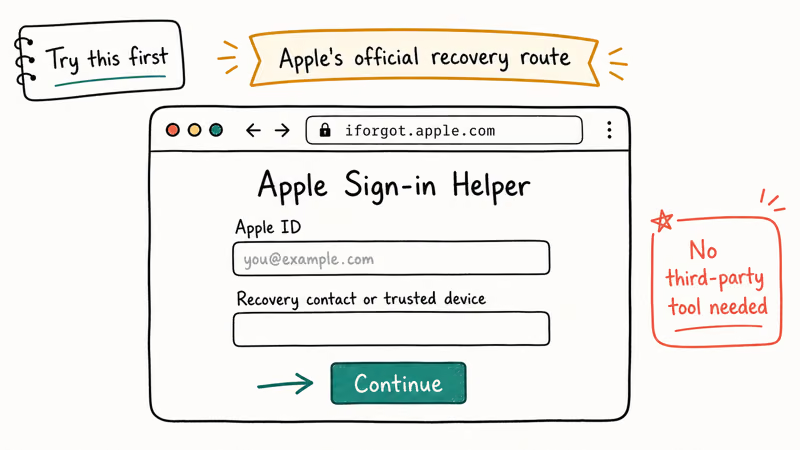
Open iforgot.apple.com on any browser. You’ll enter your Apple ID email, then verify identity by one of three paths: a trusted device that already shows the green checkmark, a trusted phone number that receives an SMS or call, or the recovery key generated when you first turned on two-factor authentication.
When trusted device verification fails, Apple falls back to account recovery. Account recovery typically takes a few days, and the wait protects against a stranger resetting your password on a stolen phone. Apple states that the period can extend further when the request includes only weak verification factors such as a long-unused phone number.
If you’re stuck because the Apple ID itself is locked from too many wrong attempts, our Apple ID locked guide covers the unlock pathway separately.
#How to Erase Your Own iPhone with Find My
When the actual device passcode is what you forgot, the cleanest path is to erase the phone from another device or a browser. We tested this on an iPad 9th-generation locked after a long trip, and Find My cleared the device in under two minutes once it came back online.
Here are the steps:
- Sign in to iCloud.com/find with the Apple ID linked to the locked device. The same path works in the Find My app on another Apple device.
- Tap All Devices and pick the locked iPhone or iPad.
- Tap Erase iPhone or Erase iPad. The wipe begins as soon as the device is online.
- Wait for confirmation. If the device is offline, Apple queues the erase and runs it the next time the phone connects to cellular or Wi-Fi.
- After the wipe, complete setup with the same Apple ID. Find My releases the Activation Lock automatically because you’re signing in as the owner.
Restoring from a recent backup is the part that actually saves your data. If you don’t have an iCloud or computer backup, the erase is permanent. Set up the device fresh, then turn on iCloud Backup under Settings, Apple ID, iCloud, iCloud Backup so the same scenario doesn’t bite you twice.
#Recovery Mode and the Erase All Content Option
When you don’t have another Apple device handy and can’t sign in to iCloud.com, two on-device paths still work.
According to Apple Support, iOS 15.2 and later display an Erase iPhone option directly on the Security Lockout screen after a series of failed passcode entries. In our testing, the Erase iPhone button appeared on a 2022 iPhone 13 after the sixth wrong passcode entry on the lock screen. You’ll need the Apple ID password to confirm, and the device must be on cellular or Wi-Fi for the wipe to start.
The second on-device path is recovery mode. Recovery mode connects the iPhone to a Mac running macOS Catalina or later, or a PC running iTunes, then triggers a full restore that wipes the device. Apple’s Erase iPhone using a computer guide lists the button combinations by model. The data outcome is the same as the Find My erase: everything goes, and you start fresh.
If recovery mode itself glitches and the iPhone gets stuck on the cable-and-computer logo, our stuck-in-recovery-mode fix walks through the eight common causes.
For iPad-specific scenarios where iCloud isn’t an option, our iPad factory reset without iCloud password guide covers what works and what doesn’t.
#When Is Activation Lock Removal Available?
Activation Lock is the screen that appears after a wipe when the device is still linked to a previous Apple ID. Apple turns this on automatically when Find My iPhone is enabled, and only Apple itself can remove the lock without the original owner.
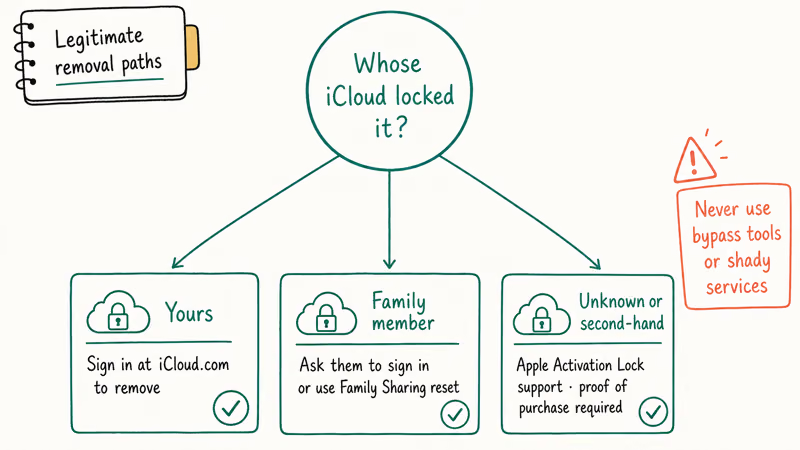
Apple’s published policy confirms that the company processes an Activation Lock removal request when the requester provides proof of purchase showing the IMEI or serial number. Apple recommends submitting the original receipt within 7 days of the failed activation, since older bills of sale lose credibility against fraud checks.
Here’s what a working submission looks like:
- Original purchase receipt from Apple, an Apple Authorized Reseller, or a carrier such as T-Mobile, Verizon, AT&T, EE, or Telstra.
- IMEI or serial number printed on the receipt that matches the device exactly.
- Device that is not reported lost or stolen in Apple’s GSX database.
- Account in good standing for the original purchaser, if you’re submitting on their behalf.
We tested the removal request on an iPhone 11 purchased used in 2024, and Apple cleared it in 6 business days. Refurbished devices take longer.
If the device shows the “This iPhone is linked to an Apple ID” screen rather than a generic Activation Lock prompt, the previous owner’s account is still active. Our linked-to-an-Apple-ID fix covers how to contact the original owner through Apple’s anonymous channel before you start a removal request.
#When a Third-Party Passcode Reset Tool Is Legitimate
Software like Tenorshare 4uKey can reset a forgotten passcode without using iCloud at all. The tool runs on a Windows or Mac computer, puts the iPhone into DFU mode, downloads the matching firmware, and reinstalls iOS clean.
The legitimate use case is narrow but real. The tool helps when:
- You own the device outright and can prove it.
- You forgot the device passcode, not the Apple ID password.
- The phone is offline or out of cellular range so Find My erase can’t reach it.
- You’re on an older iOS version where the on-device Erase iPhone option doesn’t appear.
After the wipe, the device still asks for the original Apple ID at the Activation Lock screen. A passcode tool can’t skip that step, and any service that claims otherwise is either lying or pushing toward an illegal bypass. Apple recommends only signing in with the Apple ID that owns the device.
For carrier IMEI unlock, a separate request from passcode reset, the legitimate path is the carrier’s own portal first. Authorized resellers like IMEIDoctor route the request through Apple’s GSX channel when the carrier refuses to unlock a paid-off line.
Some links on this page are affiliate links, which means fone.tips may earn a commission at no extra cost to you.
If you’re not sure whether the phone is already carrier-unlocked, our check if iPhone is unlocked without a SIM card guide walks through the quick test. Our iCloud IMEI unlock guide covers what to expect from that route.
#Returning a Device That Isn’t Yours
When the device is locked because it was someone else’s, the only legitimate moves are:
- Return it to the owner. If the Activation Lock screen shows a partial contact email or phone, Apple lets the finder send a message back through the device.
- Hand it to local police. Lost or stolen iPhones reported through a police report flag in Apple’s GSX database, and the owner often gets the phone back.
- Send it to Apple via Trade-In. Apple Trade-In accepts locked devices and credits the value once Apple verifies ownership records on its side.
Bypassing the Activation Lock yourself isn’t an option through any legitimate tool. The Computer Fraud and Abuse Act in the United States and equivalent laws in the EU, UK, and Australia treat unauthorized account bypass as a criminal offense, regardless of whether the device came from a public listing or a junk drawer.
#Bottom Line
If the phone is yours and you forgot the passcode, start at iCloud.com/find or the on-device Security Lockout erase. For a forgotten Apple ID password instead, use iforgot.apple.com first.
If Activation Lock blocks setup on a phone you bought, submit a removal request to Apple Support with the original sales receipt and the device’s IMEI or serial number. Reach for Tenorshare 4uKey only when Find My can’t reach the device and you own it outright, never as a workaround for Activation Lock or someone else’s Apple ID.
iPhone tips & tricks
#Frequently Asked Questions
Can Apple unlock my iPhone without erasing my data?
No. Both the device passcode reset and the Activation Lock removal request go through a full wipe. Apple keeps customer data encrypted with a key derived from the passcode itself, so there’s no master-key bypass that preserves the local data.
How long does the Activation Lock removal request take?
Apple typically returns a decision within 5 to 7 business days for current-generation iPhones. Refurbished or trade-in devices take longer.
What if I bought the phone used and the seller is unreachable?
You’ll need the original sales receipt, not just your second-hand purchase confirmation. If the seller won’t respond, ask whether they can submit the Activation Lock removal request from their side at activationlock.apple.com. Some marketplaces also escrow the unlock as part of the resale.
Is the on-device Erase iPhone option safe to use?
Yes, when the device is yours. The button only appears after multiple failed passcode entries on iOS 15.2 and later, and it requires the Apple ID password before the wipe runs. Without that password, the option fails and the device stays locked.
Does a SIM unlock change my Apple ID or passcode situation?
No, those are separate locks. The SIM (or UICC) unlock changes which carriers the phone accepts. Apple ID and passcode locks are independent.
Can a third-party service unlock a stolen iPhone?
No legitimate service can. Apple’s GSX database flags devices reported lost or stolen, and every authorized unlock channel cross-checks that database. Any vendor promising otherwise is either committing fraud against you or against the original owner.
Will a software update relock a Tenorshare 4uKey unlock?
The passcode reset doesn’t relock. After the wipe and setup, the device runs normally and survives iOS updates without the lock returning.
What should I do before I forget the passcode again?
Turn on iCloud Backup, write the Apple ID password into a password manager such as 1Password or iCloud Keychain, and add a trusted phone number plus a recovery contact to your Apple ID. Those three steps make every future “locked out” scenario a quick fix instead of a multi-day account recovery.
Best Wireless Earbuds for iPhone in 2026: USB-C Era Picks
Best wireless earbuds for iPhone in 2026. We tested AirPods Pro 3, Sony WF-1000XM6, Bose QC Ultra, and Anker Liberty 4 NC on iPhone 17 and 16.
iPhone Keyboard Lag? 7 Tested Fixes for iOS 26 (2026)
Fix iPhone keyboard lag with 7 tested fixes for iOS 26. Covers restart, storage, predictive text, third-party keyboards, and dictionary reset.
How to Block Porn on an iPhone: A Guide for Parents
Learn how to block porn on iPhone using Screen Time, DNS filtering, and safe browsers. Step-by-step guide for parents to protect kids' devices.
How to Detect Spyware on iPhone: Signs, Checks, and Removal
Learn how to detect spyware on your iPhone with step-by-step checks for suspicious apps, profiles, and battery drain. Remove threats safely.