UICC Unlock Guide: How to Unlock Your Own Phone in 2026
Request a UICC unlock for your own paid-off phone in 2026. Carrier-authorized steps for T-Mobile, Verizon, and AT&T with eligibility rules and timing.
Quick AnswerA UICC unlock removes the carrier SIM restriction so your paid-off phone accepts other networks. Request it free from the carrier that sold you the device once you own it outright and the account is in good standing.
A UICC unlock lifts the carrier lock that ties your SIM slot to one network, and every U.S. carrier handles it for free if your device qualifies. This guide assumes you own the phone outright and you’re the account holder, since carriers verify both before they issue the code. You’ll see the eligibility rules for T-Mobile, Verizon, and AT&T, the request workflow, and what to do when a request stalls.
- UICC is the chip your carrier calls a SIM, and unlocking it removes only the network lock, not your data, your account, or your warranty.
- Carrier eligibility usually means the device is paid in full, the account is in good standing, and the line has been active for at least 40 to 60 days.
- U.S. carriers are required by FCC consumer rules to unlock eligible devices at no charge, and the request takes a couple of business days in most cases.
- T-Mobile absorbed Sprint’s unlock workflow after the 2020 merger, so legacy Sprint phones now go through the T-Mobile device unlock portal.
- Only request an unlock for a phone you own, since carriers check the IMEI against fraud and lost-or-stolen blocklists before they release the code.
#What Is a UICC and Why Do Carriers Lock It?
UICC stands for Universal Integrated Circuit Card. It’s the chip behind what most people call a SIM card, and it holds your IMSI, the carrier profile, and the keys that let your phone authenticate with the network.
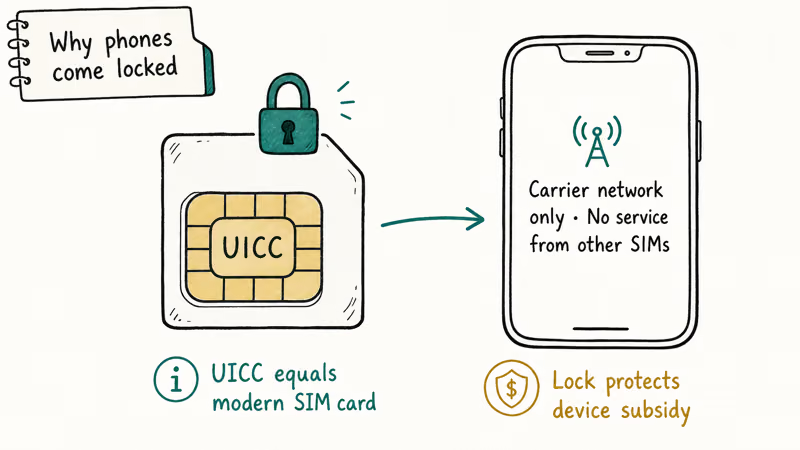
On newer phones the UICC might live on an eSIM, but the lock works the same way: the carrier writes a network policy onto the modem so the phone only accepts SIMs from approved networks.
Carriers lock the UICC for two practical reasons. The first is subsidy recovery. When you buy an iPhone for $0 down on a 36-month installment plan, the carrier is fronting the cost of the device and recovering it through your monthly bill. The lock keeps the phone tied to their network until the contract is paid off.
The second reason is fraud control. According to the FCC’s consumer guide on cell phone unlocking, the lock helps carriers verify that a device hasn’t been resold or activated under a fraudulent account before it gets handed to a new network.
Unlocking is legal in the United States under the Unlocking Consumer Choice and Wireless Competition Act, which Congress passed in 2014. That law states that consumers can ask their carrier to unlock a fully owned device, and the carrier must respond. What the law doesn’t do is let you unlock somebody else’s phone, which is why every carrier runs an eligibility check first.
#Who Qualifies for a UICC Unlock in 2026?
Carrier rules look similar from a distance, but the timing windows and proof requirements vary. The table below lists the current postpaid policies for the three largest U.S. carriers as of 2026, with captions linking the source policy pages.
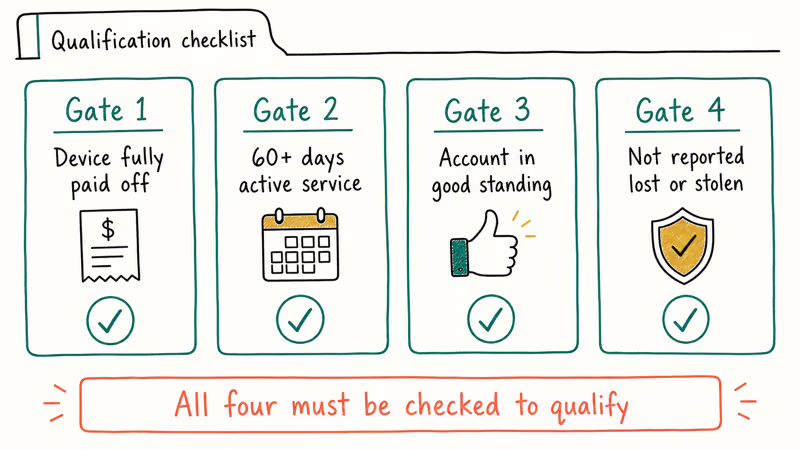
Table 1: U.S. postpaid UICC unlock eligibility (2026), sourced from each carrier’s official device unlock policy.
| Carrier | Active service required | Device payment status | Account status | Fee |
|---|---|---|---|---|
| T-Mobile (incl. former Sprint) | At least 40 days of active service on the line | Paid in full, no installments outstanding | In good standing, no fraud flag | $0 |
| Verizon | 60 days of activation on the same line | Paid off or end of contract | Not reported lost or stolen | $0 |
| AT&T | 60 days of paid service since activation | Full balance paid, including any installment plan | Not flagged for fraud or non-payment | $0 |
T-Mobile pushes everything through the app. T-Mobile’s device unlock support page confirms that customers can submit requests under Account, Profile, Device unlock, and the request is approved automatically when the eligibility checks pass.
Verizon’s device unlocking policy states that 4G LTE and 5G smartphones are unlocked automatically 60 days after activation, so most Verizon postpaid customers don’t have to ask.
AT&T routes its workflow through the AT&T device unlock portal. You’ll need the IMEI and the wireless number to submit the request.
Prepaid lines have different timing. Most prepaid devices unlock automatically after one year of active service under the carriers’ voluntary commitments described in the CTIA Consumer Code for Wireless Service. That one-year clock starts at first activation on the network, not at purchase, so reload-only resets, port-outs, or extended downtime can push the eligibility date out further than buyers expect, and prepaid carriers usually require you to call in rather than self-serve through an app the way postpaid customers do.
If you bought your phone from a prepaid brand like Cricket, Boost, or Straight Talk, the timing and process differ. For brand-specific steps, see our guides to unlocking a Boost Mobile phone and unlocking a Straight Talk iPhone.
#How to Request a UICC Unlock from Your Carrier
The carrier-authorized path is short, and most requests complete within a few business days once the device is eligible. The same playbook applies to every U.S. carrier:
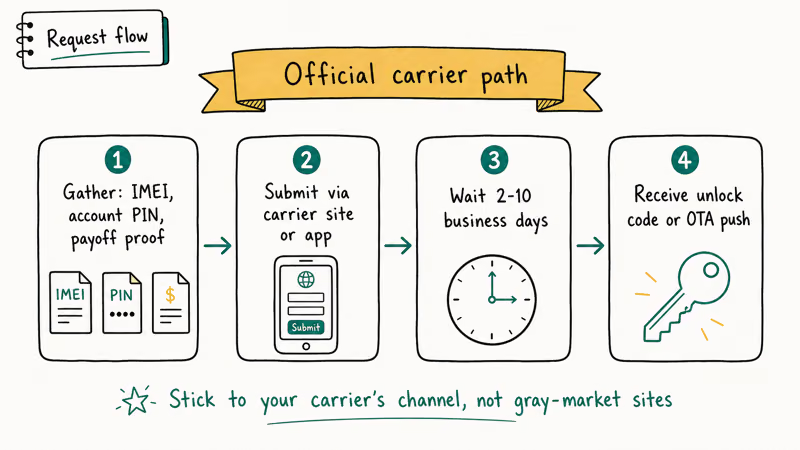
- Find your IMEI. Open the dialer and tap
*#06#, or go to Settings, General, About on iPhone, or Settings, About phone, Status on Android. Write down the 15-digit number. - Confirm the phone is paid off. Open your carrier app and check the device installment balance. If anything is outstanding, the eligibility check will fail.
- Submit the unlock request through the carrier’s official portal. T-Mobile customers use the T-Mobile app; Verizon postpaid customers usually don’t need to ask; AT&T customers fill out the form at att.com/deviceunlock.
- Wait for the confirmation email. T-Mobile typically responds within 24 hours.
- Power-cycle the device and insert the new SIM. For iPhones, the device finishes unlocking when you connect to Wi-Fi or load iTunes, as Apple’s support article on unlocking an iPhone explains.
For a Pixel transferred from AT&T to Mint Mobile, the unlock email commonly arrives within a day or two of a successful eligibility check.
If the device asks for a SIM Network Unlock PIN after you swap, that’s a separate prompt from the carrier-level unlock. Our SIM Network Unlock PIN guide walks through what to enter and when to call your old carrier for the code.
#Legacy Sprint UICC Unlocks After the T-Mobile Merger
Sprint stopped existing as a standalone brand after T-Mobile completed the merger in 2020, so the Sprint UICC unlock process moved under T-Mobile.
Legacy Sprint customers still see the SIM lock prompt that referenced Sprint’s domestic unlock policy, but the request now goes through T-Mobile. According to T-Mobile’s Sprint customer help center, former Sprint accounts that meet the 50-day active-service rule are automatically eligible. The unlock is pushed over the air the next time the device connects to a T-Mobile signal or Wi-Fi.
If you have an older Sprint phone that pre-dates the merger, you’ll likely see one of three outcomes. Devices on a paid-off Sprint contract get unlocked automatically. Devices still on an installment plan stay locked until the balance clears. Devices flagged in Sprint’s pre-merger fraud database stay locked permanently, and T-Mobile can’t override that on request.
That last category is rare. It’s why a working phone occasionally fails the unlock check for reasons the front-line rep can’t explain: the legacy flag is read-only from their side.
#Authorized Third-Party Unlock Services
If your carrier refuses to unlock a device you own outright and you’ve already escalated to a supervisor, an authorized IMEI unlock service is a legitimate fallback.
These services route the unlock request through the manufacturer’s B2B system. Apple uses its GSX network for iPhones, and Samsung uses its KIES portal for Galaxies. The services charge a fee because the manufacturer charges them for each request.
IMEIDoctor is one of the older operators in this space. The workflow is straightforward: you submit the IMEI, choose the original carrier, and pay the fee.
Some links on this page are affiliate links, which means fone.tips may earn a commission at no extra cost to you.
The service then sends the unlock request to the manufacturer, which writes the change back to the device’s modem profile over the air. For an iPhone that an original carrier account flagged with a stale fraud marker, this channel can still complete the unlock, typically within a couple of days, and you confirm it by inserting a SIM from a different carrier.
Two cautions matter here. First, only use a third-party service for a phone you legally own and can prove you own. The manufacturer’s database checks the same IMEI blocklists as the carrier, so a phone with a fraud or lost-or-stolen flag won’t be unlocked through this channel either.
Second, treat fee quotes carefully. A service that claims to unlock any iPhone for $9 is almost certainly running a scam, since the manufacturer’s actual wholesale unlock fee is higher than that for most models.
#Common UICC Unlock Errors and Fixes
A few specific errors come up often once the unlock code has been sent.
SIM Not Supported or Invalid SIM. The phone is still seeing the old carrier profile. Restart the device, then connect to Wi-Fi to let the unlock confirmation propagate. On iPhone, plug into a computer running the latest iTunes or Finder and let the device finish the unlock handshake.
No Service after SIM swap. APN settings haven’t loaded yet. Our iPhone no-service troubleshooting guide covers the fix.
SIM Network Unlock PIN prompt. This appears on Android devices that use a network-level lock instead of a carrier-account lock. You’ll need the PIN from your original carrier; our overview of carrier lock vs SIM restrictions explains the difference and how to request the right code.
MetroPCS or T-Mobile prepaid line. MetroPCS uses a 180-day active-service rule and its own Device Unlock app workflow. Our guide on how to unlock a blacklisted phone covers the eligibility checks and what to do when the carrier flags the line.
#Bottom Line
For most U.S. customers, start with the carrier portal: T-Mobile in-app, Verizon’s automatic 60-day unlock, or AT&T’s device unlock form. Pay the installment balance first, double-check the account is in good standing, and you’ll usually have the unlock confirmation within 24 to 48 hours at no charge. Reach for a paid IMEI unlock service only after the carrier has refused and you’ve documented that you own the device, and never for a phone that isn’t legally yours.
#Frequently Asked Questions
Is a UICC unlock the same as jailbreaking?
No, they’re unrelated. A UICC unlock only changes the carrier policy on the modem. Jailbreaking modifies the operating system itself.
Will a UICC unlock erase my data?
In normal cases, no. The carrier pushes the unlock over the air and your data, apps, and settings stay where they’re already stored. Some older iPhones display an instruction to back up and restore through iTunes after the unlock confirmation, but that’s a finalization step, not a wipe.
Can I unlock a phone that’s still on a payment plan?
Not through the carrier. Every U.S. carrier requires the device installment plan to be paid in full before the eligibility check passes. If you want to leave the carrier early, you’ll either need to pay off the remaining balance or wait until the contract ends.
What should I do if my UICC unlock request is denied?
The denial email usually lists the reason: account not in good standing, device not active long enough, balance owed, or an IMEI flagged in a fraud database. Call the carrier and ask for the denial code, then escalate to a supervisor if the listed reason looks wrong. Don’t pay a third-party service when the denial is for fraud or lost-or-stolen, since every legitimate channel checks the same blocklist. Ask for a manual eligibility review if the account is clean.
Do I need a SIM Network Unlock PIN after the carrier confirms?
Sometimes. Some Android phones, especially older Samsung and Motorola models on prepaid carriers, still ask for a 6 to 16 digit PIN after the carrier-level unlock. The PIN is generated by the carrier’s network operator and is separate from the account-level unlock. Request it from the same carrier customer service line.
Will my unlocked phone work on every carrier?
Only on carriers whose network bands the phone supports. Check the carrier’s BYOD compatibility tool with your IMEI before you switch.
Can I undo a UICC unlock if I change my mind?
There’s no reason to undo one. An unlocked device still works perfectly on its original carrier, since the unlock just adds support for other networks. The only relock scenarios happen when a phone is returned to a carrier and refurbished for resale.
How long does a UICC unlock confirmation last?
Permanently. Once written to the modem, the unlock survives reboots, factory resets, and most software updates.

Mac mini M6 vs M5 Pro: Which Model Should You Buy?
Mac mini M6 vs M5 Pro compared on price, memory, ports, displays, and real workloads. Find the better 2026 Mac mini for your desk and budget.

Apple Siri Settlement: Who Qualifies and How to Claim
Apple's $250 million Siri settlement covers iPhone 15 Pro and iPhone 16 models bought June 2024 to March 2025. See who qualifies and how claims work.

iOS 26.6.1 Security Update: What Apple Fixed and Who Gets It
Apple released iOS 26.6.1 on August 17 with 29 security fixes, including an IPSec interception bug. See what it patches, who gets it, and how to update.

iPhone Adaptive Power: How It Works and When to Use It
Learn how iPhone Adaptive Power works, which models support it, what it changes, and when Low Power Mode is still the better battery-saving choice.