TikTok Live Not Working? Causes and Fixes for 2026
TikTok Live not working? Fix the missing Go Live button or live streams that won't load with eligibility, app, cache, and network checks for 2026.
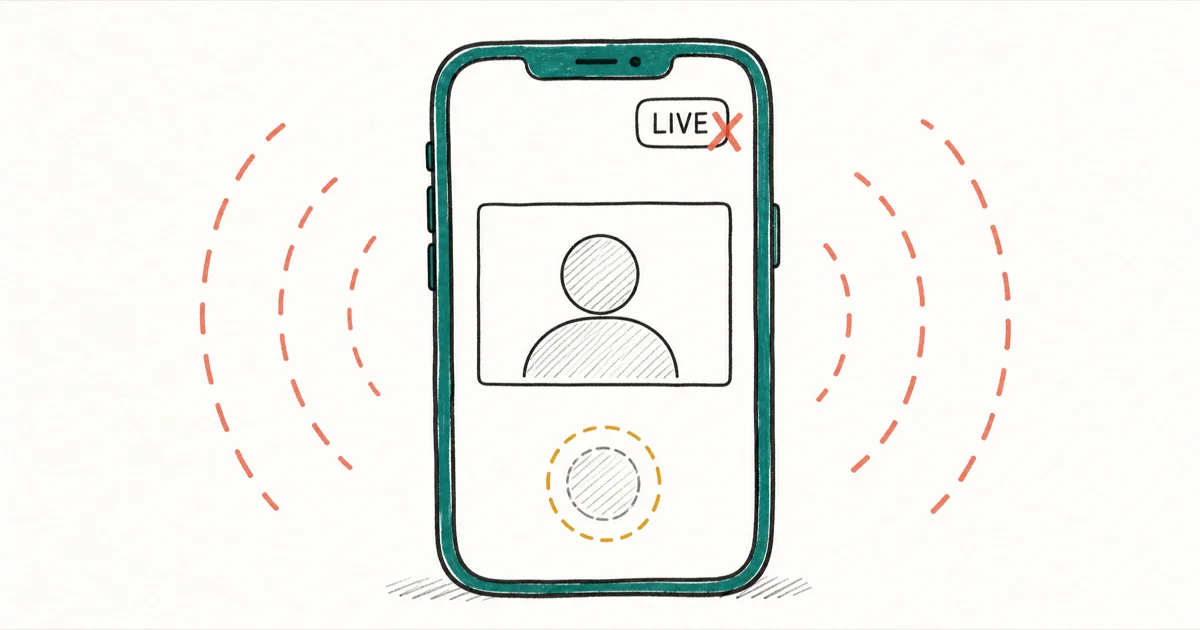
Quick AnswerIf TikTok Live isn't working, the Go Live button usually disappears because you have under 1,000 followers or your age isn't verified. To fix watching lives, update the app, clear its cache, and check your network.
When TikTok Live isn’t working, the first thing to pin down is which half of the feature is broken: going live or watching lives. They fail for completely different reasons. A missing Go Live button is almost always an eligibility issue, while a live stream that won’t load is usually an app, cache, or network problem you can fix in a couple of minutes.
- Going live requires roughly 1,000 followers plus age eligibility, so a missing Go Live button is usually an account limit, not a bug.
- TikTok raised the minimum livestreaming age to 18 after a 2022 child-safety investigation, so unverified age can block access entirely.
- Hitting 1,000 followers doesn’t guarantee instant access, since TikTok unlocks Live automatically once it judges your account eligible.
- Watching lives that won’t load points to a stale app, a bloated cache, or a weak connection.
- Avoid any tool promising to unlock Live early, since these risk your account and can’t bypass TikTok’s real eligibility checks.
#Why Can’t You Start a TikTok Live?
If the Go Live button is missing or grayed out, you’re almost certainly hitting an eligibility wall rather than a glitch. TikTok gates the broadcast feature behind a set of account requirements, and all of them have to line up before the button appears.
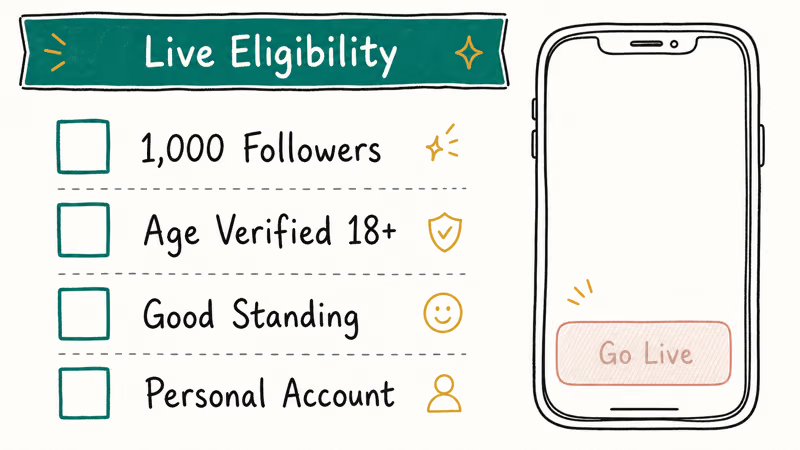
The headline requirement is 1,000 followers. TikTok’s support material states that you need 1,000 followers to broadcast, though the exact threshold can vary by region. You can read the full rules on TikTok’s LIVE access guidance page. Some accounts get special invitations to go live with fewer followers, so if the option appears for you below that number, you have early access.
Age verification is the second gate, and it trips up more people than they expect. The Wikipedia entry on TikTok reports that the platform raised the minimum livestreaming age from 16 to 18 after a 2022 BBC investigation into child safety. If TikTok can’t confirm your age, it may withhold Live even when your follower count clears the bar, and it sometimes asks for ID or a selfie before it will let you broadcast at all.
Two more conditions round it out. Your account has to be in good standing with no active Community Guidelines strikes, and a personal account gets fuller Live access than a business one.
#How Do You Get Access Once You Qualify?
Meeting every requirement doesn’t flip the switch instantly. TikTok decides eligibility on its own schedule.
The cleanest way to check is the in-app access screen. Tap the plus button, swipe to the LIVE tab, and tap Get access to go LIVE. TikTok then shows which requirements you meet and which you still need, with any unmet ones grayed out at the top. If one requirement still appears pending after you qualify, wait and recheck instead of trying to force the button.
That delay is normal. In most cases there’s nothing to manually fix, since Live simply appears once TikTok judges your account ready. If the screen shows every requirement met but the button is still missing, give it some time and check again.
#Can’t Watch TikTok Lives? Start Here
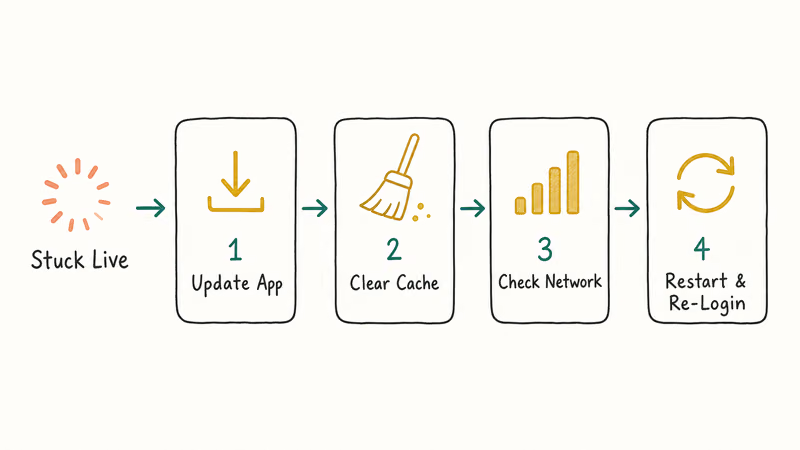
A live that buffers forever, shows a black screen, or refuses to open is a different problem entirely. This side of the feature rarely involves eligibility. Work through these fixes in order.
#Update the TikTok App
An outdated build is the most common cause of broken playback. Open the App Store or Google Play, search TikTok, and install any pending update. New TikTok features and fixes ship on the app side, so a version that’s even a few releases behind can choke on current Live streams.
#Clear the TikTok Cache
A bloated cache corrupts playback over time. Go to your profile, tap the menu, then Settings and privacy, then Free up space, and tap Clear next to Cache. Google’s Android storage guide confirms that clearing an app’s cache deletes temporary data only and leaves your saved data intact, so this won’t touch your videos or drafts. It often fixes streams that load halfway and freeze.
#Check Your Network
Live video needs steady bandwidth. Switch between Wi-Fi and mobile data to see which performs better, and run a quick speed test if streams keep stalling. A weak connection is the usual culprit behind endless buffering.
#Restart and Re-Login
When an update and a cache clear both fail, force-close TikTok, restart your phone, then log out and back in. This clears a stuck session that can block Live without affecting anything else. If TikTok still misbehaves across every feature, our guide to why TikTok is not working covers the broader troubleshooting path.
#Why You Should Skip “Unlock Live” Tools
Search results are full of services that promise to unlock TikTok Live without 1,000 followers. Skip every one of them.
TikTok’s Live access depends on age, regional follower thresholds, and account standing, and no third-party tool can safely replace those checks. TikTok’s support material confirms that only creators who meet the eligibility requirements can go live. The tools that claim otherwise tend to ask for account access, push fake engagement, or run activity that puts your account at risk.
Buying followers to reach 1,000 carries the same danger, because TikTok can detect them and the cleanup can cost you the account.
Grow a real audience instead. Our guides on making a group chat on TikTok and what you can and can’t say on TikTok cover the engagement habits that actually move your follower count.
#Region and Account-Type Differences
TikTok’s Live rules aren’t identical everywhere, which explains why two creators with the same follower count can have different access. The follower threshold can shift by region, and in some markets engagement quality matters more than a raw number. That’s why a friend abroad might be live at 800 followers while you’re still locked out at 1,200.
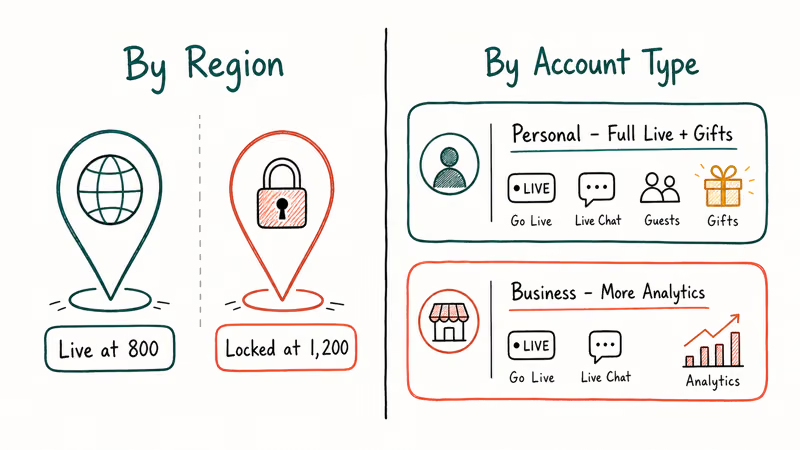
Account type changes things too. A personal account gets the full Live toolkit, gifting included, while a business account trades some Live features for richer analytics. If Live or gifting vanished after you switched account types, switching back restores the missing options.
#What to Check Before You Stream
Once Live works, a little prep saves mid-stream panic. Keep your phone plugged in and your signal solid, since either failure ends the broadcast.
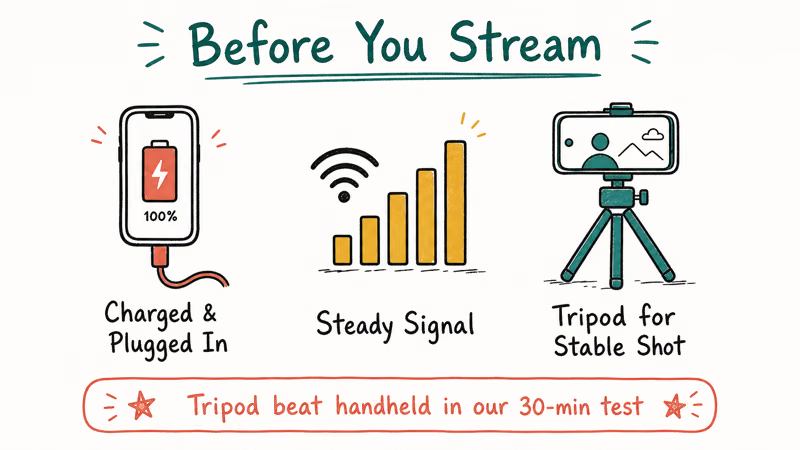
Stable footage matters too. A tripod reduces shake and keeps your framing consistent, so our roundup of the best phone tripod for TikTok is worth a look before you go live regularly.
If a viewer reports they can’t find your stream or profile, the cause may be on their end. Our guide to the account not found error on TikTok explains why.
#Bottom Line
When TikTok Live isn’t working, split the problem first. A missing Go Live button is an eligibility issue: you need roughly 1,000 followers, verified age, an account in good standing, and ideally a personal account. Access then unlocks on TikTok’s timeline rather than the instant you qualify.
A live that won’t play is the opposite, almost always a stale app, a full cache, or a weak network, all of which you can fix yourself in minutes. Steer clear of any tool that promises to skip the requirements, because the only safe path to Live is meeting them.
#Frequently Asked Questions
How many followers do I need to go live on TikTok?
You generally need 1,000 followers, though TikTok notes the threshold can vary by region. If the Go Live option appears below 1,000, you already have early access.
Why is the Go Live button missing even with 1,000 followers?
Usually unverified age. TikTok may also withhold Live for Community Guidelines strikes, a business account, or a slow regional rollout. Check the in-app access screen to see which requirement is still pending.
Do I have to be 18 to go live on TikTok?
Age requirements have tightened. Wikipedia reports TikTok raised the minimum livestreaming age to 18 after a 2022 child-safety investigation, and gifting requires being 18 too. Exact ages vary by region, so the in-app access screen is the source of truth for your account, your country, and your current standing all at once.
How do I fix TikTok lives that won’t load?
Update the app first, then clear the TikTok cache under Settings, then Free up space. If lives still stall, test your network by switching between Wi-Fi and mobile data. A weak connection is the usual cause of endless buffering.
Does clearing the TikTok cache delete my videos?
No. Clearing the cache removes only temporary files that TikTok uses to speed things up. Your posted videos, drafts, saved sounds, and account data all stay intact.
Can a third-party tool unlock TikTok Live early?
No, and you should avoid them. TikTok’s eligibility checks run on age, regional follower thresholds, and account standing, none of which an outside tool can safely bypass. These services often request account access or push fake engagement that can get your account restricted.
How long after reaching 1,000 followers does Live unlock?
It isn’t instant. TikTok grants Live access automatically once it judges your account eligible. If every requirement on the access screen shows as met and the button still doesn’t appear after a reasonable wait, contact TikTok support.

Is This Bank App Real? Spot a Fake App on Your Home Screen
A bank app can land on your home screen from a web page with no install warning. Learn the checks that tell a real banking app from a phishing web app.

Apps Crashing After iOS 27 Update? Fix Order (2026)
Apps crashing after the iOS 27 update? Update the app in the App Store first, then offload and reinstall to clear stale cache, then restart. The fix order.

Do AI Translation Earbuds Work Offline? What to Know
Do AI translation earbuds work offline? A few do with downloaded language packs, but most need the cloud. Here's what works offline and what you give up.
How to Set Up Translation Earbuds (Pairing and Modes)
How to set up translation earbuds: charge, install the app, pair over Bluetooth, pick two languages, and choose a mode. A step-by-step first-use guide.