Discord TTS Songs: 13 Funny Codes for Hilarious Pranks
13 Discord TTS songs and funny /tts commands that work in 2026. Copy-paste codes for beatbox, animal sounds, and helicopter effects on desktop.

Quick AnswerType /tts followed by repeating sound patterns like Meow, LURL, or Bois in any Discord text channel to play funny TTS songs. Enable text-to-speech in Discord Settings > Accessibility before the command works.
Discord’s /tts command turns plain text into robotic speech, and certain letter combinations produce funny effects in voice-adjacent text channels. This guide collects 13 copy-paste TTS song codes for spam loops, beatbox patterns, engine noises, and novelty sound effects.
- Discord’s /tts command works only on the desktop apps, not on iOS or Android
- Turn TTS on in
Settings>Accessibilitybefore any code will play sound - Repeating consonant clusters like LURL, Bois, and TICHDVDXTCHE produce the funniest results
- Server admins can disable TTS per role under
Server Settings>Roles - Discord’s 2,000-character message limit caps how long a single TTS song can run
#How Do You Enable Discord TTS for Songs?
Before any TTS code does anything, you have to turn on text-to-speech in your Discord settings. Discord ships with TTS playback off by default on new accounts, which is why most people copy a /tts code, paste it, and hear absolutely nothing back.
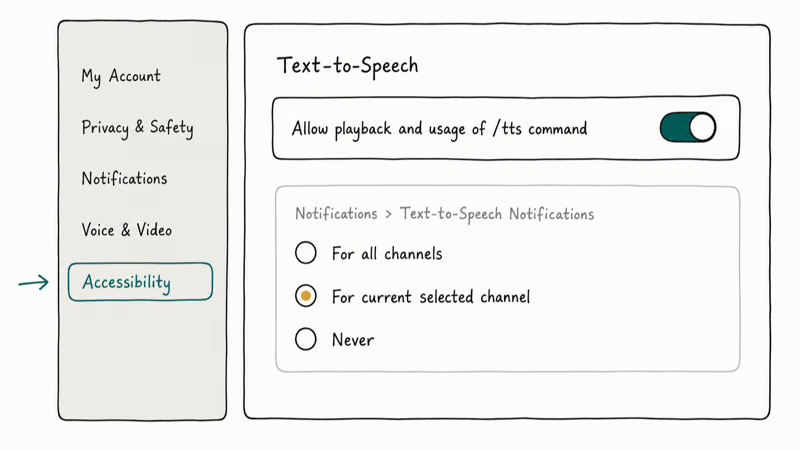
Here is the setup:
- Open Discord and click the gear icon next to your username
- Go to Accessibility in the left sidebar
- Toggle on Allow playback and usage of /tts command
Set your notification preference too. Open Settings > Notifications > Text-to-Speech Notifications and choose whether TTS plays for the focused channel, all channels, or never.
If /tts still does nothing after you flip the setting, the server admin has likely turned the role permission off. According to Discord’s Text-to-Speech 101 article, server owners can switch off “Send Text-to-Speech Messages” per role under Server Settings > Roles, and the change applies to every text channel on that server.
Playback speed varies between Windows and macOS because Discord uses each operating system’s built-in voice. Test on the platform you actually use before you trust a code.
#13 Best Discord TTS Songs and Funny Commands
Each of these works by typing /tts followed by the text in any Discord text channel. Copy the entire string after /tts for the cleanest playback.
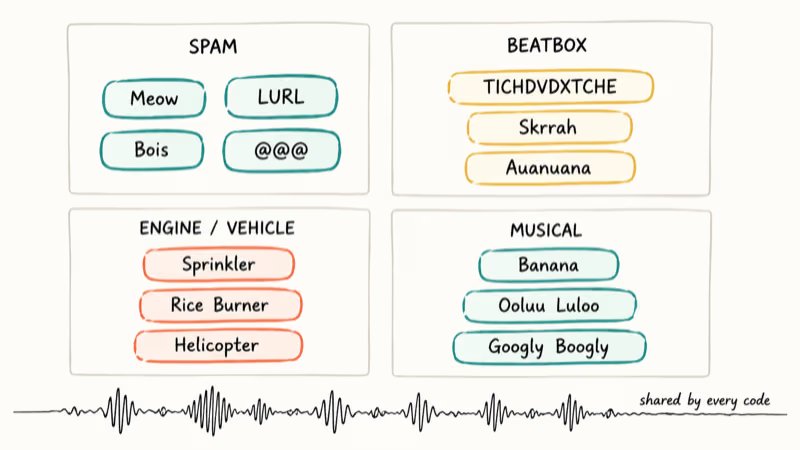
The list runs from classic spam patterns down to weird novelty effects, with short notes on when each one lands best and how many repetitions you actually need before the joke peaks. Tweak the spacing or repeat count once you hear how the engine on your machine handles each cluster.
#The Classic Meow Spam
The original Discord TTS prank. The repeating “Meow” builds into a cat chorus that turns unbearable fast.
/tts Meow. Meow. Meow. Meow. Meow. Meow. Meow. Meow. Meow. Meow. Meow. Meow. Meow. Meow. Meow. Meow. Meow. Meow. Meow. Meow.This is the kind of spam pattern that can get TTS muted quickly, so use it sparingly and only where the room is okay with noise.
#LURL Spam
LURL hits a sweet spot in the speech engine where it can’t decide whether to roll the L or chew the U. The result lands somewhere between a purr and a wet gargle.
/tts LURL. LURL. LURL. LURL. LURL. LURL. LURL. LURL. LURL. LURL. LURL. LURL. LURL. LURL. LURL. LURL. LURL. LURL. LURL. LURL.Try it once. Friends will ask what’s wrong with you, then ask for the code.
#The Bois Loop
Short and hypnotic. The pronunciation of “Bois” shifts after about the fifth repetition because the engine keeps trying to lock onto a steady cadence and missing, which produces an oddly musical loop that gets stuck in your head for hours.
/tts Bois. Bois. Bois. Bois. Bois. Bois. Bois. Bois. Bois. Bois. Bois. Bois. Bois. Bois. Bois. Bois. Bois. Bois. Bois. Bois.#TICHDVDXTCHE Beatbox
This one actually grooves. The consonant-heavy cluster produces a drum-like rhythm, and the trailing “Wuuuu” lands like a bass drop. It’s the closest a copy-paste TTS code gets to real beatboxing.
/tts TICHDVDXTCHE. TICHDVDXTCHE. TICHDVDXTCHE. TICHDVDXTCHE. TICHDVDXTCHE. Wuuuu. Wuuu. Wuuuu. TICHDVDXTCHE.#Water Sprinkler Sound
Uncanny. Plays back like a real lawn sprinkler.
/tts Pisspspsps. Pisspisps. Pispsspspspspspspspssp. Pisspspsps. Pisspisps. Pispsspspspspspspspssp.The blend of “Piss” and “psps” forces the engine to alternate between sharp and soft consonants, which builds the back-and-forth sprinkler tick.
#Rice Burner and Lawnmower Combo
Engine sounds collide with screeching tires, which is exactly what a janky street race sounds like.
/tts shersheeeerreeeerreee Vavaavoom. Wowwowowowow. Wowowowowoo. shersheeeerreeeerreee Vavaavoom. Wowwowowowow. Wowowowowoo.This pairs especially well with a funny voice changer running on your mic. The two layered together turn a Discord call into a low-budget driving simulator.
#Helicopter Sound
The repeating “Ssoii” produces a whirring tone that fades in and out the way a helicopter sounds when it’s one block away.
/tts Ssoii. Ssoii. Ssoii. Ssoii. Ssoii. Ssoii. Ssoii. Ssoii. Ssoii. Ssoii.Double the line for a full Black Hawk fly-over effect.
#Auanuanaunaunaunauna
Hard to describe before you’ve heard it. The TTS engine loses track of where each syllable ends and produces something between a yodel and a malfunctioning car alarm, sliding up and down in pitch on every cycle.
/tts Auanuanaunaunaunauna. Auanuanaunaunaunauna. Auanuanaunaunaunauna. Auanuanaunaunaunauna. Auanuanaunaunaunauna.#The Ooluu Luloo Loop
Robotic police siren. The alternating “ooluu” and “luloo” produce a rising-falling wave that ends up oddly relaxing next to the chaos of the other codes.
/tts ooluu luloo luloo. ooluu luloo luloo. ooluu luloo luloo. ooluu luloo luloo. ooluu luloo luloo. ooluu luloo luloo. ooluu luloo luloo.Paste twice for full effect.
#Googly Boogly Noogly
A Discord classic since 2019. The bouncing syllables sound absurd through a robotic voice, and you can swap the words around to roll your own variant.
/tts Googly Boogly Noogly. Googly Boogly Noogly. Googly Boogly Noogly. Googly Boogly Noogly. Googly Boogly Noogly.#Banana Song
Minions fans, this one’s yours.
/tts BananaaaBananaaabanaanaa. BananaaaBananaaabanaanaa. BananaaaBananaaabanaanaa. BananaaaBananaaabanaanaa. BananaaaBananaaabanaanaa.The stretched-out “Bananaaaa” with letters jammed together forces the engine to slow down and produce a sing-song melody close to the actual movie bit. Keep the words run together with no spaces between repeats.
#Skrrah Beatbox
Built around Big Shaq’s “Man’s Not Hot” meme, this code leans hard on percussive consonants. The “skkidiki” tail lands like a snare hit on the off-beat, and the longer you repeat the loop the more the bassline emerges between the consonant pops. Pair it with the helicopter code in the same channel for a layered rhythm track.
/tts Skrrah pa pa paa pap skkidiki. Skrrah pa pa paa pap skkidiki. Skrrah pa pa paa pap skkidiki. Skrrah pa pa paa pap skkidiki.If you want to take audio further than text, learn how screen sharing with audio routes music straight into a voice call.
#The @ Spam
Simplest one in the set. Type @ symbols after /tts and Discord reads each one as the word “at,” producing rapid-fire machine-gun fire.
/tts @@@@@@@@@@@@@@@@@@@@@@@@@@@@@@@#Why Do TTS Codes Sound Like Beatboxing?
Discord doesn’t ship its own TTS voice. The client hands the message off to whatever speech engine your operating system already has, then plays the result. Microsoft’s SAPI on Windows and Apple Speech on macOS were built around accessibility and dictionary words, not nonsense syllables.
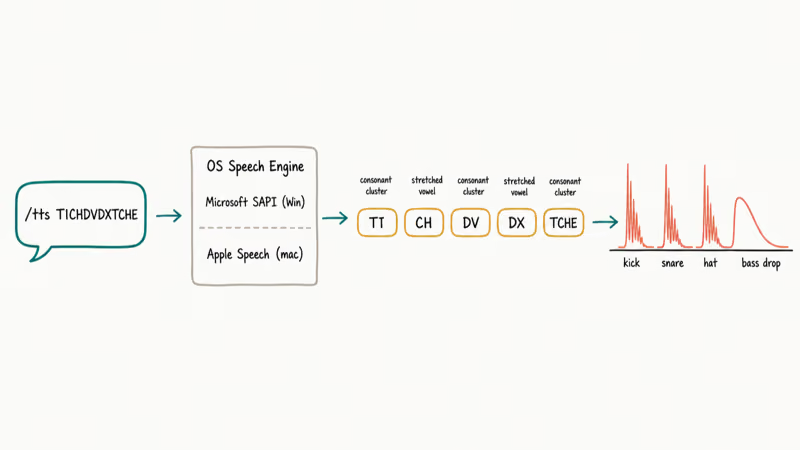
So both engines fall back to phoneme-by-phoneme pronunciation when they hit a string they can’t match against a real word, which is exactly the behavior described in Wikipedia’s speech synthesis overview. That fallback is where the music happens. Repeated consonant clusters like CH, SK, and DX get spat out as percussive hits because the engine releases air pressure each time it parses one.
Stretched vowels stretch the tone. None of it’s by design.
According to Discord’s Text-to-Speech 101 documentation, TTS playback uses the listening client’s local engine rather than a server-side voice, which is why the same code sounds different on Windows and macOS.
#Best AI Text-to-Song Tools Beyond Discord
Discord TTS can’t turn lyrics into actual songs. AI music generators have closed that gap.
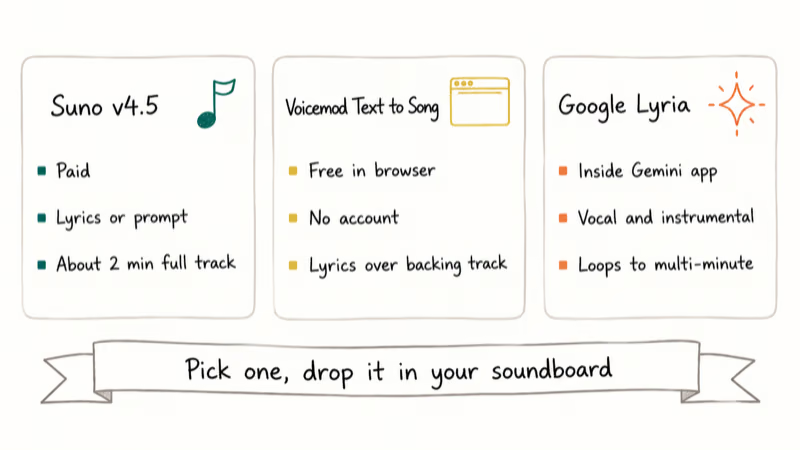
Suno’s v4.5 model is the strongest paid option in 2026. Type lyrics or a prompt, pick a genre, and Suno returns a finished track in roughly two minutes.
Voicemod Text to Song is the free browser alternative at Voicemod’s text-to-song page. Type lyrics, pick a style, and it sings the words back over a backing track. No install, no account, no payment up front. Voicemod also runs a separate Discord integration for live voice routing if you decide to upgrade later.
Google Lyria, available inside the Gemini app, generates instrumental and vocal tracks from natural-language prompts. According to Google’s music generation overview, Lyria runs on DeepMind’s audio model and ships inside Gemini for prompt-based songwriting. Output ranges from short loops to multi-minute compositions with full vocal lines, and the model handles styles from lo-fi hip-hop to orchestral arrangements.
If you already use a voice changer for Discord, these AI song tools pair well as a soundboard layer. Render a track, drop it into your soundboard, trigger during the call.
#How to Make Your Own Discord TTS Songs
You don’t have to copy our list. Writing original TTS songs takes a few minutes once you understand how the engine treats different letter patterns.
Stack consonant clusters. CH, SH, SK, and DX deliver the cleanest beats.
Stretch vowels for melody. Adding extra letters (Bananaaaa instead of Banana) forces the engine to slow down and creates a sing-song effect. The longer the vowel chain, the more drawn out the note.
Use periods as drum-machine spacing. Each . becomes a short pause.
Mix uppercase and lowercase deliberately. “LURL” and “lurl” sound different on most systems because the engine treats all-caps as an acronym to spell out and lowercase as a single word with a different pronunciation pattern.
If you write your codes inside the Discord client, Discord text formatting like bold or italics has no effect on TTS playback. The engine reads the raw characters either way.
#How to Stop TTS Messages From Spamming Your Channel
Three options, quickest to nuclear.
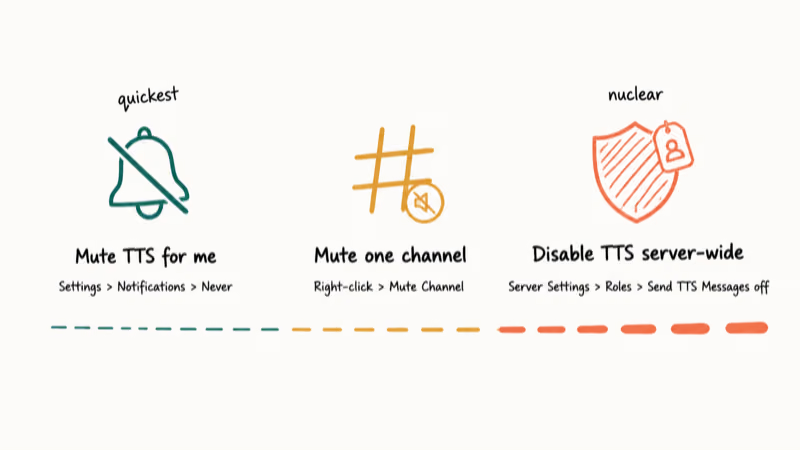
First, open Settings > Notifications > Text-to-Speech Notifications and set it to Never. TTS playback dies on your end across every server you’re in.
Second, mute that one channel. Right-click the channel name and pick Mute Channel to block notifications for that channel only.
Third, server moderators can switch TTS off entirely. Go to Server Settings > Roles, choose the role causing problems, and turn off Send Text-to-Speech Messages under Text Channel Permissions. Discord’s role permissions documentation confirms that this single toggle blocks TTS for every member assigned to that role across all channels in the server, which is the cleanest fix when one specific person keeps spamming the same code.
If audio cuts out entirely instead of just spamming, the issue isn’t TTS-specific. Run through the Discord stream no sound checklist first.
#Bottom Line
Start with Meow and LURL if you’ve never tried Discord TTS songs before; both are simple desktop-friendly patterns. For actually musical effects, copy the TICHDVDXTCHE beatbox or the Banana Song patterns and let the engine do the rhythmic work. If you want real songs from text rather than novelty pranks, run your lyrics through Suno’s v4.5 model and skip the /tts command entirely.
#Frequently Asked Questions
Why is /tts not working on my Discord?
Open Settings > Accessibility and toggle on “Allow playback and usage of /tts command.” If that doesn’t fix it, your server admin has likely switched off the role permission. Mobile Discord can’t play TTS at all.
Can everyone in the channel hear my TTS message?
Only listeners with TTS notifications enabled. Mobile users never hear it.
Do TTS songs work on Discord mobile?
No. Discord’s iOS and Android apps can’t play TTS audio. You can type a /tts message from your phone and desktop members will hear it, but your phone itself stays silent.
If you want playback on a phone, route audio through a third-party text-to-speech app for Discord instead.
What is the character limit for Discord TTS songs?
The hard cap is 2,000 characters per message. Stay under 1,000 for clean playback.
Are there TTS bots that sound better than the built-in command?
Yes. Bots like TTS Bot and Voicemod’s Discord integration use neural voices that sound much closer to natural human speech, with better intonation, breath pauses, and consonant clarity than Microsoft Sam.
Setup takes five minutes once you’ve authorized the bot on your server, granted “Send Messages” and “Connect” permissions, and assigned it to a voice channel.
Can you get banned for spamming TTS on Discord?
Yes. Stick to private servers.
How do you make a TTS code sound like beatboxing?
Stack consonant-heavy strings without real words, then separate repeats with periods. Codes like TICHDVDXTCHE, Skrrah pa pa paa pap, and skkidiki produce percussive sounds. Adding a stretched vowel at the end gives you a bass drop. Stick to 4-6 repetitions per cluster.
Is Discord TTS different on Windows and Mac?
Yes. Microsoft Speech and Apple Speech sound noticeably different on identical text.

Google Messages Error 3100: Why RCS Is Broken on Galaxy
Google Messages RCS error 3100 hits Galaxy owners after phone or carrier switches. Google told 9to5Google a fix is coming. Here's what actually helps.

Is This Bank App Real? Spot a Fake App on Your Home Screen
A bank app can land on your home screen from a web page with no install warning. Learn the checks that tell a real banking app from a phishing web app.

Apps Crashing After iOS 27 Update? Fix Order (2026)
Apps crashing after the iOS 27 update? Update the app in the App Store first, then offload and reinstall to clear stale cache, then restart. The fix order.

Do AI Translation Earbuds Work Offline? What to Know
Do AI translation earbuds work offline? A few do with downloaded language packs, but most need the cloud. Here's what works offline and what you give up.