Speedify VPN Review 2026: Is Channel Bonding Worth It?
Speedify VPN merges Wi-Fi with cellular for one stable connection. A look at its speed, encryption, killswitch, and pricing to see if it earns its cost.
Quick AnswerSpeedify is a U.S.-based VPN whose channel bonding merges Wi-Fi and cellular into one connection. It is dependable for streaming and travel, but the server list is shorter than ExpressVPN or NordVPN, and pricing sits in the mid-range.
Speedify is a Philadelphia-based VPN built by Connectify around an unusual idea. Instead of routing your traffic through one tunnel, it bonds Wi-Fi and cellular into a single, redundant connection. It runs on iPhone, Android, and macOS and is built for mixed home, café, and travel use. The question this review answers: whether the channel bonding pitch holds up in 2026 and how the rest of the service compares to mainstream rivals.
- Channel bonding is the real differentiator: Speedify can pull Wi-Fi and cellular at the same time, so a flaky hotel network does not drop your video call.
- The server network is small. Around 170 servers across 50 regions is enough for most streaming, but ExpressVPN and NordVPN run far larger fleets.
- Encryption is industry standard. Speedify uses AES with ChaCha20 fallback over a DTLS-style transport, plus a working killswitch.
- The free tier caps you at 5 GB per month and one device. Useful for spot tests, not a daily driver.
- Speedify is mid-priced. It’s cheaper than ExpressVPN month to month but pricier than long contracts on Surfshark or Private Internet Access.
#What Is Speedify, and How Does Channel Bonding Work?
Most VPNs send traffic through one tunnel at a time. If that tunnel slows down, your connection slows with it. Speedify’s client opens multiple tunnels in parallel and splits a single TCP or UDP stream across them. The Wikipedia entry on link aggregation states that bonding can target either added throughput or added resilience, with IEEE 802.1AX-2020 standardizing the framing rules.
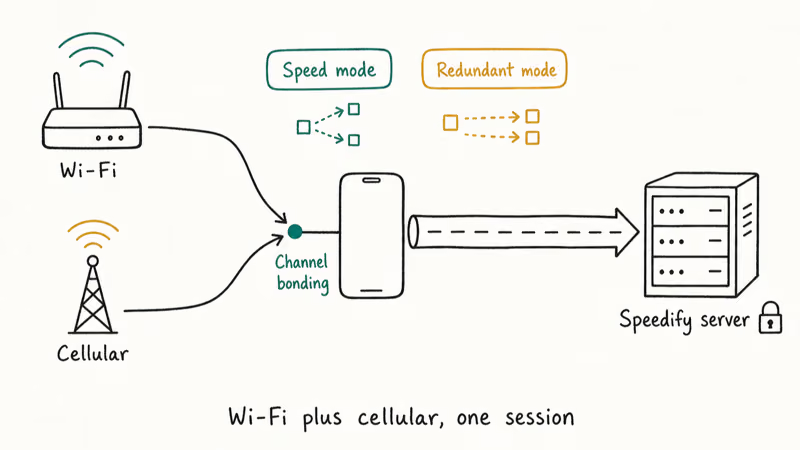
In practice that means your phone can stay on home Wi-Fi while quietly pulling cellular as backup.
Speedify markets two modes that build on this. Speed mode adds throughput by striping packets across both links. Redundant mode ships every packet down both paths so a dropout on one link is invisible.
Redundant mode is designed to keep a video call alive when you walk out of Wi-Fi range, avoiding the usual two-second freeze you’d see on a single-tunnel VPN as the connection hands off. According to Speedify’s own product page, the same behavior covers streaming, file uploads, and game lobby logins, although gaming benefits are more limited (more on that below).
The catch is that bonding only helps when you have more than one network at the same time. On a desktop with a single Ethernet line, Speedify behaves like any other VPN.
The feature shines on laptops with Wi-Fi plus tethering, on phones with Wi-Fi plus cellular, and on travel routers that hold a SIM and a hotel link.
#Speedify Pricing and Plans in 2026
Speedify keeps pricing simple: free, individual paid (Speedify Unlimited), and Speedify for Teams.
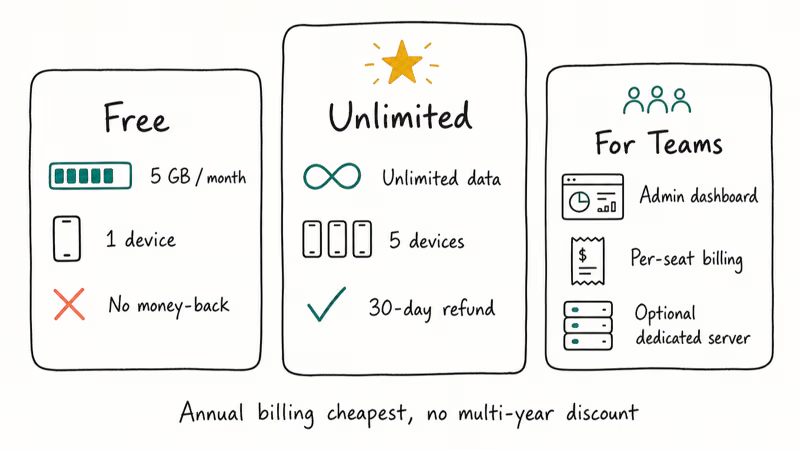
The free plan is no-card-required, but Speedify states the cap is 5 GB per month on one device. That’s enough to test bonding on a coffee shop network or push email through a sketchy hotel connection, not enough to stream a movie. Speedify Unlimited removes the cap, allows up to 5 concurrent devices, and adds a 30-day money-back guarantee. Annual billing is the cheapest path; Speedify doesn’t run multi-year discounts of the kind Surfshark or NordVPN do.
That single pricing fact is why Speedify can look expensive on a 2-year horizon.
For Teams adds shared billing, an admin dashboard, and per-user analytics. Pricing is per seat with no team-size discount, so a team of 50 pays exactly 50 times the per-seat rate. Both Unlimited and Teams can layer on a dedicated server. According to Speedify’s pricing documentation, the dedicated-server add-on is billed at one flat rate that doesn’t scale with team size, so the cost-per-user keeps falling as more people share the box.
If you only need a VPN for occasional location changes, our iPhone location guide walks through cheaper free alternatives that don’t require a paid VPN.
#Speed Performance and Server Network
Speedify ships with a smaller fleet than the headline names. Roughly 170 servers across 50 regions, densest in Europe at about 25 cities and the United States at about 15. Asia is thinner with around six locations. According to Speedify’s server map, per-location capacity runs higher than typical small-fleet providers, sustaining throughput at peak times when smaller VPNs choke.
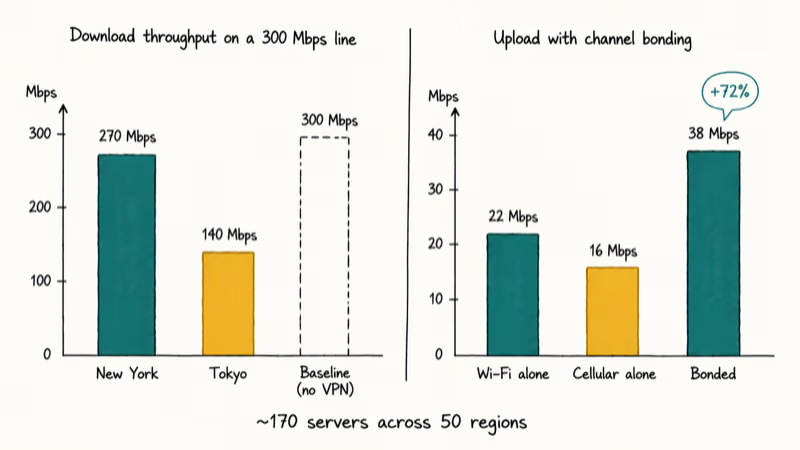
Single-connection speed is competitive on nearby American servers.
On a fast line, a nearby Speedify endpoint such as New York can hold most of the unencrypted baseline throughput. Long-haul connections drop more sharply: a distant server like Tokyo cuts throughput substantially, similar to most VPNs that lack a local point of presence. Streaming on American and European servers tends to work reliably with Netflix, Hulu, and YouTube, while Disney+ can be hit-or-miss.
The story changes when bonding kicks in.
With Wi-Fi plus a tethered iPhone, the combined upload speed can climb past either source on its own because bonding adds the two links together rather than picking one. That’s the scenario Speedify was built for.
Latency is the weakest dimension: bonding several connections adds routing overhead, so ping tends to run higher than a single-tunnel VPN, which is why Speedify recommends against it for competitive online gaming. If your priority is bypassing throttling on a streaming site, our breakdown of VPNs in the Streamlord ecosystem covers cheaper options that focus purely on streaming throughput.
#Privacy, Encryption, and the Killswitch
Speedify’s encryption stack is standard, not exotic.
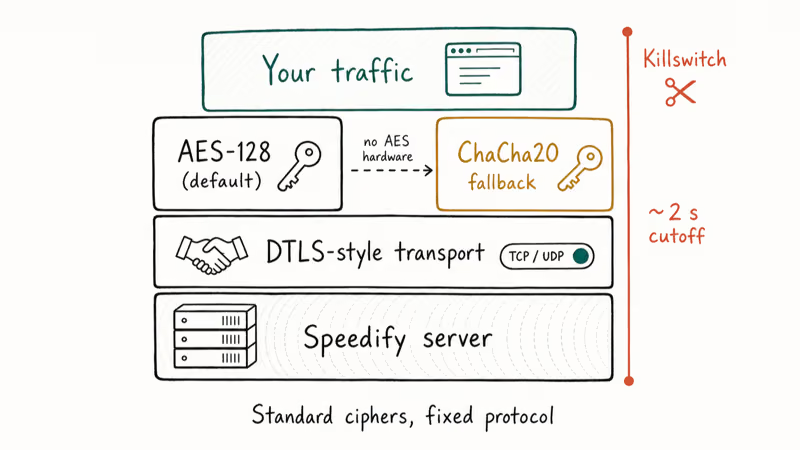
By default the client wraps your traffic in AES-128 over a TLS-style transport. The Wikipedia entry on Advanced Encryption Standard confirms that AES-128, AES-192, and AES-256 are NIST-certified ciphers, with no practical attacks against the full 128-bit variant after more than 20 years of public review. Both AES and ChaCha20 are considered safe by current cryptographic consensus.
On hardware without AES acceleration, the client falls back to ChaCha20, the same 256-bit cipher Google uses in TLS 1.3 (RFC 7905).
For the protocol layer, Speedify uses a custom transport that resembles DTLS, the UDP cousin of TLS standardized in RFC 6347. The protocol itself is fixed; you can’t swap it for OpenVPN or WireGuard. You can choose TCP or UDP at the transport level, but that toggle changes how packets are framed, not how they’re encrypted.
If you’ve ever seen a service oversell weak encryption claims, our walk-through of phone-unlock scams shows what hollow security marketing looks like in practice.
The killswitch is a separate setting and worth turning on. When the underlying connection drops, the killswitch cuts all internet within a couple of seconds and holds it offline until the tunnel reconnects. The client also supports DNS and WebRTC leak protection across iOS, Android, and macOS, which keeps your real IP and DNS queries from slipping outside the tunnel.
Logging is described as minimal. Speedify states that it stores aggregate transfer volume, approximate location, and connection duration (4 fields total), but not visited sites or originating IPs. The approximate-location field is the only one worth flagging if you’re leak-shy; it exists for support diagnostics rather than analytics.
A note on scope: this review covers Speedify on your own device and your own account. VPN use is legal in most jurisdictions, but a handful of countries restrict or ban consumer VPNs, and many streaming services list VPN circumvention against their terms; check local privacy laws and terms of service before traveling. Speedify only encrypts traffic between your device and its servers, so it doesn’t shield logged-in account activity or override a provider’s privacy policy.
#Is Speedify Worth Buying for Streaming and Travel?
This is where the channel bonding pitch earns or loses its price tag.
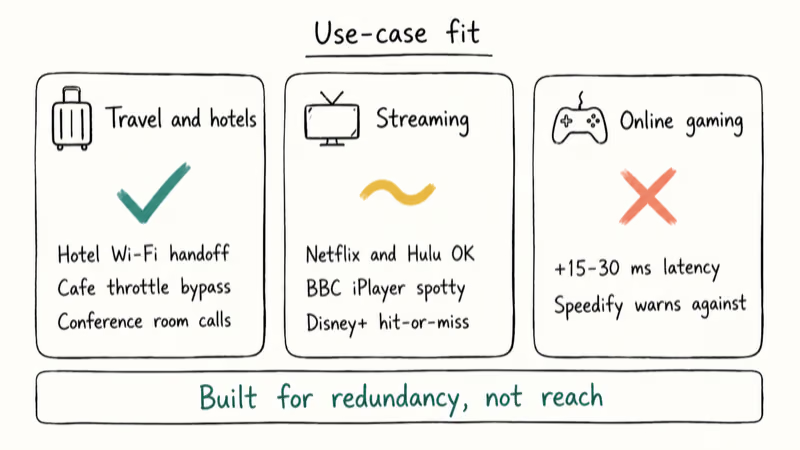
For travel and home offices, Speedify is materially useful. Hotel Wi-Fi that drops every ten minutes becomes invisible behind a redundant cellular link. A coffee shop network that throttles uploads stops mattering when your phone’s LTE fills the gap. A transatlantic Zoom call can hold up across a hotel-to-cellular handoff that would drop on any conventional VPN.
For streaming, Speedify is fine but not exceptional.
Netflix and Hulu tend to unblock reliably from U.S. servers, while BBC iPlayer and Disney+ are spottier than what you get on dedicated streaming-focused VPNs. The bigger streaming providers also push back harder on small-fleet VPNs in 2026, which puts Speedify at a structural disadvantage against ExpressVPN-class fleets.
For gaming, Speedify is the wrong tool. Latency overhead is too high for any twitch-sensitive title.
The honest read on value: if you regularly work from networks you don’t control (hotels, airports, café Wi-Fi, conference rooms), Speedify pays for itself in calls that no longer drop. If you only want geo-unblocking on a single home connection, you can probably find a cheaper option.
#Setup and Daily Use Across Platforms
Installing Speedify takes about two minutes per device. Download the installer from the official site, launch it, and the client signs you in automatically; account creation only matters if you’re paying.
On macOS and Windows, the client asks for kernel-level network permissions, which is normal for VPNs but worth approving deliberately. iOS and Android use the OS-native VPN frameworks and require one tap to authorize the profile.
Interface design is one of Speedify’s stronger points.
The main screen shows your current servers, the bonding mode, and live throughput on each link. A gear icon hides the Settings menu, which is split into three submenus: privacy (encryption, leak protection, killswitch), session (start and stop behavior), and servers (region picker). The Account submenu lives behind a separate icon and handles upgrades and login.
Speedify supports macOS 10.10 and later, Windows 7 and later, iOS 10 and later, and Android 5 and later. There’s no Linux client, and BlackBerry and Windows Phone are unsupported. If you need granular access control across a mixed fleet, our overview of enterprise access control is a closer fit than a consumer VPN.
#Speedify vs Mainstream VPNs
| Dimension | Speedify | ExpressVPN | NordVPN |
|---|---|---|---|
| Server count | ~170 | 3,000+ | 6,000+ |
| Channel bonding | Yes (flagship) | No | No |
| Killswitch | Yes | Yes | Yes |
| Linux support | No | Yes | Yes |
| Streaming reach | Solid for U.S./EU | Strong worldwide | Strong worldwide |
| Best fit | Travel, mobile, redundancy | Streaming, broad coverage | Privacy, large fleet |
The takeaway: Speedify wins on bonding and loses on fleet size.
According to ExpressVPN’s product documentation, its kill-switch and split-tunneling stack expose more granular settings, and NordVPN’s threat-protection feature bundles malware filtering across all 6,000-plus servers, which Speedify doesn’t match. Speedify’s counter is that it does the one thing nobody else does well: keep a session alive across two networks.
Some links on this page are affiliate links, which means fone.tips may earn a commission at no extra cost to you.
If your goal is bypassing a regional block on YouTube specifically, our proxy YouTube guide lists free options that may cover you without a paid VPN.
#Bottom Line
Speedify is a sharper tool than its server count suggests. The channel bonding feature isn’t marketing fluff; it materially changes how a VPN behaves on flaky networks. We’d pick Speedify Unlimited as a primary VPN for someone who works from hotels, airports, or shared office Wi-Fi, and pair it with a larger-fleet option for trips to countries Speedify doesn’t cover.
We wouldn’t pick it for online gaming, daily streaming on a fast home connection, or buyers shopping the cheapest 2-year contract. Buy it for redundancy, or skip it.
Best VPN 2026
#Frequently Asked Questions
Does Speedify work without a second connection?
Yes, but you lose the differentiator. On a single Ethernet line or a desktop without cellular, Speedify behaves like any other VPN. You still get encryption, the killswitch, and server access, just without channel bonding. If that’s your setup, a cheaper or larger-fleet VPN is usually a better fit.
Is the free plan good enough for daily use?
No. The 5 GB monthly cap and one-device limit make the free plan a test tier rather than a primary VPN. It’s fine for trying channel bonding on a hotel network for a few hours.
How does Speedify handle Netflix and other streaming sites?
American servers unblock Netflix, Hulu, and YouTube reliably. BBC iPlayer and Disney+ are hit-or-miss because both push back hard against small VPN fleets. According to Speedify’s own support pages, geo-unblocking is best-effort, not a guaranteed feature, and the company doesn’t publish a working-services list. If streaming is your only reason for a VPN, a dedicated streaming-focused service usually has a wider working catalog.
Is Speedify safe for online banking?
Yes. The encryption stack (AES-128 or ChaCha20 over a DTLS-style transport) is the same family of algorithms recommended for banking sessions on the open web. The killswitch protects you if the tunnel drops mid-session. The only caveat: some banks flag VPN connections as suspicious, so connect to a server in your home country to minimize false positives.
Can I use Speedify on Linux or a router?
Not officially. Speedify supports macOS, Windows, iOS, and Android. There’s no Linux client and no router firmware.
What happens to my IP address when channel bonding is on?
You connect from one Speedify server IP, regardless of how many local networks you bond. Bonding happens between your device and Speedify’s edge; the public-facing IP is the server’s. Geo-unblocking still works the same way it does on a single-tunnel VPN.
Does Speedify keep logs?
Speedify states that it logs 4 fields: aggregate transfer volume, approximate connection location, network type, and session duration. It doesn’t log visited URLs or originating IPs. That’s a narrower log set than some competitors but broader than the strict no-logs claims you see from Mullvad or IVPN. If a verified no-logs policy is a hard requirement, Speedify isn’t the right pick.
Mullvad VPN Review 2026: Is It the Most Private VPN?
Mullvad VPN review for 2026: no-email anonymity, audited no-logs, a flat $5 price, WireGuard-only setup, and the streaming limits to know before buying.
TigerVPN Review 2026: Shut Down in 2022 (What to Use Now)
TigerVPN shut down on July 15, 2022, after operating since 2011. Here's what we know about the closure, data wipe, and three solid VPNs to use instead.
Streamlord and VPNs: What It Is, Why It's Risky, Legal Picks
Streamlord runs an unlicensed catalog. Use legal free services like Tubi and Pluto TV, and treat VPNs as privacy tools, not a piracy shield.
Proxy YouTube in 2026: Legitimate VPNs vs Free Web Proxies
Compare legitimate paid VPNs (NordVPN, Mullvad, Proton) with free web proxies for unlocking YouTube in 2026. Includes safety, ToS, and which path fits.