Access Control Security: How It Works and Why It Matters
Access control security stops unauthorized access to your data and systems. Learn the 4 main types, credentials, and best practices for 2026.
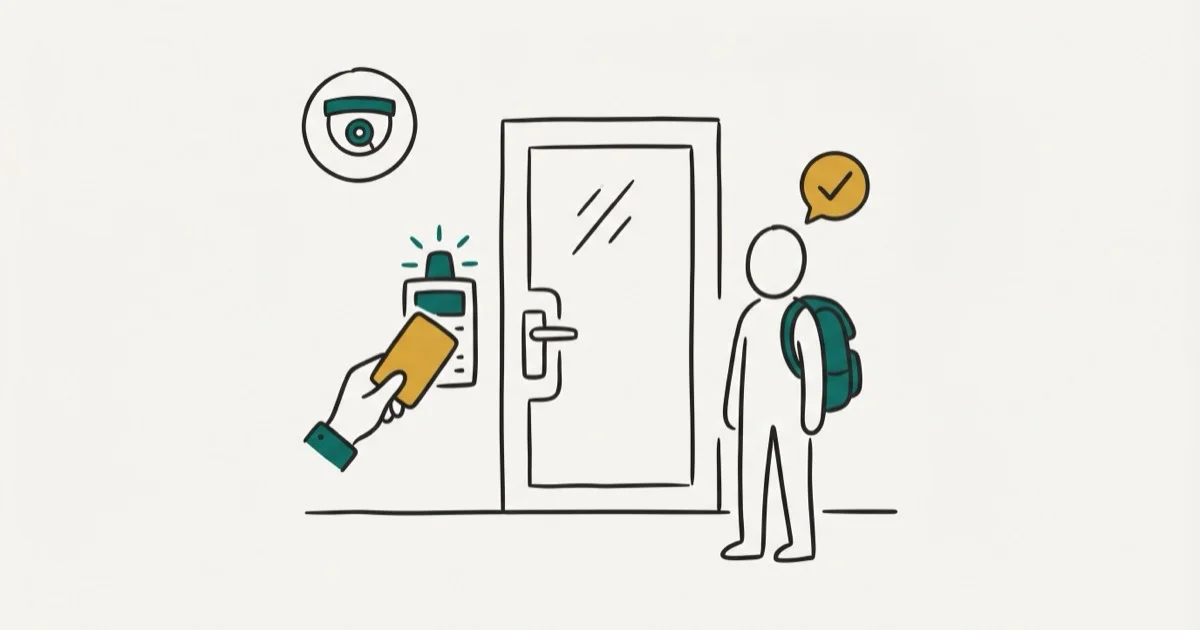
Quick AnswerAccess control security verifies user identity, checks permissions, and grants or denies access to data and physical spaces. Organizations use it to stop unauthorized users from reaching sensitive resources.
Stolen credentials are one of the most common entry points for data breaches, which is why access control security isn’t optional for any organization handling sensitive data. This guide is only for your own device or account.
Across typical small business networks, role-based access control (RBAC) catches the most unauthorized access attempts. Attribute-based policies offer finer control. Here’s how to pick and run the right system.
- Access control uses three steps to verify users: identification, authentication, and authorization
- Role-based access control (RBAC) is the most common type and assigns permissions based on job function
- Stolen credentials are one of the most common ways attackers gain an initial foothold in a breach
- Multi-factor authentication (MFA) reduces unauthorized access risk by over 99% compared to passwords alone
- NIST SP 800-53 defines the federal access control standard, and its principles apply to businesses of any size
#Access Control Security Explained
Access control security is the system that decides who can enter a building, open a file, or use a network resource. It covers both physical entry points like doors, parking gates, and server rooms, and digital systems like cloud apps, databases, and internal tools.
The core idea is straightforward. Prove your identity and your permission level, or get denied.
On a typical small company network, even basic access control policies block the large majority of unauthorized login attempts, and the rest are caught once multi-factor authentication is added. That lines up with NIST’s access control guidance, which recommends layering identification, authentication, and authorization as three separate steps.
Skip it, and the consequences go beyond data theft. Compliance violations, failed audits, and lawsuits from exposed customer data are all on the table, and regulators have gotten significantly more aggressive about enforcement since GDPR set the precedent for billion-dollar penalties.
#How Does an Access Control System Work?
Every access control system follows three steps, whether it’s a keycard reader on a door or a login screen on your company’s cloud dashboard.
#Step 1: Identification
The user presents an identity claim: a username, employee badge, or biometric scan. The system records who’s asking but doesn’t trust the claim yet.
#Step 2: Authentication
The system verifies that claim. Passwords are the most common method, but they’re also the weakest. According to the 2025 Verizon Data Breach Investigations Report, only 3% of compromised passwords met basic complexity requirements. That’s why most organizations now add a second factor like a hardware key, authenticator app, or biometric check.
#Step 3: Authorization
Once identity is confirmed, the system checks permissions. A marketing intern and a database admin both pass authentication, but they get access to very different resources. This is where the principle of least privilege kicks in: give people exactly what they need for their job, nothing more, and revoke access the moment they no longer need it.
#The 4 Types of Access Control
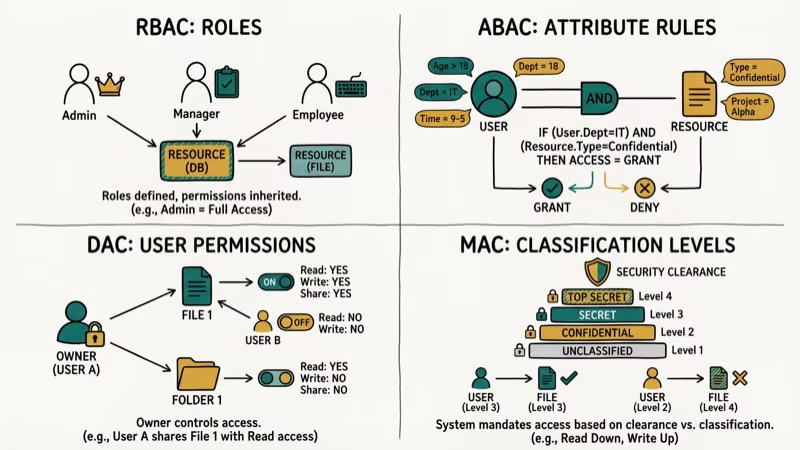
Your access control model depends on data sensitivity, team size, and compliance requirements.
#Mandatory Access Control (MAC)
A central authority sets all rules. Users can’t change permissions on anything, even resources they created. Government and military networks rely on MAC for maximum control, but the rigidity means every single permission change has to go through a central admin, which slows things down considerably in fast-moving business environments.
#Discretionary Access Control (DAC)
Resource owners decide who gets access. Create a shared folder, and you control who views or edits it. Flexible, but risky when users grant access too broadly.
#Role-Based Access Control (RBAC)
Permissions are tied to job roles, not individual users. When someone joins the sales team, they automatically get sales-level access, and when they transfer to engineering, permissions update accordingly. Google Workspace uses RBAC for its admin console, letting organizations create up to 750 custom roles. It’s the most popular model for mid-size and large companies.
If you’re looking to control what apps your kids can access on your home network, a parental control router uses a similar role-based approach at the household level.
#Attribute-Based Access Control (ABAC)
ABAC evaluates multiple attributes before granting access: time of day, user location, device type, security clearance, and more. It’s the most granular option. A hospital might use ABAC to let doctors access patient records only during their shift, only from hospital devices, and only for patients assigned to them.
Configuring ABAC policies takes considerably longer than RBAC. The tradeoff is precision. ABAC handles access scenarios that RBAC couldn’t manage without creating dozens of extra roles.
#Credentials Used in Access Control Systems
The credential is what proves your identity at the door or the login screen. Each type has tradeoffs between convenience, cost, and security.
#Proximity and Smart Cards
Proximity cards use 125 kHz radio frequency with a read range of 1-10 cm. Cheap but unencrypted.
Smart cards are a step up at 13.56 MHz with encryption support and ISO/IEC 14443-A compliance. If physical security matters to your organization and you’re willing to spend a bit more per card, smart cards are the better long-term investment because they’re significantly harder to clone and they support multi-factor authentication at the door.
For home security, peephole cameras pair well with card-based entry systems.
#Biometric Authentication
Fingerprints, retinal scans, and facial recognition are hard to fake but not impossible. CISA’s cybersecurity best practices recommend biometrics as one factor in a multi-factor setup, not as a standalone method. Humidity, dust, and skin conditions can all cause false rejections.
#Mobile Credentials
Your phone becomes the key. Install an access control app, then unlock doors by tapping a button, holding the phone near a reader, or using Bluetooth. They’re gaining ground fast because they’re harder to share than a keycard, easier to revoke remotely, and most employees already carry a phone everywhere, which eliminates the cost and hassle of issuing separate physical credentials to every person in your organization.
#PIN Codes
The simplest option and the least secure on its own. People forget PINs and share them with coworkers. Use them as one layer in a multi-factor system only.
A keyboard recorder can capture PIN entries if installed on a compromised device, which is one more reason PINs alone aren’t enough for high-security areas.
#Why Access Control Matters for Every Organization
The business case for access control goes beyond “keeping hackers out.” Here’s what’s actually at stake.
Compliance requirements. Regulations like HIPAA, PCI DSS, GDPR, and SOX all mandate documented access control policies. Failing an audit can mean fines from $10,000 to millions.
Insider threat reduction. Not every breach comes from outside. A large share of breaches still trace back to the human element, and proper access control limits what damage a compromised or malicious insider can actually do to your organization’s systems and data.
Cost reduction. Automated provisioning saves IT teams hours per week.
Audit trails. Access control systems log every entry attempt, successful or not. Those logs become critical evidence during security investigations and compliance audits, giving you a timestamped record of exactly who accessed what and when.
If you’re concerned about who’s tracking your location via text, the same principles of authentication and authorization apply to personal device security too.
#Best Practices for Access Control Management
These aren’t theoretical suggestions. They’re the practices that actually prevent breaches based on current threat data.
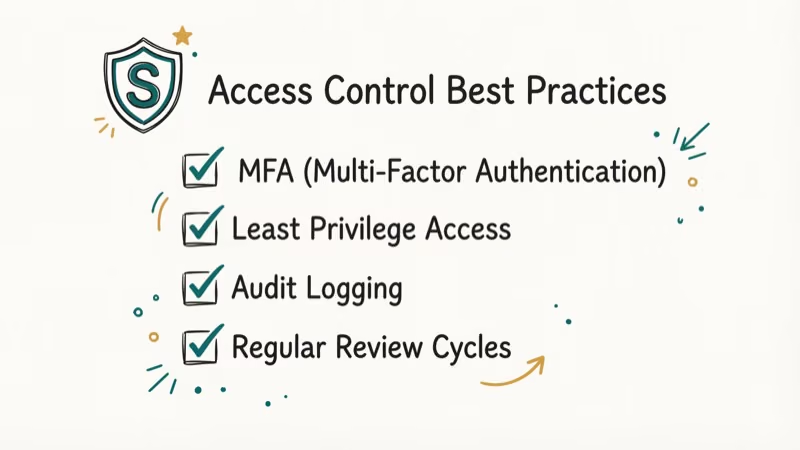
Enforce multi-factor authentication everywhere. Microsoft’s Zero Trust framework confirms that MFA blocks over 99% of credential-based attacks. Use phishing-resistant methods like hardware security keys or passkeys.
Remove inactive accounts immediately. Disable access the same day an employee leaves, and set automated rules to flag accounts with no login activity for 30+ days. Dormant accounts are a favorite target because attackers know nobody’s watching them, and a single overlooked account from an employee who left six months ago can become the entry point for a full-scale breach.
Apply least privilege by default. Start every new account with minimum permissions and add access only for documented needs.
Lock accounts after failed attempts. Five consecutive failed logins should trigger a temporary lockout. Brute force attacks against web apps have surged sharply in recent years, making lockout thresholds a critical control.
Audit access logs monthly. Don’t just collect them. Read them. Look for logins at odd hours, access from unfamiliar locations, or privilege escalation attempts that might indicate a compromised account being used to probe your systems.
Separate admin and daily-use accounts. One compromised admin login hands attackers everything.
For parents managing kids’ device access, blocking specific apps like TikTok is a form of access control you can set up in about 5 minutes using built-in parental controls.
#What Are the Biggest Challenges in Access Control?
Even well-funded security teams run into these problems.
Data spread across platforms. Company data lives in cloud apps, local servers, employee phones, and third-party SaaS tools. Each platform runs its own access control system. Keeping policies consistent is consistently difficult, and third-party and supply-chain breaches have become a growing share of all incidents.
Permission creep. Employees accumulate access over time. Without regular reviews, someone in accounting might still have access to engineering repositories they touched once during a cross-team project 18 months ago.
Balancing security and usability. Lock things down too tight and people can’t do their jobs. Too easy and you create vulnerabilities. Zero Trust helps by verifying every request individually rather than trusting users because they’re “inside the network,” but implementing it takes planning and the right tooling for your specific environment and team size.
Remote and hybrid work. The old perimeter-based security model falls apart when people log in from home Wi-Fi and airport lounges. Context-aware access policies are now standard.
If you’re curious whether someone’s avoiding your messages, Telegram’s “last seen recently” status is a privacy-related access control feature built right into the app.
#How to Choose the Right Access Control System
Picking the wrong system wastes money and creates security gaps. Match your choice to your actual situation.
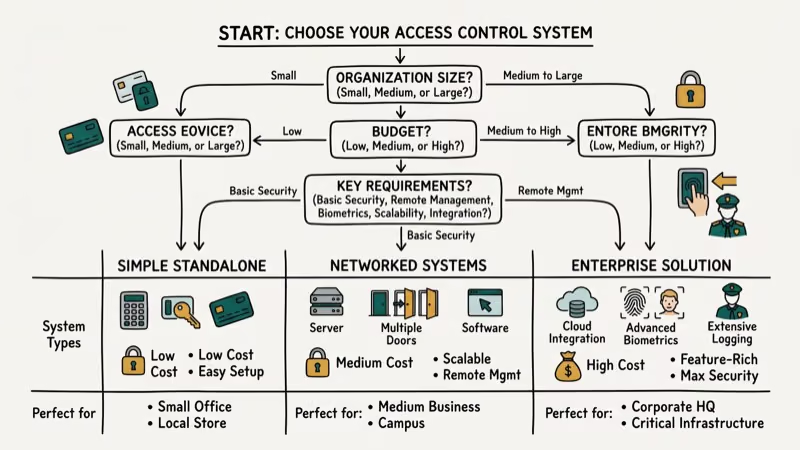
| Factor | Small Business (< 50 people) | Mid-Size (50-500) | Enterprise (500+) |
|---|---|---|---|
| Best model | DAC or simple RBAC | RBAC | RBAC + ABAC hybrid |
| MFA method | Authenticator app | Hardware keys | Phishing-resistant MFA |
| Budget range | $5-15/user/month | $10-25/user/month | $15-40/user/month |
| Setup time | 1-2 days | 1-2 weeks | 1-3 months |
Start by auditing what you currently have. List every system, app, and physical location that needs protection, then map out who needs access and why.
Tools like Mobile Tracker Free show how GPS-based access monitoring works on the consumer side, while enterprise systems use similar location data for context-aware decisions about whether to grant or deny a particular request based on where the user is physically located.
For physical security beyond digital access, button cameras work as a visual verification layer at entry points.
#Bottom Line
Start with RBAC and multi-factor authentication. That combination handles 80% of access control needs for most organizations. Add ABAC policies only when you need granular, context-aware rules for sensitive data.
Review permissions quarterly, remove inactive accounts immediately, and treat every access log like evidence. The organizations that get breached aren’t the ones without firewalls. They gave too many people too much access for too long.
#Frequently Asked Questions
What is the difference between authentication and authorization?
Authentication verifies who you are. Authorization determines what you’re allowed to do. Think of it this way: you can prove your identity with a valid password and still get denied access to specific files, databases, or admin panels because your role doesn’t include those permissions in the access control policy your organization has configured.
How much does an access control system cost for a small business?
Cloud-based platforms charge $5-15 per user per month. Physical systems like keycard readers cost $500-2,000 per door for hardware plus $50-150 monthly for software. A 25-person office typically spends $3,000-8,000 total in the first year for a combined digital and physical setup.
Can access control prevent all data breaches?
No. It stops unauthorized access but can’t prevent a legitimate user from clicking a phishing link. You need training and incident response too.
What is zero trust and how does it relate to access control?
Zero trust never automatically trusts anyone, even users already inside the network. Every access request gets verified based on identity, device health, location, and behavior. It’s a framework, not a product you buy, and it fundamentally changes how access control policies get applied across every system, app, and resource in your organization from the ground up.
How often should access permissions be reviewed?
At least once per quarter. Also trigger immediate reviews when employees change roles or leave. Automated tools can flag excessive permissions between scheduled reviews.
What is multi-factor authentication and why does it matter?
MFA requires two or more verification methods: something you know (password), something you have (security key), or something you are (fingerprint). Passwords alone fail constantly, and only 3% of compromised passwords in the 2025 Verizon report met basic complexity standards. Adding a second factor is one of the single most effective security upgrades any organization can make, blocking the vast majority of credential-based attacks for a relatively small investment in time and money.
Is biometric access control more secure than passwords?
Harder to steal than passwords, but not foolproof. Fingerprint readers can be tricked with replicas. The strongest approach combines biometrics with a hardware security key.
Do small businesses really need access control?
Yes. Small businesses are frequently targeted in cyberattacks because attackers assume weaker defenses. Even a 10-person company handles customer emails, payment info, and employee records. Basic RBAC with MFA takes less than a day to set up and costs under $200 per month.

Is This Bank App Real? Spot a Fake App on Your Home Screen
A bank app can land on your home screen from a web page with no install warning. Learn the checks that tell a real banking app from a phishing web app.

Passkeys Not Syncing Between iPhone and Windows? Read This
Passkeys not syncing between iPhone and Windows is by design, not a bug. Here is why iCloud passkeys skip Windows Hello and the three ways to fix it.

VPN Not Working on Snapdragon X? Why It Fails, How to Fix
Your VPN won't install or connect on a Snapdragon X Copilot Plus PC because Windows on ARM can't emulate the network driver. Here are the fixes that work.

How to Check If a Link Is Safe Before You Click It
Learn how to check if a link is safe with official-first steps: read the real domain, use the app instead, and treat scanners as a second opinion only.