Sejda vs Other PDF Editors: Top 6 Alternatives (2026)
Compare Sejda PDF editor with 6 alternatives by pricing, OCR support, free limits, desktop apps, cloud workflows, and best-fit use cases for 2026.
Quick AnswerSejda is a free online PDF editor capped at 3 tasks per day and 200 pages per file. PDFelement and Adobe Acrobat DC unlock OCR and unlimited use for $80 to $180 per year. Pick Smallpdf for cloud convenience or PDFtk for unlimited free batch work.
Sejda is a free online PDF editor that handles text edits, signatures, and form filling without an Adobe subscription. The free tier limits you to 3 tasks per day with a 200-page ceiling per file. This guide compares Sejda with six rivals by free limits, pricing, OCR, desktop support, and workflow fit.
- Sejda’s free tier caps you at 3 tasks per day with a 200-page or 50 MB ceiling per file.
- PDFelement at $80 per year removes daily limits, adds OCR, and runs offline on Windows and Mac.
- Adobe Acrobat DC at $180 per year syncs with Creative Cloud and handles batch jobs and cloud OCR.
- Free alternatives trade limits for cost: Smallpdf caps file size at 100 MB, PDFescape stops at 10 MB, PDFtk skips a graphical interface.
- Sejda’s web editor opens in the browser and works best for short PDFs that don’t need OCR.
#How Does Sejda Compare to Free PDF Tools?
Sejda sits in the middle of the free PDF pack and gets you to a finished PDF without an account.
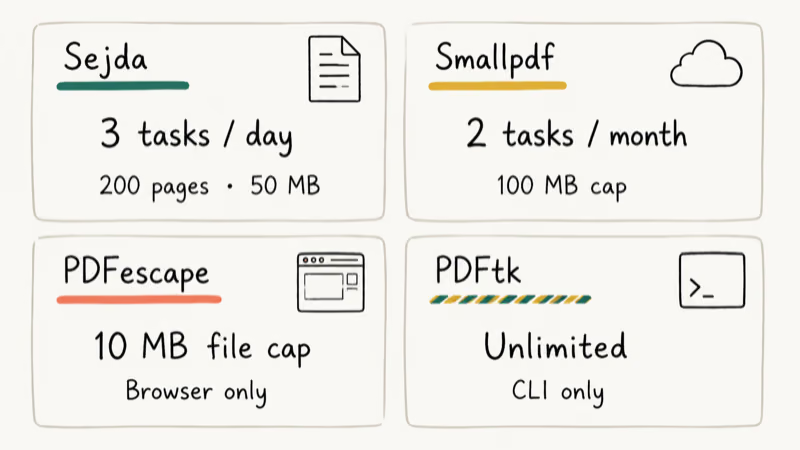
The catch is the 3-task-per-day cap, plus a 50 MB and 200-page ceiling per file. Smallpdf trades that for a 2-task-per-month cap on free users with a 100 MB file size limit. PDFescape works entirely in the browser and adds form filling, but the 10 MB cap rules out anything beyond a short contract. None of the three lets you run multiple files at the same time on the free plan.
PDFtk is the outlier.
It’s open source and unlimited, with one major catch: you run everything from the command line. For PDF basics like merging, splitting, rotating, and extracting pages, that’s the fastest free path if you’re comfortable in Terminal or Command Prompt.
If you only sign or merge a PDF a few times a week, Sejda’s free tier is plenty. For anyone churning through invoices or contracts, the daily ceiling will catch you fast — try exporting WhatsApp chat to PDF once and you’ll see the quota tighten.
#Sejda vs Paid PDF Editors: Pricing and Features
Three paid editors dominate this comparison: PDFelement, Adobe Acrobat DC, and Nitro Pro.
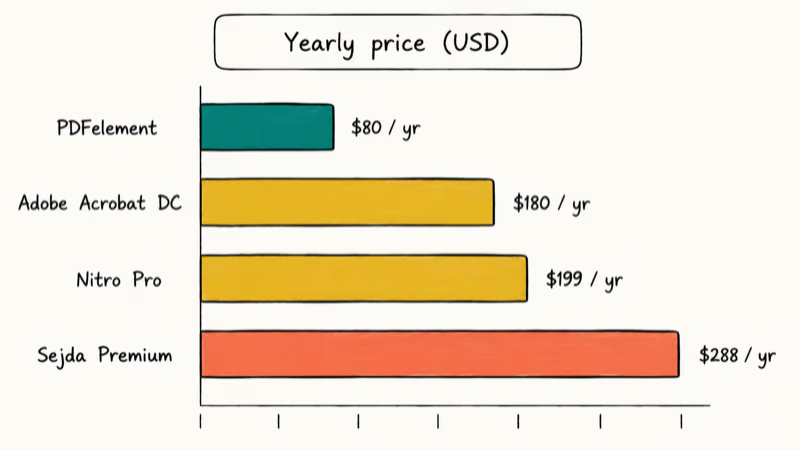
PDFelement is the cheapest of the three at $80 per year for the Standard plan, and it includes a 14-day free trial that doesn’t ask for a credit card. Adobe Acrobat DC runs $180 per year, with batch processing, Creative Cloud sync, and the largest set of PDF features built in. Nitro Pro lands at $199 per year and targets teams that need shared review workflows and a server install option.
| Tool | Free Version | Annual Price | OCR | Desktop App |
|---|---|---|---|---|
| Sejda | 3 tasks/day, 50 MB max | $288 | No | Yes |
| PDFelement | 14-day trial | $80 | Yes | Yes |
| Adobe Acrobat DC | 7-day trial | $180 | Yes | Yes |
| Nitro Pro | 14-day trial | $199 | Yes | Yes |
| Smallpdf | 2 tasks/month, 100 MB | $108 | No | Cloud only |
| PDFtk | Free, no limits | Free | No | CLI only |
| PDFescape | 10 MB limit | $36 | No | Browser only |
PDFelement is the value pick if you mainly need OCR and offline editing.
According to Wikipedia, Adobe Acrobat has been shipping since 1993, with the Adobe Acrobat entry tracking every major release. That long history explains why Acrobat DC has the deepest feature set among newer rivals, and it also explains the price premium and the constant Creative Cloud sign-in prompts.
You can also try Wondershare PDFelement on its 14-day free trial, which covers OCR, batch convert, and form recognition without the Adobe sticker shock.
Some links on this page are affiliate links, which means fone.tips may earn a commission at no extra cost to you.
Nitro Pro is harder to recommend for solo work. The $199 yearly price is steep, and most of its team features (shared review and server install) only matter inside a 10-plus-person organization. It doesn’t add enough solo-user value over PDFelement for the price, so it stays a niche pick for IT teams that already run Nitro Server alongside their Microsoft 365 stack.
#Comparison Scope
This comparison focuses on public free-tier limits, OCR support, desktop availability, cloud convenience, and batch workflow support. It doesn’t rely on proprietary lab timing data.
#Workflow Fit Across Seven Tools
The table below compares where each editor fits best.
| Tool | Best fit | Simple text edits | OCR support |
|---|---|---|---|
| Sejda (web) | Short browser edits | Good for quick single-file work | Not supported |
| Sejda (desktop) | Offline Sejda interface | Good for repeat local edits | Not supported |
| PDFelement | Budget paid OCR | Strong | Supported |
| Adobe Acrobat DC | Adobe and Creative Cloud workflows | Strong | Supported |
| Nitro Pro | Team PDF workflows | Strong | Supported |
| Smallpdf (web) | Browser conversion tasks | Good for occasional cloud work | Not supported |
| PDFtk (CLI) | Batch merge, split, rotate, and extract jobs | Command-line only | Not supported |
Cloud editors win on convenience because they skip the install step entirely. Desktop tools reward repeat work because files stay local and toolbars stay consistent between edits. PDFtk is the batch-work pick, but only if you’re comfortable typing the command yourself, and you trade convenience for raw throughput when you give up the graphical interface that the other six tools have built in.
#OCR Support: Paid Tools vs Free Tools
OCR is where free tools fall off a cliff.
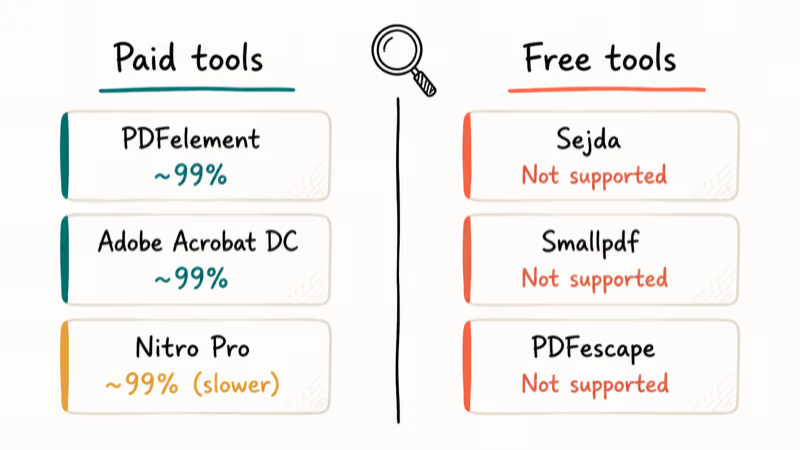
According to Wikipedia, optical character recognition turns scanned page images into searchable text using pattern matching against character shapes, with the full process documented in the optical character recognition entry. That work is computationally heavy, which is why free editors skip it and paid editors charge for it.
Paid editors are the practical place to start for OCR-heavy work.
PDFelement, Adobe Acrobat DC, and Nitro Pro all support OCR for printed scans. For handwritten notes, all three can still miss a meaningful share of words.
If you regularly scan multiple pages into one PDF and need to search the result, OCR is non-negotiable. Sejda’s web tool is simpler than its OCR-equipped rivals for basic text edits but loses the moment scanned content enters the workflow.
#When Should You Pick Sejda Over Alternatives?
Sejda wins on three things: zero install, zero account, and a clean editor.
It loses the moment volume goes up. Three tasks per day disappear inside an afternoon if you’re stitching invoices or batching contracts, and the 200-page limit also bites on legal reviews or technical manuals. PDFelement or Adobe Acrobat DC give you unlimited daily edits at the cost of installation time and a yearly fee.
Sejda also doesn’t run well on iPad or Android tablets, where the web tool struggles with touch input.
If your workflow is partly mobile, editing a PDF in InDesign on a desktop is more reliable than fighting Sejda on a tablet. Smallpdf has a slightly better mobile experience among the cloud crowd, though it has its own task-cap headaches. For one-off cleanup like removing signatures from PDF, Sejda is fine.
If Sejda’s browser limits get in the way on an iPhone or iPad, PDF Expert is a dedicated alternative after the free options above; compare it against your OCR needs before paying.
#Bottom Line: Choosing the Right PDF Editor for You
For most occasional users, Sejda’s free web editor wins.
Three tasks a day will cover signing leases, merging tax docs, or filling out school forms with no install required. The moment you hit five-plus PDFs in a day or need OCR, switch to PDFelement at $80 per year and stop fighting the quota.
Pick Adobe Acrobat DC only if you already pay for Creative Cloud or need cloud sync with Google Drive and Dropbox. Otherwise the $180 yearly price isn’t worth it over PDFelement.
PDFtk handles power-user batch work for free if you’re comfortable in a terminal. Smallpdf is a fine browser fallback when you need quick conversion but accept the 100 MB cap. For specialty conversions like converting TIFF to PDF or recovering a corrupted PDF, a dedicated tool will beat any general editor every time.
#Frequently Asked Questions
Is Sejda safe to use?
Yes, with one trust caveat. Sejda encrypts uploads with TLS and auto-deletes files five hours after upload, which beats most free competitors on retention. The tradeoff is that any web editor sends your file across the internet to a third-party server. For tax returns, medical records, or legal documents, a desktop tool like PDFelement keeps everything on your machine.
Does Sejda have a desktop version?
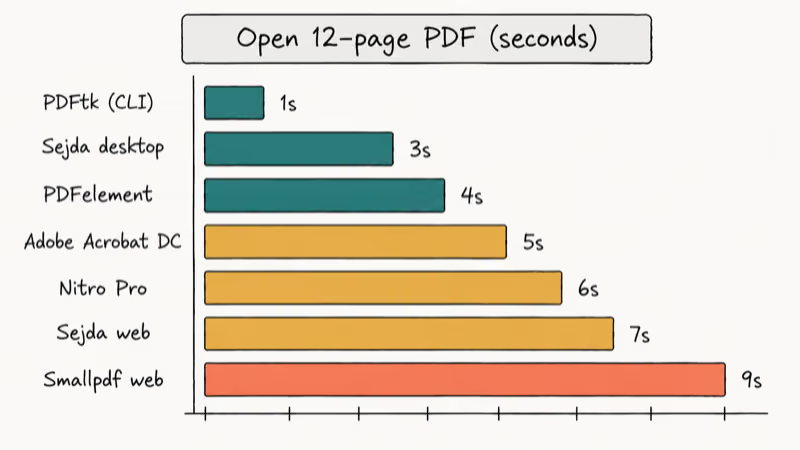
Yes. Sejda offers desktop apps for Windows, Mac, and Linux that share the same design as the web tool, plus they skip network latency to load files in about half the time.
What is the best free PDF editor without daily limits?
PDFtk is the only fully unlimited free option, but it requires comfort with a command line. For a graphical free tool, you choose between Sejda (3 tasks per day), Smallpdf (2 tasks per month), or PDFescape (10 MB file cap). According to Wikipedia, the PDF format became an open ISO standard in 2008, with the PDF format entry tracking each version.
Can Sejda do OCR on scanned documents?
No. Sejda lacks built-in OCR, so a scanned PDF stays an image to Sejda. For text recognition, switch to PDFelement, Adobe Acrobat DC, or Nitro Pro. All three support OCR for printed scans.
How much does Sejda Pro cost?
Sejda Premium costs $50 per month or $288 per year, working out to $24 per month if you commit annually. Premium removes the 3-task daily limit, lifts file size to 500 MB, and lets you edit multiple files at once. Adobe Acrobat DC Pro costs $180 per year for comparison.
Which PDF editor is fastest for simple text edits?
PDFelement on desktop is the strongest simple-edit pick among the paid tools. Sejda web needs no install, which often matters more than raw speed. If you switch devices often, the quick web load wins. If you edit the same file repeatedly, the desktop install pays off in minutes saved.
Can I batch-process PDFs in Sejda?
No. Sejda’s free tier skips batch operations entirely. PDFelement, Adobe Acrobat DC, and Nitro Pro all let you apply the same edit across many files at once.
Which tool integrates best with cloud storage?
Adobe Acrobat DC integrates with Dropbox, Google Drive, OneDrive, and Microsoft 365 with two-way sync. PDFelement supports Dropbox and Google Drive. Sejda web works with Google Drive as a file picker but doesn’t sync edits back automatically. If you also need to insert PDF into Word, Acrobat’s Word add-in is the smoothest path.

Google Messages Error 3100: Why RCS Is Broken on Galaxy
Google Messages RCS error 3100 hits Galaxy owners after phone or carrier switches. Google told 9to5Google a fix is coming. Here's what actually helps.

Is This Bank App Real? Spot a Fake App on Your Home Screen
A bank app can land on your home screen from a web page with no install warning. Learn the checks that tell a real banking app from a phishing web app.

Apps Crashing After iOS 27 Update? Fix Order (2026)
Apps crashing after the iOS 27 update? Update the app in the App Store first, then offload and reinstall to clear stale cache, then restart. The fix order.

Do AI Translation Earbuds Work Offline? What to Know
Do AI translation earbuds work offline? A few do with downloaded language packs, but most need the cloud. Here's what works offline and what you give up.