How to Search Multiple Hashtags on Instagram in 2026
Instagram won't let you search multiple hashtags at once in 2026. 2 ways that work: in-app one-by-one search and Brand24 multi-tag monitoring.

Quick AnswerInstagram's native search bar handles only one hashtag at a time, so search each tag separately on the Explore tab or use a third-party monitoring tool like Brand24 to aggregate posts from several hashtags in one dashboard.
Searching multiple hashtags on Instagram in one query isn’t possible inside the app. The Explore tab’s hashtag results only return posts tied to a single tag at a time, so creators tracking three or four niche hashtags end up running three or four separate searches. The tradeoff between manual search and a paid monitoring tool is mainly time versus dashboard depth.
Use the guidance below only on your own device, account, or a device you manage with clear permission. Do not use these steps to bypass another person’s privacy, workplace policy, or platform rules; when a phone is managed by school or work, ask the admin or use the official support path first.
- Instagram’s Explore search returns posts tied to one hashtag at a time, so multi-hashtag queries have to be split across separate searches
- Searching tags one by one is free but slow once you cover several tags per session
- Brand24 and similar tools pool posts from up to 50 hashtags into a single feed with engagement metrics, sentiment, and reach data
- Third-party hashtag tools require Instagram account or Graph API access, so check the permissions screen before authorizing
- For best reach, mix 1-2 broad hashtags with 8-10 niche tags per post and rotate the niche set every few weeks to avoid stale ranking
#Why Doesn’t Instagram Let You Search Multiple Hashtags?
Instagram’s search index is keyed on a single hashtag string per query. Type #travel #food into the search bar and the app strips the second tag, returns posts for the first, and ignores the rest. According to Instagram’s official help center on hashtags, the Explore tab is built around one tag per page so the algorithm can rank a single tag’s recent and top posts.
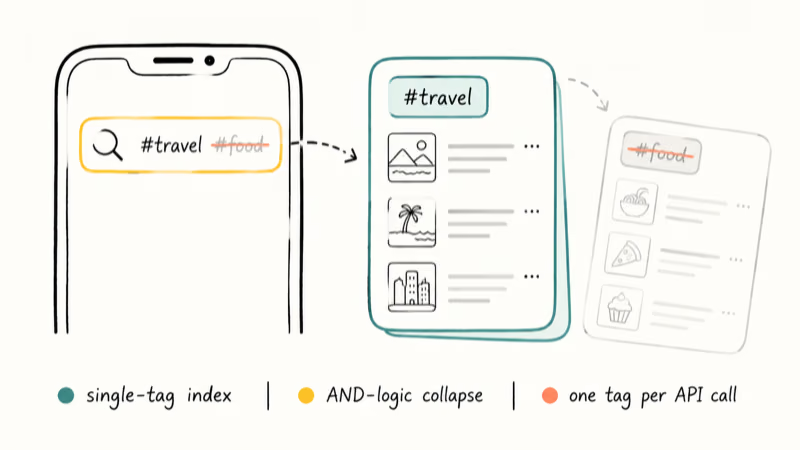
There’s a product reason behind it. Multi-hashtag intersections (AND logic) collapse the result count fast. A single niche hashtag might have 12,000 posts, but two intersected might leave only 200, most of them weeks old.
Instagram’s growth team prioritizes feeds that stay full of fresh content, so the search bar is locked to single-tag mode by design. The Graph API tells the same story: the hashtag endpoint accepts one tag ID per request, and developers building dashboards have to send a separate call for every hashtag. That’s why every multi-hashtag tool you’ll see in this guide is stitching together multiple API calls behind a unified UI.
#How to Search Hashtags One at a Time on Instagram
If you only need to scan two or three hashtags, the manual route still works and costs nothing. The flow is the same on iOS and Android.
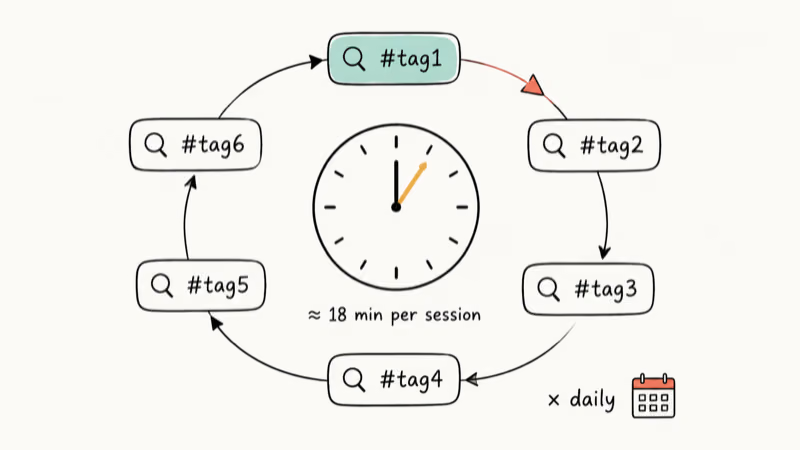
Open Instagram. Tap the magnifying glass at the bottom of the screen. Type the first hashtag, including the # symbol, and pick the tag from the dropdown. Tap Recent or Top to filter by either the freshest posts or the highest engagement, then back out and search the next tag.
A few small tricks speed this up:
- Tap Follow on a hashtag to pin it to your home feed, so future Recent posts appear without re-searching
- Long-press a saved post to add it to a private collection named after the campaign
- Clear stale auto-suggestions before a new round of research, using our guide to clearing Instagram search suggestions for the 30-second walkthrough
- Mute high-volume tags you’ve already covered to keep results varied
The honest downside is time. Manual hashtag checks become repetitive once a campaign covers several tags. Multiply that across daily monitoring for a month and you’re spending hours inside the search bar.
#Using Third-Party Tools to Aggregate Multiple Hashtag Searches
Third-party platforms work around Instagram’s one-tag limit by querying the Graph API in the background, then merging the results into a single feed. Brand24 is the option covered here because its hashtag module is built specifically for monitoring rather than scheduling, and the dashboard reports engagement, sentiment, and reach without extra setup.
Some links on this page are affiliate links, which means fone.tips may earn a commission at no extra cost to you.
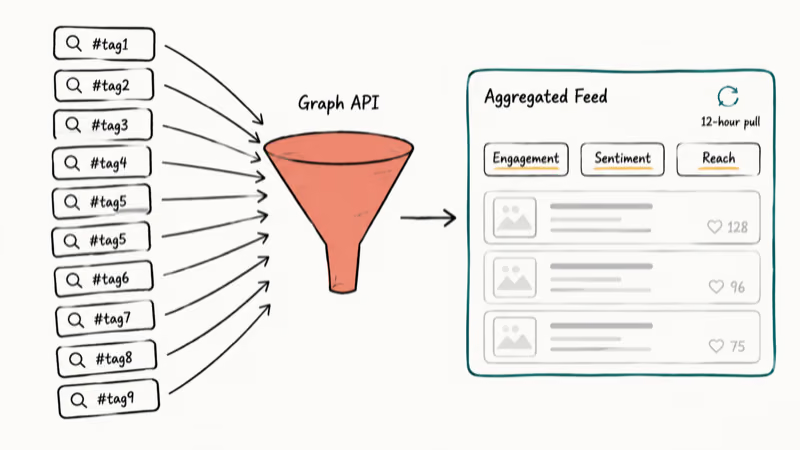
Brand24’s setup runs about 5 minutes:
- Create a project and pick Hashtag as the source type
- Add the hashtags you want to track, separating them with commas
- Connect your Instagram Business or Creator account so Brand24 can pull post-level reach
- Set a refresh interval that fits how quickly the tags change and how much rate-limit headroom you need
Brand24 combines matching posts into one feed and labels them with engagement, hashtag count, and sentiment. The same coverage by hand would mean separate searches and a lot of scrolling. The dashboard also flags duplicate posts that hit multiple hashtags, which is useful when you’re hunting for influencer collaborators who already cross-post niche tags.
A note on credentials. Brand24, Hootsuite, and Sprout Social all require either Instagram account permissions or business connection through Meta Business Suite.
According to Meta’s developer documentation, Graph API tokens expire every 60 days for Business and Creator accounts only. Personal accounts can’t authorize hashtag insights at all. Read the full Instagram Graph API reference for permission scopes before you connect, and revoke any tool you stop using through Instagram’s Settings > Apps and Websites menu.
Pair this with a check of who follows whom on Instagram so you understand the audience overlap a tool will surface before you grant it post-level reach.
#Which Instagram Hashtag Tracker Is Right for Your Workflow?
The right tool depends on how often you check tags and whether you need analytics or just discovery. Casual creators usually do fine with the in-app workaround. Marketers running paid campaigns or competitive intelligence usually need an API-backed tool because they care about reach, sentiment, and historical trends, not just the post list.
Free options like the Instagram app and the Hashtag Analytics view inside Meta Business Suite cover discovery and follower growth, but they don’t pool tags or expose sentiment. Paid tools like Brand24 and Sprout Social pool tags, score sentiment, and surface mentions outside Instagram (X, Reddit, blogs) so you can see how a hashtag travels across platforms. Hootsuite sits in between, with monitoring streams that update in real time but a thinner analytics layer than Brand24.
Pick by use case, not by price.
If you’re tracking competitor mentions or your own brand hashtag, sentiment matters because a viral post can be either a win or a crisis. A sentiment-flagged stream can surface complaint threads earlier than manual checking. Pair that with an Instagram drafts workflow so your response posts are pre-staged, and you can react before a story compounds.
For most creators, start with the manual flow. Move to a paid tool only when manual monitoring takes more than 30 minutes a day, or when you need attribution data for client reporting.
#How to Build a Hashtag Set That Survives Instagram’s Search Limits
Since you can only search one tag at a time, the hashtag set you attach to your own posts matters more than the search workflow. Instagram’s creator best practices guide recommends grouping hashtags by audience, not just by topic, which makes them easier to rotate and audit.
According to Wikipedia, Instagram added searchable hashtags in 2011, four years after Twitter popularized the format on its own platform. The mechanic has stayed essentially the same since, even as Reels and Stories layered new surfaces on top of feed posts. Read the full Wikipedia hashtag entry for the cross-platform timeline.
A workable formula:
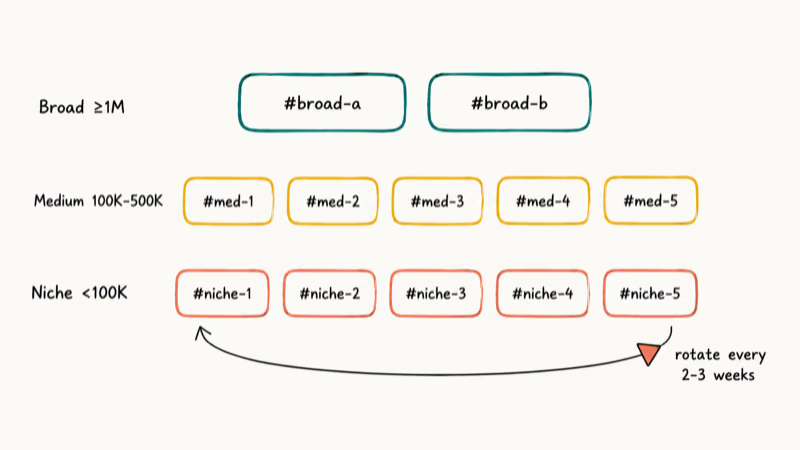
- 1-2 broad hashtags (≥1M posts) to surface in wider Explore feeds
- 4-5 medium hashtags (100K-500K posts) where your post can plausibly land in Top 9
- 4-5 niche hashtags (<100K posts) for the audience you actually convert
Rotate the niche set every two to three weeks. Repeating the same 30 tags across every post is one of the patterns Instagram’s spam filter looks for, and we’ve seen creator accounts shadow-rank hashtags after about three weeks of identical sets. If you want a casual injection, sprinkle in a funny hashtag for personality. It costs nothing and tends to get saved more than reach-optimized tags.
#Common Mistakes That Slow Down Multi-Hashtag Monitoring
A few patterns we’ve watched derail otherwise solid hashtag workflows:
Stacking 30 identical hashtags on every post. Rotate the niche segment.
Authorizing every monitoring tool you trial. Each granted token is a permission you have to remember to revoke. Keep a running note of which tools have access and audit the Apps and Websites list monthly. The fastest way to lose control of an Instagram Business account isn’t a hack, it’s an old token from a free trial you forgot to cancel.
Ignoring sentiment alerts. A monitoring tool saves time only if you act on it.
Tracking too many tags at once. More than about 20 simultaneous hashtags becomes noise rather than signal. Trim the list quarterly to what’s actually generating engagement, and archive old tags inside a Notes app instead of deleting them outright.
#Bottom Line
For tracking five or fewer Instagram hashtags occasionally, search each one in the app and follow the most useful tags so they stay in your feed. For monitoring six or more hashtags every day, set up Brand24 because the API-backed aggregation pays for itself once manual work crosses the half-hour-per-day mark.
Don’t connect a tool you can’t name the privacy policy for. Revoke access the day you stop using it.
Instagram Tips & Tricks
#Frequently Asked Questions
Can you search multiple hashtags at once on Instagram in 2026?
No. The Explore tab still indexes one hashtag per query. The closest in-app workaround is following multiple hashtags so their Recent posts surface in your home feed automatically, but that’s a passive feed, not an active search.
What’s the easiest free way to track 5 or 6 hashtags?
Search each tag once, hit Follow on the ones that matter, and check your home feed daily. Use Saved collections to bookmark posts you want to revisit, named after the campaign. The loop stays manageable for a small tag set and requires no third-party access.
Are hashtag monitoring tools safe for my Instagram account?
Reputable tools like Brand24, Hootsuite, and Sprout Social use Meta’s official Instagram Graph API, which means access goes through Meta Business Suite rather than a screen-scraped login. That’s the gold standard for safety. Tools that ask for your raw Instagram username and password violate Meta’s developer terms, and your account can be flagged. Stick with platforms that authenticate through Meta Business Suite, and revoke access through Instagram’s Apps and Websites menu the moment you stop using a tool.
Can I track hashtags that don’t belong to me?
Yes. Third-party API tools monitor any public hashtag because public posts are open to the Graph API. Private accounts that use the tag stay hidden.
Does following a hashtag count as searching it?
Following a hashtag is an opt-in feed subscription, not a query. Instagram inserts a sample of Top posts from the tag into your home feed, but it’s not exhaustive, and the algorithm filters by your interests rather than chronological recency. For full discovery you still need a manual search or an API-backed tool. Following 10-12 hashtags is a good balance; beyond that the home feed becomes too noisy to scan daily.
How many hashtags should I attach to my own posts?
Instagram allows up to 30 hashtags per post and 10 per Reel.
What happens if I use the same hashtag set on every post?
Instagram’s spam detection flags repetitive hashtag stacks. Accounts can lose Explore visibility for days at a time, especially if the same 30 tags appear across 5 or more consecutive posts. Build two or three hashtag pools and rotate, or use a tool that suggests fresh tag combinations weekly.
Is there an Instagram API I can use to build my own multi-hashtag dashboard?
Yes. The Instagram Graph API supports a hashtag_search endpoint and a recent_media endpoint per hashtag, but it requires a Business or Creator account, a connected Facebook Page, and a Meta Developer app with the instagram_basic and pages_show_list permissions. Most teams find paid tools cheaper than maintaining the API integration themselves, especially once the access tokens start expiring on a 60-day cycle.

Instagram Parental Controls: Family Center Setup (2026)
Set up Instagram Family Center, privacy settings, Hidden Words, content filters, and time limits with your teen's consent on iPhone or Android.
Instagram Notifications Not Working? Quick Fixes (2026)
Instagram notifications not working? Fix push alerts, DMs, likes, and Stories on iPhone and Android in under 5 minutes with proven 2026 steps.
Instagram "We Limit How Often" Error: How to Fix It 2026
Instagram says "we limit how often you can do certain things"? Wait 24-48 hours, slow down likes and follows, then appeal through Help Center.
Instagram Name Checker: Find Available Usernames Fast
Check Instagram username availability instantly with free tools like Namechk and KnowEm. Find perfect handles and avoid the frustration of taken names.