Redmine vs Jira: Which Issue Tracker Should You Pick?
Redmine vs Jira compared on hosting, pricing, workflows, agile, and integrations. Pick the right issue tracker based on team size, budget, and ops fit.
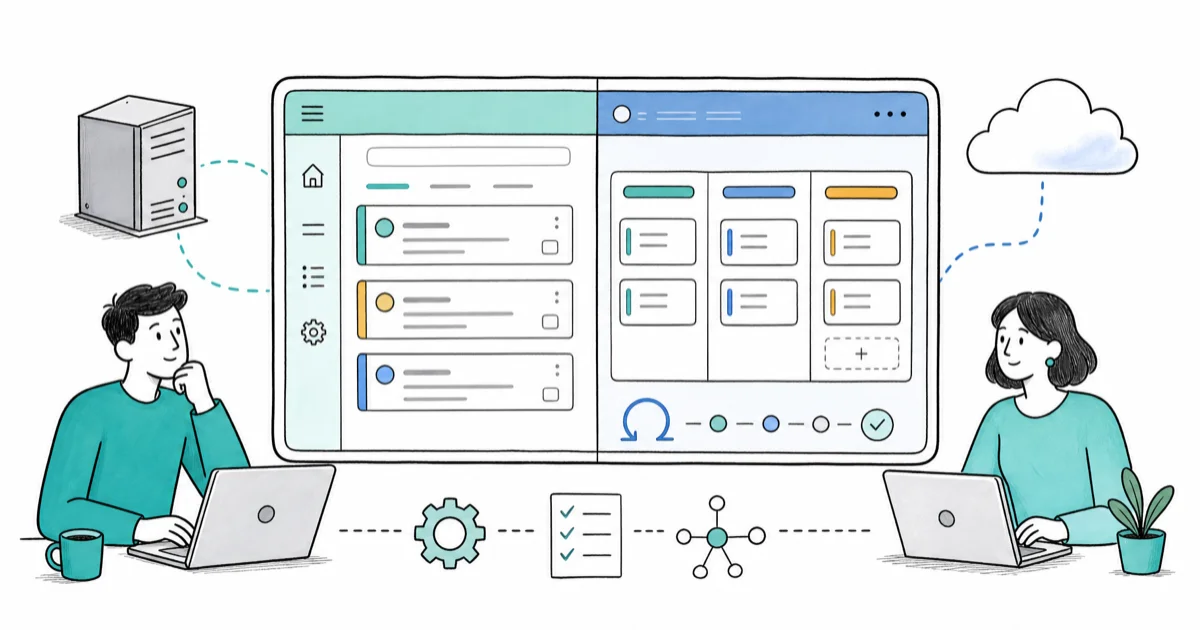
Quick AnswerPick Redmine if you want a free, self-hosted issue tracker and have Ruby on Rails ops capacity. Pick Jira Cloud if you want zero-ops setup, native Scrum and Kanban tooling, and access to thousands of Marketplace integrations.
Choosing between Redmine and Jira isn’t really about features. It’s about who runs the server. It’s about how much your team can spend per seat, and whether you want native agile boards out of the box. The right answer changes with team size, budget, and how much patience your CTO has for Rails security patches on top of the product roadmap.
- Redmine is free and open-source under GPL v2, but you pay in setup time, hosting, and ongoing Ruby on Rails maintenance.
- Jira Cloud is fully managed by Atlassian and ships with Scrum, Kanban, and Backlog views built in, while Redmine relies on community plugins for the same workflow.
- Redmine 6.1 needs Ruby 3.2 or later plus PostgreSQL 14, MySQL 8, MSSQL, or SQLite, so plan a real DBA conversation before installing.
- Jira Server reached end of support on February 2, 2024, leaving Cloud and Data Center as the only first-party Atlassian options for new deployments.
- Atlassian Marketplace lists 7,000+ apps across all products, while Redmine plugins are gem-based and community-maintained with a smaller ecosystem.
#Where Redmine and Jira Actually Differ
Redmine and Jira both started life as issue trackers and grew into fuller project management suites, but they took opposite paths. Redmine stayed close to its open-source roots, with a Ruby on Rails codebase, a flat data model, and plugin-based extension. Jira followed Atlassian’s commercial path: visual workflow editor, native agile boards, deep automation, and a Marketplace of paid add-ons.
History matters here. According to the Wikipedia entry on Redmine, the project was forked from ChiliProject and has been actively maintained since 2006. Teams who pick Redmine today are usually optimizing for license clarity, source-code access, and self-hosted data residency rather than for shiny new features.
The license gap is the first thing that matters for procurement. According to Redmine’s official wiki, the project is released under the GNU General Public License v2, which means the source code is yours to fork, audit, and run on any infrastructure. Jira is closed-source commercial software with per-seat pricing tiers and an end-user license agreement that ties usage to your seat count, scales billing as you add teammates, and locks you out of the source code itself.
Hosting is the second gap. Redmine is self-hosted by definition; you install it on your own server or a cloud VM and own the uptime. Jira used to offer a self-managed Server edition, but Atlassian’s migration journey page confirms that Jira Server reached end of support on February 2, 2024. New deployments now go to Jira Cloud (Atlassian-managed SaaS) or Jira Data Center (self-managed but enterprise-priced).
On a fresh Ubuntu VPS, a working Redmine 6.1 install with PostgreSQL takes a good while from blank server to first issue, including Ruby toolchain setup. A Jira Cloud free workspace, by contrast, is active within minutes of sign-up.
#Setup, Hosting, and Ops Cost
Setup cost is where most teams underestimate Redmine. The official Redmine installation guide lists the requirements for the 6.1 line: Ruby 3.2, 3.3, or 3.4 plus PostgreSQL 14, MySQL 8.0 to 8.4, MSSQL 2012 or later, or SQLite 3. That’s a real Ruby on Rails app you’re now responsible for upgrading every time a CVE drops in the stack, and the upgrades have a habit of arriving on a Friday afternoon.
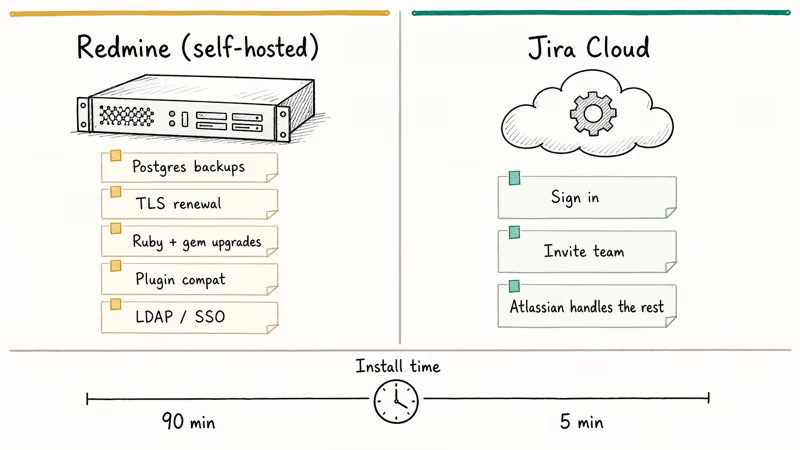
Bitnami’s pre-built Redmine stack and Docker images shrink the install to minutes, but they don’t shrink the operational tail. Someone on your team still owns:
- Database backups and point-in-time recovery
- TLS certificate renewal and reverse proxy config
- Ruby and gem upgrades for security patches
- Plugin compatibility testing across version bumps
- LDAP or SSO integration if you outgrow built-in auth
That list is the real Redmine cost. Jira Cloud removes it entirely. You log in, invite teammates, and Atlassian handles patches, scaling, uptime SLAs, and disaster recovery on their dime. The trade-off is per-seat pricing that climbs as your team grows, and the loss of full data residency control on the lower tiers, which can matter for regulated industries with explicit hosting requirements written into procurement contracts.
Jira Data Center is the middle ground. Self-managed like old Server, but architected for clustering and high availability. It costs significantly more than Cloud at the same seat count, with annual licensing tied to user tiers rather than monthly billing.
There’s another hidden cost on Redmine: plugin churn. Community plugins routinely lag behind the latest Redmine point release for weeks after an upgrade, so a portion of your stack breaks or sits unsupported each cycle. That’s a real upgrade tax.
#Why Does Workflow Customization Matter Here?
Workflows decide how an issue moves from “open” to “done” and what conditions, transitions, and validators apply at each step. This is where Redmine and Jira diverge most sharply, and where a free tracker can quickly become more expensive than a paid one.
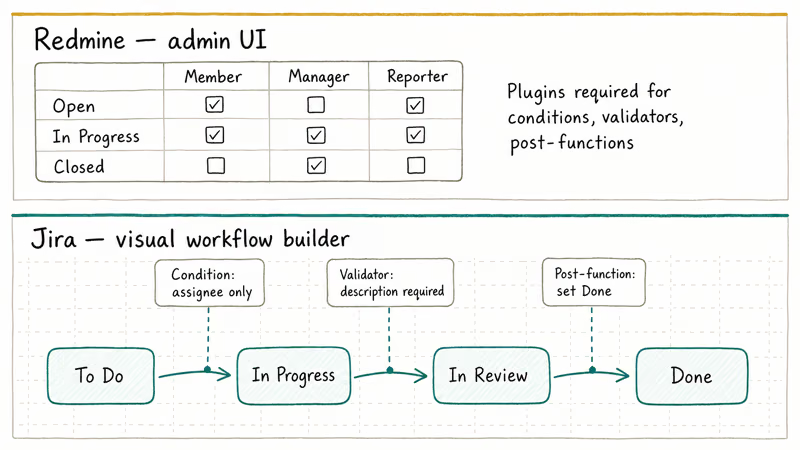
Redmine ships with a basic workflow engine: trackers (issue types) have status transitions you can configure per role through the admin UI. Anything beyond that, including conditional transitions, post-functions, and custom validators, typically requires a Ruby plugin or direct code changes. The Workflow plugin ecosystem helps, but you’re stitching together community gems and praying they survive your next upgrade.
Jira’s visual workflow builder is the headline feature for a reason. You drag statuses around, attach conditions (“only assignees can transition”), validators (“description required”), and post-functions (“set resolution to Done”) through a GUI. According to Atlassian’s workflow documentation, workflow schemes can also be associated with multiple projects, so one approval flow can govern dozens of teams without copy-pasting.
For a 5-person team running standard “Open → In Progress → Done” boards, Redmine’s built-in workflow is fine. For a 50-person engineering org with separate flows for bugs, features, security incidents, and compliance reviews, Jira’s editor saves weeks of plugin work.
#Agile, Scrum, and Kanban Out of the Box
Both tools claim agile support. Only one ships it without plugins.
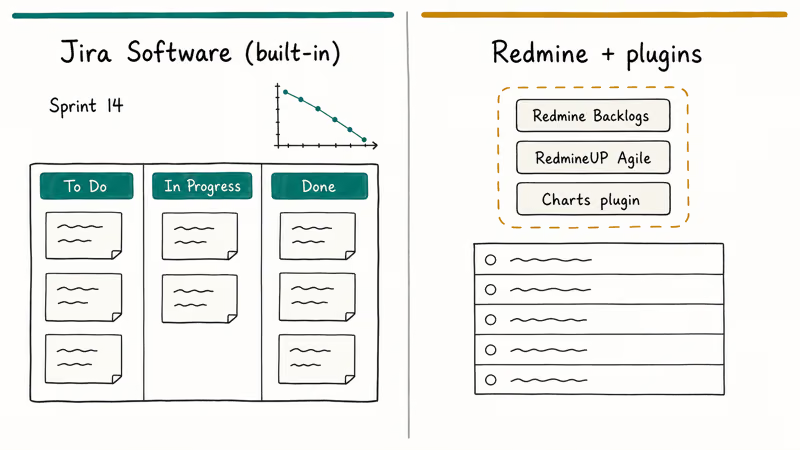
Jira Software has Scrum boards, Kanban boards, sprint planning, backlog grooming, story points, burndown charts, and velocity reports built into every Cloud tier including Free. Atlassian recommends Scrum or Kanban templates as the default project type. The boards aren’t bolted-on; they’re the primary navigation surface.
Redmine’s agile support comes from plugins. The most common pick is the Redmine Backlogs plugin or its commercial fork, plus a Kanban-style plugin like RedmineUP Agile. Each adds boards, story points, and velocity tracking, but each is also a separate upgrade dependency. Across Redmine point-release upgrades, agile plugins tend to be among the slowest to catch up.
If your team lives in sprint ceremonies, this isn’t close. Jira gets you there day one. Redmine plus plugins gets you there with maintenance overhead, and the second-class agile experience that comes from agile boards being a community add-on rather than a first-party product feature owned by a paid product team with quarterly roadmap commitments and dedicated UX designers.
That said, not every team needs ceremonial agile. A research lab tracking experiments, a legal team triaging contracts, or an internal IT queue may never need a sprint. Some of those teams already live in lighter Kanban tools and just want issue tracking on top, which is where the Trello archived cards question comes up. Redmine’s plain issue list, Gantt chart, and wiki are arguably a better fit for those workflows than Jira’s agile-first interface.
#Integrations and Marketplace Reach
The Atlassian Marketplace is Jira’s compounding moat. Atlassian’s Marketplace homepage reports 7,000+ apps across all products with 1.4 million installs and 2,200 partners. That includes Slack and Microsoft Teams notifiers, GitHub and GitLab pull request links, Figma previews, Salesforce sync, time tracking apps, test management suites, and reporting tools like eazyBI.
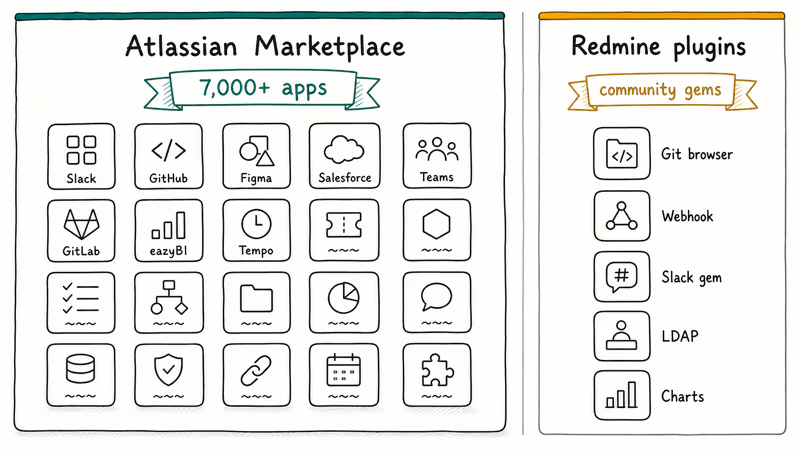
Redmine’s plugin directory is smaller and more developer-flavored. Plugins live as Ruby gems and ship through the Redmine plugin list. Quality varies. The most reliable Redmine integrations tend to be code-focused: Git or SVN repository browsers, code review plugins, REST API webhooks for CI/CD pipelines.
Setting up Slack notifications on the two stacks shows the gap clearly. Jira Cloud is a few clicks. Redmine relies on the redmine_slack gem, which means editing config files, restarting the Rails app, and the risk that a Ruby version bump breaks compatibility for a while.
The Jira path was faster every time. If your team already wrestles with Slack notifications not working on existing channels, that integration tax compounds quickly.
If your stack is GitHub, Slack, Figma, and Notion, Jira’s Marketplace ecosystem will save days. If your stack is self-hosted GitLab and an internal Wiki, Redmine’s lighter integration model is fine.
#API, Automation, and Reporting
Both tools expose REST APIs. Jira’s is significantly more mature.
Jira’s REST API documentation covers issues, projects, users, workflows, and webhooks with pagination, schema validation, and OAuth 2.0 support. Atlassian also ships Jira Automation, a low-code rule engine inside the product that lets non-developers build “when X happens, do Y” logic without touching the API.
Redmine’s REST API is real but less polished. It supports issues, projects, users, time entries, and wiki pages, but documentation is community-maintained and authentication options are thinner (mostly API keys). For automation, you write your own scripts or install plugins like Redmine Reminder or Redmine Webhook.
Reporting tells the same story. Jira’s built-in reports cover sprint velocity, control charts, cumulative flow, and release burndowns. Premium and Enterprise tiers add advanced roadmaps and cross-project dashboards. Add-ons like eazyBI extend reporting into full BI territory.
Redmine ships with basic issue lists, time entries, and a Gantt view. The Reports plugin adds charts. But if you want sprint velocity you’re back in plugin territory.
#Pricing Reality Check
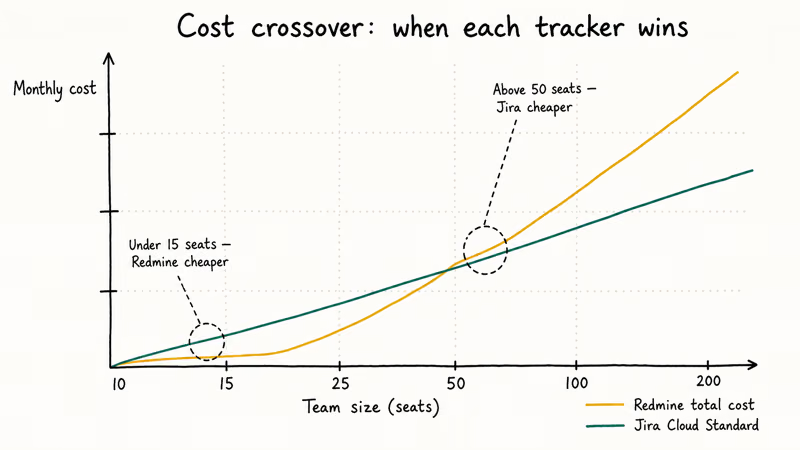
Redmine costs nothing for the software itself. Real cost is server hosting (figure $20 to $100/month for a small team’s VPS, more if you want managed Postgres and backups) plus the engineer-hours to maintain it. For a 10-person team, this is usually cheaper than Jira if you already have a sysadmin.
Jira Cloud has four tiers: Free, Standard, Premium, and Enterprise. The Free tier supports a small team with limited storage and no advanced workflows, while Standard adds user permissions, audit logs, and 250 GB storage. Premium adds advanced roadmaps, project archiving, and 24/7 support. Enterprise tops the stack with unlimited sites and centralized billing for orgs running multiple Jira instances.
Atlassian publishes current per-user pricing on the Jira pricing page. Pricing changes regularly, so check that page for live numbers rather than trusting any third-party comparison (this one included). What matters for the comparison is shape, not a specific dollar figure: Jira Cloud bills per seat per month, Jira Data Center bills per user tier per year, and Redmine bills your sysadmin’s time.
The break-even point in practice: under 15 seats, Redmine is usually cheaper if you have ops capacity. Above 50 seats, Jira Cloud Standard tends to be cheaper than the all-in cost of Redmine maintenance, especially if you’d need to hire dedicated ops headcount.
#Which One Fits Your Team?
Here’s the call to make based on team profile.
Pick Redmine if your team is under 25 people, you have a sysadmin or DevOps engineer who is comfortable with Ruby on Rails, you need full source control over your data and customizations, and your workflow needs are straightforward (issues, Gantt, wiki, time tracking). Open-source-first shops, academic teams, and budget-constrained startups often land here.
Pick Jira Cloud if you want zero-ops setup, your team uses Scrum or Kanban as a primary process, you need integrations with Slack, GitHub, Figma, or other modern SaaS tools, and your team is between 10 and 5,000 people. Most product engineering teams in 2026 fit this profile.
Pick Jira Data Center if you have an enterprise compliance mandate that requires self-hosting (FedRAMP, on-prem only data residency, air-gapped environments), you have an internal IT operations team that already runs enterprise Java applications, and your team exceeds 1,000 seats. Banks, defense contractors, and regulated healthcare orgs typically land here.
If you’re stuck between Redmine and Jira Cloud Free, just try Jira Cloud for two weeks. The Cloud signup is reversible, and it’ll tell you whether you actually need agile boards before you sink a weekend into a Redmine install.
If you’re comparing other trackers, a few related breakdowns are worth a look:
- Our Bugzilla vs Jira breakdown covers the open-source bug tracker angle in more depth.
- The Adobe Sign vs DocuSign piece walks the pricing-and-integrations frame on e-signature tools.
- The Babbel vs Duolingo piece does the same for language apps.
#Bottom Line
If you’re a self-hosting, open-source-first team under 50 developers with Ruby on Rails operational capacity, Redmine wins on cost and control. You get a free, license-clean issue tracker with Gantt, wiki, and repository integration, and you accept the maintenance tax that comes with running a Rails app.
If you want zero-ops setup, native Scrum and Kanban boards, and access to the Atlassian Marketplace’s 7,000+ integrations, Jira Cloud Standard is the better pick. The per-seat cost is real, but you save it back in setup time, plugin maintenance, and the engineer-hours you’d otherwise burn keeping Redmine current.
If you have an enterprise compliance mandate that forces on-prem hosting and your team is over 1,000 seats, Jira Data Center is the right answer. It costs more than Cloud per seat, but it’s the only first-party Atlassian path for self-managed deployments now that Server is end-of-life.
For most teams in the middle (under 200 seats, agile-curious, no compliance lockup), Jira Cloud Standard is the safer default. Redmine only wins when budget is the hard constraint and ops capacity already exists.
#Frequently Asked Questions
Is Redmine really free?
The software is free under GPL v2. The infrastructure is not.
Can I migrate from Redmine to Jira (or vice versa)?
Yes, but the directions aren’t symmetric. Atlassian’s Jira Cloud importer handles CSV imports and direct Redmine database migrations, so Redmine to Jira is straightforward. Jira to Redmine is harder, because Jira’s workflows, custom fields, automation rules, and sprint history have no clean Redmine equivalent. Plan extra time for that direction.
Did Atlassian really kill Jira Server?
Yes. According to Atlassian’s server end-of-support page, Jira Server reached end of support on February 2, 2024. New license sales ended in February 2021. Existing Server installs still run, but they no longer receive vendor support, security fixes, or app updates, so any compliance audit checking for a supported version fails on day one.
Does Redmine have Scrum and Kanban boards?
Not natively. Redmine’s core ships with issue lists, Gantt charts, calendars, and wiki. No agile boards. You add those through community plugins like Redmine Backlogs or commercial alternatives like RedmineUP Agile, and you own plugin maintenance forever after.
Which tool has better integrations?
Jira wins by a wide margin.
What database does Redmine need?
Redmine 6.1 supports PostgreSQL 14, MySQL 8.0 to 8.4, MSSQL 2012 or later, and SQLite 3. Pick PostgreSQL.
Can I use Jira for non-software projects?
Yes. Jira Software is the dev-focused product, but Atlassian also sells Jira Service Management for IT and customer support tickets, and Jira Work Management for marketing, HR, and operations teams. All three sit on the same underlying platform, so you can mix and match within one Atlassian Cloud workspace, share users across products, and keep one consolidated billing relationship instead of juggling separate vendors for each team’s tracker.
How long does each tool take to set up?
Jira Cloud takes about 5 minutes from sign-up to first issue. Redmine on a fresh VPS takes 60 to 120 minutes for a working install with database, reverse proxy, TLS, and basic config (Bitnami’s prebuilt stack or Docker images cut that to under 30 minutes). But the first-boot install is the easy part: the decade of upgrade maintenance afterwards is the real time sink.

Best Laptop for Running LLMs in 2026: Memory Comes First
The best laptop for running LLMs is a memory purchase first. Compare MacBook unified memory against NVIDIA laptop VRAM, and see what each tier really runs.

Pixel 11 vs Pixel 10: What Changed and Who Should Upgrade
Pixel 11 vs Pixel 10: same screen and camera resolution, new Tensor G6, 25W wireless, and Gemini Intelligence. Here is who should actually upgrade.

Best Power Bank for iPad in 2026: Pro, Air, and Mini
Best power bank for iPad in 2026. Compare mAh tiers and USB-C PD wattage for iPad Pro, Air, and mini, plus airline Wh math, cables, and travel tips.

Best Power Bank With Built-In Cable: Top 2026 Picks
Best power bank with built-in cable picks for 2026. Compare single USB-C, multi-connector, and retractable laptop banks, plus airline Wh math.