PS5 Controller Stick Drift Fix: 2026 Repair & Upgrade Guide
DualSense stick drift wrecks aiming and movement. Here is the software fix sequence, Sony warranty path, and when to upgrade to TMR-stick controllers.
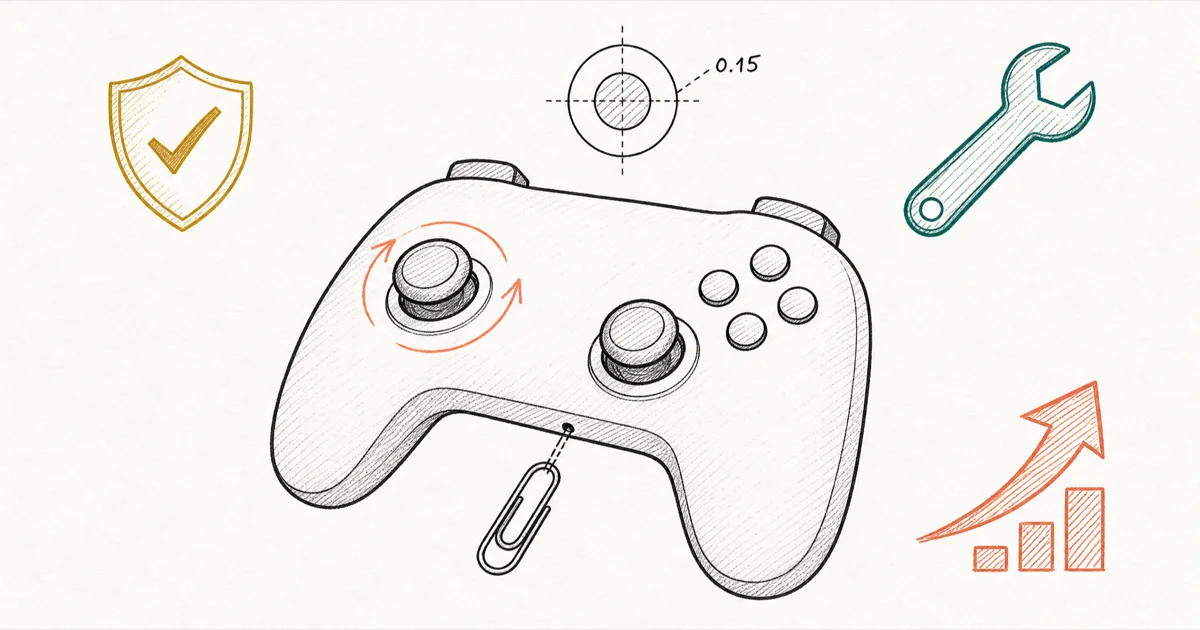
Quick AnswerRaise the in-game deadzone to 0.15-0.20 to mask mild drift, then reset the DualSense with a paperclip in the back pinhole. If drift persists under one year, Sony repairs it free.
Your character drifts left in Helldivers and the menu cursor won’t sit still. That’s classic DualSense stick drift, and it almost always traces back to wear on the analog stick.
The good news: Sony covers drift under the standard one-year warranty, so most readers can skip the DIY rabbit hole entirely. The fixes below are sequenced from fastest to most invasive, with a clean handoff to the warranty path when software stops being enough.
- Sony’s one-year limited warranty covers DualSense drift as a manufacturing defect, free repair or replacement
- A paperclip reset through the pinhole near L2 takes 30 seconds and clears phantom inputs caused by firmware glitches
- Raising the in-game deadzone to 0.15-0.20 masks mild drift instantly without any tools or warranty risk
- DualSense Edge ships with swappable stick modules so you can replace the drifting half without buying a new controller
- Scuf Omega’s TMR (tunnel magnetoresistance) sticks are non-contact and drift-resistant by design, launched May 2026 at $220
#Why DualSense Sticks Develop Drift
The DualSense uses traditional potentiometer-based analog sticks. Each stick rides on carbon-coated wipers that wear with use.
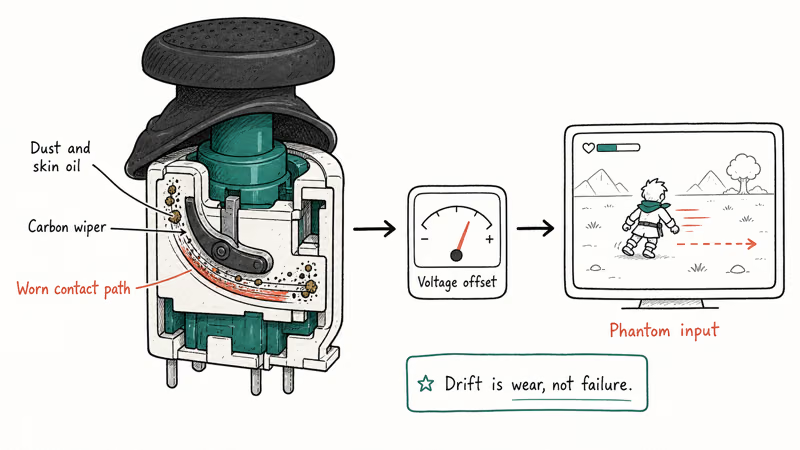
Dust or skin oil sneaks under the rubber boot and gunks up the contact path. That wear produces a tiny voltage offset, and the PS5 reads that offset as “the stick is being moved” even when your thumb is off it.
Drift is usually gradual. You’ll notice menu cursors creeping in Apex Legends, or your character walking forward in Helldivers when you’ve dropped the controller. It rarely fails overnight.
That’s the key intuition: drift is wear, not failure.
According to iFixit’s DualSense drift troubleshooter, contact contamination and worn potentiometers account for most drift cases. Damaged thumbstick boots come a distant third.
It’s not a software bug. But software can mask it. That’s why the no-tools fixes come first. They buy time while you decide between warranty service and a hardware upgrade.
Software-only relief tops out around the 5% threshold.
If you’ve also run into the PS4 CE-34878-0 error fix, you already know PlayStation hardware faults often look like software glitches at first.
#Test Your Controller in Two Minutes Before Trying Fixes
Confirm the drift first. Some complaints turn out to be a misread game setting or Bluetooth interference, and you don’t want to start opening pinholes for a problem that isn’t there.
Two minutes, no tools.
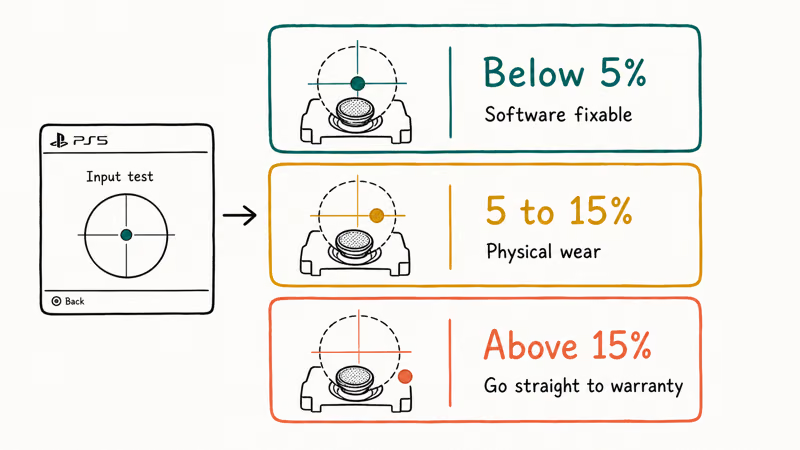
Run the PS5’s built-in input test. Go to Settings > Accessories > Controllers > Test Input Devices > Analog Sticks. Let go of both sticks and watch the on-screen indicator.
A healthy DualSense should rest very close to center, and a stick that reads noticeably off-center at rest is showing measurable drift. Asurion’s PS5 controller drift guide walks through the same menu path.
Three rules for reading the result:
- Drift below 5%: likely software-fixable with a reset or in-game deadzone bump
- Drift 5-15%: physical wear; software helps temporarily but warranty or repair is the real fix
- Drift above 15%: controller is unplayable, skip to the warranty section now
Treat higher off-center readings as a wear signal, not a defect-rate statistic.
Sony treats it as a covered issue regardless of cause, which is the part that matters to your wallet. iFixit frames it as a wear pattern. Either way, the warranty path is identical.
If your controller is acting weird in ways the input test won’t catch (random disconnects, dead trigger), the symptom set in our Oculus controller troubleshooting walkthrough applies broadly to wireless controllers.
#Can You Fix DualSense Drift Without Opening the Controller?
Yes, for mild cases. Three no-open fixes resolve drift below the 5% threshold most of the time. They take under 10 minutes combined.
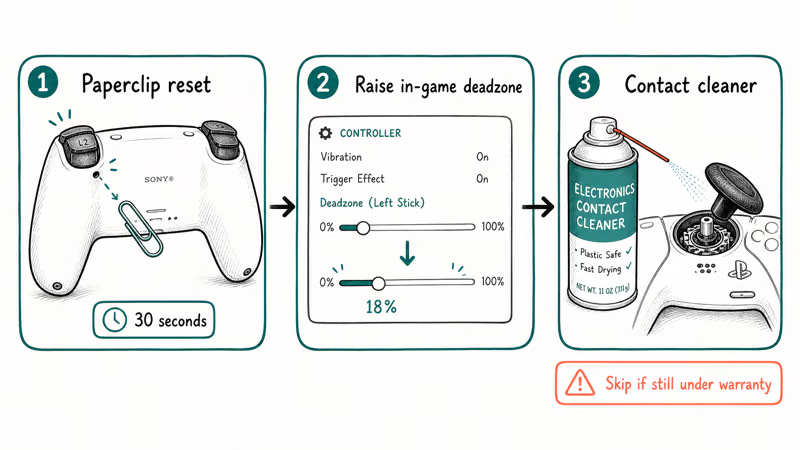
Work the list in order.
Fix 1, paperclip reset (30 seconds). Flip the DualSense over. There’s a small pinhole on the back near the L2 trigger, between the screw mount and the trigger housing.
Push a paperclip in and hold for 5 seconds. Plug the controller into the PS5 with the original USB-C cable and press the PS button. This clears the controller’s firmware state.
The paperclip trick resolves phantom inputs caused by Bluetooth pairing corruption. It won’t repair physical wear.
Fix 2, in-game deadzone increase (1 minute). Most PS5 shooters expose a deadzone slider in controller settings. Raise it from default (usually 5%) to 15-20%.
Raising the in-game deadzone can make mild drift playable without opening the controller or risking warranty coverage. This is the right first move if you suspect drift but haven’t decided whether to send the controller in yet.
Fix 3, electronics-safe contact cleaner (5 minutes). Pick up a can of Deoxit D5 or MG Chemicals Electronics Cleaner from any hardware store. Pull the rubber boot back gently with your fingernail, no tools.
Give the exposed potentiometer two short sprays. Work the stick in circles for 30 seconds. Let it dry for 10 minutes before plugging back in.
Don’t use WD-40 or rubbing alcohol.
Those leave residue that makes drift worse. Asurion recommends Deoxit-style contact cleaner as the first hardware-touch fix because it doesn’t void warranty when applied carefully. It clears the most common cause of drift: debris under the wiper.
Skip that step if your controller is still under warranty.
If none of those help, the drift is mechanical and software won’t save it. Move to the warranty section. Do not disassemble the controller while it’s still in Sony’s coverage window. Opening it voids the warranty instantly.
#How Do You File a Sony Warranty Claim for Drift?
Sony covers DualSense drift under the standard one-year PS5 warranty. According to Sony’s PS5 warranty terms, the coverage runs for 1 year from original purchase date and includes free repair or replacement for manufacturer defects.
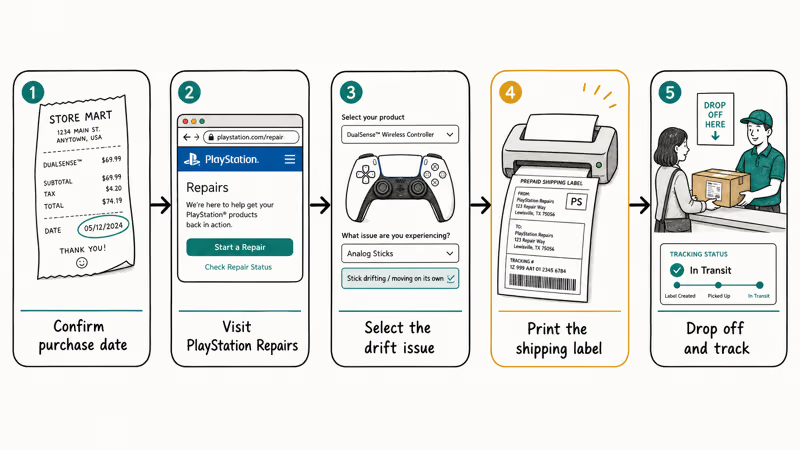
You don’t need to argue the case.
Sony classifies stick drift as a covered defect, not a wear-and-tear exclusion. TheGamer reports that Sony treats DualSense drift as a manufacturing issue under the 1-year warranty, so you can just file and ship.
Here’s the path:
- Confirm purchase date. Pull up your Amazon, Best Buy, or PlayStation Direct receipt. Anything within 12 months of today is in.
- Visit playstation.com/repairs. Sign in with the PSN account tied to the console.
- Select DualSense Wireless Controller and the issue type (stick drift falls under “analog stick problem”).
- Generate a shipping label. Sony issues a prepaid label and walks you through packaging. Bubble wrap the controller, use a small box, no original packaging required.
- Drop off at UPS or FedEx. Tracking activates within 24 hours.
Sony’s typical turnaround is 7-10 business days from receipt, plus shipping time on both ends. Plan on being controller-less for about two weeks.
If you only own one DualSense and gaming downtime is a problem, buy a cheap second controller. A used DualSense Slim from a GameStop runs $40-50.
Or pivot to single-player titles you’ve been meaning to finish. The games we listed in our best PS5 narrative games roundup all play fine with a single working stick, if drift is on the right side and movement is on the left.
You won’t get the same physical unit back.
Sony returns either a refurbished or replaced controller. The replacement carries the remainder of the original warranty plus a 90-day repair warranty, whichever is longer.
#DualSense Edge: Modular Sticks From Sony
If your DualSense is past warranty and drift keeps coming back after contact-cleaner treatment, you’re looking at controller retirement. The standard DualSense is $74.99 at retail. Replacing it every 18-24 months because of drift adds up.
DualSense Edge sells for $199.99. Sony’s pro-tier controller ships with swappable stick modules.
When a stick drifts, you pop off the magnetic faceplate, release the locking tab, and snap in a replacement module. Pairs run $19.99 from PlayStation Direct. No soldering. No tools beyond your fingernail.
Edge also has back paddles, trigger stops, and per-game profile storage. So the upgrade isn’t just about drift, it’s about the whole controller layer.
The Edge math: if you’d be replacing a standard DualSense every 18 months because of drift, the Edge’s $200 sticker plus one module swap every two years costs less than three standard DualSense controllers over a six-year window.
That math holds even before you count back paddles or profile storage as bonuses. Heavy players come out ahead. Casual players probably don’t.
#Scuf Omega: TMR Sticks for True Drift Resistance
The Scuf Omega is a different bet. Instead of making drift cheap to fix, it tries to prevent drift in the first place.
Scuf Omega sells for $219.99. It launched May 2026 with TMR (tunnel magnetoresistance) sticks.
TMR is a non-contact magnetic technology. The stick uses magnets and sensors instead of carbon wipers, so there’s no physical contact surface to wear down. According to Push Square’s Scuf Omega coverage, Scuf positions the Omega as drift-resistant by design rather than drift-fixable after the fact.
Trade-offs are real. Omega doesn’t have Sony’s haptic feedback or adaptive triggers, the standout DualSense features for games like Returnal. It’s also wired-only out of the box.
That last part stings if you play wireless.
A quick note on Hall-effect vs TMR. Both are non-contact magnetic stick technologies that resist drift far better than the standard DualSense potentiometer design.
The Razer Wolverine V3 Pro uses Hall-effect. Scuf Omega uses TMR, the newer of the two, with slightly better signal resolution at higher cost per unit.
What about cheap third-party DualSense-style controllers? Don’t. The $30-40 knock-offs save money up front but lose the adaptive trigger feel and DualSense haptics. Most still use the same potentiometer sticks Sony uses, so they’ll drift the same way.
If you’ve been gaming across platforms, connecting a PS4 to a laptop or playing console games on PC is a better fallback than buying low-end hardware.
For users who want gaming variety while their controller is at Sony, our recommendation lists for best camera-based PS5 games and games like Halo on PlayStation cover single-stick-friendly titles that don’t need both sticks at full health.
#Bottom Line
Warranty first, then deadzone, then upgrade.
If your DualSense is under one year old, send it to Sony. Use playstation.com/repairs, free repair or replacement, 7-10 business days. Don’t waste a Sunday on paperclip resets and contact cleaner first. Sony already classifies drift as a covered defect, so the warranty path is the cleanest fix.
If you’re out of warranty and drift is mild, raise the in-game deadzone to 18% and hit the thumbstick boot with Deoxit. That buys 6-12 months of useful life on average. If drift returns after the cleaner trick, or it’s already past 10% in the input test, upgrade.
The DualSense Edge at $199 is the right pick if you want to keep Sony’s adaptive triggers and haptics. The Scuf Omega at $220 is the right pick if drift resistance is your top priority and you can live without adaptive feedback. Skip the $40 off-brand controllers. They drift the same way as a stock DualSense, and the trigger feel takes a real step backward.
#Frequently Asked Questions
Is PS5 controller stick drift covered under warranty?
Yes, for one year. Sony’s standard PS5 limited warranty covers DualSense drift as a manufacturing defect. Submit a claim at playstation.com/repairs with your proof of purchase, ship the controller using Sony’s prepaid label, and you’ll get a free repair or replacement. The warranty runs from your original purchase date.
How long does Sony take to repair a DualSense?
About two weeks total, including shipping both ways.
Can a paperclip reset fix DualSense drift permanently?
No. The reset clears firmware state and resolves phantom inputs from Bluetooth pairing issues, but it can’t repair physical stick wear. If your drift comes from a worn potentiometer, the most common cause, the reset will help for a few sessions at most before the drift returns. Reach for the deadzone slider or the warranty path instead.
Should I open my DualSense to fix drift myself?
Only if you’re out of warranty. Opening the controller voids Sony’s coverage immediately. For under-warranty units, file a claim through playstation.com/repairs and let Sony swap the controller for you, free.
Does the DualSense Edge fix drift forever?
No. Edge sticks still use potentiometer-based modules and they will wear.
The difference is that Edge makes the fix painless. When a stick drifts, pop off the magnetic faceplate, release the locking tab, and snap in a replacement module for $19.99 per pair. The whole swap takes under a minute and needs no tools beyond your fingernail. For heavy players, that turns drift from a $75 problem into a $20 problem.
Is Scuf Omega worth $220 just to avoid stick drift?
Depends on what you care about. Omega’s TMR sticks resist drift by design, so if drift is your top frustration, Omega solves it. The trade-off: you lose Sony’s adaptive triggers and haptic feedback, the standout features for games like Returnal. Heavy shooter players who don’t care about haptics get the most value, story-game players are better off with the Edge.
Why does DualSense drift happen more than DualShock 4?
The DualSense has a smaller boot-to-stem clearance, so debris reaches the contact path faster.
Can a software update fix DualSense drift?
Not really. Sony’s DualSense firmware updates can adjust how the console interprets stick input (the reset trick uses this), but firmware can’t repair physical wear inside the stick assembly. If drift persists after a paperclip reset and a controller reset through the PS5, the issue is mechanical and software won’t help.

Fortnite Stuck on the Loading Screen? Fix It in 2026
Fortnite stuck on the loading screen? Check server status, fix the Windows N Media Pack and DirectX 11 on PC, clear the console cache, and verify files.

Minecraft Keeps Crashing? Java and Bedrock Fixes (2026)
Minecraft keeps crashing on startup or mid-game? Update your GPU driver, remove mods on Java, and reinstall Gaming Services on Bedrock. Fixes for both.

Pokemon GO Not Loading? Fix the Loading Screen 2026
Pokemon GO not loading or stuck on the Pokeball? Check server status, fix automatic date and time, grant location permission, clear the cache, and update.

PS5 Controller Not Charging? 9 Fixes That Work (2026)
DualSense not charging? Swap the cable, use a rear port in Rest Mode, clean the USB-C port, and check power settings. 9 fixes for a dead PS5 controller.