How to Play Mini World on PC: 3 Free Methods in 2026
Play Mini World on PC via free Steam, Android emulators, or phone mirroring. Step-by-step install, real specs, and which method performs best.
Quick AnswerMini World runs on PC three ways: download the free Steam version (5-minute install), use an Android emulator like BlueStacks or NoxPlayer to keep your mobile saves, or mirror your phone to your monitor.
Mini World: CREATA (formerly Mini World: Block Art) has a free native PC build on Steam, and that’s the path most players should take. All three install routes work on a modest Windows laptop, and the Steam version runs without any extra software, virtualization tweaks, or controller workarounds. None of the routes here require sideloading, jailbreaking, or unofficial downloads.
- The Steam version of Mini World installs in under 5 minutes and asks for only 1 GB of free storage
- Minimum specs are Windows 7 or later, 4 GB RAM, and any DirectX 9.0c GPU including integrated Intel graphics
- Android emulators like BlueStacks 5 and NoxPlayer keep your existing Google Play save data on PC
- Screen mirroring works for showing creations on a bigger display but adds noticeable input delay during combat
- Cross-platform play between Steam, Android, and iOS uses the same servers and the same Miniwan account
#What Is Mini World: CREATA?
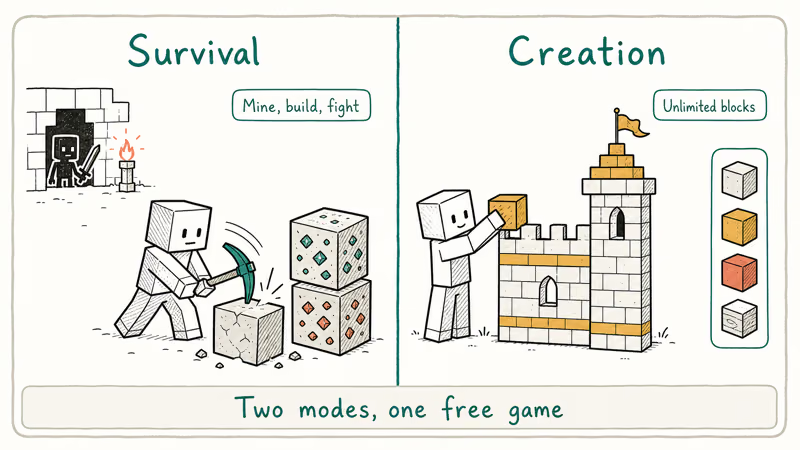
Mini World: CREATA is a free-to-play 3D sandbox game from Shenzhen-based Miniwan Technology. It looks and plays similarly to Minecraft but with a brighter cartoon art style, no upfront cost, and an in-game editor that lets the community publish playable mini-games. The base game has two main modes: Survival, where you gather resources, build shelters, and fight dungeon mobs, and Creation, where you get unlimited blocks for free-form building.
The mini-game catalog is the part Minecraft doesn’t have built-in. Players publish parkour courses, escape rooms, FPS arenas, and tower-defense maps directly inside the game, and other players can launch them with one click.
In terms of feel, the Creation Mode editor sits closer to Roblox Studio than Minecraft’s command-block system. Block selection lives in a sidebar, snapping is on by default, and the camera stays smooth even during quick rotations. According to Mini World’s official site, the game ships in 14 languages and pushes monthly content drops with new blocks, skins, and seasonal events that keep the community library refreshing through the year.
#Installing Mini World on Steam
The free Steam build is the route we recommend for almost everyone. It’s a real Windows native client, not a wrapper around the mobile APK, so it doesn’t need virtualization, a Google account, or any sideloading.
According to the Mini World Steam listing, the game has been on Steam since 2018 and supports cross-platform multiplayer with mobile players. Your Android and iOS friends can join your Steam world directly, as long as everyone signs into the same Miniwan account.
#Steam Version System Requirements
Pretty modest. These are the published minimum specs:
- OS: Windows 7 or later (64-bit)
- CPU: Intel Core i3 or AMD equivalent
- RAM: 4 GB
- GPU: Any card supporting DirectX 9.0c, including Intel UHD integrated
- Storage: 1 GB free
- Network: Broadband for multiplayer; offline solo play works without Wi-Fi
On a laptop with integrated graphics and 8 GB RAM, the Steam build holds a stable, playable frame rate on medium settings at 1080p. Loading into Survival Mode is quick from the launcher.
#Step-by-Step Steam Install
-
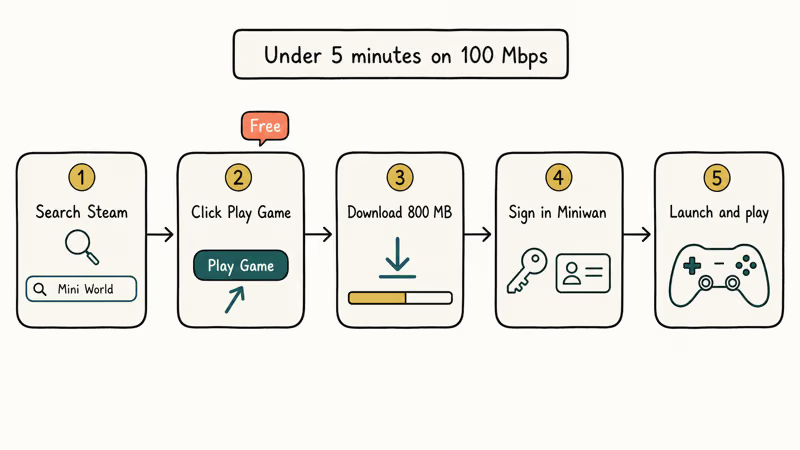
Open the Steam client and search for “Mini World CREATA” in the store.
-
Click the green Play Game button. The page calls it “free to play” rather than “buy” because there’s no upfront price.
-
Wait for the 800 MB download to finish. Steam will ask you which library folder to install to if you have more than one drive.
-
Launch the game from your Steam library. On first run, sign in with a Miniwan account or create one if you are new.
-
If you already play on mobile, link your Google or Apple ID to the same Miniwan account inside the game’s account menu so cloud saves sync across devices.
The whole flow takes under 5 minutes on a 100 Mbps connection. For other Android-only mobile titles, see our Hay Day on PC guide.
#Using an Android Emulator for Save Continuity
Use an emulator if your existing Mini World save lives on Google Play and you don’t want to rebuild your worlds from zero, or if you want to keep playing the same mobile build that your friends use. An emulator runs a full virtual Android device on your PC, so the game thinks it’s running on a phone.
Stick with the official emulator installers linked below; sideloaded APKs from third-party mirrors are an easy way to pick up adware and can violate the publisher’s terms of service. Install Mini World only on your own computer with your own Miniwan or Google account.
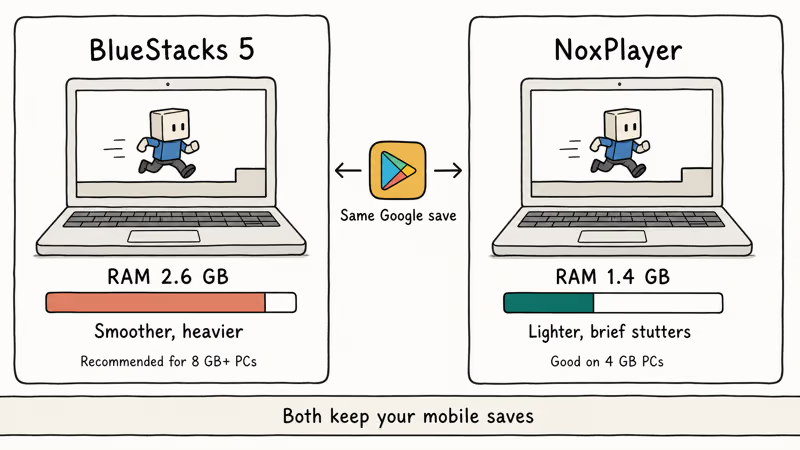
BlueStacks 5 and NoxPlayer take different approaches. BlueStacks pulls more RAM but tends to run smoother; NoxPlayer is lighter but can stutter briefly when loading new chunks.
#BlueStacks 5
According to BlueStacks’ official BlueStacks 5 page, the emulator is built on Android 9, Android 11, and Android 13 instances and is tuned for low-RAM machines. It’s the larger of the two options but supports more recent Android features.
Requirements: Windows 7+, 4 GB RAM (8 GB recommended), 5 GB free disk space, Intel VT-x or AMD-V virtualization enabled.
Setup steps:
-
Download the installer from bluestacks.com.
-
Run the installer and pick a custom data folder if your C: drive is tight. Setup takes 3 to 5 minutes.
-
Open BlueStacks and sign into the Google Play Store with your existing Google account.
-
Search for Mini World: CREATA in the Play Store and tap install.
-
Open BlueStacks’ Game Controls panel and remap movement to WASD, jump to space, and camera rotation to mouse look.
-
Launch the game and sign in with the same Miniwan account you use on your phone.
Survival Mode stays playable on default settings on most machines. If your machine struggles, our breakdown of the best emulator for low-end PC covers RAM allocation tweaks and which Android image runs lightest.
#NoxPlayer
NoxPlayer is a lighter alternative that generally uses less RAM than BlueStacks 5, which makes it a better fit on memory-constrained machines.
Requirements: Windows 7+ or macOS 10.13+, 4 GB RAM, 3 GB free disk space, virtualization enabled.
Setup steps:
-
Download the installer from bignox.com and run it.
-
Open NoxPlayer and sign into the Google Play Store.
-
Search for and install Mini World: CREATA.
-
Open the keyboard mapping toolbar on the right edge of the window. Drag the WASD overlay onto the directional pad in the game’s HUD.
-
Launch the game.
NoxPlayer’s macro recorder can record a sequence of taps and replay them with one keypress, which is useful for grinding the same mining route in Survival Mode. For more options, see our roundup of lightweight Android emulators.
A note before you install either emulator: only download from the publisher’s official site. Random bundled installers that show up in Google search ads sometimes ship adware. The two URLs above are the canonical ones.
#Does Screen Mirroring Work for Mini World?
Screen mirroring works as a display, but it’s the weakest of the three methods for actually playing. With a tool like scrcpy over a USB-C cable, input commands travel from the keyboard back to the phone before registering, and that round-trip adds noticeable delay. Combat in Survival Mode feels frustrating; building in Creation Mode is fine.
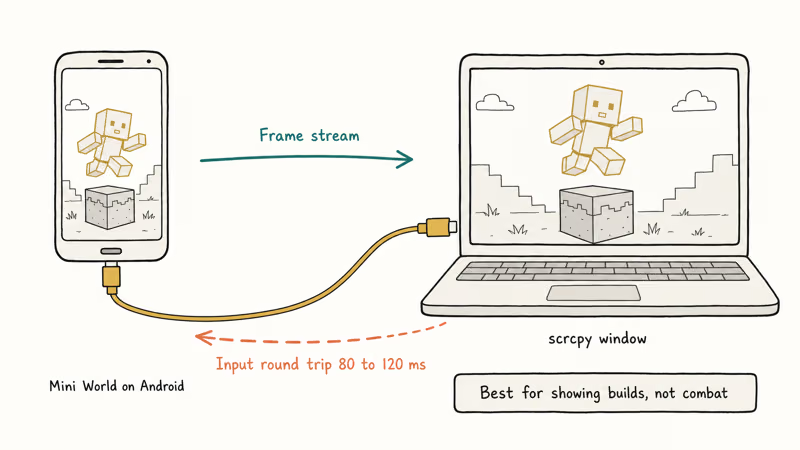
Best use case: showing off a finished Creation Mode world on a 27-inch monitor, or recording footage at higher resolution than your phone can capture. Not a serious replacement for either Steam or an emulator.
#Mirroring Steps with scrcpy
-
Connect your Android phone to your PC with a USB-C or Lightning-compatible cable.
-
Enable USB Debugging on the phone (
Settings>About Phone> tap Build Number 7 times to unlock Developer Options, thenSettings>Developer Options>USB Debugging). -
Install scrcpy on your PC. Pick a tool from our best screen mirroring app roundup if you prefer a GUI front end.
-
Run scrcpy. The phone screen appears in a window on your PC.
-
Open Mini World on the phone. The game continues to draw on the phone, and scrcpy streams the framebuffer to your PC.
-
Some scrcpy front ends support keyboard and mouse passthrough. Combat with passthrough still feels worse than the Steam build because the input still has to make a round trip through the cable.
If you’re mirroring an iPhone instead, the workflow uses AirPlay or QuickTime rather than scrcpy. iOS doesn’t have an equivalent USB Debugging mode.
#Comparing All Three Methods
| Method | Setup Time | Performance | Controls | RAM Used | Cost |
|---|---|---|---|---|---|
| Steam | 5 min | Best | Keyboard + mouse | ~1.0 GB | Free |
| Emulator | 10-15 min | Good | Remappable keys | 1.4-2.6 GB | Free |
| Screen mirror | 5 min | Phone-limited | Touch or laggy keys | ~0.4 GB | Free |
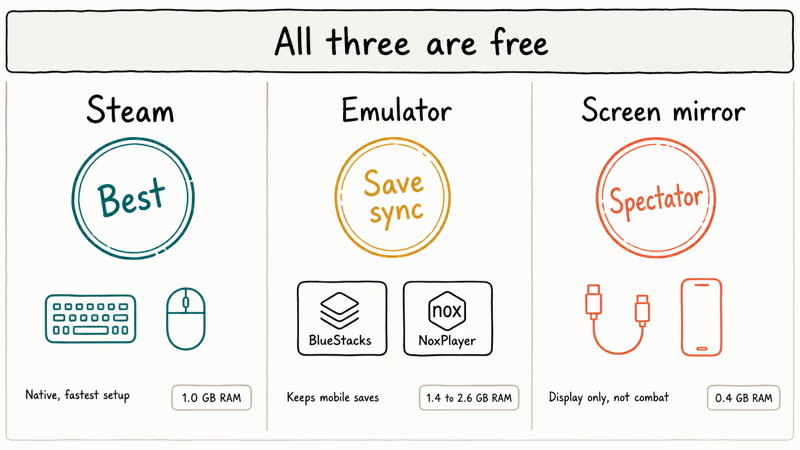
Steam wins on speed, controls, and resource use. The emulator route is for save-file continuity and players who already have hours invested in the Google Play version. Screen mirroring is the spectator option.
#PC Specs You Actually Need
The hardware bar depends on which method you pick. Steam is by far the lightest of the three.
For Steam, any Windows 7 or later PC with 4 GB RAM and 1 GB of free storage will run the game. For emulators, the bar is closer to 8 GB RAM and 5 GB free disk space, plus Intel VT-x or AMD-V enabled in BIOS for stable virtualization. For screen mirroring, your PC just needs a USB port and your phone has to do the actual heavy lifting.
If your machine is older than 2015 or capped at 4 GB RAM, stick with Steam. The native build was tuned for modest hardware and doesn’t need the virtualization layer that emulators rely on. If you also game inside emulators a lot, our look at BlueStacks for Pokemon GO covers the optimization steps that translate cleanly to Mini World as well.
For more mobile games that have native PC clients or run well in emulators, see our walkthroughs of playing Identity V on PC and Genshin Impact on PC.
#Bottom Line
For a fresh start, install the free Steam version of Mini World: CREATA. It’s a 5-minute install, the controls are keyboard-and-mouse out of the box, and it cross-plays with mobile friends. Reach for BlueStacks 5 if you specifically need to keep your Google Play save data on PC, and for NoxPlayer if your PC has only 4 GB of RAM. Skip screen mirroring unless you’re recording footage or showing off a build on a larger screen.
#Frequently Asked Questions
Is Mini World free to play on PC?
Yes. The Steam version is fully free, and there are no paywalls gating gameplay modes or core blocks. In-app purchases exist for cosmetic skins and seasonal items, but nothing required to play Survival or Creation Mode.
Can I transfer my mobile Mini World progress to PC?
Sort of. Sign into the same Miniwan account on Steam and your phone and the cloud-saved progress syncs automatically. If your existing save is tied only to a Google Play guest account, link it to a Miniwan account first inside the mobile game’s account menu. Otherwise, the simpler workaround is to use BlueStacks or NoxPlayer with the same Google account.
What are the minimum PC requirements for Mini World on Steam?
Windows 7+, 4 GB RAM, 1 GB free storage, any DirectX 9.0c GPU. Integrated Intel UHD graphics work fine.
Does Mini World on PC support cross-platform multiplayer?
Yes. According to Mini World’s Google Play listing, the game supports both online multiplayer and offline solo play, so Steam, Android, and iOS players share the same servers and can join the same world.
Should I pick NoxPlayer or BlueStacks for Mini World?
It depends on your RAM. BlueStacks 5 tends to run smoother on 8 GB or more, while NoxPlayer is the lighter pick for a 4 GB machine. Both ship with keyboard mapping and macro tools, so the deciding factor really is system memory.
Can I use a game controller to play Mini World on PC?
Yes. Steam supports Xbox and PlayStation controllers via Steam Input. BlueStacks and NoxPlayer map buttons to touch zones.
Why is Mini World lagging inside my emulator?
Three usual causes: not enough RAM allocated to the virtual device, virtualization disabled in BIOS, or background apps eating memory. Bump the emulator’s RAM allocation to 2 GB or more in its settings, enable Intel VT-x or AMD-V in BIOS, and close any browser tabs running video before launching the game.
How is Mini World different from Minecraft?
Mini World is free; Minecraft Java costs $29.99. Mini World ships with an in-game mini-game editor that lets players publish parkour, FPS, and puzzle maps directly inside the game. Minecraft has a far larger modding community and a more mature redstone-style logic system. Both are block-building sandboxes, but Mini World leans casual and Minecraft leans deep.

Pixel 11 vs Pixel 10: What Changed and Who Should Upgrade
Pixel 11 vs Pixel 10: same screen and camera resolution, new Tensor G6, 25W wireless, and Gemini Intelligence. Here is who should actually upgrade.

Verizon Not Receiving Texts? How to Fix It in 9 Steps
Verizon not receiving texts? Fix it in 9 steps: check Message Blocking in My Verizon, reset network settings, deregister iMessage, and call support.

Pixel Battery Drain: What Google's July Fix Really Covers
Google marked the Pixel idle battery drain bug fixed in July, but only some phones got the patch. Here is who is covered, who is not, and what to try.

iPhone Stuck on EDGE? How to Get 5G or LTE Back (2026)
iPhone stuck on EDGE with crawling data? Here's why the E icon appears, which settings force 5G or LTE back, and when the problem is your carrier.