Best Game Controllers for PC, Console, and Mobile (2026)
The best game controller for PC, console, and mobile in 2026. We compare wired vs wireless, Hall-effect sticks, and mobile clip pads for any setup.
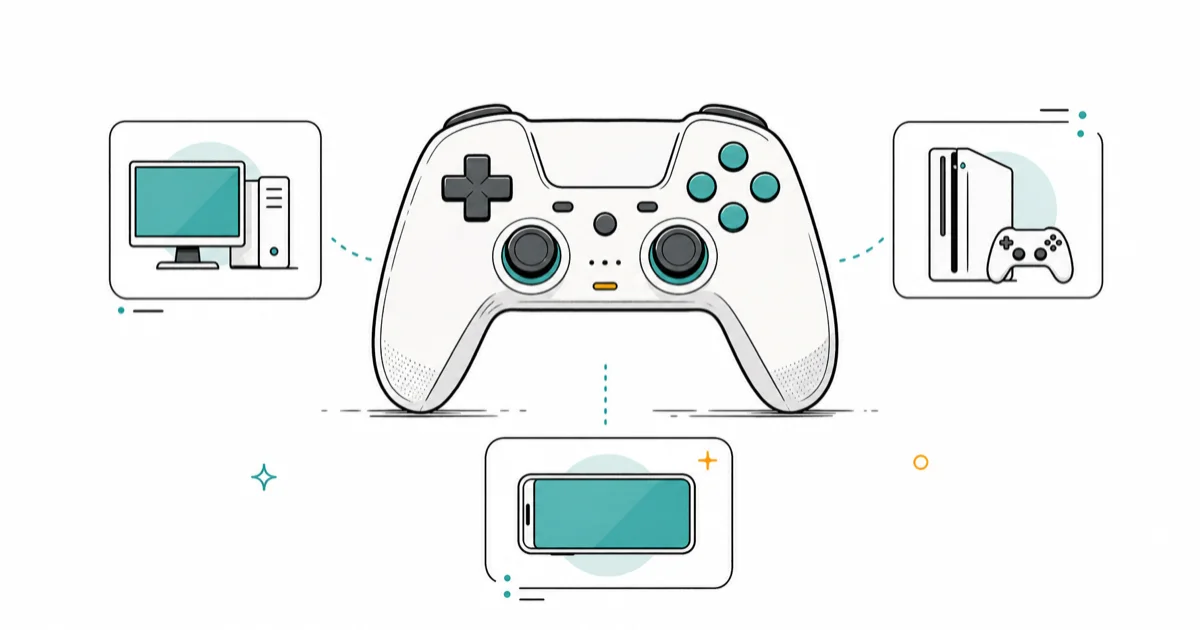
Quick AnswerThe Xbox Wireless Controller is the best game controller for most people. It works on Xbox, PC, and mobile, lasts about 40 hours on AA batteries, and costs around $60.
The best game controller depends on where you play. This guide compares controllers across PC, Xbox, PlayStation, Switch, and Android phones by platform support, stick durability, and wired-versus-wireless tradeoffs. Your pick comes down to platform support, stick durability, and wired latency versus wireless freedom.
- Xbox Wireless Controller works on Xbox, Windows, and mobile, and runs on swappable AA batteries
- DualSense Edge adds back paddles and replaceable stick modules, but costs far more than a stock pad
- Hall-effect sticks (8BitDo, GameSir) resist the stick drift that plagues standard potentiometer sticks
- Wired connections cut input lag versus Bluetooth, which is why competitive players go wired
- Mobile clip controllers like the Backbone turn a phone into a handheld with real buttons and triggers
#Match the Controller to Your Main Platform
Start with where you play. A controller that pairs natively with your main device saves you the headache of flaky third-party drivers, button remaps, and dropped connections mid-session.
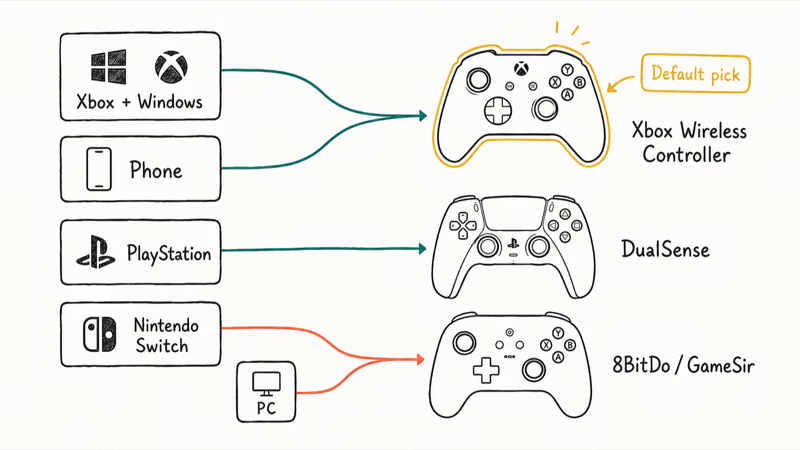
For Xbox and Windows, the Xbox Wireless Controller is the default. It pairs over Bluetooth or the Xbox Wireless protocol, and Windows recognizes it with zero setup. PlayStation players get the same native treatment from the DualSense, which adds adaptive triggers and haptics that a growing list of PC games now support, so your platform’s first-party pad is almost always the safest starting point before you shop third-party.
Switch and PC players who want extras lean toward third-party pads. The 8BitDo Ultimate 2 and GameSir Cyclone 2 pack Hall-effect sticks, back buttons, and charging docks below the price of first-party flagships. As an Amazon Associate fone.tips earns from qualifying purchases.
Fighting games are the exception. A standard pad isn’t ideal there, and our guide to the best fighting game controller covers fightpads and leverless options.
#Wired and Wireless Each Win at Different Things
Wired controllers win on latency and never die mid-match. Wireless controllers win on comfort and let you sit across the room. For most living-room gaming, that gap is small enough that wireless is fine.
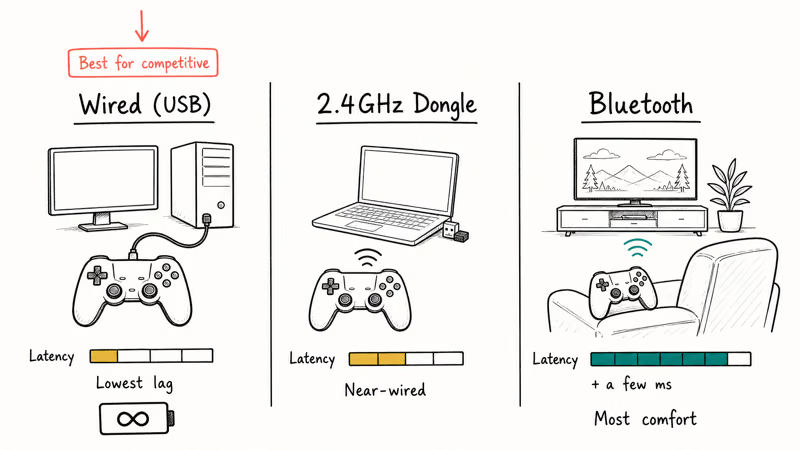
Competitive players still go wired. Bluetooth adds a few milliseconds of input lag compared to a USB cable, and in a fighting game or shooter those milliseconds decide trades. A USB cable generally gives tighter response than Bluetooth on PC.
A 2.4GHz dongle is the middle ground. According to Tom’s Guide’s game controller guide, low-latency dongles get close to wired performance while keeping the cable off your lap. Many third-party pads ship with one.
Battery type matters too. The stock Xbox pad swaps AA cells in seconds, while the DualSense recharges a built-in pack over USB-C. Swappable rechargeable AAs also make the Xbox pad easier to keep running during long sessions than the DualSense’s built-in pack.
#Are Hall-Effect Sticks Worth It in 2026?
Yes, if you’ve ever dealt with stick drift. Hall-effect sticks use magnets instead of physical contacts, so they don’t wear out the way standard potentiometer sticks do.
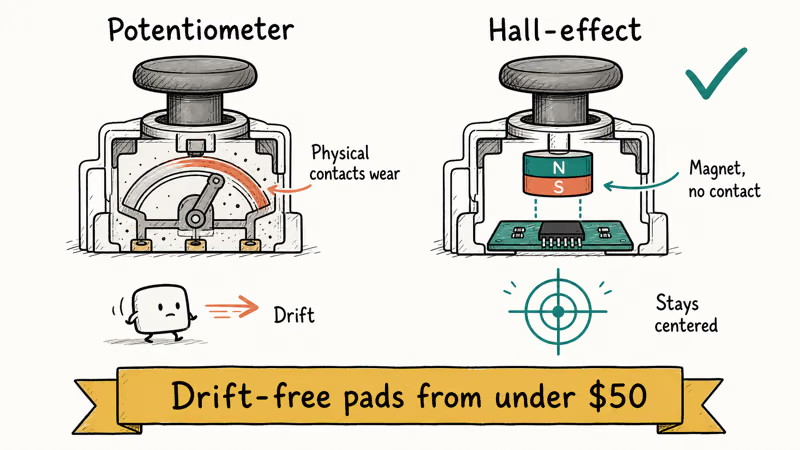
Stick drift is the slow death of most controllers. A worn potentiometer registers movement when the stick sits centered, sending your character wandering on its own. According to iFixit’s explainer on Hall-effect joysticks, the problem stems from dust and mechanical wear inside conventional analog sticks, which contactless magnetic sticks sidestep entirely.
Hall-effect sticks are designed to avoid the potentiometer wear that causes classic stick drift. The upgrade costs little now that drift-free pads start under $50.
Need a mouse for the same desk? Many players keep a controller for racing and platformers and switch to the best gaming mouse for shooters.
#What About Mobile and Clip-On Controllers?
Mobile clip controllers bridge touch controls and a real gamepad. They clamp around your phone and add sticks, a D-pad, and triggers for cloud gaming or native mobile titles.
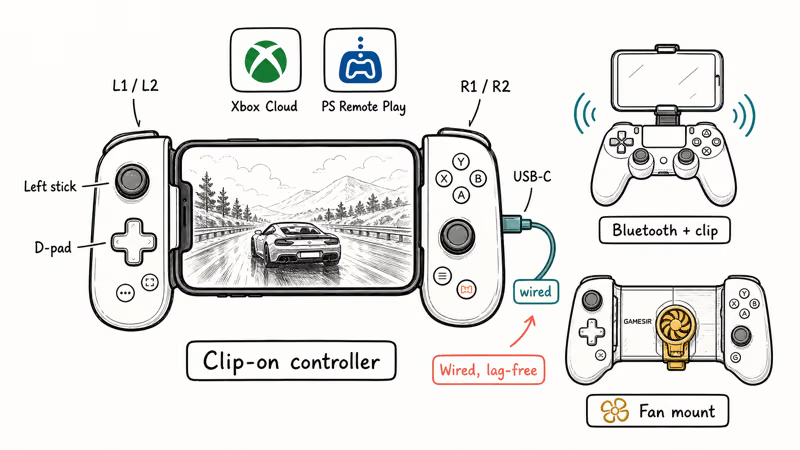
The Backbone is the popular pick for iPhone and Android. It plugs into the USB-C port for a wired, lag-free link and folds flat for travel. The Backbone One works with Xbox Cloud Gaming, PS Remote Play, and most controller-aware mobile games, which makes it the simplest way to turn a phone into a handheld.
Already own a console pad? An Xbox or DualSense controller pairs to a phone over Bluetooth in seconds, and a cheap clip holds the screen above it.
GameSir also makes telescopic mobile pads with Hall-effect sticks. These undercut the Backbone on price and add a cooling fan mount for longer sessions, though the build quality sits a clear step below the Backbone and the plastic can feel hollow under heavy thumb pressure during fast games.
#How to Set Your Controller Budget
Set a budget first, then buy the best stick durability you can afford. A drift-resistant pad is the upgrade most worth paying for if you keep controllers for years.
Most people are done at $60 to $75. A stock Xbox or DualSense pad covers the vast majority of players at that price, and pushing past it only makes sense for a specific need. According to Tom’s Guide’s PC controller picks, the premium tier earns its cost only when you want back paddles, swappable sticks, or a tournament-grade wired build that survives years of heavy competitive play.
Spend up only if you fit those cases. Otherwise the extra cash buys features you’ll never touch.
#Best Picks for Switch, Retro, and Cross-Platform Play
One pad can’t be perfect everywhere, so match the extras to your library. A versatile third-party controller pays off for retro and emulation, where the D-pad and button layout matter more than triggers.
Switch players who skip the pricey Pro Controller can get Hall-effect sticks for far less from 8BitDo or GameSir. A budget Hall-effect pad near $45 delivers the drift resistance the official Switch pad has long lacked, and it pairs over Bluetooth just as easily, so you lose almost nothing by going third-party on the cheaper end.
Want one controller for console, PC, and phone? Get a third-party pad with both Bluetooth and a 2.4GHz dongle.
#Bottom Line
Buy the Xbox Wireless Controller if you want one pad that works everywhere with no fuss. It runs on Windows, Xbox, and mobile, swaps batteries instantly, and costs about $60. Step up to the DualSense Edge only if you play on PlayStation and want back paddles plus replaceable stick modules.
If stick drift has burned you before, grab a Hall-effect pad from 8BitDo or GameSir instead. You give up first-party haptics, but you gain sticks that should outlast the rest of the controller. Cloud and mobile gamers should add a Backbone or a Bluetooth pad with a phone clip.
For the desk side of your rig, see our guide to the best gaming keyboard. Smash and emulation players should check the best gamecube controller for pc.
Fighting-game fans can compare the best arcade sticks for a tournament cabinet setup.
#Frequently Asked Questions
Which game controller works on the most platforms?
The Xbox Wireless Controller has the widest native support. It works on Xbox consoles, Windows, Android, and iOS, and PC games recognize it with no extra drivers.
Is a wired or wireless controller better for competitive gaming?
Wired is better for competitive play because a USB cable cuts the input lag that Bluetooth adds. The gap is only a few milliseconds, but it’s enough to matter in fighting games and shooters. A 2.4GHz dongle is a good compromise if you dislike cables.
Do Hall-effect controllers really prevent stick drift?
They prevent the most common cause of drift. Hall-effect sticks read movement with magnets instead of physical contacts, so there are no parts to wear down inside the stick. A Hall-effect pad avoids the potentiometer wear that causes many older sticks to drift.
Can I use a console controller on my phone?
Yes. Both the Xbox Wireless Controller and the DualSense pair to phones over Bluetooth, and a cheap clip holds the screen above the pad.
What is the best controller for cloud gaming on the go?
The Backbone One is the easiest option because it clamps directly onto your phone and connects through the USB-C port for a wired link. It folds for travel and works with the major cloud-gaming apps. A Bluetooth pad with a clip is a cheaper alternative.
How much should I spend on a game controller?
A stock Xbox or DualSense pad runs about $60 to $75 and suits nearly everyone, which is the price tier most buyers should target. Spend more only if you specifically want back paddles, swappable stick modules, or a tournament-focused wired controller built to survive years of heavy play. If drift is your main worry, a budget Hall-effect pad under $50 is the smarter buy than any premium stock pad.
Do third-party controllers work as well as first-party ones?
The good ones do, and some add Hall-effect sticks and back buttons the originals lack. Stick to known brands like 8BitDo and GameSir for reliable build quality.
Fortnite Stuck on the Loading Screen? Fix It in 2026
Fortnite stuck on the loading screen? Check server status, fix the Windows N Media Pack and DirectX 11 on PC, clear the console cache, and verify files.
Minecraft Keeps Crashing? Java and Bedrock Fixes (2026)
Minecraft keeps crashing on startup or mid-game? Update your GPU driver, remove mods on Java, and reinstall Gaming Services on Bedrock. Fixes for both.
Pokemon GO Not Loading? Fix the Loading Screen 2026
Pokemon GO not loading or stuck on the Pokeball? Check server status, fix automatic date and time, grant location permission, clear the cache, and update.
PS5 Controller Not Charging? 9 Fixes That Work (2026)
DualSense not charging? Swap the cable, use a rear port in Rest Mode, clean the USB-C port, and check power settings. 9 fixes for a dead PS5 controller.