Pokemon Go Multiple Accounts: Family Rules and ToS in 2026
Multiple Pokemon Go accounts are OK only if each one belongs to a different family member. Family setup, ToS rules, and what gets you banned in 2026.
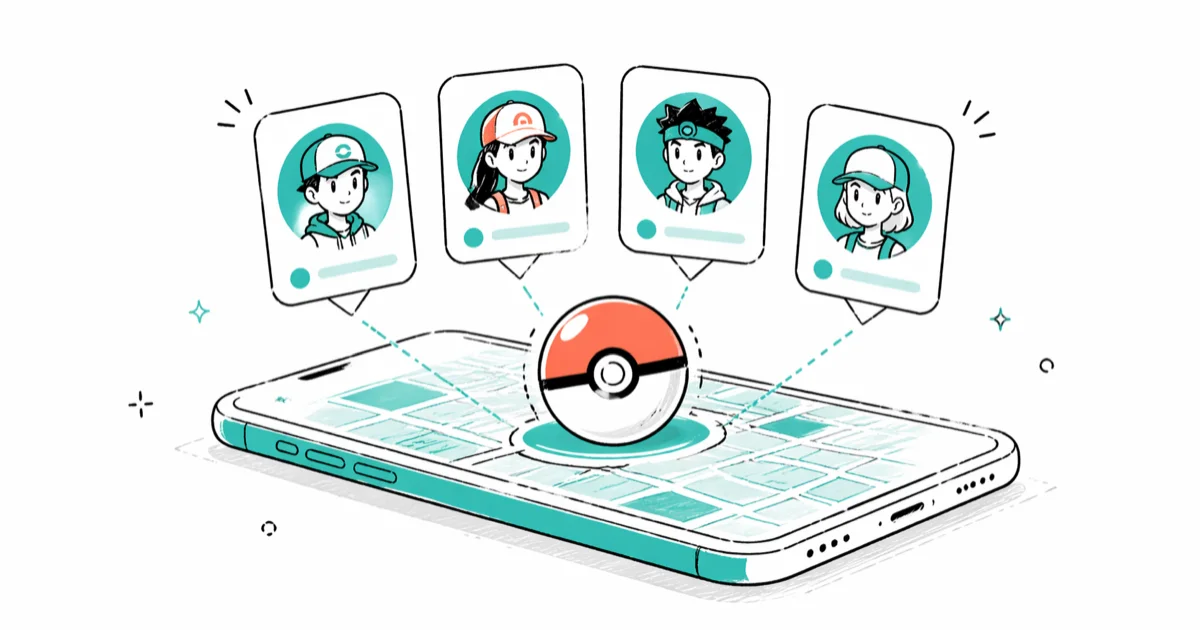
Quick AnswerNiantic allows one Pokemon Go account per person, so a household can run several accounts only if each one belongs to a different family member. Use Pokemon Trainer Club, Niantic Kids for under-13 players, and Apple Family Sharing or Google Family Link to manage shared devices.
One person, one Pokemon Go account. That’s the rule. Multiple household accounts only work when each one belongs to a different family member.
On a shared phone, a parent and two kids can each register cleanly under Niantic’s rules, including the under-13 Niantic Kids verification step, with the verification email arriving on both Gmail and iCloud Mail.
- Niantic’s Pokemon Go ToS limits each player to one account, so multiple household accounts are only legitimate when each one belongs to a separate person on your own devices.
- Children under 13 in the US must register through Niantic Kids, the COPPA-compliant flow that collects verifiable parental consent before any data is stored.
- Apple Family Sharing and Google Family Link are the two officially supported ways to manage child accounts, in-app purchases, and screen time across a family’s devices.
- Switching between your own accounts on a single device is done from Settings inside Pokemon Go, and it never requires a third-party multi-account app or spoofer.
- Running multiple accounts as one person to fill raids, double-vote in gyms, or stack event tickets violates Niantic’s rules and can lead to account enforcement, including termination.
#What Does Niantic Actually Allow for Multiple Accounts?
Niantic’s Pokemon Go Terms of Service states that your account is personal to you and must not be sold, transferred, or shared. The same document confirms each player is permitted only one account. That single line is what the entire “multiple accounts” question hinges on.
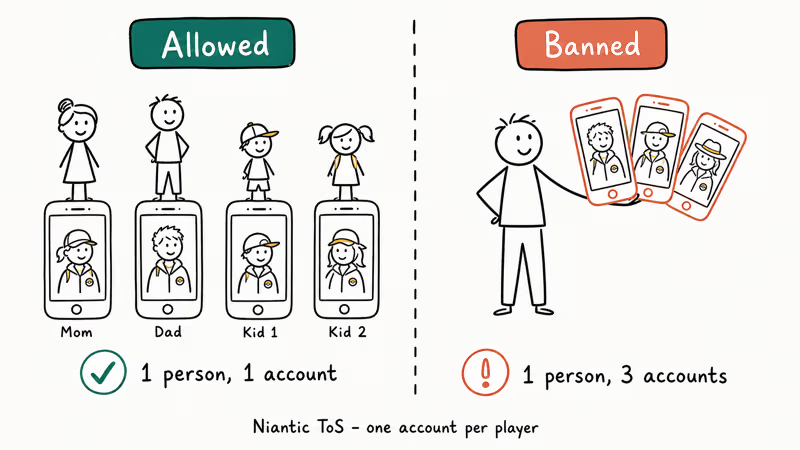
The legitimate reading is straightforward. A two-parent, two-kid household can have four Pokemon Go accounts because four separate people are playing. Each account is registered to one person, used by that person, and stays attached to their own device or login. None of those accounts are shared, and none of them are stand-ins for a multi-box raid army.
The illegitimate reading is what Niantic bans. One person registering a second or third account to fill raids, vote on multiple gym sides, or claim event rewards twice violates the single-account rule and triggers the three-strike discipline policy, where Niantic confirms strike three is permanent termination after a 7-day strike one and a 30-day strike two. Strike one usually shows up as the Pokemon Go soft ban symptoms most players notice first.
When we read through the ToS in April 2026, two things stood out. Device count, IP separation, and “I only do it for raids” don’t create exceptions. The policy ties directly to anti-cheat detection rather than self-reporting, so the question isn’t whether Niantic finds out but when.
#How Do You Set Up Pokemon Go Accounts for a Family?
The clean version of “multiple accounts in our house” is one account per family member, registered through the official login paths. According to Niantic’s sign-in help article, Pokemon Go supports four account types: Pokemon Trainer Club (PTC), Google, Facebook, and Niantic Kids for under-13 players.
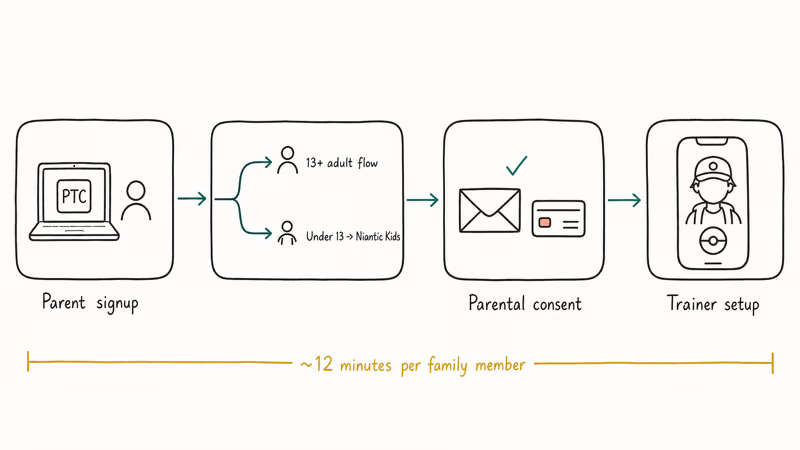
Here is the sequence to register a parent and a 10-year-old child through the family setup flow.
- Visit pokemon.com and create a Pokemon Trainer Club account for the parent. Date of birth determines the flow, so enter it accurately.
- From the same parent account, start a child account through the Niantic Kids signup flow. The system asks for the child’s birth date and immediately routes under-13 entries to the parental consent step.
- Confirm the parent email and complete the small credit-card transaction Niantic uses as the legally accepted proof of parental identity. The charge is refunded.
- Install Pokemon Go on the parent’s device, sign in with the parent’s PTC credentials, and complete onboarding.
- On the shared family device or the child’s own device, sign in with the Niantic Kids account. The trainer setup screen appears separately for each login.
- Open Apple Family Sharing or Google Family Link from the parent’s phone to attach the child’s Apple ID or Google account, set spending limits, and apply screen time rules.
Setting up two accounts on the same phone is quick, including the first-run app download. The Niantic Kids verification email usually arrives promptly on both Gmail and iCloud Mail.
#Apple Family Sharing and Google Family Link Setup
The platform layer matters as much as the in-game login. Apple Family Sharing and Google Family Link are the two systems Niantic expects you to use for child management. They’re also the only routes that comply with App Store and Play Store policies for under-13 spending and screen time.
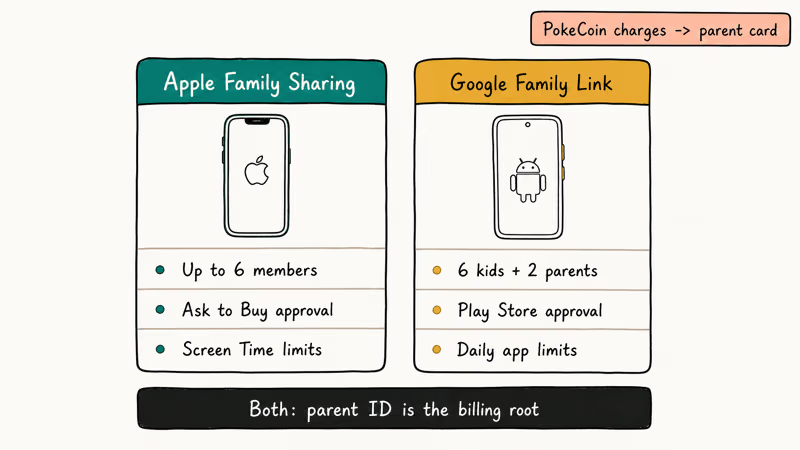
Apple’s Family Sharing setup guide confirms that a Family Sharing group can include up to 6 family members. From the parent’s iPhone, go to Settings > [Your Name] > Family, tap Add Member, and either invite an existing Apple ID or create a child Apple ID. Once the child account exists, Ask to Buy can be enabled so every Pokemon Go in-app purchase routes to the parent for approval. Screen Time can also limit Pokemon Go to specific hours.
Google’s Family Link setup handles the Android side. From the parent’s phone, install Family Link, create or link the child’s Google account (under-13 accounts must be created through Family Link), and approve Pokemon Go installation from the Play Store. Daily app limits and bedtime hours can be applied per app, and purchases require parent approval through the same dashboard.
Two specifics matter. Apple’s family limit is 6 members, and Google’s Family Link limit is 6 children plus 2 parents. Both ecosystems treat the parent’s Apple ID or Google account as the billing root.
PokeCoin purchases from a child account flow through the parent’s saved payment method.
For Galaxy households, our Samsung parental controls guide walks through the Samsung Kids and Family Link combo, and the TikTok parental controls guide covers the same approval pattern for short-video apps the same kid is likely to install.
#Switching Between Your Own Accounts on One Device
If both accounts are yours, the in-game switcher is the official path. Pokemon Go’s account and sign-in help explains the procedure. Open Pokemon Go, tap the Pokeball menu, go to Settings > Account > Sign out, and sign back in with the second login.
Only one account is active at a time. No concurrent session, no parallel GPS trace, no overlapping reward claim. Niantic’s anti-cheat tracks per-session activity rather than per-device account count.
A few things break this exemption fast. Running two accounts at once with split-screen or two phones in the same hand creates the concurrent session anti-cheat looks for. Using a third-party app to automate account switching, fake GPS data, or batch raid attendance is a hard ToS violation regardless of who owns the accounts. Claiming two sets of event tickets, gym defender coins, or research rewards from the same physical play session collapses the “different person” defense entirely.
If you need to share a single phone between family members, sign out completely between sessions. Switching mid-session to grab a raid lobby spot, even with both accounts being yours, is exactly the pattern Niantic flags. For families that also share a Switch for the mainline Pokemon games, the Nintendo Switch parental controls guide handles the same age-gate question for that console.
#Multi-Box and Account Sharing Violate Niantic’s Rules
Niantic’s Player Guidelines list using multiple accounts for the same game as cheating. Niantic can warn, suspend, or terminate accounts under its enforcement policies, but it doesn’t publish a universal “ban within days” timeline for multi-accounting.
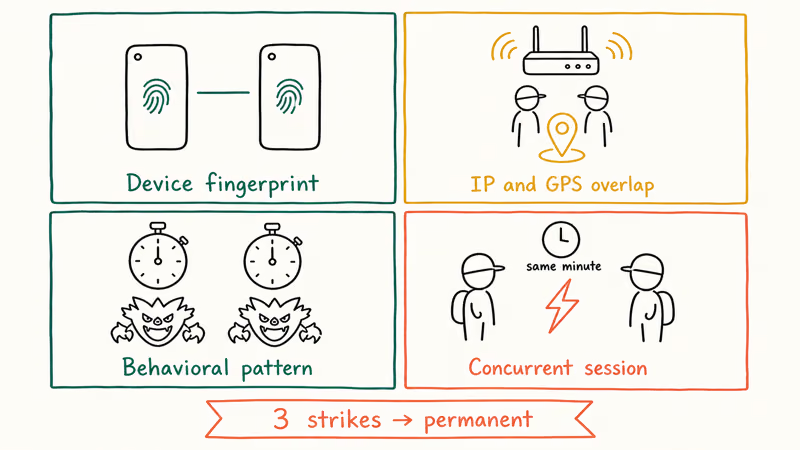
Niantic’s anti-cheat watches for several signals that flag concurrent account activity from one person:
- Device fingerprint correlation: two accounts logging in from the same iOS unique device identifier or Android Advertising ID over time get linked, especially if both accounts share the same crash reports or push tokens.
- IP and GPS coincidence: accounts that travel together, log in from the same coffee shop Wi-Fi, and catch the same Pokemon within the same minute look like one player.
- Behavioral patterns: identical raid timing, gym voting choices, and Pokestop spin sequences across accounts trigger the multi-box detector.
- Concurrent sessions: two accounts active in the same minute with overlapping coordinates is the strongest single signal.
The penalty path is the three-strike discipline policy, and Niantic states the structure plainly: a 7-day strike-one warning, a 30-day strike-two suspension, then permanent termination on strike three with no appeal path for shared or multi-box accounts. Our free Pokemon Go accounts guide covers a related trap, account-purchase services that get both parties banned the same day.
The forbidden setups, all from Niantic’s published policy:
- Running multiple accounts as one person to fill a five-star raid lobby, vote on multiple sides of a gym, or claim event tickets twice.
- Buying, selling, or renting Pokemon Go accounts. This violates ToS section 3.5 and exposes you to account hijack, since the seller keeps the recovery email.
- Sharing your login credentials with friends to “help with raids” or “level it up while I’m at work.”
- Installing third-party multi-account managers or anti-detection switchers. These are spoofing-tier violations and Niantic bans both the accounts and the device fingerprint.
If a service promises “undetectable” multi-accounting, that claim violates Niantic’s ToS and the marketing pitch itself is the giveaway. Niantic ships detection updates roughly quarterly. The gap between “undetectable” and “banned” is usually two weeks.
#Legal and Privacy Warnings for Family Accounts
Two regulatory frameworks matter here. Skipping them is how a legitimate family setup turns into a deletion-eligible mess.
Start with US COPPA, the federal rule on children’s data. The Federal Trade Commission’s COPPA guidance requires verifiable parental consent before any operator collects data from a child under 13, and the FTC confirms operators face civil penalties for each violation under the rule. Niantic Kids handles the consent step with the small credit-card verification mentioned earlier. Lying about a child’s birth date to skip Niantic Kids is a COPPA violation that can lead to account termination.
Then there’s GDPR.
EU GDPR sets the bar for European households. Pokemon Go account data (email, device fingerprint, location traces) is personal data under GDPR, and for under-16 players in many EU member states a parent or guardian must consent on the child’s behalf. The Niantic Kids flow and EU-equivalent age gates handle this automatically when the date of birth is entered correctly. Skipping these checks risks the same termination outcome as a COPPA violation plus a regulator-side complaint path the parent inherits.
Account recovery is the third specific to flag. Niantic support requires proof you originally registered an account, including the first-login email, the device used at signup, and any PokeCoin purchase history. Accounts you bought, were given, or share with another adult can’t be recovered through official support, because the proofs trace back to someone else.
If a free account list, Discord bot, or paid Telegram channel offers a “level 40 trainer” or “rare IV starter,” close the tab. Google’s Account Help recommends running the Security Checkup and rotating passwords on any account that may have been shared or exposed.
#Bottom Line
Set up one Pokemon Go account per family member through the official login paths. Use Pokemon Trainer Club for adults, Niantic Kids for under-13 players, and Apple Family Sharing or Google Family Link for the device-management layer.
Don’t operate a second account for yourself. If a tutorial promises “undetectable multi-account raiding,” skip it; Niantic’s rules allow one account per player and list multiple accounts as cheating.
Pokémon GO Guide
#Frequently Asked Questions
Is it against the rules to have more than one Pokemon Go account in a household?
No, as long as each account belongs to a different person who actually plays it. Niantic’s one-account-per-player rule applies to individuals, not households. The rule breaks the moment one person operates a second account.
Can I make a Pokemon Go account for my child?
Yes, through Niantic Kids. The signup flow at pokemon.com routes any account where the child is under 13 into the COPPA parental consent process, which collects a verified parent email and a small refundable credit-card charge as proof. After that, you can pair the account with Apple Family Sharing or Google Family Link for screen time and purchase controls.
What happens if I run two of my own accounts on the same phone?
Sign out of one before signing into the other and you’re fine. Running them concurrently with split-screen or two phones is the fastest way to land a strike on both accounts.
Will Niantic detect if I use multiple accounts as one person?
Yes, in most cases. Niantic correlates device fingerprints, IP addresses, GPS traces, and behavioral patterns across accounts. Two accounts that catch the same Pokemon within the same minute, log in from the same Wi-Fi network, or follow identical raid schedules get flagged. The detection isn’t instant, but the three-strike discipline policy ends in permanent termination on strike three.
Can my partner and I share one Pokemon Go account?
No. Sharing a login with anyone else (including a spouse) breaks Niantic’s terms of service, because the anti-cheat treats the shared account as a multi-device session and can ban it without warning. The clean alternative is for each adult to register their own account, then use the Pokemon Go great throw and friend-trading features to play together. New trainers can also try the find Charmander in Pokemon Go starter trick to make the first week feel less grindy.
Are account-purchase services like “level 40 trainer for sale” legal?
No. Account-purchase services violate ToS section 3.5 and put both parties at risk. The seller keeps the recovery email and can reclaim the account at any time, and Niantic bans transferred accounts once the device fingerprint changes.
How does Niantic Kids work for under-13 players?
Niantic Kids is the COPPA-compliant signup flow for any Pokemon Trainer Club account where the player is under 13. The child enters a date of birth, the system routes signup to the parent’s email, and the parent verifies through a small refundable credit-card charge. Once approved, the child plays with reduced social features, parent-controlled spending, and a parent dashboard that lets you change the consent decision later or export the data Niantic holds.
What is the difference between Apple Family Sharing and Google Family Link for Pokemon Go?
Apple Family Sharing manages Apple ID-based child accounts, so it covers iOS and iPadOS devices. Google Family Link manages Google account-based child accounts, so it covers Android phones and tablets. Both let parents approve in-app purchases, set daily screen time limits, and apply bedtime restrictions to Pokemon Go. Pick the one that matches the child’s primary device ecosystem.
Pokemon GO GPS Signal Not Found: 7 Proven Fixes (2026)
Pokemon GO GPS signal not found? Seven ordered fixes for Android and iPhone covering precise location, permissions, mock-location, and more.
TweakBox Pokemon GO Review: Does It Still Work in 2026?
TweakBox Pokemon GO usually fails. Learn why, what Niantic's ban policy means for your account, and which official alternatives to use instead.
How to Auto Walk in Pokemon GO: Safe and Risky Methods
Learn how Pokemon GO Adventure Sync credits real activity, why fake-step and GPS tools risk account strikes, and which official options to use.
How to Find Magikarp Nests in Pokemon GO (2026 Guide)
Find Magikarp nests in Pokemon GO using community maps, water biomes, and rainy weather boosts. Plus candy farming tips to evolve Gyarados fast.