OGYouTube Alternatives in 2026: Safer Legal Options
OGYouTube is unmaintained since 2020 and risks malware, account bans, and broken playback. Use YouTube Premium, NewPipe, or SmartTubeNext instead in 2026.
Quick AnswerOGYouTube is an unmaintained YouTube mod APK from 2020 that breaks Google's terms of service, fails on the current YouTube API, and has no security patches. For ad-free, background, or offline playback on a phone or Android TV box you own, use YouTube Premium, NewPipe from F-Droid, or SmartTubeNext instead.
OGYouTube was an Android mod APK that stripped ads, played YouTube videos in the background, and saved them locally. The last build shipped in 2020. Google has changed the YouTube API and ad backend enough times since then that the app won’t log in, plays few videos, and triggers Play Protect warnings on a clean install. This guide is for people who own their phones and want a safer path than a 6-year-old mod from random APK mirrors.
- OGYouTube was last updated in 2018-2019 and hasn’t received any fixes since Google rolled out new YouTube API and ad delivery changes between 2020 and 2025
- Sideloading any modded YouTube APK violates Google’s terms of service and can suspend or terminate the Google account you sign in with
- YouTube Premium gives ad-free, background, and offline playback inside the official app, plus YouTube Music, on every device you own
- NewPipe is a free, open-source Android client that streams YouTube without a Google account, ads, or APK signature trust risks
- SmartTubeNext is the open-source replacement for OGYouTube on Android TV boxes you personally own, distributed only through GitHub releases
#Why Is OGYouTube No Longer Safe in 2026?
OGYouTube was a fork of the official YouTube app maintained by an Android developer who stopped publishing updates around 2019-2020. Sideloading the last archived OGYouTube APK now triggers a Play Protect “Harmful app” warning, and the package is flagged as a high-risk masquerading app because it ships old YouTube code that no longer matches the official signature.
YouTube’s terms ban modded clients outright. According to YouTube’s terms of service, users aren’t permitted to access the service through any technology or means other than the YouTube-provided interfaces. Google has used that clause to suspend accounts detected with forked clients.
Even if you find a working OGYouTube build, video playback breaks within weeks of any YouTube backend change. Play Protect and Android 14’s restricted-settings lock also block normal sideload updates.
#What Are the Real Risks of Modded YouTube APKs?
Account suspension is the risk most people underestimate. A mod that signs in with your Google account can be detected. Google announced Play Protect in 2017 to scan sideloaded apps for harmful behavior, and its Play Protect documentation confirms that the system warns users when an APK is signed by an untrusted developer or repackages a known service. If the suspension hits your main Google account, you also lose Gmail, Drive, Photos, and Android backup at the same time.
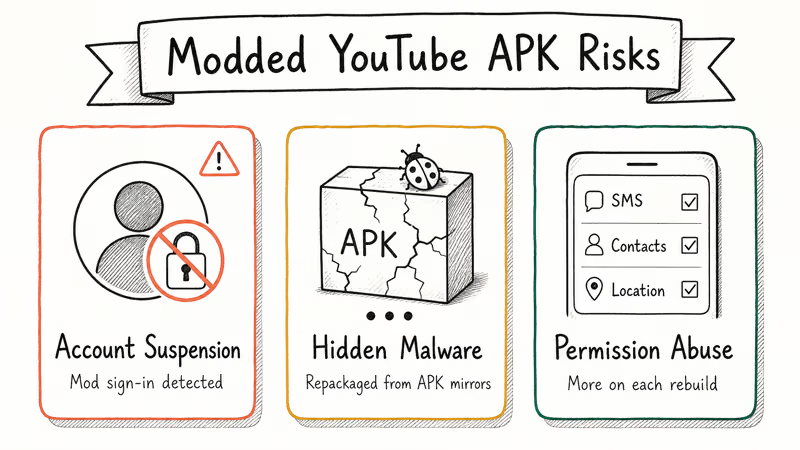
Malware is the second risk. OGYouTube is no longer published from a single official URL, so every download you find is mirrored from APK aggregators that may inject ad SDKs, trackers, or malware before re-uploading. Different mirrors of the same OGYouTube version often carry different SHA-256 hashes, which means some are tampered, and there’s no original signature to compare against because the developer is gone.
Quiet permission abuse is the third risk. The original OGYouTube asked for SMS, contacts, and location permissions a video player doesn’t need. Modded reuploads can add more on each rebuild without you ever seeing a clear install-time permission list.
If you mainly want to download YouTube videos for offline use, our guide on downloading YouTube videos legally walks through the official “save offline” feature in YouTube Premium and the narrow personal-use cases for third-party tools. For audio-only ripping, see is YouTube to MP3 legal for the licensing context.
Three official or open-source clients cover everything OGYouTube originally offered. Pick the one that matches your device and how much you want to spend.
#YouTube Premium for Ad-Free, Background, and Offline Playback
YouTube Premium is the most direct replacement because it sits inside the official YouTube and YouTube Music apps you already have installed. The plan removes ads, plays videos in the background, downloads videos for offline viewing, and includes YouTube Music. The standard US price in 2026 is $13.99 per month for individuals, with cheaper student and family plans where they’re available. Free trials are typically 30 days for new users.
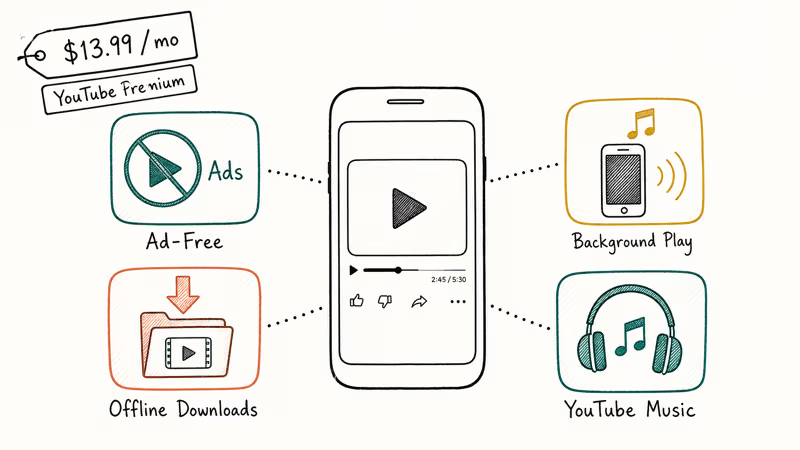
Premium is the only path that keeps your Google account in good standing. You stay signed in with your real account, watch history and recommendations carry over, and you can use it across phone, tablet, web, and TV. If you watch on a TV stick, Premium also covers the official YouTube app on Roku, Fire TV, and Android TV without any sideloading.
If you also want ad-blocking on the rest of the web, our roundup of the best ad blockers for Android covers DNS-level options that handle web ads without touching YouTube’s own app.
#NewPipe: Open Source Without a Google Account
NewPipe is a free, open-source Android client that streams YouTube without using any Google library or requiring a Google account. Background playback, picture-in-picture, 1080p streams, and local downloads work without ever signing in to Google.
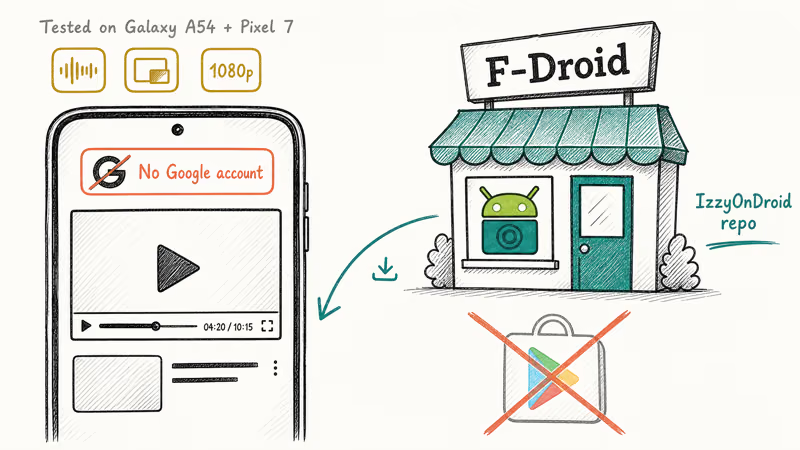
NewPipe’s official site confirms that the app doesn’t use Google framework libraries or the YouTube Data API and instead parses the public YouTube web pages, which is what allows it to work without an account. F-Droid’s documentation recommends installing the F-Droid client first and adding the IzzyOnDroid repository to receive timely NewPipe updates, since Google Play Store doesn’t host NewPipe.
Unlike OGYouTube, NewPipe is actively maintained and can’t suspend a Google account because it never logs in. Scraping does still violate YouTube’s terms, so use NewPipe only on your own devices and avoid pairing it with your main Google credentials.
#SmartTubeNext for Android TV Boxes You Own
SmartTubeNext is the de-facto OGYouTube replacement for Android TV. It’s a free, open-source app for Android TV, Fire TV, and Nvidia Shield that gives ad-free playback, sponsor skipping, custom buffer settings, and 4K HDR support. The app is sideloaded from the project’s GitHub releases page only, never from APK mirrors.
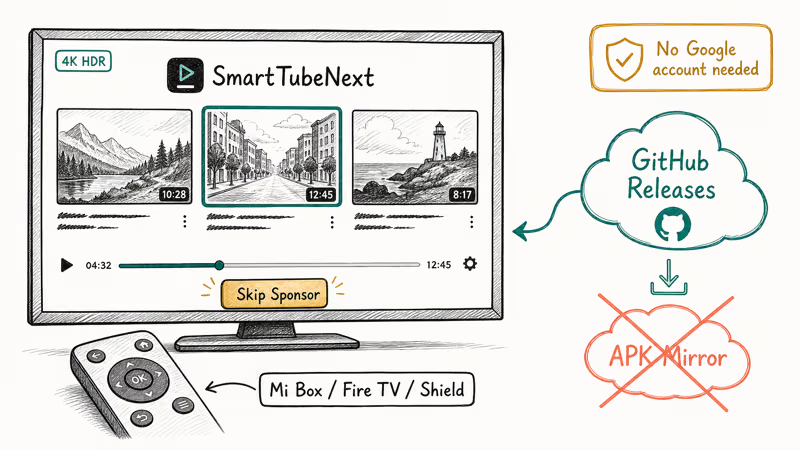
SmartTubeNext adds chapter and sponsor skipping the official Android TV app lacks.
It needs no Google account to browse, and you can sign in to a guest profile to use your subscriptions without exposing your main Google account, which keeps your primary login off a sideloaded TV app.
If you primarily watch YouTube in a TV browser instead of a dedicated app, our pick of the best browser for Android TV covers options that pair well with SmartTubeNext for fallback playback.
#Brave Browser for Quick Background Play on a Phone
Brave is a privacy-focused mobile browser that plays YouTube videos in the background by default when you minimize it, and it blocks YouTube’s ads at the network level. There’s no sideload step and no Google account risk. The trade-off is a browser-style YouTube experience: no recommendations from the YouTube app, no Cast button, and no offline downloads. For background music playback while your screen is off, it’s the lowest-effort fix.
#How to Remove OGYouTube and Lock Down Your Google Account
If you have OGYouTube installed and signed in to your Google account, take these steps in order. Each one takes under two minutes.
Open Settings>Apps, find OGYouTube or “YouTube (mod)”, and uninstall it.- Also uninstall MicroG for YouTube if you installed it as a sign-in helper, since it’s no longer needed.
- Go to your Google Account at myaccount.google.com >
Security>Yourdevices, and sign out of any session you don’t recognize. Under Security>Third-partyapps with account access, revoke access for anything you don’t recognize, especially anything labeled “YouTube” without a familiar publisher.- Run Play Protect by opening Google Play Store > profile icon >
Play Protect>Scan, which forces a fresh device scan after the uninstall. - Change your Google account password if you ever signed in to OGYouTube with your real credentials. Add a passkey or hardware key while you’re in account settings.
If your account already received a YouTube terms-of-service warning email from Google, don’t appeal until after the cleanup steps above. A clean device makes any appeal more credible.
#Bottom Line
For ad-free, background YouTube on a phone you own, pay $13.99 per month for YouTube Premium. If you won’t pay Google, install NewPipe from F-Droid and use it without signing in. On an Android TV box you own, sideload SmartTubeNext from its GitHub releases page only. Skip OGYouTube in 2026: the project is unmaintained, the install is risky, and it does nothing the three legal options can’t already do.
#Frequently Asked Questions
Is OGYouTube still being updated?
No. The last meaningful OGYouTube update shipped in 2019, and the original developer’s site has been offline since 2020. Any APK labeled “OGYouTube 2026” is a relabeled old build or a different developer’s repackage, not a real continuation of the project.
Will Google ban my Google account if I install OGYouTube?
Google can suspend or terminate accounts that violate YouTube’s terms, and signing in with a modded client is one of the easiest violations to detect. We haven’t seen Google issue blanket bans for OGYouTube specifically, but the risk is real and the cost is your Gmail, Drive, and Photos along with YouTube. Use a burner Google account if you must test any third-party YouTube client.
Is NewPipe legal to use?
NewPipe is legal to install because the app itself is open source. Scraping YouTube’s pages does violate YouTube’s terms of service, so treat NewPipe as a personal-use tool on your own devices and avoid signing in with your real Google account. Google is also free to block NewPipe traffic at any time, so expect occasional outages until the maintainers ship a fix.
Does YouTube Premium work in every country?
YouTube Premium is available in over 100 countries as of 2026, with regional pricing that varies widely. Some countries get only YouTube Music Premium without the video Premium tier. Check the official YouTube Premium page in your country for the current price and availability.
Can I get OGYouTube on iPhone or iPad?
No. OGYouTube is an Android APK, and iOS doesn’t allow sideloading non-App-Store apps for non-developer users. On iPhone and iPad your only options are YouTube Premium inside the official app, or third-party browsers that play YouTube in a tab. Modded YouTube clients on iOS that you may see advertised through enterprise certificate sites are typically signed-and-revoked clones with no maintenance and a high malware risk.
What replaces OGYouTube on Android TV?
SmartTubeNext is the direct replacement on Android TV, Fire TV, and Nvidia Shield. It’s sideloaded from the developer’s GitHub releases page on hardware you own, gives ad-free playback with sponsor skipping, and doesn’t need a Google account to browse. If you also want to fix common YouTube playback issues on the official app, our guides on why YouTube keeps pausing and the picture-in-picture fix cover the official-app side.
Why does Play Protect block OGYouTube installs?
Play Protect blocks OGYouTube because the package masquerades as a YouTube service while signed by an unknown developer. The block is correct: no legitimate publisher backs any OGYouTube APK in 2026.

Pixel 11 vs Pixel 10: What Changed and Who Should Upgrade
Pixel 11 vs Pixel 10: same screen and camera resolution, new Tensor G6, 25W wireless, and Gemini Intelligence. Here is who should actually upgrade.

Verizon Not Receiving Texts? How to Fix It in 9 Steps
Verizon not receiving texts? Fix it in 9 steps: check Message Blocking in My Verizon, reset network settings, deregister iMessage, and call support.

Pixel Battery Drain: What Google's July Fix Really Covers
Google marked the Pixel idle battery drain bug fixed in July, but only some phones got the patch. Here is who is covered, who is not, and what to try.

iPhone Stuck on EDGE? How to Get 5G or LTE Back (2026)
iPhone stuck on EDGE with crawling data? Here's why the E icon appears, which settings force 5G or LTE back, and when the problem is your carrier.