Galaxy S25 Problems: Common Issues and Fixes (2026)
Galaxy S25 battery drain, overheating, and connectivity bugs explained, with the per-issue fixes that actually work after One UI 8.5 in 2026.

Quick AnswerMost Galaxy S25 problems in 2026 trace to battery drain and overheating from the Snapdragon 8 Elite chip working hard, plus post-update bugs from One UI 8.5. Find the runaway app in Battery usage, switch off High Performance mode, and install the latest One UI 8.5 patch to clear the bulk of them.
The Galaxy S25 line is fast, but a few complaints keep surfacing in Samsung Members threads through 2026: the phone runs hot near the camera, the battery drains faster than expected, and connections drop after the One UI 8.5 update. Most of these have specific fixes that don’t involve a factory reset. This guide assumes the S25 is a phone you own.
- Galaxy S25 overheating usually traces to the Snapdragon 8 Elite chip under sustained load, and switching off High Performance mode is the fastest fix
- Battery drain after the One UI 8.5 update is often temporary, since the phone re-optimizes apps and reindexes storage for the first 7 to 14 days
- The most-reported persistent drain has been linked to the Samsung Keyboard, which Samsung patched through a Galaxy Store update
- One UI 8.5 fixed several connectivity bugs, including random Bluetooth disconnections, so updating is worth doing before deeper troubleshooting
- The Good Guardians suite’s Thermal Guardian and App Power Management tools pinpoint a runaway app faster than scrolling through Battery usage by hand
#Why Is My Galaxy S25 Overheating?
The S25 runs the Snapdragon 8 Elite, and that chip is the usual reason your phone gets warm near the camera.
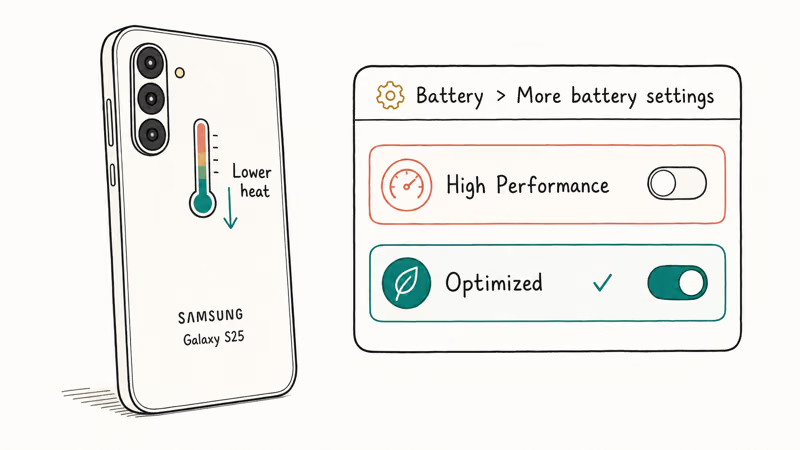
Heat under heavy load, like gaming, 4K recording, or a long navigation session, is expected. The fix is to stop pushing it into High Performance mode. Go to Settings > Battery and device care > Battery > More battery settings, and check that the performance profile is set to Optimized rather than High Performance. That one toggle drops sustained temperatures noticeably.
If the phone runs hot during light use, something is wrong. Samsung’s own Good Guardians suite has a Thermal Guardian tool that shows which app is generating heat. Install it from the Galaxy Store, open it after the phone warms up, and check the report. A background sync loop, stuck app, or weak-signal radio scan can keep the phone hot even when you are not actively using it.
Common reported triggers include broken background sync, a recently sideloaded APK that never sleeps, and aggressive 5G Standalone scanning in weak-signal areas. Clear the suspect app’s cache, reboot, and watch.
Android Central found that the One UI 8.5 beta cleaned up a long list of issues for the Galaxy S25, including a false DeX overheating warning, so make sure you’re on the latest build before assuming the heat is hardware. Samsung’s own Galaxy S25 support hub is the canonical place to check your model’s known issues and firmware status.
#Galaxy S25 Battery Draining Fast
Battery drain is the second-loudest S25 complaint, and the cause depends on timing.
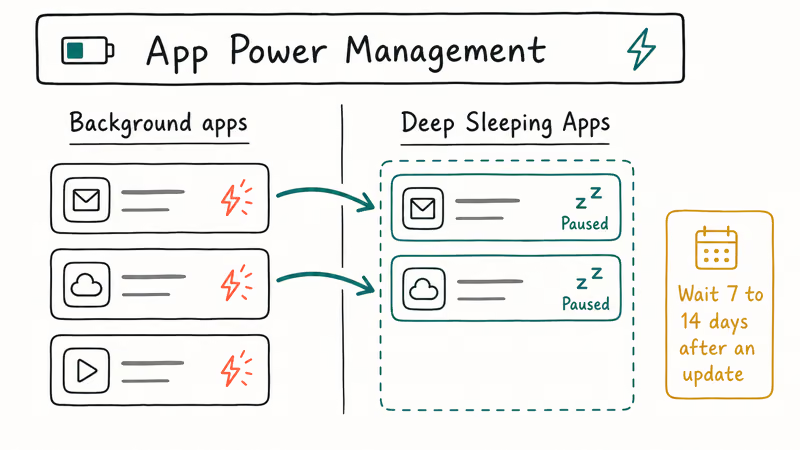
If you just updated to One UI 8.5 or just moved in from an old phone with Smart Switch, give it time. After a major update or a big data transfer, the phone re-optimizes apps and reindexes storage in the background.
How long to wait: 7 to 14 days. Past that window, the drain is a specific app or setting, not the OS settling in.
For persistent drain, start at Settings > Battery and device care > Battery, and review which apps are eating the most. The most-reported culprit this cycle was the Samsung Keyboard, which Samsung fixed through a Galaxy Store patch, so update the keyboard first.
Update the keyboard and clear its cache before chasing more invasive fixes. For everything else, use App Power Management to move heavy background apps into Deep Sleeping Apps, which stops them running when you’re not using them.
Our deeper Samsung Galaxy battery draining fast guide covers the full diagnostic flow, and the Android system battery drain walkthrough handles the OS-level cases.
The exact battery-drain pattern after One UI 8.5 is documented in our One UI 8.5 problems guide, since it affects the whole Galaxy line, not just the S25. If the keyboard itself is also acting up, our Samsung Keyboard keeps stopping fix handles the crash variant.
#Did One UI 8.5 Fix the Galaxy S25 Bugs?
Largely, yes, and that’s the main reason to update before troubleshooting further.
Sammy Fans found that across 9 beta builds, the One UI 8.5 cycle for the Galaxy S25 closed out a long list of bugs, tracked build by build, including battery drain, lag, and Gallery crashes, before the stable release. Those fixes carried into the stable build.
What One UI 8.5 has been observed to address on the S25:
- Random Bluetooth disconnections, patched at the system level.
- Battery drain from earlier builds, improved.
- Screen flicker on the back key, gone.
- Better Wi-Fi recovery when switching between networks.
The catch is the early-stable battery drain. Some S25 owners reported heavy drain right after installing stable One UI 8.5, which is the same post-update re-optimization window described above. Wait it out before concluding the update made things worse.
Check Settings > Software update daily for the first two weeks after a patch hits your region, since Samsung ships S25 maintenance patches on a rolling schedule.
#Galaxy S25 Connectivity and Bluetooth Drops
Connectivity complaints split into two buckets: Bluetooth dropping in cars, and Wi-Fi handoff stuttering.
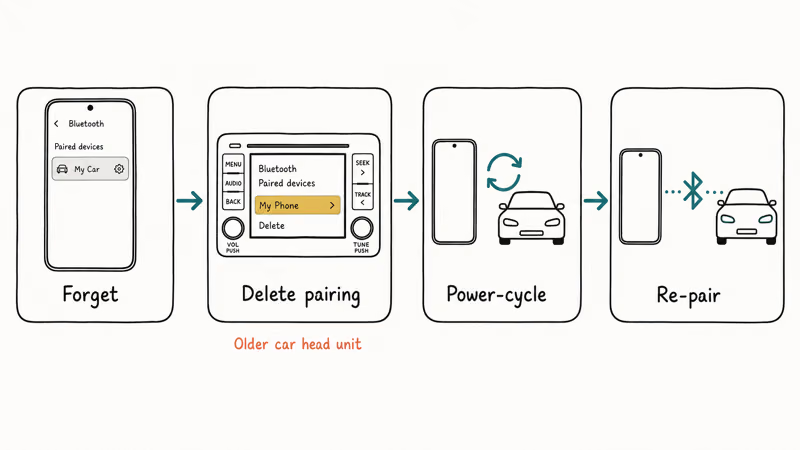
For Bluetooth, One UI 8.5 patched several random disconnection bugs, so update first. If a specific device, especially an older car head unit, still drops, do a clean re-pair: delete the pairing on the phone, delete it on the other device, power-cycle both, then pair fresh from discovery mode. Our Android Bluetooth troubleshooting guide covers the system Bluetooth cache clear if the re-pair doesn’t hold.
For Wi-Fi, the fix is usually to forget and rejoin the network. Go to Settings > Connections > Wi-Fi, tap the gear next to the network, choose Forget, then reconnect. If your S25 keeps dropping to mobile data with full Wi-Fi bars, turn off “Switch to mobile data” under Wi-Fi > Intelligent Wi-Fi, which can be too aggressive on the S25.
XDA’s One UI 8.5 coverage found that the update added connectivity features like enhanced Auracast and Storage Share, so some “missing feature” complaints are actually new settings you haven’t found yet, not bugs.
#Galaxy S25 Slow or Stalled Charging
A few S25 owners report charging that stalls or crawls. The usual cause isn’t the battery.
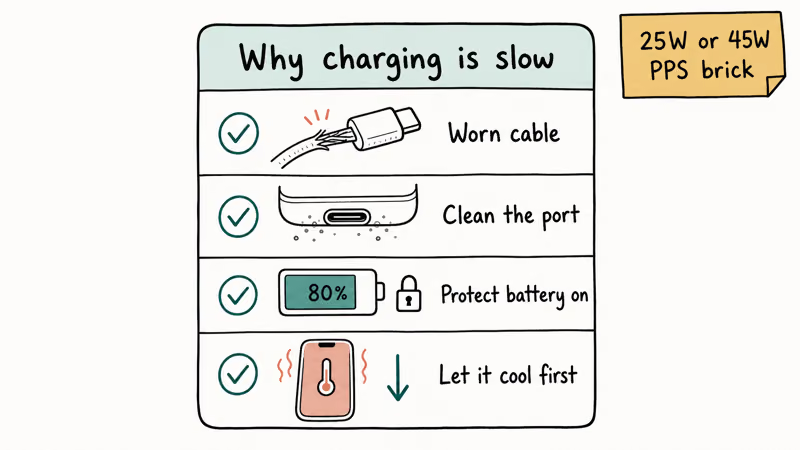
Heat throttles charging. If the phone is hot, it deliberately slows the charge to protect the cell, so let it cool first.
Beyond heat, check three things: the cable and brick (a worn USB-C cable is the single most common cause), the charging port for lint, and whether Settings > Battery and device care > Battery > More battery settings has Protect battery enabled, which caps the charge at 80 percent on purpose.
For the fastest top-up, the S25 supports 25W or 45W wired charging depending on the model, and you need a Power Delivery PPS brick rated for it. A generic 5W charger will charge slowly no matter what.
#Samsung Keyboard and Typing Issues
The Samsung Keyboard shows up twice in S25 complaints: as a battery drain and as input lag.
It’s the same build behind both. Update the keyboard through the Galaxy Store first, since the prediction-latency fix often ships there ahead of the main OS patch. Then clear its cache through Settings > Apps > Samsung Keyboard > Storage > Clear cache and reboot.
If the lag continues, turn off Smart Typing predictions for 48 hours as a test. Our Samsung Keyboard has stopped errors guide covers the deeper repair path.
#Bottom Line
For overheating, switch the performance profile from High Performance to Optimized first, then use Thermal Guardian to find any app generating heat during light use. That handles the Snapdragon 8 Elite heat complaint for most owners.
For battery drain, wait out the 7-to-14-day re-optimization window after any update, then update the Samsung Keyboard through the Galaxy Store and use Deep Sleeping Apps for the rest. For connectivity, install One UI 8.5, then re-pair Bluetooth devices and forget-and-rejoin Wi-Fi networks if drops continue.
Skip the factory reset. The S25’s common problems almost always trace to one app or one setting, and the One UI 8.5 update plus a runaway-app hunt clears the bulk of them.
#Frequently Asked Questions
Why is my Galaxy S25 overheating?
The Snapdragon 8 Elite chip generates heat under sustained load, so gaming, 4K recording, and long navigation sessions warm the phone near the camera. Switch the performance profile from High Performance to Optimized in Battery settings. If the phone runs hot during light use, use the Thermal Guardian tool in Good Guardians to find the app generating heat.
Is the Galaxy S25 battery drain normal after One UI 8.5?
For the first 7 to 14 days after the update, yes. The phone re-optimizes apps and reindexes storage during that window, which causes temporary drain. Past two weeks, the cause is a specific app, and the Samsung Keyboard was the most-reported culprit before Samsung patched it through the Galaxy Store.
Did One UI 8.5 fix Galaxy S25 problems?
Mostly. The beta cycle closed out battery drain, lag, Gallery crashes, and Bluetooth disconnections before stable, and those fixes carried over.
How do I fix Galaxy S25 Bluetooth dropping in the car?
Update to One UI 8.5 first, since it patched several disconnection bugs. If an older car head unit still drops, delete the pairing on both the phone and the car, power-cycle both, then re-pair from scratch with the phone in discovery mode.
Why does my Galaxy S25 keep switching from Wi-Fi to mobile data?
Intelligent Wi-Fi is too aggressive about jumping to mobile data on a weak signal. Turn off “Switch to mobile data” under Settings > Connections > Wi-Fi > Intelligent Wi-Fi. That stops the handoff and keeps you on Wi-Fi even when the signal dips, which is usually what you want at home or in the office.
Should I factory reset my Galaxy S25 to fix these problems?
Almost never. Most S25 issues trace to one runaway app or setting, and One UI 8.5 fixes the rest. Try the per-issue steps first.
How do I find which app is draining my Galaxy S25 battery?
Open Settings > Battery and device care > Battery and review the per-app list, or use App Power Management to spot apps running in the background. The Good Guardians suite shows the same data with extra detail, and moving heavy apps into Deep Sleeping Apps stops them draining power when idle.

Pixel 11 vs Pixel 10: What Changed and Who Should Upgrade
Pixel 11 vs Pixel 10: same screen and camera resolution, new Tensor G6, 25W wireless, and Gemini Intelligence. Here is who should actually upgrade.

Verizon Not Receiving Texts? How to Fix It in 9 Steps
Verizon not receiving texts? Fix it in 9 steps: check Message Blocking in My Verizon, reset network settings, deregister iMessage, and call support.

Pixel Battery Drain: What Google's July Fix Really Covers
Google marked the Pixel idle battery drain bug fixed in July, but only some phones got the patch. Here is who is covered, who is not, and what to try.

iPhone Stuck on EDGE? How to Get 5G or LTE Back (2026)
iPhone stuck on EDGE with crawling data? Here's why the E icon appears, which settings force 5G or LTE back, and when the problem is your carrier.