One UI 8.5 Problems: 2026 Fix Guide for Galaxy Phones
One UI 8.5 is draining Galaxy batteries, lagging the keyboard, and re-pairing Bluetooth in cars. Here are the per-issue fixes that work in 2026.

Quick AnswerMost One UI 8.5 problems trace to one bad app or a known Samsung Keyboard bug, not the OS. Clear the affected app cache, install the latest Galaxy Store and One UI 8.5 patch, and the battery drain usually settles within a day or two.
One UI 8.5 reached stable Galaxy phones in May 2026, and the same handful of post-update complaints keeps surfacing in Samsung Members threads: heavy battery drain, a stuttering Samsung Keyboard, and Bluetooth dropping in the car. The fix is almost always two steps and lives at the app level, not in the OS. This guide assumes the Galaxy is a phone you own.
- One UI 8.5’s most-reported battery drain has been traced to the Samsung Keyboard, and Samsung shipped a Galaxy Store patch that fixes it without a full OS update
- Stable One UI 8.5 began rolling out on May 6, 2026 to the Galaxy S25 series first, then the S24 line and foldables, so your fix may already be queued for your region
- Keyboard burst-typing and dropped letters usually clear after clearing the Samsung Keyboard cache and updating it through the Galaxy Store
- Bluetooth-to-car dropouts after One UI 8.5 need the old pairing deleted on both phone and head unit, then a fresh re-pair from discovery mode
- The August 2026 security patch closes 8 critical Android flaws, but its public notes say nothing about July’s idle-drain wakelock, so install it for the security holes and keep the WhatsApp backup workaround in place
#What Is Breaking in One UI 8.5 Right Now
The short list is battery drain, keyboard lag, overheating, and Bluetooth re-pairing. Those four cover most of what Galaxy owners are posting.

According to Samsung’s official newsroom, One UI 8.5 began its stable rollout on May 6, 2026, leading with the Galaxy S25 series before expanding to older flagships. That matters because the early-rollout window is exactly when post-update bugs cluster and exactly when the first hotfixes land.
The single biggest complaint has a known cause. Sammy Fans reported that Samsung tracked a major battery drain back to the Samsung Keyboard and pushed a fix through the Galaxy Store rather than waiting on a full firmware update. So if your S25 is bleeding charge after the update, your first move is a keyboard update, not a panic restore.
Samsung has also acknowledged the rest. Sammy Fans noted that the company was investigating lag and overheating reports during the beta cycle, which fed into the maintenance patches now reaching stable devices.
Pick the one issue that’s actually hurting you. Most owners only need a single fix.
#Why Is My Galaxy Battery Draining After One UI 8.5?
Start here, because this is the loudest complaint of the cycle.
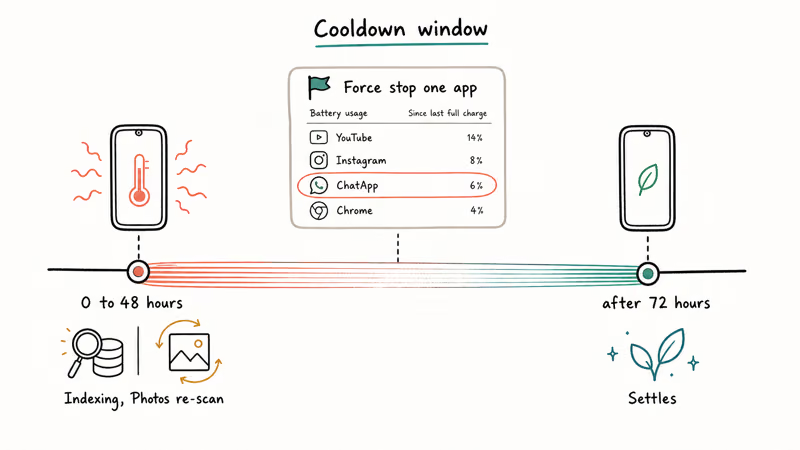
Some drain is normal for the first 48 to 72 hours while the media indexer, Google Photos re-scan, and Play Services finish their post-update work. If your phone is past that window and still dying fast, the cause is almost always one app.
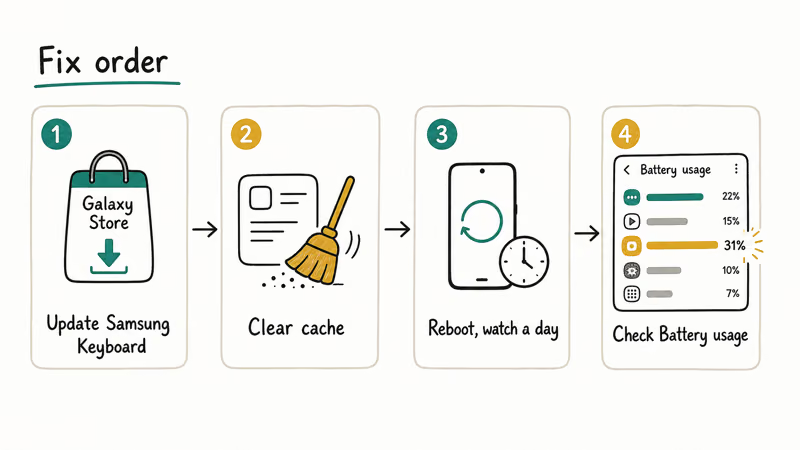
The known culprit this cycle is the Samsung Keyboard. Before you go hunting, do this:
- Open the Galaxy Store, tap your profile, choose Updates, and update Samsung Keyboard if a new version is listed.
- Then clear its cache:
Settings>Apps>Samsung Keyboard>Storage>Clearcache. - Reboot and watch a full day.
If drain continues, open Settings > Battery and device care > Battery > Battery usage and look for any app eating 20 percent or more on a phone you’ve barely touched. Force stop it, clear its cache, and reboot. Two One UI 8.5 behaviors are worth checking directly: Always-On Display set to “Show always” instead of “Tap to show,” and 5G Standalone mode causing wake locks in weak-signal areas (switch Network mode to LTE for a day to test).
For the deeper drain checklist that applies across Galaxy models, our guide on a Samsung Galaxy battery draining fast walks through the heavier diagnostics. The Android system battery drain walkthrough covers the OS-level cases.
#July 2026 Update: WhatsApp Backup Loop Hits S24 and S25 Ultra
The July 2026 security patch kicked off a second, separate drain wave, and this one isn’t the keyboard.
Galaxy S25 Ultra and S24 Ultra owners started reporting sharp idle drain, overheating, and slower charging within days of installing the July update. 9to5Google reported on July 30 that affected phones were losing 5 to 7 percent per hour while sitting untouched, and Samsung Members threads filled with the same pattern.
The trigger looks specific. According to Android Authority’s breakdown, users traced the heat and drain to WhatsApp getting stuck in a loop during its encrypted backup after the update. The app keeps retrying the backup, the processor never sleeps, and the battery cooks.
The workaround takes one minute:
- Open WhatsApp and go to
Settings>Chats>Chatbackup. - If a backup shows as running or stuck, cancel it.
- Force stop WhatsApp (
Settings>Apps>WhatsApp>Forcestop), then reboot. - Re-run the backup manually later on Wi-Fi and confirm it completes.
Users who cancelled the stuck backup saw idle drain return to normal right away. If your backup keeps jamming on the retry, our WhatsApp backup stuck guide covers the deeper fixes. Owners tracking other post-update quirks on the S25 line can cross-check our Galaxy S25 common problems roundup.
Samsung hadn’t publicly acknowledged the issue as of July 31, so keep the backup on manual. The next section covers what August’s patch did and didn’t bring.
#August 2026 Security Patch: What It Fixes and What It Doesn’t
The August patch is here, and it’s a security release, not a battery release.
Samsung detailed its August 2026 Security Maintenance Release in the first week of August. Per Samsung’s own security bulletin, SMR-AUG-2026 covers Galaxy devices on Android 14, 15, and 16, and lists 8 Critical and 31 High Android CVEs alongside 18 Samsung-specific items. Some of those Android entries are flagged as not applicable to Galaxy hardware, so the count that reaches your phone is smaller than the headline.
SamMobile’s breakdown notes the Samsung-side items land in Messages and Contacts plus system pieces like clipboard data, audio and video codecs, and the cellular radio.
Availability varies by model, carrier, and region, and Samsung doesn’t publish one universal rollout order for a monthly SMR.
Here’s the part that matters if you landed on this page because of drain: Samsung’s public August bulletin doesn’t mention the reported wakelock or promise any battery fix. That’s an absence in the notes, not a Samsung statement that the drain is untouched, and Samsung doesn’t disclose every SVE item in full.
So install it, because 8 critical holes is a real reason to update, but don’t count on it clearing the drain. Keep the WhatsApp backup workaround above in place, and only retire it if Samsung or your device changelog confirms a fix.
To check where you stand:
- Open
Settings>Softwareupdate > Download and install. - After it completes, go to
Settings>Aboutphone > Software information. - Your Android security patch level should read August 1, 2026 or later.
If Software update says you’re current but your patch level is older, the update may not be offered yet for your model, carrier, or region, or your model may have moved to a quarterly update window. Check your model’s support status on Samsung’s site rather than trying to force the OTA.
#Samsung Keyboard Lag and Dropped Letters
The keyboard does two annoying things on One UI 8.5. It lags, and it skips letters before dumping a queued burst all at once.
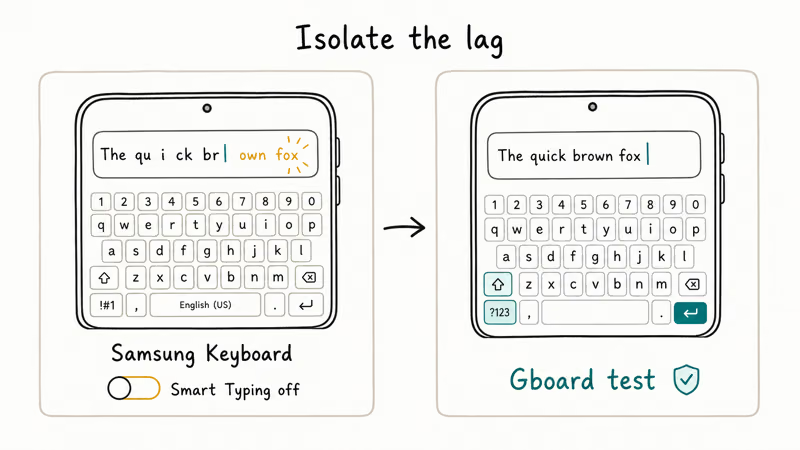
This is the same Samsung Keyboard build at the center of the battery problem, so the fix overlaps.
First, update the keyboard through the Galaxy Store. The prediction-latency improvements often ship there ahead of the main OS patch, so the fix may already be one refresh away.
If lag persists after the update and a cache clear:
- Open Samsung Keyboard settings and turn off Smart Typing predictions for 48 hours. Watch whether the stutter clears. If it does, the bug is in the prediction engine and the next patch should resolve it.
- As a control test, install Gboard from the Play Store, set it as default in
Settings>Generalmanagement > Keyboard list and default, and type for an hour. - If Gboard is smooth, the issue is the Samsung Keyboard build. If even Gboard lags, the cause is system-wide and points back to the overheating-app problem above.
Our standalone walkthrough for Samsung Keyboard has stopped errors covers the deeper repair path if the cache wipe and prediction toggle don’t hold, and the broader Samsung Keyboard keeps stopping guide handles the crash variant.
#Bluetooth in the Car Keeps Disconnecting
This carries over from the One UI 8 cycle and stays a problem on 8.5.
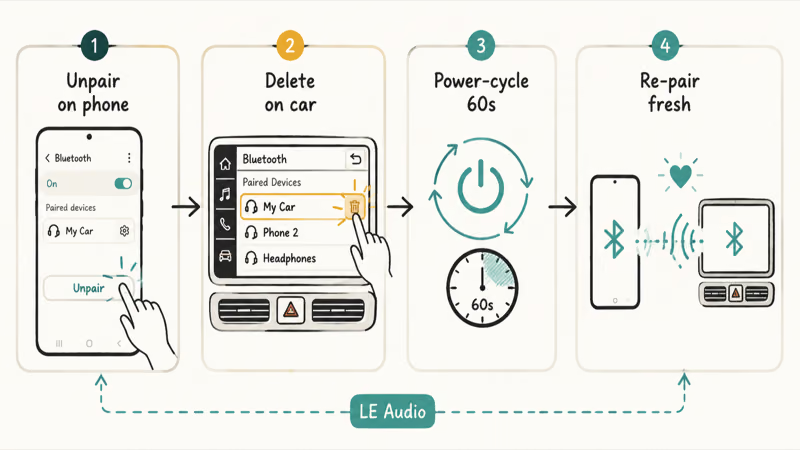
One UI 8.5 sits on top of the same newer LE Audio Bluetooth stack, and older head units, especially 2019 to 2022 model-year vehicles, sometimes refuse to renegotiate the codec on the first reconnect after an update. The reliable fix is a clean re-pair on both ends.
The reliable sequence is to delete the old pairing on the phone, delete it on the car, then re-pair fresh from discovery mode.
Sequence to try:
- On the phone, go to
Settings>Connections>Bluetooth, tap the gear next to the car, and choose Unpair. - On the head unit, open the Bluetooth menu and delete the phone entry.
- Power-cycle both: engine off, wait 60 seconds, restart.
- Put the phone into Bluetooth discovery mode and start a fresh pairing from the car with the engine running.
- Allow contacts and message access when prompted.
If it still drops, clear the system Bluetooth cache through Settings > Apps > three-dot menu > Show system apps > Bluetooth > Storage > Clear cache, then reboot. Our Android Bluetooth troubleshooting guide covers the general cache step. The detailed re-pair logic is the same one documented in our One UI 8 problems guide, since the underlying stack didn’t change in 8.5.
#Overheating and Lag Samsung Already Confirmed
Some heat is normal for the first day while indexing finishes. Sustained heat is not.
Sammy Fans found that Samsung acknowledged the lag and overheating reports during the One UI 8.5 beta and folded the fixes into the maintenance patches now reaching stable phones. So if your phone is hot and sluggish, you’re not imagining a per-unit defect.
The reliable triage is to wait out the first 48 hours, then check Settings > Battery and device care > Battery > Battery usage for a single app that never sleeps. Force stop it, clear its cache, and reboot before blaming the OS.
#Did One UI 8.5 Fix the One UI 8 Bugs?
Mostly, and that’s the point of the minor release.
SamMobile’s rollout coverage found that the wider worldwide rollout began just 5 days after the May 6 Korea launch, landing on May 11, 2026 and reaching the Galaxy S24 generation and foldables on a staggered schedule. The keyboard battery fix and the prediction-latency improvements are part of that wave.
What 8.5 has been observed to address:
- The Samsung Keyboard battery drain, fixed through a Galaxy Store side-channel patch.
- Keyboard prediction latency, improved in the same update channel.
- Lag and overheating reports Samsung confirmed it was investigating, now handled through maintenance patches.
If you’re on an early stable 8.5 build and one of the above is your issue, sitting tight for the next maintenance patch is often faster than fighting it. Open Settings > Software update > Download and install daily for the first two weeks after 8.5 reaches your region, since the staggered schedule means your fix may land a week after a neighbor’s.
The Samsung Members forum is where the unfiltered per-build data lives. Search your specific device model and build number before assuming a bug is universal.
#Bottom Line
For One UI 8.5, update the Samsung Keyboard through the Galaxy Store before anything else. That one move addresses both the headline battery drain and the keyboard lag, because they share a root cause Samsung already patched.
For Bluetooth in the car, delete and re-pair on both sides, then clear the system Bluetooth cache if it still drops. For overheating, find the runaway app in Battery usage and force stop it. For everything else, check Settings > Software update once a day until your region gets the next maintenance patch.
Skip the factory reset. The drain almost never traces to One UI 8.5 itself. It traces to a single app, and the fix is at that app or one Galaxy Store update away.
#Frequently Asked Questions
Is One UI 8.5 causing battery drain on Galaxy phones?
Yes, and Samsung has already addressed the main one. The most-reported drain was traced to the Samsung Keyboard, and Samsung pushed a fix through the Galaxy Store rather than a full OS update. Update the keyboard first, clear its cache, then check Battery usage for any other runaway app.
How do I update the Samsung Keyboard to fix the One UI 8.5 drain?
Open the Galaxy Store, tap your profile icon, choose Updates, and install any pending Samsung Keyboard update. Then reboot and watch battery life for a day.
Did One UI 8.5 fix the One UI 8 bugs?
Largely. The keyboard battery drain and prediction-latency issues are fixed in 8.5, and the lag and overheating reports Samsung was investigating are handled through maintenance patches. Rollout is staggered by device and region, so your patch may arrive later than someone else’s.
When did One UI 8.5 roll out?
Samsung began the stable rollout on May 6, 2026, leading with the Galaxy S25 series. The worldwide wave followed on May 11.
Why does my Galaxy keyboard lag after One UI 8.5?
The lag comes from the same Samsung Keyboard build behind the battery issue. Update the keyboard through the Galaxy Store, clear its cache, and if it still stutters, turn off Smart Typing predictions for 48 hours as a test.
How do I fix Bluetooth car issues after One UI 8.5?
Delete the pairing on the phone, delete it on the head unit, power-cycle both, then re-pair from scratch with the phone in Bluetooth discovery mode. If it still drops, clear the system Bluetooth cache. One UI 8.5 uses a newer LE Audio stack that some 2019 to 2022 head units refuse to renegotiate without a clean pairing.
Should I roll back from One UI 8.5 to fix problems?
Almost never. A downgrade through Smart Switch or Odin wipes the phone and can trip Knox attestation, and most 8.5 issues clear with a keyboard update or a cache wipe. Wait one maintenance patch cycle before considering a rollback.

Pixel 11 vs Pixel 10: What Changed and Who Should Upgrade
Pixel 11 vs Pixel 10: same screen and camera resolution, new Tensor G6, 25W wireless, and Gemini Intelligence. Here is who should actually upgrade.

Verizon Not Receiving Texts? How to Fix It in 9 Steps
Verizon not receiving texts? Fix it in 9 steps: check Message Blocking in My Verizon, reset network settings, deregister iMessage, and call support.

Pixel Battery Drain: What Google's July Fix Really Covers
Google marked the Pixel idle battery drain bug fixed in July, but only some phones got the patch. Here is who is covered, who is not, and what to try.

iPhone Stuck on EDGE? How to Get 5G or LTE Back (2026)
iPhone stuck on EDGE with crawling data? Here's why the E icon appears, which settings force 5G or LTE back, and when the problem is your carrier.