Neo Geo Emulator: Legal Setup, Best Apps & Alternatives
Neo Geo emulator guide for PC, Mac, Android, and iPhone. Top picks like MAME and FBNeo, BIOS and ROM legality, plus the best legal alternatives.
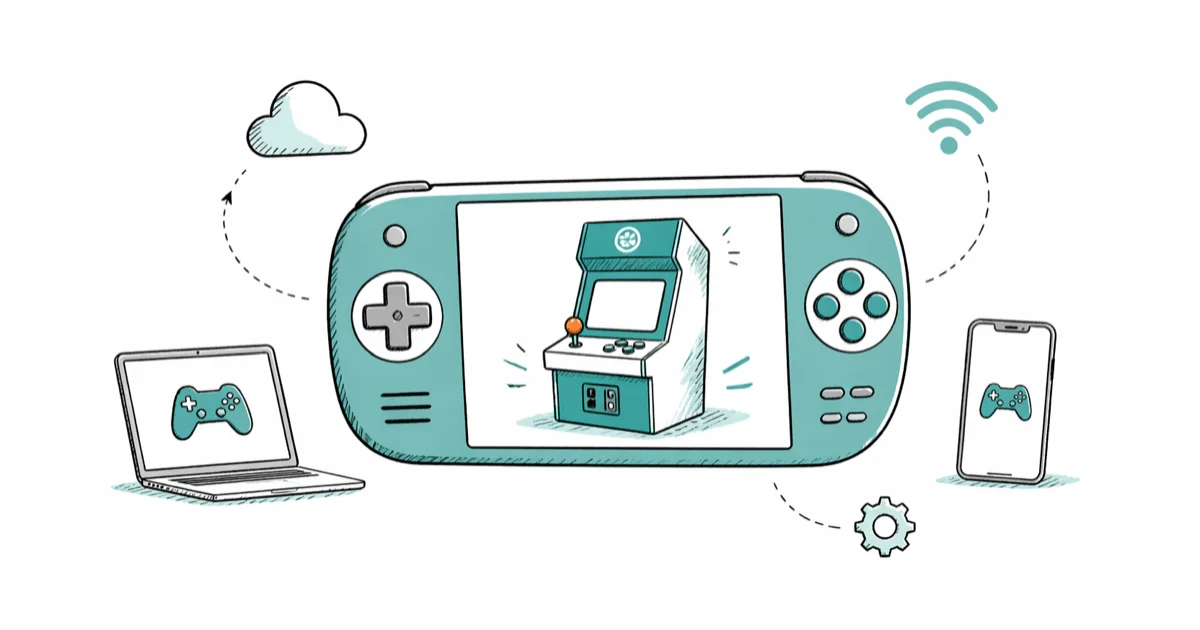
Quick AnswerEmulators like MAME and FBNeo are legal software, but you must dump the Neo Geo BIOS and ROMs from arcade boards or cartridges you own; downloading those files from random sites is copyright infringement.
A Neo Geo emulator lets you play SNK’s MVS arcade and AES home games on a PC, phone, or Mac, but the legal picture is narrower than the download links suggest. The emulator itself is fine to install. The BIOS file and game ROMs stay copyrighted, and you can only legally use copies ripped from hardware you own. This guide covers the main options on Windows, macOS, and Android and what actually works.
- MAME and FBNeo are open-source emulators that are legal to install on Windows, macOS, Linux, and Android.
- The Neo Geo BIOS (neogeo.zip) and individual game ROMs are copyrighted; you must dump them from arcade boards, AES cartridges, or Neo Geo CD discs you actually own.
- MAME and FBNeo’s RetroArch core both run Metal Slug X and The King of Fighters ‘98 at full speed on any mid-range PC from the last several years.
- Hamster’s ACA Neo Geo line covers over 100 SNK arcade titles across Switch, PS5, Xbox, and Steam at $7.99 each.
- The Neo Geo Mini International ships with 40 preinstalled SNK games and bypasses the BIOS legality question entirely.
#What Counts as a Legal Neo Geo Emulator Setup?
The emulator is the easy part. MAME, FBNeo, and the RetroArch front-end are open-source software, freely distributed, and legal to install in every major country we know of. None of that changes the law around the games themselves.
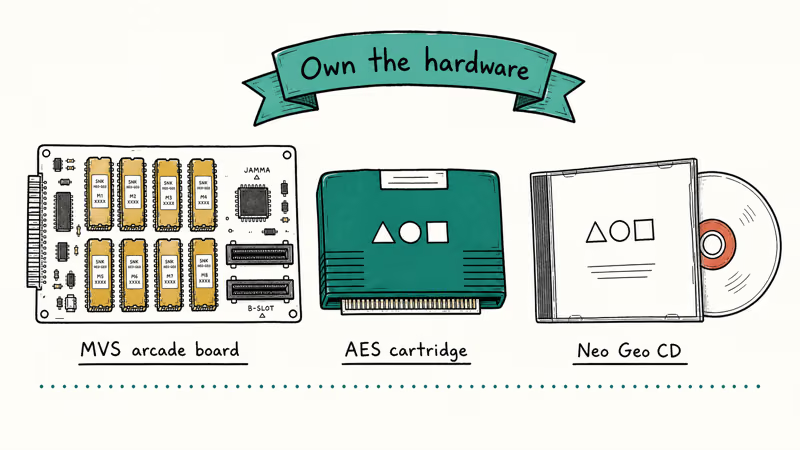
A working Neo Geo emulator needs three things: the emulator binary, a Neo Geo BIOS file (usually named neogeo.zip), and one or more game ROMs. SNK still owns the BIOS and every game. According to the MAME legal information page, ROM files are copyrighted material that cannot be distributed without the explicit permission of the copyright holder, and you must own the original hardware to use ROM copies legally.
That gives you exactly three legal sources for the BIOS and ROMs:
- An MVS arcade board you own. Pull the EPROMs and dump them with a programmer.
- An AES home cartridge you own. Same idea, plus a cartridge adapter.
- A Neo Geo CD or CDZ disc you own, ripped on your own drive.
Anything else, including the “ROM packs” advertised on torrent indexes and shady GitHub mirrors, is copyright infringement under US, UK, EU, and Japanese law. We don’t link to any of those sources, and we don’t recommend them.
#Best Neo Geo Emulators for PC and Mac
Once you have a legal BIOS file and ROMs, these are the emulators worth keeping. Each one runs well on a typical Windows 11 desktop and on an Apple silicon MacBook.
#MAME (Windows, macOS, Linux)
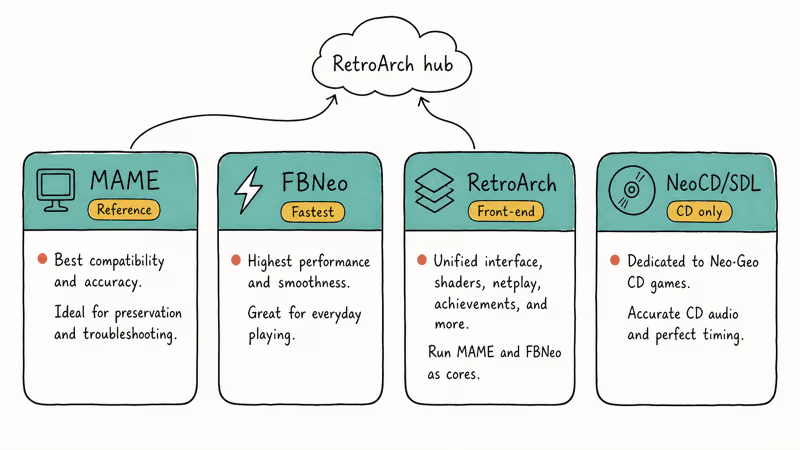
MAME is the reference implementation. It supports thousands of arcade systems, including every Neo Geo MVS revision and the AES. On a modern mid-range desktop, MAME runs Metal Slug 3 and Garou: Mark of the Wolves at full speed without frame drops. The interface is dated and the configuration file syntax takes some getting used to, but accuracy is the best in the category.
If your hardware is older, MAME’s nightly builds also publish a mame64lite variant that drops some less-common drivers to cut RAM use. We cover similar lightweight options in our best emulator for low-end PC roundup.
#FBNeo / Final Burn Neo (Windows, RetroArch core)
FBNeo started as a Capcom arcade emulator and grew into the fastest Neo Geo option for older PCs. Its GitHub repository confirms the project is open source and active, with regular driver updates. Both the standalone Windows build and the RetroArch core run at full speed on an Apple silicon MacBook under Rosetta and on a desktop natively. Sound emulation is excellent, and the menu is faster to navigate than MAME’s.
#RetroArch (every major desktop OS)
RetroArch is a front-end, not an emulator. It loads “cores” like FBNeo and MAME and gives them a unified controller interface, save-state system, and shader pipeline. RetroArch is the right choice when you want one configuration to cover Neo Geo, Sega Saturn, and Dreamcast in a single session, and the Dreamcast fighting games library pairs naturally with the Neo Geo SNK lineup.
#NeoCD/SDL (Neo Geo CD only)
If your collection is the CD format rather than cartridge, NeoCD/SDL is the specialist option. It’s a small standalone build, runs on Windows and Linux, and only handles Neo Geo CD images. Audio CD track playback works correctly, which the older NeoCD on Windows did not always handle.
#Best Neo Geo Emulators for Android and iPhone
Mobile is more constrained, but the answer is mostly the same: RetroArch with the FBNeo or MAME core.
#RetroArch on Android
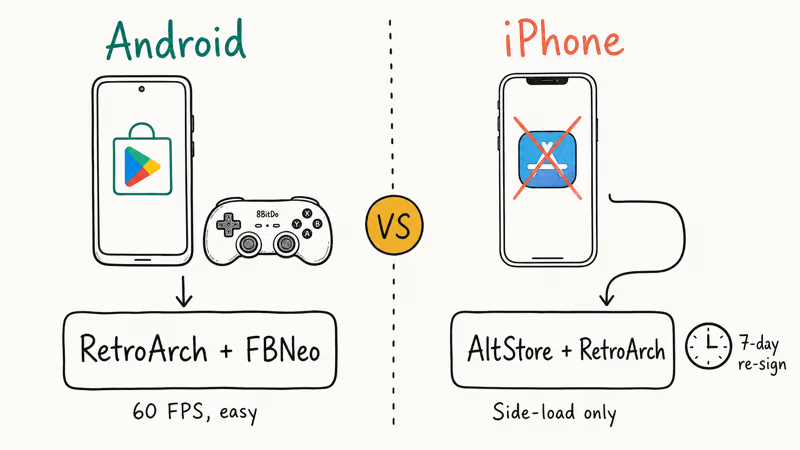
RetroArch’s Android build is on the Google Play Store and on F-Droid. With the FBNeo core on a modern Android phone, controller pairing with an 8BitDo SN30 Pro is quick, and performance stays at full speed for Neo Geo titles. Pair it with a decent Bluetooth pad or one of the picks in our best fighting game controller guide for arcade-style play.
#iPhone and iPad: the Limited Path
iOS is harder. Apple’s App Store does not host Neo Geo emulators, and Apple removed RetroArch from the App Store in 2020. Your legitimate options are narrow:
- AltStore with the RetroArch IPA, sideloaded using your own Apple ID. Re-signing is required every seven days unless you have a paid developer account.
- Provenance (open source, side-loaded) supports several Neo Geo cores via the same workflow.
Both still require legally dumped BIOS and ROMs from hardware you own. There’s no App Store-blessed way to play Neo Geo on a stock iPhone in 2026.
#How Do You Get Neo Geo BIOS Files Legally?
You dump them from hardware. There’s no honest second answer.
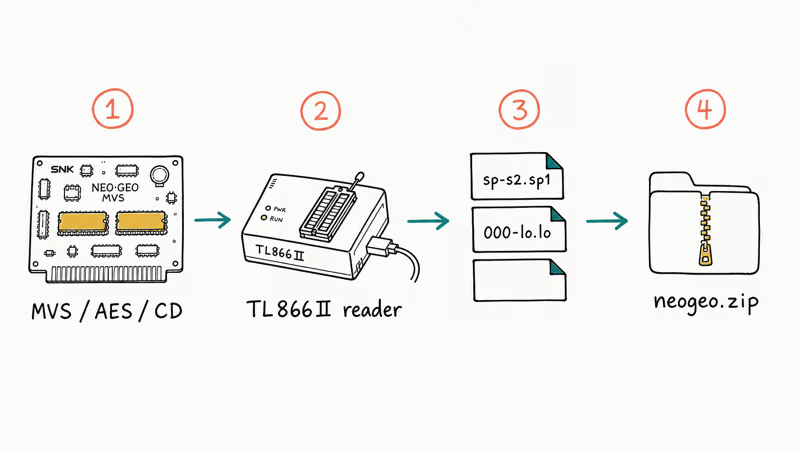
Wikipedia’s Neo Geo entry confirms that SNK’s MVS arcade hardware launched in 1990 and was designed around cabinets that could hold up to 6 game cartridges at once. The BIOS itself is split across several ROM chips on the motherboard. Dumping it requires opening the cabinet, pulling the chips, and reading them with an EPROM programmer. AES home cartridges and Neo Geo CD discs are easier but still need the right hardware.
Steps in plain language:
- Confirm the board or cartridge you own is genuine SNK hardware. Reproductions are a separate legal issue.
- Buy or borrow an EPROM reader (TL866II Plus is a common choice) for cartridge-based dumps, or a CD-ROM drive that can read raw sectors for Neo Geo CD.
- Read each chip and save the dumps with the filenames the emulator expects (
sp-s2.sp1,000-lo.lo, etc., for the MVS BIOS). - Pack the BIOS files into a
neogeo.ziparchive and place it next to your ROMs in the emulator’s roms folder.
Sites that distribute BIOS files for free download are violating SNK’s copyright, and so is anyone who downloads from them. The same applies to “complete Neo Geo ROM sets.” If you don’t have the hardware, the legal path is to skip the dump and use one of the alternatives below.
#Legal Alternatives if You Don’t Want to Dump ROMs
For most readers, this is the easier route. SNK and Hamster have been releasing Neo Geo arcade titles on modern platforms since 2017.
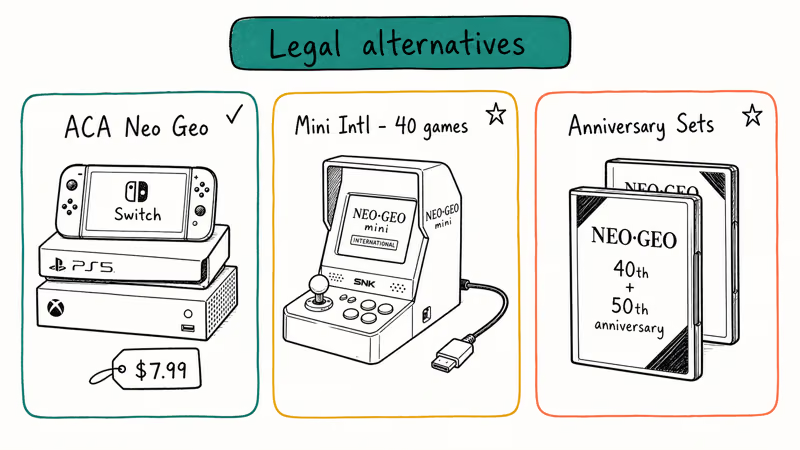
#Hamster’s ACA Neo Geo Series
Hamster’s Arcade Archives Neo Geo line ships on Nintendo Switch, PS4, PS5, Xbox One, Xbox Series X/S, and Steam. Each title is $7.99 list price. The catalog covers more than 100 SNK arcade games, including Metal Slug 1-X, The King of Fighters ‘94 through 2003, Samurai Shodown, and Garou: Mark of the Wolves. They’re the default way to legally replay any specific Neo Geo game without touching a BIOS dump.
If you’re working through SNK’s fighting catalog, the picks in our best samurai games roundup line up almost perfectly with Hamster’s Samurai Shodown releases.
#Neo Geo Mini International
The Neo Geo Mini International ships with 40 preinstalled SNK arcade titles and outputs over HDMI, as listed on SNK’s official site. It’s a self-contained legal Neo Geo with zero BIOS or ROM concerns. The catch is the fixed lineup: no SD card slot, no DLC, and no firmware path to add new games, so it works best as a highlights device rather than a full SNK collection.
#SNK 40th Anniversary Collection and SNK 50th Anniversary Collection
Both compilations are sold on Switch, PlayStation, Xbox, and Steam. Each bundles 20-30 SNK titles, including pre-Neo Geo arcade games that the ACA line does not cover. SNK recommends these collections for fans who want a curated set rather than buying titles one at a time.
#Arcade Hardware Investments
If you want the real thing, restored AES consoles, MVS boards, and Neo Geo Mini consoles still trade on the used market. A clean AES with one cartridge typically runs $300-600. Pair it with one of our best arcade sticks for the original feel.
#Setup and Configuration Tips
Once you have a legal BIOS and at least one ROM, configuration is the same across every major Neo Geo emulator.
- BIOS placement. Drop
neogeo.zipinto the emulator’sbiosorsystemfolder, not the roms folder. - Display. Use integer scaling (4× from the Neo Geo’s native 320×224 lands on 1280×896, which fits a 1080p screen). Disable any built-in upscaling filter unless you want CRT shaders.
- Audio. Set the sample rate to 48 kHz to match modern audio interfaces. Neo Geo’s native 44.1 kHz works, but resampling sometimes adds clicks on Bluetooth output.
- Controllers. Map the four arcade buttons (A, B, C, D) to the face buttons of a modern pad. Coin and start need to be on the shoulders or back paddles for fighting games.
- Save states. Save before bosses. Neo Geo arcade games were designed to eat coins, and continues are punishing in modern emulation.
If you’re coming from a different system, our best GameCube emulators guide uses a similar setup pattern, and the controller advice carries over.
#Bottom Line
If you already own AES cartridges, an MVS board, or Neo Geo CDs, install MAME and FBNeo, dump the BIOS yourself, and you’re set. If you don’t own the hardware, buy individual ACA Neo Geo titles on Switch or Steam for $7.99 each, or pick up a Neo Geo Mini International for a 40-game console. Downloading neogeo.zip from a “ROM site” is copyright infringement, no matter how easy the link is to find.
#Frequently Asked Questions
Are Neo Geo emulators legal?
Yes. The emulator software itself is legal to install and use. What’s not legal is downloading the Neo Geo BIOS or game ROMs from sites that don’t own the rights, which is most of them.
Where do I get the Neo Geo BIOS file legally?
You dump it from hardware you own. That means an MVS arcade board, an AES home console, or a Neo Geo CD/CDZ system, plus an EPROM programmer or CD reader. There’s no online source that has the legal right to redistribute the BIOS.
Can I play Neo Geo games on my iPhone?
Not from the App Store. Apple removed RetroArch from the store in 2020 and has not approved a Neo Geo emulator since. You can sideload RetroArch or Provenance using AltStore with your own Apple ID, but you still need a legally dumped BIOS and ROMs, and the certificate has to be re-signed every seven days unless you pay for a developer account.
What’s the best emulator for Metal Slug?
FBNeo’s RetroArch core. It holds full speed on lower-spec hardware where MAME can dip during heavy explosion scenes.
Is the Neo Geo Mini still worth buying in 2026?
It depends. The Mini International ships with a locked 40-game lineup, and the 3.5-inch built-in screen is too small for serious play, so most owners route the HDMI out to a TV. It works best as an occasional couch device for Metal Slug 3 and Samurai Shodown II. If you want the full SNK catalog rather than a fixed 40, Hamster’s ACA Neo Geo titles on Switch or Steam are a better fit.
Do I need a Neo Geo BIOS for ACA Neo Geo titles?
No. Hamster handles licensing, and each ACA title is self-contained on the Switch eShop, PSN, Xbox Store, or Steam.
Will MAME run on a low-end laptop?
Yes, with caveats. MAME runs Neo Geo titles fine on a budget chip like an Intel Core i3-8100. Older Capcom CPS-3 games on the same MAME build are a different story, so if your laptop is from before 2018 and you also want Street Fighter III, lean on FBNeo instead.
Can I use a regular gamepad with Neo Geo emulators?
Yes. RetroArch, MAME, and FBNeo all support Xbox, PlayStation, and 8BitDo controllers over USB and Bluetooth. For arcade authenticity, a fight stick is closer to the original MVS feel, but a standard pad maps cleanly to the Neo Geo’s four-button layout.

Fortnite Stuck on the Loading Screen? Fix It in 2026
Fortnite stuck on the loading screen? Check server status, fix the Windows N Media Pack and DirectX 11 on PC, clear the console cache, and verify files.

Minecraft Keeps Crashing? Java and Bedrock Fixes (2026)
Minecraft keeps crashing on startup or mid-game? Update your GPU driver, remove mods on Java, and reinstall Gaming Services on Bedrock. Fixes for both.

Pokemon GO Not Loading? Fix the Loading Screen 2026
Pokemon GO not loading or stuck on the Pokeball? Check server status, fix automatic date and time, grant location permission, clear the cache, and update.

PS5 Controller Not Charging? 9 Fixes That Work (2026)
DualSense not charging? Swap the cable, use a rear port in Rest Mode, clean the USB-C port, and check power settings. 9 fixes for a dead PS5 controller.