Microsoft Office 2013 Product Key: How to Recover Yours
Recover your legitimate Microsoft Office 2013 product key from your retail card, Microsoft account, or registry, and decide when to upgrade.
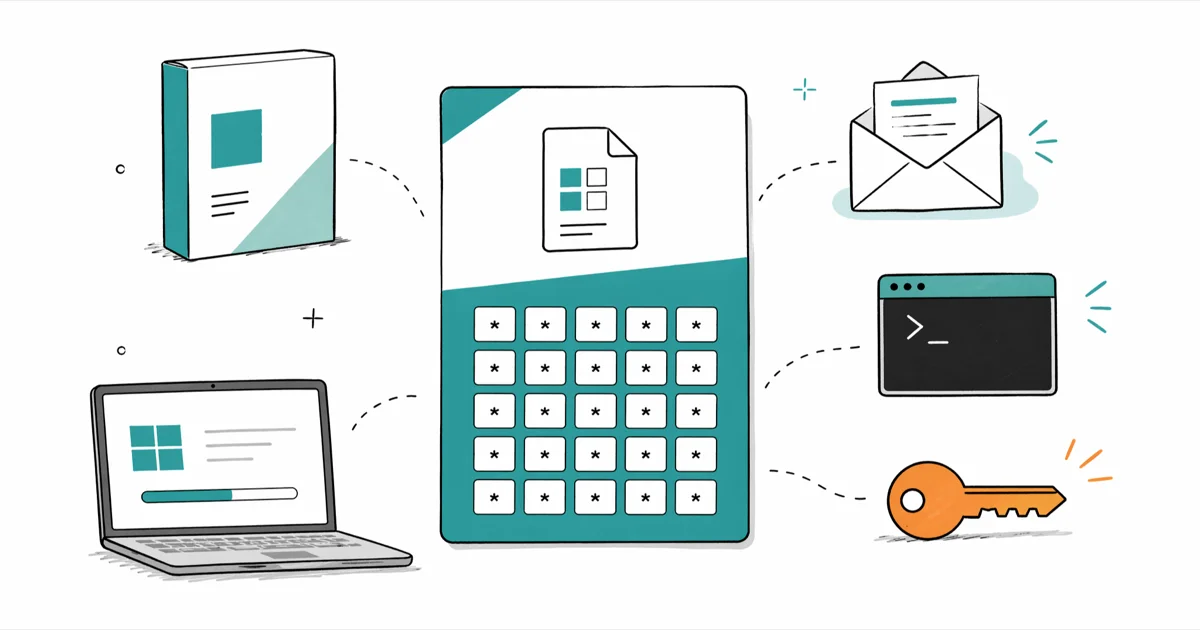
Quick AnswerA legitimate Microsoft Office 2013 product key is a 25-character code printed on the retail card inside your original box, listed in your Microsoft account purchase history, or stored in the Windows registry of a PC where Office 2013 is already activated.
Microsoft Office 2013 product keys still activate genuine retail and OEM installs in 2026, even though Microsoft ended extended support on April 11, 2023. If you own a legitimate copy and need to reinstall it, the 25-character code is the only thing that gets you back into Word, Excel, and PowerPoint. This guide covers where to find that key, how to recover it from an activated PC, and when it’s time to stop using Office 2013 altogether.
- A legitimate Office 2013 product key is a 25-character alphanumeric code formatted as XXXXX-XXXXX-XXXXX-XXXXX-XXXXX, and a retail license activates one PC at a time.
- The four legitimate recovery sources are the retail card or OEM sticker, your Microsoft account purchase history, the registry on a PC where Office 2013 is already activated, and Microsoft Support with proof of purchase.
- Free product key websites are scams or piracy because shared keys belong to volume or OEM licenses, get blocked once Microsoft notices, and violate the licensing terms you agreed to at install.
- Microsoft ended extended support on April 11, 2023, so Office 2013 no longer receives security patches, which makes long-term use on internet-connected PCs a real risk.
- For new installs, Microsoft 365 or a one-time purchase of Office 2024 are the supported replacements; LibreOffice and the free Microsoft 365 web apps cover the no-cost lane.
#Where Can You Legitimately Find Your Office 2013 Product Key?
Your product key location depends on how you originally bought Office 2013, and only the original purchaser has the right to recover or reuse it.
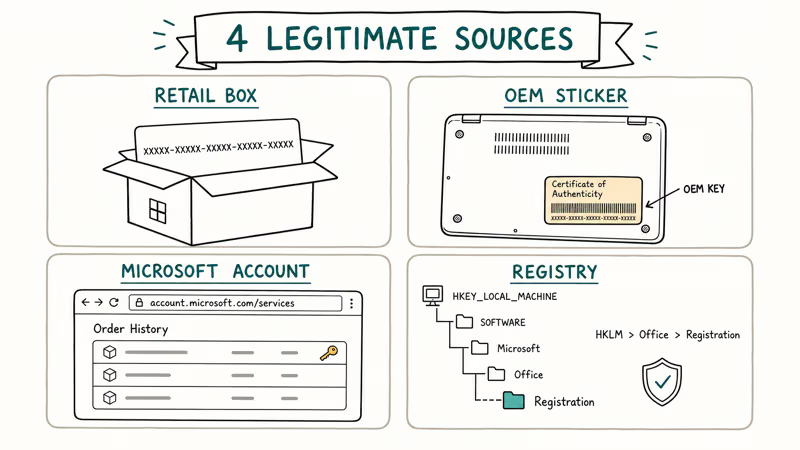
Retail box or card. The key sits on a card inside the box, formatted as XXXXX-XXXXX-XXXXX-XXXXX-XXXXX. Check there first.
OEM sticker on a pre-installed PC. If Office 2013 came pre-installed on a Dell, HP, Lenovo, or other branded PC, the key may be on a Certificate of Authenticity sticker. On laptops it usually lives under the battery, on the bottom case, or inside the documentation packet. Some OEM installs use a digital license tied to the device hardware instead, in which case there’s no visible sticker at all.
Microsoft account purchase history. Digital Office purchases made directly from Microsoft are linked to the account you used at checkout. Sign in to your Microsoft account services page and check the subscription and one-time purchase list. Microsoft’s account services portal confirms that digital one-time Office purchases stay listed in your account history when you sign in with the original purchase email.
Some OEM installs expose no visible key.
#How to Recover the Key From an Activated PC
If Office 2013 is already installed and activated on the PC, Windows stores the license information in the registry. There are two ways to read it.
#Last Five Characters via Command Prompt
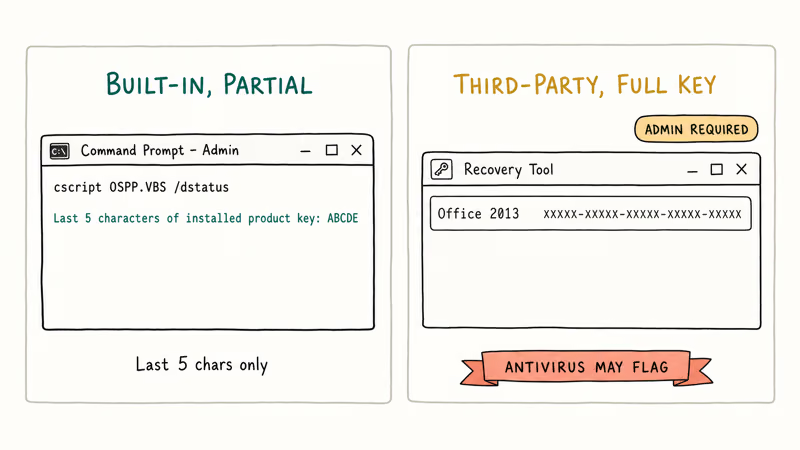
This built-in method shows only the last 5 characters, which helps match an installed copy to a legitimate license you already have.
- Right-click the Start button and choose Command Prompt (Admin) or Terminal (Admin).
- Type the command below and press Enter.
cscript "C:\Program Files\Microsoft Office\Office15\OSPP.VBS" /dstatus- Read the Last 5 characters of installed product key line in the output.
If Office is installed in the 32-bit Program Files folder on a 64-bit Windows install, swap Program Files for Program Files (x86) in the path. The command returns only the last 5 characters. The full key is intentionally hidden by this command for security reasons.
#Full Key via a Recovery Tool (Antivirus Heads Up)
To pull the full 25-character key out of the registry, you need a third-party reader. ProduKey from NirSoft and Belarc Advisor are the two most widely used free options. Both read the same Windows registry locations Office writes its license to during activation.
Both readers need admin rights to access the license hive.
Windows Defender and most antivirus suites flag ProduKey as HackTool:Win32/ProductKey or a similar generic label. The flag exists because the same registry-reading technique is misused by attackers on machines they don’t own; on your own PC it’s a recovery tool, not malware. Recover the key in a controlled session, copy it straight into a password manager or printed receipt, and remove the tool when you’re done.
Download key recovery tools only from the developer’s own page. Random mirror sites repackage these binaries with adware or modified payloads.
#What If You Can’t Find Your Office 2013 Product Key?
If you have a legitimate license but can’t locate the key in any of the sources above, your options narrow quickly.
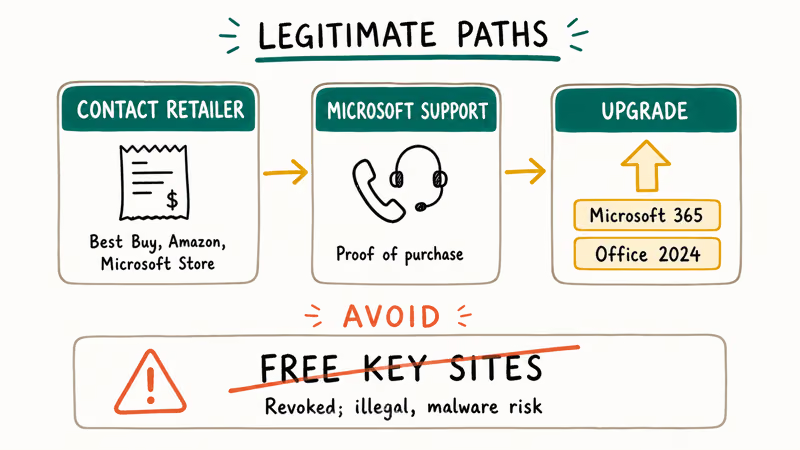
Contact the retailer where you bought it. Best Buy, Amazon, and the Microsoft Store keep digital order records for years. A receipt is enough to look up or re-issue the key.
Call Microsoft Support with proof of purchase. According to Microsoft’s product activation guidance, the team can re-issue a replacement key for genuine retail purchases when you prove ownership with a receipt or invoice. A photo of the retail card or OEM sticker speeds the case. The activation phone number appears inside any Office app under File > Account > Activate Product > Activate by phone.
Free key websites are not a workaround. Sites that hand out “free” Office 2013 keys share leaked volume license keys, OEM keys lifted from disposed PCs, or generated strings that fail validation. Microsoft revokes them in batches, so an activation today can be reversed within days. KMS activators and keygens fall in the same bucket and often bundle malware. Stick to your own legitimate key or use a free legal alternative.
If your license is truly gone and you don’t want to rebuy a 13-year-old suite, the upgrade and alternatives section below covers what makes sense in 2026.
#Why You Should Stop Using Office 2013
Office 2013 still launches and edits .docx files, but the support situation has changed. According to Microsoft’s Office 2013 lifecycle page, mainstream support ended on April 10, 2018, and extended support ended on April 11, 2023.
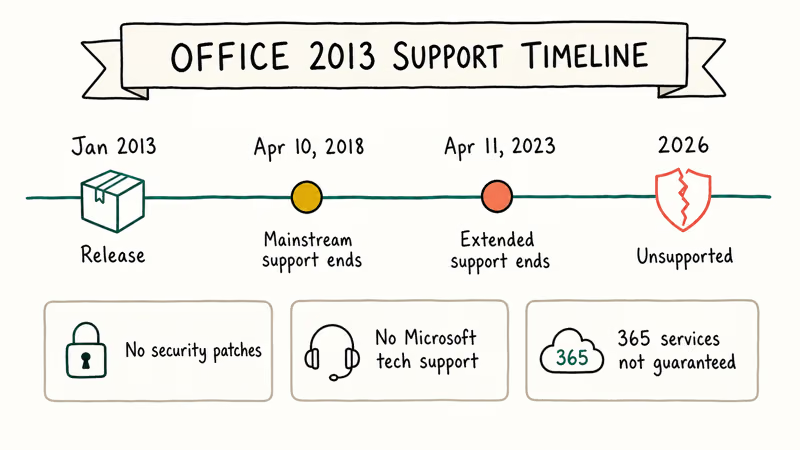
That has three concrete consequences:
- No more security patches for Office 2013 vulnerabilities, including the ones found after April 2023.
- No technical support from Microsoft for installation, activation, or repair issues.
- New Microsoft 365 services, including the latest Outlook account auth flows and OneDrive sync changes, are no longer guaranteed to work with the 2013 client.
For an offline machine that handles personal documents and never opens email attachments, Office 2013 still does the job. For anything that touches the internet or shared files, the missing patches turn into a real risk.
The supported replacements break down like this:
| Option | Type | Notes |
|---|---|---|
| Microsoft 365 Personal | Subscription | Always-current Word, Excel, PowerPoint, Outlook plus 1 TB OneDrive |
| Office Home & Student 2024 | One-time purchase | Word, Excel, PowerPoint for one PC, no Outlook |
| Office Home & Business 2024 | One-time purchase | Adds Outlook to the Home & Student set |
| Microsoft 365 web apps | Free, browser-based | Lighter feature set, signs in with your Microsoft account |
| LibreOffice | Free, open source | Reads and writes .docx, .xlsx, .pptx on Windows, Mac, and Linux |
Microsoft recommends Microsoft 365 as the supported successor, since the subscription bundles always-current Word, Excel, PowerPoint, and Outlook with 1 TB of OneDrive on up to five devices. If you want to leave OneDrive behind, our OneDrive to Google Drive guide covers the export and re-upload.
Migrating long-shelved files to the new install can surface read errors. Our recover unsaved Word document guide walks through Word’s AutoRecover folders, and the Excel file not opening guide covers Open and Repair plus protected-view tweaks.
#How to Activate Office 2013 With a Valid Key
Once you have a legitimate key in hand, activation is straightforward.
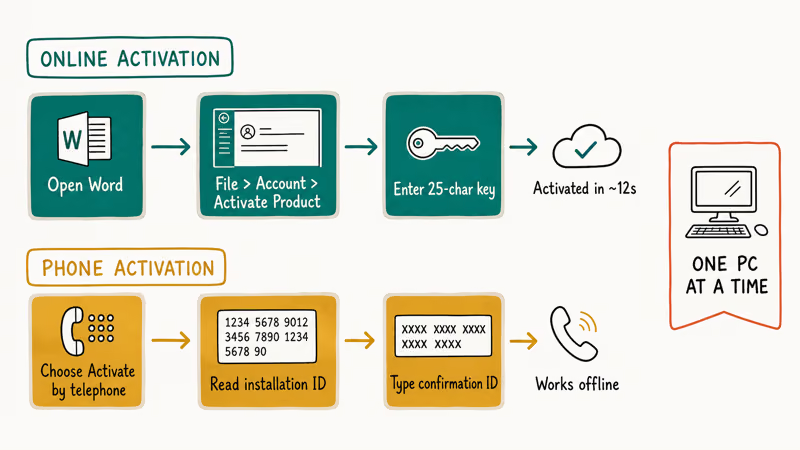
#Online Activation
- Open Word, Excel, or any other Office 2013 app.
- Go to
File>Account>Activate Product(or Change Product Key if a placeholder is already in place). - Enter the 25-character key in the dialog.
- Click Continue and let it contact Microsoft’s activation servers.
With a valid retail key, online activation contacts Microsoft’s activation servers and confirms the license through the Office dialog.
#Phone Activation
Offline or failed online activation uses phone activation:
- Open any Office 2013 app and go to
File>Account>Activate Product. - Choose I want to activate the software by telephone.
- Call the number displayed on screen and read out the installation ID.
- Type the confirmation ID the automated system reads back into the dialog.
Phone activation remains live for genuine retail Office 2013 keys even though the suite is no longer sold.
#One-PC Rule for Retail Licenses
A retail Office 2013 license activates one PC at a time. To move to a new computer, deactivate or uninstall it on the old machine first under File > Account > Manage Account, then activate on the new PC with the same key. Reusing the same retail key on a second active install will trigger a license-conflict error.
#System Requirements for Office 2013
Office 2013 was built for the Windows 7 / 8 era. Before installing it on legacy hardware, confirm the machine meets the minimum specs:
| Component | Minimum |
|---|---|
| Processor | 1 GHz or faster (32-bit or 64-bit) |
| RAM | 1 GB (32-bit) or 2 GB (64-bit) |
| Storage | 3 GB free |
| Display | 1024 x 576 |
| Graphics | DirectX 9 capable |
| Operating system | Windows 7, 8, 8.1, 10, or 11 |
Microsoft never listed Windows 11 as a supported OS, so Word, Excel, and PowerPoint compatibility isn’t guaranteed on Windows 11.
#Bottom Line
Check the retail card or OEM sticker first, fall back to your Microsoft account purchase history, then to a registry recovery tool on the activated PC. Skip every “free” Office 2013 key site. For anything that touches email or shared documents, move to Microsoft 365 or Office 2024 so Word, Excel, and PowerPoint keep getting security patches.
#Frequently Asked Questions
Can I use one Office 2013 product key on multiple computers?
No. A retail Office 2013 license activates one PC at a time. Volume licenses purchased through Microsoft business channels work differently, but they aren’t what individual buyers receive at retail.
What does Microsoft Support need before they will replace my Office 2013 key?
Microsoft typically asks for proof of purchase such as a receipt, invoice, or order confirmation that shows your name, the purchase date, and the product name. A photo of the retail card or OEM sticker, when you still have it, helps speed the case along. Without proof of purchase, the support team can’t re-issue a replacement key, so dig out the original paperwork before you call.
Are free Office 2013 product keys safe to use?
No, and they’re not legal. Most “free” keys are leaked volume license keys or OEM keys recovered from discarded computers, both of which violate Microsoft’s licensing terms. Microsoft rotates blocklists, so an activation today can be reversed within days.
How do I transfer an Office 2013 license to a new computer?
Uninstall Office 2013 from the old PC under Programs and Features, then install it on the new PC and enter the same retail key during setup. If online activation reports the key is in use, choose phone activation and tell the automated system you are transferring the license. The system handles transfers without a support agent in most cases.
Will Office 2013 still run on Windows 11?
It’s not officially supported, so Word, Excel, and PowerPoint compatibility isn’t guaranteed on Windows 11.
What if Word or Excel keeps freezing after I activate Office 2013?
Frozen Office apps are usually unrelated to the product key itself. Our Microsoft Word not responding guide covers the safe-mode launch sequence and add-in disable steps, and our Excel not responding fixes walk through the same approach for Excel 2013.
Can I still download Office 2013 installers from Microsoft?
Microsoft no longer publishes Office 2013 installers on its main download pages. Your Microsoft account services page sometimes still shows a download link in the order history; otherwise the original installation media (DVD or USB) is the only sanctioned source. Copies posted on torrent sites or unofficial mirrors are not safe to install because they often include modified executables or bundled malware that can compromise the host PC.
How does Microsoft handle product key abuse?
Microsoft tracks activation patterns server-side and rotates blocklists for keys that show signs of resale, mass activation, or volume license leakage. Repeated activation failures or use of a known-blocked key can lead to deactivation of the install and removal of the entitlement from your Microsoft account. Operating only with keys you bought yourself, and never sharing them with anyone, avoids this entirely and keeps your Microsoft account in good standing for future purchases.

Best Laptop for Running LLMs in 2026: Memory Comes First
The best laptop for running LLMs is a memory purchase first. Compare MacBook unified memory against NVIDIA laptop VRAM, and see what each tier really runs.

How to Run a Local LLM on Windows: A 2026 Setup Guide
Run a local LLM on Windows with LM Studio or Ollama. Pick a model that fits your GPU memory, keep every prompt offline, and skip the monthly bill.

Bluetooth Not Working on Snapdragon X? Fixes for 2026
Bluetooth not working on your Snapdragon X Copilot+ PC? Generic audio, mice, and keyboards work, but vendor apps often lack an ARM build. Fixes inside.

Docker Desktop and WSL2 Not Working on Snapdragon X? Fix It
WSL2 runs fine on Snapdragon X, but Docker Desktop ARM is Early Access and throws WSL errors. Use WSL2 plus native ARM64 Ubuntu and Docker Engine.