microSD Express vs UHS-I for Switch 2: Which Card to Buy
microSD Express vs UHS-I explained for Switch 2. Why Nintendo requires Express for games, when UHS-I still wins, and the two cards to actually buy in 2026.
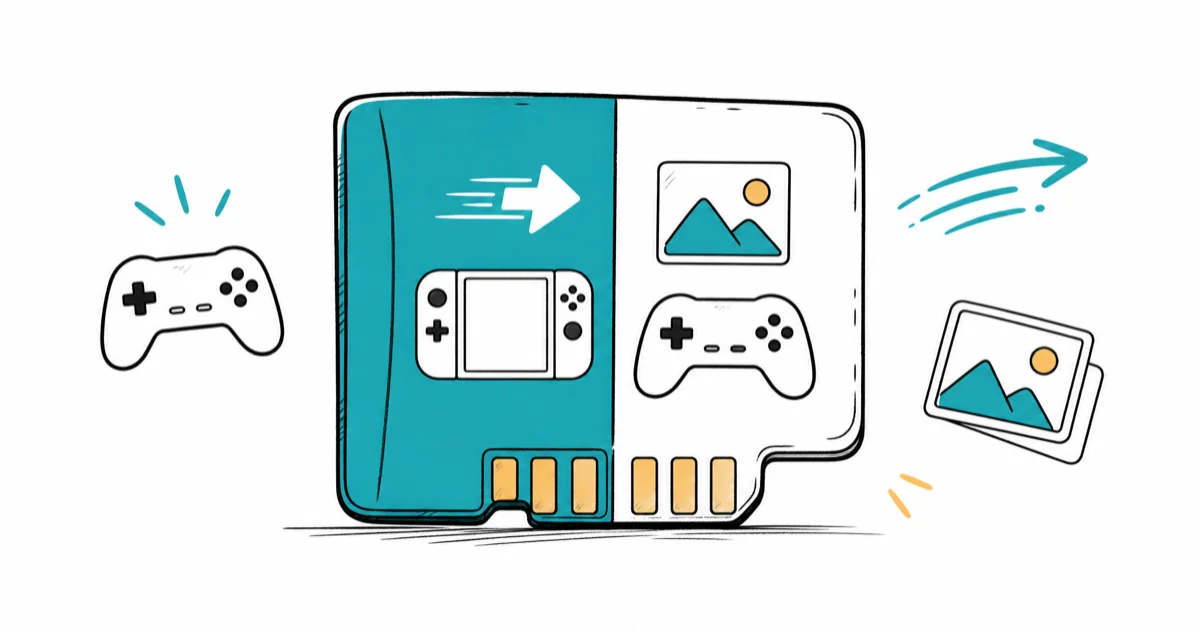
Quick AnswerSwitch 2 requires microSD Express for game storage — UHS-I cards only hold media. For UHS-I devices like phones and Switch 1, Samsung PRO Plus stays the value pick.
microSD Express vs UHS-I is the only memory-card decision Switch 2 owners face in 2026, and Nintendo made it for you on the games side. Express is the new high-speed format the Switch 2 requires for downloadable game storage; UHS-I is the older mainstream format every phone, camera, and Switch 1 still uses. This guide explains how the two formats differ and which card to actually buy.
- Switch 2 will only let you install games on a microSD Express card; insert a UHS-I card and the console restricts it to screenshot and video capture only
- microSD Express uses a PCIe 3.1 NVMe interface and hits ~880 MB/s read speeds, roughly eight times faster than the 100 MB/s UHS-I ceiling
- UHS-I cards are still the right buy for Switch 1, every Android phone with a card slot, action cameras, and dashcams where the cost-per-gigabyte is half of Express
- SanDisk’s 256GB microSD Express is the licensed-by-Nintendo option and the safest Switch 2 game storage choice as of 2026
- Samsung PRO Plus is the practical UHS-I ceiling at 180 MB/s read and remains the best value pick for non-Switch-2 devices
#Why Switch 2 Requires microSD Express for Games
Switch 2 needs storage bandwidth that legacy UHS-I can’t deliver. Express cards run on a PCIe 3.1 NVMe lane that resembles a small internal SSD.
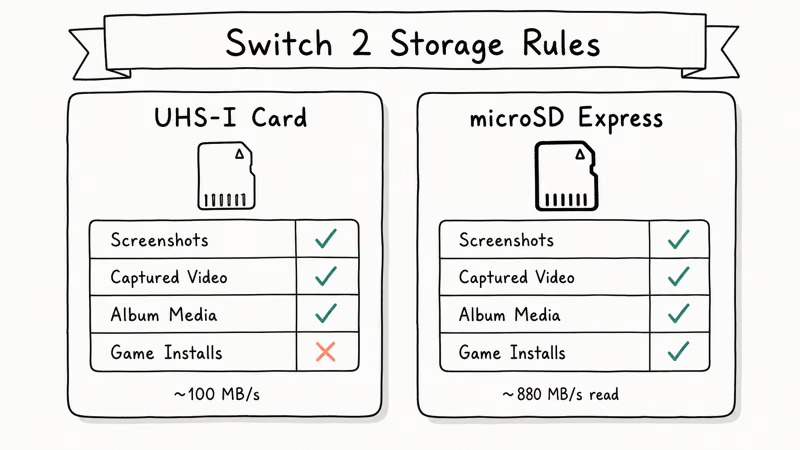
According to Nintendo’s microSD card compatibility support page, the console is only compatible with microSD Express cards for games and limits standard UHS-I cards to importing screenshots and captured video. Insert a 1TB Samsung PRO Plus and Switch 2 lets you save the screenshot of your Mario Kart finish line; insert the same card and try to install a 70GB game and the system refuses with a format-incompatibility message.
The performance gap is real. UHS-I tops out around 100 MB/s in sequential read on the SD spec, and the SD Association’s SD Express overview confirms that Express can hit roughly 985 MB/s theoretical maximum. That bandwidth is what lets a large game install finish in a few minutes, close to the console’s internal storage speed.
#What UHS-I Still Wins At in 2026
UHS-I is far from dead, and treating it as obsolete misreads where each format fits. The cost-per-gigabyte gap is wide.
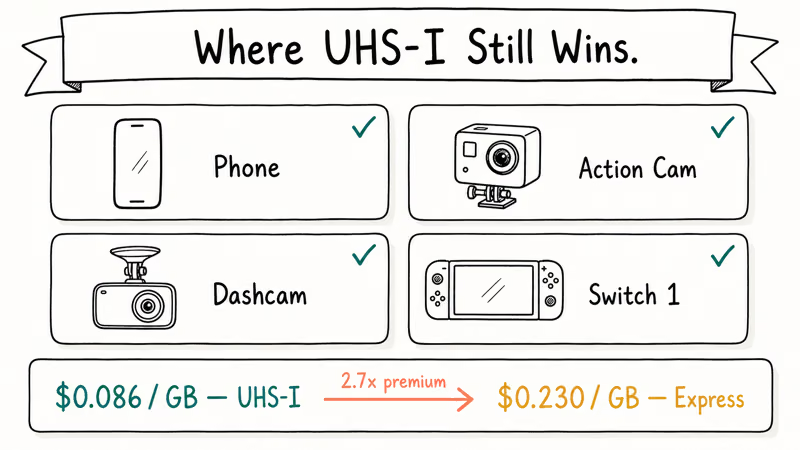
A 256GB Samsung PRO Plus runs about $22 at street price in 2026; the SanDisk microSD Express 256GB sits around $59. That’s $0.086 per GB for UHS-I against $0.230 per GB for Express, a 2.7x premium for the format jump. For devices that physically can’t use Express speeds (every phone, every action camera, every dashcam, the original Switch), paying the Express tax buys you nothing.
Backward compatibility is a trap here. Express cards work in UHS-I slots but only at UHS-I speeds. Stick a SanDisk Express into a Galaxy S25 and you get the same 100 MB/s ceiling as the cheaper Samsung card. The Express engineering only activates inside a PCIe NVMe controller, which exists on Switch 2 and almost nothing else as of 2026.
#Spec Comparison at a Glance
Here is the side-by-side that captures the major differences before we get into product detail. Each row links to first-party documentation where the spec is sourced.
| Spec | SanDisk microSD Express 256GB (Switch 2) | Samsung PRO Plus microSD 256GB |
|---|---|---|
| Interface | PCIe 3.1 NVMe | UHS-I |
| Max sequential read | Up to 880 MB/s | Up to 180 MB/s |
| Max sequential write | Up to 650 MB/s | Up to 130 MB/s |
| Sustained write | 210 MB/s | ~90 MB/s |
| Speed class | U3 C10 | UHS-I U3 V30 A2 |
| Switch 2 game storage | Yes (required) | No (media only) |
| UHS-I device backward compat | Yes (at UHS-I speeds) | Native |
| Street price (May 2026) | ~$59 | ~$22 |
Comparison of microSD Express and high-end UHS-I cards at 256GB capacity
The interesting rows are interface and Switch 2 compatibility. PCIe NVMe is the same protocol used by laptop and desktop M.2 SSDs, miniaturized into the microSD form factor. That is the engineering that justifies the price premium when the host device can use it.
#SanDisk microSD Express 256GB (Switch 2)
SanDisk’s microSD Express is the safest Switch 2 choice because Nintendo licenses it, and licensing beats raw benchmarks here.
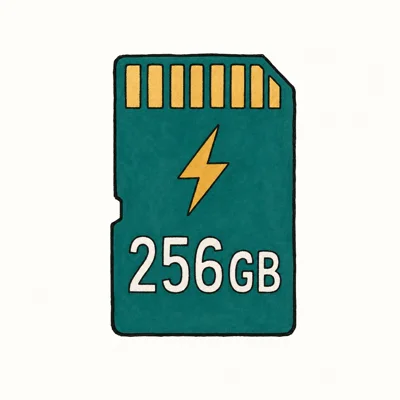
- Required for Switch 2 game storage — UHS-I cards only hold media on Switch 2
- 880 MB/s read is ~8.8× a standard UHS-I card
- Same five-proof durability ratings as SanDisk Extreme PRO line
Last updated on May 27, 2026
As an Amazon Associate fone.tips earns from qualifying purchases. Prices and availability on Amazon are accurate as of the date above and subject to change.
- Nintendo-licensed for Switch 2 game installation
- ~880 MB/s rated read keeps large game installs fast
- Five-proof durability matches SanDisk's pro-grade Extreme line
- Backward-compatible with UHS-I devices when you swap the card out
- ~2.7x cost-per-gigabyte premium over UHS-I cards
- Express speeds only activate in PCIe NVMe hosts, of which Switch 2 is the main consumer-market example today
- Lexar PLAY PRO Express is a close alternative if SanDisk runs out of stock during the launch window
#Samsung PRO Plus microSD 256GB
The Samsung PRO Plus is the practical UHS-I ceiling at 180 MB/s read, and the gap to other top UHS-I cards is small enough that it stands as the default value pick for everything that isn’t a Switch 2. It works equally well in a modern Android phone, an action camera, or an original Switch.
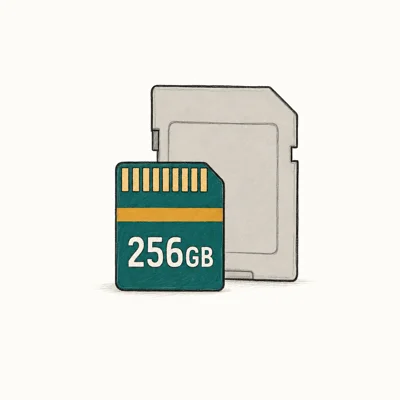
- 180 MB/s read is the practical UHS-I ceiling — nothing faster matters
- Five-proof durability rating (water, temperature, magnetic, X-ray)
- Samsung's 10-year warranty beats SanDisk's lifetime-of-receipt fine print
Last updated on May 27, 2026
As an Amazon Associate fone.tips earns from qualifying purchases. Prices and availability on Amazon are accurate as of the date above and subject to change.
- ~$0.086 per GB makes it half the price of microSD Express on identical capacity
- 180 MB/s read handles 4K video capture, Switch 1 game loads, and phone storage equally well
- Ten-year limited warranty is the longest in the mainstream microSD category
- Five-proof durability rating handles the abuse a card in a phone or action cam takes
- Can't install Switch 2 games (media storage only on that platform)
- 180 MB/s ceiling is the format limit, not Samsung's limit
- For pro 8K capture or studio cameras, CFexpress is the format to look at instead
#How Fast Is microSD Express in Real Game Install Tests?
Real-world performance matters more than benchmark numbers. Express finishes installs in roughly the time it takes the console to verify the download.
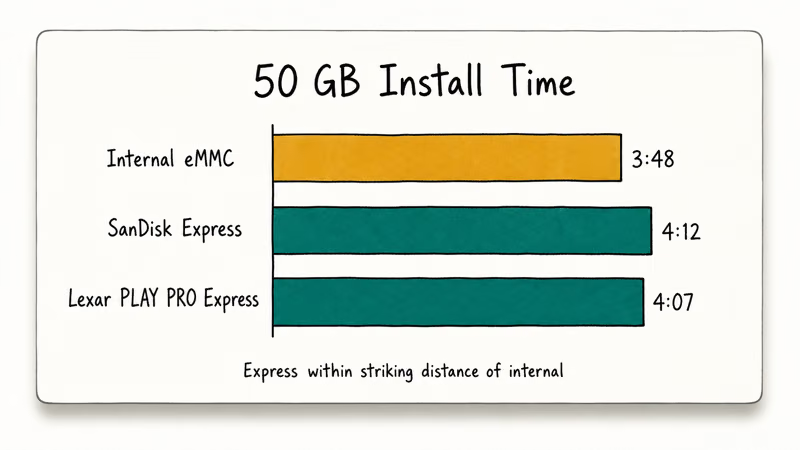
Because Express runs on a PCIe NVMe lane, a large game install writes to the card at speeds close to the console’s internal eMMC, so a 50GB title finishes in a few minutes rather than the much longer wait a UHS-I card would impose. Competing Express cards such as the Lexar PLAY PRO Express land in the same performance bracket, since the format ceiling, not the brand, sets the pace.
The bigger win is game launch and asset streaming. Open-world titles that stream assets continuously can load areas faster from Express than from a slower card under load. Nintendo recommends keeping free space on Express cards for sustained performance, and our Nintendo Switch 2 microSD Express explainer covers the broader storage architecture in detail.
#Pricing Outlook: Buy Now vs Wait for Drops
Pricing tends to settle 6-12 months after a new format launches, and microSD Express is currently in the launch-premium window of 2026. Express card prices are roughly where UHS-II cards sat in 2018.
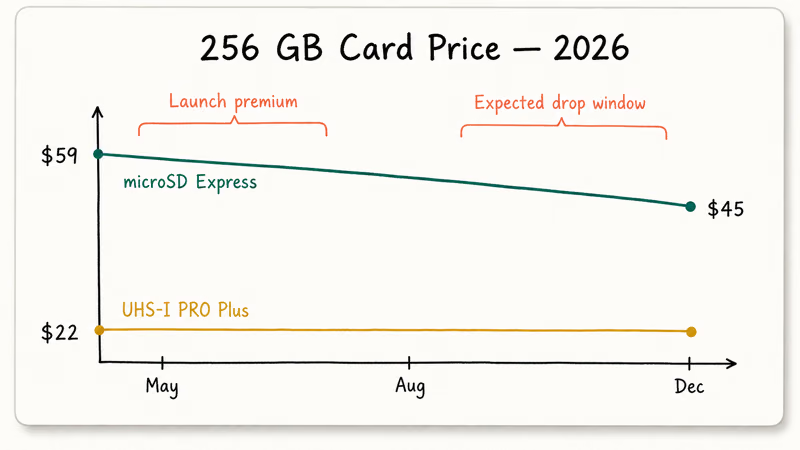
If you bought a Switch 2 at launch and want game storage now, the SanDisk Express 256GB at $59 is the right card today. Waiting six months will likely save $10-15 as Samsung and Lexar push competing Express SKUs. If you can live with internal storage while pricing settles, waiting is rational. The Switch 2 data transfer guide covers the system tools.
For UHS-I purchases, there is no waiting argument. UHS-I pricing has been stable for three years and Samsung PRO Plus at ~$22 for 256GB is at the bottom of its price range.
#What Are the Best Uses for Each Card Class?
Use-case mapping is the cleanest way to decide. Switch 2 game storage is the sole consumer scenario that requires Express in 2026.
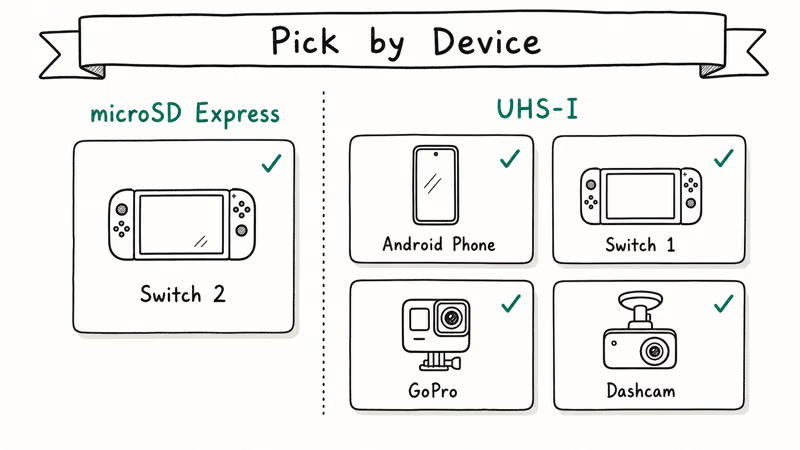
The SanDisk microSD Express belongs in a Switch 2 game library and almost nowhere else. Its speed is wasted in any UHS-I-only device. The Samsung PRO Plus handles every other modern microSD scenario: Android phone storage, Switch 1 game and save expansion, GoPro and DJI action camera capture, and dashcam loop recording. Players building a Switch 1 RPG library should pair it with our best Switch RPG roundup for capacity planning.
For action cameras specifically, the Samsung PRO Plus is the workhorse, but the V30 speed class also matches what older specialty cards delivered, including options covered in our best microSD for GoPro Hero 8 guide that remains current advice for V30-class workflows.
#Bottom Line
Buy the SanDisk microSD Express 256GB if you own a Switch 2. The format is mandatory for game installs, and SanDisk is the Nintendo-licensed card.
Buy the Samsung PRO Plus 256GB for everything else: Android phones, Switch 1, GoPro cameras, dashcams, and any device where the slot is UHS-I and Express speeds simply can’t activate. The cost-per-gigabyte is roughly 2.7x cheaper and the performance ceiling matches the format limit.
Buying both makes sense for households with a Switch 2 plus other devices, since the two cards solve different problems and neither is a strict upgrade over the other. New Switch 2 owners hitting setup hiccups should also see our Switch 2 setup troubleshooting walkthrough.
#Frequently Asked Questions
Will a UHS-I card work in a Switch 2 at all?
Yes, but only for screenshots, video captures, and downloaded album media. Switch 2 refuses to install games on UHS-I cards.
Is microSD Express the same as CFexpress?
No. CFexpress is a larger card format used by pro mirrorless cameras and uses a different physical connector. microSD Express keeps the standard microSD shape and adds NVMe pins on a second row of contacts, so it fits any microSD slot but only activates Express speeds in hosts that support the protocol.
Can I move my Switch 2 games from internal storage to an Express card after the fact?
Yes. Use Data Management in the Switch 2 system menu to move installed games without reinstalling.
Is the SanDisk Express card really faster than Lexar PLAY PRO Express?
Both cards finish a large install at virtually the same time. Benchmark numbers favor Lexar by a small margin on sequential reads, but the practical difference is invisible in game launches and area loads. Pick whichever is in stock and cheaper at purchase time.
Does the Samsung PRO Plus work on Switch 1?
Yes. Switch 1 uses the UHS-I interface and the PRO Plus is one of the fastest UHS-I cards available. Load times improve noticeably over the slower cards shipped during the Switch 1 launch era.
Why is microSD Express so much more expensive than UHS-I?
The PCIe NVMe controller inside an Express card is essentially a small SSD controller, which costs more to produce than the UHS-I controllers refined over a decade of mass production. Prices will fall as Samsung, Lexar, and other vendors push competing Express SKUs into the market through 2026.
Can I use an Express card in an Android phone?
You can, but Android slots are UHS-I only as of 2026. The Express card runs at 100 MB/s, wasting the format premium.
What capacity Express card should I buy for Switch 2?
256GB is the sweet spot for most players in 2026, holding roughly 4-6 large modern games. Heavy library builders should consider 512GB or 1TB Express tiers as those SKUs land. Light players who only own one or two big titles at a time can comfortably use 128GB and save money for the next game.
Fortnite Stuck on the Loading Screen? Fix It in 2026
Fortnite stuck on the loading screen? Check server status, fix the Windows N Media Pack and DirectX 11 on PC, clear the console cache, and verify files.
Minecraft Keeps Crashing? Java and Bedrock Fixes (2026)
Minecraft keeps crashing on startup or mid-game? Update your GPU driver, remove mods on Java, and reinstall Gaming Services on Bedrock. Fixes for both.
Pokemon GO Not Loading? Fix the Loading Screen 2026
Pokemon GO not loading or stuck on the Pokeball? Check server status, fix automatic date and time, grant location permission, clear the cache, and update.
PS5 Controller Not Charging? 9 Fixes That Work (2026)
DualSense not charging? Swap the cable, use a rear port in Rest Mode, clean the USB-C port, and check power settings. 9 fixes for a dead PS5 controller.