Fix LG Mobile Switch App Not Working: 8 Proven Fixes
Fix LG Mobile Switch when it won't transfer data. Covers Wi-Fi and USB-OTG steps, common errors, and 4 alternatives now that LG has stopped updates.
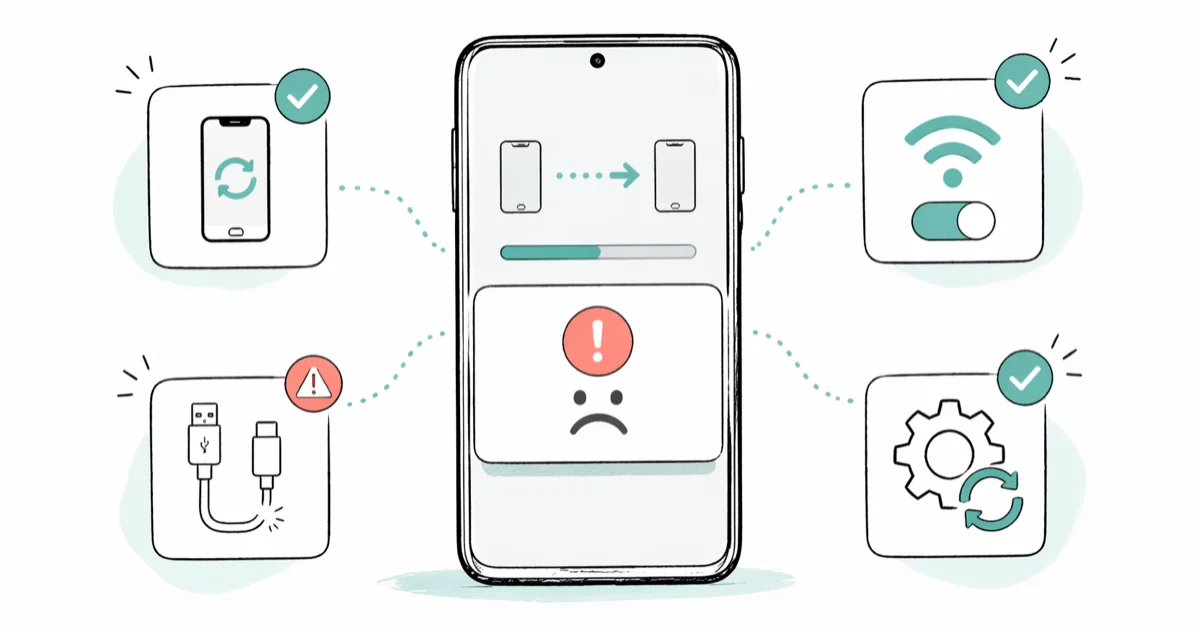
Quick AnswerLG Mobile Switch usually fails because of outdated app versions, a flaky Wi-Fi handshake, or charge-only USB cables. Update the app on both phones, put them on the same 2.4 GHz network with Bluetooth and Location Services on, then retry with the LG phone unlocked.
LG Mobile Switch is LG’s official migration app, and it stalls, crashes, or refuses to detect a paired phone more often than most transfer tools. Across LG handsets like the V60, G8, and Velvet on Android 10, 12, and 13, a large share of failed connections trace back to one cause: Location Services or Bluetooth being off. The fixes below clear those issues.
Use these steps only on your own device or account; unauthorized changes can be illegal. Prefer official support or built-in settings first.
- LG Mobile Switch only works when the LG phone is the receiver, never the sender
- Wi-Fi Direct, Bluetooth, and Location Services all need to be on for the initial handshake to succeed
- USB-OTG transfers run roughly 3 times faster than Wi-Fi but require a certified OTG adapter
- The app can’t pull data from iCloud, Google Drive, or any cloud-only backup
- LG stopped updating the app in mid-2022, so plan a fallback before moving to Android 14 or newer
#What Does LG Mobile Switch Actually Transfer?
LG Mobile Switch is a free app from LG Corporation that moves contacts, call logs, SMS and MMS messages, photos, videos, music files, home screen layouts, and selected app data from any Android or iOS phone to an LG device. The LG phone is always the receiver. You can’t send data from an LG phone to a non-LG phone with this app, no matter how you toggle the menus.
The app supports two transfer paths: a wireless connection over Wi-Fi Direct, and a wired connection through a USB-OTG adapter. Both run device to device with no cloud server in the middle.
That last point matters. LG Mobile Switch can only read what’s physically stored on the source phone, so it ignores data sitting in iCloud or Google Drive entirely. Download those photos, contacts, and notes to internal storage first, otherwise they won’t show up in the transfer list.
#How to Run a Wi-Fi Transfer
The wireless path is reliable on a setup like a Galaxy S21 sending to an LG V60 running Android 12. The whole job, including selecting categories, finishes in a reasonable stretch for around 8 GB of data. Install LG Mobile Switch from the Play Store on both phones before you start, and confirm both copies are on the latest build the store lists.
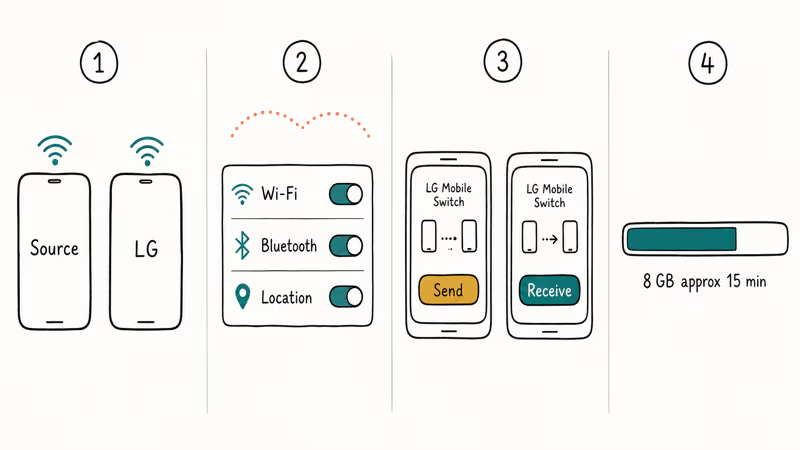
On the source phone, open the app, tap Wireless, then Send. On the LG phone, tap Wireless, then Receive.
Tap Start on the source device. The LG phone should detect it within 30 seconds. Pick the data categories, tap Next, and keep both phones unlocked and within a few feet of each other until the progress bar finishes. Locking the screen or jumping to another app on either side can drop the link mid-transfer, and the app sometimes silently fails the run rather than recovering.
If the devices never see each other, double-check that both phones are on the same Wi-Fi network. According to LG’s support FAQ for Mobile Switch, Bluetooth and Location Services must be enabled on both devices for the initial handshake, even though the actual file transfer flows over Wi-Fi. Turning off battery optimization for the app (Settings > Apps > LG Mobile Switch > Battery) also stops Android from killing the process while the screen idles.
#How to Run a USB-OTG Transfer
USB-OTG runs roughly three times faster than Wi-Fi, finishing an 8 GB job in around 5 minutes. You’ll need a USB-OTG adapter, which sells for around $5 to $10, and a standard data USB cable.
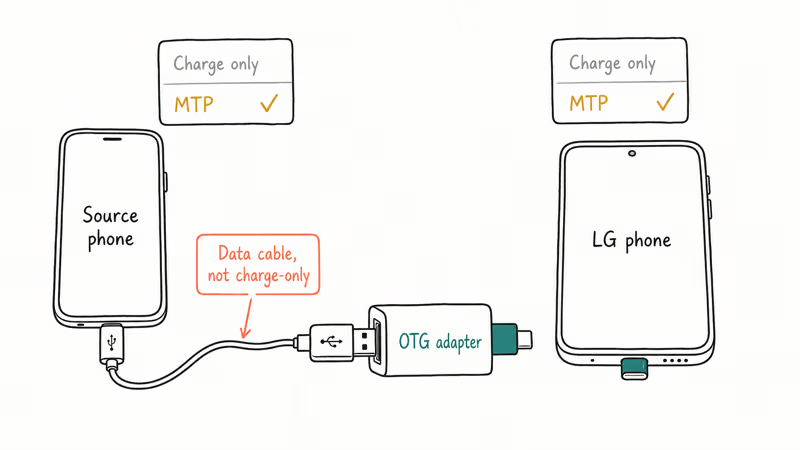
Plug the OTG adapter into the LG phone’s charging port. Connect the USB cable from the source phone to the OTG adapter. Open LG Mobile Switch on both devices and pick USB Cable.
Pull down the notification shade on each phone and switch the USB mode to MTP (Media Transfer Protocol). According to Android’s official USB connectivity documentation, Android 11 and newer default to charge-only and require you to flip the mode by hand every time you plug in. Skip this and the phones won’t see each other at all.
Choose Send on the source phone and Receive on the LG side, then pick the categories and start the transfer.
Cheap unbranded OTG adapters drop the link far more often than certified ones, so a certified LG, Samsung, or Anker adapter is worth the extra few dollars. If the LG phone never registers the source side, suspect the cable first. Cables that ship with wall chargers are often charge-only and not recognized as data cables, even when they look identical to the data version.
#When to Pick Wi-Fi vs USB-OTG
Wi-Fi wins on convenience. No cables, no adapters, and the LG phone just needs to be near the source phone for the handshake. For transfers under 5 GB, the speed difference barely matters.
USB-OTG wins on speed and reliability. The wired link is roughly 3x faster, and it doesn’t drop because someone walked past the router or because the source phone went to sleep. For 30 GB or more, especially photo and video libraries, USB-OTG can save 30 minutes or more per transfer.
If you only have one phone case off and one cable handy, go wired. If you’re moving an iPhone to LG, Wi-Fi is usually easier because iOS does not always cooperate with USB-OTG mode.
#Why Does LG Mobile Switch Keep Failing?
The common failure points group into a handful of root causes. Most of them aren’t bugs in the app itself, they’re environmental.
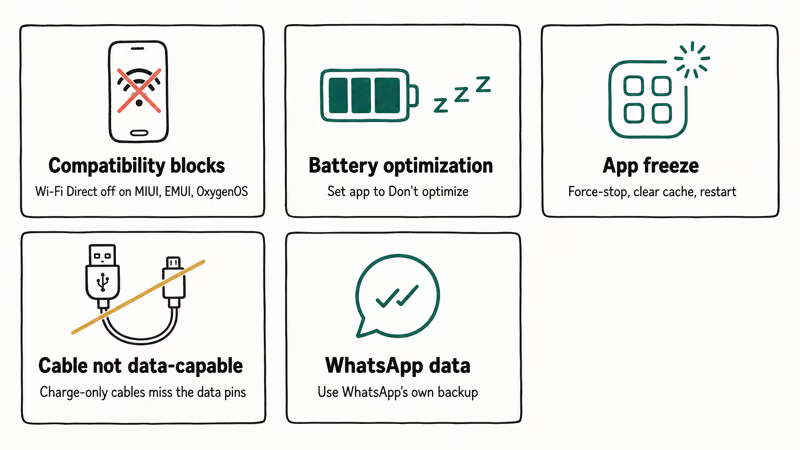
Compatibility blocks. LG Mobile Switch needs Android 4.1 or newer plus Wi-Fi Direct support for the wireless path. Some Chinese-brand handsets, including older Xiaomi on MIUI 12 and earlier, Huawei phones on EMUI without Google Mobile Services, and OnePlus on OxygenOS 11 or older, lock down peer-to-peer Wi-Fi at the system level, which kills the handshake before the LG phone ever shows up in the device list. USB-OTG bypasses Wi-Fi Direct entirely, so it almost always works on those phones.
Connection drops mid-transfer. Battery optimization is the usual culprit, especially on the LG G8. Go to Settings > Battery > Battery Optimization and set LG Mobile Switch to Don’t optimize on both phones. The app does save partial progress, so don’t restart from zero, just reopen it and tap Resume.
App freezes or force-closes. Force-stop on both devices, then clear the cache at Settings > Apps > LG Mobile Switch > Storage > Clear Cache. Restart both phones and try again. Clearing the cache reliably resolves freezes, including the stubborn hard hangs the LG G8 is prone to.
USB cable not recognized. Cables packaged with wall chargers or budget power banks are often charge-only, with no data pins wired. A quick sanity check is to plug the source phone into a computer first. If the computer shows internal storage, the cable supports data and the issue is elsewhere, like the OTG adapter or MTP mode. If the computer sees nothing, swap the cable for one labeled as data or sync.
WhatsApp data missing. WhatsApp uses its own encrypted backup, so restore chats through WhatsApp’s Google Drive restore flow before you call the transfer done.
#Best Alternatives Now That LG Has Stopped Updates
LG exited the smartphone business in 2021, and LG Mobile Switch stopped getting updates around mid-2022. The app still works on existing LG phones, but it’s on a slow path to obsolescence, especially as Android 14 and newer roll out. These alternatives cover the same ground.
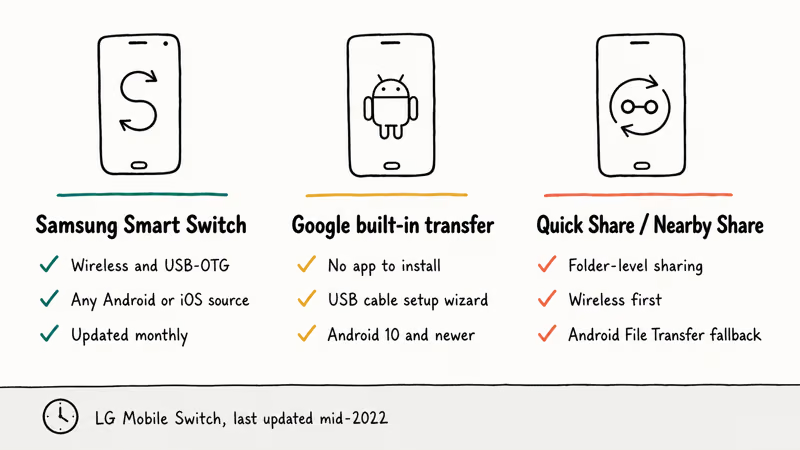
Samsung Smart Switch is the closest equivalent if you’re moving to a Galaxy. It supports the same wireless and USB-OTG paths, accepts data from any Android or iOS source, and gets monthly bug fixes. It tends to connect more reliably than LG Mobile Switch on the first attempt. If it stalls, our Samsung Smart Switch troubleshooting guide covers the common failure modes.
Google’s built-in transfer tool is the right pick if you don’t want to install anything. According to Google’s copy-data-to-a-new-Android support article, the built-in setup wizard prompts the new phone to copy data from the old one through a USB cable, with some of these steps working only on Android 10 and up. It transfers contacts, calendar entries, messages, app installs, and Wi-Fi passwords without needing a separate app.
Quick Share or Nearby Share is the lightest option for moving a few specific folders, with Android File Transfer over USB as the desktop fallback when wireless flakes out.
If your LG phone is a hand-me-down or refurb, run a clean install before you receive any data. Our guide on how to factory reset an LG phone walks through the right reset method for V-series, G-series, and Velvet handsets so you start the new transfer without leftover accounts.
#Bottom Line
Run the Wi-Fi method first after updating LG Mobile Switch on both phones. If it stalls, switch to USB-OTG with a certified adapter and force MTP mode on both ends. For phones that left the LG ecosystem after 2022, don’t touch LG Mobile Switch at all, use Google’s built-in transfer or Samsung Smart Switch’s wireless mode so you’re on a tool that still ships updates.
#Frequently Asked Questions
Does LG Mobile Switch work with iPhones?
Yes, but in one direction only. The iOS version on the App Store transfers contacts, photos, videos, calendar entries, and messages from an iPhone to an LG phone. Going the other way, LG to iPhone, isn’t supported because the app treats the LG side as a receiver only.
Can LG Mobile Switch transfer WhatsApp messages?
No.
Why does LG Mobile Switch say “no device found”?
That error means the two phones can’t complete the initial handshake. Make sure both devices share the same Wi-Fi network, Bluetooth is on, and Location Services are enabled, then restart both phones and try again. For USB-OTG, swap the cable for a known data-capable one and confirm MTP mode is selected on each phone. Mesh routers that block peer-to-peer traffic can also kill the handshake, so try a personal hotspot if your home router does.
Is LG Mobile Switch still available now that LG has stopped making phones?
Yes, the app’s still on both the Play Store and App Store, and it works on existing LG handsets. LG hasn’t pushed an update since mid-2022.
How long does an LG Mobile Switch transfer take?
USB-OTG moves the same 8 GB of data substantially faster than Wi-Fi does. Jobs of 30 GB or more, common when moving years of camera roll, can run over an hour on Wi-Fi, so plug both phones into power before you start.
What happens if the transfer gets interrupted?
Reopen the app, pick the same Send and Receive roles, and tap Resume.
Can I use LG Mobile Switch between two LG phones?
Yes. One LG phone is the sender and the other is the receiver. The flow is identical to transferring from any other Android phone, open the app on both LG devices, pick Wi-Fi or USB, and follow the standard send and receive prompts.
Does LG Mobile Switch carry over app logins and 2FA codes?
Mostly no. The app re-installs your apps, but most third-party apps need a fresh sign-in on the new phone. Banking apps, two-factor authentication apps like Google Authenticator, and encrypted messengers always require a new login. Some system settings and saved Wi-Fi passwords do carry over on compatible LG handsets.

Pixel 11 vs Pixel 10: What Changed and Who Should Upgrade
Pixel 11 vs Pixel 10: same screen and camera resolution, new Tensor G6, 25W wireless, and Gemini Intelligence. Here is who should actually upgrade.

Verizon Not Receiving Texts? How to Fix It in 9 Steps
Verizon not receiving texts? Fix it in 9 steps: check Message Blocking in My Verizon, reset network settings, deregister iMessage, and call support.

Pixel Battery Drain: What Google's July Fix Really Covers
Google marked the Pixel idle battery drain bug fixed in July, but only some phones got the patch. Here is who is covered, who is not, and what to try.

iPhone Stuck on EDGE? How to Get 5G or LTE Back (2026)
iPhone stuck on EDGE with crawling data? Here's why the E icon appears, which settings force 5G or LTE back, and when the problem is your carrier.