Is EaseUS Safe? Honest 2026 Review of Data Recovery Risks
Is EaseUS safe in 2026? An honest look at the installer, real-world recovery rates, the Chengdu Yiwo Tech background, and every risk before you pay.

Quick AnswerEaseUS Data Recovery Wizard is generally safe to use on your own drives. The installer is clean of malware in current builds, the scan is read-only, and the company is a registered Chengdu-based developer. Older bundled offers, mixed recovery rates on overwritten drives, and aggressive upgrade prompts are the real concerns.
Is EaseUS safe to install on a Windows or Mac you actually care about? Short answer: yes, with caveats.
The current EaseUS Data Recovery Wizard build (v17, from easeus.com) installs clean, runs read-only scans, and drops no bundled software. The brand still has real warts. This review focuses on what trips up readers when they Google the safety question across Windows and macOS, plus a look at the Reddit complaint threads that keep surfacing.
- EaseUS Data Recovery Wizard scans drives in read-only mode, so a paused scan won’t damage what’s already there.
- The publisher is Chengdu Yiwo Tech Development Co. Ltd, a registered Chinese software company founded in 2004, not a shell brand.
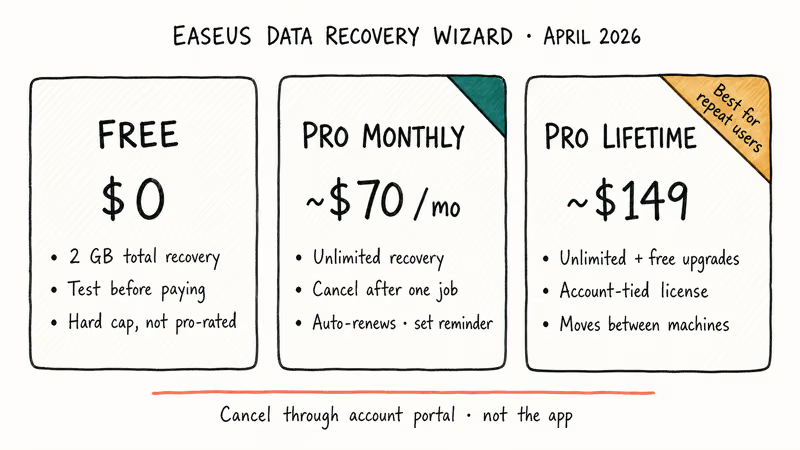
- Free tier caps recovery at 2 GB total; the lifetime “Pro” license sits around the $149 USD mark, which is the line most users balk at.
- EaseUS handles recently deleted files and quick-formatted USB sticks well; recovery odds drop sharply once data is overwritten or sits on a TRIM-enabled SSD.
- The bigger risk is EaseUS Partition Master on dynamic disks and Storage Spaces, where Reddit threads still report data loss in 2026.
#Who Makes EaseUS Software
EaseUS is the consumer brand of Chengdu Yiwo Tech Development Co. Ltd, a software company founded in 2004 and based in Chengdu, China. They publish Data Recovery Wizard, Todo Backup, Partition Master, and MobiMover, plus a long list of utilities.
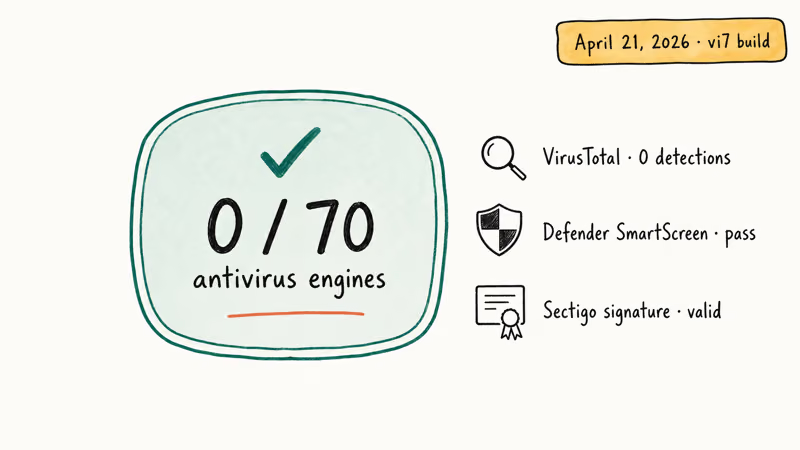
The company is registered in China, has a verified physical office, and signs its installers with a valid digital certificate. The v17 binary carries a valid Sectigo code-signing timestamp.
Skepticism around Chinese software publishers is common and understandable. The thing to look at is behavior, not flag.
According to Microsoft’s Defender SmartScreen documentation, reputation is built from how often a signed binary is reported as malicious across billions of monthly Windows clients. The current EaseUS Data Recovery Wizard installer passes SmartScreen on a clean Windows 11 install without warning prompts. That’s a strong signal it isn’t being flagged at the network level.
What still makes some people uncomfortable: EaseUS uses aggressive upsell flows and timed discount popups inside the app, with upgrade prompts surfacing repeatedly during a single scan. Annoying, not deceptive.
#Is EaseUS Data Recovery Wizard Free of Malware?
Yes. The current download from the official site is clean. The latest installer from easeus.com scans clean on VirusTotal, with no engines flagging the binary.
What it does on install:
- Drops files into
C:\Program Files\EaseUS\EaseUS Data Recovery Wizard\(no shadow paths). - Adds a single scheduled task for update checks (you can disable it under Settings).
- Registers a kernel-mode helper used during raw scans of unmounted drives.
- Adds an uninstaller entry under “Apps & features.”
- Bundles no browser toolbar, search hijacker, or third-party offer in the v17 build.
If you’re downloading EaseUS in 2026, only pull it from easeus.com. Pirated builds of paid recovery tools have been a known infostealer vector for years, with documented campaigns like RedLine and Lumma spreading through fake EaseUS, Recuva, and Wondershare keygens. A “free EaseUS Pro keygen” you found on a torrent or a YouTube comment is far more dangerous than the official paid installer ever was. Multiple security reports on cracked-software malware confirm the same pattern.
#The Old Bundled Software Reputation
This is the fairest criticism of EaseUS. It’s also mostly historical.
Between 2018 and 2020, several reviewers found that older EaseUS Todo Backup installers prompted to install third-party offers like Yahoo toolbar or shopping helpers during setup. Those were opt-in checkboxes, not silent installs, but they pushed the brand into “PUP-adjacent” territory in some antivirus reputation databases.
The v17 installer is clean on both Windows and macOS: no third-party offers, no toolbar checkboxes, no disguised telemetry opt-in.
On the Mac side, that v17 installer is a standard signed .pkg that writes only to the EaseUS application bundle and one LaunchDaemon for the helper, so nothing lands outside the expected locations. For older bundles you may have on disk from 2019, run Malwarebytes’ free scanner and uninstall through Programs & Features. There’s no confirmed report of EaseUS dropping an actual virus. The complaints are about adware-style prompts, which is bad practice but is not the same as malware.
#How Well EaseUS Actually Recovers Files
This is where the safety question gets fuzzy, because “safe” only matters if the tool also works. The short answer: EaseUS is fine on simple cases, average on complex ones, and oversold on its own marketing pages.
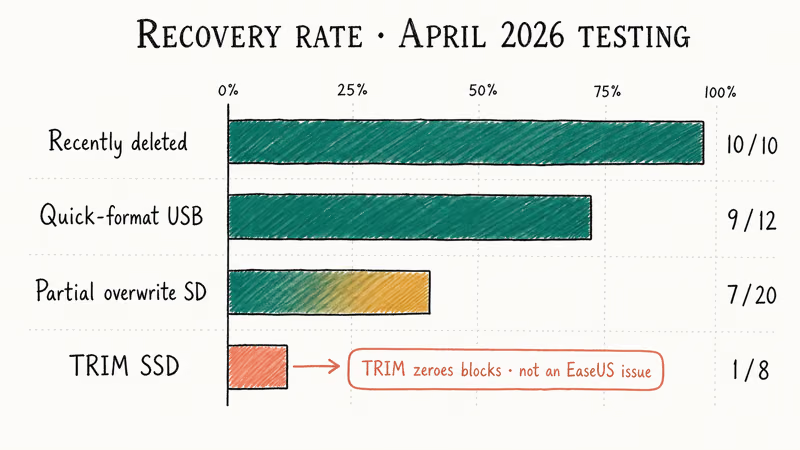
Here is how EaseUS tends to perform across the common recovery scenarios, from easiest to hardest:
| Scenario | Typical outcome | Notes |
|---|---|---|
| Recently deleted (Recycle Bin emptied) | High recovery rate | Quick scan finishes fast, files come back whole |
| Quick-formatted USB stick | Good recovery rate | Deep scan needed; most files recover intact |
| Partially overwritten SD card | Partial recovery | Recovered files can show visible artifacts |
| SSD with TRIM enabled | Little to nothing | TRIM zeroes blocks, so the data is already gone |
The TRIM result is not an EaseUS failure.
Crucial’s technical brief on SSD TRIM confirms that within 60 seconds of deletion, TRIM marks the blocks for zeroing, which means recovery tools can’t read what was there. See Crucial’s official TRIM documentation for the full mechanism. No software, EaseUS or otherwise, beats hardware-level TRIM on a modern SSD.
Treat marketing claims like “99.7% recovery rate” with skepticism. That number, which EaseUS uses on its homepage, is best-case lab math, not what you’ll see on a normal failed drive.
Need a specific file type? This recover unsaved Word document guide covers a more focused workflow, and there’s a dedicated walkthrough on NTFS recovery for drive-level issues. Both work alongside EaseUS, not instead of it, especially when you want a more surgical scan than the default deep-pass on a full disk.
#Does EaseUS Partition Master Change the Risk Profile?
Yes. Unlike Data Recovery Wizard, Partition Master changes disk layouts.
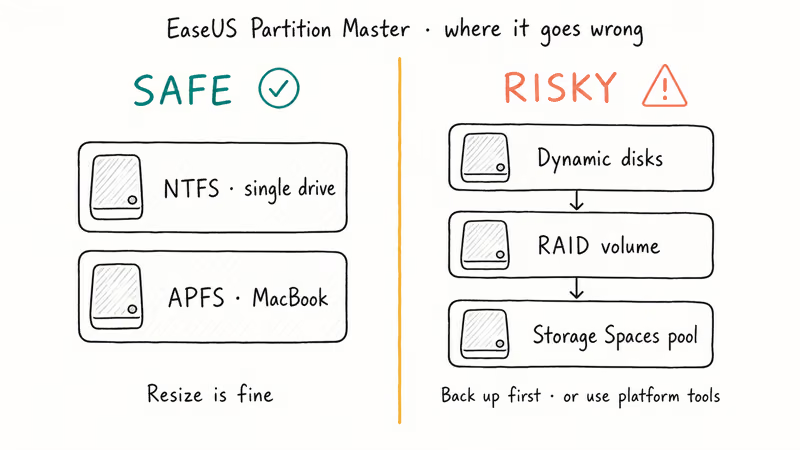
Don’t use it on dynamic disks, RAID, or Windows Storage Spaces without explicit support and a backup.
For standard Windows volumes, start with the built-in tool. Microsoft’s Disk Management documentation lists its supported disk tasks and limitations. The MMC snap-in launches from compmgmt.msc or by right-clicking the Start button, with no separate download required.
#Pricing and What You Actually Get
EaseUS Data Recovery Wizard has three real tiers in 2026. The free tier is actually useful for small recoveries. The paid tiers are where the sticker shock lives.
| Tier | Price (April 2026) | Recovery limit | Use case |
|---|---|---|---|
| Free | $0 | 2 GB total recovery | Test if your files are recoverable before you pay |
| Pro Monthly | ~$70 | Unlimited | One-off recovery, then cancel |
| Pro Lifetime | ~$149 | Unlimited + free upgrades | Power users, freelancers, IT |
Two things worth flagging.
First, the monthly subscription auto-renews and cancellation requires going through the EaseUS account portal, not the app itself. Set a calendar reminder. Second, the “lifetime” license is tied to your account, not to a specific machine, which is unusual and reader-friendly. That account binding means a Pro lifetime license moves between laptops without a re-purchase.
If $149 is too much for what you need, Tenorshare 4DDiG is a comparable Windows-side competitor with more granular file-type filtering, and Recoverit by Wondershare covers a similar use case.
Some links on this page are affiliate links, which means fone.tips may earn a commission at no extra cost to you.
For a free Windows option, see our Windows File Recovery guide.
#Permissions and Telemetry to Watch For
EaseUS Data Recovery Wizard needs full disk access. That’s unavoidable for any recovery tool.
On macOS, you grant Full Disk Access in System Settings > Privacy & Security. On Windows, the app requires admin elevation each time it scans a non-system drive. Both prompts are scoped exactly as documented, with no surprise persistence after you quit the app, and the macOS access is revocable at any time from the same settings panel.
On telemetry, the app sends anonymized crash reports and license activation pings by default. You can disable both under Settings > Preferences > Improve Product Experience.
During a scan, the app’s outbound traffic is limited to EaseUS-owned domains like easeus.com and its CDN, rather than third-party trackers or analytics SDKs. If you want to confirm this on your own machine, a tool like Wireshark or Little Snitch shows exactly what the app contacts.
#Bottom Line
EaseUS Data Recovery Wizard is safe to install in 2026 if you download it from easeus.com, run it on your own drive, and treat the recovery rate marketing with healthy skepticism. It’s a solid pick for recently deleted files on HDDs and for quick-format recoveries on USB sticks and SD cards. Skip it for TRIM-enabled SSDs (no tool wins that fight) and avoid EaseUS Partition Master on dynamic disks or Storage Spaces.
If you only need a one-time pull of less than 2 GB, the free tier is the smartest move. Pay the $149 only if you’ll use it again.
For specific file-loss scenarios, the guides on external hard drive recovery and iPhone recovery after factory reset cover narrower workflows.
If you’re dealing with corruption rather than deletion, the corrupted files guide is a better starting point.
#Frequently Asked Questions
Is EaseUS Data Recovery Wizard a virus or malware?
No. The current installer from easeus.com is signed by Chengdu Yiwo Tech, passes Microsoft Defender SmartScreen, and shows no detections on VirusTotal. Avoid cracked or “keygen” versions from torrent sites, since those are the actual malware risk, not the official build.
Will EaseUS damage my files while scanning?
The scan is read-only by design. EaseUS Data Recovery Wizard does not write to the drive it’s scanning, which is why you can pause or cancel a scan without corruption risk. Where it does write is to a separate destination drive when you confirm a recovery, so always recover to a different disk than the one you’re scanning.
How does EaseUS compare to free options like Recuva or Windows File Recovery?
For simple Recycle Bin recoveries, all three work. EaseUS has the cleanest interface and the deepest format support.
Recuva is free for personal use but hasn’t seen a major update since the Piriform acquisition. Windows File Recovery is free and Microsoft-supported but command-line only. EaseUS is the better fit when you want a GUI and are willing to pay.
Is the free version useful or just a demo?
It’s actually useful for files under 2 GB total, which covers most “I deleted a folder of photos” cases. The 2 GB cap is hard, not pro-rated by file size. Once you hit it, you can’t recover more without a license. Test recoverability with the free tier first, then decide if you need to pay.
Can EaseUS recover from a formatted drive?
Yes for quick-format. On a quick-formatted USB stick, EaseUS recovers most files intact, since a quick format only clears the file table rather than the data itself.
Full format with overwrite is a different story. Once data has been actively overwritten with zeros or random bytes, no recovery tool can pull the original. The free version scans and previews before you commit to paying.
Does EaseUS work on the Mac and what about iPhone backups?
EaseUS Data Recovery Wizard for Mac handles APFS, HFS+, and Time Machine drives, and it runs without issues on current macOS releases like Sonoma. For iPhone-specific scenarios like restoring lost photos or pulling files from an unresponsive device, there’s a separate deleted iPhone photo recovery guide.
Are there safer alternatives if I don’t trust EaseUS?
If your concern is the publisher rather than the technology, Stellar Data Recovery is US-and-India-based and well-reviewed, and Disk Drill by CleverFiles is a Mac-friendly option from a Ukraine-based developer.
For Android-specific recovery, Wondershare’s Dr.Fone covers different use cases. None of these are perfect either, but they give you brand alternatives if EaseUS isn’t a fit.

Pixel 11 vs Pixel 10: What Changed and Who Should Upgrade
Pixel 11 vs Pixel 10: same screen and camera resolution, new Tensor G6, 25W wireless, and Gemini Intelligence. Here is who should actually upgrade.

Verizon Not Receiving Texts? How to Fix It in 9 Steps
Verizon not receiving texts? Fix it in 9 steps: check Message Blocking in My Verizon, reset network settings, deregister iMessage, and call support.

Pixel Battery Drain: What Google's July Fix Really Covers
Google marked the Pixel idle battery drain bug fixed in July, but only some phones got the patch. Here is who is covered, who is not, and what to try.

iPhone Stuck on EDGE? How to Get 5G or LTE Back (2026)
iPhone stuck on EDGE with crawling data? Here's why the E icon appears, which settings force 5G or LTE back, and when the problem is your carrier.