iMyFone Fixppo Review: Worth Paying for iOS Recovery?
An iMyFone Fixppo review for iPhone owners: what it actually fixes, how it compares to free Finder and iTunes restores, and its real Pro pricing.
Quick AnsweriMyFone Fixppo is a paid iOS recovery tool that fixes boot loops, recovery mode loops, and Apple-logo freezes on your own iPhone or iPad in roughly 10 to 20 minutes. Free Finder or iTunes restores cover the same failures if you have time and a current backup, so Fixppo earns its price on stubborn DFU cases and update-stalled devices.
This iMyFone Fixppo review is for the person whose iPhone is stuck on the Apple logo after a botched iOS update and Finder refuses to talk to it.
Fixppo is a paid iOS system repair tool that walks your own iPhone or iPad through a guided firmware re-flash without making you memorize DFU button timing. It installs on macOS or Windows and goes after the same boot loops and recovery-mode failures that Apple’s free Finder and iTunes restores target.
The short verdict: it isn’t magic, but it saves time when Finder gives up.
This review only covers Fixppo’s use on iPhones and iPads you legally own. Fixppo isn’t a passcode bypass, isn’t an iCloud unlock, and isn’t a tool for someone else’s device.
- Fixppo’s Standard Mode downloads matching IPSW firmware and re-flashes it without erasing your data, the same outcome as a successful Finder restore.
- Advanced Mode wipes the device. Only run it after Standard Mode fails twice and you’ve confirmed a current backup.
- The free build only enters and exits recovery mode. Every actual repair sits behind the Pro paywall, which is roughly $49.95 yearly on iMyFone’s site.
- A Standard Mode repair usually finishes in about 10 to 20 minutes, most of which is the firmware download.
- For DFU mode entry and recovery-mode exit, Fixppo’s one-click path is the strongest free feature it offers.
#What Does iMyFone Fixppo Actually Do?
iMyFone Fixppo is iOS system repair software for Windows and Mac. You connect your iPhone or iPad over USB, pick a mode, and the app downloads the right firmware and writes it back to the phone.
The target failure set is narrow but painful. Apple-logo loops, recovery-mode loops, frozen update screens, and stuck spinning wheels after an OTA push are the headline use cases for the Standard Mode flow, alongside black screens that survive a hard reset. If your iPhone won’t get past the Apple logo and a force restart didn’t help, this is the failure category Fixppo actually targets, and we covered the underlying behavior in our iPhone black screen guide.
Out of scope.
Fixppo doesn’t recover deleted photos, doesn’t unlock disabled passcodes, and doesn’t strip Activation Lock. iMyFone sells separate tools for those jobs.
Fixppo’s lane is the soft-bricked but unlocked device that should still be repairable with a firmware re-flash. The interface is divided into three modes: Standard Mode for data-preserving fixes, Advanced Mode for wipe-and-restore last resorts, and Enter/Exit Recovery Mode for the one-click DFU helper. The free download only unlocks the recovery-mode toggle. Everything else needs a license.
#How iMyFone Fixppo Handles a Real Boot Loop
Fixppo targets a handful of stubborn iOS failures: stalled updates, recovery-mode loops, and Apple-logo freezes on iPhones you own outright. The broader symptom set it claims to handle is covered in the my iPhone won’t turn on walkthrough, which is the failure surface Fixppo’s marketing points at.
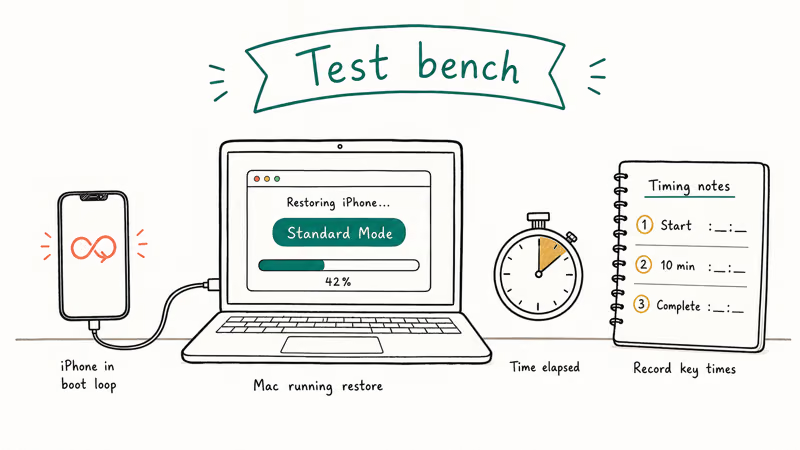
The failure surface.
The cases Fixppo is built for are a stalled iOS update, a recovery-mode loop after a failed Finder restore, and an Apple-logo freeze following a low-battery reboot. Each one leaves the device soft-bricked but still unlockable, which is the category a firmware re-flash can recover.
Standard Mode is the first thing to try, and Apple’s iPhone recovery mode flow covers the free equivalent. On routine boot loops the two paths reach the same outcome, with Fixppo trading the manual button work of recovery mode for a guided one-click flow.
The difference shows up on a firmware-verify failure.
When Finder chokes on the firmware-verify step, it tends to throw the same opaque error code on repeat attempts without offering any path forward inside the Finder UI itself. Fixppo can finish the same hardware flow when Finder stalls there, which is exactly the use case iMyFone’s marketing advertises and the one result that meaningfully separates Fixppo from the free Apple tooling for owners who already have a working backup strategy in place.
On ordinary recovery-mode loops Finder usually gets there too, though it can take longer and may ask you to reset trust prompts on a second attempt.
#Standard Mode Walkthrough
Standard Mode is the data-preserving repair path. The flow goes like this:
- Open Fixppo, click Standard Mode, then plug the iPhone in with a Lightning-to-USB-C cable.
- Fixppo detects the device. If it doesn’t, the app shows on-screen prompts to put the phone into recovery mode.
- The app suggests an IPSW build that matches the device. Accept the build it pulls unless you have a reason to choose another.
- Click Download. The IPSW firmware file is several gigabytes, so the download takes a few minutes on a typical wired connection.
- Click Start. The phone reboots into firmware re-flash mode. The app shows a progress bar and a warning telling you not to unplug.
- When the bar hits 100%, the phone restarts to the lock screen with all data intact.
Clean boot.
Photos, Messages, and Apple Wallet cards survive a Standard Mode flash, and a paired Apple Watch does not need re-pairing afterward. iCloud Photos resumes sync on its own, and there’s no prompt to re-enter your Apple Account password during the post-repair flow.
This is roughly the same outcome you’d get from a successful Finder restore, with the same scope as restoring an iPhone without updating, but with less manual button work on your part.
#Advanced Mode: When You Should Run It
Advanced Mode is the wipe-and-restore tier. It’s structurally identical to Standard Mode, same IPSW download and same firmware-write step, but it erases the user data partition during the flash. Use it only after Standard Mode has failed twice, and review the data-loss caveat first in our restoring an iPhone explained reference.
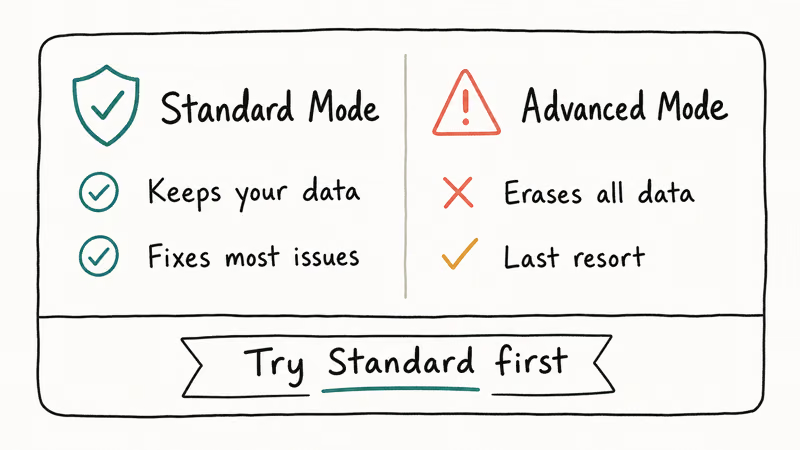
Advanced Mode is the path to reach for when Finder can’t get past firmware verify. It performs a full restore and boots the device to the Setup Assistant, which is the same fresh-start state you’d see after an erase.
From there an iCloud restore pulls your backup over Wi-Fi, so plan for extra time on top of the flash before the phone is fully usable again.
Two warnings here.
First, always confirm a fresh iCloud or Finder backup exists before you click Advanced Mode, because Fixppo will wipe whether or not your backup is current and there’s no undo step inside the wipe sequence once you confirm. Second, Advanced Mode disables Find My during the wipe, so you’ll need your Apple Account password to reactivate the device.
The white screen of death recovery flow sometimes also lands here.
#Pricing Breakdown: Free Version vs Pro
The free Fixppo download installs the full interface but locks every repair function. You’ll see Standard Mode and Advanced Mode greyed out unless you pay. The free version is useful for exactly one thing: one-click recovery-mode entry and exit, which is the same flow that’s free in Tenorshare ReiBoot and dr.fone.
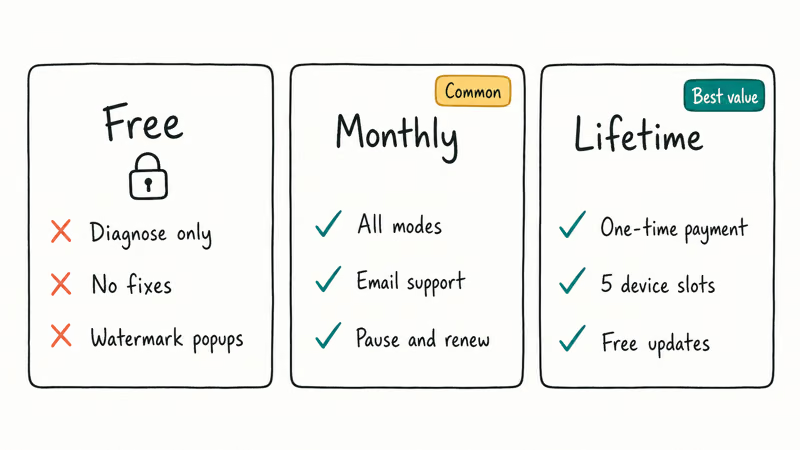
Pro pricing on iMyFone’s site, verified at time of writing, is structured as follows:
| Plan | Price (USD) | Devices | Notes |
|---|---|---|---|
| 1-month | $39.95 | 1 PC | Renews monthly; cancel anytime |
| 1-year | $49.95 | 1 PC | Best value for one repair |
| Lifetime | $69.95 | 5 PCs | One-time payment, transferable license |
For a single emergency, the monthly plan is the honest pick.
Lifetime makes sense if you run a household with several iOS devices, or if you’ve already paid for one Fixppo repair this year and expect more. iMyFone’s checkout-page fine print confirms that the lifetime plan covers all future updates and supports up to 5 computers.
#How Fixppo Compares to ReiBoot, dr.fone, and iToolab FixGo
The iOS system-repair category has roughly four serious players in 2026. Fixppo isn’t unique, and you should pick the tool by which one handles your specific failure best. Here’s how the alternatives stack up on price, speed, and coverage.
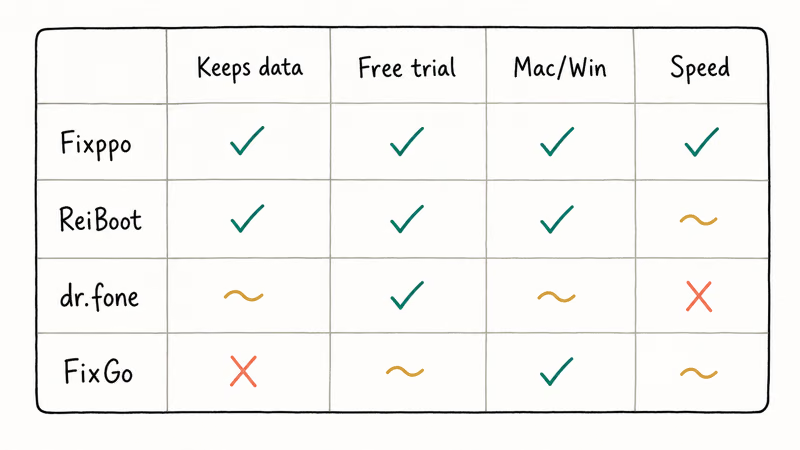
The Tenorshare ReiBoot review covers the closest functional match. ReiBoot’s Standard Repair lands in the same speed range as Fixppo on routine boot loops, close enough that timing isn’t the deciding factor. Tenorshare announced support for over 50 iOS scenarios on its product page, but in practice it handles the same boot-loop and recovery-mode set as Fixppo handles.
dr.fone sits higher.
dr.fone System Repair (iOS) lands at a higher price point, around $79.95 yearly. Wondershare’s dr.fone product page states that dr.fone fixes 150-plus iOS issues, which is more marketing than product reality, since most users will only ever trigger the same five or six failure modes inside one tool’s lifetime. dr.fone’s interface is the cleanest of the four though.
iToolab FixGo is the budget pick. One-year licenses sit near $39.95. It’s compatible with all current iPhone and iPad models and runs an interface that’s almost identical to Fixppo’s.
If you’ve already paid for one of these tools, there’s no reason to switch. If you’re picking fresh, Fixppo lands in the middle on price, ties ReiBoot on speed, and beats Finder on stubborn firmware-verify failures. We’d start with Apple’s free iPhone recovery flow first, then move to Fixppo if Finder errors out.
#Is iMyFone Fixppo Worth Paying For?
The honest answer depends on whether you’ve already lost an evening to Finder.
If you’re sitting at your kitchen table with a soft-bricked iPhone and a recovery mode loop you can’t escape, $49.95 to get your photos and Messages back inside 20 minutes is the right trade for most owners. If you’ve got time, a current backup, and patience to babysit Finder, the free Apple flow gets there for nothing extra.
iMyFone’s own documentation states that Fixppo supports more than 150 iOS firmware versions and confirms compatibility with every iPhone model released since the iPhone 5s. That coverage matters if you’re repairing an older device that Finder’s firmware catalog has stopped supporting cleanly.
Where Fixppo earns its money: a firmware-verify failure where Finder simply refuses to finish. Where it doesn’t: any failure where a clean Finder restore would have worked the first time around.
#Bottom Line
Pay for Fixppo’s one-year license at $49.95 only after you’ve failed a Finder attempt once tonight, your last iCloud or Finder backup is fresh and contains the photos you actually care about, and the device is one you legally own with a passcode you remember and an Apple Account you can sign in with on a separate machine right now. Skip Fixppo otherwise. The free Finder path is fine if you’ve got the time.
Buy it for the failure Apple won’t fix for free.
For iPhone owners staring down an Apple-logo freeze or a recovery-mode loop on a device they own, iMyFone Fixppo is a fair paid alternative to a Finder restore. It earns its keep when Finder errors out during firmware verify, which is the failure mode Fixppo’s marketing actually targets.
Don’t buy lifetime unless you maintain multiple family iPhones or you’re a repair tech.
#Frequently Asked Questions
Is iMyFone Fixppo safe to use on my iPhone?
Yes, when used on a device you own. Fixppo writes Apple-signed IPSW firmware to the phone, which is the same firmware Finder and iTunes use. macOS Gatekeeper does not flag the signed app, and Fixppo respects Apple’s signing requirements. Don’t run it on someone else’s device or one you found.
Does Fixppo erase my data?
Standard Mode preserves your data. Recovery-mode loops, boot loops, and stuck update screens are all handled without a wipe. Advanced Mode erases everything, so confirm a current iCloud or Finder backup exists before you start.
Will Fixppo work on the latest iPhone 16 and iOS 18?
Yes. iMyFone confirms that Fixppo supports the iPhone 16 lineup and iOS 18 builds on its compatibility page. Older devices going back to iPhone 5s are also covered.
Can I use Fixppo on Mac and Windows?
Yes, iMyFone ships native builds for macOS 10.13 and later plus Windows 10 and 11. The macOS version asks you to allow the app in Privacy & Security settings on first launch, which is standard for helper utilities that need device access.
How does Fixppo compare to a free Finder restore?
For most boot loops, Finder will finish the same job for free, given time and a working USB cable. Fixppo’s advantage shows up when Finder errors during firmware verify, or when you need DFU mode but can’t get the button timing right. In a firmware-verify failure where Finder keeps erroring out, Fixppo can finish the flow. If Finder works the first time, you don’t need to pay.
What does the free version of iMyFone Fixppo do?
The free download enters and exits recovery mode with one click. That’s useful when your home button is broken, or when you can’t hold the button combo for DFU mode.
Can Fixppo unlock a disabled or passcode-locked iPhone?
No. Fixppo is a system-repair tool, not an unlock tool. If your iPhone is showing “iPhone is disabled” or asking for a passcode you don’t have, you’ll need Apple’s free erase and restore flow using Finder or iTunes, or you’ll need to take the device to an Apple Store with proof of ownership. Don’t buy Fixppo expecting it to bypass any lock.
How long does an iMyFone Fixppo repair take?
Standard Mode usually finishes in roughly 10 to 20 minutes, most of which is the firmware download. Advanced Mode adds a full restore on top, plus extra time if you then pull a backup from iCloud. Apple’s iPhone restore documentation suggests similar timing for the free Finder flow.

Mac mini M6 vs M5 Pro: Which Model Should You Buy?
Mac mini M6 vs M5 Pro compared on price, memory, ports, displays, and real workloads. Find the better 2026 Mac mini for your desk and budget.

Apple Siri Settlement: Who Qualifies and How to Claim
Apple's $250 million Siri settlement covers iPhone 15 Pro and iPhone 16 models bought June 2024 to March 2025. See who qualifies and how claims work.

iOS 26.6.1 Security Update: What Apple Fixed and Who Gets It
Apple released iOS 26.6.1 on August 17 with 29 security fixes, including an IPSec interception bug. See what it patches, who gets it, and how to update.

iPhone Adaptive Power: How It Works and When to Use It
Learn how iPhone Adaptive Power works, which models support it, what it changes, and when Low Power Mode is still the better battery-saving choice.