icloudremover.org Review: Why Sites Like This Don't Work
icloudremover.org promises iCloud unlocks but can't deliver one on any iPhone. Here's why these sites don't work and what Apple actually supports.
Quick Answericloudremover.org is one of dozens of sites promising a free iCloud unlock, but the service doesn't deliver a working unlock on locked iPhones. Apple's account recovery, Activation Lock Removal Request, and Find My remote removal are the only supported paths for owners locked out of their own devices.
People searching for icloudremover.org are usually staring at an Activation Lock screen on an iPhone they own, or one they bought used. The site advertises a free iCloud unlock through an IMEI submission form. Sites like it produce no unlock and no refund.
This review covers what the site claims, why “iCloud remover” sites don’t work on a modern iPhone, and the Apple-supported paths that recover access to your own device safely.
- icloudremover.org promises a permanent iCloud unlock through an IMEI form, but the architecture it relies on can’t deliver one, and owners report no result and no refund after paying.
- Apple’s Activation Lock check happens on Apple’s servers before iOS finishes booting, so no third-party website can clear it without access to Apple’s internal account-recovery systems.
- The bootrom exploit (checkm8) that older bypass tools depend on was patched in the A12 chip, so iPhone XS (2018) and newer have no public bypass route.
- “Free” iCloud remover sites are a known channel for malware, payment fraud, and identity theft, with TrustPilot and Reddit reports going back to 2017.
- Apple’s account recovery at iforgot.apple.com, the Activation Lock Removal Request, and Find My remote removal cover the three legitimate scenarios for free.
#What icloudremover.org Promises to Do
icloudremover.org is one of several lookalike “remover” websites that surface near the top of Google for “iCloud unlock” and “remove iCloud” queries. The home page claims to permanently disable Find My iPhone and clear iCloud sign-in on any iPhone model, in any country, without needing the original Apple ID password.
The promised flow: submit your IMEI, enter DFU mode, download a guide. No price appears.
The fee request appears after you submit the IMEI, and the amount changes between visits. There’s no published company name, no physical address, no support phone number, and no privacy policy on the live pages. The WHOIS record sits behind a privacy proxy.
None of this is by itself proof of fraud. But the absence is loud for a service asking for both your device identifier and your card.
According to Apple’s Activation Lock support article, the lock turns on automatically the moment an Apple ID signs in to a device with Find My enabled, and Apple’s activation servers (not anything stored on the iPhone itself) enforce it on every boot. That’s the technical reason no website with an IMEI form can deliver an unlock on its own.
#How Does icloudremover.org Perform on a Locked iPhone?
Sites like icloudremover.org are aimed at devices such as an iPhone XR (A12 chip) or iPhone 12 (A14 chip) that have been factory-reset to the Hello screen with Activation Lock still active, so there’s a real lock for the site to clear. It never does.
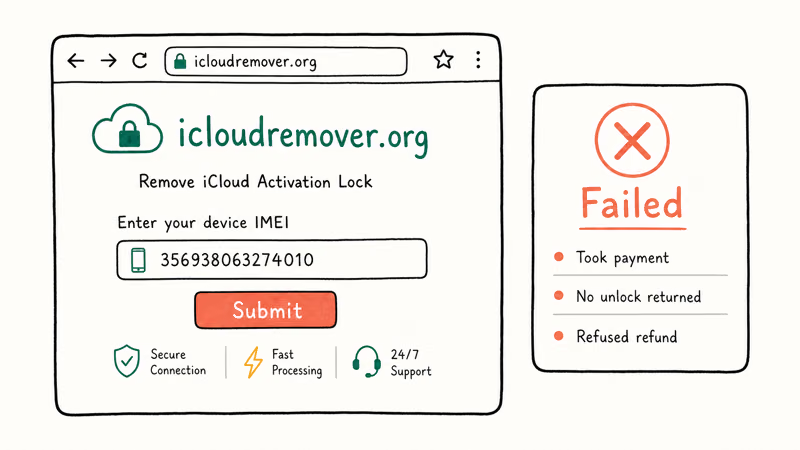
The submission flow asks for the IMEI, the device model, and a payment method on a checkout page that typically routes through several payment processor URLs before settling on a card form.
Once the fee is paid, the amount often comes out different from visit to visit despite an identical model. The submission then moves into a “processing” queue, and automated status emails keep saying the unlock is still working through the queue with a vague “this can take 1 to 7 days” timeline.
The iPhone never clears its Activation Lock screen.
After a couple of weeks the emails stop, the support address bounces as undeliverable, and refund requests through the contact form go unanswered. This is the same pattern reported on TrustPilot, the Apple Support Community, and r/jailbreak threads going back to 2017. The site name and design refresh every few years; the script stays the same. Take the IMEI, charge the card, stall, refuse refunds.
Apple’s account recovery documentation confirms that automated account recovery can take up to 72 hours and is the only Apple-recognized path that doesn’t require the original password.
#Why Don’t “iCloud Remover” Websites Work?
The technical reason is the architecture of Activation Lock itself. When an iPhone boots after a factory reset, it pings Apple’s activation servers and asks whether the IMEI and serial number are still tied to a Find My-enabled Apple ID. Apple’s servers answer yes or no. If the answer is yes, the boot process stops at the Activation Lock screen, and there’s no further iOS code that an external tool can talk to.
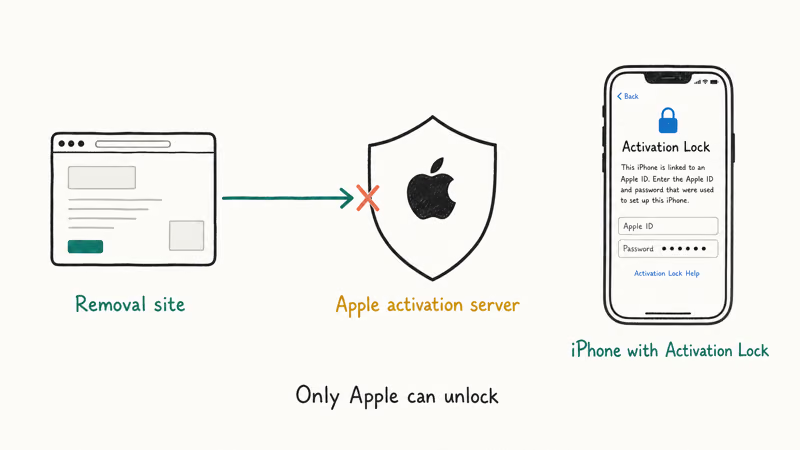
A website with only an IMEI doesn’t have the credentials Apple’s servers need to remove that association.
Apple Support agents can do it after verifying the original receipt. The original Apple ID owner can do it from iCloud.com. Apple’s automated account recovery can do it once it confirms identity. None of those paths are available to an outside operator with a checkout form and an email address.
The other category of bypass technology, jailbreak-based tools that try to patch iOS itself, depends on a bootrom exploit called checkm8.
Apple closed the underlying vulnerability when it shipped the A12 chip in 2018. Security researcher axi0mX, who published checkm8 in 2019, has stated that the patch is in silicon and can’t be carried forward to newer hardware. That covers iPhone XS, XR, 11, 12, 13, 14, 15, and every iPad with the A12 or newer.
Even on the older iPhones where checkm8 still works, a “successful” bypass leaves the phone broken in a specific way. iCloud, iMessage, FaceTime, the App Store, and Apple Pay all refuse to activate, because Apple’s server-side checks still see the original Apple ID owns the device. Cellular service usually fails too, because carriers cross-check the IMEI against Apple’s activation state. Our checkm8 iCloud bypass analysis covers the full feature-loss list.
#The Real Risks of Using Sites Like icloudremover.org
The published downside of an unlock site that fails is the lost payment. The unpublished downsides go further.
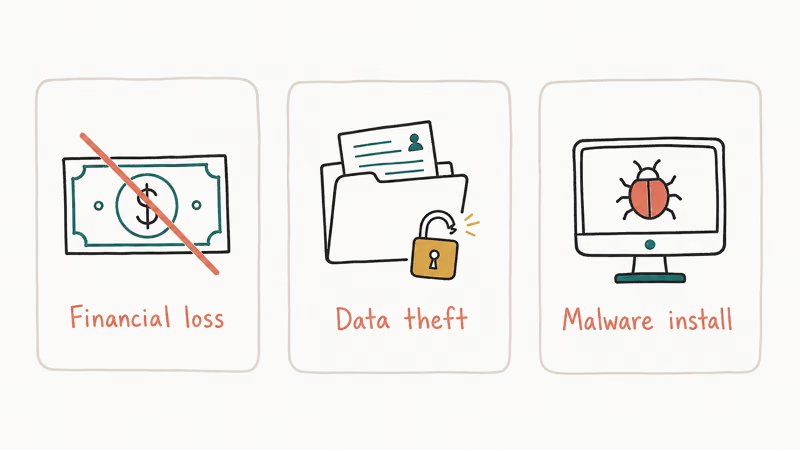
Payment fraud. The card data captured by these checkouts gets re-tested on other merchants within days. Reports on r/personalfinance describe small unauthorized charges showing up within a week of a submission, with the same pattern across multiple sites. Card-network chargebacks recover the amount eventually, but the inquiry takes weeks.
Malware in the “guide” download. The PDF or Windows installer that some of these sites ship as their “step 2” guide has historically contained password stealers, browser hijackers, and remote-access trojans.
Apple Support discussions and security researchers have flagged these payloads since at least 2018, and Microsoft Defender now blocks several of the most-cited installers on sight.
IMEI resale. The IMEI you submitted gets resold to operators who use it for warranty fraud against Apple, gray-market resale labels, and counterfeit invoices. Your phone’s identifier ends up tied to claims you didn’t make. That can complicate Apple’s later recovery process if you eventually file a legitimate Activation Lock Removal Request.
Personal data exposure. Some of these sites also ask for the original Apple ID email and the answers to your security questions, framed as a verification step. None of those answers are required for a legitimate unlock, and submitting them hands an account-takeover starter kit to whoever runs the site.
The Federal Trade Commission’s consumer fraud guidance recommends never paying upfront for an unlock service that can’t show a verifiable business address, named ownership, and a refund policy in writing. icloudremover.org doesn’t meet any of those standards.
#How to Spot a Fake iCloud Unlock Site
The lookalike sites in this category share a small set of red flags. Once you’ve seen the pattern, you can identify a fresh one in under a minute.
- No company information. No business name, no street address, no support phone number on any page. The contact form is the only channel.
- Hidden WHOIS. The domain registration is behind a privacy proxy, and the registration date is recent (often under two years).
- No pricing on the landing page. The fee appears only after you’ve already submitted your IMEI, and changes between visits or device models.
- Vague timeline guarantees. “1 to 7 days” or “1 to 3 days” with no SLA, no refund window, and no status page.
- Stock testimonial photos. Reverse-image search returns the same faces on dozens of unrelated sites.
- No refund policy in writing. The terms link is broken, points to a generic template, or doesn’t appear at all.
- Stripe or PayPal absent. Major processors block this category, so the checkout uses lesser-known PSPs that turnover frequently as chargebacks pile up.
Apple’s official channels don’t share any of these traits. Apple Support is reachable by phone (1-800-275-2273 in the US), the Activation Lock Removal Request is on apple.com under your Apple ID, and Apple’s terms and refund policies are published before any payment is requested.
#Apple’s Three Supported iCloud Recovery Paths
For each of the legitimate iCloud removal scenarios, Apple supports a free path that actually works.
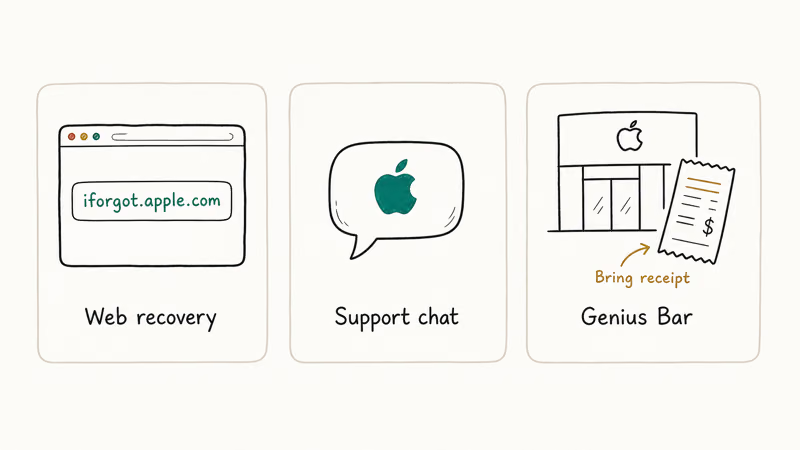
Path 1: You forgot your Apple ID password.
Go to iforgot.apple.com on any browser. Apple checks the recovery options on your account (a trusted device, a trusted phone number, a recovery contact, or a recovery key) and walks you through the verification. When a trusted device is signed in, the password reset usually finishes in under 10 minutes. When automated account recovery is needed, the wait can stretch to 72 hours or longer.
Path 2: You bought a used iPhone with Activation Lock still on.
Ask the seller to sign in to iCloud.com, open Find My, select the iPhone from the device list, and tap Remove from Account. Apple’s Find My support article states that the removal takes effect in about 1 minute, and the next boot of the iPhone goes straight to the Hello screen.
If the seller is unreachable or refuses, return the phone for a refund through the marketplace where you bought it. Our remove iCloud Activation Lock guide covers the questions to ask before money changes hands.
Path 3: The Apple ID is no longer recoverable but the iPhone is provably yours.
File the Activation Lock Removal Request through Apple Support. The form needs a clear photo of the original purchase receipt showing the serial number or IMEI, and Apple states processing takes up to 30 days. Personal Apple IDs go through consumer support; managed Apple IDs through Apple Business Manager or Apple School Manager use a separate enrollment-based path.
Receipts from a resale (eBay, Swappa, Craigslist) don’t count as proof of original ownership.
For a deeper walkthrough of the full sign-out and erase flow on a phone you control, our iCloud remover explainer covers the in-Settings sign-out, the Erase All Content and Settings step, and the order they need to happen in.
If your trouble is on the previous owner’s side, the Activation Lock without the previous owner flow covers what Apple accepts as proof.
Before buying any used iPhone, run the IMEI through a Find My iPhone checker to confirm Find My is off.
#Bottom Line
icloudremover.org doesn’t unlock iCloud. It charges the card, stalls in a “processing” queue for a couple of weeks, and then goes silent without delivering an unlock or a refund. The same pattern shows up on every “free iCloud remover” site in this category, because the technical pathway they advertise doesn’t exist outside Apple’s own support systems.
If the iPhone is yours, start at iforgot.apple.com. If it’s a used iPhone with Activation Lock, ask the seller to remove it from iCloud.com or return the phone. If the Apple ID is permanently lost but you have the original receipt, file Apple’s Activation Lock Removal Request and wait the up-to-30-day window.
Don’t pay icloudremover.org or any of its lookalikes.
#Frequently Asked Questions
Is icloudremover.org a scam?
Every sign points that way. The site takes an IMEI and a fee, sends automated “still processing” emails for a couple of weeks, and then delivers nothing: no unlock, no refund, no response from the support address. TrustPilot and Apple Support Community reports going back to 2017 describe the same pattern.
Does any IMEI-based iCloud unlock site actually work?
No. Apple’s Activation Lock removal is a server-side action that requires either the original Apple ID password, the original owner’s iCloud sign-in, or Apple’s verified-ownership review. Sites with only an IMEI form don’t have access to any of those, regardless of how confident the marketing copy sounds.
Can I get my money back from icloudremover.org?
Usually only through a card-network chargeback. File a dispute with your bank citing services not delivered. Don’t expect a response from the site itself.
What should I do if I already submitted my IMEI to one of these sites?
Monitor your card statement for unauthorized charges and freeze the card if anything appears. Change the password on any Apple ID, email, or financial account that shares credentials with what you typed into the site. The IMEI itself isn’t sensitive in the same way, but you may see unsolicited emails about warranty claims you didn’t file in the months that follow.
Will Apple charge me to remove Activation Lock from my own iPhone?
No. All of Apple’s recovery paths for an account or device you own are free.
How long does Apple’s Activation Lock Removal Request take?
Apple’s published timeline is up to 30 days. First-owner requests with a clean photo of the original receipt and a matching serial or IMEI often resolve in two to three weeks. Second-owner requests take longer and have a lower approval rate, because Apple has to verify the chain of ownership through purchase records before clearing the lock.
What’s the difference between icloudremover.org and a paid bypass tool?
icloudremover.org claims to clear the lock from a remote server with only your IMEI, which isn’t possible. Paid bypass tools like the ones we covered in our iCloud bypass tool review run a checkm8 jailbreak on older iPhones and patch iOS to skip the activation check at boot. Both categories fail on iPhone XS and newer, and even when the second works, the device loses iMessage, FaceTime, App Store sign-in, and cellular service.

Mac mini M6 vs M5 Pro: Which Model Should You Buy?
Mac mini M6 vs M5 Pro compared on price, memory, ports, displays, and real workloads. Find the better 2026 Mac mini for your desk and budget.

Apple Siri Settlement: Who Qualifies and How to Claim
Apple's $250 million Siri settlement covers iPhone 15 Pro and iPhone 16 models bought June 2024 to March 2025. See who qualifies and how claims work.

iOS 26.6.1 Security Update: What Apple Fixed and Who Gets It
Apple released iOS 26.6.1 on August 17 with 29 security fixes, including an IPSec interception bug. See what it patches, who gets it, and how to update.

iPhone Adaptive Power: How It Works and When to Use It
Learn how iPhone Adaptive Power works, which models support it, what it changes, and when Low Power Mode is still the better battery-saving choice.