iCloud Remover: How to Safely Remove iCloud From iPhone
Need an iCloud remover? Apple's sign-out flow, account recovery, and Activation Lock Removal Request clear iCloud from your iPhone the safe way.

Quick AnswerTo remove iCloud from an iPhone you own, sign out under Settings, erase the device, then turn off Find My on iCloud.com. If you forgot the Apple ID password, Apple's account recovery and Activation Lock Removal Request restore access without third-party tools.
People search for an “iCloud remover” for three different reasons. They want to wipe iCloud off a phone before selling it, they forgot the Apple ID password, or they bought a used iPhone that still shows the previous owner’s Activation Lock.
The right removal path is different in each case, and Apple supports all three at no cost. This guide walks through what an iCloud remover does, the safe Apple-supported routes, and what to do when an iPhone is stuck.
- Removing iCloud means three different things: signing out, clearing the Apple ID after a forgotten password, or lifting Activation Lock on a phone you own.
- The clean sign-out path on the device itself is Settings > [your name] > Sign Out, followed by Erase All Content and Settings, and it takes around five minutes.
- If you can’t sign in, Apple’s account recovery at iforgot.apple.com returns the Apple ID through a trusted device, a recovery contact, or a trusted phone number.
- Apple’s Activation Lock Removal Request needs the original receipt that shows the serial number or IMEI, and processing takes up to 30 days.
- Third-party “iCloud remover” tools either fail outright on iPhones with the A12 chip and newer (iPhone XS, 2018+) or leave the device without iMessage, FaceTime, the App Store, or cellular service.
#What an iCloud Remover Actually Does
“iCloud remover” is a catch-all phrase. In Google, it covers four very different jobs.
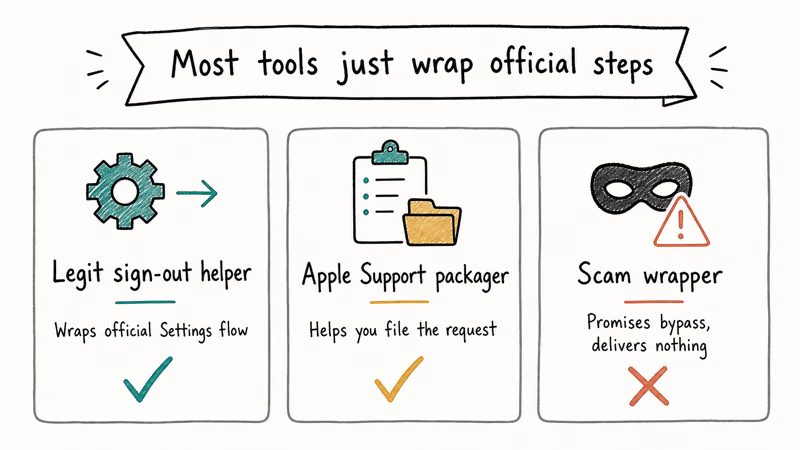
The first is signing out of iCloud on a device you control. That’s what most owners want when they’re prepping an iPhone for sale or handing it to a family member.
The second is removing an Apple ID after the password is forgotten and the trusted devices are no longer accessible. The third is clearing the Activation Lock screen that appears after a factory reset, when the phone is still tied to the previous owner’s iCloud. The fourth, marketed by the “iCloud remover” software industry, is bypassing Activation Lock on a device the seller doesn’t own and can’t prove they own.
Only the first three are legitimate. Apple supports all of them at no cost.
According to Apple’s Activation Lock support article, the lock turns on automatically when an Apple ID signs in to a device with Find My enabled. The lock lives on Apple’s servers, not on the phone. That’s why the only software that can truly clear it runs inside Apple’s own systems, after they verify ownership.
All three legitimate paths run through Apple’s own systems. Paid “iCloud remover” tools can’t reach those servers, so they stall.
#How Do You Sign Out of iCloud on an iPhone You Own?
The cleanest iCloud removal is the one Apple builds into the Settings app. It works on iPhone 5s and newer, every supported iOS version, and takes about five minutes when the network is responsive.
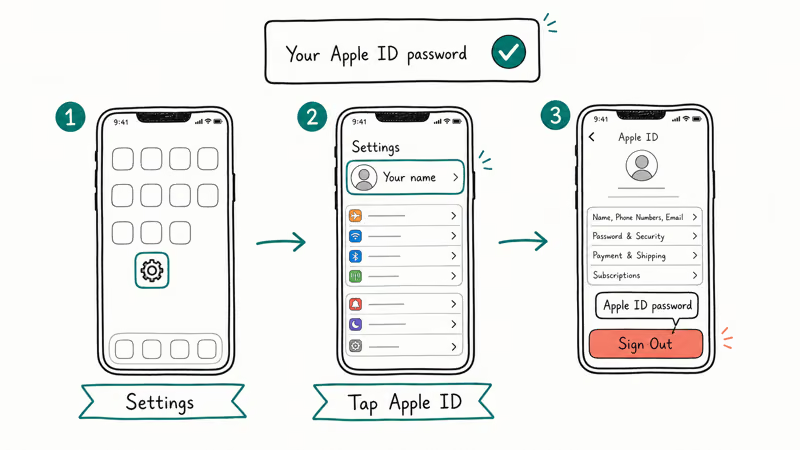
Open Settings and tap your name at the top. Scroll to the bottom of the Apple ID page and tap Sign Out. iOS asks for your Apple ID password to confirm, which is how it disables Find My on this device at the same time.
When the device asks which data to keep on the iPhone, choose Keep on My iPhone for anything you still want available after sign-out, such as contacts, photos, and calendars. The next screen confirms the sign-out. After it finishes, the Apple ID section in Settings shows “Sign in to your iPhone” with no account attached.
To finish the iCloud removal completely, erase the device.
Go to Settings > General > Transfer or Reset iPhone > Erase All Content and Settings. iOS prompts for the device passcode, runs through the network-settings warning, and reboots into the Hello screen with no iCloud account, no Activation Lock, and no personal data.
This is the state Apple recommends for any iPhone you’re selling or returning. The full procedure is documented in Apple’s What to do before you sell, give away, or trade in your iPhone checklist.
For owners who run into a greyed-out Sign Out button or an error during sign-out, the can’t sign out of Apple ID walkthrough covers the Screen Time restriction and the Apple ID server-side blocks that cause it. If the iPad version of the problem keeps the Apple ID stuck in Settings, the iPad-specific Apple ID removal flow is the same idea with the iPad screenshots.
#Removing iCloud When You Forgot the Password
This is the job third-party tools advertise most aggressively, and the one Apple handles for free when you can prove the account is yours.
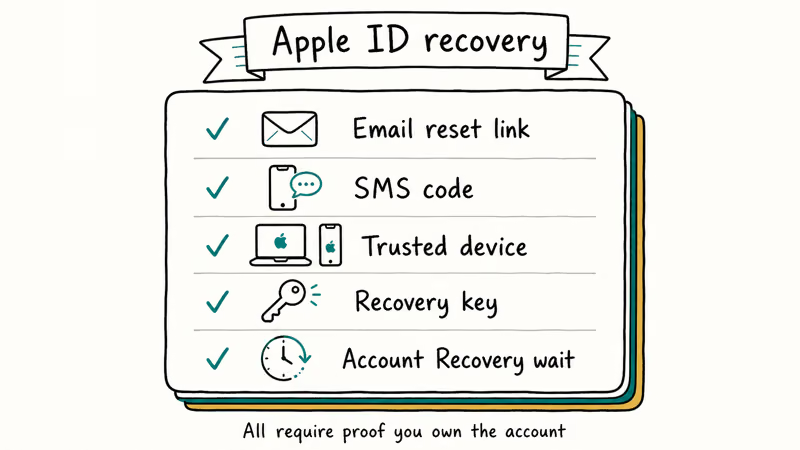
Start at iforgot.apple.com, Apple’s account recovery entry point. Enter the Apple ID email and Apple decides which recovery path to offer based on what the account has on file: a trusted phone number, a trusted device, a recovery key, or a recovery contact. When a trusted device is already signed in, the password reset usually finishes in under ten minutes.
If the trusted phone number is no longer in service, the recovery path shifts to automated account recovery. Apple’s account recovery documentation confirms that the waiting period varies by account, and the system sends a notification when the account is ready. For a dormant Apple ID tied to a retired phone number, recovery can take several days.
Once the password resets, sign in on the iPhone in Settings > Apple ID and the device is back under your control.
There’s no need for a wipe at that point unless you’re prepping the phone for someone else.
When account recovery itself is blocked because the Apple ID is in a security hold, the Apple ID locked recovery is the prerequisite. Apple states that the security hold has to clear before any other recovery work can proceed, because the account has to be in a normal state for the recovery system to verify identity. Once it unlocks, the same iforgot.apple.com flow finishes the job.
For owners whose iPad is already at the Activation Lock screen because the previous attempt to reset locked them out, the factory reset iPad without iCloud password flow covers the recovery-mode reset and the Apple ID sign-in step that follows.
#Asking a Previous Owner to Release the Device
The hardest “iCloud remover” job is the one with a secondhand iPhone that boots straight into Activation Lock and asks for an Apple ID that isn’t yours. This shows up most often after a private sale on eBay or Facebook Marketplace, where the seller skipped the prep checklist. The wrong move is paying for an unlock tool. The right move is asking the seller to remove the device themselves, and if that fails, going to Apple with proof of purchase.
Ask the previous owner to sign in to iCloud.com/find on a browser, pick the iPhone from the list, and tap Remove from Account. The lock clears within a minute on Apple’s side, and the next boot of the iPhone goes straight to the Hello screen.
Apple’s Remove an iPhone from a previous owner’s account doc walks through this exact flow on the previous owner’s end. They don’t need the physical device for this step. As long as their iCloud account is accessible from any browser, the removal works.
When the seller refuses to cooperate and the receipt isn’t yours, the iPhone isn’t recoverable through any path. Return it for a refund, dispute the charge with the payment processor, or report the device to local authorities if it was sold as stolen. Our remove iCloud activation lock guide goes deeper into what to ask the seller before money changes hands.
#Filing Apple’s Activation Lock Removal Request
When the previous owner is unreachable but the iPhone is legitimately yours (gifted from a relative, inherited, purchased with paperwork), the Activation Lock Removal Request is the Apple-supported recovery.
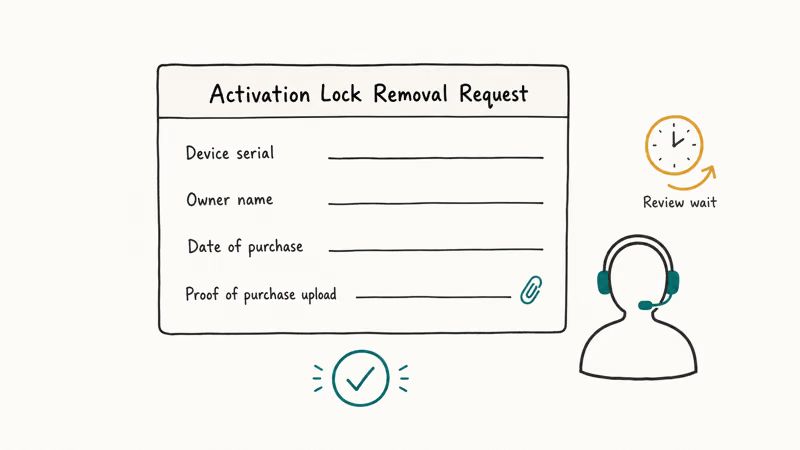
The form needs a clear receipt photo showing the serial number or IMEI of the locked iPhone.
Apple states that processing takes up to 30 days. Personal Apple ID accounts go through the consumer support team. Managed Apple IDs through Apple Business Manager or Apple School Manager use a separate enrollment-based removal that the organization’s admin runs directly.
A few details matter for a clean submission. The receipt has to show the original retail purchase, not a resale receipt. The serial number on the receipt has to match the serial in Settings > General > About, or the IMEI under Settings > General > About > IMEI. Apple cross-checks every field against its purchase records, and any mismatch sends the request back unprocessed.
#Are Third-Party iCloud Remover Tools Safe?
“iCloud remover” software lives at the top of Google because the keyword is high-volume, not because the tools work.
Two of the most-cited paid tools, Tenorshare 4MeKey and iMyFone iBypasser, target the iPhone 14 (A15 chip) and similar models but can’t clear the Activation Lock on them. The device often ends up stuck in a boot loop at the Apple logo even after the software reports “complete,” and it needs a recovery-mode restore through Finder to come back to a usable state.
The reason is technical. Most paid bypass tools depend on a bootrom exploit called checkm8, which Apple patched in the A12 chip in 2018. iPhone XS, iPhone 11, iPhone 12, iPhone 13, and newer aren’t covered by any public exploit. The “successful” demos online are either older devices or video edits.
Even on the older iPhones where a bypass works, the result is half-broken.
A bypassed iPhone keeps the network identifier tied to the previous Apple ID on Apple’s servers, so iMessage, FaceTime, iCloud, App Store sign-in, and Apple Pay refuse to activate. Cellular service usually fails too, because carriers cross-check the IMEI against Apple’s activation state before issuing service. That’s the trade behind any “successful” bypass result.
The fuller breakdown of why the tool category fails is in our iCloud bypass tool analysis.
IMEI-based “remote unlock” services that quote 1 to 3 days are a different problem. Apple doesn’t expose an external API that lets a third party remove an Apple ID from someone else’s iCloud. The firms claiming to do it are reselling Activation Lock Removal Requests with falsified receipts, which Apple rejects on review.
For owners with a legitimate receipt, going directly to Apple is faster and free. For buyers without one, the service can’t deliver what it promises.
#Bottom Line
Three jobs, three Apple-supported paths. Pick the one that matches your situation.
If you own the iPhone and the Apple ID, the in-Settings sign-out plus Erase All Content and Settings is the only iCloud remover you need. It finishes in about five minutes.
If you forgot the Apple ID password, iforgot.apple.com restores access in minutes when a trusted device is available, and within 72 hours under automated account recovery. If you bought a used iPhone with Activation Lock still on, the previous owner has to remove it at iCloud.com/find, or Apple has to clear it via the Activation Lock Removal Request with the original receipt.
Skip the paid bypass tools. On modern iPhones they don’t work. On older ones they leave the device locked out of iMessage, FaceTime, the App Store, and cellular service.
#Frequently Asked Questions
Is there a real iCloud remover app for iPhone 13 or newer?
No. Apple’s bootrom-level fix in the A12 chip (2018) closed the only public route, and no working tool exists for iPhone XS through iPhone 15. Apple’s own recovery paths through iforgot.apple.com and the Activation Lock Removal Request are the only ones that produce a working phone on these models.
How long does Apple’s Activation Lock Removal Request take?
Apple states the process takes up to 30 days. Requests with a clean photo of the original receipt and a serial or IMEI that matches Apple’s purchase records often clear in 5 to 10 business days, while ones with mismatched details get rejected within a week.
Can I remove iCloud from an iPhone without the password?
You can if the Apple ID is yours. Apple’s account recovery at iforgot.apple.com restores the password through a trusted device, a trusted phone number, or a recovery contact. After the reset, you sign out normally in Settings, and the iPhone is back under your control without any wipe required. You can’t remove someone else’s iCloud account without their permission or Apple’s verified ownership review.
Does erasing the iPhone remove iCloud?
Not entirely. Erase All Content and Settings clears personal data, but if Find My is still on, the device boots back into the previous owner’s Activation Lock. The correct order is sign out of iCloud first (which disables Find My), then erase.
Will Apple remove an Apple ID from a phone I bought used?
Only when you can prove ownership through the original receipt. If you bought the phone secondhand, Apple treats the receipt of the original purchaser as the ownership record, not your resale receipt or Craigslist screenshot. Going back to the seller and asking them to remove the device at iCloud.com/find is faster, and it works regardless of receipt status because the seller is signed in to the iCloud account that owns the lock.
Are paid iCloud removal services worth the money?
Almost never. The cheap ones resell Activation Lock Removal Requests that Apple rejects when the documentation doesn’t match. The expensive ones run checkm8 jailbreaks limited to iPhone 5s through iPhone X, and the bypassed device can’t use iCloud, the App Store, or cellular service afterward.
What happens if I sign out of iCloud on someone else’s iPhone?
You can’t. Sign-out requires the Apple ID password, so the screen blocks you the moment you tap Sign Out. If you happen to have the password (a family member shared it, for example), the flow works the same as on your own iPhone, and it disables Find My on the device.

Mac mini M6 vs M5 Pro: Which Model Should You Buy?
Mac mini M6 vs M5 Pro compared on price, memory, ports, displays, and real workloads. Find the better 2026 Mac mini for your desk and budget.

Apple Siri Settlement: Who Qualifies and How to Claim
Apple's $250 million Siri settlement covers iPhone 15 Pro and iPhone 16 models bought June 2024 to March 2025. See who qualifies and how claims work.

iOS 26.6.1 Security Update: What Apple Fixed and Who Gets It
Apple released iOS 26.6.1 on August 17 with 29 security fixes, including an IPSec interception bug. See what it patches, who gets it, and how to update.

iPhone Adaptive Power: How It Works and When to Use It
Learn how iPhone Adaptive Power works, which models support it, what it changes, and when Low Power Mode is still the better battery-saving choice.