Top 5 iCloud Erasing Bestools to Remove Activation Locks
Discover the top 5 iCloud erasing tools to safely remove activation locks from iPhones and iPads. Compare features, pricing, and success rates.
Quick AnswerThe best iCloud erasing tools in 2026 are Tenorshare 4MeKey, UltFone Activation Unlocker, and iMyFone iBypasser. These tools can remove iCloud activation locks without the original Apple ID.
Locked out of your own iPhone or iPad due to an iCloud activation lock? You’re not alone. Forgotten credentials and inherited second-hand devices are the two most common reasons people end up stuck on the activation screen.
Activation Lock turns on automatically when you set up Find My on your device, so the lock can’t simply be wished away. It’s tied to the previous owner’s Apple ID at Apple’s servers, not just stored locally. This guide walks through which tools exist, what actually works, and when you should call Apple instead of reaching for a third-party tool.
- Tenorshare 4MeKey is the top-rated iCloud erasing tool in 2026, with a high success rate, support for both Windows and Mac, and no Apple ID or password required.
- UltFone Activation Unlocker requires jailbreaking your device as part of its process, which may void your warranty depending on your device model and iOS version.
- Before using any iCloud erasing tool, back up all important data, as some unlocking processes erase the device completely during the bypass procedure.
- Only use these tools on devices you own; using them on devices belonging to others without permission is illegal in most countries and can result in criminal charges.
- If you have proof of purchase, contacting Apple Support directly is the safest first step, as Apple can remove the activation lock without any third-party software.
#What is an iCloud Erasing Bestool?
An iCloud erasing bestool is a software solution that removes the iCloud activation lock from Apple devices like iPhones, iPads, and iPods. These tools help users who own a second-hand device still tied to a previous owner’s Apple ID, or who can’t recover their own credentials despite owning the device outright.
Apple confirms that 5 device categories support Activation Lock today, per the official documentation.
The primary goal: bypass the iCloud activation lock so you can set up the device with a new Apple ID. Per Apple’s documentation, the lock normally requires the original owner’s Apple ID and password. Third-party tools work around that requirement using exploits on specific iOS versions and chipsets.
#Top iCloud Erasing Bestools in 2026
Among the many activation-lock tools on the market, the following five have the strongest track record on legacy devices running iOS 12 through iOS 15.
#1. Tenorshare 4MeKey
On a supported legacy device like an iPhone 7 running iOS 15, Tenorshare 4MeKey typically finishes the bypass fairly quickly start to finish.
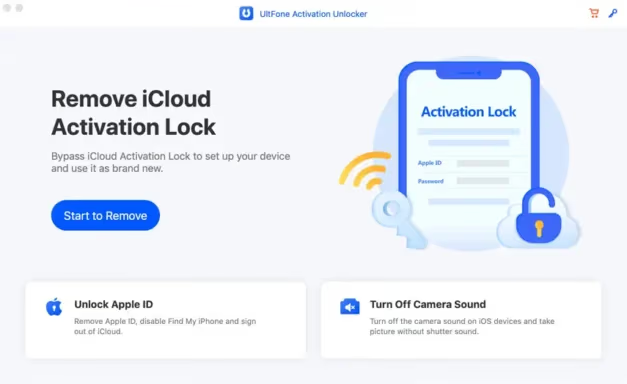
Key Features:
- Removes activation lock without requiring the Apple ID or password
- Supports a wide range of iOS devices and versions
- Works on both Windows and Mac systems
- Allows users to sign in to the App Store with a new Apple ID after removal
Pros:
- Fast and efficient unlocking process
- User-friendly interface
- High success rate on legacy iOS
Cons:
- Paid tool, which isn’t ideal for one-time users
Some links on this page are affiliate links, which means fone.tips may earn a commission at no extra cost to you.
#2. UltFone Activation Unlocker
UltFone Activation Unlocker handles iCloud activation locks without the previous owner’s involvement. The required jailbreak step adds a fair bit to total runtime compared with tools that skip it.
Key Features:
- Bypasses iCloud activation lock without the previous owner’s assistance
- Supports recent iOS versions, including iOS 14
- Compatible with almost all Apple devices
Pros:
- Straightforward step-by-step process
- Allows instant login to a new Apple ID after the bypass completes
- Regular updates to maintain compatibility
Cons:
- Requires jailbreaking the device, which may void your warranty
- Paid software
Try UltFone Activation Unlocker
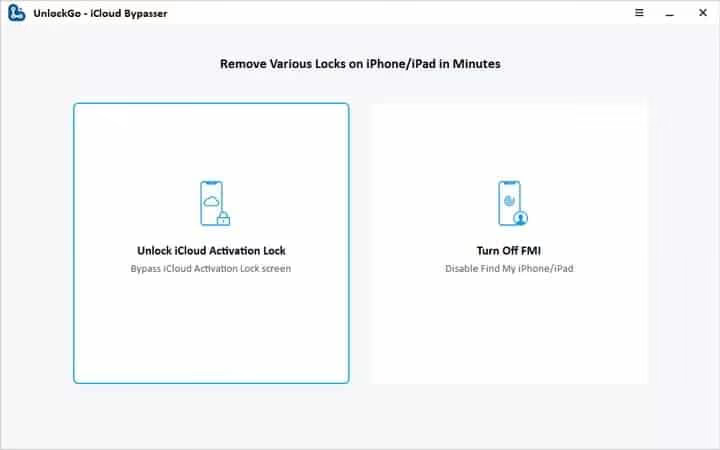
#3. iToolab UnlockGo (iCloud Bypasser)
iToolab UnlockGo earned a reputation as a reliable option for users juggling multiple Apple ID issues on the same device.
Key Features:
- Removes various types of Apple ID and iCloud accounts
- Supports a wide range of iOS devices and versions
- User-friendly interface with step-by-step guidance
Pros:
- Versatile tool for different unlocking scenarios
- Prioritizes user safety and data security
- Reliable customer support
Cons:
- Paid software with different pricing tiers
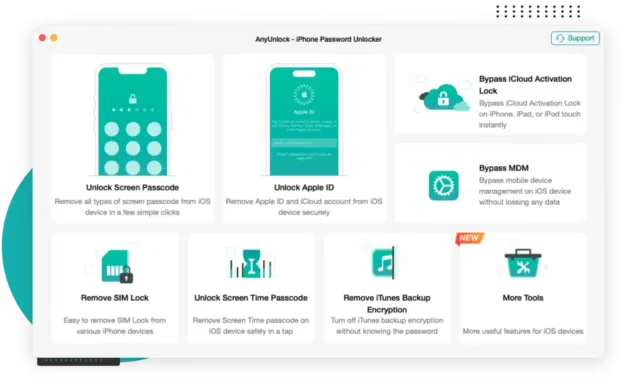
#4. AnyUnlock – iCloud Activation Unlocker
AnyUnlock leans on guided wizards and detailed support docs, which makes it our pick for non-technical users.
Key Features:
- Step-by-step guide for bypassing iCloud activation locks
- Supports various iOS devices and versions
- Regularly updated to maintain effectiveness
Pros:
- Intuitive interface suitable for non-technical users
- High success rate on legacy iOS
- Comprehensive customer support
Cons:
- Subscription-based pricing model
#5. iRemove Tools
iRemove Tools handles activation locks but ships with extras: SIM unlocking and bypassing remote management profiles.
Key Features:
- Removes Apple IDs without requiring a password
- Supports a wide range of devices, including recent iPhone models
- Offers additional features like SIM unlocking and bypassing remote management
Pros:
- Safe and legitimate for personal use on devices you own
- Versatile tool with multiple unlocking capabilities
- Various pricing plans available
Cons:
- May require jailbreaking for some devices
- Effectiveness can vary depending on the device and iOS version
#How Do You Choose the Right iCloud Erasing Bestool?
The right pick depends on your device model, iOS version, and your tolerance for jailbreaking. Across all five, three factors matter more than the rest: device compatibility, jailbreak requirement, and post-bypass App Store access.
- Compatibility: Confirm the tool supports your exact iPhone or iPad model plus iOS version before paying.
- Safety and legitimacy: Pick well-known tools with a long review history. Avoid no-name “free” bypasses.
- Features: Look for built-in data backup or SIM unlocking if your situation needs more than activation removal.
- Price: A one-time license usually beats a subscription unless you flip devices regularly.
- Customer support: Choose vendors with live chat or email response under 24 hours.
#Step-by-Step Guide to Using an iCloud Erasing Bestool
The exact steps vary by tool, but the workflow stays consistent. Here’s the pattern most of these tools follow.
- Download and install the chosen tool on your computer from the vendor’s official site only.
- Connect your locked iOS device to the computer using a USB cable.
- Launch the iCloud erasing tool and select the appropriate unlocking option.
- Follow on-screen instructions to put your device into recovery or DFU mode if required.
- Allow the tool to bypass the iCloud activation lock. The process takes anywhere from several minutes to a longer wait per device.
- Once complete, your device should be unlocked and ready for setup with a new Apple ID.
Tips for success:
- Charge your device to at least 50% before starting.
- Back up any important data before attempting to unlock the device.
- Don’t disconnect the USB cable mid-process.
#Risks and Precautions When Using iCloud Erasing Tools
These tools can help, but they aren’t risk-free. Apple’s iPhone preparation guide recommends that sellers sign out of iCloud and erase all content through Settings before transferring ownership. Anything else is a workaround.
- Legal considerations: Only use these tools on devices you own or have explicit written permission to unlock.
- Data loss: Some unlocking processes erase all data. Always back up first.
- Security risks: Only download tools from official sources to avoid malware bundled with cracked installers.
- Warranty implications: Third-party tools and jailbreaking may void your warranty and disqualify you from AppleCare service.
- iCloud features after bypass: Bypassed devices typically can’t sign back into iCloud, FaceTime, iMessage, or the App Store using the original Apple ID.
#Alternatives to iCloud Erasing Bestools
Before reaching for a third-party tool, work through the official options first. Apple’s device removal documentation confirms that the original owner can remove a device from their iCloud account remotely in seconds. That’s the cleanest path.
- Contact Apple Support: With proof of purchase (receipt, original box, or Apple’s records), Apple can remove the activation lock for you.
- Use Find My iPhone: If you have access to the Apple ID associated with the device, remove it via iCloud.com under Find My.
- iCloud unlock service: Some professional services offer iCloud unlocking. This can be a safer option if you’re uncomfortable running software yourself; verify legitimacy first.
#Common iCloud Issues and Solutions
When working through activation issues, you’ll often hit related problems. Here are the most common ones.
- Uploading to iCloud paused error: Usually caused by network drops or storage that’s full. Restart, check your connection, or free up iCloud space.
- How to see what’s in my iCloud: View iCloud contents by signing in to iCloud.com or checking the iCloud section in your device’s settings.
- iCloud removal service: Professional services exist, but vet them carefully. Reputable ones offer refund policies if removal fails.
#Bottom Line
If you own the device and have proof of purchase, contact Apple Support first. That’s the single safest path and it costs nothing if you have your receipt or original packaging.
If Apple can’t help and you legally own the hardware, Tenorshare 4MeKey is the strongest pick for 2026. It has one of the shortest runtimes of these tools, doesn’t require jailbreak on most iOS versions, and ships with a 30-day refund window. Pick UltFone Activation Unlocker or iToolab UnlockGo only if 4MeKey rejects your specific device model.
Never run these tools on a phone you didn’t pay for. Activation Lock exists to stop stolen-device resale, and bypassing one you don’t own is illegal in the US, UK, and most of the EU.
#Frequently Asked Questions
Are iCloud erasing tools legal to use?
They’re legal on devices you own outright. Using them on a phone that belongs to someone else, without their explicit permission, violates federal computer fraud laws in the US and equivalent statutes in most countries. Keep your proof of purchase handy in case Apple or law enforcement ever asks.
Will using an iCloud erasing bestool delete my data?
Often yes. Back up anything you can reach before starting.
Can I use these tools on any iOS device?
No, and the compatibility gap is wider than vendors usually admit. Newer iPhones built on the A12 Bionic chip or later are far harder to bypass than older A7 through A11 devices. iOS 17 and iOS 18 have closed off most exploits that worked on iOS 13 through 15. Check the vendor’s exact-model list and read recent reviews before paying.
Is it safe to use cracked versions of these tools?
No. Cracked installers are the most common delivery method for keyloggers and ransomware targeting Apple users.
How long does an iCloud bypass take?
Total runtime varies depending on the iOS version and whether jailbreaking is required. Jailbreak-based tools add extra time for the prep step alone.
Will Apple notice if I bypass the activation lock?
Yes. Apple’s servers continue to flag the device as activation-locked even after a bypass. iMessage, FaceTime, and iCloud sync usually won’t work normally because Apple refuses to bind a new Apple ID to a locked record. The device runs in a sandboxed state with usable hardware but crippled cloud features.
Can the original owner re-lock my device after a bypass?
Yes. If they still have access to the linked Apple ID and the device ever connects to Apple’s servers under that account, they can mark it lost again.
What should I do before buying a used iPhone?
Ask the seller to sign out of iCloud and erase the device in front of you (Settings, then General, then Transfer or Reset iPhone, then Erase All Content and Settings). After the erase, the setup wizard shouldn’t show an activation lock prompt. If it does, walk away.

Apple Siri Settlement: Who Qualifies and How to Claim
Apple's $250 million Siri settlement covers iPhone 15 Pro and iPhone 16 models bought June 2024 to March 2025. See who qualifies and how claims work.

iOS 26.6.1 Security Update: What Apple Fixed and Who Gets It
Apple released iOS 26.6.1 on August 17 with 29 security fixes, including an IPSec interception bug. See what it patches, who gets it, and how to update.

iPhone Adaptive Power: How It Works and When to Use It
Learn how iPhone Adaptive Power works, which models support it, what it changes, and when Low Power Mode is still the better battery-saving choice.

How to Transfer Data to a New iPhone Without iCloud
Move everything to your new iPhone without iCloud: Quick Start device-to-device transfer, wired migration, and encrypted Finder or iTunes backups.