How to Whisper on Twitch in 2026: Web, Mobile, and /w
Twitch whispers send private DMs using the /w chat command, the Whispers icon, or the mobile app. Step-by-step paths for web, iOS, and Android.
Quick AnswerTo whisper on Twitch, click another user's name in chat and pick Whisper, or type /w username message in any chat box. Both web and mobile apps support it, but you need a verified phone number under Settings > Security and Privacy before any whisper leaves your outbox.
Twitch whispers are private one-to-one messages that skip the public chat. They work the same way on the desktop browser, the iOS app, and the Android app, and each method here lands the message in the recipient’s inbox within seconds. The catch: since 2021, Twitch has required a verified phone number on the sender’s account, and late-2024 changes extended that gate to most chat actions.
- Twitch whispers require a verified phone number on the sender’s account, set under
Settings>Security and Privacy. - The /w command works in any chat: type /w username your message, then press Enter.
- Twitch caps senders at 40 unique recipients per day, 3 whispers per second, and 100 per minute.
- The first whisper to a new recipient is capped at 500 characters; once they reply, the cap rises to 10,000.
- Turning on Block Whispers from Strangers limits incoming whispers to friends, follows, subs, mods, and editors.
#How does the whisper feature work on Twitch?
A whisper is Twitch’s name for a direct message. Both sides see the conversation in a thread that sits separate from the public chat scrolling next to a stream. The thread persists across web and mobile, so a reply you start on a phone shows up the next time you sign in on a laptop.
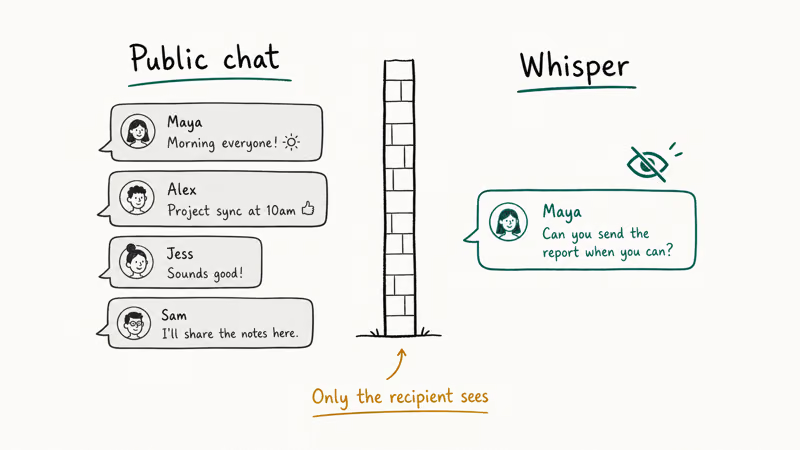
That sounds simple. The behavior changed in 2021 when Twitch added phone verification as a precondition for sending whispers, mostly to slow scammers and view-bot operators who were spamming raid links into strangers’ inboxes.
Twitch’s developer page states that senders are capped at 40 unique recipients per day, 3 whispers per second, and 100 per minute, and those caps apply equally to verified bots with no path to raise them. According to Twitch’s developer documentation, every account that wants to send a whisper has to add and verify a phone number first. The platform has been tightening these spam controls since Amazon acquired Twitch for $970 million in 2014.
There’s one quirk worth knowing. Twitch’s developer docs state that the API may silently drop whispers it suspects of policy violations, even when it returns a success status to the sender. If a whisper of yours seems to vanish, the recipient probably never saw it. If you also keep hitting Twitch error 2000 on the same browser, fix the network or extension issue first before troubleshooting whispers.
#How to send a whisper from a desktop browser
This is the path most people use. The steps are identical across Chrome, Firefox, and other major browsers on both Windows and macOS.
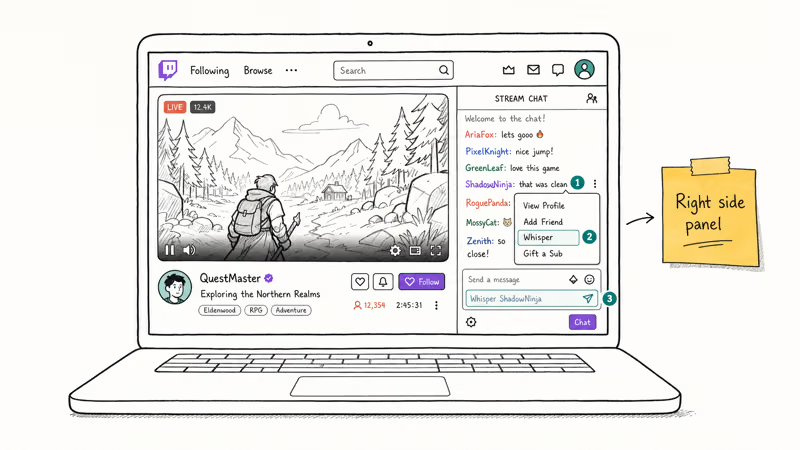
- Open Twitch.tv and sign in.
- Open any live channel where the person you want to message is in chat.
- Click their username in the chat panel.
- In the popup card, click Whisper.
- Type your message in the small chat window and press Enter.
Don’t see the option? You’re missing the phone-verification step from the introduction. Go to Settings > Security and Privacy > Contact, add your phone number, and enter the SMS code Twitch sends. The Whisper button reappears within a minute or two.
If the user isn’t currently in any active chat, click the Whispers icon in the top bar (the small speech bubble between Notifications and Get Bits). The panel that opens lets you start a thread by typing the username. Once the first message goes out, replies show up in that same panel within a second.
#How to send a whisper on iPhone or Android
Mobile is slightly different on each platform, but the underlying steps match. The flow is the same on current versions of the Twitch app for both iPhone and Android.
Android steps:
- Open the Twitch app and sign in.
- Tap the person’s avatar in the chat scroll.
- Tap Whisper on the profile card.
- Type the message and tap the send arrow.
iPhone steps:
- Open the Twitch app and sign in.
- Tap the person’s avatar in the chat scroll.
- Tap the three-dot icon at the top right of the profile card.
- Pick Whisper from the action sheet.
- Type the message and tap the send arrow.
To start a whisper without picking through chat, tap your profile avatar in the upper-left corner, then Whispers. That’s where every thread you’ve sent or received lives, including ones started on a desktop. While you’re in the app, learning how to clip a moment on Twitch is worth bookmarking too. Clips are a faster way to hand someone a highlight than describing it in a whisper.
#Using the /w command without leaving the stream
If you don’t want to lose your spot watching a stream, the chat command is the fastest method. According to Twitch’s chat commands documentation, typing /w username message in any chat box opens a whisper to that person without taking you out of the channel.
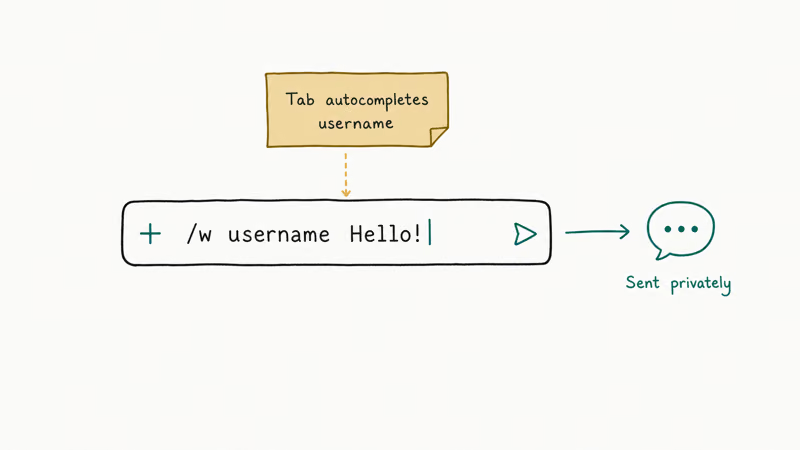
The format:
/w istarapps Hey, that strat at minute 38 was wild. Can you share the build?Press Enter and Twitch routes the message to that person’s whispers panel. Their reply appears in your chat box once they answer. The command works the same in both the embedded chat panel and the popout chat window.
A few rules to keep in mind:
- The first whisper to a new recipient maxes out at 500 characters. Once they reply once, the cap on each later message rises to 10,000 characters.
- Usernames aren’t case-sensitive:
/w iStarAppsand/w istarappsboth reach the same account. - The command doesn’t work from inside a Twitch Studio dashboard chat preview, only from a live channel chat box.
If the recipient is offline, the message still queues. They’ll see it the next time they open Twitch on any device.
#What stops your whispers from going through?
Most “my whispers don’t work” complaints trace back to one of three causes. Each one fails silently, with no error shown to the sender, which is what makes them confusing.
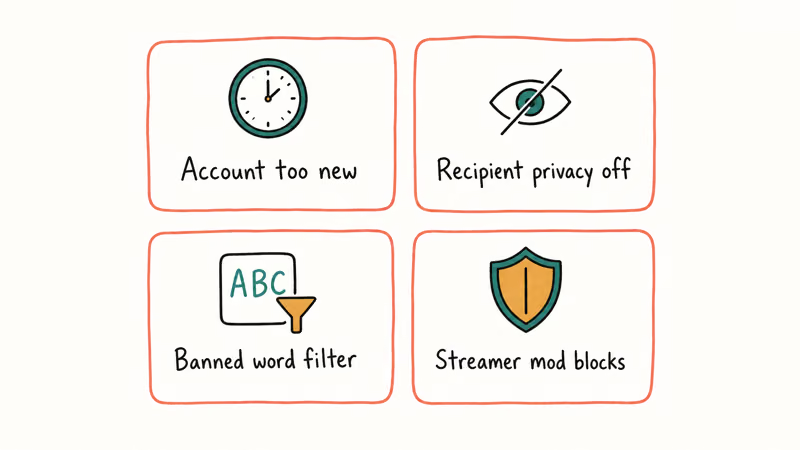
No verified phone number. Twitch’s phone and email verification page confirms that phone verification is the gate for sending whispers, and the platform extended that requirement to broader chat-spam controls in late 2024. Without it, the send button is hidden or the API silently rejects the call. Add the number under Settings > Security and Privacy > Contact.
The recipient blocks whispers from strangers. That toggle is on by default for some account ages, particularly accounts under 30 days old. Their inbox accepts whispers from friends, accounts they follow, subscribers, moderators, and channel editors only. If your account doesn’t fit one of those categories, your whisper goes nowhere and you get no error.
Daily or per-minute cap reached. Streamers and large community managers hit the 40-recipient daily limit most often. Wait out the day; the counter resets at midnight UTC.
A fourth, rarer cause: Twitch’s anti-spam layer holds new accounts under a quiet review window of about 24 to 48 hours. Building chat history in public channels, including learning how to cheer with bits on Twitch or simply chatting in streams you watch, tends to shorten that window.
#Privacy settings that block whispers
Whispers cut both ways. If you don’t want strangers DMing you, Twitch gives you two switches under Settings > Security and Privacy > Privacy.
Block Whispers from Strangers. Default off for older accounts, default on for accounts under 30 days. With it on, only friends, accounts you follow, accounts you subscribe to, your moderators, and your editors can whisper you. Everyone else gets a silent fail. The sender sees nothing on their end, and the message never reaches your inbox.
Block Hyperlinks in Whispers. A separate toggle that strips link previews and clickable URLs from incoming whispers. It’s worth leaving on for any account that follows large channels, since clipboard-bait scams almost always rely on a clickable link.
For streamers who actively need open whispers, leaving Block Whispers off and using a moderation bot to filter the inbox tends to work better than blanket blocking. Twitch’s safety center recommends layering channel mods plus AutoMod over a global block. Pulling Twitch chat logs from a moderator’s perspective is the easiest follow-up if you spot something off in a community.
#Bottom Line
For most viewers, the fastest whisper path is: verify your phone number once, then use /w username message from any chat box. It avoids the popup card and works in every major browser. Streamers coordinating a small team should pair Twitch with Discord, since the 40-recipient daily cap makes broad announcements impractical. First-time community owners should also walk through the steps for setting up donations on Twitch before relying on whispers as a support channel.
#Frequently Asked Questions
Do I need to follow someone to whisper them on Twitch?
You don’t need to follow them, but they have to allow whispers from non-followers. If they’ve toggled on Block Whispers from Strangers, your message will silently fail.
Can I send a whisper to multiple people at once?
No. Twitch whispers are strictly one-to-one, so the same message to ten people means writing ten separate whispers. Twitch’s per-day cap of 40 unique recipients makes group blasts impractical anyway.
Why is the Whisper option missing when I click someone’s name?
The most common reason is that you haven’t added a verified phone number to your account. Twitch hides the Whisper button on accounts that haven’t completed phone verification under Settings > Security and Privacy. Add and confirm a number, refresh the page, and the button reappears within a minute or two.
Are Twitch whispers encrypted?
Whispers travel over HTTPS, so they’re encrypted in transit. They aren’t end-to-end encrypted, which means Twitch staff and law enforcement with a valid request can read them. Don’t share passwords, payment information, or two-factor codes in a whisper.
How long are old whispers kept?
Twitch keeps whisper history indefinitely on its servers. You can scroll back as far as the conversation goes from the Whispers panel on web or mobile. The history is per-account, so signing in on a new device pulls down the same threads. Deleting your account removes the visible history through Twitch’s account deletion flow, though the platform may retain backend copies for a period defined in its privacy policy.
Can a streamer block me from whispering them specifically?
Yes. Any user can block another user from the profile card or from Settings > Security and Privacy > Blocked Users. Once you’re blocked, your whispers, mentions, and chat messages won’t reach them.
Why can’t I receive whispers from someone I just met in chat?
Your account probably has Block Whispers from Strangers turned on. New accounts often have it on by default. Toggle it off under Settings > Security and Privacy > Privacy if you want chat acquaintances to be able to message you privately.

Google Messages Error 3100: Why RCS Is Broken on Galaxy
Google Messages RCS error 3100 hits Galaxy owners after phone or carrier switches. Google told 9to5Google a fix is coming. Here's what actually helps.

Is This Bank App Real? Spot a Fake App on Your Home Screen
A bank app can land on your home screen from a web page with no install warning. Learn the checks that tell a real banking app from a phishing web app.

Apps Crashing After iOS 27 Update? Fix Order (2026)
Apps crashing after the iOS 27 update? Update the app in the App Store first, then offload and reinstall to clear stale cache, then restart. The fix order.

Do AI Translation Earbuds Work Offline? What to Know
Do AI translation earbuds work offline? A few do with downloaded language packs, but most need the cloud. Here's what works offline and what you give up.