How to Move in Pokemon Go without Walking (iOS & Android)
Play Pokemon Go from one place with Incense and other official features. Learn why GPS spoofing on iOS or Android risks account strikes and bans.
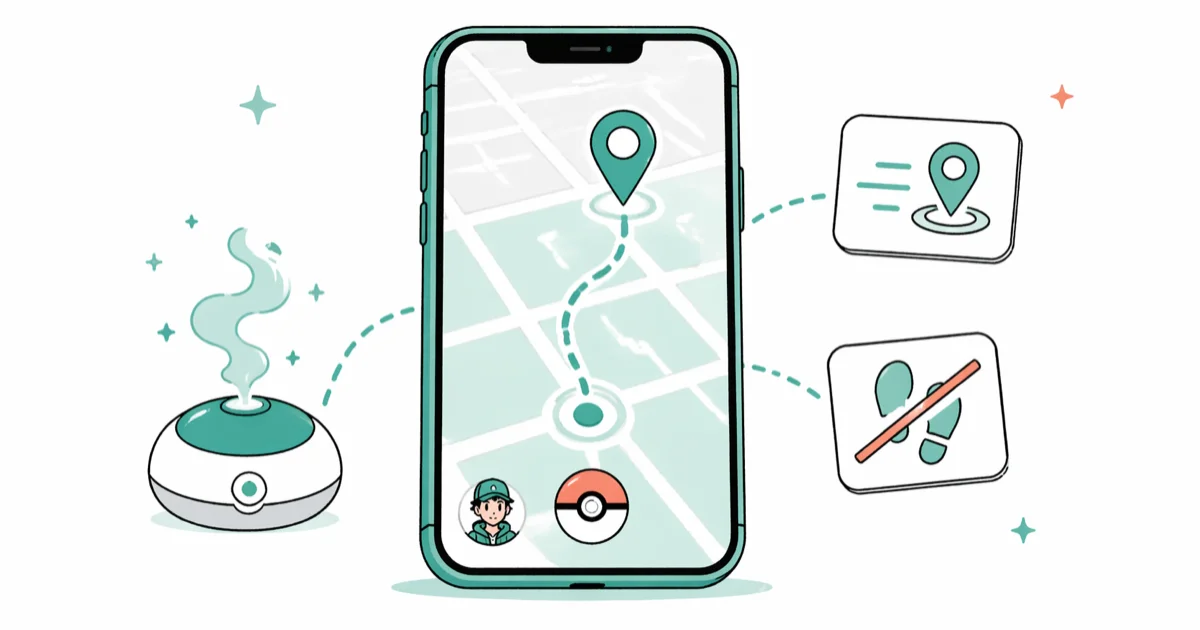
Quick AnswerIncense attracts Pokemon where you are, while Adventure Sync credits real steps at home. GPS-spoofing tools can move your avatar, but they violate Niantic rules and can lead to account termination.
You can play parts of Pokemon Go without physically walking by using official features such as Incense. GPS-spoofing tools can also move an avatar, but using them with the game violates Niantic’s rules and puts the account at risk.
Before changing these settings, use the steps only on your own device, computer, or account, or with explicit permission from the owner. Unauthorized access can violate law, privacy rights, and platform terms, so don’t use this guide to bypass someone else’s controls. When available, start with the official support option, built-in settings menu, or vendor documentation before trying manual fixes, especially if the device or account belongs to work, school, or another person.
- Desktop and Android GPS tools can falsify the position Pokemon Go reads
- Android mock-location controls are intended for authorized app testing, not bypassing a game’s rules
- Niantic can escalate location-spoofing enforcement from a warning to permanent account termination
- Incense is zero-risk: it draws Pokemon to you for 60 minutes with no location change needed
- Adventure Sync counts pedometer steps, so pacing around home still hatches eggs
#Can You Really Play Pokemon Go without Moving?
Yes. Niantic designed Pokemon Go to reward outdoor movement, but several legitimate and third-party methods let you play from a fixed location. According to Niantic’s official support page, the game uses your device’s GPS signal to determine your position. Any app that modifies that GPS signal will change your in-game avatar’s position.
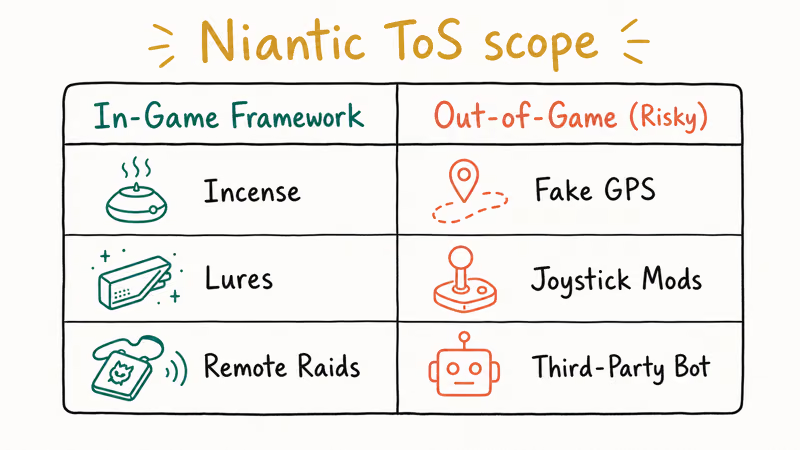
Niantic actively detects GPS spoofing. Their system flags accounts that move at impossible speeds, for example appearing in Tokyo and then Sydney 10 minutes later. A first offence typically results in a 7-day soft ban where you can’t collect items from PokéStops. Repeated violations lead to permanent account termination.
According to Niantic, a first confirmed offense brings a 7-day warning; its Three-Strike Policy page documents the sequence.
The supported approach is to use Incense, Adventure Sync, Remote Raid Passes, and other official features without falsifying the phone’s location.
Remote Raid Passes cover eligible distant raids without changing your coordinates. Incense brings spawns to your real position, and Adventure Sync credits actual movement recorded by the phone. None unlocks every regional Pokemon, but each keeps the game’s location stream tied to real travel.
#iOS Location Tools and False Coordinates
There’s no supported way to falsify GPS for Pokemon Go on iPhone. Desktop location tools can route simulated coordinates to an iPhone over USB, while jailbreaking adds separate device-security risks. Developers may use location simulation with an app they own, but Pokemon Go isn’t an authorized test target.
#Method 1: Tenorshare iAnyGo
iAnyGo is one of the desktop tools commonly discussed for changing an iPhone’s reported position. That product category doesn’t make spoofing safer for a Pokemon Go account.
The desktop client connects over USB and can replace the coordinates that location-aware apps read. A developer can use that behavior to check geofences, map states, or regional UI in a dedicated test build. Sending those false coordinates to Pokemon Go instead turns the same feature into a Terms of Service violation.
Route simulation can feed a sequence of changing coordinates to an app. A walking-looking path, variable pace, or set of waypoints does not turn falsified Pokemon Go movement into legitimate play. We don’t provide speed targets or movement patterns intended to reduce detection.
Desktop location changers also depend on device trust and current iOS support. Those compatibility details matter for authorized app QA, but they don’t alter Niantic’s rules or the consequences for a Trainer account.
#Method 2: iToolab AnyGo
iToolab AnyGo is another desktop location changer with teleport and joystick-style controls.
Like other tools in this category, it can supply a fixed position or a changing route to software on the connected iPhone. Keep that use inside a development or QA workflow for an app you own and a device you’re authorized to test.
Joystick mode changes coordinates continuously rather than reporting a single fixed point. Neither continuous movement nor instant relocation is a compliant way to play Pokemon Go, and no simulated pace should be treated as protection from enforcement.
#Android Mock Locations and App Testing
XDA’s Android mock-location overview covers developer testing.
Use Android’s developer controls only with an authorized test build. A production game can reject mock data, record impossible movement, or take action under its own account rules.
Fake GPS Location Spoofer is an example of an app that supplies mock coordinates. Installing it from an app store does not make its use with Pokemon Go approved.
We don’t provide a Pokemon Go setup sequence.
Some Android tools add joystick or route controls, while rooted devices may expose more system-level options. Hiding root, mock-location status, or Developer Options from a third-party app is an evasion technique, so it isn’t covered here.
The mock location app guide explains the developer feature and its legitimate testing scope.
#How Adventure Sync Earns Distance at Home
Adventure Sync uses your phone’s built-in pedometer to count steps and convert them into in-game distance. No GPS required, no spoofing needed.
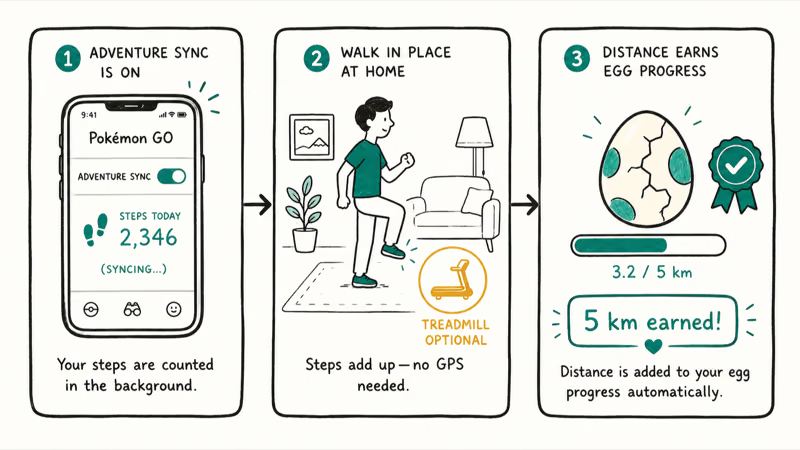
According to Niantic’s Adventure Sync FAQ, the feature requires Apple Health on iOS or Google Fit on Android. It runs in the background even when Pokemon Go is closed, which means pacing around your apartment while watching TV still counts toward egg hatching progress and Buddy Candy earning. That’s a genuine zero-risk way to earn rewards without leaving home.
The limitation: Adventure Sync won’t help you reach new PokéStops or gyms. You still need GPS movement, real or spoofed, to catch Pokemon in different areas.
#Using Incense to Play without Moving
Incense is the easiest option. No apps, no setup, zero ban risk.
Tap the Pokéball at the bottom of the screen, go to Items, and select Incense. Tap it once to activate. A pink swirl appears around your avatar and a 60-minute countdown begins.
Wild Pokemon spawn near you at roughly 1 every 5 minutes while stationary. According to the Pokemon Go Live blog, Niantic has added themed incense variants that attract specific types during events. The standard blue incense attracts random Pokemon, while event-specific incense can target rare species you’d otherwise need to travel to find.
Use Incense only at your real position.
#What Happens If Niantic Detects GPS Spoofing?
Soft ban is the most common outcome. PokéStops spin but give no items for 7 days, and Pokemon flee immediately on first throw.
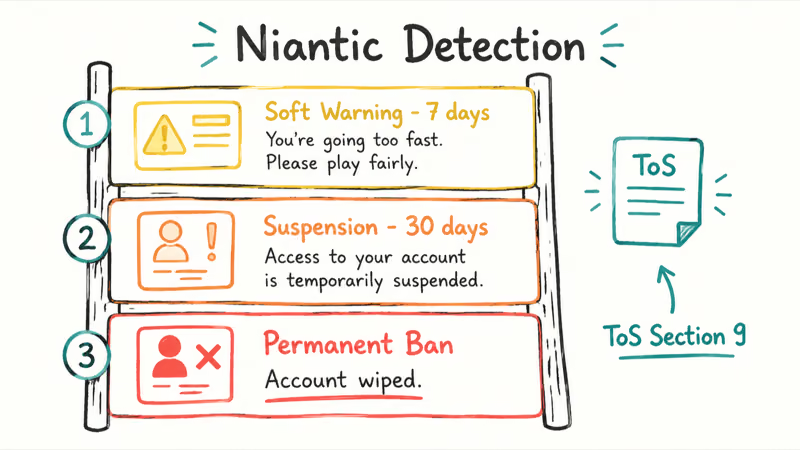
Permanent ban follows repeated violations. Niantic’s terms of service explicitly prohibit GPS spoofing. There’s no appeal process once the account is terminated.
No cooldown is safe.
Built-in cooldown timers don’t change Niantic’s rules. Niantic’s Gameplay Fairness Policy prohibits false location data, and our soft-ban explainer covers the consequences without a distance-to-wait table. We don’t direct players to a joystick or modified client that times interactions after a teleport.
A second account or separate device does not make spoofing compliant. Don’t move the same prohibited behavior elsewhere to protect a primary account.
#Bottom Line
Start with Incense and Adventure Sync. They cover stationary catching and real indoor activity without falsifying location. Regional Pokemon don’t have a zero-risk spoofing shortcut; wait for official events, trade with another player, or use a Pokemon Go accessory during real travel rather than relying on a cooldown window, simulated walking speed, or a location changer.
Pokémon GO Guide
#Frequently Asked Questions
Can you move in Pokemon Go without any app?
You can use incense and Adventure Sync without any third-party app. Incense attracts Pokemon to your location for 60 minutes, and Adventure Sync counts steps from your phone’s pedometer without requiring GPS movement. Neither method lets you reach PokéStops or gyms in new areas, though.
Is GPS spoofing safe for your Pokemon Go account?
No. There’s always a ban risk.
Does iAnyGo work on the latest iPhone?
iAnyGo supports current iPhone models and recent iOS versions without a jailbreak, but compatibility does not make using it with Pokemon Go safe or compliant.
Should you enable Developer Options for Pokemon Go spoofing?
No. Android’s mock-location controls are for authorized app testing. Don’t select a spoofing provider for Pokemon Go or hide Developer Options from the game.
What is the cooldown rule in Pokemon Go spoofing?
There is no official safe cooldown for spoofing. Distance-to-wait tables and claims that only post-jump interaction triggers detection are evasion guidance, not an exception to Niantic’s rules. False coordinates can put the account at risk regardless of the delay.
Can Fake GPS on Android work without rooting?
Fake GPS apps can run on some unrooted Android devices through the operating system’s mock-location controls. Root access may expose more system options, but hiding root or Developer Options from an app is detection evasion. Neither rooted nor unrooted spoofing is a supported Pokemon Go workflow.
Does incense work better near populated areas?
Incense works at your real position and does not need a fake-GPS setup. Moving to a busier area in person may put you near more ordinary map spawns, while Incense continues to attract its own spawns.
Why do Pokemon flee immediately after my teleport?
This is the classic soft ban symptom. When Niantic detects that you’ve teleported too quickly, all Pokemon will flee on first throw and PokéStops won’t give items. Stop using the spoofing method; a waiting period is not a safe way to continue it.
Pokemon GO GPS Signal Not Found: 7 Proven Fixes (2026)
Pokemon GO GPS signal not found? Seven ordered fixes for Android and iPhone covering precise location, permissions, mock-location, and more.
TweakBox Pokemon GO Review: Does It Still Work in 2026?
TweakBox Pokemon GO usually fails. Learn why, what Niantic's ban policy means for your account, and which official alternatives to use instead.
How to Auto Walk in Pokemon GO: Safe and Risky Methods
Learn how Pokemon GO Adventure Sync credits real activity, why fake-step and GPS tools risk account strikes, and which official options to use.
How to Find Magikarp Nests in Pokemon GO (2026 Guide)
Find Magikarp nests in Pokemon GO using community maps, water biomes, and rainy weather boosts. Plus candy farming tips to evolve Gyarados fast.