How to Use Google Find Hub: Setup + Find Lost
Set up and use Google Find Hub to locate, ring, lock, or erase your own Android phone, including offline finding and powered-off Pixel support.
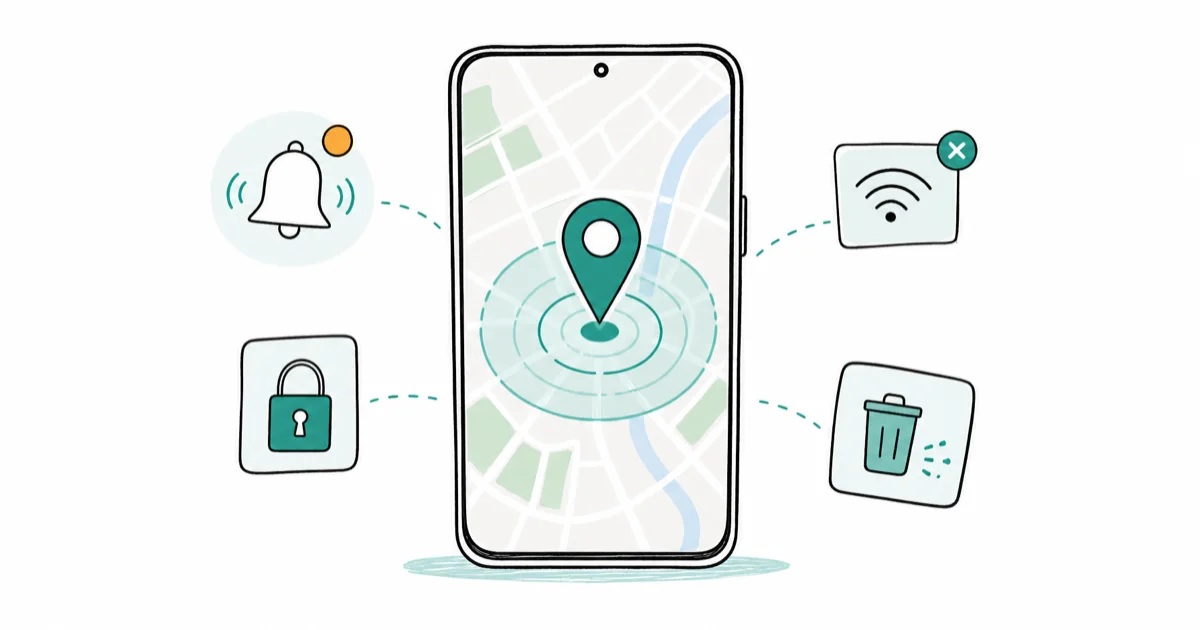
Quick AnswerSign in at android.com/find with the Google account on your phone, then ring, lock, locate, or erase it. Turn on the Find Hub network in Settings so it works offline too.
Google Find Hub is the official Android tool for finding a phone you own. It rings on silent, locks the screen, and wipes the device remotely. Since the April 2024 network relaunch, it can surface your phone when it’s offline too.
This guide covers finding your own Android phone, or a phone you have explicit permission to recover. Tracking a device that doesn’t belong to you, without the owner’s consent, is illegal in most jurisdictions and violates Google’s terms of service. Don’t confront a stranger you spot on the map. File a police report instead.
- Google Find Hub works in any browser at android.com/find or through the Find Hub app on another Android
- The Find Hub network, launched in April 2024, finds your phone offline through encrypted Bluetooth pings from nearby Androids
- Pixel 8 and newer can stay findable for hours after the battery dies if the network is turned on
- The four core actions are Locate, Play Sound (rings for 5 minutes even on silent), Secure Device (lock + sign-out + lockscreen message), and Erase Device
- Google renamed Find My Device to Find Hub in May 2025; the underlying service and android.com/find URL are unchanged
#How to Set Up Google Find Hub on Your Phone
Setup takes about two minutes. Find Hub is on by default on most Android 9+ phones. The network opt-in is the switch most people miss.
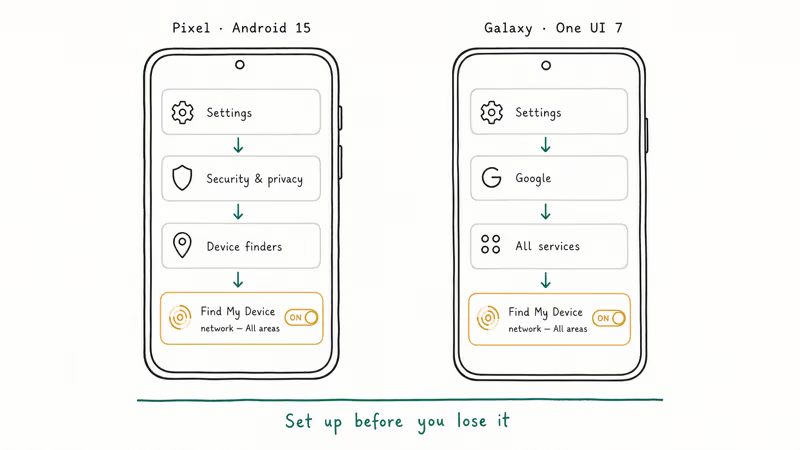
That opt-in is what makes your phone findable when it’s offline. According to Google’s Find Hub terms, the service shows only devices tied to the Google account you sign in with.
On a Pixel running Android 15, the path is Settings > Security & privacy > Device finders > Find Hub. On Samsung Galaxy with One UI 7, it’s Settings > Google > All services > Find Hub.
Open it and confirm three things. Use Find Hub must be on (the master switch that lets your Google account see the phone). Find Hub network must be set to With network in all areas (the setting that powers offline finding). And the Google account shown must be one you can sign into from another device.
According to Google’s support page, location services, Wi-Fi, mobile data, and an active Google account connection must all be enabled for live tracking. The network finds you even when those are off, but only after you’ve opted in.
Do one dry run now. Sign in, locate, ring. That’s it.
#How Do You Find Your Phone With Google Find Hub?
You have two entry points. The web at android.com/find or the Find Hub app on a different Android. Both use the same Google account and show the same controls. On iPhone or a borrowed device, the web is the only path because the app is Android-only.
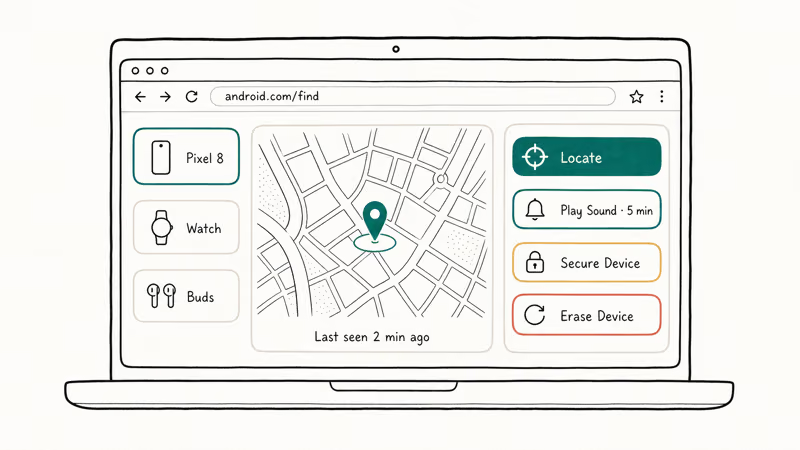
Open the page in any browser, sign in with the Google account on your missing phone, and Google shows every device tied to that account on the left rail. Pick the phone you want. The map centers on its last known position, with four buttons stacked on the side:
- Locate, which refreshes the position
- Play Sound, which rings the device at full volume for 5 minutes, including when the ringer is silent
- Secure Device, which locks the screen, signs the device out of your Google account, and lets you add a lockscreen message and callback number
- Erase Device, which factory-resets the phone over the air
Play Sound is the right first move when the phone may be nearby. It doesn’t lock, erase, or change anything on the device.
Save Secure Device for a longer-distance loss. Erase Device goes last, only when the phone seems gone for good.
#How the Find Hub Network Works
Google’s current Find My Device page is the live source for the Android lost-device network. The simplest way to picture it: compatible Android devices can help relay encrypted location signals for nearby offline devices and trackers.
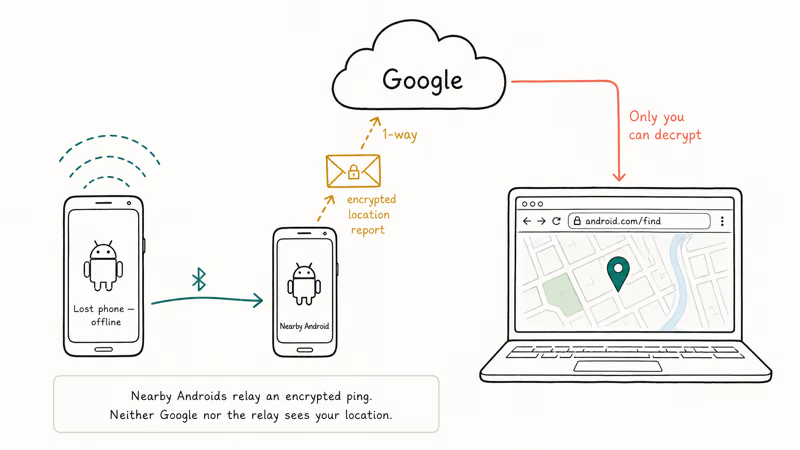
The encryption runs one-way. Google can’t see where your phone sits. The relaying Android can’t tell whose phone it’s relaying. You sign into android.com/find and Google decrypts the most recent report for you alone.
It’s the same crowd-finding model Apple’s Find My network uses. That’s why a Bluetooth-only device with no GPS without internet can still appear on the map.
Two reasons the network might fail. First, your phone needs to be in range of at least one other modern Android with the network turned on, which is dense in cities and sparse in remote areas. Second, the phone itself must have opted into the network before going offline.
#Ring, Lock, or Erase Your Android Phone Remotely
The three remote actions trade reversibility for security. Use the lightest one that solves your problem.
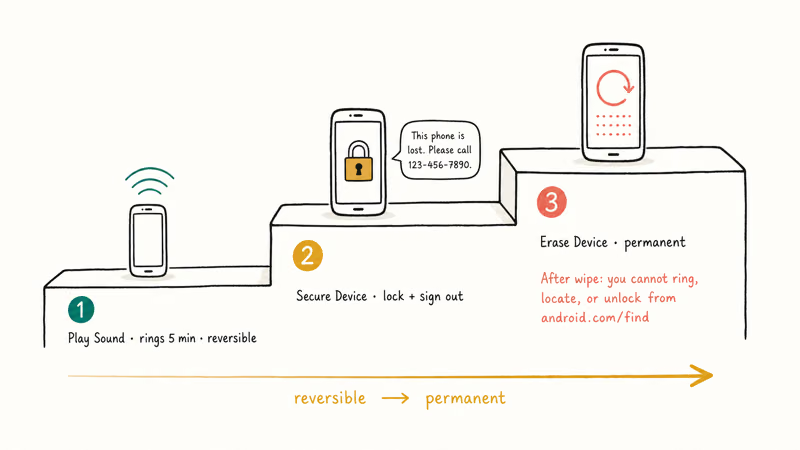
Play Sound is reversible and harmless. It rings at full volume for 5 minutes, even on silent. Tapping the power button stops it. Use this when the phone is plausibly in your house, your bag, or a friend’s car.
Secure Device locks the screen with your existing PIN, fingerprint, or face unlock. It signs the device out of your Google account too, which kills downloaded mail and Drive content. A custom message and phone number appear on the lockscreen for whoever finds it. The screen lock survives a battery pull or a network drop, so even an offline phone stays inaccessible until you sign in.
This is the right move when the phone is gone but you’re not yet ready to wipe it.
Erase Device is permanent. It triggers a full factory reset over the next available connection, which drops the phone out of Find Hub entirely because there’s no signed-in account left. Erase only when the phone is gone for good. Once the wipe runs, you can’t ring, locate, or unlock it from android.com/find ever again.
#Can You Find an Android Phone That Is Turned Off?
Yes, with two big caveats.
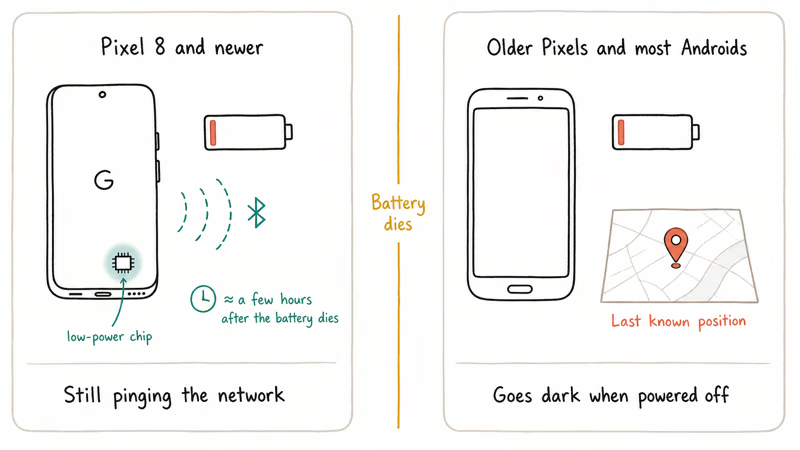
Google states that on Pixel 8 and newer, the network keeps responding for several hours after the battery dies, thanks to a dedicated low-power chip, which Google’s Find My Device support page documents. Older Pixels and most other Androids stop responding the moment they power off. What you’ll see on the map is the last position the phone reported while it was still on.
For a phone already dead before you start looking, check the map and write down the last known location. Then call the carrier to report the line and contact local police with the IMEI. We walk through the full cross-device playbook in our guide to find a phone that is off. Our companion guide on how to find a dead iPhone covers the Apple side.
The single most useful prep step is the Find Hub network opt-in, set to “all areas”. Without it, the moment your phone leaves cell or Wi-Fi range, it stops appearing on android.com/find entirely.
#Find Hub vs Find Hub: What Changed in 2024-2025
Google’s current Find My Device page is the safer live source than old rename posts. The app, web view, and notifications may use Find Hub language in some regions, but the underlying service still centers on your Google account, remote actions, and the encrypted crowd network behind it.
What did change is scope. Find Hub now sits as a single place to track phones, watches, earbuds, Bluetooth tags, and (in some regions) shared family device locations. If your phone shows “Find Hub” in Settings and your laptop shows “Find Hub” on the web, both are the same service mid-rollout. Use whichever name your phone uses; search engines still rank both terms.
The parallel guide for iPhone is our track a lost phone walkthrough, which covers Find My on the Apple side.
#Track Bluetooth Tags and Accessories With Find Hub
The Find Hub network was built to find more than phones. It also locates supported Bluetooth tags, headphones, and trackers tied to your Google account. Chipolo POP, Pebblebee Clip, and Motorola Moto Tag all ride the same network and show up as their own pin on android.com/find. For cross-platform shoppers, our Samsung SmartTag 2 vs AirTag breakdown covers which side each tag ecosystem actually serves.
Setup matches a phone. Pair the tag, register it, confirm it’s on the network. Each tag shows up as its own pin with a Play Sound button. We compare hardware in our best Bluetooth tracker for Android guide.
One safety note. Google built unwanted-tracker alerts into Android 6.0 and later, so the same network that finds your tag will alert other people if your tag travels with them for too long. If you ever see one of those alerts on your own phone, walk through how to spot an unwanted tracker before assuming it’s malicious.
#What to Do When Find Hub Can’t Locate Your Phone
If android.com/find shows your phone as Offline, Last seen 3 hours ago, or No location available, work down this short checklist:
- Is the phone signed into the right Google account? Find Hub only sees devices tied to the account you’re signing in with. If you recently swapped accounts on the phone, the older account no longer has access.
- Was the Find Hub network turned on before the phone went offline? Network opt-in is what lets nearby Androids relay your position. Without it, you’re limited to the last live position the phone reported.
- Did you wait at least 5 minutes after triggering Locate? The first refresh can take a couple of minutes if the phone is offline, because Google waits for a network relay rather than pinging the device directly.
- Is the phone in Airplane Mode or out of cell + Wi-Fi range with no nearby Androids? A phone in the middle of a national park without the network opt-in is effectively invisible until it reconnects.
None of those resolve it? File a police report with the IMEI (it’s on the Google account’s device page) and contact your carrier to suspend the line. Erase Device is still worth running. The moment the phone connects to any network, it’ll wipe itself before a stranger can sign into your accounts.
#Bottom Line: Turn It On Before You Lose Your Phone
The single switch most people miss is the network opt-in, set to “all areas”. Pair that with a five-minute dry run today (sign in, locate, tap Play Sound) and you’ll know the recovery flow works before you actually need it.
Samsung Galaxy Guide
#Frequently Asked Questions
How do I set up Google Find Hub?
Open Settings > Security & privacy > Device finders > Find Hub on a Pixel, or Settings > Google > All services > Find Hub on a Samsung Galaxy. Turn on Use Find Hub and set Find Hub network to With network in all areas. Confirm the Google account shown is the one you can sign in from elsewhere.
Can I find my phone if it’s turned off?
On a Pixel 8 or newer, yes. The Find Hub network keeps responding to encrypted Bluetooth pings using dedicated hardware for several hours after the battery dies. Older Pixels and most other Androids show the last reported position instead.
How does the Find Hub network work?
Nearby Androids that have opted into the network pick up your phone’s encrypted Bluetooth ping, encrypt a location report, and forward it to Google. Google decrypts it only for you when you sign into android.com/find. Neither Google nor the relaying Android can see your phone’s location or whose phone they’re relaying. This crowd-finding model means a phone with no GPS and no cellular signal can still appear on the map, as long as one nearby Android has the network enabled.
Can I ring my phone remotely if it’s on silent?
Yes. Play Sound rings for 5 minutes at full volume regardless of silent mode or DND. Tap the power button on the phone to stop it.
How do I erase a lost phone with Find Hub?
Open android.com/find, pick the phone, tap Erase Device, and confirm. The erase runs the next time the phone connects to any network. Once the wipe completes, the phone drops out of Find Hub permanently because there’s no signed-in account left. After that point you can’t ring, locate, or unlock it remotely; the only recovery path is physically getting the device back and signing into your Google account again.
Is Find Hub the same as Find Hub?
Yes. Google renamed it in May 2025. Same service, same URL, same network.
Do I need a Google account to use Find Hub?
Yes, and the account must already be signed in on the phone before it goes missing. Without that account, the device can’t register with Find Hub or appear at android.com/find.
Can Find Hub track a phone that isn’t mine?
No. Find Hub only shows devices tied to the Google account you sign in with. Tracking a phone you don’t own without the owner’s explicit consent is illegal in most jurisdictions and violates Google’s terms. If you suspect your own device is being tracked by someone else, review your account’s device list at myaccount.google.com.
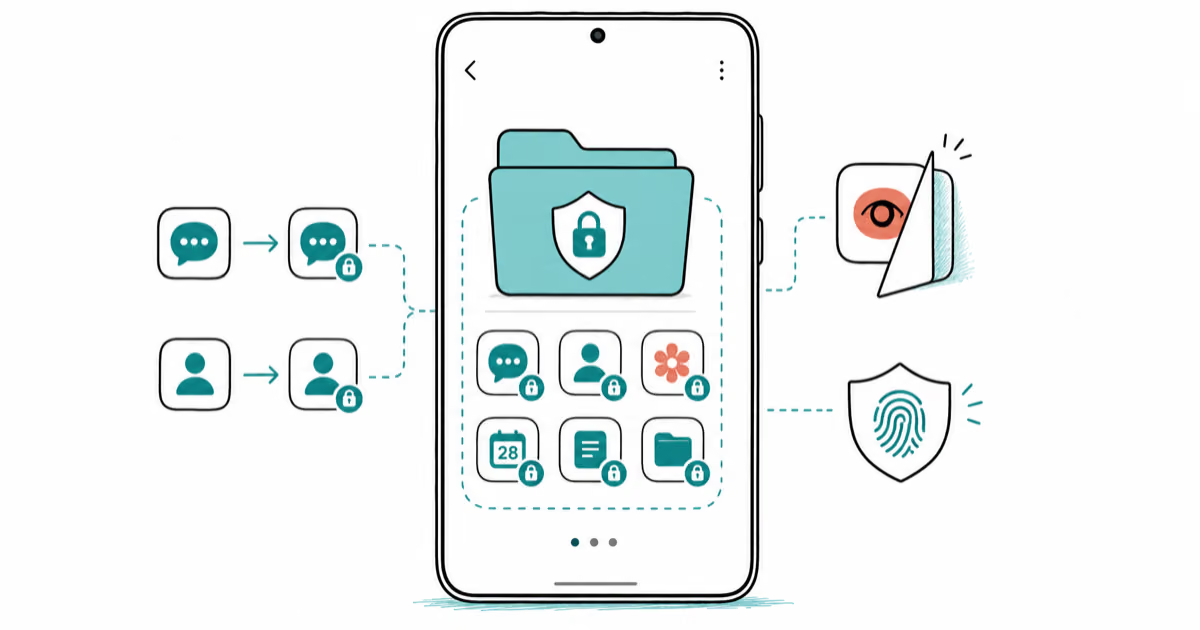
Samsung Secure Folder: Setup, Hide Apps, Clone Apps
Set up Samsung Secure Folder in under 5 minutes. Hide apps and photos, clone a banking app, and hide the Secure Folder icon on any Galaxy S8 or newer.
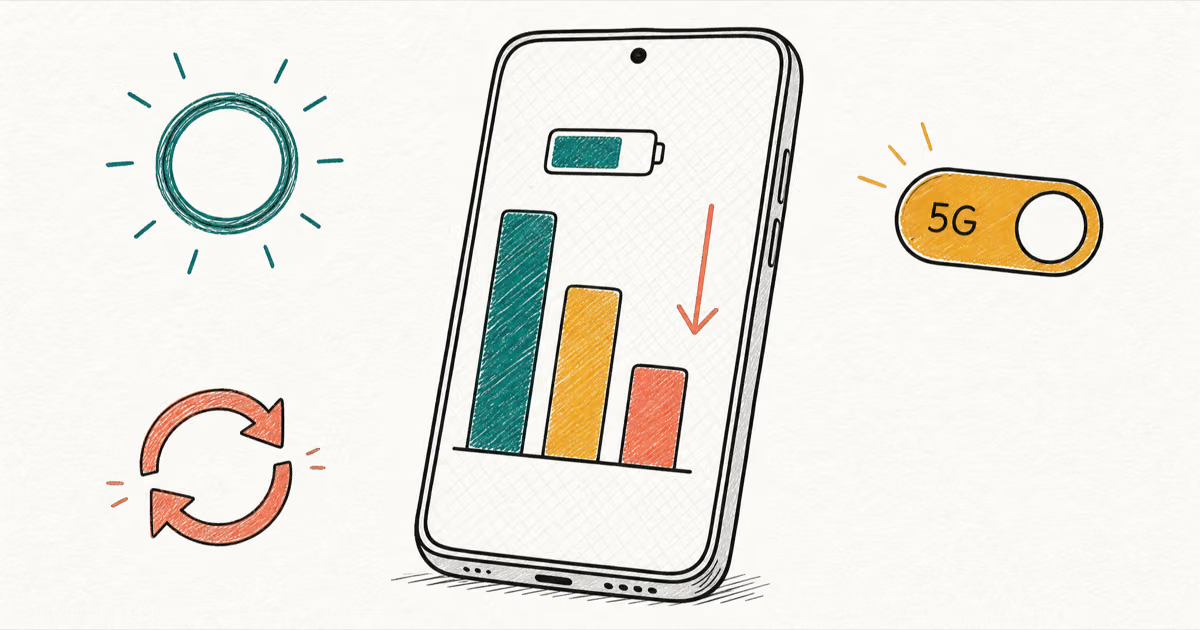
Samsung Galaxy Battery Draining Fast: 2026 Fix Guide
Diagnose Galaxy S25 battery drain in five minutes through Battery Usage, then walk through six reversible Galaxy settings before a factory reset.
Samsung Parental Controls: Full Setup Guide for Parents
Set up Samsung parental controls in three layers: Samsung Kids, Google Family Link, and Digital Wellbeing. Free step-by-step guide for Galaxy parents.
Samsung Smart View Not Working? 7 Fast Fixes to Try Now
This guide compares seven fixes for Samsung Smart View connection problems, including Wi-Fi alignment, app updates, cache clears, and resets.