Best Bluetooth Tracker for Android: 4 AirTag Rivals
AirTags barely work on Android. We compare the 4 best Bluetooth trackers for Android by network, range, and price so you pick the right tag.
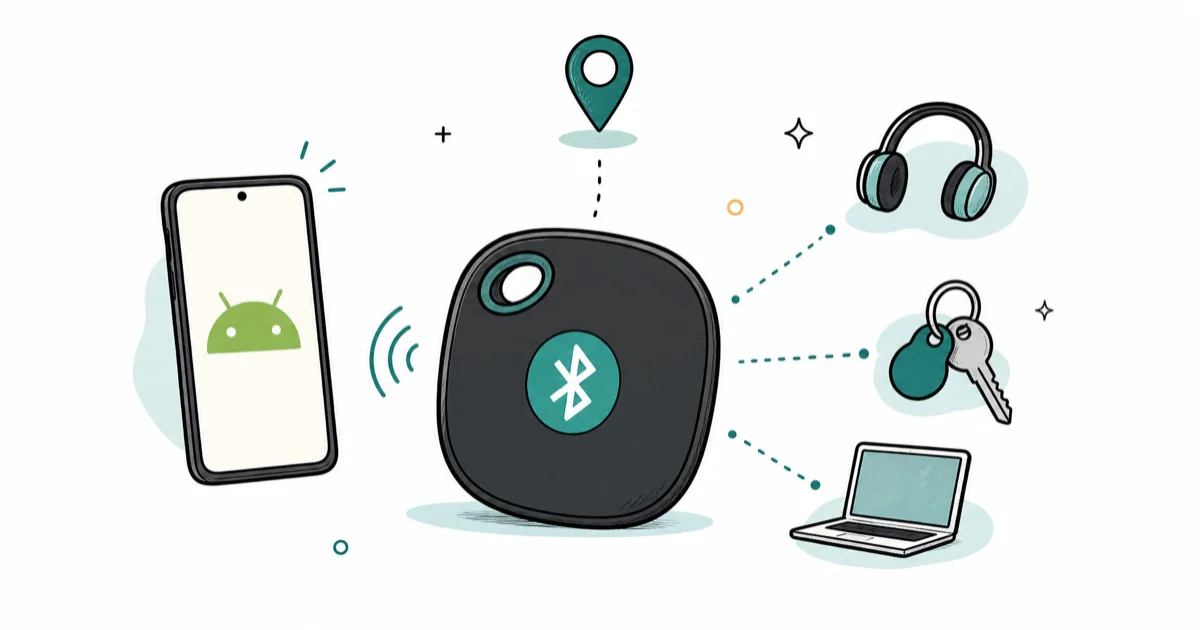
Quick AnswerThe Chipolo POP is the best Bluetooth tracker for most Android phones because it rides Google's Find Hub network. Samsung Galaxy owners should buy the SmartTag 2 instead.
The best Bluetooth tracker for Android isn’t the one with the longest spec sheet. It’s the one that rides the finding network your phone already speaks. This roundup ranks the four strongest 2026 picks by network coverage, range, and price so you can match a tag to your phone.
- The single biggest buying factor is network: Google Find Hub for most phones, Galaxy Find for Samsung, Tile’s own network for everyone else
- The Chipolo POP rings at 120 dB, runs about a year on a CR2032, and costs roughly $29, making it the cleanest AirTag swap for most Android phones
- The Samsung SmartTag 2 adds UWB precision and up to a 700-day battery, but only works on Samsung Galaxy phones
- The Pebblebee Clip recharges over USB-C for up to 12 months and reaches the longest direct Bluetooth range of the four
- Tile’s network is the smallest of the major players, so long-distance finds are slower than the Find Hub options
#Why AirTags Are a Bad Buy for Android
AirTags have no Android app. You can’t set one up, ring it, or see it on a map from a Galaxy or Pixel. The precision finding that makes them feel magical relies on Apple’s U1 ultra-wideband chip talking to an iPhone, and none of that crosses over to your Android phone, no matter how good the tag’s hardware is on paper or how close it sits to you.
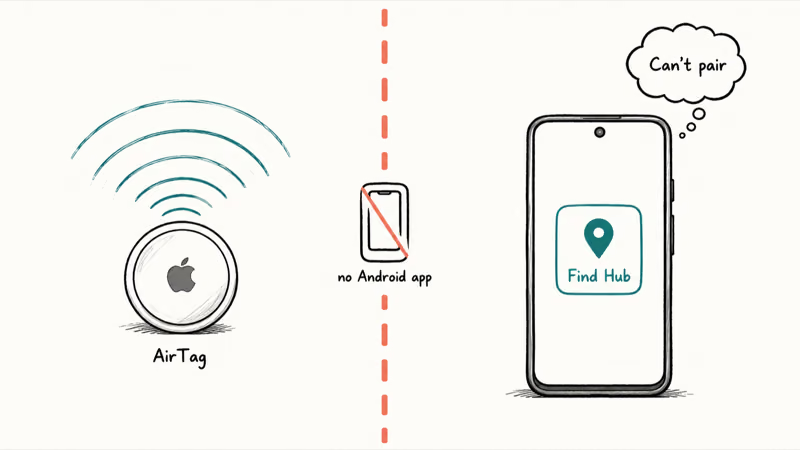
Android phones can still warn you if a stray AirTag is following you, thanks to the joint Apple and Google unwanted-tracker standard. That’s a safety feature, not ownership. If your worry is the reverse situation, our guide on how to spot an unwanted tracker walks through the detection scan.
So for finding your own stuff, you want a tag that reports to a network your phone joins. That’s the whole game.
#Which Tracking Network Should You Pick?
Three networks matter for Android in 2026. Get this right and the rest of the decision is easy.
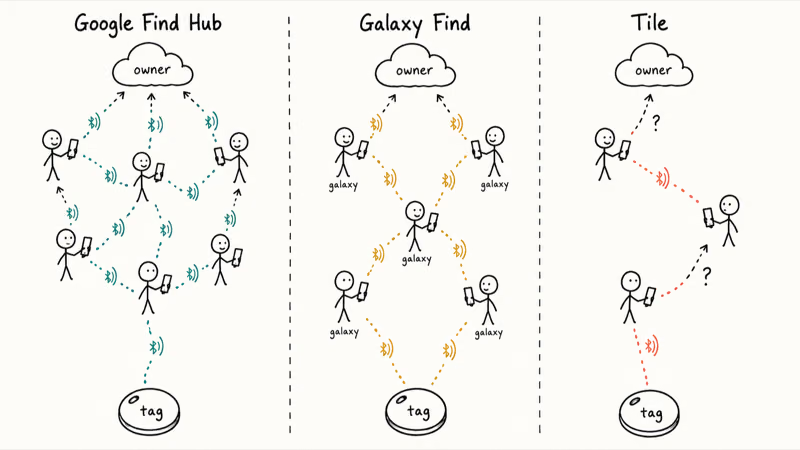
Google Find Hub (formerly Find My Device) is the default for most Android phones. Google’s Find Hub support page states that the app locates accessories and lets you mark a lost tag with a contact message so a stranger can help return it. Chipolo and Pebblebee tags ride this network, and it’s the same system that can track a lost phone tied to your Google account.
Galaxy Find (Samsung’s network, run through SmartThings Find) only works on Samsung phones. It’s dense in Samsung-heavy regions but useless if you switch to a Pixel later.
Tile’s own network is the oldest and the smallest of the three. It works on any phone through the Tile app, but a smaller relay crowd means slower long-distance recovery. If you’re weighing that cross-platform reach against raw network size, see how Tile stacks up against AirTag.
Why does crowd size matter? A Bluetooth tag has no GPS and no SIM. It shouts its ID over Bluetooth, and any passing phone on the same network reports where it heard that shout, even when the tag is nowhere near your own phone. That relay is also why these tags keep working where GPS without internet would normally stall. More phones, more sightings, faster finds.
#Chipolo POP
#Chipolo POP: Best Overall for Android
For a non-Samsung Android phone, the Chipolo POP is the pick. It pairs with Google’s Find Hub, so any Android phone can set it up in a tap, and it’s loud enough to actually find under a couch cushion.
- 120 dB ring is the loudest in this roundup
- Pick Google Find Hub or Apple Find My at setup
- About $29 with a replaceable year-long battery
Last updated on May 25, 2026
As an Amazon Associate fone.tips earns from qualifying purchases. Prices and availability are accurate as of the date above and subject to change.
- Works on any Android phone via Find Hub
- Loudest ring in the group at 120 dB
- Replaceable CR2032 lasts about a year
- Cheapest of the four picks
- One network only, chosen at setup
- No ultra-wideband, so no step-by-step distance arrow
- IP55 resists splashes, not full submersion
The POP delivers what the spec sheet promises. Its 120 dB ring is the loudest in this roundup, which matters more than range for everyday “where are my keys” moments. Chipolo’s spec page states that the POP rings at 120 dB, runs about a year on a CR2032, and carries an IP55 splash rating. One catch: you pick Find Hub or Apple Find My at setup, not both.
#Samsung SmartTag 2
#Samsung SmartTag 2: Best for Galaxy Phones
If your phone is a Samsung Galaxy, stop reading the Chipolo section. The SmartTag 2 is the better tag for you, because it unlocks features the others can’t on Samsung hardware.
- Up to 700-day battery in power-saving mode
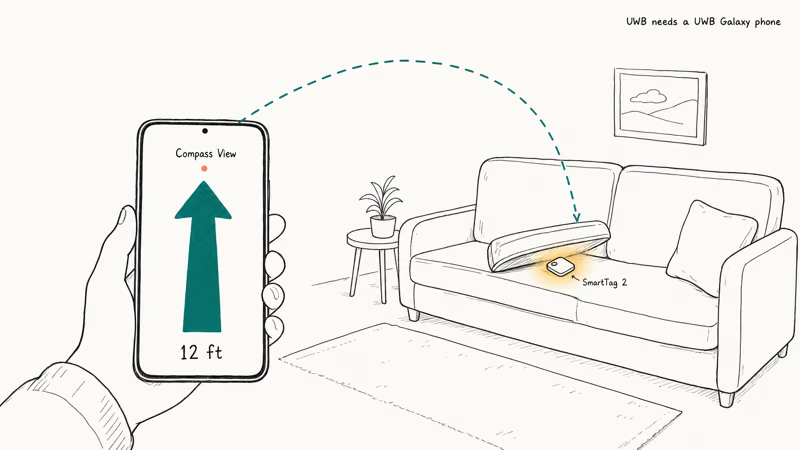
- UWB Compass View points you to the tag on UWB Galaxy phones
- 120 m Bluetooth range and IP67 dust and water rating
Last updated on May 25, 2026
As an Amazon Associate fone.tips earns from qualifying purchases. Prices and availability are accurate as of the date above and subject to change.
- Longest battery life of the four, up to 700 days
- UWB precision finding on compatible Galaxy phones
- IP67 survives a brief dunk
- Dense Galaxy Find network in Samsung-heavy areas
- Works only on Samsung Galaxy phones and tablets
- UWB needs a UWB-capable Galaxy phone
- Worthless if you ever switch to Pixel or Motorola
The hardware is strong, but the lock-in is total. Android Police reports that the SmartTag 2 stays limited to Samsung devices and won’t join Google’s Find My Device network. Its replaceable coin cell is rated for multi-year life in power-saving mode, the longest of the four tags here. Buy it only if you’re sure your next phone is also a Galaxy.
#Pebblebee Clip
#Pebblebee Clip: Best for Range and Recharging
The Pebblebee Clip is for people who hate buying coin cells. It recharges over USB-C and pairs with Find Hub, so it joins the same network as the Chipolo.
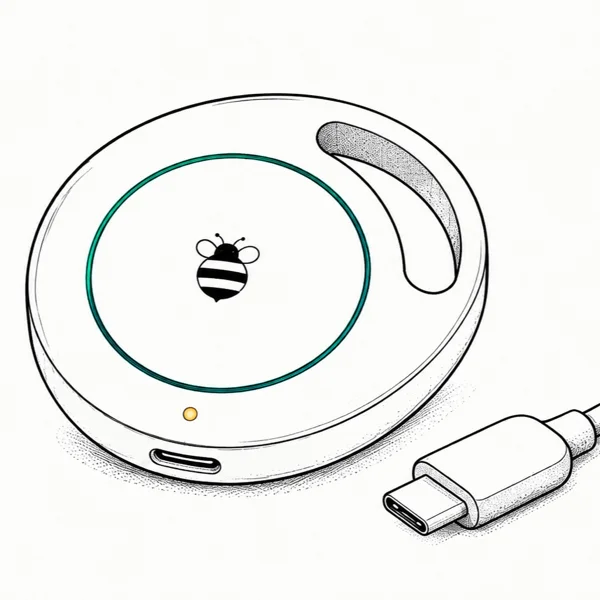
- USB-C recharge lasts up to 12 months per charge
- Reaches about 500 feet in open space
- 97 dB ring with light-up LED
Last updated on May 25, 2026
As an Amazon Associate fone.tips earns from qualifying purchases. Prices and availability are accurate as of the date above and subject to change.
- No coin cells, just recharge over USB-C
- Longest direct Bluetooth range of the four
- Rides the Find Hub network on Android
- LED light helps locate in the dark
- Pricier than the Chipolo POP
- You have to remember to recharge it
- Bulkier than a flat tag
Range and recharging are the reasons to pay more. Engadget’s tracker testing found that the Pebblebee Clip 5 was the loudest tag they tried at 97 decibels, and the rechargeable design means you’ll never hunt for a CR2032 at midnight. For a daily bag that travels long distances, it earns the premium.
#Tile Mate: Why We Stopped Recommending It
Tile invented the consumer Bluetooth tracker, and the Tile Mate still works on any Android phone through the Tile app. The hardware is fine. The problem is the network.
Tile runs its own finding crowd rather than Google’s, and it’s the smallest of the major networks. The same Engadget tracker testing found that Tile was slow in crowded locations, with one tracker still undiscovered after four hours. That’s fine for a tag you only ring at home, and wrong for recovering something across town.
We skipped a Product box for the Tile Mate because it’s no longer a tag we’d recommend buying fresh. If you already own Tiles, keep them. If you’re buying new, pick a Find Hub tag instead.
#How Do These Trackers Compare on Battery and Range?
The four picks split along two axes: battery type and network. The Chipolo POP and Samsung SmartTag 2 use replaceable CR2032 cells, with Samsung stretching to a claimed 700 days, while the Pebblebee Clip recharges over USB-C instead, trading coin cells for a cable and up to a year per charge before you plug it back in.
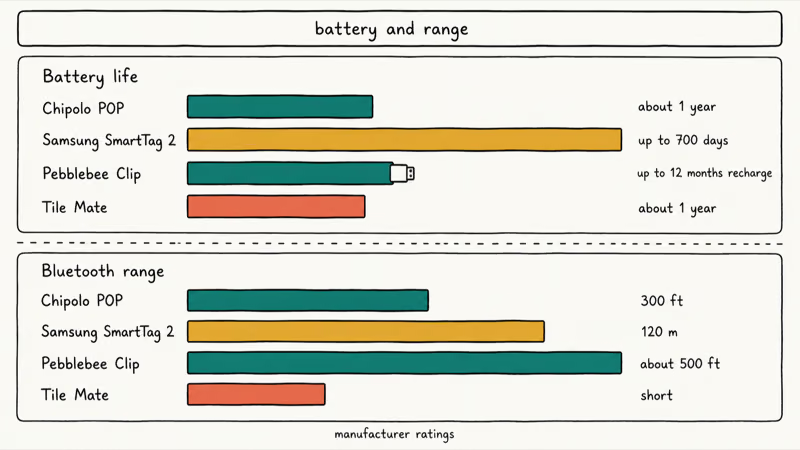
Range tells a similar story. Samsung’s 120-meter and Pebblebee’s roughly 500-foot Bluetooth links beat the Chipolo’s 300-foot rating on paper. Beyond the next room, though, the network does the real work, which is why the smaller-crowd Tile Mate lags despite decent radios, and why we’d put network coverage ahead of a few extra feet of raw Bluetooth reach every time you’re choosing between two otherwise similar tags.
Here’s a detail buyers miss. None of these tags need cellular or Wi-Fi to report in, and toggling your own phone’s radios won’t silence a tag the way airplane mode and GPS interact on a phone.
All four carry the cross-platform unwanted-tracker alerts from the Apple and Google standard. Use them to find your own belongings only. Slipping a tracker onto another person without their consent is illegal in most places.
#Bottom Line: Which Android Tracker Should You Buy?
Buy the Chipolo POP if you carry a non-Samsung Android phone. It rides Google’s Find Hub crowd, rings at 120 dB, and costs about $29, which makes it the cleanest AirTag swap for most people. If your phone is a Samsung Galaxy, skip the POP and get the SmartTag 2 instead, because its UWB precision and 700-day battery only unlock on Samsung’s own Galaxy Find network.
Choose the Pebblebee Clip only when rechargeability and maximum range matter more than the lowest price. Don’t buy Tile in 2026 unless you’re already locked into its app. And if what you really need is to keep tabs on people rather than things, that’s a job for family locator apps, not a Bluetooth tag.
#Frequently Asked Questions
Do AirTags work with Android phones?
No. AirTags have no Android app, so you can’t set one up or see it on a map from a Galaxy or Pixel. The only thing an Android phone does with an AirTag is warn you when one is following you.
Which Bluetooth tracker works with any Android phone?
The Chipolo POP and the Pebblebee Clip both work with any Android phone through Google’s Find Hub network. The POP is the better value at around $29.
Does the Samsung SmartTag 2 work on non-Samsung phones?
No. The SmartTag 2 only works on Samsung Galaxy phones and tablets through SmartThings Find. It won’t pair with a Pixel, a Motorola, or any other brand, and it doesn’t join Google’s Find My Device network. Buy it only if you plan to stay on Samsung hardware.
Can a Bluetooth tracker work without internet or a SIM?
Yes, and this is the part that confuses most first-time buyers. A Bluetooth tag has no GPS and no SIM of its own. It just broadcasts its ID over Bluetooth, and any nearby phone on the same network reports where it heard the signal, then relays that sighting to you over the internet. So your tag keeps updating even when it’s miles from your own phone, as long as someone else on the network walks past it.
Do Android trackers warn you if one is following you?
Yes. All four trackers reviewed here follow the joint Apple and Google unwanted-tracker standard, so a phone on either platform automatically alerts you when an unknown tag has been moving with you for a while after separating from its owner. That cross-platform protection is now baked into recent versions of both iOS and Android, and you can also run a manual scan if you have a specific suspicion that someone slipped a tag into your bag or car.
Is the Tile network good enough for Android in 2026?
For ringing a tag inside your home, yes. For recovering something you left across town, no. Tile runs its own smaller finding crowd rather than Google’s Find Hub, and independent testing has found it slow to surface a tag in busy public places. A Find Hub tracker recovers distant items faster.
How long do Bluetooth tracker batteries last?
It depends on the design. The Chipolo POP runs about a year on a replaceable CR2032, and the Samsung SmartTag 2 claims up to 700 days in power-saving mode. The Pebblebee Clip skips coin cells entirely and recharges over USB-C, lasting up to 12 months per charge before you plug it back in.

Pixel 11 vs Pixel 10: What Changed and Who Should Upgrade
Pixel 11 vs Pixel 10: same screen and camera resolution, new Tensor G6, 25W wireless, and Gemini Intelligence. Here is who should actually upgrade.

Best Power Bank for iPad in 2026: Pro, Air, and Mini
Best power bank for iPad in 2026. Compare mAh tiers and USB-C PD wattage for iPad Pro, Air, and mini, plus airline Wh math, cables, and travel tips.

Best Power Bank With Built-In Cable: Top 2026 Picks
Best power bank with built-in cable picks for 2026. Compare single USB-C, multi-connector, and retractable laptop banks, plus airline Wh math.

Best Apple Watch Band for Working Out: Proven Picks
The best Apple Watch band for working out handles sweat and stays put on your wrist. Compare silicone, nylon, and titanium picks for runs and lifts.