Best Laptops for Teachers in 2026: Top Picks for Educators
Find the best laptops for teachers in 2026, with picks for lesson planning, grading, online teaching, portability, battery life, and budget.
Quick AnswerThe MacBook Air M3 is the best laptop for teachers, offering 16 hours of battery life, a 2.7-pound design, and enough power for Zoom calls, grading, and lesson planning simultaneously.
A good teaching laptop needs to last a full school day on one charge and handle Zoom, Google Workspace, and grading software without slowing down. The best options for educators balance battery life, portability, display quality, and classroom software needs.
- The MacBook Air M3 lasts up to 16 hours on a single charge and weighs just 2.7 pounds for easy transport between classrooms
- The Dell XPS 14 has a 3.2K OLED touchscreen ideal for creating visual lesson content and a 1080p webcam for clear online teaching
- Budget-conscious educators can get the Acer Aspire 3 with an AMD Ryzen 7, 16GB RAM, and 512GB SSD for under $500
- The Lenovo Flex 5i Chromebook Plus runs Google Workspace flawlessly at under $400 with a 2-in-1 touchscreen design
- A 2-in-1 laptop like the Asus Zenbook 14 Flip OLED lets teachers annotate student work directly on screen with an included stylus
#Best Overall Laptop for Teachers: MacBook Air (M3, 2023)
The Apple MacBook Air (M3, 2023) stands out as the top choice for teachers seeking a blend of performance, portability, and user-friendly features.
Key Features:
- Powerful Apple M3 chip
The MacBook Air M3 has enough headroom for common teacher workloads like browser tabs, video calls, and Google Slides running at the same time.
-
13.6-inch Retina display
-
Up to 24GB unified memory
-
Up to 2TB storage
-
Exceptional battery life (up to 16 hours)
-
Sleek, lightweight design
Benefits for Teachers: The MacBook Air M3 has enough headroom for common teacher workloads like browser tabs, video calls, and Google Slides running at the same time. Wirecutter’s 2025 laptop guide confirms that a minimum of 8 hours of battery life is essential for a full school day without needing to recharge. Its long battery life ensures you can work through an entire school day without needing to recharge. The high-quality Retina display reduces eye strain during long hours of work, while the comfortable keyboard makes lesson planning and grading more enjoyable.
As an Amazon Associate, fone.tips earns from qualifying purchases. Some links on this page are affiliate links.
#Best Windows Laptop for Teachers: Dell XPS 14 (2024)
For educators who prefer Windows, the Dell XPS 14 (2024) offers a premium experience with powerful specs and a stunning display.
Key Features:
-
Intel Core Ultra 7 155H processor
-
Up to 64GB DDR5 RAM
-
14.5-inch 3.2K OLED touchscreen
-
Up to 4TB storage
-
NVIDIA RTX 4050 GPU (optional)
-
1080p webcam with Windows Studio Effects
Advantages for Educators: The Dell XPS 14 combines performance and style, making it a strong choice for teachers who need to handle resource-intensive tasks. Its high-resolution OLED display is ideal for creating and viewing detailed visual content, while the powerful processor ensures smooth performance for any educational software. The high-quality webcam is excellent for online teaching and virtual meetings.
According to Dell’s XPS 14 product page, configuration options can vary, so check the display, memory, and storage before buying.
#Best Dual-Screen Laptop for Teachers: Lenovo Yoga Book 9i
The Lenovo Yoga Book 9i introduces a unique dual-screen design that can transform how teachers work and multitask.
Key Features:
-
Two 13.3-inch OLED displays
-
Intel Core i7 processor
-
16GB RAM
-
Up to 1TB storage
-
Versatile usage modes
-
Long battery life
Multi-tasking Capabilities for Teachers: With two screens, teachers can easily compare documents, research while writing, or display reference material during online lessons. The versatile design allows for multiple configurations, adapting to different teaching scenarios. This unique laptop is particularly beneficial for educators who frequently juggle multiple tasks or need extensive screen real estate for their work.
According to the current Amazon listing, verify the included accessories and seller before checkout.
#Best Budget Laptop for Teachers: Acer Aspire 3
The Acer Aspire 3 offers solid performance at an affordable price point, making it an excellent choice for budget-conscious educators.
Key Features:
-
AMD Ryzen 7 5700U processor
-
15.8-inch 1080p display
-
816GB RAM
-
512GB SSD storage
-
Full-size keyboard with number pad
-
HD webcam
Benefits for Budget-Conscious Educators: Despite its lower price, the Acer Aspire 3 doesn’t compromise on essential features. It provides adequate performance for everyday teaching tasks, a comfortable keyboard for extended typing sessions, and a large display for easy viewing. The inclusion of an HD webcam makes it suitable for online teaching as well.
#Most Portable Laptop for Teachers: Acer Swift Edge 16
For teachers who are always on the move, the Acer Swift Edge 16 offers an ultra-lightweight design without sacrificing screen size.
Key Features:
-
16-inch OLED display
-
AMD Ryzen 7 7840U processor
-
Weighs only 2.71 pounds
-
0.51 inches thick
-
Strong performance for productivity tasks
Benefits of Portability for Teachers: The Swift Edge 16’s lightweight design makes it easy to carry between classrooms or to and from school. Despite its portability, it doesn’t compromise on screen size, offering a large 16-inch display that’s perfect for multitasking or presenting content to small groups.
#Best 2-in-1 Laptop for Teachers: Asus Zenbook 14 Flip OLED
The Asus Zenbook 14 Flip OLED offers the versatility of a 2-in-1 design, making it adaptable to various teaching scenarios.
Key Features:
-
13th-gen Intel Core i7 processor
-
14-inch OLED touchscreen
-
360-degree hinge
-
Included stylus pen
-
16GB RAM
-
1TB SSD storage
Versatility for Educators: This 2-in-1 laptop can transform from a traditional laptop to a tablet, making it ideal for tasks ranging from typing lesson plans to annotating student work directly on the screen. The high-quality OLED display and included stylus enhance the teaching experience, especially for subjects that require visual explanations or diagrams.
For teachers who need even more flexibility, consider exploring the best detachable laptops, which offer the ultimate in versatility.
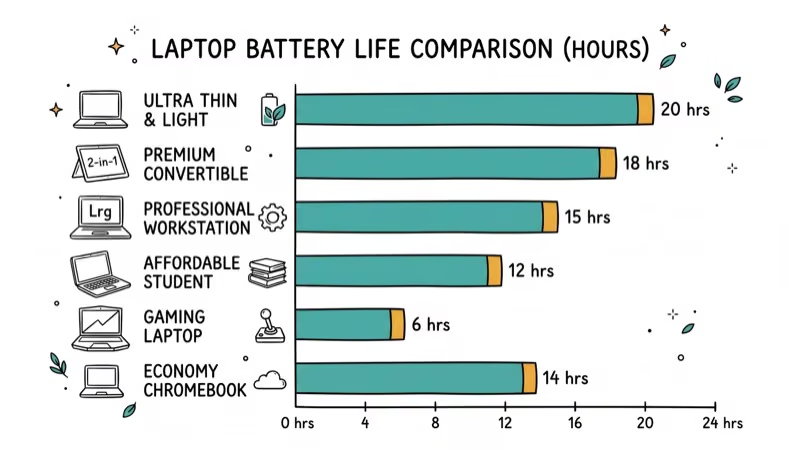
#Best Laptop for Battery Life: Asus Zenbook 14 OLED
For teachers who need a laptop that can last through long school days without recharging, the Asus Zenbook 14 OLED is an excellent choice.
Key Features:
-
Up to 15 hours of battery life
-
14-inch 2880x1800p OLED touchscreen
-
Sturdy metal chassis
-
Affordable price point
Importance of Long Battery Life for Teachers: The exceptional battery life of the Zenbook 14 OLED ensures that teachers can work through an entire school day, attend after-school meetings, and grade papers in the evening without worrying about finding a power outlet. This long-lasting performance, combined with a high-quality OLED display, makes it an ideal companion for educators with demanding schedules.
#Best Eco-Friendly Laptop for Teachers: Acer Aspire Vero
For environmentally-conscious educators, the Acer Aspire Vero offers a eco-friendly option without compromising on performance.
Key Features:
-
Made with 30% post-consumer recycled plastic
-
Intel Core i7 processor
-
16GB RAM
-
512GB SSD
-
15.6-inch Full HD display
Appeal for Environmentally-Conscious Educators: The Aspire Vero allows teachers to reduce their environmental impact while still enjoying powerful performance. Its eco-friendly design is a talking point and example for students, promoting sustainability in the classroom.
#Best Chromebook for Teachers: Lenovo Flex 5i Chromebook Plus
For teachers who primarily work with web-based tools and Google Workspace, the Lenovo Flex 5i Chromebook Plus offers an excellent Chrome OS experience.
Key Features:
-
2-in-1 design
-
14-inch 1920 x 1200 touchscreen display
-
Intel Core i3 processor
-
8GB RAM
-
128GB SSD storage
-
Affordable price point
Benefits of Chrome OS for Education: Chromebooks are known for their simplicity, security, and integration with Google’s educational tools. The Flex 5i offers a premium Chromebook experience with its versatile 2-in-1 design, allowing teachers to easily switch between laptop and tablet modes. Its performance is more than adequate for web-based tasks, and the lower price point makes it an attractive option for schools with limited budgets.
#Do You Need a Specialized Laptop for Your Subject Area?
#Best Laptops for Virtualization
For teachers in computer science or IT courses, laptops capable of running virtual machines are essential. Check out our guide on the best laptops for virtualization to find powerful options suitable for running multiple operating systems simultaneously.
#Best Computers for Animation
Art and design teachers may require laptops capable of handling complex animation software. Explore the best computers for animation to find high-performance machines suitable for creative tasks.
#Best Laptops for Accounting
For business and accounting teachers, having a laptop that can handle financial software and large spreadsheets is crucial. Our guide on the best laptops for accounting offers options tailored to these specific needs.
#What Should Teachers Look for in a Laptop?
When selecting a laptop for teaching, consider the following factors:
-
Performance: Ensure the processor and RAM are sufficient for your typical tasks, including running educational software and multitasking. For many teachers, laptops with Intel Core i5 processors offer a good balance of performance and value.
-
Portability: If you move between classrooms or work from different locations, a lightweight laptop is crucial.
-
Battery Life: Long battery life is essential for uninterrupted work throughout the school day.
-
Display Quality: A high-resolution display reduces eye strain and makes it easier to create and view content.
-
Keyboard Comfort: Since teachers often spend a lot of time typing, a comfortable keyboard is important.
-
Connectivity: Ensure the laptop has the ports you need for connecting to projectors, external drives, or other peripherals.
-
Budget: Balance your needs with your budget, considering long-term value over initial cost. For those with more flexibility, consider exploring laptops under $2000 for high-performance options.
#Bottom Line
Choosing the right laptop can significantly impact a teacher’s efficiency and effectiveness in and out of the classroom. Whether you prioritize performance, portability, battery life, or eco-friendliness, there’s a laptop on this list to suit your needs.
Consider your specific requirements and budget when making your decision, and remember that investing in a quality laptop can enhance your teaching experience for years to come.
#Frequently Asked Questions
What’s the minimum RAM a teacher should look for in a laptop?
For most teaching tasks, 8GB of RAM is sufficient. However, 16GB is recommended for smoother multitasking and future-proofing.
Are Chromebooks good enough for teachers?
Chromebooks can be excellent for teachers who primarily use web-based tools and Google Workspace. They’re cost-effective and easy to use but may not be suitable for those who need specific Windows or Mac software.
How important is a touchscreen for a teacher’s laptop?
While not essential, a touchscreen can be very useful for annotating documents, drawing diagrams, or using educational apps. It’s particularly beneficial in 2-in-1 devices.
Should teachers prioritize performance or battery life?
Both are important, but the priority depends on individual needs. For those who move around a lot or have long days without access to power outlets, battery life might be more crucial. For those running resource-intensive software, performance might take precedence.
Is it worth investing in a high-end laptop for teaching?
While budget options can suffice for basic tasks, investing in a higher-end laptop can provide better performance, longevity, and features that enhance the teaching experience. Consider it a long-term investment in your professional tools.
Can teachers get discounts on laptops?
Yes. Apple, Dell, Lenovo, and HP all offer education discounts ranging from 5% to 15%. Many school districts also have technology stipends or bulk purchasing programs that can reduce costs further. Check with your district’s IT department before buying.

Mac mini M6 vs M5 Pro: Which Model Should You Buy?
Mac mini M6 vs M5 Pro compared on price, memory, ports, displays, and real workloads. Find the better 2026 Mac mini for your desk and budget.

macOS 27 Compatible Macs: Every Supported Model (2026)
macOS 27 Golden Gate runs only on Apple Silicon Macs. Here is the full list of supported M-series models and the four Intel Macs that lose support.

macOS 27 Golden Gate: Every Major New Feature Confirmed
macOS 27 Golden Gate goes Apple Silicon only, adds a Gemini-powered Siri, refines Liquid Glass, and rebuilds Spotlight. Here is every confirmed change.
macOS 27 Liquid Glass: Every Readability Fix Explained
macOS 27 Golden Gate refines Liquid Glass with an intensity slider, better contrast, cleaner window corners, and edge-to-edge sidebars to fix readability.