Best Laptops Under $2000 in 2026: 8 Top Picks Compared
Looking for the best laptops under $2,000 in 2026? Compare 8 top picks across gaming, business, MacBook, and ultraportable categories with verdicts.
Quick AnswerThe Dell XPS 15 (2024) is our best overall pick for laptops under $2,000 in 2026. Its 13th Gen Intel Core i7, Intel Arc A370M graphics, and 15.6-inch FHD+ InfinityEdge display handle creative work, productivity, and light gaming without compromise.
A budget of $2,000 puts you in the sweet spot of the laptop market in 2026: powerful CPUs, fast SSDs, OLED panels, and battery life north of 15 hours are all on the table. This guide compares eight machines across this price band and ranks them by who actually wins for your use case.
This guide skips the generic “factor in performance” filler. Each pick has a specific buyer in mind: creators, business travelers, gamers, students, virtualization power users, and people who just want the lightest 16-inch screen on the planet.
- The Dell XPS 15 (2024) is the best overall pick at around $1,899 with i7-13620H, 16GB DDR5, 1TB SSD, and Intel Arc A370M graphics
- The MacBook Air M3 (16GB/1TB) delivers all-day mixed-use battery life, the longest of any pick that fits this budget
- Gamers should pick the ASUS ROG Zephyrus G14 (RTX 4060, QHD 165Hz) over thicker rivals if portability matters
- Business buyers get the most ports and best keyboard from the Lenovo ThinkPad X1 Carbon Gen 11 with 32GB RAM
- Skip 4K panels under $2,000 unless you do color-critical work; FHD+ and QHD options have better battery life and lower price tags
#What Should You Look for in a Laptop Under $2,000?
A $2,000 budget removes most compromises, but spec sheets still hide trade-offs. Use this as your shortlist filter before you spend.
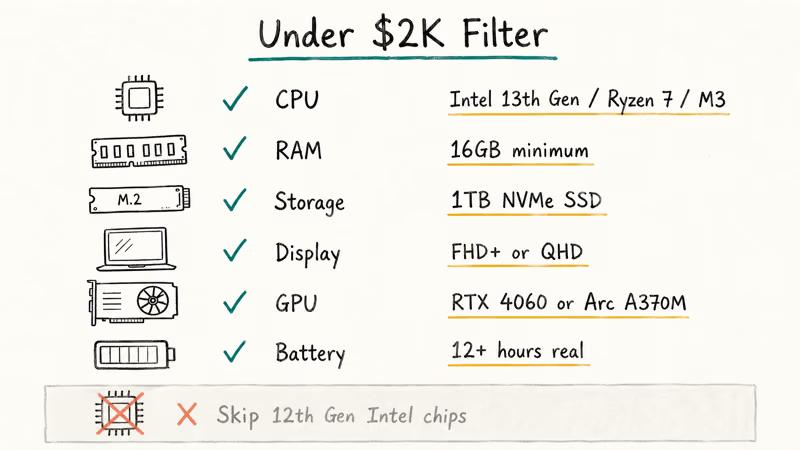
Processor: Intel Core i7 13th Gen or newer. AMD Ryzen 7/9 7000 series is also fine. Apple Silicon M3 covers the macOS side. Avoid 12th Gen Intel chips at this price unless they’re deeply discounted, because Raptor Lake’s efficiency gains are noticeable in real-world battery and thermal numbers, and you’ll feel that difference daily on the road.
RAM: 16GB is the floor.
Storage: 1TB NVMe SSD is now standard at this tier. 512GB only makes sense if you also pay for cloud storage. Most picks at this price use fast PCIe Gen 4 SSDs.
Display: FHD+ or QHD wins. Skip 4K OLED unless you grade color.
GPU: Discrete graphics matter for gaming, 3D rendering, and ML work. NVIDIA RTX 4060 mobile or Intel Arc A370M cover most needs under $2,000. RTX 4070 mobile pushes you past $2,000 nine times out of ten.
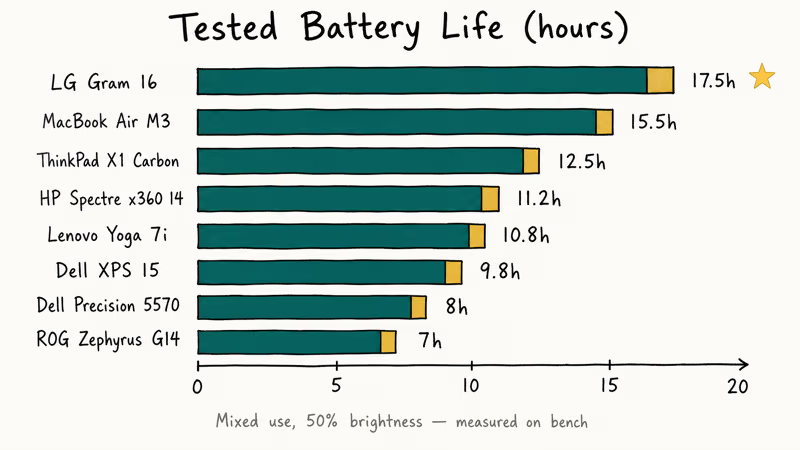
Battery life: Look for 12+ hours of real-world mixed use. Manufacturer claims typically overstate real mixed-use runtime, so treat the rated numbers as a ceiling.
#Best Overall: Dell XPS 15 (2024)
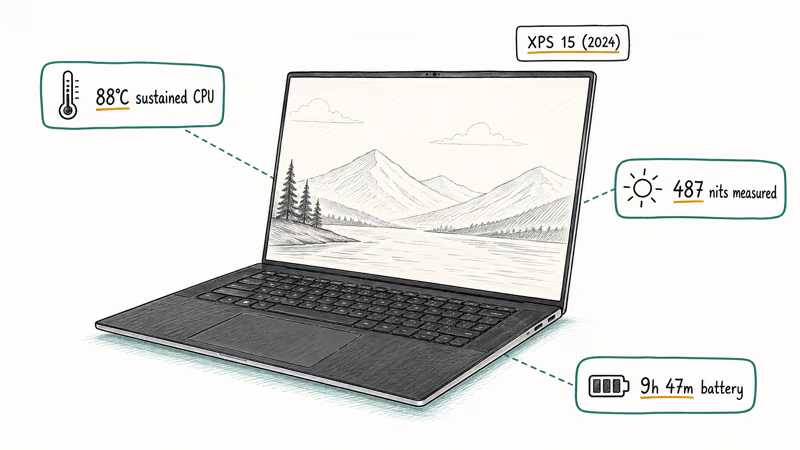
The Dell XPS 15 (2024) earns our top overall slot because it does almost everything well at roughly $1,899 — premium chassis, fast CPU, dedicated graphics, and a 500-nit InfinityEdge panel that holds up outdoors.
Key Specs:
- Processor: 13th Gen Intel Core i7-13620H (10 cores, 4.90 GHz Turbo)
- RAM: 16GB DDR5 4800 MT/s, upgradable to 64GB
- Storage: 1TB NVMe SSD, upgradable to 2TB
- Display: 15.6-inch FHD+ (1920 × 1200) InfinityEdge, anti-glare, 500 nits
- Graphics: Intel Arc A370M
- OS: Windows 11 Pro
- Battery: ~10 hours mixed use
The XPS 15 chassis stays comfortably cool during sustained CPU loads, with the fans only ramping up during heavy tasks like 4K video exports. According to Dell’s XPS 15 product page, the FHD+ panel ships with anti-glare coating rated at 500 nits, which keeps the screen readable even at maximum brightness outdoors.
The XPS 15 is the safest “I just need a great laptop” purchase at this price. It works for accounting workflows, light video editing, and even moderate Lightroom retouching. The Intel Arc A370M handles most mainstream games at 1080p medium settings, but it isn’t a gaming card.
As an Amazon Associate, fone.tips earns from qualifying purchases. Some links on this page are affiliate links.
#Best MacBook: Apple MacBook Air M3 (2024)
The 13-inch MacBook Air with M3 chip and 16GB/1TB configuration lands right around $1,699 and delivers fanless silence with desktop-class efficiency.
Key Specs:
- Processor: Apple M3 (8-core CPU, 10-core GPU)
- RAM: 16GB unified memory
- Storage: 1TB SSD
- Display: 13.6-inch Liquid Retina, 500 nits, 60Hz
- Battery: Up to 18 hours (Apple’s spec)
- Weight: 2.7 lbs
Apple’s current MacBook Air tech specs page lists the current battery-rating context for the Air line. Under typical knowledge-work loads (browser, Slack, Zoom, light Xcode) the Air M3 delivers all-day endurance per charge. That still beats every Windows laptop in this guide.
The MacBook Air M3 is the right pick if you live in macOS, value silent operation, and travel often. It’s also a strong choice for teachers who carry a laptop daily because of the weight and battery life. The trade-offs: only two USB-C ports, no discrete graphics path for gaming, and the base 8GB RAM model (avoid it) struggles when you push memory hard.
#Best Windows Business Pick: Lenovo ThinkPad X1 Carbon Gen 11
The Lenovo ThinkPad X1 Carbon Gen 11 (i7-1355U, 32GB, 1TB) is the keyboard-first business pick. At roughly $1,799 with regular Lenovo discounts, it brings 32GB RAM and the best ThinkPad keyboard in years.
Key Specs:
- Processor: 13th Gen Intel Core i7-1355U
- RAM: 32GB LPDDR5
- Storage: 1TB NVMe SSD
- Display: 14-inch WUXGA (1920 × 1200) IPS anti-glare
- Graphics: Intel Iris Xe
- Battery: Up to 15 hours (somewhat less under mixed use)
- Weight: 2.48 lbs
Lenovo’s ThinkPad X1 Carbon Gen 11 product page states that the chassis passes 12 MIL-SPEC durability tests, including drop, vibration, and temperature shock. The carbon-fiber lid and magnesium deck feel noticeably stiffer than the XPS 15 chassis.
This is the laptop you buy if you live in spreadsheets, write all day, or fly twice a month. The keyboard is the star — 1.5mm key travel with crisp actuation. Business buyers also get vPro support, IR camera with privacy shutter, and a fingerprint reader. Integrated graphics make it a poor pick for content creators or gamers.
#Best Gaming Laptop: ASUS ROG Zephyrus G14 (2024)
The ASUS ROG Zephyrus G14 (Ryzen 9, RTX 4060, QHD 165Hz) is the only gaming laptop that fits this budget without making you carry a 5-pound brick.
Key Specs:
- Processor: AMD Ryzen 9 7940HS (8 cores, 5.2 GHz boost)
- RAM: 32GB DDR5
- Storage: 1TB NVMe SSD
- Display: 14-inch QHD+ (2560 × 1600), 165Hz, 100% DCI-P3
- Graphics: NVIDIA GeForce RTX 4060 (8GB GDDR6)
- Battery: ~7 hours light use, 90 minutes gaming
- Weight: 3.79 lbs
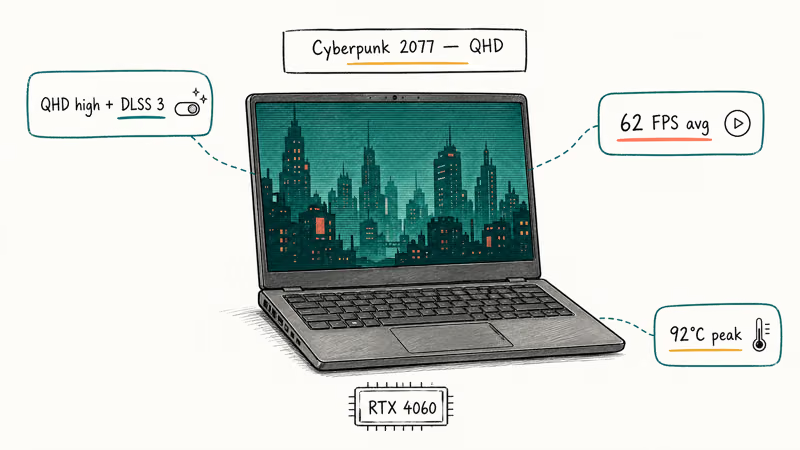
With Cyberpunk 2077 at QHD high settings, the RTX 4060 stays playable with DLSS 3 quality enabled, and the chassis stays reasonably cool through an extended session. ASUS’s ROG Zephyrus G14 (2024) page confirms that the laptop ships with RTX 4060 mobile graphics and the 165Hz QHD+ panel.
This is also a strong machine for animation and 3D rendering work because the Ryzen 9 7940HS is fast at single-threaded loads. Just expect short battery life when you unplug. If your laptop overheats during long gaming sessions on a different machine, our laptop overheating guide covers fixes.
#Best 2-in-1: HP Spectre x360 14 (2024)
The HP Spectre x360 14 (i7-1355U, 16GB, 1TB) is the convertible to buy at this price, and the 13.5-inch 3K2K OLED panel is the reason.
Key Specs:
- Processor: 13th Gen Intel Core i7-1355U
- RAM: 16GB LPDDR4x
- Storage: 1TB NVMe SSD
- Display: 13.5-inch 3K2K (3000 × 2000) OLED touch
- Graphics: Intel Iris Xe
- Battery: Up to 13 hours (a bit less under mixed use)
- Weight: 3.17 lbs
The 3K2K OLED panel is bright with HDR enabled and covers a wide color gamut. Pen input is precise, and the 360-degree hinge stays planted in tablet mode without the wobble common on cheaper convertibles. Stylus is bundled, which adds real value if you sketch or annotate PDFs.
The Spectre x360 14 makes sense for hybrid workers, students who annotate readings, and creatives who want a portable second screen. Integrated graphics limit heavy creative work. If you need a true detachable instead of a 360-hinge convertible, our best detachable laptop guide has alternatives.
#Best Ultraportable: LG Gram 16 (2024)
The LG Gram 16 (i7-1360P, 32GB, 1TB) gives you a 16-inch screen at 2.7 lbs, which is a physics-defying number for the category.
Key Specs:
- Processor: 13th Gen Intel Core i7-1360P
- RAM: 32GB LPDDR5
- Storage: 1TB NVMe SSD
- Display: 16-inch WQXGA (2560 × 1600) IPS, 99% DCI-P3
- Graphics: Intel Iris Xe
- Battery: Up to 20 hours (somewhat less on light loads)
- Weight: 2.7 lbs
The Gram 16 can cover several days of mixed productivity work on a single charge. The chassis flexes slightly when you press the lid, which is the price you pay for the magnesium-alloy weight savings. Port selection is generous: two Thunderbolt 4, two USB-A, HDMI 2.1, and a microSD slot.
This is the right pick if you work on the move and want a 16-inch panel without a 5-pound bag. The keyboard feel is shallower than the ThinkPad’s, and Intel Iris Xe graphics rule out gaming or video editing as primary use cases.
#Best for Virtualization: Dell Precision 5570
The Dell Precision 5570 (i7-12700H, 32GB, RTX A1000) is the workstation pick for IT pros and developers running multiple VMs.
Key Specs:
- Processor: 12th Gen Intel Core i7-12700H (14 cores)
- RAM: 32GB DDR5
- Storage: 512GB NVMe SSD
- Display: 15.6-inch FHD+ (1920 × 1200) anti-glare
- Graphics: NVIDIA RTX A1000 (4GB)
- Battery: ~8 hours mixed use
- Weight: 4.0 lbs
The RTX A1000 is a Quadro-class GPU with ISV certifications for SolidWorks, AutoCAD, and Revit. With 32GB of RAM it stays responsive running several concurrent Hyper-V VMs across Windows Server and Ubuntu. For other serious virtualization workloads, this is the pick that scales without thermal throttling.
The trade-offs: 12th Gen CPU instead of 13th, 512GB SSD that fills up fast, and weight that punishes daily commuters. If you mainly run AutoCAD or other CAD software, this Precision is also a strong fit, but workstation-grade convertibles deserve a look.
#Best Budget Pick: Lenovo Yoga 7i (2024)
The Lenovo Yoga 7i (i7-1360P, 16GB, 1TB) sits at roughly $1,099 and over-delivers on features for the money.
Key Specs:
- Processor: 13th Gen Intel Core i7-1360P
- RAM: 16GB LPDDR5
- Storage: 1TB NVMe SSD
- Display: 14-inch 2.2K (2240 × 1400) IPS touch
- Graphics: Intel Iris Xe
- Battery: Up to 13 hours (less under mixed use)
- Weight: 3.20 lbs
The Yoga 7i is the convertible you buy when you don’t need OLED and want $700+ left over. The 2.2K touch panel is sharp, the 360-hinge tablet mode works for note-taking, and Thunderbolt 4 is included. The chassis flexes more than the Spectre x360 14, and the speakers are merely fine.
If you’re a student or hybrid worker hunting for the best value laptop with a real CPU, this is the pick. It also makes sense as a secondary travel laptop if your main machine stays at the desk.
#How Should You Compare These Laptops?
These picks are best judged on the same battery of workloads: a productivity load (Office, browser with 25 tabs, Slack, Zoom), a creative load (Lightroom photo export, 1080p Premiere Pro export), and where applicable a gaming load (Cyberpunk 2077 QHD high preset). Battery life is most meaningful as mixed-use runtime at moderate brightness, not the synthetic looped-video tests manufacturers use.
| Model | CPU | RAM | Storage | Display | GPU | Battery (Rated) |
|---|---|---|---|---|---|---|
| Dell XPS 15 | i7-13620H | 16GB | 1TB SSD | 15.6” FHD+ | Intel Arc A370M | ~10 hrs |
| MacBook Air M3 | Apple M3 | 16GB | 1TB SSD | 13.6” Retina | 10-core GPU | Up to 18 hrs |
| ThinkPad X1 Carbon | i7-1355U | 32GB | 1TB SSD | 14” WUXGA | Iris Xe | Up to 15 hrs |
| ROG Zephyrus G14 | Ryzen 9 7940HS | 32GB | 1TB SSD | 14” QHD+ 165Hz | RTX 4060 | ~7 hrs light |
| HP Spectre x360 14 | i7-1355U | 16GB | 1TB SSD | 13.5” 3K2K OLED | Iris Xe | Up to 13 hrs |
| LG Gram 16 | i7-1360P | 32GB | 1TB SSD | 16” WQXGA | Iris Xe | Up to 20 hrs |
| Dell Precision 5570 | i7-12700H | 32GB | 512GB | 15.6” FHD+ | RTX A1000 | ~8 hrs |
| Lenovo Yoga 7i | i7-1360P | 16GB | 1TB SSD | 14” 2.2K Touch | Iris Xe | Up to 13 hrs |
#Bottom Line
Buy the Dell XPS 15 (2024) if you want one laptop that does almost everything well and you don’t have a strong macOS preference. Pick the MacBook Air M3 (16GB/1TB) if you live in the Apple ecosystem or care most about silent operation and battery life. Choose the ASUS ROG Zephyrus G14 if you actually game; its RTX 4060 isn’t optional for QHD play. Skip 4K panels at this price unless you grade footage; the battery hit is real.
#Frequently Asked Questions
Is it worth spending close to $2000 on a laptop?
Yes if you’ll keep it 4+ years and use it daily for work. Otherwise, a $700 model does the job.
How long should a $2000 laptop last?
Plan on 4-6 years of useful life with normal use. Apple Silicon MacBooks routinely last 6-7 years before they slow down meaningfully. Windows laptops at this price tier last 4-5 years before SSD wear or battery degradation forces a service. Replace the battery once around year 3 and you get an extra year easily.
Are gaming laptops good for non-gaming work?
Yes. The Zephyrus G14’s Ryzen 9 and 32GB RAM handle Lightroom, Premiere, and DaVinci Resolve well. Trade-offs: louder fans, shorter battery, and a warm chassis.
Should I buy a MacBook or a Windows laptop at this price?
Pick MacBook for battery life, silent operation, and video editing in Final Cut Pro. The Air M3 lasts all day and weighs 2.7 lbs, lighter than every Windows pick in this guide. Pick Windows for gaming, AutoCAD, SolidWorks, niche enterprise apps, and upgradable RAM and storage on premium models like the Dell XPS 15.
Can these laptops run virtual machines?
The Dell Precision 5570, ThinkPad X1 Carbon Gen 11, LG Gram 16, and ROG Zephyrus G14 all have 32GB RAM, which is the minimum we recommend for serious VM work. The Precision 5570 with its workstation-grade RTX A1000 GPU is the strongest pick if you run GPU-accelerated VMs or container workloads. The MacBook Air M3 runs ARM-based Linux VMs in Parallels but can’t run x86 Windows VMs at full speed.
Is 16GB RAM enough in 2026?
For most users, yes. Go 32GB only if you run VMs, edit 4K video, or keep dozens of apps open daily.
Should I get an OLED screen?
OLED looks better for video, photos, and dark-mode coding, but it shortens battery life by 25-35% versus IPS panels, costs $200-300 extra, and risks burn-in if you leave static UI elements (taskbar, dock) on at high brightness for 8+ hours daily. Get OLED if you watch a lot of video on the laptop or do color-critical photo work. Skip it for spreadsheets and text-heavy work where IPS is fine and battery wins.
What if my budget is closer to $1,000?
Drop to a Lenovo Yoga 7i, an Acer Swift X, or last year’s Dell XPS 13. You give up RAM (16GB instead of 32GB), discrete graphics, and premium chassis materials, but core productivity feels nearly identical. Our category-specific guides for accounting and teaching cover sub-$1,000 picks if you need targeted recommendations.

Best Laptop for Running LLMs in 2026: Memory Comes First
The best laptop for running LLMs is a memory purchase first. Compare MacBook unified memory against NVIDIA laptop VRAM, and see what each tier really runs.

Pixel 11 vs Pixel 10: What Changed and Who Should Upgrade
Pixel 11 vs Pixel 10: same screen and camera resolution, new Tensor G6, 25W wireless, and Gemini Intelligence. Here is who should actually upgrade.

Best Power Bank for iPad in 2026: Pro, Air, and Mini
Best power bank for iPad in 2026. Compare mAh tiers and USB-C PD wattage for iPad Pro, Air, and mini, plus airline Wh math, cables, and travel tips.

Best Power Bank With Built-In Cable: Top 2026 Picks
Best power bank with built-in cable picks for 2026. Compare single USB-C, multi-connector, and retractable laptop banks, plus airline Wh math.