Best Gaming Keyboard: Hall-Effect to Hot-Swap (2026)
The best gaming keyboard in 2026, from Hall-effect analog to hot-swap mechanical. We compare rapid trigger, TKL and 60% layouts, and what suits your games.
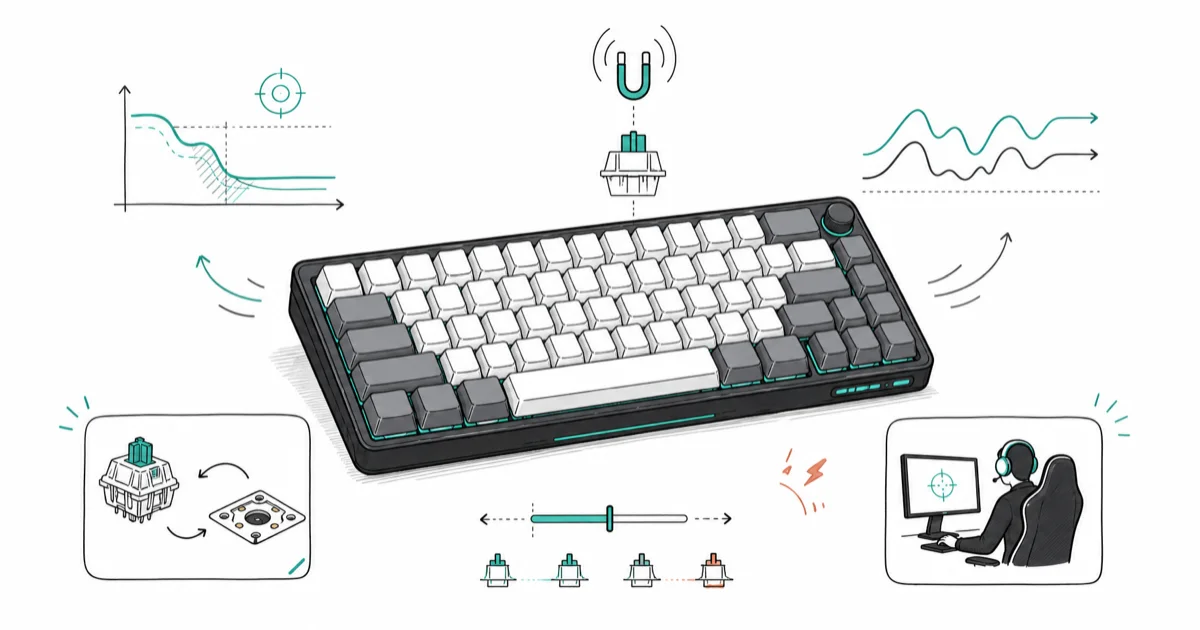
Quick AnswerThe Wooting 60HE is the best gaming keyboard for competitive players. Its Hall-effect analog switches add rapid trigger and adjustable actuation, which sharpen reaction time in fast shooters.
The best gaming keyboard in 2026 is increasingly a Hall-effect analog board, not a standard mechanical one. This guide compares analog keyboards, hot-swap mechanical boards, and compact layouts across shooters, strategy games, and daily typing. Switch type, rapid trigger, and size are the three choices that shape how a keyboard plays.
- Hall-effect analog boards like the Wooting 60HE add rapid trigger for faster counter-strafing
- Adjustable actuation lets you set how far a key travels before it registers a press
- Hot-swap sockets let you change switches without soldering, so you can tune feel over time
- TKL and 60% layouts free desk space and let you place the mouse closer to your body
- Standard mechanical boards still win on value if you don’t need analog features
#Hall-Effect vs Mechanical: Pick Your Side
Pick a Hall-effect board for competitive shooters, or a mechanical board for value. Hall-effect switches read key travel with magnets, which unlocks features a normal switch can’t match.
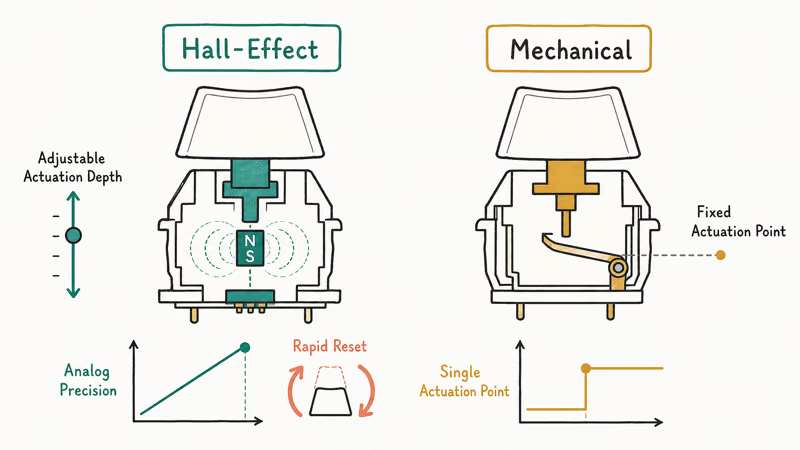
The headline feature is rapid trigger. It resets a key the instant you lift, so you can tap it again faster, which helps with counter-strafing in tactical shooters. According to Tom’s Guide’s gaming keyboard guide, analog Hall-effect boards have moved from a niche curiosity to a serious competitive tool that pros now bring to tournaments.
Adjustable actuation is the second perk. You set how far a key sinks before it registers, from a light hair-trigger for gaming to a deeper press that resists typos. The Wooting 60HE popularized this approach. As an Amazon Associate fone.tips earns from qualifying purchases.
Standard mechanical boards still make sense. They cost less and feel great for both gaming and writing. If analog features don’t interest you, a quality mechanical keyboard is the smarter spend.
#What Switches Are Best for Gaming?
The best switch depends on whether you prioritize speed, feedback, or quiet operation. Linear switches are the common gaming choice because they move smoothly with no bump to slow down rapid taps.
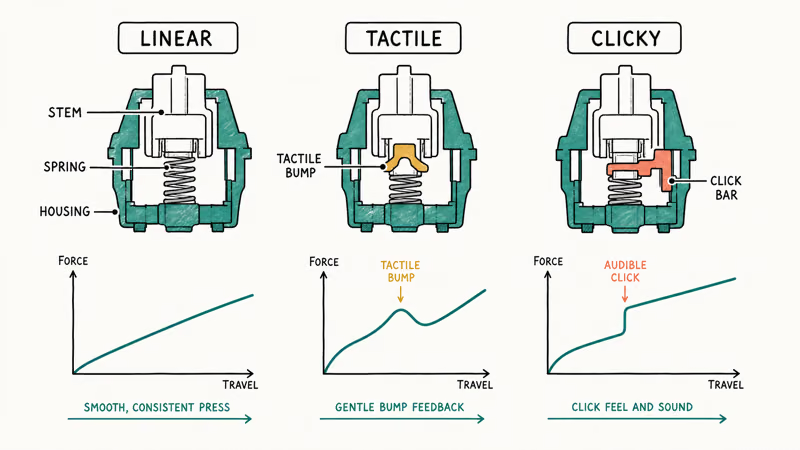
Linear switches like reds and speed silvers travel straight down without a tactile bump, which suits fast double-taps. Tactile switches add a bump you feel at the actuation point, giving typing feedback that some players like for gaming too. Clicky switches stack sound on top of that bump and tend to annoy anyone nearby, so they’re the worst pick for a shared room or a voice call.
Hot-swap sockets change the math. A hot-swap board lets you pull switches out by hand and drop new ones in with no soldering, so you can audition reds, browns, and speed silvers on the same board until one clicks. The Keychron Q1 is a popular hot-swap pick for exactly this kind of experimenting.
Lighter speed switches can shorten the felt actuation point on a hot-swap board, making fast inputs feel quicker without buying a new keyboard.
#TKL and 60% Layouts Free Up Desk Space
Smaller layouts give you more desk room for big mouse swings, while full-size boards keep the number pad for productivity. The right size is a trade between mouse space and the keys you actually use.
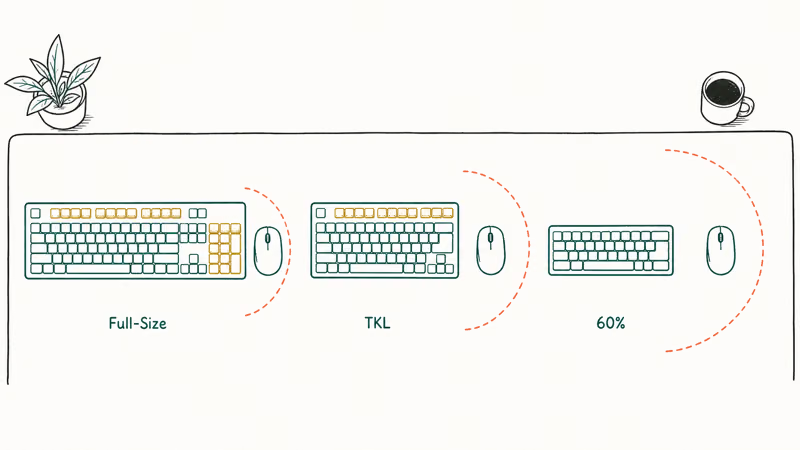
A tenkeyless, or TKL, board drops the number pad and keeps everything else. This is the safe default for most gamers because it frees space without losing the function row or arrow keys. A 60% board goes further, cutting the function row and arrows for a tiny footprint that competitive shooter players love.
Compact boards pay off. According to Tom’s Guide’s gaming keyboard picks, a smaller board lets you angle the deck and place the mouse closer to your body, which eases shoulder strain over long sessions.
The cost is lost keys. A 60% board hides the arrows and function keys behind a modifier layer, which frustrates anyone who edits documents. Choose TKL if you want compactness without relearning shortcuts.
Want a board built for typing first? Our best mechanical keyboard 2026 guide covers switch feel and build quality outside of gaming.
#What Features Actually Matter for Gaming?
Focus on switch type, actuation control, and build quality, and treat RGB lighting as a bonus. A solid case and good stabilizers do more for the experience than any light show.
N-key rollover is essential and standard on gaming boards. It makes every key register even when you hold several at once, so movement and ability presses never drop in a hectic fight where you might press four or five keys in the same instant. Almost any keyboard sold for gaming includes it, so it’s rarely a deciding factor, but it’s worth confirming on a cheap board before you buy.
Wireless is now viable for gaming. A 2.4GHz dongle delivers latency close to wired, and our best wireless mechanical keyboard guide ranks the low-latency options.
Onboard memory is a quiet win. It stores your actuation settings and macros on the board itself, so your tuning follows you to another PC. Hall-effect keyboards lean on this to keep per-key settings portable.
#How to Set Your Gaming Keyboard Budget
Decide first whether you actually need analog features. They drive most of the price gap, and a standard mechanical board does the gaming job for far less.
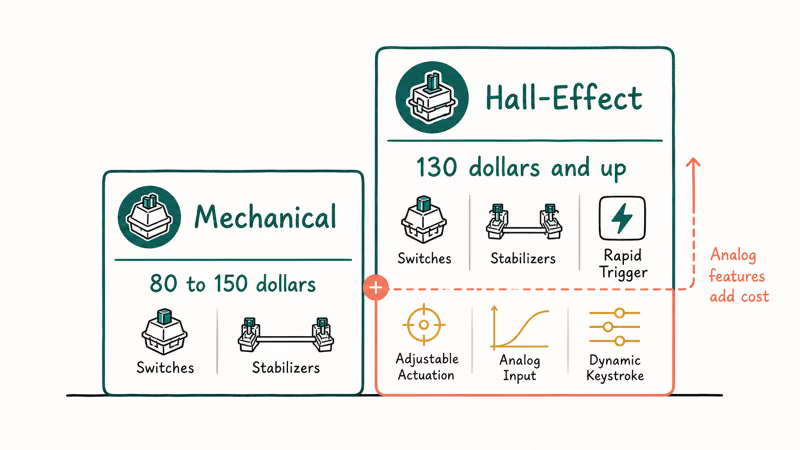
A good mechanical gaming keyboard runs about $80 to $150. As Tom’s Guide’s mechanical keyboard guide recommends, prioritize the case, stabilizers, and switch feel over flashy extras at this tier. A solid TKL mechanical board near $100 covers most gamers without touching analog tech.
Hall-effect boards start higher, often $130 and up. Pay it only if rapid trigger and per-key actuation matter. Otherwise spend the money on a better mouse.
#Best Picks by Player Type
Your main game points to a clear board. Competitive FPS players get the most from a 60% Hall-effect board, where rapid trigger and the tiny footprint both pay off in fast aim duels and the freed desk space lets you swing the mouse at a lower sensitivity without running out of room.
MOBA and MMO players lean toward a TKL or full-size mechanical board with macro keys. The extra width is fine when you aren’t making huge mouse swings, and the spare keys hold ability binds. A board with dedicated macro keys saves you from awkward modifier combos mid-fight.
Casual and all-purpose gamers are best served by a quality TKL mechanical board with linear or tactile switches. It games well, types well, and costs far less than analog tech you may never tune.
#Bottom Line
Buy the Wooting 60HE if you play competitive shooters and want the sharpest reaction edge. Its Hall-effect switches add rapid trigger and adjustable actuation that a standard board can’t match, and the 60% size frees room for big mouse swings. Choose a Keychron Q1 hot-swap board instead if you value typing feel and the freedom to change switches.
Don’t need analog features? A standard TKL mechanical keyboard with linear switches gives you most of the gaming benefit for less money. Pick the size around your desk space and how often you reach for the number pad and arrow keys.
Finish your battlestation with the best gaming mouse matched to your grip. If MOBAs are your main game, check the best league of legends keyboard for layouts tuned to ability-heavy play.
Want both in one purchase? The best keyboard and mouse combo guide pairs matched gear.
#Frequently Asked Questions
Are Hall-effect keyboards better than mechanical ones for gaming?
For competitive shooters, yes, because they add rapid trigger and adjustable actuation. For casual gaming and typing, a good mechanical board is just as enjoyable and costs less.
What is rapid trigger on a gaming keyboard?
Rapid trigger resets a key the moment you start lifting your finger, instead of waiting for it to rise past a fixed point. This lets you tap the key again faster, which helps with counter-strafing. It’s exclusive to analog Hall-effect keyboards.
Is a TKL or 60% keyboard better for gaming?
TKL is the safer choice for most gamers because it frees desk space while keeping the function row and arrow keys. A 60% board goes smaller for the most mouse room but hides the arrows and function keys behind a modifier layer. Pick 60% only if you rarely need those keys.
What does hot-swap mean on a keyboard?
Hot-swap means the switches sit in sockets you can pull and replace by hand, with no soldering. It lets you try different switch types or fix a faulty switch on the same board, which is ideal if you’re still figuring out which feel you prefer or you want one keyboard that can change personality over the years instead of buying a new board each time.
Do I need RGB lighting for gaming?
No. RGB lighting is purely cosmetic and doesn’t affect performance. Build quality, switch type, and actuation control matter far more. Treat lighting as a nice extra.
Which switches are best for fast-paced shooters?
Linear switches are the usual pick because they move straight down with no tactile bump to slow rapid taps. Speed linear variants register with even shorter travel for quicker inputs. If you want the fastest possible response, a Hall-effect board with a low actuation setting beats any fixed switch.
Is a wireless keyboard fast enough for competitive gaming?
A wireless board with a dedicated 2.4GHz dongle is fast enough for nearly all players, with latency close to wired. Bluetooth is slower and better suited to casual use or travel. If you go wireless for competition, use the 2.4GHz receiver rather than Bluetooth.
Fortnite Stuck on the Loading Screen? Fix It in 2026
Fortnite stuck on the loading screen? Check server status, fix the Windows N Media Pack and DirectX 11 on PC, clear the console cache, and verify files.
Minecraft Keeps Crashing? Java and Bedrock Fixes (2026)
Minecraft keeps crashing on startup or mid-game? Update your GPU driver, remove mods on Java, and reinstall Gaming Services on Bedrock. Fixes for both.

Pokemon GO Not Loading? Fix the Loading Screen 2026
Pokemon GO not loading or stuck on the Pokeball? Check server status, fix automatic date and time, grant location permission, clear the cache, and update.
PS5 Controller Not Charging? 9 Fixes That Work (2026)
DualSense not charging? Swap the cable, use a rear port in Rest Mode, clean the USB-C port, and check power settings. 9 fixes for a dead PS5 controller.