Best Mechanical Keyboard 2026: Picks by Switch and Use
Best mechanical keyboard 2026 by switch type and use case, from gasket-mount typing boards to wireless TKL gaming and quiet office picks for work.
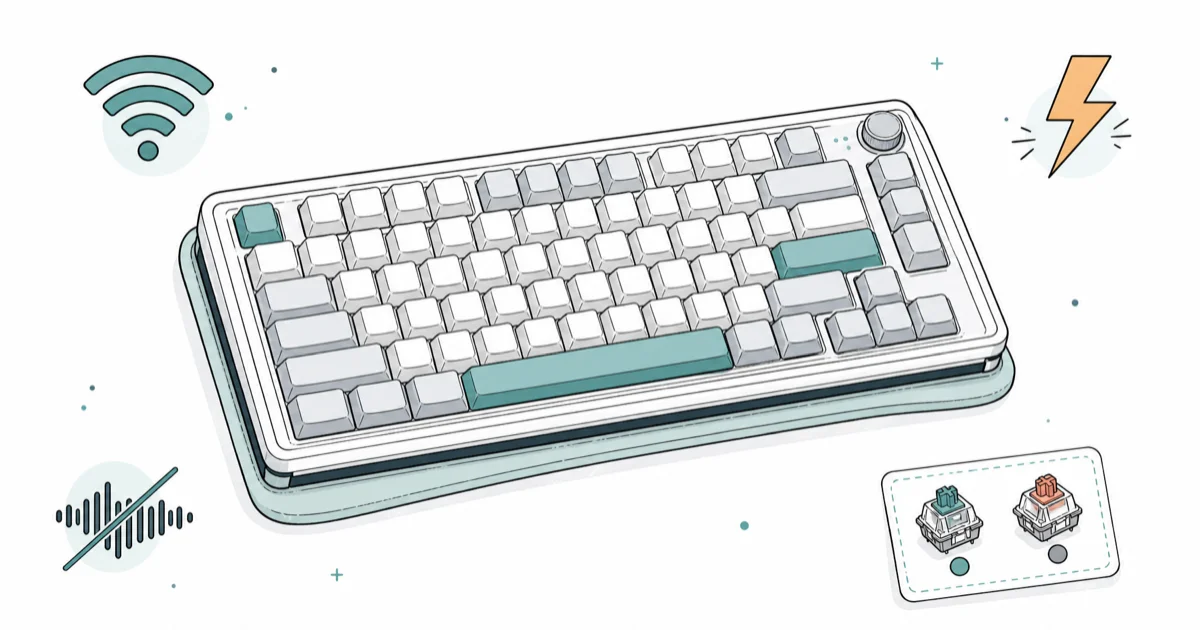
Quick AnswerThe Keychron Q5 Max is the best mechanical keyboard in 2026 for most people, with premium gasket-mount typing feel out of the box. Gamers want a fast wireless TKL, and quiet offices want a tactile board with silent switches.
A mechanical keyboard lives or dies on two choices: the switch under each key and how the board is mounted. Get the switch right and a board feels like an extension of your hands. Get the mount right and every keystroke lands soft instead of harsh. This guide maps the major keyboard types to the people they’re best for.
- The Keychron Q5 Max is the best mechanical keyboard for most people in 2026, with heavyweight aluminum build and tuned gasket-mount typing feel straight out of the box
- Switch type matters more than brand: linear for gaming, tactile for typing, clicky for feedback, and silent linear for shared offices
- Hot-swap sockets let you change switches without a soldering iron, so buy hot-swap if you’re unsure which switch you’ll love
- Wireless TKL boards now hit 1000 Hz polling over a 2.4 GHz dongle, closing the old wired-versus-wireless gap for gaming
- Layout drives desk space: full-size keeps the numpad, TKL drops it for mouse room, and 65 percent trims everything but arrows for minimal setups
#Best Mechanical Keyboards: Our Top Picks and Where to Buy
Here is the short version on each pick and where to get it before the full guide.
#Keychron Q5 Max
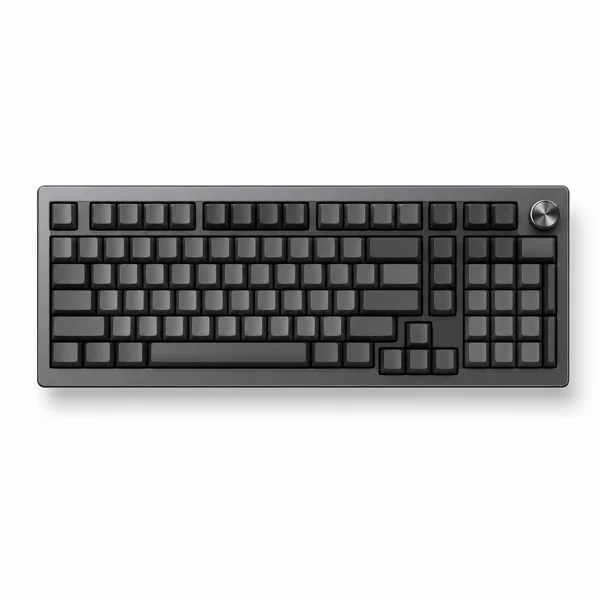
- Dense, premium typing feel out of the box
- QMK/VIA hot-swap for full customization
- Tri-mode wireless plus wired, works on any OS
Last updated on Jun 30, 2026
As an Amazon Associate fone.tips earns from qualifying purchases. Prices and availability on Amazon are accurate as of the date above and subject to change.
#Lemokey P1 Pro
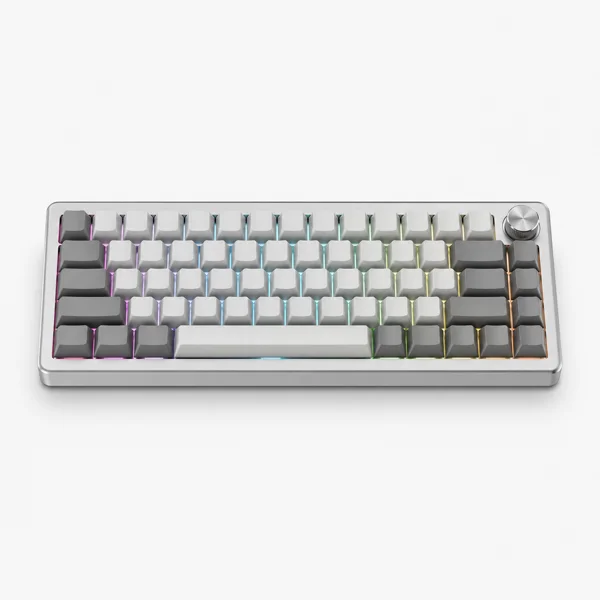
- Aluminum build and hot-swap rare under $150
- 2.4GHz, Bluetooth, and wired triple connectivity
- 1000Hz polling for low-latency gaming
Last updated on Jun 30, 2026
As an Amazon Associate fone.tips earns from qualifying purchases. Prices and availability on Amazon are accurate as of the date above and subject to change.
#How Do You Choose a Mechanical Keyboard Switch?
Switches are the whole game. A switch decides how a key feels, how loud each press lands, and how fast it actuates, which is why the same board can feel completely different with two switch types. Pick the switch first. The board is just the housing.
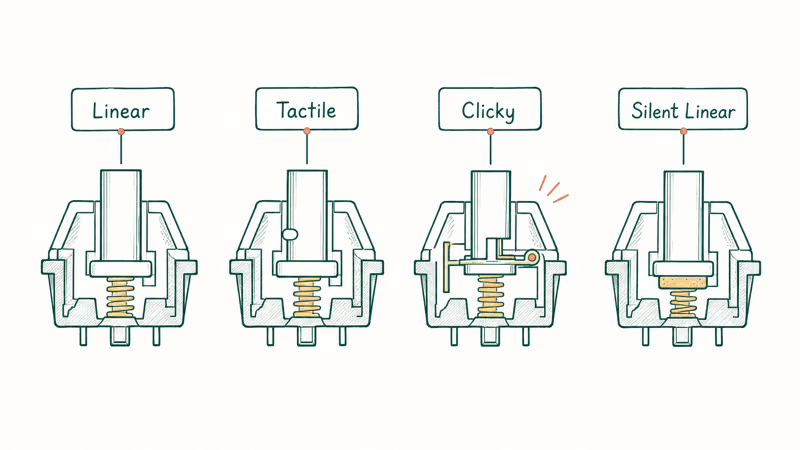
There are three families, plus a quiet variant. Linear switches like Red and Yellow press straight down with no bump, which suits gaming and fast typists. Tactile switches like Brown and Clear give a felt bump at the actuation point, which most typists prefer because the bump confirms the press without forcing a full bottom-out. Clicky switches like Blue and Green add an audible click on top of that bump, satisfying at home but loud in a shared room.
For a shared office, silent linear switches dampen the bottom-out noise without changing the feel much. According to RTINGS’ mechanical keyboard testing, the Keychron Q5 Max leads its roundup on typing quality, which comes down to the switch tuning paired with sound-dampening foam inside the case, the kind of tuning that separates a board you tolerate from one you reach for every morning. If you can, type on a switch tester before you commit, since no spec sheet captures feel.
#Best Mechanical Keyboard Overall: Keychron Q5 Max
The Q5 Max gets the hard parts right at the factory. The Keychron Q5 Max combines a gasket mount, a 96 percent layout, and a heavy aluminum case, which is exactly the recipe for a softer, less hollow typing feel. No modding needed.
As an Amazon Associate, fone.tips earns from qualifying purchases.
Here is what makes it the default pick:
- Premium typing feel out of the box. Gasket mount plus internal foam means no modding required to sound good.
- Heavyweight aluminum chassis. It stays planted during fast typing and doesn’t slide.
- 96 percent layout. You keep a numpad while saving some desk width over a full-size board.
- Triple connection. Wired USB-C, 2.4 GHz wireless, and Bluetooth all work.
The downside is weight and price. This is a desk board, not a travel board, and it costs more than a mainstream membrane keyboard. For typists who want one keyboard for years, that trade is easy. If you would rather spend less and still get hot-swap, our best membrane keyboard guide covers the quieter, cheaper end of the spectrum.
#Best Wireless Mechanical Keyboard for Gaming: Lemokey P1 Pro
Gaming changes the priority list. Polling rate and a true TKL or compact layout matter more than premium acoustics, because the goal is fast input and room to swing the mouse. A 1000 Hz wireless connection is the bar to clear.
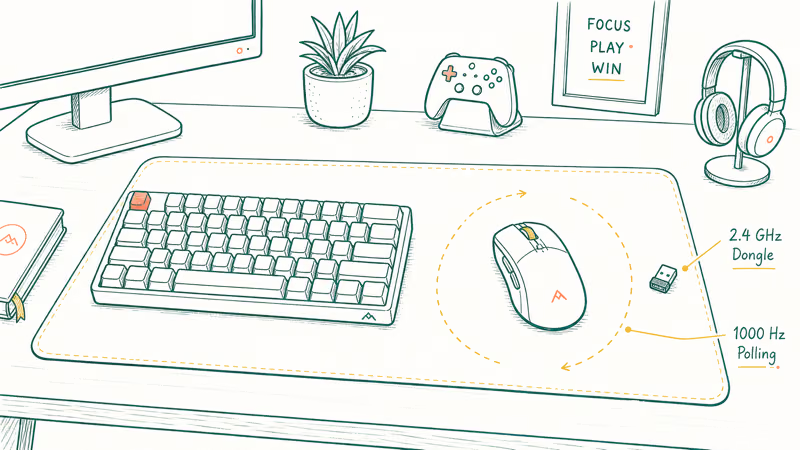
The Lemokey P1 Pro is the value standout here. GamesRadar’s hot-swappable keyboard roundup found that a wireless hot-swappable board with a 1000 Hz polling rate at this price is rare, and the P1 Pro adds switching between 2.4 GHz, Bluetooth, and wired. That combination of speed, hot-swap, and triple connectivity is unusual under $150.
For players who want a more premium enthusiast build, the Lemokey L3 brings a gasket-mount TKL with Gateron switch options. Either way, drop to a TKL or smaller so the right hand has room to swing the mouse.
Our best wireless mechanical keyboard guide breaks down the connectivity trade-offs in depth. Genre players should also check the best keyboards for League of Legends for layouts tuned to fast key combos.
#Best Quiet Mechanical Keyboard for Offices
Shared spaces need a board nobody else hears. The fix is two-fold: silent linear switches and a case that absorbs vibration. A Keychron V Max fitted with silent linear switches is the sensible direction for an open-plan office where a clicky board would draw complaints by lunch.
The keys to a quiet board:
- Silent linear switches. Dampening pads inside the switch soften the bottom-out and the return.
- Gasket or foam-lined case. This kills the case ping and resonance that clicky boards amplify.
- Avoid clicky switches entirely. Blue and Green switches are the loudest type by design.
A quiet board doesn’t mean a dead board. You still get the smooth keystroke and hot-swap flexibility, just without the rattle. Our quiet mechanical keyboard guide covers switch dampening and case mods in full.
#Mount Type and Build Quality Explained
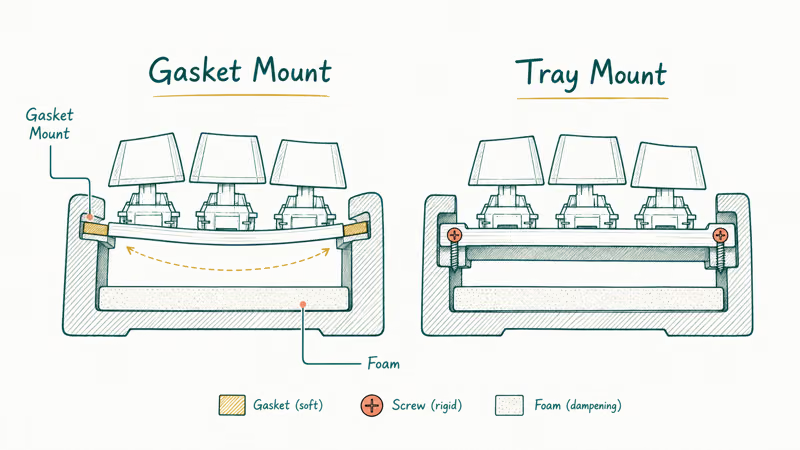
Beyond the switch, the case and mount decide how a board sounds and feels. A gasket mount suspends the keyboard plate on soft strips, which gives a slight flex and a softer bottom-out than a board screwed straight into a metal tray. That single design choice is most of why the Q5 Max sounds premium while a budget tray-mount board sounds hollow, even when both run the exact same switches.
Material matters too. According to Tom’s Guide’s mechanical keyboard testing, the best boards range from budget decks to premium slabs of aluminum and wood, with build quality and typing sound driving the top placements. An aluminum case adds weight that keeps the board planted and kills resonance. Plastic cases run lighter and cheaper but ring more unless they’re foam-lined.
Foam is the cheap upgrade hiding inside good boards. It absorbs the vibration that turns into a hollow ping. If a board you like sounds harsh, a foam mod is often the fix.
#What Layout Should You Buy: Full-Size, TKL, or 65 Percent?
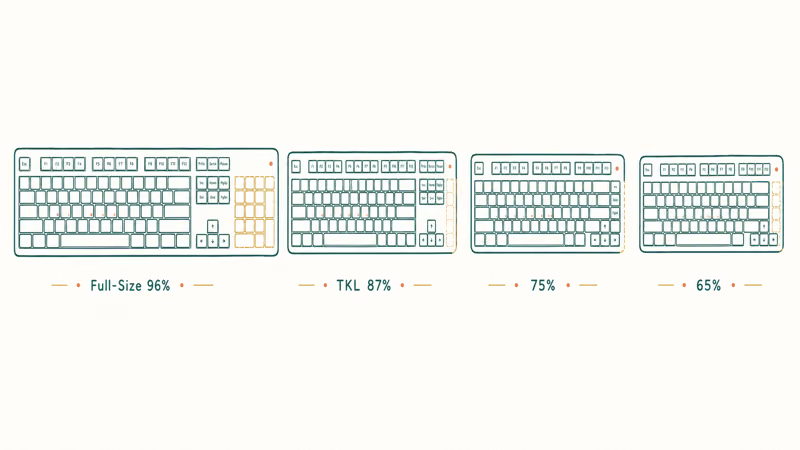
Layout is about desk space and which keys you actually use. Full-size keeps the numpad, TKL drops it to free mouse room, and 65 percent trims everything but the arrow cluster for the smallest footprint. There is no wrong answer, only a fit.
Choose by your daily work:
- Full-size or 96 percent if you crunch numbers and need the numpad. The Q5 Max sits here at 96 percent.
- TKL (87 percent) if you want arrow keys and a clean desk. This is the sweet spot for most people.
- 65 percent if you value a minimal setup and don’t mind function-layer shortcuts for the F-row.
- 75 percent if you want the best balance, with arrows and a compact F-row in one block.
Smaller layouts free up room to swing a mouse, which is why competitive players gravitate to TKL and below. The trade is muscle memory: a 65 percent board makes you learn key combos for delete, page up, and the function row.
#Bottom Line
For most people in 2026, the Keychron Q5 Max is the mechanical keyboard to buy. Its gasket mount, aluminum case, and factory tuning deliver premium typing with zero modding, and the 96 percent layout keeps a numpad without going full-width.
Gamers should skip it for the Lemokey P1 Pro, which trades acoustics for a fast 1000 Hz wireless TKL with hot-swap sockets. For a shared office, fit a Keychron V Max with silent linear switches so nobody across the desk hears a thing. Whatever board you pick, buy hot-swap so you can change the switch later without a soldering iron.
#Frequently Asked Questions
What is the best mechanical keyboard switch for typing?
Tactile switches like Brown or Clear. They give a felt bump at the actuation point that confirms the keystroke without the loud click of a Blue switch. Most typists find tactile switches the most comfortable for long sessions because the bump reduces accidental bottom-outs.
Are wireless mechanical keyboards good for gaming now?
Yes. Modern wireless boards like the Lemokey P1 Pro hit 1000 Hz polling over a 2.4 GHz dongle, which matches wired response for all but the most elite players. The old lag complaint applied to Bluetooth-only boards. For ranked play, use the dongle.
Should I buy a hot-swappable keyboard?
If you’re not certain which switch you want, yes. Hot-swap sockets let you pull a switch and drop in another with just a switch puller, no soldering iron and no desoldering. So you can buy one board and experiment with linear, tactile, and silent switches until you find a favorite, which makes hot-swap the safest choice for a first mechanical keyboard and the reason we steer beginners toward it over a soldered board every time.
How loud is a mechanical keyboard in a shared office?
It depends entirely on the switch. Clicky switches like Blue are loud by design and carry across a room, which is why they belong at home and not in an open-plan office. Silent linear switches paired with a foam-lined case are the safer choice when sound is a concern, and a gasket-mount board helps absorb resonance.
What layout is best for a small desk?
A 65 percent or 75 percent board. A 65 percent layout drops the numpad and function row, keeping only the arrows, which leaves the most room for a mouse. A 75 percent layout adds back a compact function row in one tidy block. Both beat a full-size board on desk space.
Do I need a wrist rest with a mechanical keyboard?
For tall boards, often yes. Mechanical keyboards sit higher than laptop keyboards, so a wrist rest keeps your wrists neutral and reduces strain during long sessions. Our best keyboard wrist rests guide covers foam, gel, and wood options sized for each layout. A low-profile board reduces but doesn’t eliminate the need.

Best Laptop for Running LLMs in 2026: Memory Comes First
The best laptop for running LLMs is a memory purchase first. Compare MacBook unified memory against NVIDIA laptop VRAM, and see what each tier really runs.

Pixel 11 vs Pixel 10: What Changed and Who Should Upgrade
Pixel 11 vs Pixel 10: same screen and camera resolution, new Tensor G6, 25W wireless, and Gemini Intelligence. Here is who should actually upgrade.

Best Power Bank for iPad in 2026: Pro, Air, and Mini
Best power bank for iPad in 2026. Compare mAh tiers and USB-C PD wattage for iPad Pro, Air, and mini, plus airline Wh math, cables, and travel tips.

Best Power Bank With Built-In Cable: Top 2026 Picks
Best power bank with built-in cable picks for 2026. Compare single USB-C, multi-connector, and retractable laptop banks, plus airline Wh math.