How to Transfer eSIM to a New Android Phone (2026 Guide)
Move an eSIM to a new Samsung, Pixel, or OnePlus phone with the wireless 6-digit transfer, a carrier QR code, or a quick call. Pre-checks and fixes inside.
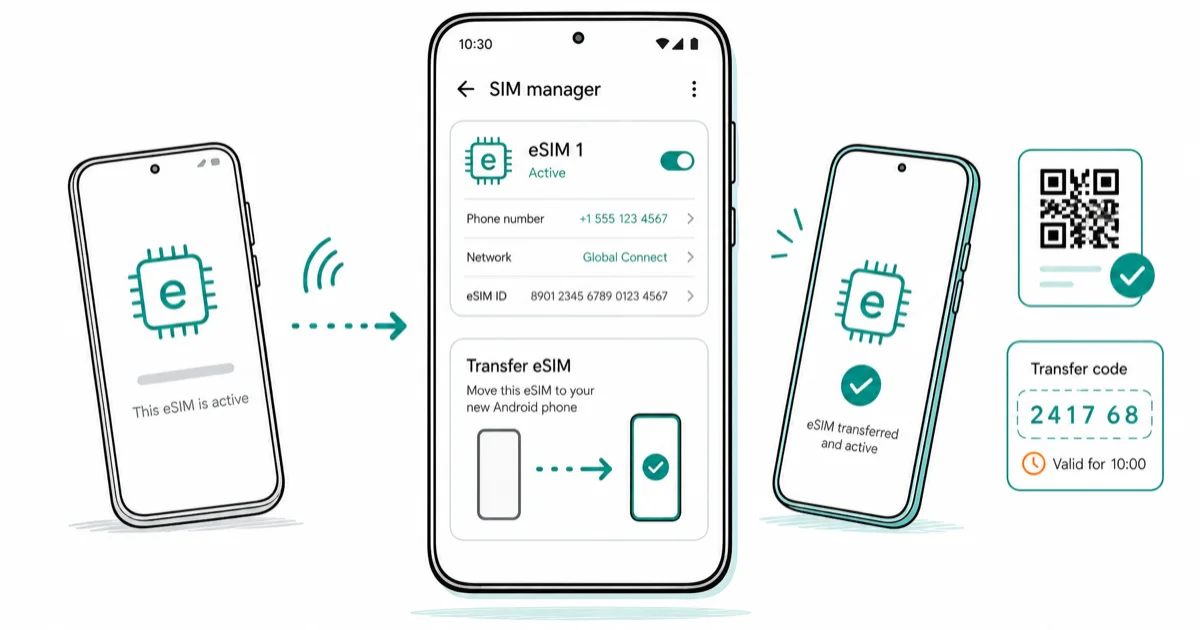
Quick AnswerOn the new Android phone, open Settings, SIM manager, Add eSIM, then tap Transfer SIM from Galaxy or Android phone. Approve on the old phone and enter the 6-digit code.
Moving an eSIM to a new Android phone used to mean a call to your carrier. Since Android 13, many Samsung and Pixel phones can hand the profile over wirelessly when the phone model, Android version, and carrier all support the transfer flow.
- Wireless eSIM transfer between two Galaxy phones takes about 60 seconds and needs a 6-digit code shown on the new phone, Bluetooth on both, and a stable Wi-Fi connection
- Samsung’s Instant Transfer works on Galaxy S20 through S26, Z Fold and Z Flip, FE, A-series, and Tab S models when both the carrier and the destination phone support it
- Pixel 10 in the US has no physical SIM tray, so eSIM transfer is the only way to bring your number over to those devices
- Keep the old phone powered on and connected to its network until the new eSIM shows signal bars on the new phone, then remove or factory-reset
- If wireless transfer fails, ask your carrier for a fresh QR code or activation code rather than retrying the same wireless flow
#Before You Start: The Five Pre-Checks
Most transfer failures are environment problems, not carrier problems. Run through this list on both phones before you tap a single button.
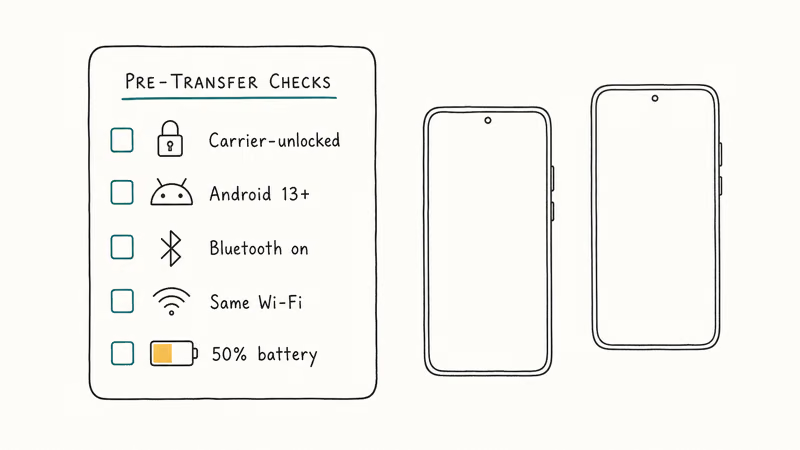
The new phone must be carrier-unlocked. A phone that’s still locked to a different carrier will accept the eSIM profile but refuse to register on the network, which looks like a transfer failure but isn’t. If you’re not sure, our guide on carrier lock and no SIM restrictions walks through the checks. Both phones need Android 13 or newer, Bluetooth on, the same Wi-Fi network, and at least 50% battery.
Proximity matters too. Wireless eSIM transfer uses Bluetooth to pair and Wi-Fi to move the profile, the same combination Quick Share uses for files. If you’ve set up Quick Share between two Android phones, the eSIM flow should feel familiar.
Sign in to the same Google account on both phones first. For two Galaxies, have your Samsung account ready on both. Smart Switch and the Pixel migration tool bundle eSIM transfer into the larger device-setup flow, so a fresh phone often gets the eSIM moved during first-boot rather than a separate trip into Settings later on.
#Transfer Between Two Samsung Galaxy Phones
Samsung calls this eSIM Instant Transfer, and it’s the fastest path between any two Galaxy phones that both support it.
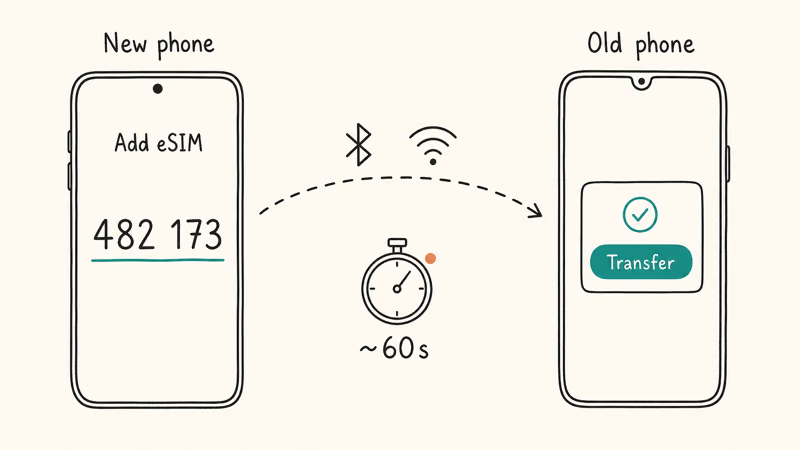
According to Samsung’s official Galaxy eSIM support page, the new device drives the flow:
- On the new Galaxy, go to Settings, Connections, SIM manager, Add eSIM
- Tap Transfer SIM from Galaxy or Android phone
- Wait for the prompt on the old phone, then tap Transfer
- Enter the 6-digit verification code shown on the new phone
- Pick the phone number you want to move from the list on the new phone
- Tap Transfer to confirm
- Wait for the new Galaxy to download and activate the profile, usually 30 to 60 seconds
The old phone will display a confirmation, and at that point the line will go dead on the old device. Samsung’s supported list covers Galaxy S20 through S26, Z Fold and Z Flip, FE, A-series in select regions, Xcover, and Tab S. If your model is on that list and your carrier is on Samsung’s supported-carriers chart, this flow should work on the first try.
Samsung also added an eSIM recovery option on the S25 and S26. The new phone can redownload a recently deleted eSIM from Settings, Connections, SIM manager, Add eSIM, Recover deleted eSIM. Useful if you accidentally wiped the profile during a botched first attempt.
#How Do I Move an eSIM to a New Pixel Phone?
Pixel uses the same wireless model as Samsung, but the menus live under different labels. The path is Settings, Network and internet, SIMs, Add SIM, Transfer SIM from another device.
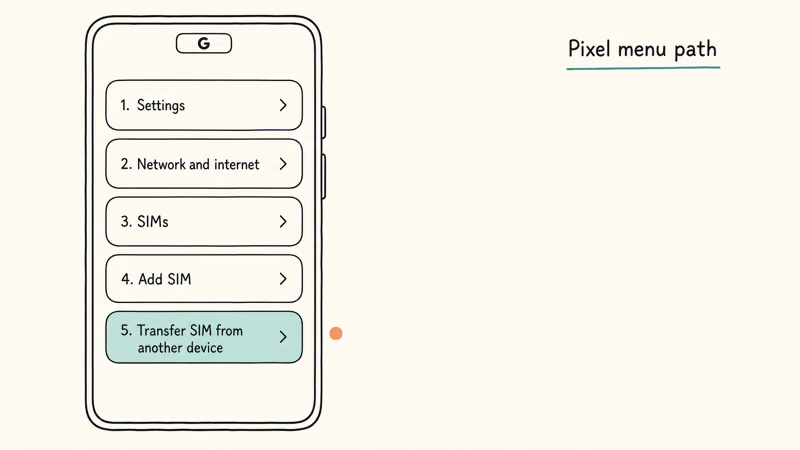
Google’s Pixel support page confirms that Pixel can pull an eSIM from another Android device or an iPhone running iOS 26 or newer. If your carrier supports automatic onboarding, the Pixel may surface the eSIM during the device-setup wizard, which is the lower-friction path.
Otherwise, the manual settings path is the same shape as Samsung’s: open the SIMs menu, tap Add, pick Transfer.
One regional caveat. The Pixel 10 in the US has no physical SIM tray, which means eSIM transfer isn’t optional, it’s the only way to get a working line on the device. If wireless transfer hangs on a Pixel 10, see our notes on common Pixel 10 problems for the launch-window fixes.
For cross-brand transfers, say from a Galaxy to a Pixel, both wireless flows can talk to each other in most regions. The Pixel side initiates with Transfer SIM from another device and lists the Galaxy as a source. If the source phone appears in the transfer list, follow the code prompt and keep both phones online until the new device shows signal bars.
#What If Wireless Transfer Does Not Work?
Three common reasons the wireless flow fails: the carrier hasn’t enabled it for your line, one of the phones is too old, or you’re moving across brands where the bridge isn’t yet supported.
There’s also a quieter failure mode where the profile moves but cellular data fails after an eSIM transfer, which needs its own fix sequence on the receiving phone.
The QR code path is the universal fallback.
Most US carriers will email or display a fresh QR if you ask. On the new phone, open Settings, SIM manager, Add eSIM, Scan QR code from service provider. Confirm, and the profile downloads in seconds.
The same menu has Enter activation code for carriers that send an SM-DP+ address instead of a QR.
#Carrier App Fallbacks for T-Mobile, AT&T, and Verizon
T-Mobile uses its T-Life app. T-Mobile’s eSIM support page confirms the steps: disable SIM Protection, open T-Life, pick the line, enter the new phone’s IMEI, then confirm through the interactive SMS prompt.
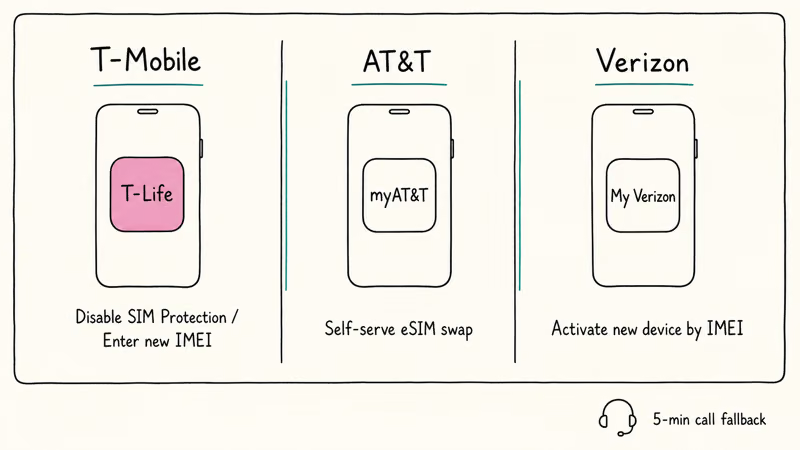
AT&T and Verizon have similar self-serve flows in their apps. If the in-app path stalls, a 5-minute call to support is usually enough to re-provision the profile to the new IMEI manually. Samsung also recommends contacting the carrier directly when Instant Transfer fails on a supported model.
A quick warning on travel eSIMs. Most one-time plans, including Holafly, Airalo, and ByteSim, are device-bound after first activation and can’t be transferred to a new phone. You’ll need to buy a fresh plan for the destination. Your home carrier’s primary eSIM doesn’t have this restriction.
#Keep Your Number Safe During the Handoff
The single biggest mistake is factory-resetting the old phone before the new eSIM is confirmed active. Don’t do that.
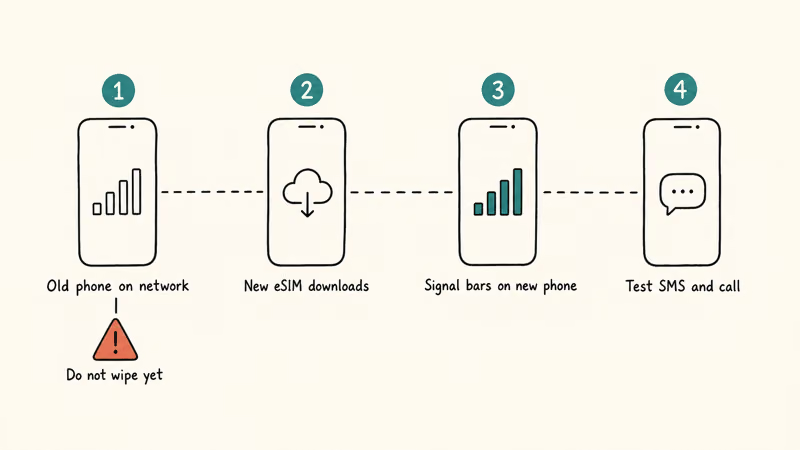
Keep the old phone powered on, connected to its network, and physically with you for the whole process. If the new eSIM downloads but doesn’t register, having the old phone still alive lets you abort, repeat the transfer, or call the carrier from the line itself. Samsung’s doc states that a failed transfer leaves the eSIM in a stuck state where neither phone has the live profile, and recovering usually means a carrier call.
Watch for signal bars on the new phone, then send a test SMS and place a test call. Only after both succeed should you consider removing the eSIM from the old phone or starting Smart Switch’s data wipe. If Smart Switch itself stalls during the broader migration, our walkthrough on Smart Switch stuck issues covers the common fixes.
Keep your carrier’s account login and IMEI handy. The IMEI lives in Settings, About phone on both devices. Support will ask for it within the first 30 seconds of any call.
If you’re moving to or from an iPhone in the same session, our companion guide on switching a SIM card from Android to iPhone covers the cross-platform direction.
#Bottom Line
Try the built-in wireless transfer first. On Galaxy phones, that’s Settings, SIM manager, Add eSIM, Transfer SIM from Galaxy or Android phone. On Pixel, it’s Settings, Network and internet, SIMs, Add SIM, Transfer SIM from another device. Either flow takes about a minute when both phones are unlocked, on the same Wi-Fi, and on a supported carrier.
If wireless transfer fails twice, don’t keep retrying. Ask the carrier for a fresh QR code or use their self-serve app to re-provision the profile to your new device’s IMEI.
Above all, keep the old phone alive on its network until the new eSIM shows signal bars and passes a test call. Skip that one habit and a 60-second transfer turns into a 60-minute support call.
#Frequently Asked Questions
How do I transfer my eSIM to a new Android phone?
On the new phone, open Settings and go to the SIM manager. Tap Add eSIM, then Transfer SIM from Galaxy or Android phone (on Samsung) or Transfer SIM from another device (on Pixel). Confirm on the old phone, enter the 6-digit code shown on the new phone, pick the number, and wait for the profile to activate. The whole flow takes about a minute on most carriers.
Can I move an eSIM without calling my carrier?
Yes, on most major US carriers. Samsung’s Instant Transfer and Pixel’s equivalent flow handle the carrier handoff in the background, so you never speak to a person. You only need a call if your carrier hasn’t enabled the wireless transfer feature for your line, your phone’s too old to support it, or you’re on a prepaid plan that requires manual re-provisioning.
What is the 6-digit eSIM transfer code?
It’s a one-time pairing code the new phone generates and the old phone consumes. It expires after a few minutes.
Do I delete the eSIM from my old phone first?
No. Wait until the new phone shows signal bars and passes a test call. Then remove or wipe.
Does eSIM transfer work between Samsung and Pixel?
In most regions, yes. The Pixel-to-Samsung and Samsung-to-Pixel bridges use the same underlying protocol, so the wireless flow can recognize the other brand as a valid source when both devices and the carrier support it. If the cross-brand flow fails, fall back to a carrier QR code.
What if my carrier does not support wireless eSIM transfer?
Use a QR code or activation code from the carrier instead. Most US carriers will send a fresh QR by email or display one in their app on request.
On the new phone, go to Settings, SIM manager, Add eSIM, Scan QR code from service provider, and scan. If the carrier only sends a text-based SM-DP+ address and activation code, pick Enter activation code from the same menu.
How many times can I transfer the same eSIM?
Most carriers cap transfers at five to ten lifetime moves per profile, and support can usually reset the counter if you ask. Travel eSIMs like Airalo and Holafly are one-time-use and can’t be transferred at all, so plan to buy a fresh travel plan for each device or trip. The home carrier eSIM is the only profile that travels with you reliably across upgrades.

Pixel 11 vs Pixel 10: What Changed and Who Should Upgrade
Pixel 11 vs Pixel 10: same screen and camera resolution, new Tensor G6, 25W wireless, and Gemini Intelligence. Here is who should actually upgrade.

Verizon Not Receiving Texts? How to Fix It in 9 Steps
Verizon not receiving texts? Fix it in 9 steps: check Message Blocking in My Verizon, reset network settings, deregister iMessage, and call support.

Pixel Battery Drain: What Google's July Fix Really Covers
Google marked the Pixel idle battery drain bug fixed in July, but only some phones got the patch. Here is who is covered, who is not, and what to try.

iPhone Stuck on EDGE? How to Get 5G or LTE Back (2026)
iPhone stuck on EDGE with crawling data? Here's why the E icon appears, which settings force 5G or LTE back, and when the problem is your carrier.