Pixel 10 Problems and Fixes: 2026 Update Map and FAQ
Pixel 10 problems mapped to the update that fixed each one, including the August 2026 build for gaming crashes, GPU, touch, and CVE-2026-0163.
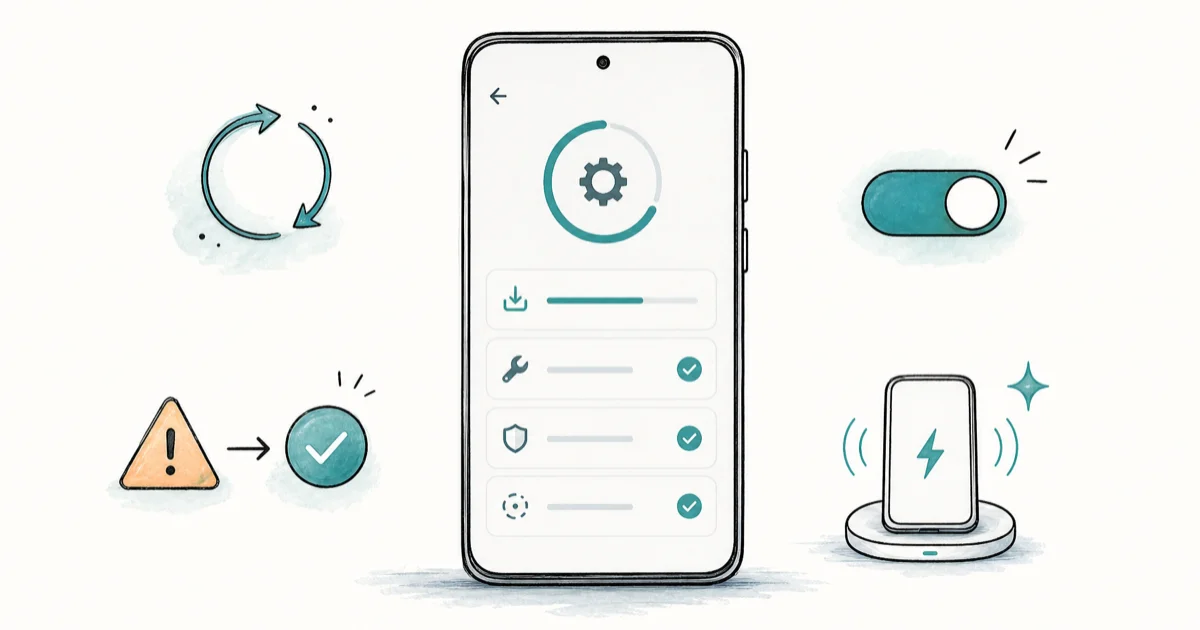
Quick AnswerInstall the August 2026 Pixel update (build CP2A.260805.005) from Settings, System, Software updates. On Pixel 10 it covers gaming crashes, GPU hiccups, touch freezes, plus a high-severity VPU security fix.
Pixel 10 problems cluster around Tensor G5 launch bugs plus later gaming crashes and touch freezes. Google has shipped patches for most of them through monthly updates and Feature Drops.
Using these methods on devices or accounts you don’t own may violate applicable laws and platform terms.
- Most Pixel 10 bugs are software, and fixes now span December 2025 through the August 2026 build CP2A.260805.005
- August 2026 adds Pixel 10 gaming-crash, GPU, and touch-panel fixes plus high-severity CVE-2026-0163 in the Video Processing Unit
- Wireless charging on the Pixel 10 is rated up to 15W on Pixel Stand 2 and 12W on any Qi-certified pad above 10W
- The Pixel 10 Pro camera freeze is tied to 4K 60fps mode and older launch-window builds
- Google’s Pixel update bulletin lists every monthly patch so you can match a fix to your build number in under a minute
#Why Are People Reporting Pixel 10 Problems?
The Pixel 10 shipped on Tensor G5, Google’s first 3nm in-house chip. New silicon, new ISP, new modem firmware, and a stock Android 16 build all dropped together, so the first month produced more bug reports than the Pixel 9 launch did. Most are software, which is the good news.
According to Google’s Pixel update bulletin, every monthly security patch and Feature Drop is dated and linked to a build number, so you can match a fix to your phone in under 30 seconds. The December 2025 Feature Drop addressed the camera freeze and tightened the wireless-charging handshake. The March 2026 update fixed the Pixel 10a lock-screen freeze and shipped a new Mali GPU driver that smoothed the Tensor G5 stutter.
The fastest universal first step is to install the latest update. Go to Settings, System, Software updates, System update, then tap Check for update. The phone reboots into the update in two to three minutes.
After the reboot, clear the cache for the misbehaving app. Settings, Apps, see all apps, pick the app, then Storage and cache, Clear cache. That two-step path targets the highest-probability software causes before you reset anything.
#Pixel 10 Tensor G5 Lag and GPU Stutter
The most reported Pixel 10 problem is a brief animation stutter when launching the camera, opening the recent-apps switcher, or scrolling a long Reddit thread. The root cause is the Mali-G725 driver that shipped with the launch build, and Google has confirmed the issue in a Pixel Help community thread.
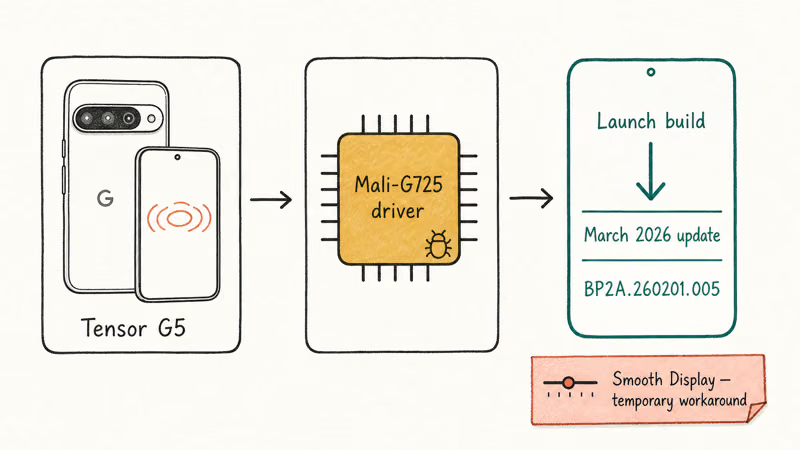
The stutter fix is tied to the March 2026 build path. If you’re still on a pre-March build, install the update.
A second troubleshooting step is to turn off Smooth Display while you debug, then turn it back on. Settings, Display, Smooth Display toggle. This forces the GPU off the dynamic 120Hz mode that triggered most of the stutter on the launch driver.
If the stutter persists after the update, clear the system cache. Hold Power plus Volume Up to reach the boot menu, pick Recovery mode, then Wipe cache partition. This keeps your data but removes the stale shader cache the driver wrote under the old build. On Pixel devices the wipe takes about 90 seconds.
Drains the battery too? Our Android system battery drain checklist covers the wakelock pattern the Tensor G5 launch build introduced. Google’s Pixel reset guide recommends the cache-partition wipe before any factory reset.
#Pixel 10 Wireless Charging Slow or Delayed
The Pixel 10 wireless charging spec is 15W on a Pixel Stand 2 and up to 12W on any Qi-certified pad above 10W. The bug owners reported in the first two months was different: the phone sat on the pad for 5 to 10 minutes before the charging indicator appeared, then charged at the expected wattage. Launch firmware was the cause.
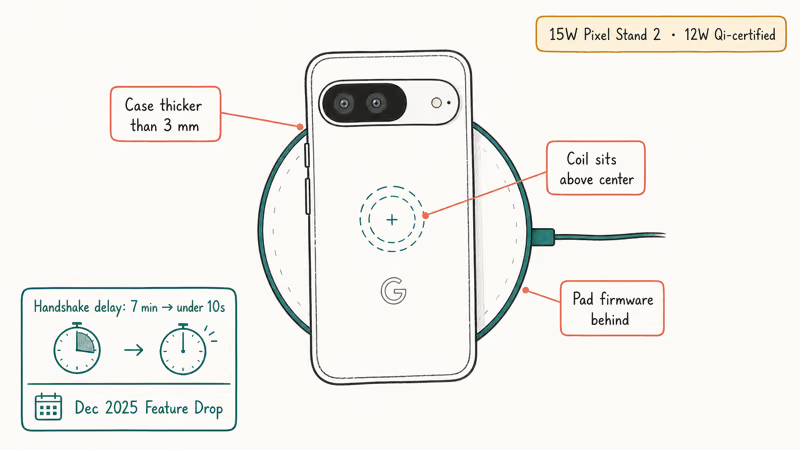
Update first.
Google’s December 2025 Feature Drop tightened the wireless-charging handshake. If your phone still hesitates after the update, the issue is almost always one of three things.
First the case. A case thicker than 3mm or one with a metal plate for magnetic mounts kills the handshake, so take the case off as a test.
Second is alignment. The Pixel 10 charging coil sits slightly above center, and pads designed for older Pixels often miss it. Center the phone so the camera bar sits just above the top of the pad.
Third is the pad’s own firmware. Belkin and Anker pushed firmware updates in early 2026 for Pixel 10 compatibility, so check the pad’s companion app.
If the indicator appears but the charge speed is stuck at 5W, your charger is doing standard Qi instead of the faster handshake. According to Google’s Pixel charging support page, only the Pixel Stand 2 reaches the full 15W; other Qi pads top out near 12W even when rated higher.
#Does the Pixel 10 Camera App Still Freeze?
This was the launch-window bug that pushed the most people to forums. The Pixel 10 Pro camera app froze for several seconds when switching to 4K 60fps video mode, and on hot days the freeze sometimes ended in a Camera has stopped error. Launch-window reports centered on warm phones switching into 4K 60fps.
Google patched the freeze in the December 2025 Feature Drop. If you’re still seeing it, your phone is on an older build. Install the latest Pixel update before anything else.
After the update, the secondary fix is clearing the Camera app cache. Settings, Apps, see all apps, Camera, Storage and cache, Clear cache. Don’t tap Clear storage; that resets your shot history. The cache clear pushes the ISP to rebuild its tuning file on the next launch and resolves the residual freezes some people kept reporting on Reddit after the December patch.
Two follow-ups.
For generic camera issues that survive the Pixel-specific fixes, our Android camera not working guide covers permission resets and third-party app conflicts. If you also use Google Photos, confirm cloud sync resumed after the update, because the camera freeze sometimes blocked the Google Photos backup queue from draining until you reopened the Photos app.
#Pixel 10a Lock Screen Freeze After Notifications
The Pixel 10a, Google’s spring 2026 mid-range, shipped with a separate bug: tapping a notification on the lock screen sometimes froze the screen for 10 to 30 seconds, with the haptic still firing on every tap. Android Authority reported on the bug in its Pixel 10a coverage shortly after launch.
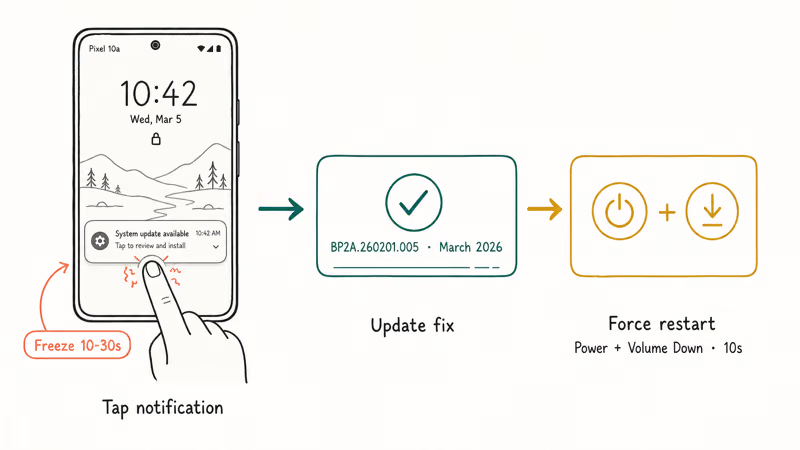
Fixed already.
March 2026’s update landed it in build BP2A.260201.005. To check your build, go to Settings, About phone, Build number. If the build is older, run a software update.
If the freeze is still there after the update, a second issue is in play. The most common is a third-party launcher that intercepts the lock-screen tap on a stale event handler. Settings, Apps, Default apps, Home app, then switch to Pixel Launcher as a test. If the freeze stops, the launcher is the cause.
Stuck on the freeze with an unresponsive screen? Force-restart the phone. Hold Power plus Volume Down for about 10 seconds.
Force-restart works.
The Pixel will reboot without losing data. This recovery path mirrors the EMUI reboot system now loop on other Android phones, except the Pixel doesn’t show the misleading recovery prompt.
#Pixel 10 Call Audio Dropping or Distorted
Call audio on the Pixel 10 launch build had two failure modes: brief silent gaps on cellular calls and distorted incoming audio on speakerphone above 70 percent volume. Both came from the modem firmware that shipped with launch.
Patched.
February 2026’s monthly security patch updated the modem firmware. Settings, System, Software updates, then run both System update and Google Play system update. The Google Play path delivers the modem firmware separately on some Pixel builds.
Distortion still on speakerphone? That one is acoustic, not software.
The Pixel 10 mid-frame conducts sound from the top speaker and creates a buzz when an unfortunate case design covers the bottom port.
Take the case off, place the call, then put the case back. If the distortion is gone with the case off, replace the case. WhatsApp and Telegram VoIP drops are unrelated to the modem, so clear the messaging app’s cache, then restart.
#Pixel 10 Overheating During 4K Capture
The Pixel 10 Pro runs hot during sustained 4K 60fps capture. Google confirms that the camera ISP throttles after 8 minutes of sustained 4K recording, with the launch build letting the surface temperature reach 43C before throttling (see Google’s Pixel camera support page). That triggered a Camera will close soon warning that scared people off recording.
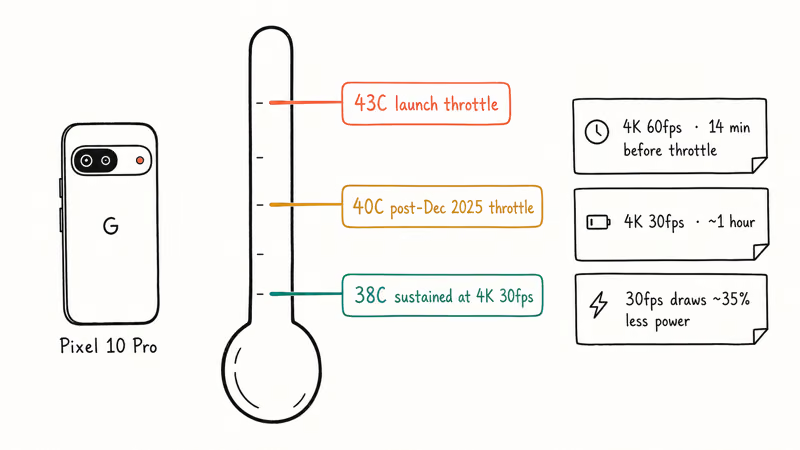
December’s patch fixed it.
The Feature Drop lowered the throttle threshold to 40C and brought the warning forward. The phone still gets warm, but the warning appears earlier so you can lower the capture load before the app closes.
Want longer clips?
If you need longer continuous capture, drop to 4K 30fps. 4K 30fps generates less heat than 4K 60fps, so it’s the safer choice for interview-style shooting where you don’t need the 60fps shutter.
Two software triggers also make the phone run hot: a runaway Google Play Services sync after a system update, and a misbehaving third-party app stuck in a wakelock. Boot into safe mode by holding Power, then long-press the Restart prompt. If the heat goes away in safe mode, a third-party app is the cause.
#Is the Pixel Idle Battery Drain Fixed Yet?
Google says yes for most current models. Owners are split. In late July 2026 Google closed its long-running idle battery drain thread on the Issue Tracker, saying the fix is merged into the July update (build CP2A.260705.006) for the Pixel 9 and Pixel 10 series, including the Pixel 10a. As reported by 9to5Google’s coverage of the closure, Pixel 8a and 9a owners have to wait for the September update instead.
The pushback is real, though. Android Police’s roundup of the tracker replies shows plenty of owners on the July build reporting that idle drain looks unchanged.
For the full model-by-model coverage list, and what to do if your Pixel isn’t on it, see our guide to Pixel battery drain after the update.
And the older Pixel 7 and 8 phones in that thread? Silence.
So what should you actually do? Install the latest build that includes July or newer (CP2A.260705.006 or the August follow-up below), then give the phone a few days of normal use before judging it.
If idle drain persists after that, check Settings, Battery, Battery usage for an app holding the phone awake overnight, and clear that app’s cache before resetting anything. Screen-off drain with no obvious app attached is worth reporting back on the tracker thread, because a reopened thread is the main pressure Google responds to.
#August 2026 Pixel Update: Gaming Crashes, GPU, and Touch
On August 4, 2026 Google started shipping the August Android 17 security update. Global build CP2A.260805.005. Rogers Canada variant CP2A.260805.005.A1.
Eligible phones are Pixel 8 and newer across the Pixel 9 and Pixel 10 lines. Pixel 6 and Pixel 7 are out of this drop. Android Authority’s rollout notes also flag that Rogers-sold Pixel 8, 8 Pro, and 8a units are missing from Google’s table, so carrier packaging still matters even when the model name matches.
Security is the quiet part that still matters. Google’s August 2026 Pixel Update Bulletin lists one high-severity elevation-of-privilege issue in the Video Processing Unit, CVE-2026-0163, and sets the security patch level to 2026-08-05.
Day-to-day, Pixel 10 owners will notice the stability notes first. As covered by 9to5Google’s August rollout report, Google calls out three functional fixes on Pixel 10, 10 Pro, 10 Pro XL, 10 Pro Fold, and 10a:
- Crashes in certain gaming apps under certain conditions
- GPU performance improvements under some conditions
- A touch panel that can become unresponsive
This is not a second idle-battery-drain fix. August is still worth installing for the security patch and those Pixel 10 stability items, but it does not put Pixel 8a or 9a on the idle-drain coverage list. That wait remains September. Use the dedicated battery-drain guide when you need the full model matrix.
Install path stays the same: Settings, System, Software updates, System update, then confirm. After reboot, open Settings, About phone. Match Build number to CP2A.260805.005 (or the .A1 Rogers variant) and Security update to August 5, 2026.
Still crashing in a game after you’re on that build? Clear that game’s cache before you factory-reset anything.
#The Pixel Update That Shipped Each Fix
Tracking which build shipped which fix is the part most articles skip. Here is the map for the bugs in this hub, sourced to Google’s Pixel update bulletin and the August factory notes.
Pixel 10 known bugs and the update that shipped the fix.
| Bug | Fix shipped in | Build number |
|---|---|---|
| Camera app freeze in 4K 60fps | December 2025 Feature Drop | BD2A.251201.005 |
| Wireless charging handshake delay | December 2025 Feature Drop | BD2A.251201.005 |
| Tensor G5 GPU stutter | March 2026 update | BP2A.260201.005 |
| Pixel 10a lock-screen freeze | March 2026 update | BP2A.260201.005 |
| Call audio gaps on cellular | February 2026 security patch | BD2A.260105.002 |
| 4K capture overheating throttle | December 2025 Feature Drop | BD2A.251201.005 |
| Idle battery drain (Google-claimed) | July 2026 update | CP2A.260705.006 |
| Gaming app crashes (Pixel 10 series) | August 2026 update | CP2A.260805.005 |
| GPU performance (Pixel 10 series) | August 2026 update | CP2A.260805.005 |
| Touch panel unresponsive (Pixel 10) | August 2026 update | CP2A.260805.005 |
| VPU elevation-of-privilege (CVE-2026-0163) | August 2026 update | CP2A.260805.005 |
To confirm your build, Settings, About phone, scroll to Build number. If the number is older than the one listed, install the update before anything else. Two minutes saved here is hours saved later. The same triage rule helps when an Android 7 phone is stuck on the Google account recovery loop because the OS missed a critical patch.
#Upgrading to the Pixel 11: What Actually Changed
Short answer: not for the bugs on this page.
Google announced the Pixel 11, 11 Pro, 11 Pro XL, and 11 Pro Fold on August 12, 2026, with sales opening August 20 and the base model at $899. Every fix mapped in the table above already reached the Pixel 10 through a monthly build, so a Pixel 10 sitting on CP2A.260805.005 is not a phone you need to replace.
Three changes are real, though.
The first is silicon. Android Authority’s Tensor G6 breakdown describes a 7-core CPU on a 2nm process, a 50 percent jump in TPU-driven on-device AI, and roughly 3.5 times faster local AI execution. Treat the browsing and app-launch percentages with care, because they come from Google’s own pre-production testing rather than independent benchmarks.
The second lands on the wireless-charging complaint further up this page. As 9to5Google reported on the Qi2 upgrade, all four Pixel 11 models reach 25W wireless on the Qi2.2 standard.
Across the Pixel 10 line only the Pro XL managed that, which is why a Pixel 10 idling at 12W on a third-party pad felt slow even when nothing was actually broken. Your existing magnetic puck still works, and our best wireless charger for Pixel 10 picks carry over to the new phones.
Wired charging barely moved. A 30W PPS brick still takes the Pixel 11 and 11 Pro to roughly 55 percent in 30 minutes, and the Pro XL wants 45W PPS. The bricks in our best charger for Pixel 10 Pro roundup cover both tiers.
The third change is security. Pixel 11 pairs Tensor G6 with a Titan M3 chip and post-quantum cryptography for secure boot, per Google’s Pixel 11 launch announcements.
Android 17 is not a reason. Your Pixel 10 already runs it.
One wrinkle to know before you preorder. The Pixel 11 Pro ships with 12GB of RAM at the 256GB tier, down from the Pixel 10 Pro’s 16GB baseline, with 16GB reserved for the 512GB and 1TB tiers.
Upgrade if you want the faster on-device AI, 25W wireless on a non-XL body, or the newer security chip. Stay put if the August build already fixed what was bothering you.
Our full Pixel 11 vs Pixel 10 comparison walks the decision spec by spec.
#Bottom Line
Install the latest Pixel update first.
December 2025 fixed the camera freeze, charging handshake, and overheating throttle. March fixed Tensor G5 stutter and the Pixel 10a lock-screen freeze. July claimed the idle-drain kernel fix for Pixel 9 and Pixel 10.
August 2026 build CP2A.260805.005 is the one to grab now if gaming crashes, GPU hitching, or a dead touch panel is still on your Pixel 10. Confirm About phone shows that build and a 2026-08-05 security patch level before you wipe the phone.
For cross-device sharing once your Pixel is stable, our Pixel screen mirroring guide covers the Chromecast and Quick Share paths.
#Frequently Asked Questions
Why is my Pixel 10 lagging?
Launch’s Mali-G725 driver caused brief GPU stutter.
Google fixed it in the March 2026 update, build BP2A.260201.005. Install the update from Settings, System, Software updates. If the stutter persists, wipe the cache partition from recovery mode.
Is the Pixel 10 wireless charging slow?
It was at launch. Spec sheet says 15W on Pixel Stand 2 and up to 12W on Qi-certified pads. Launch firmware caused a multi-minute handshake delay before charging started, then charged at the expected wattage. Google fixed the handshake in the December 2025 Feature Drop.
Three likely culprits if you still see a delay: thick case, bad alignment, or pad firmware that’s a release behind. Belkin and Anker shipped Pixel 10 firmware in early 2026 through their companion apps.
How do I fix the Pixel 10 camera freeze?
Install the December 2025 Feature Drop. Then clear the Camera app cache from Settings, Apps, Camera, Storage and cache, Clear cache.
Don’t tap Clear storage. If the freeze still occurs at high ambient temperatures, drop to 4K 30fps for sustained recording.
Did a Pixel update fix these bugs?
Yes, most of them.
December 2025 fixed the camera freeze, wireless-charging delay, and overheating throttle. February fixed cellular call-audio gaps. March fixed Tensor G5 GPU stutter and the Pixel 10a lock-screen freeze.
July claimed the idle-drain fix for Pixel 9 and Pixel 10. August 2026 added Pixel 10 gaming, GPU, and touch fixes plus CVE-2026-0163. Check your build number to see which fixes you already have.
What is the August 2026 Pixel update build number?
CP2A.260805.005 globally, or CP2A.260805.005.A1 on Rogers Canada. Security patch level is 2026-08-05. Pixel 8 and newer are listed. Pixel 6 and Pixel 7 are not on this drop.
Is the Pixel 10a having lock screen issues?
Launch units had a bug where tapping a lock-screen notification froze the screen for 10 to 30 seconds. March 2026’s update fixed it in build BP2A.260201.005.
Still seeing it? Switch your home launcher back to Pixel Launcher from Settings, Apps, Default apps, Home app.
How do I force restart a Pixel 10?
Hold the Power button and the Volume Down button together for about 10 seconds. The phone reboots without losing data. Use this combo on Pixel 10, Pixel 10 Pro, and Pixel 10a when the lock screen freezes, the camera app stops responding, or the device hangs after a failed update.
Should I do a factory reset to fix Pixel 10 problems?
No, not first.
Almost every Pixel 10 bug listed in this guide is fixed by a software update plus an app cache clear. Try the update first, then the cache, then a cache partition wipe from recovery. Only reset if all three fail, and back up to Google One before you start.

Pixel 11 vs Pixel 10: What Changed and Who Should Upgrade
Pixel 11 vs Pixel 10: same screen and camera resolution, new Tensor G6, 25W wireless, and Gemini Intelligence. Here is who should actually upgrade.

Verizon Not Receiving Texts? How to Fix It in 9 Steps
Verizon not receiving texts? Fix it in 9 steps: check Message Blocking in My Verizon, reset network settings, deregister iMessage, and call support.

Pixel Battery Drain: What Google's July Fix Really Covers
Google marked the Pixel idle battery drain bug fixed in July, but only some phones got the patch. Here is who is covered, who is not, and what to try.

iPhone Stuck on EDGE? How to Get 5G or LTE Back (2026)
iPhone stuck on EDGE with crawling data? Here's why the E icon appears, which settings force 5G or LTE back, and when the problem is your carrier.