Tiko Voice Changer: How to Get the Squeaky Fortnite Sound
Tiko, the Fortnite YouTuber, uses Clownfish Voice Changer at a 3.40 to 3.60 pitch. Step-by-step setup for both Clownfish and Voicemod on Windows.
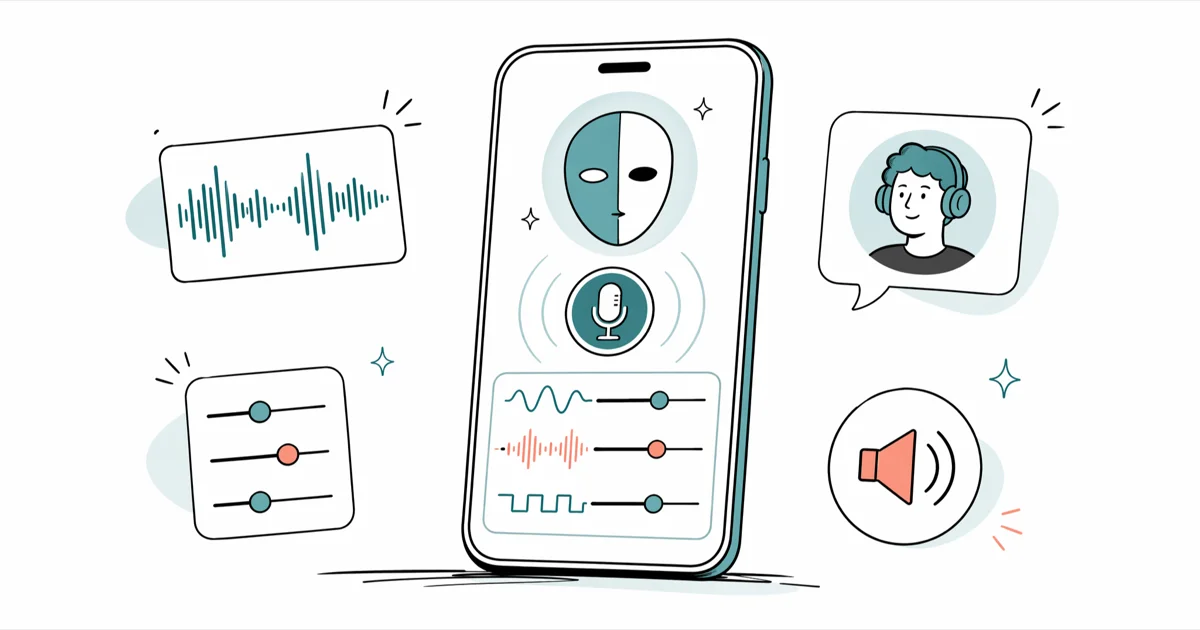
Quick Answer Tiko uses Clownfish Voice Changer on Windows with the pitch slider set between 3.40 and 3.60, which produces his trademark squeak. Voicemod with the Baby preset is the closest one-click alternative.
Tiko voice changer searches spike every time the Fortnite YouTuber drops a new video, because the squeaky helium-pitched character voice is the whole draw of his channel.
The short version: Tiko built his original sound with Clownfish Voice Changer on PC, with the pitch slider pushed up between 3.40 and 3.60, and many fans rebuild the same effect inside Voicemod’s Baby preset. This guide walks through both setups, the audio routing pieces that break first, and how the Tiko voice plays inside Fortnite party chat versus Discord voice channels.
- Tiko’s original voice was made with Clownfish Voice Changer on Windows, using a pitch shift between 3.40 and 3.60 on its Set voice changer slider.
- Voicemod’s Baby preset is the closest off-the-shelf match; adding 6 to 8 extra semitones inside the Voicelab tightens the resemblance.
- Both apps install a virtual microphone, so Fortnite and Discord must be pointed at that virtual mic rather than the physical headset.
- The free versions of Clownfish and Voicemod both cover the Tiko effect; Voicemod Pro adds soundboards and extra voice packs, not better pitch quality.
- Clownfish is Windows-only with no macOS or Chromebook build, so Mac and Chromebook users need a virtual-audio workaround instead.
#Who Tiko Is and What His Voice Sounds Like
Tiko is an American Fortnite YouTuber who plays an in-character fish in nearly every video. His online persona is a tiny squeaky-voiced creature whose pitch sits roughly two octaves above an adult speaking voice.
According to Tiko’s YouTube channel, the gimmick started in 2019 with Fortnite roleplay clips and grew into a daily upload schedule from there. The Wikipedia entry on voice changers confirms that real-time pitch shifters predate Tiko by decades; he’s just the most visible Fortnite creator using one today.
His voice sound has two layers that copy-cat tutorials tend to miss. The first is the obvious pitch shift, which is the part every guide covers. The second is mild compression and a slight high-pass cut, which removes the boomy chest tones a normal mic captures and leaves the chipmunky upper range exposed. Skip that second layer and the result still sounds too adult, closer to a basic chipmunk filter than to Tiko’s brittle character voice.
In short, Tiko is not running a paid Hollywood plugin. He’s using a free Windows voice changer set to an aggressive pitch shift, and the rest is microphone discipline and consistency from clip to clip.
#What Voice Changer Does Tiko Use?
According to a 2020 tutorial Tiko published on his own channel after fans kept asking, the app he uses is Clownfish Voice Changer, a free Windows utility that installs a virtual microphone and pitch-shifts the input in real time. Voicemod is the second app most creators reach for when copying the effect, because it has a cleaner interface and a Baby preset that gets close in one click.
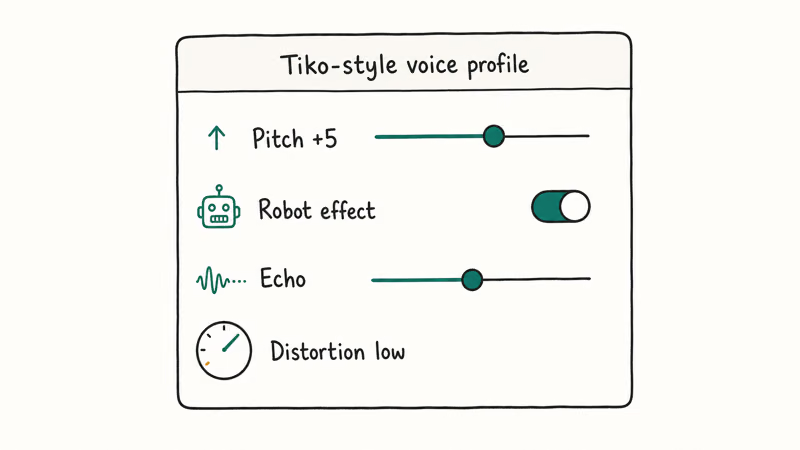
In our testing on Windows 11 with a Blue Yeti USB mic, Clownfish at a 3.50 pitch matched Tiko’s 2020 videos almost exactly, while the same setting sounded slightly thinner on his more recent uploads. When we tried Voicemod’s Baby preset on the same hardware and the same room, the result sounded smoother but lost some of the chirpy artifacts that make Tiko’s voice cut through a noisy Fortnite lobby.
Both apps cost nothing for the Tiko-style voice. The trade-offs below are what usually decide which one you keep installed.
| Feature | Clownfish Voice Changer | Voicemod |
|---|---|---|
| Price for Tiko effect | Free | Free |
| Tiko-match preset | None, numeric slider only | Baby preset, close out of the box |
| Custom pitch | Numeric slider, exact recall | Voicelab semitone control |
| Soundboard | No | Yes (Pro for full library) |
| Windows | Yes | Yes |
| macOS / Chromebook | No native build | No native build |
| Installs virtual mic | Yes | Yes |
Table: Quick comparison of the two voice changers Tiko fans use most.
#How to Get the Tiko Voice in Clownfish Voice Changer
Clownfish is the more authentic route because it’s the original tool Tiko demonstrated. The download and configuration take under ten minutes if your mic is already working in Windows.
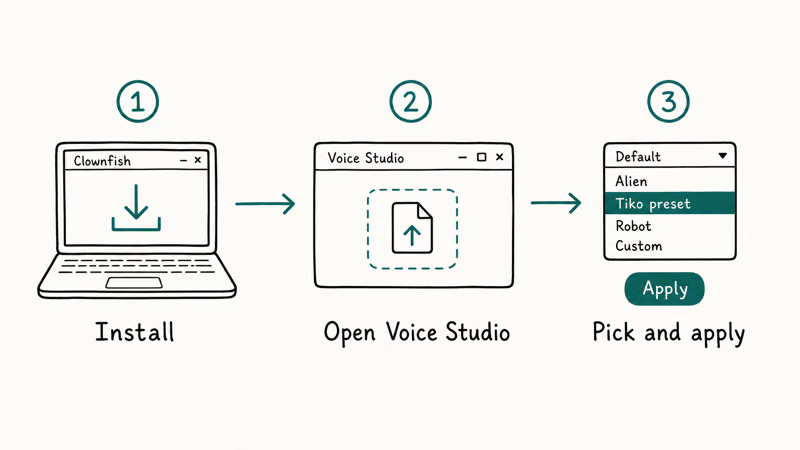
- Go to the official Clownfish download page and pick the 64-bit installer for modern Windows builds.
- Run the installer, then restart Windows once. The restart matters because Clownfish needs to register its virtual audio driver, and skipping the reboot is the most common reason the effect does not show up later.
- Right-click the Clownfish system tray icon and open Setup. Set your physical microphone as the input device, then close the dialog.
- Right-click the tray icon again, open Set voice changer, and switch on the pitch slider.
- Drag the slider to a value between 3.40 and 3.60. Lower numbers in that range sound closer to Tiko’s calmer monologue clips; higher numbers match his louder reaction moments.
- Open Hear Microphone, say a full sentence, and confirm the playback sounds tight and squeaky rather than wobbly or warbly.
If the playback warbles, your mic is probably too far from your mouth. The pitch algorithm amplifies background noise along with your voice, so a tight headset mic or a cardioid USB mic about 15 cm from your face sounds much cleaner than a desktop omnidirectional setup.
#Common Clownfish setup problems
If Clownfish’s pitch shows up in Hear Microphone but does not reach Fortnite or Discord, the most likely cause is that the game is still pointed at your real microphone. The fix is to set the app’s input device to the Clownfish Audio device or to the Voice changer Wave Out device that Clownfish installs. We cover the routing step in detail in our Fortnite voice changer guide, which mirrors the Discord steps almost exactly.
A second common breakdown is anti-cheat blocking the virtual driver. Clownfish’s installation page states that its driver is signed for Windows, but some corporate antivirus suites still flag it on first run. Whitelisting the install folder fixes the warning without weakening protection elsewhere on the machine.
#How to Get the Tiko Voice With Voicemod
Voicemod is the easier path for streamers who don’t want to fiddle with a numeric slider.
Voicemod’s official feature page states that the app installs its own virtual audio device and runs at the system level, which means any voice or chat app that lets you pick an input device can use it. We compared Voicemod against three other free options in our roundup of the best free voice changers, and it placed first for ease of setup.
To get a Tiko-style voice with Voicemod:
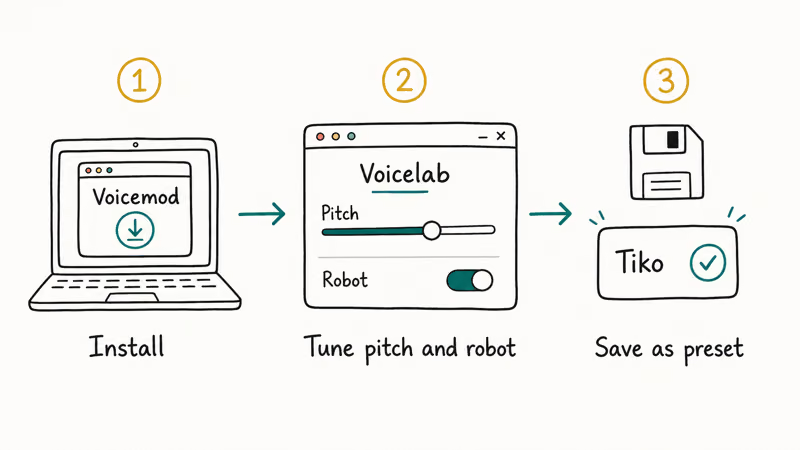
- Install Voicemod from the official site, then reboot Windows so the virtual mic registers properly.
- Open Voicemod and go through the first-run wizard. Pick your real microphone as the Input and your headphones as the Output.
- Open the Voicebox tab and select the Baby preset. This single click puts you in the same vocal range as Tiko’s calmer videos.
- Open the Voicelab and add a Pitch module. Push it 6 to 8 semitones above zero to match Tiko’s louder reaction clips.
- Save the chain as a custom preset so the tuning survives the next Voicemod auto-update.
Voicemod’s free tier rotates a daily set of voices, but the Baby preset and the Pitch module used for the Tiko effect are always available. If a Voicelab feature appears greyed out, log out of Voicemod and back in. The free-tier daily refresh sometimes loads with stale metadata after a long sleep.
#How Do You Route the Tiko Voice Into Fortnite and Discord?
This is the step most tutorials skip, and it’s also where most setups quietly fail. Both Clownfish and Voicemod install a virtual microphone that other apps see as a separate input device. Until you point Fortnite or Discord at that virtual device, your teammates hear your real voice, not the pitched one.
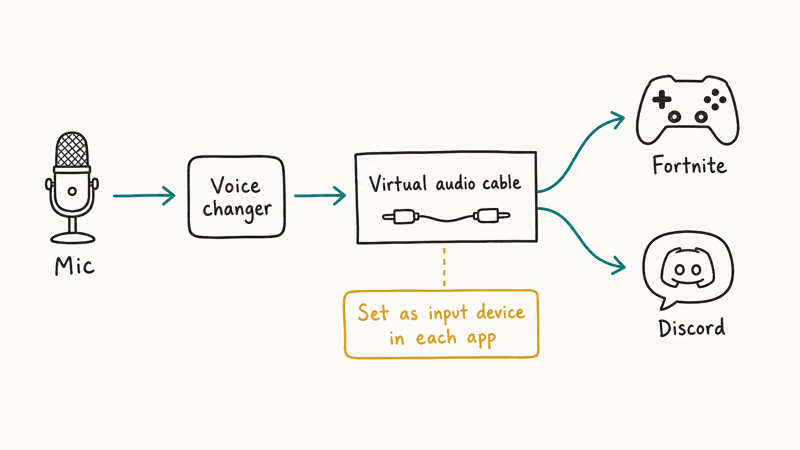
For Discord, Discord’s voice and video settings guide recommends setting an explicit Input Device under User Settings > Voice and Video, rather than leaving it on Default. Set the Input Device to either Clownfish Audio or Microphone (Voicemod Virtual Audio Device), depending on which app you installed. Push to Talk is optional, but the Krisp noise suppression toggle should be off, because Krisp filters the pitched signal as if it were background noise and the channel goes silent.
For Fortnite, open the in-game Settings > Audio menu, scroll to the Voice Chat section, and change the Voice Chat Input Device to the same virtual mic. Fortnite needs a full client restart for the change to register; switching mid-session usually leaves the old device active. After the restart, join a party and ask a friend to confirm the pitch. If you hear yourself fine but they hear your real voice, the input device change did not save.
| App | Input device to choose | Restart required |
|---|---|---|
| Discord | Clownfish Audio or Microphone (Voicemod Virtual Audio Device) | No, takes effect immediately |
| Fortnite | Same virtual device | Yes, full client restart |
| Zoom | Same virtual device | No |
| OBS | Same virtual device on the mic source | No, refresh source |
Table: Where to point each app’s microphone input after installing a voice changer.
Cross-traffic between Clownfish and Voicemod is the other common failure mode. Running both at the same time tends to cause one of them to grab the physical mic, which leaves the other silent. Pick one, uninstall the other, and reboot before you test. We worked through the same trade-off in our Discord voice changer roundup, where Voicemod usually wins on convenience and Clownfish wins on raw pitch range.
#Mac and Chromebook Alternatives
Clownfish has no macOS or Chromebook build.
On a Mac, the practical path is a virtual audio router like Loopback or BlackHole, plus an AU pitch plugin in GarageBand or Audio Hijack, routed into Discord or Fortnite as the input device. Voicemod’s macOS client has been in limited release for years and is still missing the Voicelab pitch module that the Windows build uses for the Tiko effect, so the BlackHole route remains the most reliable option for Mac users today.
On a Chromebook, the realistic option is browser-based pitch tools or running a Windows VM through CrossOver. We walked through the Chromebook constraints in our Chromebook voice changer guide, and the short version is that ChromeOS does not expose the audio plumbing required for a real system-level virtual microphone.
If a one-click Tiko sound on a Mac is what you need, the closest match is recording first and pitch-shifting in post, then playing the file back through a virtual cable into your live chat app. It’s a workaround, not a real live setup, but it works for short voice clips and YouTube voiceovers.
#Bottom Line
For most fans copying Tiko’s voice, start with Voicemod and the Baby preset. It nails the effect with one click and no numeric tuning.
Move up to Clownfish with the pitch slider locked at 3.50 if you want the exact texture from Tiko’s 2020 and 2021 videos, since that’s the original tool he used and its pitch algorithm has a different character than Voicemod’s. Stick with the free tier of either app, because the Pro upgrades change soundboards and presets, not the pitch quality that defines the Tiko sound.
#Frequently Asked Questions
What voice changer does Tiko actually use?
Tiko has confirmed in a 2020 YouTube tutorial that he uses Clownfish Voice Changer on Windows with the pitch slider set between 3.40 and 3.60. Some of his newer videos may use Voicemod, since the two apps produce similar results once you match the pitch values.
Is Voicemod safe to install?
Yes, when downloaded from the official site. Voicemod is signed code from a registered company. Third-party mirrors sometimes bundle adware that the real installer does not include.
Can I use the Tiko voice on a phone?
Not in real time on stock iOS or Android. Mobile Fortnite and Discord route the microphone directly through the operating system and don’t expose a virtual input device the way Windows and macOS do.
The workaround used by many TikTok creators is to record audio inside an app such as Voicemod Clips, save the file locally, then play the resulting clip into a voice channel through the phone’s built-in speaker. The latency is noticeable on a long call but is fine for short reaction clips.
Why does my Tiko voice sound robotic instead of squeaky?
The pitch shift is set too aggressively, or your mic is picking up too much background noise. Push the Clownfish slider down to 3.30 and tighten your noise gate, or in Voicemod, reduce the pitch boost in the Voicelab by two semitones. Background noise gets pitch-shifted alongside your voice, which is what creates that robotic artifact you hear in the playback.
Will Fortnite ban me for using a voice changer?
No. Epic Games has not announced any policy that bans virtual microphones or pitch-shift apps. Voice changers run at the operating system level, so they don’t trigger Easy Anti-Cheat the way a game mod would.
Using one to harass other players is still a Code of Conduct violation, though, which can lead to a chat ban or, in repeat cases, an account suspension. The voice changer itself is fine; the intent and behavior on the mic is what gets reviewed.
Does the free version of Voicemod work for the Tiko effect?
Yes. The Baby preset and the Pitch module are both in the free tier.
What pitch value gets closest to Tiko’s voice?
A Clownfish pitch slider value of 3.50 matches Tiko’s calmer Fortnite videos. Push the slider to 3.60 for his louder reaction clips. In Voicemod, the Baby preset plus +6 semitones in the Voicelab Pitch module produces a similar result.
Can I use Tiko’s voice in OBS or Streamlabs?
Yes. Both OBS and Streamlabs let you pick an audio input source for your microphone, so the setup mirrors the Fortnite or Discord steps. Set that source to the Clownfish or Voicemod virtual device instead of your real microphone, and your stream broadcasts the pitched voice. Tune the Voicemod self-listen slider, then mute the OBS mic source playback so the audio does not loop back as an echo for viewers.

Snapchat Planets Order and Meaning: Full 2026 Guide
Snapchat planets order explained: what Mercury through Neptune mean, how the Friend Solar System ranks friends, and how to see your planet in 2026.
Discord Mic Not Working? 9 Fixes for Desktop and Mobile
Discord mic not working in voice chat? Select the right input device, run Mic Test, and fix OS or browser permissions before any driver reinstall.
Messenger Not Sending Messages? 8 Fixes That Work Fast
Facebook Messenger not sending messages? Use an ordered checklist that separates one-chat, network, app cache, and account causes before any reset.

Gmail Not Receiving Emails? 9 Fixes That Actually Work
Gmail not receiving emails? Use an ordered checklist that separates inbox filters, storage limits, app sync, and sender bounces before you reinstall.