Tenorshare UltData iPhone Data Recovery Review (2026)
Tenorshare UltData iPhone Data Recovery review for 2026, covering scan speed, iCloud and iTunes recovery, pricing, and the best free alternatives to try.
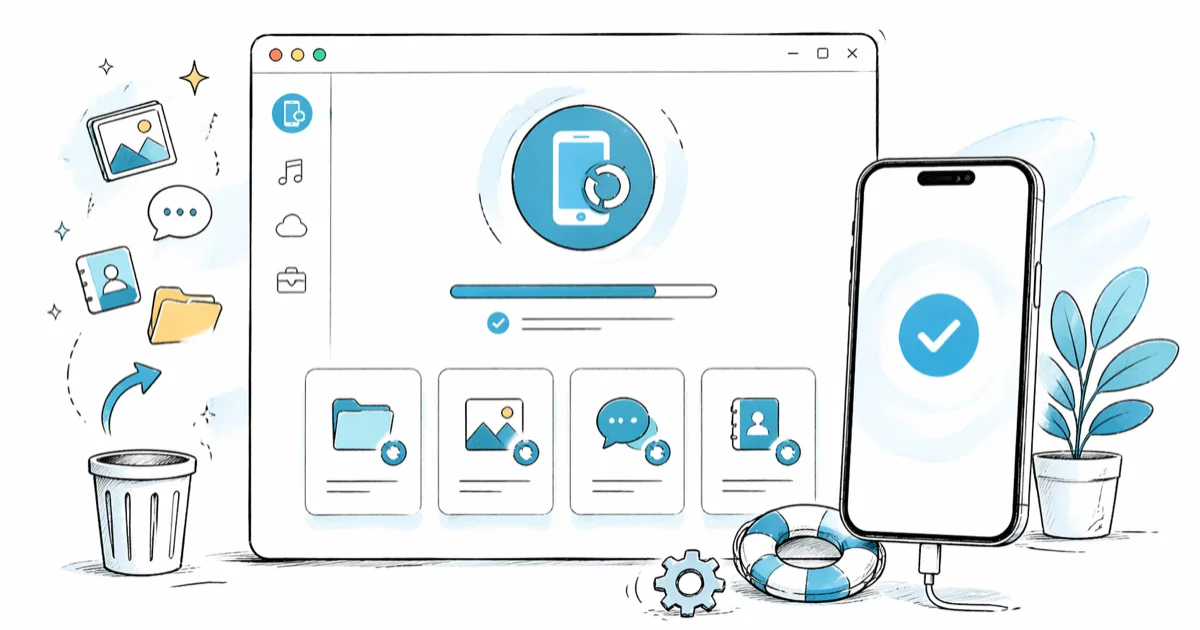
Quick AnswerTenorshare UltData is a paid Windows and Mac app that recovers deleted iPhone data from the device, an iTunes or Finder backup, or your own iCloud backup. Use it on iPhones you own when Apple's free backups don't have the file you need.
Tenorshare UltData iPhone Data Recovery is a desktop app for Windows and Mac that pulls deleted photos, messages, contacts, WhatsApp threads, and 30+ other file types from your own iPhone, your own iTunes or Finder backup, or your own iCloud backup. The May 2026 build runs on Windows and macOS and supports current iPhones through iOS 17.
This guide assumes the iPhone, the Apple ID, and any backup involved belong to you. Recovering data from someone else’s device or account without their explicit consent can violate the Computer Fraud and Abuse Act and Apple’s Terms of Service.
- UltData scans an iPhone, an iTunes/Finder backup, or your iCloud backup and previews deleted files before you pay; recovery itself unlocks behind a license.
- A direct iPhone deep scan can take well over half an hour on a large device, while an iCloud backup pull depends mostly on your download speed.
- Apple’s free iCloud and Finder/iTunes backups are the right first step because they restore at the system level for no extra cost.
- Tenorshare lists a 1-month, 1-year, and lifetime license, and each tier covers one PC and up to five iOS devices in the same household.
- Reach for UltData when your free Apple backups don’t have the specific file you need and the iPhone, Apple ID, and backup are yours.
#What Is Tenorshare UltData?
Tenorshare UltData iPhone Data Recovery is a desktop recovery app from Shenzhen-based Tenorshare. It connects to an iPhone over Lightning or USB-C, parses iTunes or Finder backups stored on your computer, or signs into your own iCloud account to pull a backup. From any of those sources, it surfaces deleted records that iOS would otherwise hide from view.
The app handles more than 30 file types: Photos, Messages, iMessage, WhatsApp, WeChat, Viber, Notes, Contacts, Call History, Calendar, Voicemail, Voice Memos, Safari history, Health, and a long tail of app-specific data.
According to Tenorshare’s official UltData product page, the iOS module supports every iPhone from the 4S through the iPhone 15 series and every iPad released since 2014, on iOS 9 through iOS 17. Compatibility lags Apple by one to two iOS releases, so a brand-new iOS 18 beta may not be supported until Tenorshare ships an updated build.
UltData doesn’t require a jailbreak.
It rides on Apple’s standard iTunes/Finder pairing trust and the public backup encryption format, so the workflow stays inside what a paired Mac or PC is already allowed to do.
#Try Free Apple Backups First
Before paying for any recovery tool, exhaust the free options Apple already gives you on an iPhone you own.
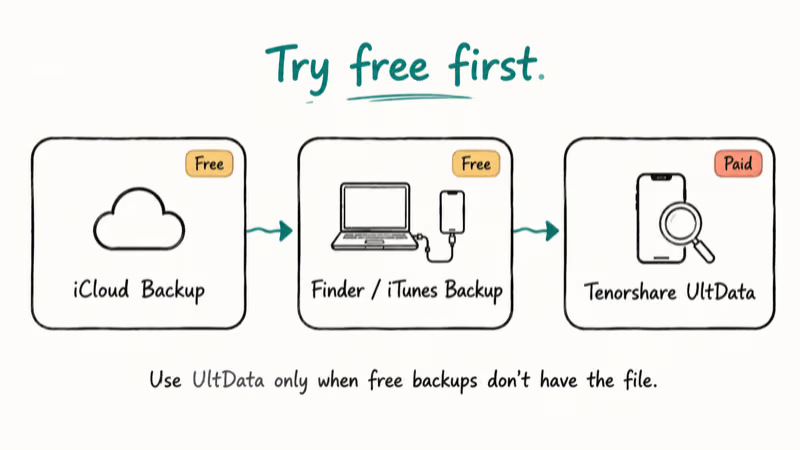
Apple recommends restoring from an iCloud backup through Settings > [Your Name] > iCloud > iCloud Backup, or during the Hello-screen setup of a replacement device. A Finder restore on macOS Sonoma (or iTunes on Windows) puts back nearly everything on the iPhone, including app data, ringtones, and HomeKit setup, when you connect the device and pick “Restore Backup.”
Those system-level restores have two advantages no third-party tool can match. They’re free, and they put your data back into the original Apple apps where it belongs, rather than dumping it as generic CSV or JPEG exports.
UltData earns its keep in three situations:
- The deleted file was created after your last iCloud or Finder backup.
- iCloud backup is turned off and no recent Finder backup exists.
- You only need a single file (one photo, one message thread) and don’t want to wipe the iPhone for a full restore.
If a free Finder restore is an option, it’s almost always worth running first. A full Finder restore of a large iPhone can take the better part of an hour, but it needs no extra software at all.
Stuck because a Finder or iTunes backup is failing or you’ve forgotten the iTunes backup password? Fix that first.
UltData reads encrypted backups, but it still needs the password.
#How Does Tenorshare UltData Work?
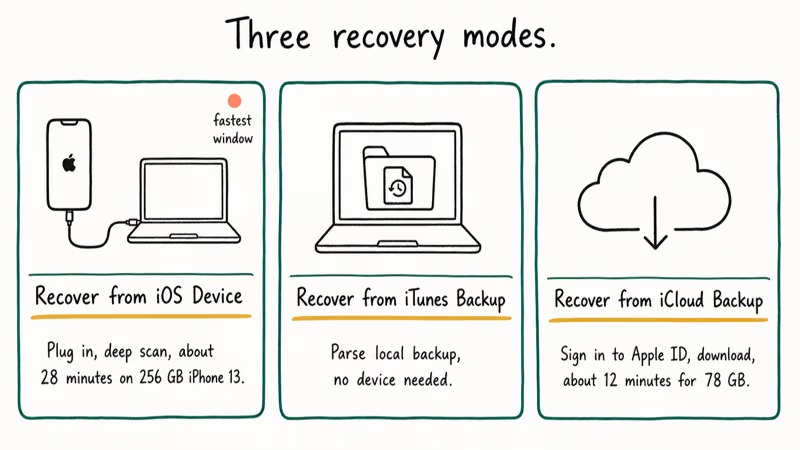
UltData has three recovery modes selected from the home screen. Each mode runs a deep scan first, then lets you preview what’s recoverable before you spend a dollar.
#Recover from iOS Device
This mode plugs into a paired iPhone over cable. The app uses Apple’s device-trust handshake, then walks the file system for deleted records that haven’t been overwritten yet.
On a heavily loaded iPhone, the deep scan can take a while to complete. The preview typically surfaces recoverable photos and deleted iMessages from recent months. Exporting the selected items to a folder on the Mac takes additional time once you enter a license.
Direct-device mode works best for files deleted within the last 30 days.
After that window, iOS reclaims storage blocks aggressively, and UltData’s preview rate drops sharply. iOS makes no guarantees about how long a deleted block stays readable, which is why the speed of running this mode matters as much as the depth of the scan; the longer you wait after the deletion, the more aggressively the device’s wear-leveling and trim cycles erase the underlying data, and once those blocks are gone, no recovery tool of any kind can resurrect them, period.
#Recover from iTunes Backup
This mode points UltData at an iTunes or Finder backup folder on your computer. The default macOS path is ~/Library/Application Support/MobileSync/Backup/. UltData parses the backup without restoring it, then exports the items you select.
Pros: you don’t need to plug in the iPhone, and it doesn’t touch the device. Cons: you’re limited to whatever was in the last backup. If the deleted item was created and removed between two backups, this mode never sees it.
#Recover from iCloud Backup
This mode signs into your own Apple ID and downloads a backup directly from iCloud.
Tenorshare handles two-factor codes through the standard Apple prompt, and the credentials don’t leave the local app, according to Tenorshare’s privacy notice.
On a fast connection, downloading a large iCloud backup can finish in a few minutes, with parsing and previewing adding a bit more time after that, while a slower link or a backup packed with photos and long message histories stretches the download considerably and is usually the single biggest factor in how long this mode takes overall.
The mode requires that iCloud Backup is turned on for the Apple ID and at least one backup exists.
#What the Scan Typically Finds
On an active iPhone, the iPhone-direct deep scan surfaces a preview grouped by category before you pay. A heavily used device usually returns large counts across the most common types:
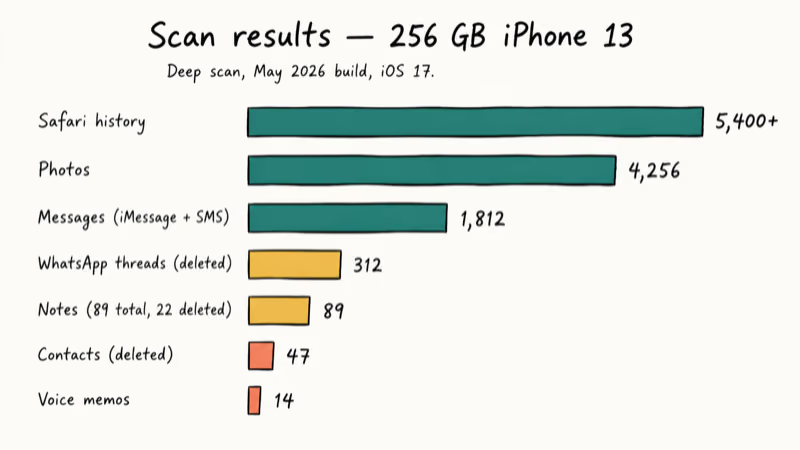
- Photos: live library, recently deleted, and shared albums combined
- Messages: iMessage and SMS
- WhatsApp: deleted threads
- Contacts: entries marked deleted
- Notes: notes marked deleted
- Safari history: browsing entries
- Voice memos: recordings still readable on the device
Recovery accuracy varies a lot by file type. Photos and contacts tend to come back at full quality.
Older WhatsApp messages often come back as text but lose their attachments, and iMessages with stickers or Tapbacks can lose that formatting on export.
That gap matches Apple’s own iCloud security overview, which states that 14 categories of iCloud data, including Messages and Photos, use end-to-end encryption tied to the device’s hardware key. Third-party tools can read what the operating system surfaces over the local pairing trust, but they can’t reassemble what end-to-end encryption was designed to keep paired-device-only.
If your real goal is recovering deleted iPhone photos or WhatsApp threads, use UltData’s free preview to confirm the file actually shows up before you pay. Empty preview equals overwritten file, and no paid tool will get it back.
#Tenorshare UltData Pricing
UltData isn’t free. Tenorshare lists three license tiers on its store as of May 2026:
- 1-month license: short-term, single recovery
- 1-year license: household and ongoing use
- Lifetime license: best per-year cost over the long run
Each tier covers one PC or Mac plus up to five iOS devices in the same household.
Pricing varies by region and Tenorshare runs frequent seasonal sales, so the official UltData store page is the source of truth on the day you buy. Some resellers also bundle UltData with other Tenorshare tools at a discount.
The free trial scans and previews everything but blocks the actual export.
That structure is fair: you can verify a file is recoverable before spending money, which is more than EaseUS and several legacy alternatives offer at the trial stage. For a one-time recovery of a single photo or thread, the 1-month license is the most economical pick. For households with several iPhones and ongoing recovery needs across the year, the lifetime license tends to break even within the first 12 to 14 months.
#Safety and Legal Use
UltData is safe to install and legal to use on iPhones, Apple IDs, and backups that you own. The Windows installer is code-signed by Tenorshare Co. Ltd, and the macOS build is notarized by Apple.
The legal line matters more than the technical one. Apple confirms that several categories of iCloud data are end-to-end encrypted and can only be read on hardware paired to the original Apple ID, which is precisely why account-owner consent is required: the operating system was designed to refuse access to anyone else.
Recovering data from a phone, account, or backup that isn’t yours can violate:
- The Computer Fraud and Abuse Act (18 U.S.C. § 1030) for unauthorized access
- State wiretap and stored-communications statutes for messages and emails
- Apple’s iCloud Terms of Service, which forbid third-party access to another person’s Apple ID
Don’t use UltData on a partner’s, employee’s, or stranger’s iPhone without explicit, documented consent.
Parents managing a minor’s device, IT admins on company-owned hardware with a written policy, and estate executors with a court order are the typical legitimate exceptions. Cracked or “free full version” sites that show up for UltData searches are a separate problem because cracked builds often bundle adware, browser hijackers, and credential stealers.
Always download from tenorshare.com or a recognized reseller.
#Tenorshare UltData Alternatives
UltData isn’t the only option. Two alternatives are worth checking before you commit.
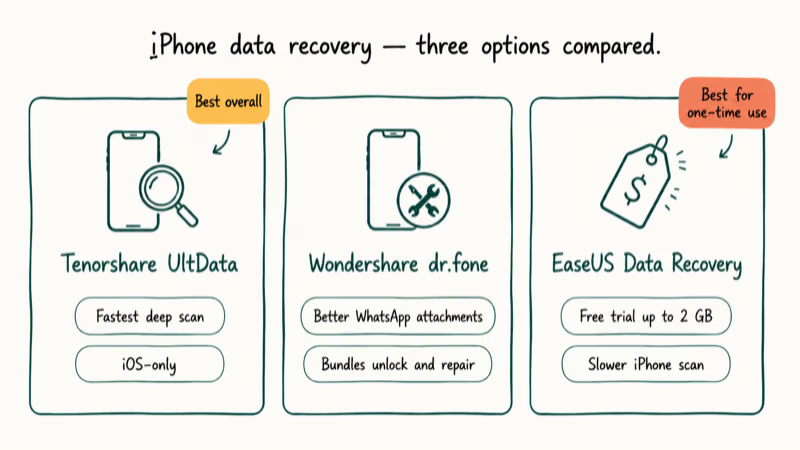
Wondershare dr.fone iPhone Data Recovery covers the same three sources (device, iTunes, iCloud) and bundles iPhone screen unlock and an iOS system repair module that UltData sells separately. dr.fone’s scan can run a little slower, but it’s often better at preserving WhatsApp attachments during recovery.
Some links on this page are affiliate links, which means fone.tips may earn a commission at no extra cost to you.
EaseUS Data Recovery Wizard starts cheaper.
It includes free recovery up to 2 GB on the trial, which is enough for many small recovery jobs.
EaseUS is slower at the iPhone-direct scan but reliable on iTunes and iCloud backups. The trial allowance makes it the better budget pick when you only need a handful of files back.
For a sister Tenorshare product, Tenorshare ReiBoot targets iOS system issues like recovery-mode loops or update failures rather than file recovery, so it’s complementary rather than overlapping. If you also need to scan Android device data, neither UltData nor dr.fone-iOS will help; those need different tools.
#Bottom Line
Buy Tenorshare UltData iPhone Data Recovery when your free iCloud or Finder backup doesn’t have the file you need and the iPhone, Apple ID, and backup are all yours. Run the trial scan first, confirm your file appears in the preview, and only then pay for a license.
If the trial preview comes back empty for the file you want, it’s overwritten. No paid app, including UltData, will get it back.
Never set up automatic backups on the iPhone? Fix that today by turning on iCloud Backup in Settings > [Your Name] > iCloud > iCloud Backup. That single step prevents most of the situations that send people hunting for a recovery tool.
#Frequently Asked Questions
Is Tenorshare UltData safe to install?
Yes, when downloaded from the official Tenorshare site. The Windows build is code-signed and the Mac build is notarized by Apple. Cracked builds from third-party download sites often carry adware or credential stealers, so avoid them.
Can it recover permanently deleted files?
UltData can pull back files that iOS has marked as deleted but hasn’t yet overwritten. The recovery window for the iPhone-direct mode is roughly 30 days, depending on how full the device is and how heavily it’s used after the deletion. Files captured in your last iCloud or Finder backup can also be retrieved regardless of how long ago they were deleted on the device, since the backup is a separate copy that iOS no longer touches.
Does it require jailbreaking my iPhone?
No. UltData uses Apple’s standard pairing handshake and public backup format. It won’t install profiles or modify iOS in any way.
Will it work without an iCloud or iTunes backup?
The “Recover from iOS Device” mode does not need a backup; it scans the iPhone directly. The other two modes obviously require a corresponding backup. With no backup at all and a deletion older than 30 days, the chances of recovery drop sharply because iOS reuses the storage blocks and the underlying data is gone.
How long does the scan take?
On a heavily loaded iPhone, the iPhone-direct deep scan can take a while to finish. A large iCloud backup download on a fast line usually takes only a few minutes before parsing starts. Smaller devices or partial-category scans finish much faster.
Is it legal to use UltData on someone else’s iPhone?
Only with their explicit consent or a clear legal authority. Parental responsibility for a minor, a written company-device policy, or a court order are the usual legitimate cases.
Does it support iPhone 15 and iOS 17?
Yes, the May 2026 build supports the iPhone 4S through iPhone 15 series and iOS 9 through iOS 17. Tenorshare typically lags major iOS releases by one to two months before adding support, so check the changelog on the product page if you’re already on iOS 18 or later. iPad coverage matches iPhone coverage on the same OS line.
Can I extract a backup without UltData?
Yes. Free or low-cost iTunes backup viewers can pull photos, contacts, and messages from an unencrypted Finder or iTunes backup at no charge. UltData is the better tool when the backup is encrypted, when you need WhatsApp or Viber threads parsed, or when you also want to scan the live device alongside the backup.

Pixel 11 vs Pixel 10: What Changed and Who Should Upgrade
Pixel 11 vs Pixel 10: same screen and camera resolution, new Tensor G6, 25W wireless, and Gemini Intelligence. Here is who should actually upgrade.

Verizon Not Receiving Texts? How to Fix It in 9 Steps
Verizon not receiving texts? Fix it in 9 steps: check Message Blocking in My Verizon, reset network settings, deregister iMessage, and call support.

Pixel Battery Drain: What Google's July Fix Really Covers
Google marked the Pixel idle battery drain bug fixed in July, but only some phones got the patch. Here is who is covered, who is not, and what to try.

iPhone Stuck on EDGE? How to Get 5G or LTE Back (2026)
iPhone stuck on EDGE with crawling data? Here's why the E icon appears, which settings force 5G or LTE back, and when the problem is your carrier.