Telegram Last Seen Recently: What It Actually Means
Telegram Last Seen Recently means the user hid their exact activity time in Privacy settings. Here is what each status label really tells you.

Quick AnswerLast Seen Recently on Telegram means the user has restricted their activity status in Privacy settings. They were online sometime in the past 2 to 3 days, but Telegram deliberately hides the precise timestamp.
Telegram’s last seen recently label confuses almost every new user. If you opened a chat and saw that vague status next to a contact’s name, you’re not being ignored and you’re probably not blocked. The contact has flipped a privacy switch that hides their exact activity time.
- “Last Seen Recently” signals an active Privacy setting, not inactivity
- The label covers a 2 to 3 day window before it shifts to “Within a Week”
- Telegram uses four vague labels when exact times are hidden
- Last Seen visibility has four options: Everyone, My Contacts, My Contacts Except, and Nobody
- The “typing…” indicator still appears even when Last Seen is hidden
#What Does “Last Seen Recently” Mean on Telegram?
“Last Seen Recently” is the label Telegram shows when a user has restricted their activity status under Privacy and Security. The contact was active in the past 2 to 3 days. The app deliberately hides the precise timestamp from anyone outside their allowed list.
Telegram doesn’t strip the status away completely. It swaps the exact time for one of four vague phrases.
According to Telegram’s documentation, the “recently” window covers roughly 72 hours of activity, with no exact timestamp shown to outside viewers. The full breakdown lives in Telegram’s official FAQ, which lists all four label tiers and how privacy settings drive them. A contact could have been online ten minutes ago or a full two and a half days ago. You see the same label either way.
Quick contrast: WhatsApp removes the Last Seen line entirely from the chat header when a user hides it. Telegram keeps a coarse label visible by design. That gap exists because of the reciprocity rule covered below.
#The Four Telegram Activity Status Labels Decoded
Telegram swaps exact timestamps for four labels when a user limits their privacy.
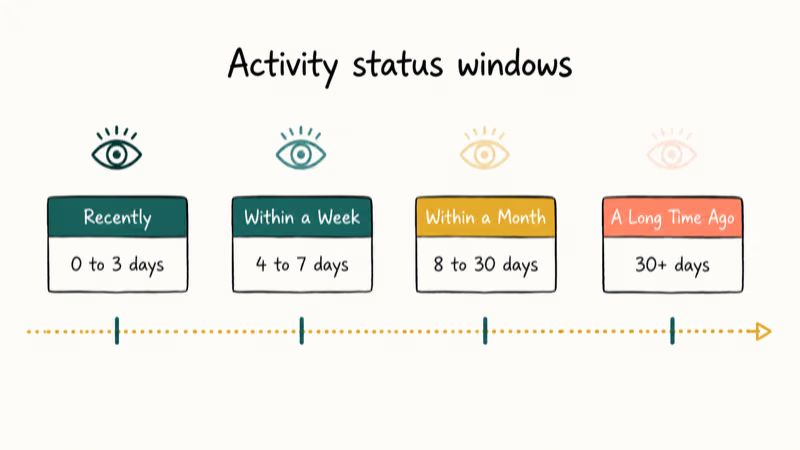
Last Seen Recently appears for activity in the past 2 to 3 days. It’s the label you’ll see most often, since most privacy-conscious users open Telegram every couple of days.
Last Seen Within a Week appears once 4 to 7 days have passed without activity. If you watched a contact go from “Recently” to “Within a Week,” more than 72 hours have gone by since they opened the app. That’s a normal weekly cadence, not a warning sign.
Last Seen Within a Month covers 8 to 30 days. The account is still maintained, just not in heavy daily use.
Last Seen a Long Time Ago appears after a month of inactivity. It also shows up when a contact has blocked you, which is why a sudden jump to this label is worth a closer look. Block signals are covered further down.
If a user hasn’t touched their privacy settings, you’ll instead see exact timestamps like “Last seen today at 3
PM” or “Online” while they’re using the app. That precision is the default, but most active users eventually toggle it off.#How Telegram’s Reciprocity Rule Shapes Last Seen
Telegram has been privacy-first since launch. Its activity status system is one of the most visible places that posture shows up.
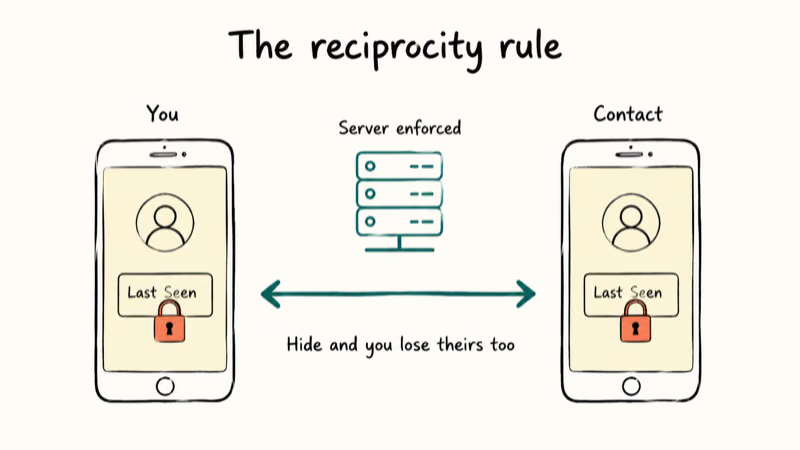
Wikipedia’s Telegram entry tracks the app’s history since 2013. Telegram’s privacy policy states that users get 4 distinct visibility tiers for Last Seen, all set inside Privacy and Security. The four-tier label system is how that control reaches the people viewing your profile, with reciprocity baked into the rules.
The deal is mutual. Hide from others, and you lose their exact times too.
Telegram enforces reciprocity at the server level. No third-party tool or workaround can sneak around it. Going back to “Everyone” reopens exact time visibility in both directions.
Online status behaves separately. Even with privacy locked down, Telegram can briefly show “Online” when a contact opens the app while you have their chat open. That label disappears after they leave that chat.
The “typing…” indicator is its own thing again. It always appears, whether the contact has hidden their Last Seen or not. If they’re tapping out a reply, you’ll see the animated dots regardless of any privacy setting.
#How to Change Your Last Seen Privacy Settings
Switching who can see your Last Seen takes about 30 seconds. The path is identical on Android and iOS.
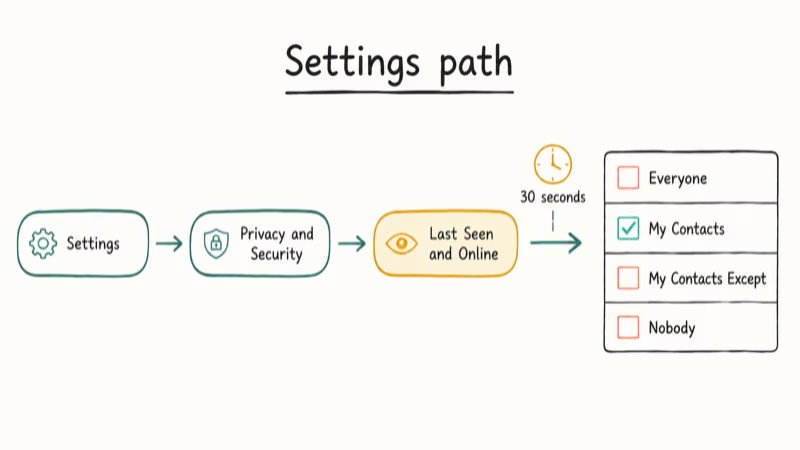
- Open Telegram and tap the hamburger menu (three lines) in the top left corner. On iPhone, tap Settings in the bottom right tab bar instead.
- Tap Settings if you used the menu, then select Privacy and Security.
- Tap Last Seen & Online near the top of the Privacy and Security screen.
- Pick one of the four options: Everyone, My Contacts, My Contacts Except, or Nobody.
- Tap the back arrow or checkmark to save.
Pick Nobody to show “Last Seen Recently” to every viewer. Pick My Contacts to keep exact times visible to people in your phonebook while showing the vague label to everyone else. The change applies to future Last Seen visibility across devices tied to that account.
The My Contacts Except option lets you hide your status from a handful of named contacts while keeping it open for the rest. Useful when you want to dodge one or two people without blocking them outright. If you’re pruning your contact list anyway, you can delete Telegram contacts directly from the People Nearby screen.
#Does “Last Seen Recently” Mean Someone Blocked You?
“Last Seen Recently” on its own isn’t a block signal. A sudden jump from a precise timestamp to “Last Seen a Long Time Ago” can hint at one, though Telegram never tells you outright.
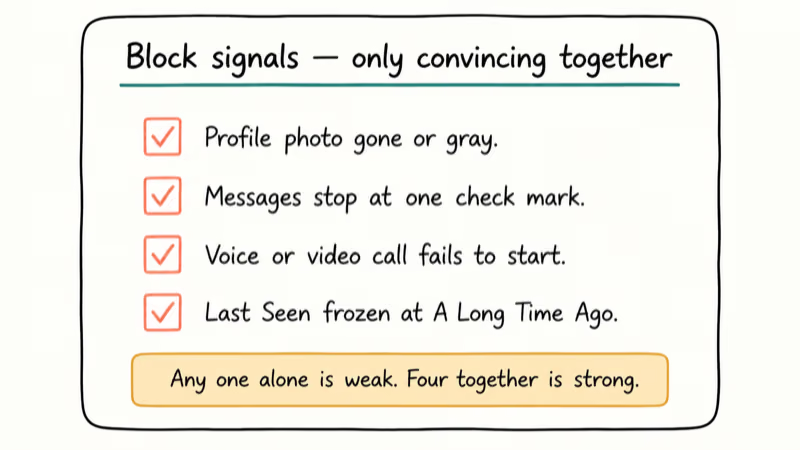
Look for these signs together rather than any one alone:
- Their profile photo disappears or shows as a gray circle
- Your messages stop at a single check mark and never reach the second
- You can’t start a voice or video call with them
- Their Last Seen status is frozen at “a Long Time Ago” while mutual contacts confirm they’re still active
A combination of these signals is far more diagnostic than any single one. A missing profile photo on its own can mean the user simply removed it. A frozen “Long Time Ago” status alone can mean they really did stop using the app. The four together are convincing.
Read receipts behave a little differently across platforms. Same logic applies if you want to learn how to tell if someone read your text on Android using indicators the other party controls.
#How Telegram Compares to WhatsApp, Signal, and Discord
Telegram’s four-tier label system gives you more information than most privacy-focused messengers do. The tradeoff: you can’t opt out of seeing any presence data at all.
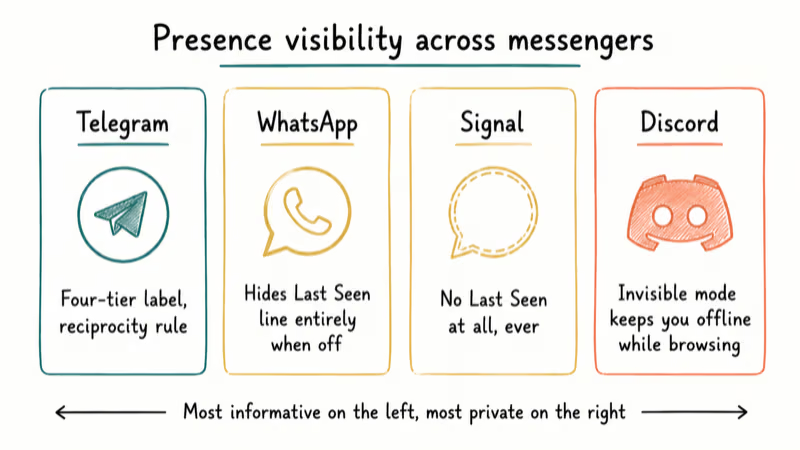
Signal’s support documentation confirms that Signal omits Last Seen entirely for all contacts under any setting. Signal’s privacy-first design simply doesn’t ship the indicator. The Signal vs Telegram breakdown compares encryption, group features, metadata handling, and voice quality across both apps.
Discord goes further. Its Invisible mode shows you as offline to everyone while you keep browsing. The Discord vs Telegram breakdown covers the rest of the feature gap.
Want to skip the phone-number link entirely? You can use Telegram without a phone number by registering through a virtual number service. That layer of separation matters more than any in-app privacy setting if you want true anonymity from your contacts.
Status stuck? The Telegram not working guide has the fix.
#Bottom Line
If a contact’s status reads “Last Seen Recently,” they’ve set their Last Seen visibility to something other than Everyone. That’s the entire story. They aren’t necessarily ignoring you, almost certainly not blocking you, and not currently online.
Suspect a real block? Watch for the four together.
To control your own status, head to Settings > Privacy and Security > Last Seen & Online and pick “My Contacts” if you want a balanced default. That keeps your exact times visible to people you actually know while showing strangers nothing more than the recency label.
#Frequently Asked Questions
What does “Last Seen Recently” mean on Telegram?
It means the user has restricted their Last Seen visibility in Privacy and Security. They were online in the past 2 to 3 days.
How long does the “Last Seen Recently” status last?
The “recently” label covers roughly the past 72 hours of activity. After that window passes without any new activity, Telegram automatically shifts the label to “Last Seen Within a Week.” Two users active at very different points, say 10 minutes ago versus 60 hours ago, both show the same label. The status updates only as time passes since the last open.
Does “Last Seen Recently” mean someone blocked me?
No. It’s a privacy-setting result, not a block signal.
Can I see someone’s exact Last Seen if they set it to Nobody?
No. Telegram enforces this at the server level, not just on your client. There’s no in-app workaround, no third-party tool, and no toggle that exposes the exact time when a contact has chosen “Nobody.” This applies across all Telegram clients, including the web version, the desktop apps, and any third-party Telegram clients built on the official API.
Will Telegram show me as online even if I hide my Last Seen?
Yes. If a contact has your chat open while you open Telegram, they briefly see “Online” before your privacy setting reasserts.
How do I make others see “Last Seen Recently” for my profile?
Open Settings > Privacy and Security > Last Seen & Online and pick Nobody. Anyone outside your allowed list sees “Last Seen Recently” right away.
Why did someone’s Telegram status suddenly stop showing the exact time?
They changed their privacy setting. Before the change, their Last Seen was visible to you. After they switched to “My Contacts” or “Nobody,” Telegram replaced the timestamp with a vague label. The same shift hits every viewer outside the user’s new allowed list, so it’s rarely targeted unless you also see the block signals listed above.
Is “Last Seen Recently” the same as being online on Telegram?
No. “Online” means the contact is in the app right this second.

Google Messages Error 3100: Why RCS Is Broken on Galaxy
Google Messages RCS error 3100 hits Galaxy owners after phone or carrier switches. Google told 9to5Google a fix is coming. Here's what actually helps.

Is This Bank App Real? Spot a Fake App on Your Home Screen
A bank app can land on your home screen from a web page with no install warning. Learn the checks that tell a real banking app from a phishing web app.

Apps Crashing After iOS 27 Update? Fix Order (2026)
Apps crashing after the iOS 27 update? Update the app in the App Store first, then offload and reinstall to clear stale cache, then restart. The fix order.

Do AI Translation Earbuds Work Offline? What to Know
Do AI translation earbuds work offline? A few do with downloaded language packs, but most need the cloud. Here's what works offline and what you give up.