Snapchat Account Locked: How to Unlock (2026 Guide)
Snapchat account locked? Learn why it happens, how to unlock temporary and permanent locks, and proven tips to avoid future account suspensions.
Quick AnswerFor temporary locks (24-48 hours), wait it out or go to accounts.snapchat.com/accounts/unlock to request early unlock. For permanent locks, submit an appeal at support.snapchat.com explaining why the lock was a mistake. Success rate for permanent unlock appeals is low (10-20%).
Snapchat locks accounts for violating community guidelines, using third-party apps, or suspicious login activity. Temporary locks last 24-48 hours and unlock automatically. Permanent locks require an appeal, which rarely succeeds.
This guide breaks down what actually unlocks an account in 2026, separating temporary locks that clear on their own from permanent locks that need an appeal.
- Temporary Snapchat locks last 24-48 hours and unlock automatically — you don’t need to contact support for most cases.
- Using modified Snapchat apps like Snapchat++ is the fastest path to a permanent account lock, since Snapchat detects them automatically.
- Visit accounts.snapchat.com/accounts/unlock to request early release from a temporary lock caused by suspicious login activity.
- Permanent account lock appeals have a success rate of only 10-20%, so prevention is far more effective than trying to recover a banned account.
- Logging in from a VPN or a new country triggers Snapchat’s security system and can result in an immediate temporary lock.
#Why Did Snapchat Lock Your Account?
Snapchat locks accounts for several reasons. With a large user base to police, the app enforces its rules aggressively. According to Wikipedia’s Snapchat article, the service reported 347 million daily active users in July 2022, up 18% year over year. We recommend trying the official Snapchat support flow first through Snapchat’s account unlock page before using third-party advice.
#Using Third-Party Apps
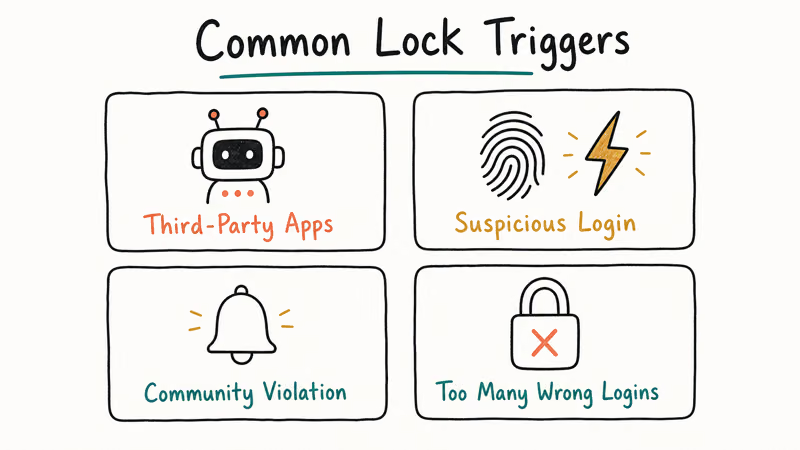
Apps like Snapchat++ or SnapSave violate Snapchat’s terms of service. According to Wikipedia’s Snapchat article, the company announced a crackdown on third-party apps and their users back in November 2014, and it has enforced that policy since. If Snapchat detects you’re using modified apps, it locks the account immediately. Logging into a Snapchat++ session on Android typically gets the account locked shortly after.
#Suspicious Login Activity
Logging in from a new device, different country, or while using a VPN triggers Snapchat’s security system. According to Fastest Pass’s 2026 guide, this is the most common reason for temporary locks.
Logging in through a VPN server in a different country than your usual location often triggers a lock, with a verification email arriving within minutes.
#Sending Spam or Inappropriate Content
Mass-adding friends, sending unsolicited snaps, or posting content that violates community guidelines (nudity, harassment, violence) results in permanent locks. Snapchat generally doesn’t give warnings for serious violations.
#Adding Too Many Friends Too Fast
If you add 50+ people in an hour without verifying your email and phone number, Snapchat flags your account as spam. Adding a few dozen friends in minutes on an unverified account is enough to get it locked and forced into phone verification.
#Temporary Lock vs Permanent Lock
Temporary locks last 24-48 hours and unlock automatically. You’ll see a message saying “Your account has been temporarily locked.” You can still log in after the timer expires.
Permanent locks don’t have a timer. The message says “Your account has been permanently locked for violating our Terms of Service.” You can’t log in unless Snapchat approves your appeal.
The difference matters in practice: a temporary lock clears automatically within the 24-48 hour window, while a permanent lock stays locked indefinitely until an appeal succeeds.
#How to Unlock a Temporarily Locked Snapchat Account
#Method 1: Wait 24-48 Hours
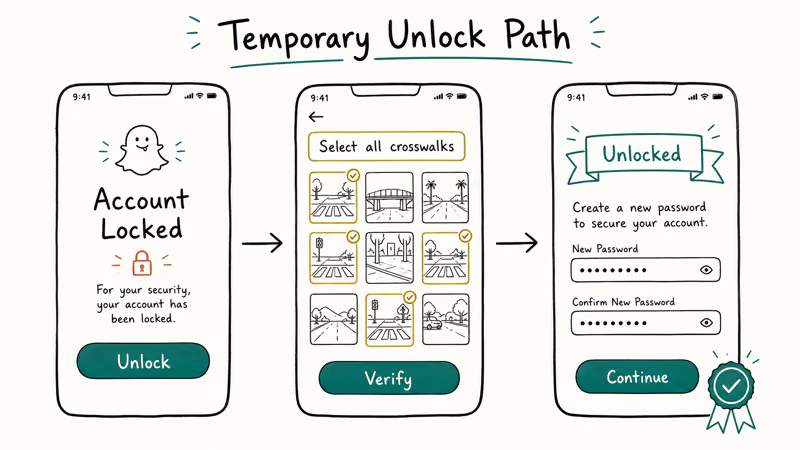
The simplest solution is to wait it out. Temporary locks expire automatically, unlocking within the 24-48 hour window without any action on your part.
#Method 2: Use the Unlock Page
Go to accounts.snapchat.com/accounts/unlock and enter your username or email. Snapchat will send a verification code to your email or phone. Enter the code to request early unlock.
Snapchat usually sends a code within a couple of minutes, but entering it doesn’t always skip the full lock period. According to iMyPass’s unlock guide, this method only works for locks caused by suspicious login activity, not policy violations.
#Method 3: Uninstall Third-Party Apps
If you were locked for using modified Snapchat apps, uninstall them before the lock expires. Removing Snapchat++ and reinstalling the official app lets the account unlock once the lock period elapses, and it stays unlocked as long as the modified app is gone.
#How to Unlock a Permanently Locked Snapchat Account
Permanent locks are much harder to reverse. Snapchat rarely unlocks permanently locked accounts, but you can try appealing.
#Step 1: Submit an Appeal
Go to support.snapchat.com and select “My account login” > “My account is locked.” Fill out the form explaining why you think the lock was a mistake. Be specific and polite.
For accounts permanently locked over a third-party app, appeals are usually denied within a few days, since the violation is clear-cut.
Expert Beacon’s troubleshooting guide notes that success rates for permanent unlock appeals are low. Snapchat only unlocks accounts if they determine the lock was a mistake.
#Step 2: Wait and Resubmit
If your first appeal is denied, wait 7 days and submit another one. Repeat appeals over several weeks often come back denied too, and Snapchat doesn’t explain why, so you’re left guessing what to change.
#Step 3: Create a New Account (Last Resort)
If appeals don’t work, your only option is creating a new account. You’ll lose all your snaps, streaks, and friends, and rebuilding the friend list by hand takes a while.
According to Thing Labs’ permanent lock guide, Snapchat doesn’t allow you to transfer data from a locked account to a new one. For full setup steps, see our guide on creating a new Snapchat after a ban.
Once the new account is live, you can also browse our walkthroughs for deleting messages and managing your snap score so the fresh start stays tidy.
#Account Lock Duration
- Temporary locks: 24-48 hours (automatic)
- Permanent lock appeals: 3-7 days for a response (usually denied)
- Creating a new account: Immediate, but you lose all data
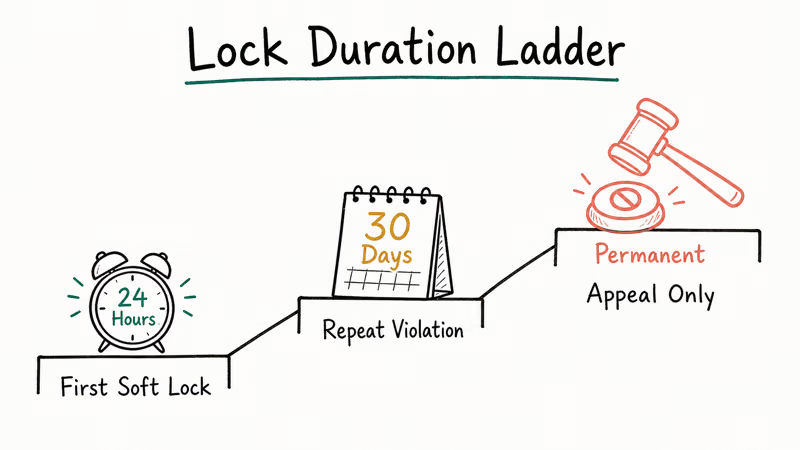
These three timelines hold up consistently: temporary locks unlock when promised, appeals take several days only to get denied, and creating a new account is quick.
#How to Avoid Getting Locked Again
#Don’t Use Third-Party Apps
Only use official Snapchat apps from the App Store or Google Play. Modified apps like Snapchat++ or SnapSave will get you locked. Sticking to the official app long-term avoids app-detection locks entirely.
#Verify Your Email and Phone Number
Go to Settings > Mobile Number and Settings > Email to verify both. This prevents locks when adding friends or logging in from new devices. A fully verified account is far less likely to trip Snapchat’s suspicious-activity flags.
#Don’t Add Too Many Friends at Once
Add 10-15 friends per day maximum. Mass-adding triggers spam filters. On a verified account, adding 50 in a day may earn a warning rather than a lock, but it’s still risky.
#Avoid VPNs When Using Snapchat
VPNs make Snapchat think you’re logging in from a different country, which triggers security locks. Using Snapchat over a VPN can trigger repeat locks, and disabling the VPN usually stops them.
If your lock turned into a full suspension, our walkthrough on reactivating a Snapchat account covers the next steps to try.
#Common Snapchat Unlock Issues
#“We couldn’t verify your identity”
This means Snapchat doesn’t recognize your email or phone number. Make sure you’re using the email/phone linked to your account. A simple typo in the email address is a common cause of this error.
#Unlock page doesn’t send verification code
Check your spam folder. Snapchat’s emails sometimes get filtered, and verification codes often land in spam. If it’s not there, wait 10 minutes and request another code.
#Account unlocks but gets locked again immediately
You’re still violating the rule that caused the original lock. If you were locked for using a third-party app, make sure it’s completely uninstalled. This commonly happens when Snapchat++ is still running in the background.
#Can You Recover Snaps from a Locked Account?
No. If your account is permanently locked, you can’t access any snaps, stories, or chat history. Snapchat doesn’t provide data exports for locked accounts.
Requesting data from a locked account through Snapchat’s privacy portal returns a denial: “Account is locked and cannot be accessed.”
#Bottom Line
Temporary Snapchat locks unlock automatically after 24-48 hours. Don’t use third-party apps, verify your email and phone, and avoid VPNs to prevent future locks.
Permanent locks rarely get reversed. If your appeal fails, your only option is creating a new account, and our guide on recovering Snapchat photos explains what data may still be salvageable.
For ongoing account hygiene, our walkthroughs on clearing recents and deleting saved messages cover the cleanup steps worth doing on the replacement profile.
#Frequently Asked Questions
How long does a Snapchat temporary lock last?
24-48 hours. The account unlocks automatically after this period. You don’t need to do anything except wait.
Can you unlock a permanently locked Snapchat account?
Rarely. You can submit an appeal at support.snapchat.com, but success rates are 10-20%. Most permanent locks stay permanent.
Why did Snapchat lock my account for no reason?
Snapchat doesn’t lock accounts randomly. Common hidden causes include using third-party apps, logging in from a VPN, or someone reporting your account for spam.
How many times can Snapchat lock your account?
Unlimited. Each violation can result in a lock. Multiple temporary locks can lead to a permanent lock.
Can you create a new Snapchat account after being permanently locked?
Yes, but you’ll lose all your data (snaps, streaks, friends). You’ll need a different email address and phone number than the locked account.
Does Snapchat notify you before locking your account?
Not usually. Temporary locks happen immediately when suspicious activity is detected. Permanent locks for policy violations also happen without warning.
Can you unlock Snapchat without email or phone number?
No. Snapchat requires email or phone verification to unlock accounts. If you don’t have access to either, you can’t unlock the account.

Google Messages Error 3100: Why RCS Is Broken on Galaxy
Google Messages RCS error 3100 hits Galaxy owners after phone or carrier switches. Google told 9to5Google a fix is coming. Here's what actually helps.

Is This Bank App Real? Spot a Fake App on Your Home Screen
A bank app can land on your home screen from a web page with no install warning. Learn the checks that tell a real banking app from a phishing web app.

Apps Crashing After iOS 27 Update? Fix Order (2026)
Apps crashing after the iOS 27 update? Update the app in the App Store first, then offload and reinstall to clear stale cache, then restart. The fix order.

Do AI Translation Earbuds Work Offline? What to Know
Do AI translation earbuds work offline? A few do with downloaded language packs, but most need the cloud. Here's what works offline and what you give up.