Can a PS4 Play Blu-ray Movies? Setup, Limits, and Fixes
PS4 plays standard 1080p Blu-ray and DVD discs after one software update, but no PS4 model supports 4K UHD Blu-ray. Setup, formats, regions, and fixes.
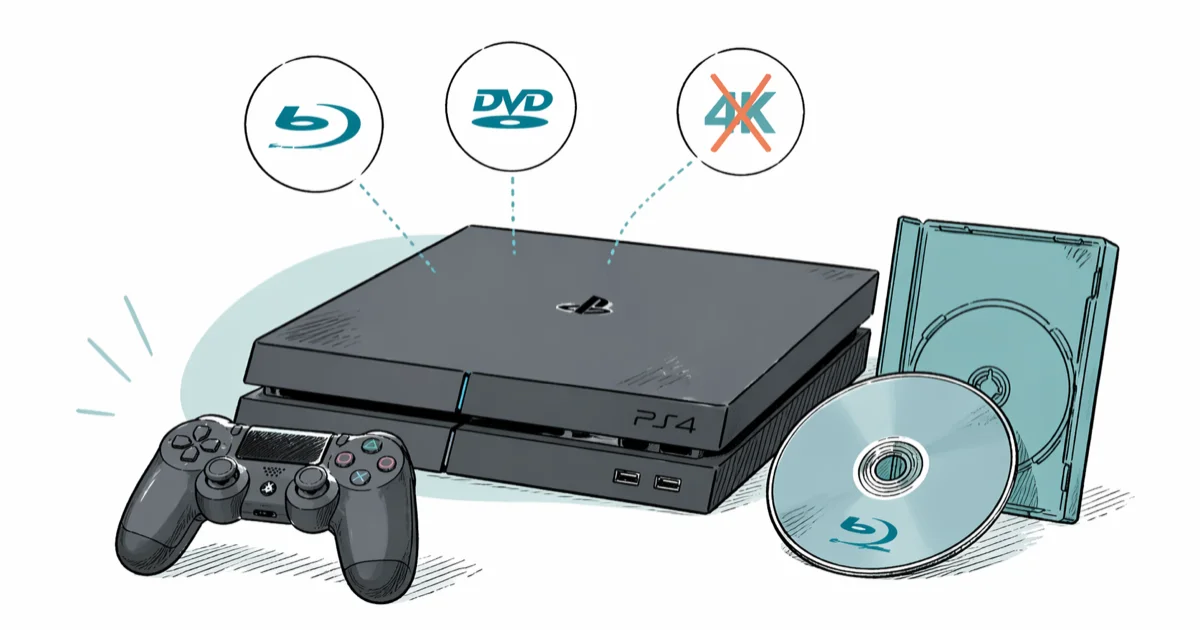
Quick AnswerYes. Every PS4 model plays standard 1080p Blu-ray discs and DVDs after one free software update, but no PS4 (original, Slim, or Pro) reads 4K Ultra HD Blu-ray discs. For 4K disc playback you need a PS5, Xbox Series X, or a dedicated 4K UHD player.
Short answer first: yes. The PS4 plays Blu-ray movies. It’s been a 1080p Blu-ray and DVD player out of the box since launch, as long as you let it pull a one-time system update first. What it can’t do is read 4K Ultra HD Blu-ray discs, and that limit applies to every PS4 model including the PS4 Pro.
- All three PS4 models (original, Slim, Pro) ship with a 1080p Blu-ray drive and need one free system update before disc playback works.
- No PS4 model reads 4K Ultra HD Blu-ray discs; the 4K UHD drive only ships in the PS5 (with disc), Xbox Series X, and standalone 4K UHD players.
- Blu-ray discs use three regions (A for North America, B for Europe and Australia, C for most of Asia), and your PS4’s region is locked at the factory.
- The “Unrecognized Disc” error usually means a 4K UHD disc, a wrong-region Blu-ray, a dirty disc, or a Cinavia/HDCP handshake that didn’t complete on first try.
- DVDs upscale to 1080p on the PS4 and the console handles 3D Blu-ray on a 3D-capable TV, but neither output bitstreams Dolby TrueHD or DTS-HD MA.
#Does the PS4 Play Blu-ray Discs?
Yes, and that hasn’t changed since the console launched in November 2013. According to Sony’s official PS4 specifications page, every retail PS4 ships with a Blu-ray and DVD drive that reads BD-ROM, BD-R, BD-RE, DVD-ROM, DVD-R, DVD-RW, and audio CDs. The first time you power the console on, you have to install the system software so the BD-J playback runtime is registered. After that the disc icon shows up on the home screen the moment you push a movie in.
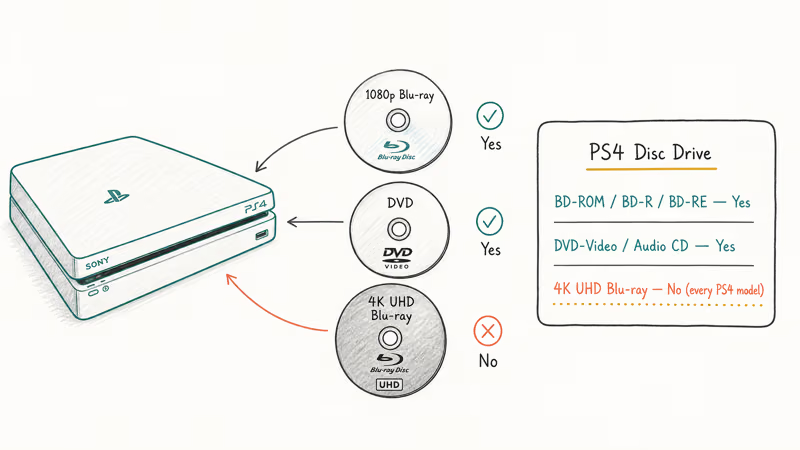
Two things the drive does not do: 4K UHD Blu-ray and 4K-resolution movie streaming over HDMI from disc. The PS4 Pro outputs 4K for games via upscaling, but the optical drive itself is a single-laser 1080p Blu-ray reader. It isn’t the triple-layer reader 4K UHD requires.
According to the Wikipedia entry on Ultra HD Blu-ray, the format requires a BDXL-capable triple-layer drive that no PS4 model ever shipped with. A 4K UHD Blu-ray will therefore return an “Unrecognized Disc” style failure instead of playing like a standard Blu-ray.
If your PS4 won’t even read a regular Blu-ray, we cover the most common cause in our PS4 unrecognized disc fix guide. For DVDs and CDs, the steps below apply too.
#How to Set Up Blu-ray Playback on PS4
Setup takes about 10 minutes the first time, then it’s automatic. Use this sequence on any PS4 model.
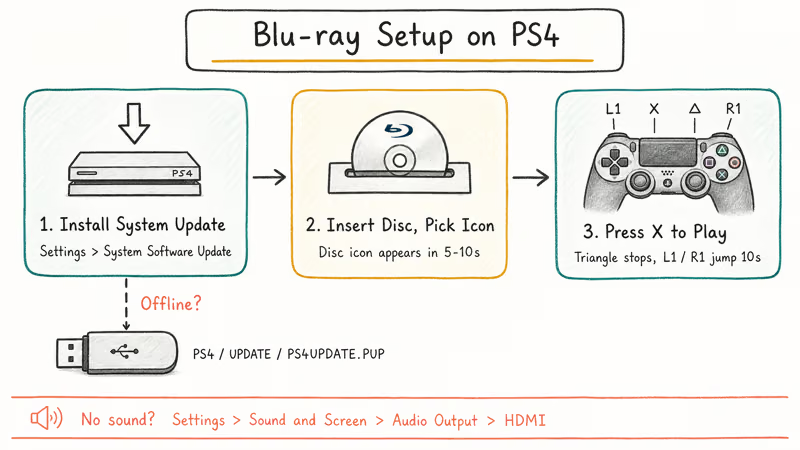
Step 1. Install the system software update. Go to Settings > System Software Update and let the console pull the latest firmware over Wi-Fi or Ethernet. If your PS4 isn’t online, download the PS4 update file (PS4UPDATE.PUP) from Sony’s PS4 system software page onto a FAT32 USB stick under \PS4\UPDATE\, then run Settings > System Software Update > Update from USB Storage Device. Sony’s support page confirms the update enables DVD and Blu-ray playback on first boot.
Step 2. Insert the disc and pick the disc icon. Once the firmware finishes installing, push the Blu-ray in label-side up. The disc icon appears on the home row in 5 to 10 seconds. Press X to launch the PS4 Media Player.
Standard Blu-ray discs should launch from the disc icon once the firmware update and playback runtime are installed.
Step 3. Map your DualShock 4 buttons. During playback, X is play/pause, Triangle stops, L1 and R1 jump 10 seconds, and the Options button opens subtitles, audio tracks, and chapter selection. The touchpad doubles as a cursor on disc menus that need a click. If you connect a Blu-ray remote, it works the same way.
If video plays but you have no sound, go to Settings > Sound and Screen > Audio Output Settings, set primary output to HDMI, and set audio format to Bitstream (Dolby) or Bitstream (DTS) depending on your AV receiver. PCM works for most TV speakers.
For unrelated startup faults like a flashing white power LED, see our PS4 white light troubleshooting guide before assuming the disc drive is the problem.
#Which Blu-ray Formats the PS4 Supports
The drive reads more disc types than most owners realize. It also refuses a few that look identical on the shelf, which is what catches people out at the checkout. Before you buy a movie or burn one yourself, the table below covers exactly what loads and what bounces back as “Unrecognized Disc.”
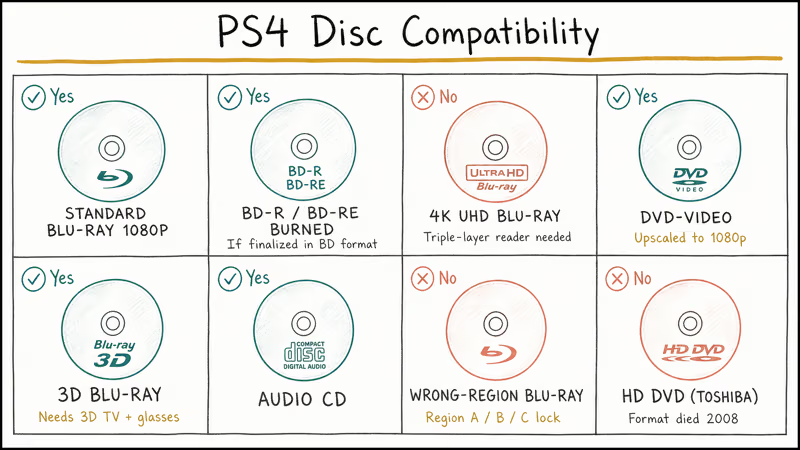
| Format | PS4 Plays? | Notes |
|---|---|---|
| Standard Blu-ray (1080p, BD-ROM) | Yes | Up to 50 GB dual-layer; BD-J menus supported |
| BD-R / BD-RE (burned) | Yes | If properly finalized in BD format |
| 4K Ultra HD Blu-ray (66/100 GB) | No | Triple-layer reader missing on every PS4 |
| DVD-Video | Yes | Upscaled to 1080p over HDMI |
| 3D Blu-ray | Yes | Needs 3D-capable TV plus 3D glasses |
| Audio CD | Yes | Plays through Media Player |
| Region-mismatched Blu-ray | No | Region A/B/C lock enforced by drive firmware |
| HD DVD (Toshiba format) | No | Format died in 2008; never supported |
Sony recommends keeping firmware current to avoid disc compatibility regressions.
According to the Blu-ray Disc Association’s official BD region code documentation, Blu-ray uses three region codes (A, B, C) instead of the eight DVD codes. PS4s sold in the US, Canada, Mexico, Japan, South Korea, and Latin America are Region A. PS4s sold in Europe, the UK, Australia, New Zealand, and Africa are Region B. Region C covers most of Asia including mainland China, India, and Russia.
A Region B disc bought in London won’t play on a Region A US PS4 unless that disc is marked “Region Free” on the back cover.
The PS4 also enforces HDCP 1.4 on the HDMI output for protected content. If your TV or receiver is older than 2009 or you route the PS4 through a cheap HDMI splitter that strips HDCP, Blu-ray playback drops to a black screen.
Connecting the PS4 directly to a known-good HDCP TV is the cleanest first test.
#Why Won’t My PS4 Recognize a Blu-ray Disc?
Nine times out of ten the cause is one of five things, in roughly this order of frequency.
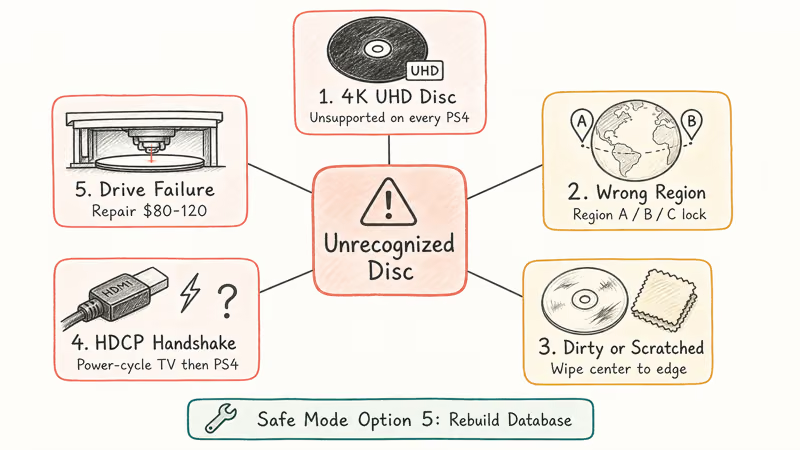
1. The disc is a 4K UHD Blu-ray. The packaging says “Ultra HD” and the disc itself is usually black. PS4 returns “Unrecognized Disc” the instant you slot it in. Play it on a PS5 with disc drive, an Xbox Series X, or a dedicated 4K player instead, since no firmware update for any PS4 model adds 4K UHD reading.
2. Wrong region. Region A discs won’t play on a Region B PS4. Check the back cover symbol.
3. Dirty or scratched data side. Wipe with a microfibre cloth, center to edge in straight lines (not circular). A drop of distilled water on stubborn smudges helps, and avoid paper towels because they shed fibres the laser reads as new scratches.
4. HDCP handshake failure. Black screen or no-signal logo. Power-cycle TV then PS4, swap the HDMI cable, and skip any AV receiver in the chain.
5. Drive failure. Rebuild the database from Safe Mode: hold the power button 7 seconds until the second beep, plug in the controller via USB, and pick Option 5: Rebuild Database. If the disc still won’t mount and other discs fail too, the laser assembly is likely worn out. A repair-shop swap costs around $80 to $120, or our CE-34878-0 fix walkthrough covers the related crash error if you’ve seen that too.
#PS4, PS4 Slim, and PS4 Pro Drive Differences
All three PS4 models use the same Blu-ray and DVD drive internally, contrary to what the Pro’s 4K branding suggests. Here’s what changes between them.
| Feature | PS4 (Original) | PS4 Slim | PS4 Pro |
|---|---|---|---|
| Blu-ray drive type | 1080p BD/DVD | 1080p BD/DVD | 1080p BD/DVD |
| 4K UHD disc support | No | No | No |
| Game upscaling output | 1080p | 1080p | 4K (checkerboard) |
| HDR10 streaming | Yes (firmware) | Yes (firmware) | Yes |
| HDMI version | 1.4 | 2.0a | 2.0b |
| Disc loading mechanism | Slot-loading | Slot-loading | Slot-loading |
The HDMI version matters for HDR streaming apps like Netflix and Amazon Prime Video, but not for disc playback. Every PS4 model maxes out at 1080p Blu-ray. The PS4 Pro launched at $399 in November 2016, and Sony’s PS4 Pro launch FAQ confirms that its internal Blu-ray drive does not support the 4K Ultra HD Blu-ray Disc format.
Sony also recommends an active cooling pause between long disc sessions on the launch PS4 fat model, which runs hotter than the Slim or Pro.
If you’re upgrading storage to fit more games and movies, our best SSD for PS4 guide covers the swap. The drive itself is unchanged, so SSD upgrades don’t affect Blu-ray performance.
#Region Codes, HDCP, and 3D Blu-ray Notes
A few specifics that catch first-time PS4 Blu-ray users.
Region locking is permanent. The region is burned into the optical drive firmware at the factory.
3D Blu-ray works, but 3D TVs are rare now. Most TV brands stopped shipping 3D capability after 2017. If you still own a 3D TV, enable Settings > Sound and Screen > Video Output Settings > 3D Display before inserting a 3D Blu-ray. The PS4 outputs side-by-side 1080p per eye at 24fps over HDMI 1.4 or higher.
Audio bitstream limits. The PS4 Media Player passes through Dolby Digital and DTS in bitstream mode, but it doesn’t bitstream the lossless Dolby TrueHD or DTS-HD Master Audio tracks Blu-ray discs ship with. You get the lossy core only. Dedicated Blu-ray players and the PS5 handle the lossless tracks. If your AV receiver shows “Dolby Digital” instead of “Dolby TrueHD” on a PS4 Blu-ray, that’s expected behavior, not a setup mistake.
For a deeper look at AV setup faults, our HDMI port not working guide walks through cable, port, and handshake checks.
#PS4 vs Dedicated Blu-ray Player vs PS5
If you already own a PS4, it’s a fine 1080p disc player. If you’re buying for movie playback specifically, the calculus shifts.
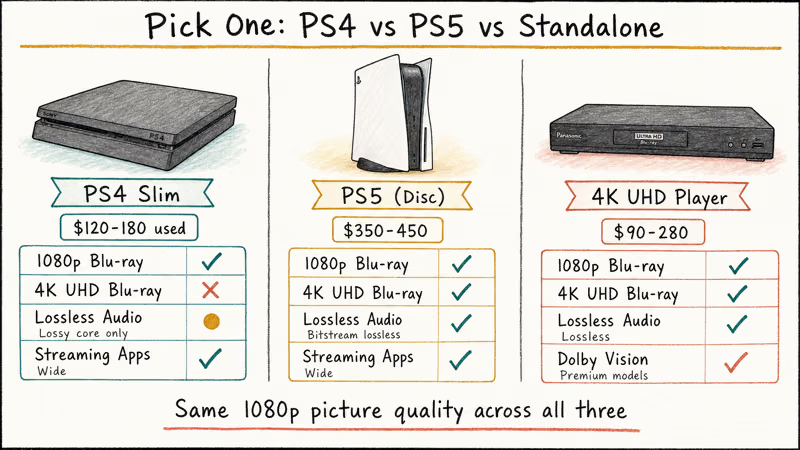
| Capability | PS4 Slim | PS5 (Disc Edition) | Dedicated 4K Blu-ray Player |
|---|---|---|---|
| Standard 1080p Blu-ray | Yes | Yes | Yes |
| 4K Ultra HD Blu-ray | No | Yes | Yes (on 4K models) |
| Lossless audio (TrueHD/DTS-HD) | Bitstream lossy core | Bitstream lossless | Bitstream lossless |
| Dolby Vision | No | No | Yes (premium models) |
| Streaming app library | Wide | Wide | Limited |
| Used-market price (2026) | $120–180 | $350–450 | $90–280 |
For most people who want both gaming and 1080p movies on one box, the PS4 Slim used at $120 to $180 is hard to beat. If you specifically want 4K UHD movies, a Panasonic UB420 or LG UBK90 around $200 outperforms any console for picture quality. The disc-edition PS5 splits the difference.
For deeper connectivity setups, our PS4 to laptop connection guide covers HDMI capture rigs, and our Kodi on PS4 explainer handles the streaming-app angle.
#Bottom Line
If you’re using a PS4 you already own as a Blu-ray player, install the firmware update once at Settings > System Software Update, push in your standard 1080p Blu-ray, and you’re set. Want 4K UHD Blu-ray playback? No PS4 model will ever do it; buy a PS5 with disc drive, an Xbox Series X, or a Panasonic UB420 standalone. For “Unrecognized Disc” errors on a regular Blu-ray, work through the five causes above before assuming the drive is dead.
#Frequently Asked Questions
Can the PS4 Slim play Blu-ray movies?
Yes. The PS4 Slim uses the same 1080p Blu-ray drive as the original PS4 and PS4 Pro. Install the firmware update once and disc playback works.
Do you need PlayStation Plus to watch Blu-ray on PS4?
No subscription, no PSN login. Disc playback is free.
Can the PS4 Pro play 4K Ultra HD Blu-ray discs?
No, and this is the most common misconception about the Pro. The 4K branding fools a lot of buyers; the optical drive is still a 1080p BD/DVD reader. For real 4K UHD disc playback, get a PS5 with disc drive, an Xbox Series X, or a standalone 4K UHD player like the Panasonic UB420.
Why won’t my PS4 play a Blu-ray I bought overseas?
Region mismatch, almost always. Check the back of the disc case for the region symbol and match it to your console.
Does the PS4 play 3D Blu-ray movies?
Yes, but only if you have a 3D TV and matching 3D glasses. Enable 3D output in Settings > Sound and Screen > Video Output Settings > 3D Display before you insert the disc. Output is side-by-side 1080p per eye at 24fps. Most TV brands dropped 3D capability around 2017, so this is mostly for older home theater setups.
Can the PS4 play burned DVDs and Blu-rays?
Only if the burn is finalized in a recognized format (BD-R, BD-RE, DVD-R, DVD-RW). Raw data discs full of MP4 files won’t load — use a USB stick instead.
Why does my PS4 Blu-ray audio cut out after 20 minutes?
That’s Cinavia copy-protection kicking in. On a legit disc, try a different HDMI cable.
Will the PS5 still play my old PS4 Blu-ray collection?
Yes. The PS5 with disc drive plays every standard 1080p Blu-ray and DVD that worked on a PS4, plus 4K Ultra HD Blu-ray discs the PS4 could never read. Region rules are unchanged, so a Region A disc still needs a Region A console. The digital-edition PS5 has no disc drive at all and can’t play any physical media of any kind.

Fortnite Stuck on the Loading Screen? Fix It in 2026
Fortnite stuck on the loading screen? Check server status, fix the Windows N Media Pack and DirectX 11 on PC, clear the console cache, and verify files.

Minecraft Keeps Crashing? Java and Bedrock Fixes (2026)
Minecraft keeps crashing on startup or mid-game? Update your GPU driver, remove mods on Java, and reinstall Gaming Services on Bedrock. Fixes for both.

Pokemon GO Not Loading? Fix the Loading Screen 2026
Pokemon GO not loading or stuck on the Pokeball? Check server status, fix automatic date and time, grant location permission, clear the cache, and update.

PS5 Controller Not Charging? 9 Fixes That Work (2026)
DualSense not charging? Swap the cable, use a rear port in Rest Mode, clean the USB-C port, and check power settings. 9 fixes for a dead PS5 controller.