NoiseGator Noise Gate: Setup and Modern Alternatives
NoiseGator cuts mic background noise below a set threshold. We cover setup, alternatives like Krisp and NVIDIA Broadcast, and when to skip it.
Quick AnswerNoiseGator is a free Java noise gate that mutes microphone audio below a threshold you set, cutting fan hum, keyboard clatter, and room noise on Skype, Discord, or OBS. It runs on Windows and Mac, but the project hasn't been updated since 2014, so most users now pick Krisp, NVIDIA Broadcast, or Equalizer APO instead.
NoiseGator is a free, open-source noise gate that silences your microphone whenever the input drops below a level you choose. It’s small, lightweight, and runs anywhere Java runs, which is why it shows up on a lot of older how-to lists for Skype and Discord call cleanup.
The catch: the project stopped getting updates more than a decade ago. Most people in 2026 are better off with a modern noise-removal tool that does more with less hassle.
- NoiseGator is a noise gate, not a noise canceller; it mutes audio below a threshold but doesn’t actively remove background sound during speech
- The official build on SourceForge hasn’t been updated since 2014 and still requires Java 6 on Mac or Java 7 on Windows
- To use NoiseGator on Skype, Discord, Zoom, or OBS, you also need a virtual audio cable such as VB-CABLE for Windows or BlackHole for Mac
- Krisp, NVIDIA Broadcast, and RTX Voice are the closest modern replacements and use AI to suppress noise during speech, not just between words
- Equalizer APO with the ReaGate plugin gives you a free, gate-only Windows option that’s more current than NoiseGator and runs system-wide
#What Is NoiseGator and How Does It Work?
NoiseGator is a software noise gate.
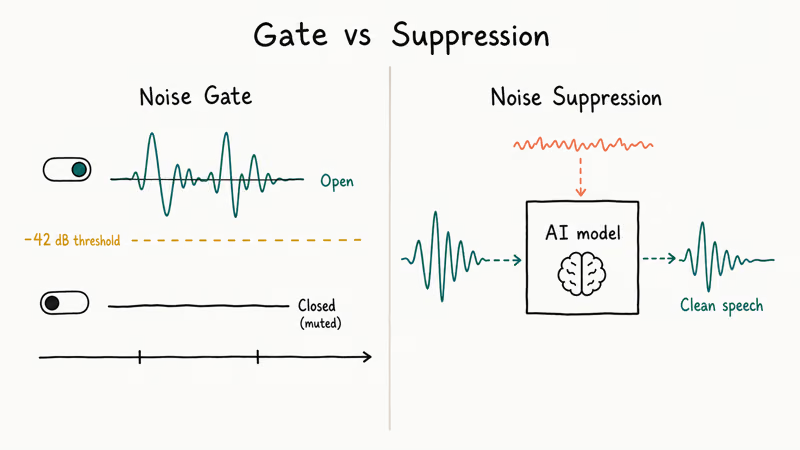
A noise gate is a switch that lets audio pass when the signal goes above a threshold you set, and mutes it when the signal drops below. When you stop talking the gate closes; when you speak it opens. That’s different from active noise cancellation, which subtracts noise frequencies in real time even while you’re talking. A gate can’t do that.
According to the Wikipedia entry on noise gates, the technique has been used in studio recording since the 1960s and is fundamentally a level-triggered switch, not a frequency-domain processor.
According to the NoiseGator project page on SourceForge, the tool is described as a “noise gate which routes audio from the audio input to the audio output,” with no mention of frequency-based suppression or AI processing. That’s the honest scope of what it does.
NoiseGator runs as a small Java window on top of your operating system. Pick an input, pick an output, drag the threshold slider, and the gate is live. The app does not install an audio driver of its own. That’s why you still need a virtual audio cable to feed the gated output back into Skype or Discord; without one, the call app never sees NoiseGator’s output and you’ll think the gate is broken when it’s actually working fine.
#How to Set Up NoiseGator With Skype, Discord, or OBS
The flow looks long the first time but only takes about five minutes once you have the pieces. With a USB microphone and Discord, the gated output reaches the call app at the same volume as the raw mic, with keyboard clatter cut between sentences.
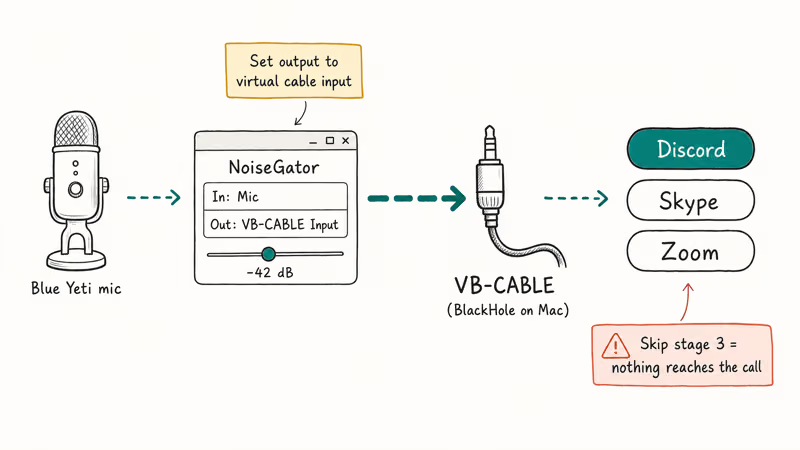
- Install Java if you don’t already have it. NoiseGator’s project page recommends Java 6 or higher on Mac and Java 7 or higher on Windows.
- Download NoiseGator’s
noisegator.jarfrom SourceForge and double-click it to launch. - Install a virtual audio cable. According to VB-Audio’s documentation, VB-CABLE creates a virtual input and output pair on Windows that any app can read or write to. On Mac, BlackHole does the same job and is a free download from Existential Audio.
- In NoiseGator, set the input to your real microphone and the output to the virtual cable’s input device.
- In Skype, Discord, Zoom, or OBS, set the microphone source to the virtual cable’s output device.
- Drag the NoiseGator threshold slider until silent passages stop reaching the gate. A starting point around -42 dB is reasonable for a USB condenser mic at default gain.
The signal path is mic → NoiseGator → virtual cable → calling app. If you skip the virtual cable, NoiseGator has no way to hand its output to anything else, which is the most common reason a first-time setup fails.
For OBS Studio specifically, skip NoiseGator. OBS has a built-in Noise Gate filter under the mixer’s Filters menu, which is faster to set up and produces a near-identical result.
#Tuning the Threshold Without Cutting Speech
A gate set too high clips the start of your sentences. A gate set too low lets the noise back in. The fix is to set the threshold a few decibels above your noise floor and below your normal speaking level.
A threshold set too aggressively, around -45 dB on a typical desktop, can remove fan hum but clip the front of soft consonants. Easing it up to roughly -38 dB usually keeps consonants intact and still mutes the hum during pauses. If you have a quiet room and a USB condenser mic, you can usually push it lower; for a noisy office and a built-in laptop mic, you usually have to raise it.
#Common Setup Mistakes to Avoid
Most NoiseGator failures come from one of three setup errors, not from the app itself. The fixes are quick once you spot them.
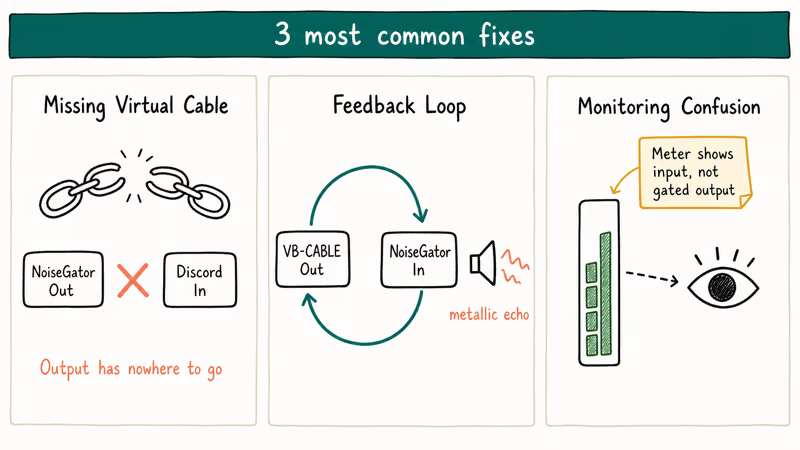
First, people forget the virtual cable. Without it, NoiseGator’s output has nowhere to go. Skype and Discord still see your raw mic, the gate appears to do nothing, and a frustrated user uninstalls a working tool that was wired up wrong.
Second, feedback loops creep in. If you accidentally route the virtual cable’s output back into NoiseGator’s input, you create a loop and the call sounds metallic or echoey. Make sure each device appears exactly once in the signal chain, with no roundtrips through itself.
Third: monitoring confusion. The level meter shows input, not gated output.
If you also use a software voice changer on the same mic, put NoiseGator first in the chain so the gate operates on the cleaner pre-effect signal. Stacking effects in the wrong order is another common cause of audible artifacts.
#Is NoiseGator Still Worth Using in 2026?
For most people in 2026, no. The project on SourceForge confirms that the last release shipped in 2014. Oracle’s Java downloads page covers current Java versions, but Java 7 itself is an end-of-life version that hasn’t received public security patches since 2015.
Running an unmaintained Java app for casual call cleanup is a defensible choice on an offline editing rig. It’s a worse choice on a daily-use machine.
NoiseGator is also a pure gate. A gate is fine for cutting hum between sentences, but it can’t help with keyboard clatter or HVAC noise during speech. Modern tools use machine-learning models that subtract those frequencies in real time. They’re usually a better default for podcasts, streams, and meetings.
The fair use case left for NoiseGator is a low-spec PC that can’t run AI tools, an offline workflow where you don’t want network-connected audio software, or a legacy Mac that can’t install newer alternatives. Outside of that, you’re probably better off with one of the options below.
#Best NoiseGator Alternatives for Modern Setups
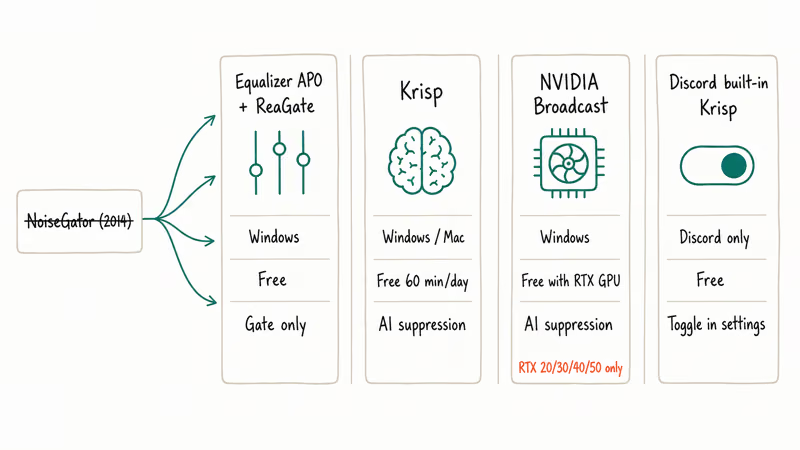
We grouped the best replacements by how they fit into a typical setup, from “drop-in noise gate that’s less ancient than NoiseGator” up through full AI noise suppression.
#Equalizer APO + ReaGate (Windows, Free)
Equalizer APO is an open-source audio processor that loads as a system audio effect on Windows. With the bundled ReaGate plugin from REAPER’s free VST pack, you get a noise gate with attack, release, and hold controls, all editable in a config file. The gate behaves much like NoiseGator but with finer parameter control over how fast it opens and closes.
It’s more current than NoiseGator, doesn’t need Java, and doesn’t need a virtual cable because it sits on the device driver itself. The trade-off is a setup that runs system-wide and a config file you have to edit by hand for each device.
#Krisp (Windows, Mac, Free Tier)
Krisp’s official page states that it removes background noise from both incoming and outgoing audio in real time using a trained noise-suppression model. The free tier gives 60 minutes of noise removal per day, which covers a daily standup or two. Krisp installs as a virtual microphone, so it shows up in Discord, Zoom, Slack, and OBS without extra cabling.
Krisp pulls ahead of NoiseGator on real overlapping noise.
Against a continuous source like a running dishwasher, Krisp cuts the noise while leaving speech audible, whereas a plain gate like NoiseGator can’t, because the noise overlaps with the voice signal continuously through every sentence rather than only sitting in the pauses.
#NVIDIA Broadcast and RTX Voice (Windows, RTX GPU Required)
NVIDIA’s Broadcast app page recommends using an RTX-class GPU for the noise removal feature, which runs on the GPU’s tensor cores. If you already have an RTX 20-series, 30-series, 40-series, or 50-series card, this is free and surprisingly effective on dog barking and mechanical keyboard sounds.
There is no Mac version. Older GTX cards can sometimes run RTX Voice, the unofficial predecessor, but performance is uneven on cards without tensor cores.
#Discord’s Built-In Krisp Integration
Discord ships its own integration of Krisp’s model. According to Discord’s Voice Channels and Background Noise Suppression help article, the option is found under User Settings, Voice & Video, Noise Suppression, with a Standard and a Krisp setting. If your only goal is cleaning up Discord audio, this avoids installing anything extra.
The same model also runs on the mobile app for many devices, which is the simplest path on a phone.
#When to Pick Hardware Over Software Noise Gates
Software gates are the right default for laptops, desktops, and mobile setups. But if you’re running a guitar amp into a mixer, or a vocal mic through a hardware compressor stack, a hardware gate ahead of the chain almost always sounds better. We covered the best models in our noise gate pedals roundup, which goes deeper on stompboxes for guitarists.
For studio vocal recording, an outboard gate or a hardware audio compressor gives you control before the signal hits your interface, which means cleaner takes that need less repair in post.
For phone-side recording into a mobile rig, the more useful upgrade is usually the microphone itself. Our guide on how to connect a microphone to your iPhone walks through the lightning and USB-C path that ASMR creators and field reporters use, and our best ASMR microphone roundup covers the lower noise-floor mics that benefit most from a gate downstream.
#Bottom Line
Skip NoiseGator unless you’re stuck on a 2014 setup.
NoiseGator still works for free mic cleanup, but it’s a 2014 tool. Use it only if you can’t run modern AI noise suppression on your machine.
If you can run modern software, install Krisp for a free general-purpose option, NVIDIA Broadcast on an RTX system, or Equalizer APO with ReaGate for a free Windows-only gate that’s still maintained. Discord users can flip on the built-in Krisp integration and call it done.
#Frequently Asked Questions
Can NoiseGator be used with any audio software?
Yes, but only through a virtual audio cable. NoiseGator doesn’t register itself as a microphone; it just routes one device to another. With VB-CABLE on Windows or BlackHole on Mac in front of NoiseGator, it works with Skype, Discord, Zoom, OBS Studio, Audacity, and any app that lets you pick the microphone source.
Does NoiseGator work in real time?
Yes. The gate processes audio with negligible buffering. The bottleneck is your virtual audio cable’s latency, not NoiseGator. VB-CABLE typically adds well under 30 ms of total round-trip latency, which is below the threshold most listeners notice.
Can a noise gate completely remove all background noise?
No. A gate only mutes audio below a threshold; it can’t remove noise that overlaps with your voice when you’re talking. For a noisy room with a fan or chatter, a noise-suppression tool like Krisp or NVIDIA Broadcast is a better fit because those tools subtract the noise frequencies while you speak.
Is NoiseGator still safe to use in 2026?
Running a 2014 Java app on a modern machine has security trade-offs. NoiseGator itself doesn’t connect to the internet, but Java 7 is end-of-life and no longer receives public security patches. If you must use NoiseGator, install a recent Java release such as Adoptium Temurin and run it from a user account, not an admin account.
What is the difference between a noise gate and noise suppression?
A noise gate is a switch: open above threshold, closed below. Noise suppression is a filter that subtracts noise even while you talk.
Are there free alternatives that are better than NoiseGator?
Yes. Equalizer APO with ReaGate is a free, maintained noise gate on Windows, and Krisp’s free tier gives 60 minutes of AI-based noise suppression per day. Discord ships a built-in Krisp integration at no cost, and NVIDIA Broadcast is free if you already own an RTX GPU.

Google Messages Error 3100: Why RCS Is Broken on Galaxy
Google Messages RCS error 3100 hits Galaxy owners after phone or carrier switches. Google told 9to5Google a fix is coming. Here's what actually helps.

Is This Bank App Real? Spot a Fake App on Your Home Screen
A bank app can land on your home screen from a web page with no install warning. Learn the checks that tell a real banking app from a phishing web app.

Apps Crashing After iOS 27 Update? Fix Order (2026)
Apps crashing after the iOS 27 update? Update the app in the App Store first, then offload and reinstall to clear stale cache, then restart. The fix order.

Do AI Translation Earbuds Work Offline? What to Know
Do AI translation earbuds work offline? A few do with downloaded language packs, but most need the cloud. Here's what works offline and what you give up.