How to Use a VPN on a Firestick: 2026 Vega OS Guide
Install a VPN on Firestick in under 5 minutes. Covers Amazon Appstore picks, APK sideload, the 2026 Vega OS catch, and when you don't need one.
Quick AnswerSearch the Amazon Appstore for NordVPN, Surfshark, or Proton VPN on your Firestick, then sign in and connect. On a 2026 Vega OS Stick, choose NordVPN. ExpressVPN's app is not yet Vega-compatible.
Learning how to use a VPN on a Firestick takes about five minutes if you already own a 2nd-generation or newer Fire TV Stick. The setup path changed in 2026 because Amazon shipped Vega OS on its latest hardware, and not every VPN has caught up. This guide walks through the Amazon Appstore install, the sideload route for older Sticks, the Vega OS compatibility picture, and the honest cases where a VPN doesn’t actually help.
- The Amazon Appstore install path takes under five minutes on a 2nd-generation or newer Fire TV Stick: Find, Search, Get, sign in, connect.
- NordVPN, Surfshark, and Proton VPN all ship Fire OS apps. Proton VPN requires Fire OS 7 or newer per Proton’s setup page.
- The 2026 Vega OS Fire TV Stick currently supports NordVPN but not ExpressVPN, and ExpressVPN’s own support page confirms the gap.
- First-generation Fire TV Sticks can’t run a VPN client at all, so you need a 2nd-gen or newer device or a router-level setup.
- A VPN protects your own traffic from your ISP and on public Wi-Fi, but it won’t legitimately unblock licensed Netflix or Hulu regions because those services geofence by billing address.
#Why Use a VPN on a Firestick?
A VPN on a Firestick does one job: it hides your streaming traffic from your ISP and from anyone snooping on the same Wi-Fi.
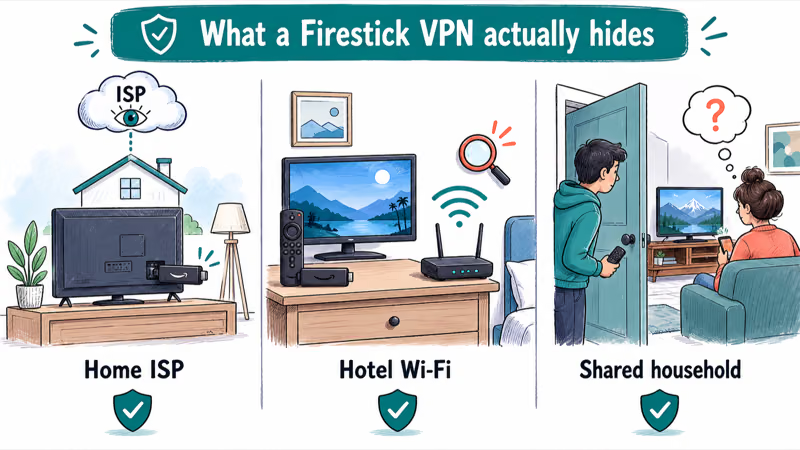
That matters in three common situations. Your home network operator can log which streaming domains your Fire TV Stick connects to. Hotel and rental Wi-Fi networks see every unencrypted request your Stick makes. A roommate on the same router can fingerprint what’s playing on the living-room TV.
The same plumbing you already know from VPN basics on iPhone applies here: the VPN app on your Firestick encrypts traffic between the Stick and a server you pick, then forwards it to the destination. The streaming service still sees a request, but your ISP, the hotel network, and the people on your local Wi-Fi only see encrypted packets to one server.
What a Firestick VPN doesn’t do is reliably bypass content geofences on legitimate streaming apps.
Netflix, Hulu, Disney+, and most live PPV apps check the billing address tied to your account, not just your IP. Switching your apparent server location for your own traffic won’t unlock another country’s Netflix library. That’s the most common misconception, and it’s the reason this guide spends time on the privacy use cases first.
Three honest reasons to install one: ISP-level traffic privacy on your own home network, public Wi-Fi safety on hotel and travel networks, and shared-household TV privacy in dorms or co-living setups. A VPN only shields traffic in transit, so to cut the personal data that is already public, pair it with removing your info from data broker sites.
#Install a VPN From the Amazon Appstore
The Appstore install is the official path. On a current Fire TV Stick, the trip from the Find tile to a working NordVPN connection takes only a few minutes, including the email sign-in step.
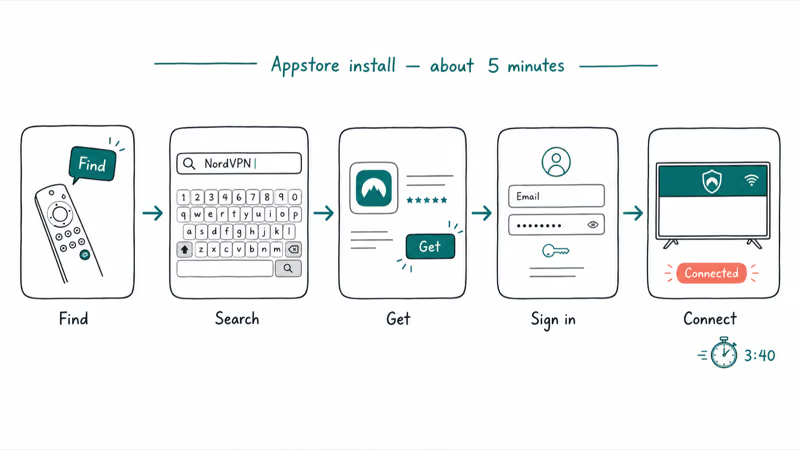
Here is the full sequence:
- From the Fire TV home screen, go to Find, then Search.
- Type the name of your VPN. NordVPN, Surfshark, and Proton VPN all have official Fire TV apps.
- Pick the app from the results and select Get or Download.
- Open the app, sign in with the account you created on the provider’s website, and pick a server.
- Connect. The Fire TV status bar shows the VPN icon when the tunnel is up.
Some links on this page are affiliate links, which means fone.tips may earn a commission at no extra cost to you.
For Proton VPN, there’s a hard system requirement. According to Proton VPN’s Fire TV requirements, the Proton VPN app works on Fire OS 7 or newer. If your Stick is older than that, the Appstore listing won’t show Get as a clickable option.
The Amazon Appstore path covers every mainstream Fire TV device, but 2026 added a wrinkle: Amazon’s new Vega OS Sticks have a smaller initial app catalog. On a 2026 Vega OS Stick the ExpressVPN listing may install but then fail to launch. That matches the notice on ExpressVPN’s Fire TV setup page, which states that the ExpressVPN app is not currently compatible with Amazon’s Vega OS.
On Vega OS Sticks, NordVPN installs and connects without the same trouble. Security.org’s Firestick VPN guide confirms that NordVPN is one of the first VPN providers to offer a Vega OS-compatible app. If you have a 2026 Vega OS Stick, choose NordVPN today. If you have any earlier Fire OS Stick, all four major providers are fair game.
#Sideload a VPN APK With the Downloader App
Sideloading installs a VPN the Appstore doesn’t list for your Stick. Use it only on your own Fire OS device, never on someone else’s Stick without their permission.
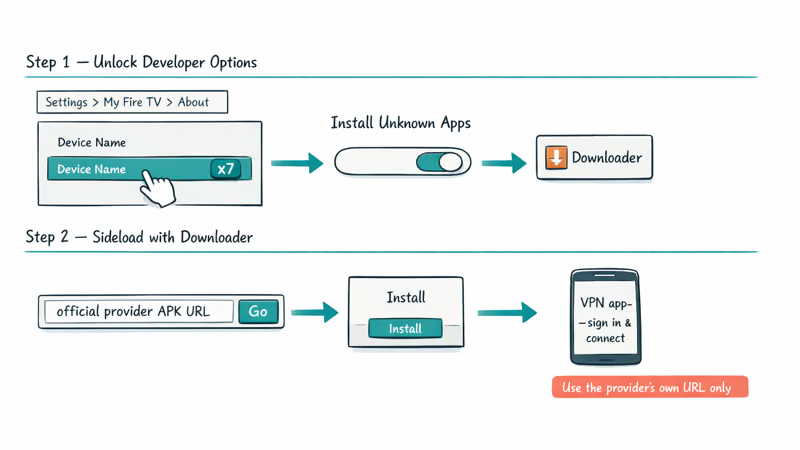
Before sideloading, enable Developer Options. On Fire OS 7 and later, go to Settings, My Fire TV, About, then click the device name seven times. Back out one level, open Developer Options, and turn on Install Unknown Apps for the Downloader app specifically (not as a blanket toggle).
The sideload sequence with the Downloader app on Firestick goes like this:
- Search for Downloader in the Appstore, install it, and open it once to grant storage permission.
- In the Downloader URL bar, paste the direct APK link your VPN provider publishes on its Fire TV support page. Use the official provider URL, never a third-party APK mirror.
- Press Go. Downloader fetches the APK and prompts you to install.
- Open the installed VPN app, sign in, and connect.
The Downloader-app sideload route takes a few extra minutes versus the Appstore install because Developer Options has to be unlocked first. The added time is the cost of admission for older Sticks. Stick to the official APK URLs published by NordVPN, Surfshark, or Proton VPN.
#What If Your Firestick VPN Won’t Connect?
VPN connection trouble on Firestick usually has one of five causes. Walk this list in order:
- The VPN app launched but shows a spinning connect icon. Restart the Stick from Settings, My Fire TV, Restart. A clean reboot clears most stuck-tunnel states.
- The app connects but streaming apps return network errors. The streaming service detected the VPN endpoint and blocked it. Pick a different server, or accept that this app won’t work with a VPN active.
- The VPN connects but your router is also running its own VPN. Two VPN tunnels at once usually fail. Either turn off router-level VPN or skip the Stick-level app.
- The Appstore listing is missing entirely. Your Stick may be a generation that the provider no longer supports. BleepingComputer’s Fire TV VPN guide confirms that first-generation Amazon Fire Sticks don’t allow VPN connections, and ExpressVPN’s compatibility list states that ExpressVPN supports Fire TV Stick 3rd generation and above.
- Nothing works and the Stick feels stuck. Try the reset Fire Stick steps as a last resort, then reinstall the VPN app.
A separate confusion comes from PPV billing. The PPV on Firestick guide explains that PPV apps geofence by your billing address, not your IP, so flipping the VPN on or off doesn’t change what the app shows. Trying to use a VPN to switch your apparent location for licensed streaming violates the service’s terms and can void your subscription.
#Picking the Right VPN for Your Fire TV
Choosing a VPN for Fire TV in 2026 comes down to five filters. Apply them in this order:
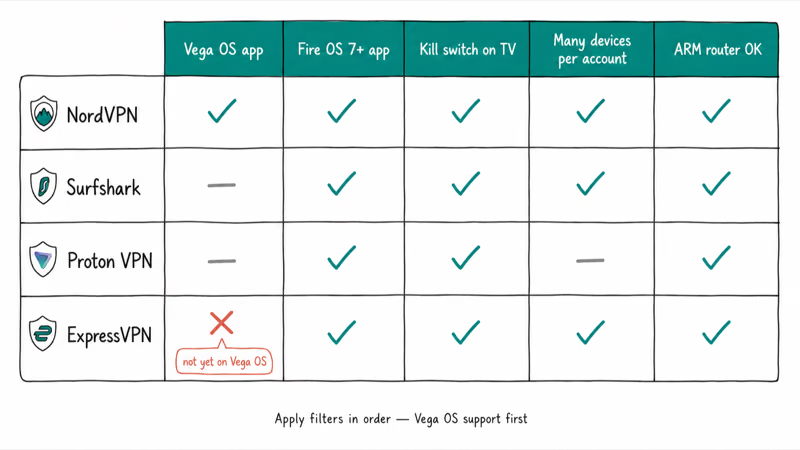
- Vega OS support. If you bought a 2026 Fire TV Stick, NordVPN is currently the safe pick because its app launches on Vega OS today.
- Fire OS app presence. For 2nd-generation through 4K Max Sticks, NordVPN, Surfshark, and Proton VPN all maintain Fire OS apps. ExpressVPN works on Fire TV Stick 3rd generation and above on classic Fire OS, but not on Vega OS yet.
- Simultaneous connections. Surfshark and NordVPN both allow plenty of devices per account, which matters if you also want the VPN running on a phone or laptop.
- Built-in kill switch on TV. The kill switch cuts your Stick’s internet if the tunnel drops. NordVPN and Surfshark both expose this on Fire TV. Proton VPN exposes it on Fire OS 7+.
- Honest pricing. Multi-year plans usually land somewhere between forty and sixty dollars per year. Avoid lifetime VPN deals from defunct or no-name brands. The TigerVPN 2022 shutdown is a reminder that brand-name longevity matters.
For Fire OS 7+ on 2nd-gen through 4K Max Sticks, NordVPN is the all-rounder, Surfshark is the budget pick with unlimited devices, and Proton VPN is the privacy-first option. ExpressVPN remains a fine pick on classic Fire OS Sticks. Just confirm Vega OS support before buying if you have a 2026 model.
If your interest is streaming privacy on third-party movie apps, our safer VPN streaming picks covers what to look for on those workflows. The Firestick install steps above stay the same regardless of which provider you pick.
#Use a Router-Level VPN if Your Stick Can’t Run One
A 1st-generation Fire TV Stick can’t run a VPN client app at all. The Amazon Fire TV product line on Wikipedia documents which generations shipped which OS builds, and the original 2014 Stick predates the Fire OS versions that VPN providers target today. If that’s the device you still own, your only path is a router-level VPN that protects every device on the network, the Stick included.
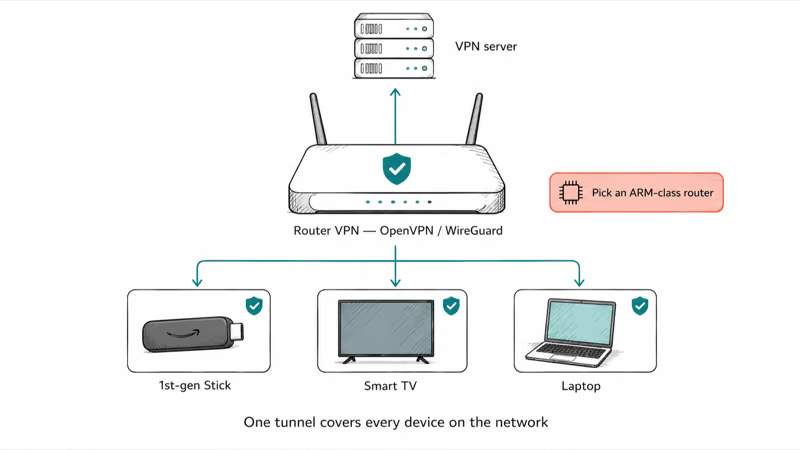
A router-level setup covers every device on the network at once: Stick, smart TV, laptop. Major routers from Asus, GL.iNet, and Synology run OpenVPN or WireGuard. The trade-off: every device shares one tunnel.
The other case for router-level VPN is when you don’t trust the Stick’s app to stay connected. The router enforces the tunnel for everything downstream, so even if the Stick’s app crashes silently, traffic still routes through the VPN. Pick a router with at least an ARM-based CPU; budget routers tend to drop throughput to a fraction of your real line speed once VPN encryption kicks in.
#Bottom Line
Install NordVPN, Surfshark, or Proton VPN from the Amazon Appstore on any 2nd-generation or newer Fire TV Stick running Fire OS 7 or later. The Find-search install path takes under five minutes and gives you real ISP-traffic privacy on shared and public Wi-Fi.
If you bought a 2026 Fire TV Stick with Vega OS, NordVPN is the safe pick today because ExpressVPN’s own setup page confirms its Vega OS app isn’t yet available. Reach for the Downloader-app sideload route only when the Appstore listing is missing on your Stick generation and the provider publishes a direct APK URL on its own Fire TV support page.
Don’t buy a VPN expecting to unlock other countries’ Netflix or Hulu libraries. Those services geofence by billing address, so a VPN gives you privacy, not a regional unlock.
#Frequently Asked Questions
Do you need a VPN on a Firestick?
You need one if you want privacy from your ISP or safer streaming on public Wi-Fi. You don’t need one if your only goal is unlocking licensed streaming regions, because services like Netflix geofence by billing address rather than IP.
How do you install a VPN on Firestick without an Appstore version?
Use the Downloader app to sideload the official APK that your provider publishes on its Fire TV support page. Enable Developer Options under Settings, My Fire TV, About by clicking the device name seven times. Then allow Downloader to install unknown apps and paste the APK URL from the provider’s own site.
Does ExpressVPN work on the 2026 Fire TV Stick?
Not on a 2026 Vega OS Fire TV Stick. ExpressVPN’s setup page confirms that its app isn’t compatible with Vega OS yet, so it installs but won’t launch. Use NordVPN today.
Will a VPN slow down my Firestick streaming?
A VPN on a Firestick adds some overhead because every packet gets encrypted and routed through a server. On a modern Firestick with a fast home connection, the throughput hit is usually small enough that 4K streaming still runs smoothly on a nearby server. Pick a server geographically close to you and choose WireGuard if your app offers it.
Can a VPN unblock Netflix or Hulu region content on Fire TV?
Not reliably, and not legitimately either. Both services geofence libraries by the billing address on your account.
Is it safe to sideload a VPN APK on Firestick?
Sideloading is safe when you use the APK URL that the provider itself publishes on its official Fire TV support page. The risk is downloading from third-party APK mirrors, which can repackage the installer with adware. Only enable Install Unknown Apps for the Downloader app specifically, not as a blanket toggle, and turn it back off after the install completes. Stick to providers you already pay for, not free VPN services that surfaced only on APK directories.
Which Fire TV Stick generations support a VPN?
The 2nd-generation Fire TV Stick and every newer device support a VPN client. That includes Fire TV Stick 4K, Fire TV Stick 4K Max, Fire TV Stick Lite, and the 2026 Vega OS Stick. BleepingComputer’s Fire TV VPN guide confirms first-generation Amazon Fire Sticks don’t allow VPN connections, so original Stick owners need a router-level setup.

Is This Bank App Real? Spot a Fake App on Your Home Screen
A bank app can land on your home screen from a web page with no install warning. Learn the checks that tell a real banking app from a phishing web app.

Apps Crashing After iOS 27 Update? Fix Order (2026)
Apps crashing after the iOS 27 update? Update the app in the App Store first, then offload and reinstall to clear stale cache, then restart. The fix order.

Do AI Translation Earbuds Work Offline? What to Know
Do AI translation earbuds work offline? A few do with downloaded language packs, but most need the cloud. Here's what works offline and what you give up.
How to Set Up Translation Earbuds (Pairing and Modes)
How to set up translation earbuds: charge, install the app, pair over Bluetooth, pick two languages, and choose a mode. A step-by-step first-use guide.