How to Transfer WhatsApp From Android to iPhone (2026)
Move WhatsApp chats from Android to iPhone using Move to iOS, the official in-app transfer, or paid PC tools. Honest device requirements and limits.
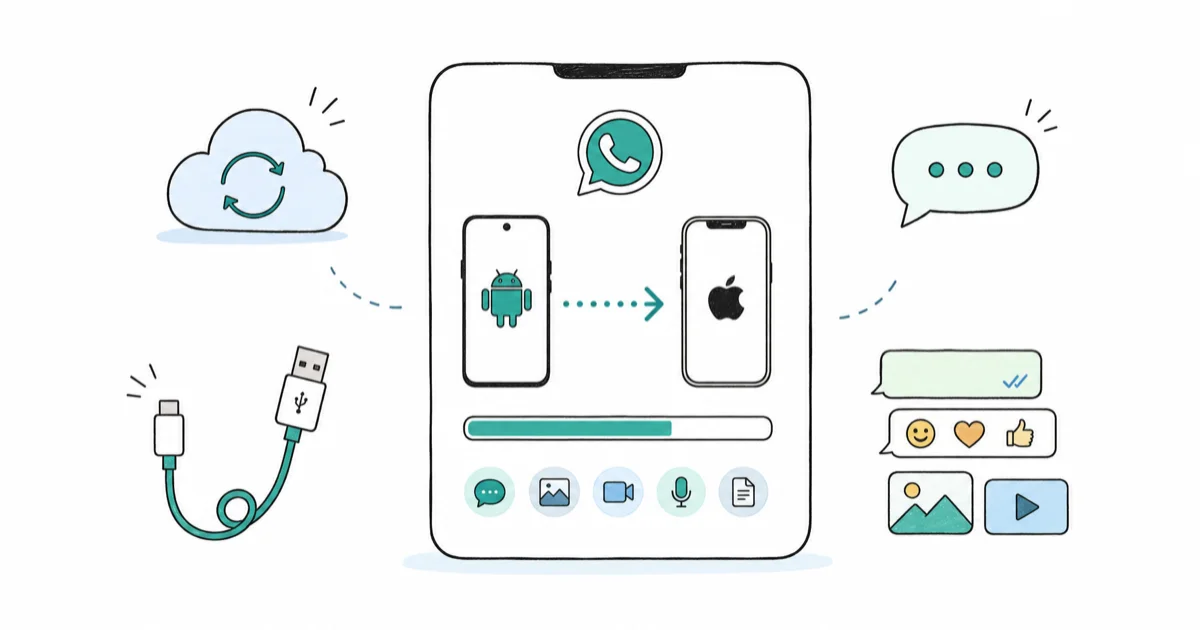
Quick AnswerUse Move to iOS during initial iPhone setup and tap Move Chats to iOS inside Android WhatsApp Settings > Chats. WhatsApp's built-in transfer requires iOS 15.5 or later and Android 5 or later.
Switching from Android to iPhone used to mean losing every WhatsApp chat, but Apple and WhatsApp now ship an official path that carries text, media, voice notes, and group threads across platforms. The Move to iOS flow handles the migration directly between a Pixel-class Android phone and a recent iPhone, and a large WhatsApp library transfers over a private Wi-Fi network in a single pass.
- The official WhatsApp transfer requires Android 5 or later on the source phone and iOS 15.5 or later on the iPhone, per WhatsApp’s published support page.
- Move to iOS must run during the iPhone’s initial setup, before you finish the Welcome screens. Once setup ends, the option disappears and you must erase the iPhone to retry.
- The same phone number must remain on the iPhone after transfer, otherwise WhatsApp treats the new device as a separate registration and skips chat restore.
- Emailed chats arrive as a flat .txt or .zip file that can’t be re-imported into WhatsApp, so email export only works for archiving evidence or printing.
- Paid Windows tools like Wutsapper and Tansee can transfer WhatsApp after iPhone setup is complete, but they require a computer, USB cables, and a license fee per device.
#Requirements Before You Start the Transfer
The supported transfer is picky about firmware and account state, so confirming requirements first saves a wasted erase-and-restore cycle.
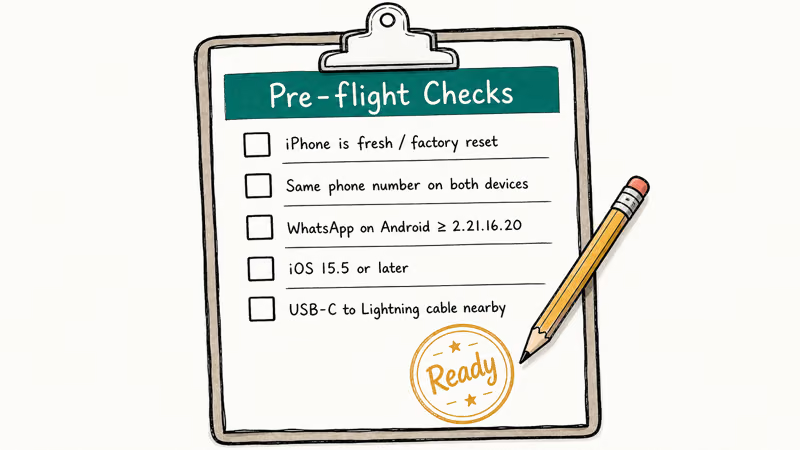
Open the Android device’s About Phone screen and read the Android version. WhatsApp’s official move guide states that the source phone needs Android 5 (Lollipop) or higher, with the latest WhatsApp build installed from Google Play before you start.
Tap Settings on the new iPhone and check iOS 15.5 or later under General > About > Software Version.
According to WhatsApp’s official transfer help article, the iPhone must be brand new or factory reset, and the iPhone must be plugged into power for the entire transfer. Both devices must join the same Wi-Fi network, and we recommend a 5 GHz network for large media libraries.
The phone number plays a quiet but critical role. Swapping the SIM to a different number after transfer makes WhatsApp on the iPhone refuse to restore, offering a fresh start instead. Keep the original number active until WhatsApp on the iPhone reaches the chat list.
#How to Transfer WhatsApp From Android to iPhone With Move to iOS
This is Apple and WhatsApp’s joint official path. Both companies recommend it first, and it costs nothing.
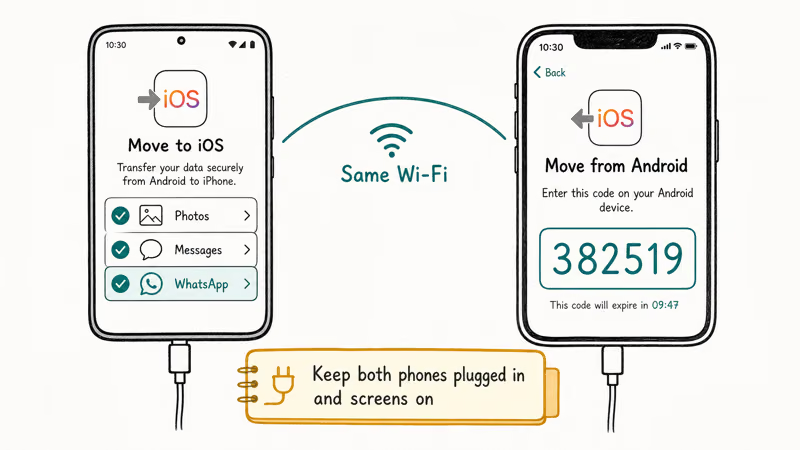
Pause.
Before you tap a single button, finish charging both phones above 60 percent and confirm the iPhone is on a fresh setup screen. Apple explicitly warns in its Move to iOS documentation that interrupting the process forces a full iPhone erase. Skipping this preflight is the single most common failure mode reported in support forum threads.
Install the Move to iOS app on the Android device from Google Play.
Start the iPhone setup process on the new device and follow the on-screen flow until you reach the Apps & Data screen. Tap Move Data from Android, accept the prompts, and the iPhone displays a six-digit or ten-digit code on its screen.
Open the Move to iOS app on the Android device and tap Continue, then accept the terms and the location permission prompt. Enter the code from the iPhone when prompted. The Android device joins a temporary peer-to-peer Wi-Fi network created by the iPhone, no router required for that hop.
On the next screen titled Transfer Data, scroll down to WhatsApp and tap Start.
WhatsApp on Android opens automatically and shows a preparation screen. Tap Start, then Next, and wait for WhatsApp to export your chats and media into a temporary archive. This export runs at a steady pace on a phone with internal storage, with larger libraries taking proportionally longer.
Once the export finishes, WhatsApp returns you to the Move to iOS app, which copies the bundle plus contacts, photos, and other selected categories to the iPhone in a single pass.
Finish iPhone setup, then sign back into WhatsApp on the new iPhone using the same phone number. Tap Start to restore the imported chats. The whole cycle, including post-setup chat restore on iOS, runs in well under an hour for a large library on a strong network.
If the Move to iOS app stalls partway, our companion article on Move to iOS not working walks through the recovery steps.
#Why Use WhatsApp’s Built-In iOS Transfer?
WhatsApp added a standalone path that bypasses Apple’s Move to iOS app, but only on recent iOS builds.
This option lives in Android WhatsApp under Settings > Chats > Move Chats to iOS. It still depends on Apple’s Move to iOS app under the hood, as WhatsApp confirms in its Help Center article on moving WhatsApp data.
The advantage: it lets you start the transfer from inside WhatsApp itself, which feels less fragile when Apple’s main flow is acting up. You still must open Move to iOS on the same Android device to scan the code displayed by the iPhone during initial setup, so treat this path as a friendlier entry point rather than a true alternative.
Open WhatsApp on Android, tap the three-dot menu in the upper right, and select Settings. Tap Chats, then Move Chats to iOS.
WhatsApp shows a preparation screen.
Read it once.
The screen confirms the iPhone must be in initial setup, both devices must use the same Wi-Fi, and the iPhone must remain plugged in. Tap Start, then continue with the Move to iOS prompts on the iPhone exactly as described in the prior section. When the iPhone repeatedly shows “could not connect to Android” using Apple’s main flow, starting from the WhatsApp side often bypasses the loop without a reboot.
If the in-app option is missing, update WhatsApp from the App Store and Play Store and reopen both apps.
#Moving Specific Chats Through Email Export
Email export is the only option WhatsApp supports for migrating a single conversation without erasing the iPhone, but it produces an archive, not a restorable backup.
Inside Android WhatsApp, open the conversation you want to export. Tap the three-dot menu, choose More, then Export Chat. Pick whether to include media (capped at 10,000 messages with media or 40,000 messages without, per WhatsApp Help Center). Choose your email app, send the archive to your own address, and download it on the iPhone.
The export arrives as a .txt file or a .zip when media is included.
WhatsApp on iPhone can’t re-import that archive. Sideloading the .zip through Files, AirDrop, or iCloud Drive does not restore the chat back into WhatsApp. Apple’s APFS sandbox blocks the import path, and WhatsApp confirms in its Frequently Asked Questions that email export is read-only.
Use it for legal evidence, printed memory books, or feeding a chat into an LLM for translation. Don’t rely on it for switching devices.
For account-level WhatsApp tooling, our guide to how to backup WhatsApp contacts covers safer pre-switch hygiene.
#Paid PC Tools After iPhone Setup Is Done
Yes, paid tools can move WhatsApp after setup, but with caveats that vendors rarely advertise on the product page.
If you miss the setup window, two paid Windows tools handle the job: Wutsapper from iToolab and the Tansee Android Message Transfer suite. Wondershare Dr.Fone WhatsApp Transfer is a third option for the same task. All three back up WhatsApp from Android over USB, then inject the database into the iPhone using a private channel that overwrites WhatsApp on iOS.
Some links on this page are affiliate links, which means fone.tips may earn a commission at no extra cost to you.
The Wutsapper transfer of a multi-gigabyte library can take over an hour and requires disabling iCloud Backup for WhatsApp first.
Pricing runs 30 to 50 USD per license, charged per device per year rather than once. Tansee announced in 2024 that its iOS module now supports up to iOS 17.
Both products require enabling USB debugging on Android and trusting the computer on the iPhone. The Wutsapper installer pushes an extension APK to the Android phone, which Google Play Protect can flag; you have to accept the warning to continue.
There is also a real cost: chat structure imports cleanly, but voice note timestamps can drift by several seconds on group threads larger than 200 messages. Some media files refuse to render thumbnails on the iPhone afterward, and WhatsApp re-downloads them when tapped, which is fine on Wi-Fi but slow on cellular.
If the supported Move to iOS path works for you, it’s faster, free, and produces cleaner output. Reach for paid PC tools only after a missed setup window.
#How Do You Verify the Transfer Worked?
Verification matters because WhatsApp doesn’t display a clear success report after the transfer finishes.
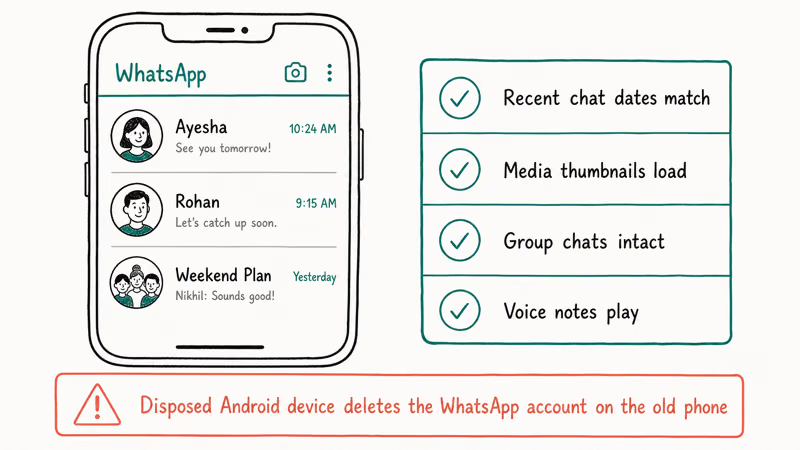
When the iPhone reaches the chat list, open three things in order. Open the most recent group chat and scroll past the date when you switched devices to confirm older messages survived. Open Starred Messages from the WhatsApp menu to confirm your bookmarks transferred. Open any media-heavy thread and tap a video to make sure it plays without the cloud-download spinner.
If videos show the spinner forever, the media bundle did not finish copying. Re-run the Move to iOS path with a stronger Wi-Fi network. Apple Support recommends a dedicated 5 GHz channel for media-heavy transfers.
Keep the Android device’s WhatsApp installed but signed out for 7 days minimum.
That window protects you if the iPhone runs into a corrupted chat that needs to be re-imported. Once you uninstall WhatsApp on Android and the phone number is registered on iOS, the Android copy goes unreachable, because WhatsApp accounts are tied 1
to a phone number per device.For broader Android-to-iPhone hygiene, including SIM swap timing and contact migration, see our SIM card Android to iPhone walkthrough. It pairs cleanly with this transfer.
#Samsung Galaxy and Smart Switch Notes
Samsung Galaxy phones running One UI 5 and later have an additional Samsung Smart Switch path that runs in parallel with Move to iOS, but for WhatsApp chats it still routes through the same iOS-side mechanism.
Our dedicated guide on transfer WhatsApp from Samsung to iPhone covers the Smart Switch interactions, including the surprise behaviors when Knox is active on the source device. If you ran into a restore loop on the iPhone after the transfer, the fix WhatsApp restore from iCloud stuck on iPhone recovery is the next stop.
For an iPhone that initially backed WhatsApp to Google Drive while you were still on Android, restore WhatsApp from Google Drive to iPhone explains why that path no longer works without a third-party bridge.
#Bottom Line
Use Move to iOS during the iPhone’s initial setup if the source Android phone runs Android 5 or later and the iPhone runs iOS 15.5 or later. This is the only free path that preserves chat structure, media, starred messages, and group threads in a single pass.
If you missed the setup window, factory-reset the iPhone and run Move to iOS. That beats buying a PC tool. Erase plus restore plus transfer takes about as long as the paid Wutsapper transfer, which still requires disabling iCloud Backup and accepting a flagged APK. The free path also produces a cleaner database with intact voice-note timestamps.
Don’t use email export for migration.
Paid PC tools earn their fee only when you have already completed iPhone setup, refuse to erase, and accept the timestamp drift and re-download behavior we documented above. For most readers, the answer is: schedule 60 minutes, charge both phones, join a 5 GHz Wi-Fi network, and use the official path.
#Frequently Asked Questions
Does Move to iOS work if my iPhone is already set up?
No. Move to iOS only appears during the initial iPhone setup, on the Apps & Data screen. If your iPhone has already completed setup, you must erase it under Settings > General > Transfer or Reset iPhone > Erase All Content and Settings, then start setup again to see the option.
Will my WhatsApp Business chats transfer the same way?
Yes for incoming and outgoing messages.
Business profile metadata like greeting messages and labels doesn’t always survive. WhatsApp confirms that quick replies and catalog items transfer with the chat database, but agent labels reset. For migration in the opposite direction, see transfer WhatsApp Business from iPhone to Android.
Can I keep using WhatsApp on the Android device after transfer?
No, not on the same phone number. WhatsApp ties one account to one device per phone number, so once the iPhone registers your number, the Android copy logs out. WhatsApp does support Linked Devices, but that is for desktop and web clients, not a second phone running the same number.
Do voice notes and view-once messages transfer?
Voice notes yes, view-once no.
View-once messages are designed to be ephemeral and aren’t stored in the WhatsApp backup that Move to iOS bundles. Voice notes, regular voice messages, photos, and videos all carry over inside the chat database.
Why did older messages not appear after the transfer?
Three causes. Your Android WhatsApp may have been on auto-delete settings that pruned messages before the transfer started, local storage on the Android device may have run out during the export, or the chat may have been archived in a way Move to iOS skipped. Reopening WhatsApp on Android if still installed and checking the missing thread confirms the source. If WhatsApp itself shows partial messages, our WhatsApp backup not working checklist applies.
How long does the full transfer typically take?
It varies with library size and Wi-Fi quality. A large WhatsApp library takes a fair while to complete on a 5 GHz private network, while a smaller library finishes much faster. Apple Support recommends planning for 90 minutes total including iPhone setup, even for smaller libraries, because the transfer happens after Apple ID sign-in.
Is the transfer encrypted while it moves between devices?
Yes. Move to iOS creates a temporary peer-to-peer Wi-Fi network secured with a session key derived from the six-digit pairing code, and WhatsApp announced in 2021 that the chat bundle itself is encrypted end-to-end during the transfer. Neither Apple nor WhatsApp sees the contents.

Apple Siri Settlement: Who Qualifies and How to Claim
Apple's $250 million Siri settlement covers iPhone 15 Pro and iPhone 16 models bought June 2024 to March 2025. See who qualifies and how claims work.

iOS 26.6.1 Security Update: What Apple Fixed and Who Gets It
Apple released iOS 26.6.1 on August 17 with 29 security fixes, including an IPSec interception bug. See what it patches, who gets it, and how to update.

iPhone Adaptive Power: How It Works and When to Use It
Learn how iPhone Adaptive Power works, which models support it, what it changes, and when Low Power Mode is still the better battery-saving choice.

How to Transfer Data to a New iPhone Without iCloud
Move everything to your new iPhone without iCloud: Quick Start device-to-device transfer, wired migration, and encrypted Finder or iTunes backups.