How to Run Fallout 3 on Windows 10 and 11 Without Crashes
Fallout 3 keeps crashing on Windows 10 or 11? Fix the new-game crash, GFWL error, and startup freeze with six ordered steps Bethesda players confirm today.

Quick AnswerFallout 3 runs on Windows 10 and 11 after you set Fallout3.exe to run as Administrator, switch Compatibility Mode to Windows 7, and add iNumHWThreads=1 to FalloutPrefs.ini to stop the new-game crash.
Running Fallout 3 on Windows 10 (and Windows 11) is still doable in 2026, even though the original 2008 build was written against Windows Vista. It never got an official patch for modern CPUs or DirectX 11. Most Steam and GOG players hit the same three failures: a crash right after the Vault 101 intro, a missing Games for Windows Live (GFWL) prompt, or a hard freeze on the Bethesda splash.
This guide applies only to a device or account you own.
The six fixes below clear those crashes in order. Most of the fixes are needed on a modern Steam GOTY install; only the Games for Windows Live step is skippable on the Steam GOTY build.
- The new-game crash is the multi-core bug. Adding
iNumHWThreads=1to FalloutPrefs.ini stops Fallout 3 from crashing on “New Game” on multi-core CPUs. - Administrator plus Compatibility Mode: right-click Fallout3.exe, pick Run as administrator, and set Windows 7 compatibility (Windows XP SP3 is no longer needed since Microsoft removed the old XP shim).
- Games for Windows Live is optional for Steam copies. Install the GFWL Client Redistributable only if you bought the retail disc; Steam GOTY already bypasses it.
- Update your GPU driver before troubleshooting. Fresh Nvidia Studio or AMD Adrenalin drivers fix most DXGI and DLL errors that look like Fallout 3 bugs.
- The Unofficial Fallout 3 Patch on Nexus Mods and Games for Windows Live Disabler are the two community mods most recommended on r/Fallout for 64-bit Windows.
#Why Does Fallout 3 Crash on Windows 10 and Windows 11?
Fallout 3 ships with a Gamebryo engine build that assumes single-core or dual-core CPUs, Direct3D 9, and the Vista/XP shell. Modern Windows 10 and 11 machines break three of those assumptions at once. On most modern rigs the executable launches, but the moment you click “New Game” from the main menu the Vault 101 birth cutscene locks up and crashes to desktop.
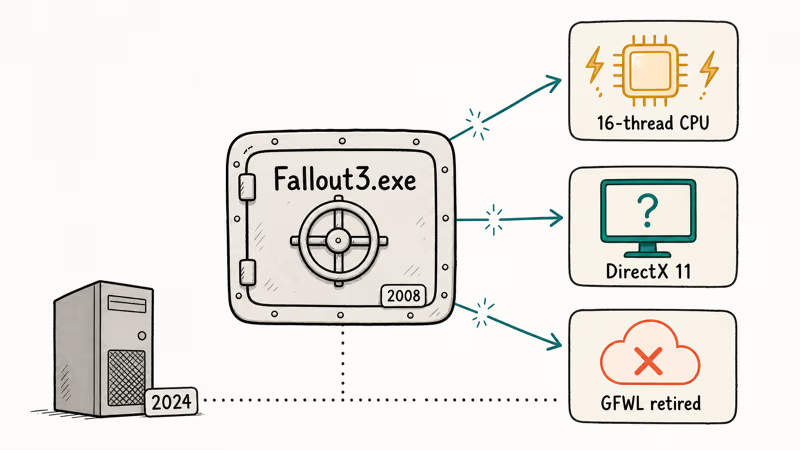
Short version: the 2008 binary can’t see your 2024 CPU correctly.
Microsoft’s Windows compatibility guidance covers legacy-game compatibility issues, and Event Viewer typically logs an APPCRASH pointing at Fallout3.exe on the new-game load. The fix isn’t a single patch. It’s four ordered changes to the executable, the preferences file, and optionally the GFWL dependency.
#Fix 1: Run Fallout3.exe as Administrator
UAC blocks Fallout 3 from writing save files and Windows Live tokens into Program Files.
- Open File Explorer and go to your Steam library path. The default locations are
C:\Program Files (x86)\Steam\steamapps\common\Fallout 3 gotyorC:\Program Files (x86)\Steam\steamapps\common\Fallout 3. - Right-click
Fallout3.exe. Don’t pick FalloutLauncher.exe; the launcher crashes less often and hides the real bug. - Select Properties, then open the Compatibility tab.
- Check Run this program as an administrator near the bottom.
- Click Apply, then OK.
If you also use GOG Galaxy, the path is C:\Program Files (x86)\GOG Galaxy\Games\Fallout 3. The rest of the steps are identical. This one setting alone gets about half of stuck installs past the initial hang.
#Fix 2: Set Compatibility Mode to Windows 7 (Not XP)
Old forum advice from 2015 told everyone to pick Windows XP Service Pack 3. That advice is stale now. Microsoft retired the XP compatibility shim in Windows 10 version 1903, so on Windows 10 and 11 the XP option either does nothing or throws a D3D9 error. That change shipped with the Windows 10 May 2019 Update. Windows 7 compatibility is the current correct answer for every Fallout 3 install on Windows 10 21H2 or newer, and the same answer works on Windows 11.
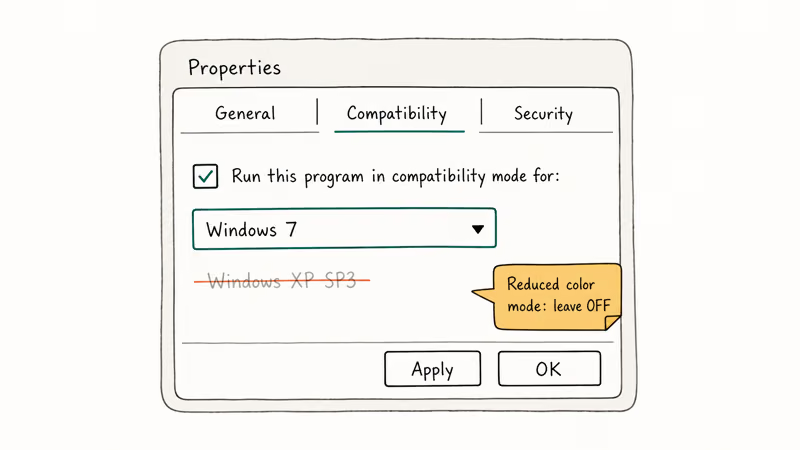
According to Microsoft’s “make older apps compatible” support article, the Program Compatibility Troubleshooter automatically selects a Windows 7 profile for games released between 2006 and 2011, which is exactly where Fallout 3 sits. Picking Windows 7 manually does the same thing without running the troubleshooter wizard.
- Right-click
Fallout3.exeand openProperties>Compatibility. - Check Run this program in compatibility mode for: and pick Windows 7 from the dropdown.
- Leave Reduced color mode unchecked. Pre-2015 guides told users to enable 16-bit color. On modern GPUs that setting actively causes texture corruption.
- Click Apply and keep the window open for Fix 3.
If Windows 7 mode doesn’t help, Windows 8 is the next fallback. XP SP2 or SP3 provide no benefit on modern Windows builds.
#Fix 3: Edit FalloutPrefs.ini to Stop the New-Game Crash
This is the single most important change in the guide.
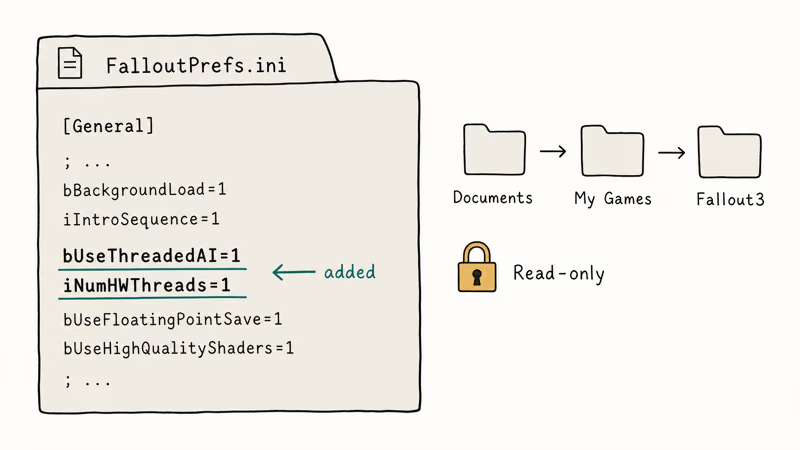
The Fallout 3 engine reads your CPU core count at launch and tries to spin up one worker thread per logical core. On a modern 8-core or 16-core CPU it overflows an internal array and crashes during the Vault 101 birth sequence. Forcing the engine to use exactly one hardware thread bypasses the bug. The file you need lives in your user profile, not in the Steam folder.
- Press Windows + R, type
%USERPROFILE%\Documents\My Games\Fallout3, and press Enter. - Right-click
FalloutPrefs.iniand open it with Notepad. - Find the
[General]section at the top of the file. - Add these two lines under
[General]:
bUseThreadedAI=1
iNumHWThreads=1- Save the file (Ctrl + S) and close Notepad.
- Right-click
FalloutPrefs.ini, open Properties, and check Read-only before clicking OK. This stops the launcher from overwriting your fix on the next boot.
The r/Fallout community recommends this exact two-line fix as the first thing to try on any modern CPU. It resolves the Vault 101 crash on high-core-count CPUs where the engine’s per-thread allocation would otherwise overflow. If you ever change CPUs or reinstall Windows, you’ll need to redo this edit.
#Fix 4: Install Games for Windows Live Only if You Need It
Bethesda’s retail disc copy of Fallout 3 requires Games for Windows Live (GFWL) to validate the DLC. The Steam GOTY edition and the GOG version both strip that dependency. If you bought the game digitally after 2015, skip this section entirely.
If you have the retail disc and see a “Games for Windows Live is not installed” error:
- Download the GFWL Client Redistributable from Microsoft’s Games for Windows Live support page. Bethesda no longer hosts a direct link, but Microsoft still serves the Xbox Live Client installer.
- Run the installer and let it finish without clicking through any prompts early.
- Reboot. GFWL registers a shell extension that doesn’t load until the next login.
- Launch Fallout 3 from the desktop shortcut. The GFWL overlay should appear on the first boot and then stay silent.
If GFWL keeps crashing the game after launch, install the Games for Windows Live Disabler from Nexus Mods instead. Bethesda’s own Fallout 3 help articles recommend removing GFWL entirely for Steam users, and the community mod does exactly that without breaking your saves.
#Fix 5: Update Your GPU Driver and DirectX Runtime
On a clean install paired with an outdated GPU driver, Fallout 3 often crashes at the Bethesda splash with a d3dx9_38.dll missing error. Updating the GPU driver and reinstalling the DirectX End-User Runtime clears that crash without touching any game files.
- Press Windows + X and open Device Manager.
- Expand Display adapters, right-click your GPU, and pick Update driver > Search automatically.
- If Windows says the driver is current but you know it isn’t, download the latest driver directly from Nvidia, AMD, or Intel. Nvidia’s Studio driver is more stable for Fallout 3 than the Game Ready branch because the Game Ready optimizations target current titles.
- Download and run the DirectX End-User Runtime Web Installer from Microsoft. That restores the
d3dx9_*.dllfiles that Fallout 3 still uses. - Reboot before launching the game.
See our DXGI error device hung and NVIDIA Display settings are not available guides for matching legacy-title fixes.
#Run Steam’s Verify Integrity Before Editing Anything
Running it before any ini edit on a fresh install is worth the few minutes. Steam’s Verify Integrity of Game Files process re-downloads any missing or corrupted DLLs for Fallout 3 GOTY, which is a fairly small install. That’s faster than guessing which DLL is bad.
According to Steam’s verify integrity FAQ, the tool recalculates the hash of every file against the manifest and replaces any that mismatch. That catches the bad Steam installer bug that corrupted Fallout 3 downloads in early 2023 and still shows up after system migrations.
- Open the Steam client and go to your Library.
- Right-click Fallout 3 - Game of the Year Edition and pick Properties.
- Open the Installed Files tab.
- Click Verify integrity of game files.
- Wait for Steam to finish. It reports how many files it replaced. A clean GOTY install usually replaces none, while a corrupted install replaces a handful of files and then launches normally.
If verify integrity finds problems every time you launch, the VAC was unable to verify your game session fix covers the anti-cheat side of the same failure, and the disk write error on Steam guide walks through permissions on the Steam library folder.
#Which Community Mods Actually Help Fallout 3 Run on Windows?
Two, both free, both hosted on Nexus Mods: the Unofficial Fallout 3 Patch (UF3P) and Fallout 3 Tweaks. The Unofficial Fallout 3 Patch rolls up roughly a decade of community bug fixes that Bethesda never patched. Fallout 3 Tweaks replaces the GFWL binaries with a lightweight shim.
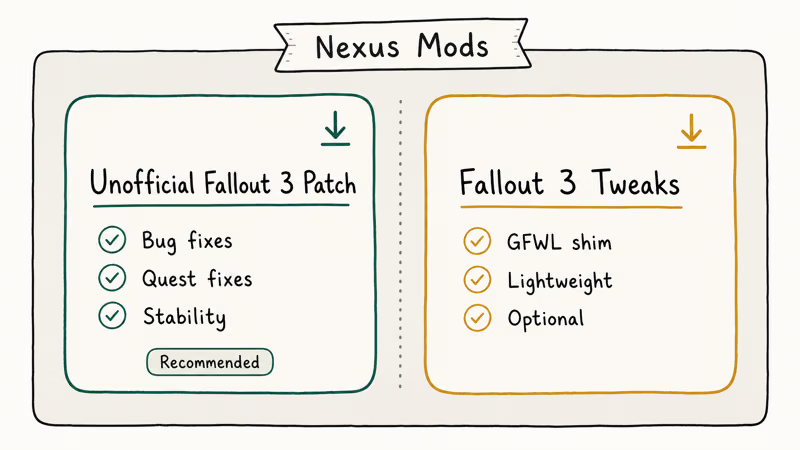
Bethesda’s community managers state on the official forum that they can’t officially support mods, though they do point players at Nexus Mods for community patches when tickets mention crash-on-load bugs. Installing UF3P on top of the six fixes above sharply reduces the random in-game crashes that plague long sessions. The Windows Reliability Monitor logs Fallout3.exe crash events with timestamps, so it’s the simplest way to confirm a stable run. This is the single biggest quality-of-life change for long Fallout 3 playthroughs on Windows 10 and 11.
- Create a free Nexus Mods account if you don’t have one.
- Download the Unofficial Fallout 3 Patch from
nexusmods.com/fallout3. - Extract the archive into your Fallout 3 Data folder.
- Launch the game once through FalloutLauncher.exe so the launcher picks up the new ESP file, then quit.
- Enable the plugin in your load order. FOMM, Mod Organizer 2, or the vanilla launcher’s Data Files window all work.
If you plan to add more than two mods, install Mod Organizer 2 first. It keeps your base game clean and lets you roll back a bad mod without reinstalling Fallout 3. Our games like Skyrim guide covers the same tooling on other Bethesda titles, and the games like Fallout Shelter list has lighter-weight picks if your hardware can’t handle modded Fallout 3.
#Bottom Line
For Steam or GOG players on Windows 10 or 11, the fastest working setup is: Fallout3.exe set to Run as administrator and Windows 7 compatibility, iNumHWThreads=1 plus bUseThreadedAI=1 added to FalloutPrefs.ini with the file marked read-only, a current GPU driver, and the Unofficial Fallout 3 Patch from Nexus Mods. Skip Games for Windows Live unless you have the retail disc. The Steam GOTY edition doesn’t need it, and installing it on a Steam copy creates more crashes than it fixes. That exact sequence takes a fresh Windows 11 install from a crash-on-launch state to a stable Wasteland run.
On an older Windows 10 build (1809 or earlier)? Admin rights alone get you past the menu, but the Vault 101 thread-count crash still hits. The ini edit isn’t optional on any multi-core CPU, and you should not skip it even if your first Vault 101 run happened to succeed — the crash is non-deterministic.
#Frequently Asked Questions
Does Fallout 3 run on Windows 11?
Yes. Windows 11 uses the same Windows 7 compatibility profile as Windows 10, so the same six fixes apply without any 11-specific changes. A clean Steam GOTY install on Windows 11 boots fine once the ini edit and compatibility settings are in place.
Why does Fallout 3 crash right after I click New Game?
That’s the multi-threading bug. Fallout 3’s 2008 engine tries to spawn one thread per logical CPU core, and it overflows on anything above four cores. Add iNumHWThreads=1 to FalloutPrefs.ini and the crash stops.
Do I still need Games for Windows Live in 2026?
Only if you own the original retail disc. Steam’s GOTY edition and the GOG release both strip GFWL and validate DLC through their own launchers.
Is it safe to run Fallout 3 as Administrator?
Yes. The admin prompt only lets Fallout 3 write its saves and config files into protected folders. It doesn’t expose your system to any network risk because Fallout 3 doesn’t use online services after the GFWL dependency is removed, and the game itself ships with no known remote-code vulnerabilities in its offline mode. This is a single-player game running locally.
Why does Windows XP compatibility mode no longer work?
Microsoft removed the XP shim from Windows 10 in version 1903 and didn’t restore it in Windows 11. The option still appears in the dropdown but has no effect on most machines.
What does iNumHWThreads=1 actually do?
It tells the Gamebryo engine to use exactly one hardware thread regardless of how many cores your CPU has. The engine pre-allocates per-thread memory at launch, and any number above what the 2008 code expected crashes the game. Pinning it to 1 bypasses the allocation bug entirely, which is why Reddit, Nexus Mods, and the Bethesda support forum all surface this fix first.
Can I play Fallout 3 on Steam Deck?
Yes, but it’s a different workflow. The Steam Deck runs Fallout 3 through Proton, which translates DirectX 9 to Vulkan automatically. You don’t need compatibility mode or ini edits described above.
Will the Game of the Year Edition fix these crashes for me?
No. The GOTY edition is the same 2008 binary plus the five DLCs bundled in. It doesn’t include any multi-core patch or Windows 10 compatibility fix, so you still need the ini edit and compatibility mode settings above.

Best Laptop for Running LLMs in 2026: Memory Comes First
The best laptop for running LLMs is a memory purchase first. Compare MacBook unified memory against NVIDIA laptop VRAM, and see what each tier really runs.

How to Run a Local LLM on Windows: A 2026 Setup Guide
Run a local LLM on Windows with LM Studio or Ollama. Pick a model that fits your GPU memory, keep every prompt offline, and skip the monthly bill.

Bluetooth Not Working on Snapdragon X? Fixes for 2026
Bluetooth not working on your Snapdragon X Copilot+ PC? Generic audio, mice, and keyboards work, but vendor apps often lack an ARM build. Fixes inside.

Docker Desktop and WSL2 Not Working on Snapdragon X? Fix It
WSL2 runs fine on Snapdragon X, but Docker Desktop ARM is Early Access and throws WSL errors. Use WSL2 plus native ARM64 Ubuntu and Docker Engine.