WhatsApp Not Backing Up to Google Drive: Full 2026 Fix
WhatsApp not backing up to Google Drive? Check the account, permissions, and Drive limits, then delete the old backup and retry on stable Wi-Fi.
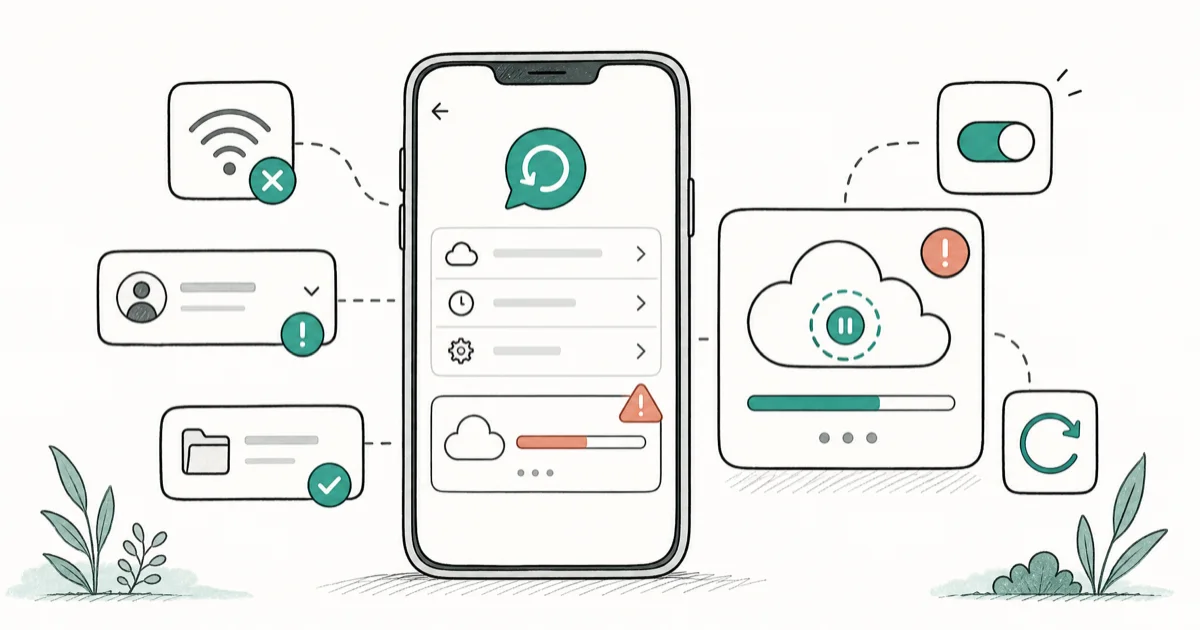
Quick AnswerWhatsApp backup to Google Drive usually stalls because of weak Wi-Fi, the wrong Google account, or missing storage permissions. Confirm the selected account, grant permission, and use stable Wi-Fi before deleting the old backup.
WhatsApp not backing up to Google Drive almost always comes down to the wrong Google account, missing permissions, or a flaky connection. A backup that hangs at 0% or stalls at 99% feels like a phone fault, but it’s usually an account or storage problem. Start with the selected account, app permissions, and network stability before deleting any backup.
- WhatsApp Drive backup is Android-only. iPhone backups go to iCloud instead.
- The top cause is a backup saved under a different Google account than the one you check.
- Storage permission must be granted, or the backup silently fails with no error.
- A backup stuck at 99% is usually finishing media upload, not frozen.
- Deleting the old Drive backup and making a fresh one fixes most half-finished backups.
#Why Is WhatsApp Not Backing Up to Google Drive?
Most failed backups trace to one of four things. The Google account you picked doesn’t match the one you check, the app lost its storage permission, your Wi-Fi dropped mid-upload, or your Google account is out of free space. A fifth, rarer cause is a corrupted backup file that must be deleted before a new one starts.
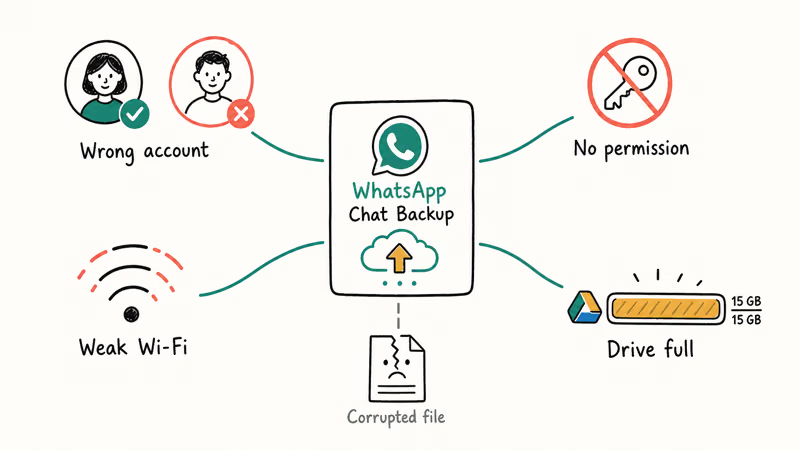
The order matters. Account and permission problems are silent, while connection and storage problems show a stalled progress bar.
According to WhatsApp’s official backup help, Drive backup needs 3 things: a Google account, Google Play services, and free space on both your phone and Drive. Miss any one and the backup won’t finish. Start there.
#Pick the Right Google Account
This trap catches most people. Many Android phones have two or three Google accounts signed in, and WhatsApp backs up to whichever one was selected. Check the wrong account and the backup looks missing when it’s sitting safely under another email. It’s the single most overlooked cause.
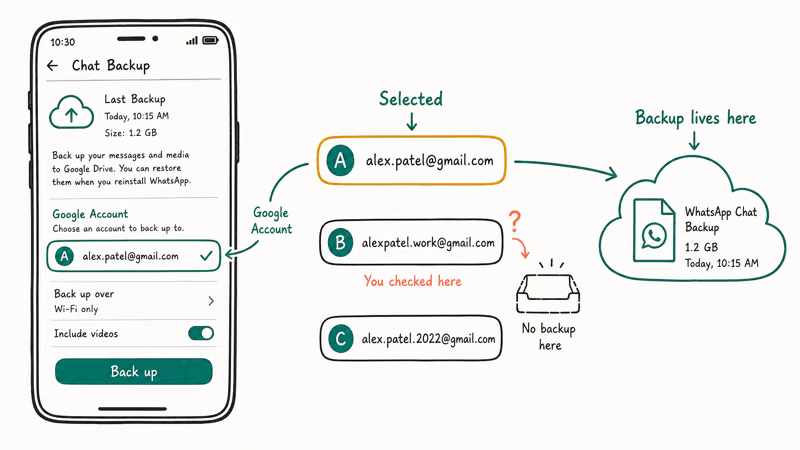
Open WhatsApp, tap the three-dot menu, then Settings, Chats, Chat backup. Look at the “Google Account” line and confirm it shows the email you want. Re-select the right account, then tap “Back up” to start a fresh upload. If you switch accounts, the earlier backup stays under the old account, so pick one and stick with it.
Moving between phones or platforms? Transfer WhatsApp to iPhone covers the cross-platform path, since Drive backups don’t carry over to iOS.
#Fix Permissions and Background Data
WhatsApp needs storage access and the ability to run in the background. If you denied a prompt or a battery saver killed the app, the backup quietly stops.
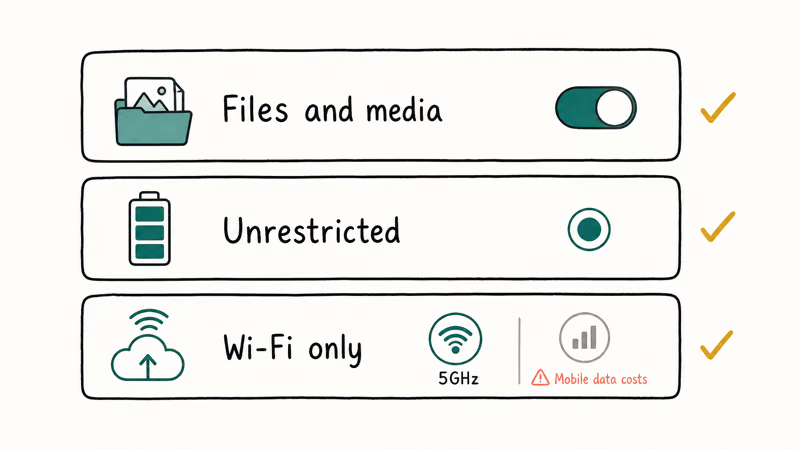
Go to Settings, Apps, WhatsApp, Permissions. Make sure “Files and media” is allowed. On Android 13 and newer, also allow photos and videos so media gets included. Then open Battery in the same screen and set WhatsApp to Unrestricted so the system doesn’t pause it mid-upload.
Mobile data trips people up too. By default, WhatsApp only backs up over Wi-Fi. You can switch to cellular in “Back up using,” but a full media backup can use a lot of data. For reliability, keep large media backups on stable Wi-Fi instead of cellular.
If contacts are your only concern, backup WhatsApp contacts covers that lighter export.
#Clear the Old Backup and Restart
When the account and permissions are right but the backup still hangs, the existing Drive file is often the cause. A half-finished file blocks a new one, so deleting it forces a clean start.
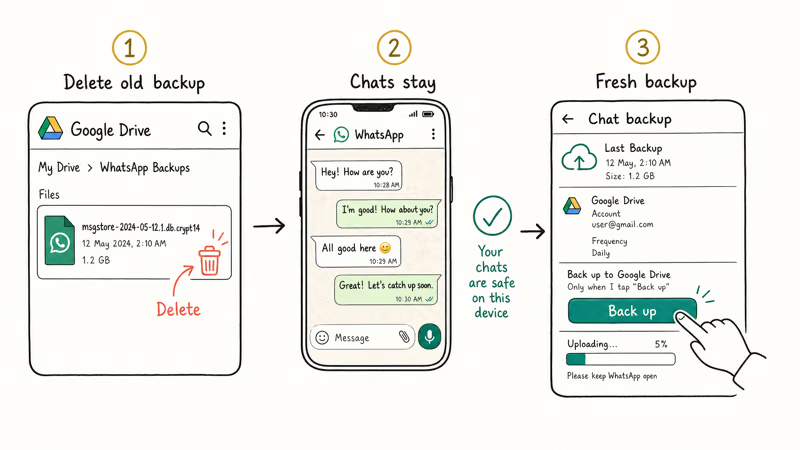
Open Google Drive, tap the gear or your profile, find Backups, locate the WhatsApp entry, and delete it. This won’t delete your chats on the phone. It only removes the cloud copy, which WhatsApp rebuilds. Return to WhatsApp, open Chat backup, and tap “Back up.”
Still stalling? Fully close WhatsApp, restart your phone, reconnect to Wi-Fi, and try once more. A reboot clears the stuck Google Play services session that freezes a backup at the same percentage. Samsung owners can also check WhatsApp on Samsung, since One UI handles background limits differently.
#When Does Google Storage Block the Backup?
A WhatsApp Drive backup doesn’t count against your free storage in most regions, but the media inside it sometimes does, and a Drive that’s already full will simply reject the write. If your account is sitting near its 15GB free limit, that alone is enough to stop a backup cold before it ever finishes, even when your account and permissions are perfectly configured and your Wi-Fi is rock solid the whole time.
Google’s Drive storage documentation states that files and app data share the same 15GB quota across Drive, Gmail, and Photos, so a stuffed inbox or big photo library can starve a backup. Check your storage at one.google.com/storage. If you’re over, clear large Gmail attachments, empty the Drive trash, or remove old backups, then retry.
According to Google’s storage management guidance, accounts past the limit lose the ability to add new files until space is freed, which is exactly why a backup refuses to run. Make room first, then try again.
#Backup Works but Restore Fails
A backup that completes but won’t restore on a new phone is a different problem. It almost always comes down to an account or number mismatch. The destination phone must be signed in to the exact Google account holding the backup, with the same WhatsApp phone number.
A restore can also fail when the Google account matches but the WhatsApp phone number differs; WhatsApp may not offer that backup during setup. Fix the account and number on the new phone before trying again. If the restore itself hangs on the destination, WhatsApp restore stuck walks through clearing it, and the iPhone privacy checklist helps you lock the new device down once your chats are back.
#Bottom Line
Start with the account check. It fixes more cases than any other step. Confirm WhatsApp is using the Google account that actually holds the backup, grant storage permission, and run the backup on stable Wi-Fi. Account confusion and missing permissions cause most failures, and both are silent.
If it still stalls, delete the old Drive file and create a fresh one. Free up Google storage only if you’re near the quota.
#Frequently Asked Questions
Why is my WhatsApp backup stuck on Google Drive?
A stuck backup usually means the upload lost Wi-Fi, the wrong Google account is selected, or storage permission is missing. A backup frozen at 99% is often still uploading media in the background. Leave it on a stable connection for a few minutes before assuming it failed.
Where does WhatsApp store its Google Drive backup?
It lives in the hidden app-data area of the Google account you selected, not in your visible “My Drive” files. You’ll find it under Drive Settings, then Backups, where it shows as a backup entry rather than a file you can open.
Does Google storage being full stop the backup?
Yes. If your Drive is full the backup can fail to write, especially the media inside it. The backup file itself usually doesn’t count against your 15GB quota, but a full account still blocks new data from being saved. Clearing large Gmail attachments, emptying the Drive trash, or deleting old backups frees enough room to retry, and the backup should resume on its own once there’s space.
Why does the backup work but the restore fails?
Restore failures are almost always an account mismatch on the new phone. The destination device must be signed in to the exact Google account that holds the backup, with the same WhatsApp number. If either differs, WhatsApp can’t find the file.
Should I delete the old backup before retrying?
Delete it only when the backup keeps stalling at the same point, since a corrupted file can block a new one. Deleting the Drive copy never touches your on-device chats.
Do I need Wi-Fi for WhatsApp Drive backup?
By default yes. WhatsApp only backs up over Wi-Fi to avoid eating mobile data, though you can switch to cellular inside the Chat backup screen if you need to. Just remember a full media backup can use a lot of data, so staying on Wi-Fi is safer unless you have an unlimited plan, and a stable network is less likely to stall than a crowded one.

Is This Bank App Real? Spot a Fake App on Your Home Screen
A bank app can land on your home screen from a web page with no install warning. Learn the checks that tell a real banking app from a phishing web app.

Apps Crashing After iOS 27 Update? Fix Order (2026)
Apps crashing after the iOS 27 update? Update the app in the App Store first, then offload and reinstall to clear stale cache, then restart. The fix order.

Do AI Translation Earbuds Work Offline? What to Know
Do AI translation earbuds work offline? A few do with downloaded language packs, but most need the cloud. Here's what works offline and what you give up.
How to Set Up Translation Earbuds (Pairing and Modes)
How to set up translation earbuds: charge, install the app, pair over Bluetooth, pick two languages, and choose a mode. A step-by-step first-use guide.