TikTok Keeps Crashing? 9 Fixes for iPhone & Android
TikTok keeps crashing or closing on launch? Restart, check the server, clear the cache, and update Android WebView. 9 proven fixes for iPhone and Android.
Quick AnswerTikTok keeps crashing usually because of a corrupt cache, an outdated app, low storage, or a server outage. Restart your phone, check the server, update the app, and clear the cache.
TikTok keeps crashing for most people because of a corrupt cache, an outdated app, low storage, or a server problem, not a broken phone. The app might close the second you open it, freeze mid-scroll, or kick you out right after an update. Work through the fixes below in order and you’ll usually have it stable again in a few minutes.
- Restart your phone first, since a quick reboot clears the temporary glitches behind most one-off crashes in under a minute.
- Check whether TikTok is down on Downdetector before troubleshooting, because an outage affects everyone and no local fix will help.
- On Android you can clear the TikTok cache in Settings, but iPhone has no cache option, so you offload and reinstall instead.
- An outdated Android System WebView is a frequently-missed cause, because TikTok leans on it to render content and a stale version crashes the app.
- Keep at least 1 to 2GB of free storage, since a nearly-full phone starves the app and forces it to close.
#Why Does TikTok Keep Crashing?
A crashing TikTok app comes down to a handful of causes: a corrupt cache, an outdated app build, low storage, a server outage, an old operating system, or an outdated Android System WebView. The fastest route to a fix is to rule each one out in order rather than reinstalling at random, because the wrong fix wastes time and the right one is usually near the top of the list.
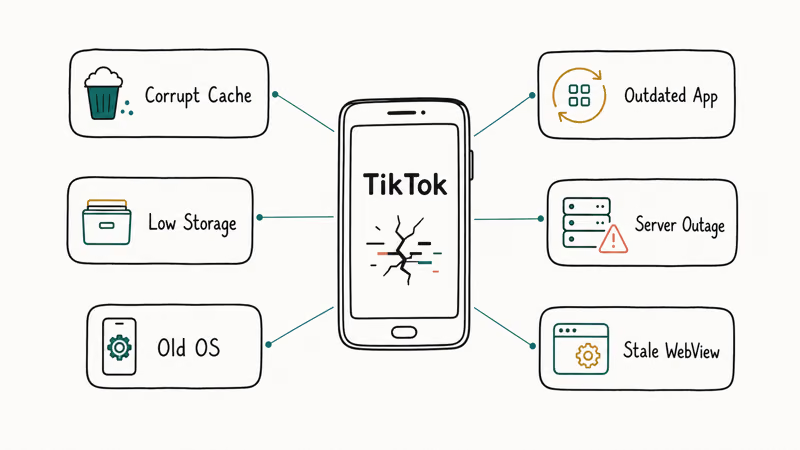
Notice the pattern of the crash. If TikTok closes the instant you open it, that points to a corrupt cache or a bad app build. If it crashes only mid-scroll, that leans toward low memory or storage.
That pattern is why cache clearing sits high on this list. A corrupt cache can cause launch crashes without pointing to a wider phone problem, so clear it before you delete the app or chase unrelated settings.
#Restart and Check TikTok’s Server Status
Restart your phone before anything else. A reboot clears the temporary memory and process states behind most random crashes, and on Android a force-restart (hold power and volume-down) handles a frozen app that won’t even close normally. It takes under a minute and fixes more than people expect.
Then check whether the problem is even yours. If TikTok crashes for everyone, it’s a server outage, and nothing on your phone will change that.
Open Downdetector or search “is TikTok down” to confirm. According to TikTok’s app troubleshooting help, checking for a known outage comes before any device-level fix, and during a confirmed outage the only move is to wait it out, usually under an hour. If TikTok loads but misbehaves rather than crashing, our guide on why TikTok is not working covers that wider set of symptoms.
#Update the App and Your Operating System
An outdated app is one of the top crash causes. Open the App Store on iPhone or the Play Store on Android, search TikTok, and tap Update if a button appears rather than trusting auto-update to have run. New TikTok builds fix the very crashes older versions trigger.
Update your operating system too. A months-old version of iOS or Android can fall out of sync with TikTok’s current build, and the mismatch shows up as crashes. Go to Settings > General > Software Update on iPhone or Settings > System > System update on Android.
Restart once more after both updates finish. Installing an update and then relaunching from a clean state clears any leftover glitch from the old version, which matters more than it sounds.
#Clear the Cache or Reinstall TikTok
A bloated or corrupt cache is the single most common crash cause. Clearing it’s the highest-value Android fix you can run.
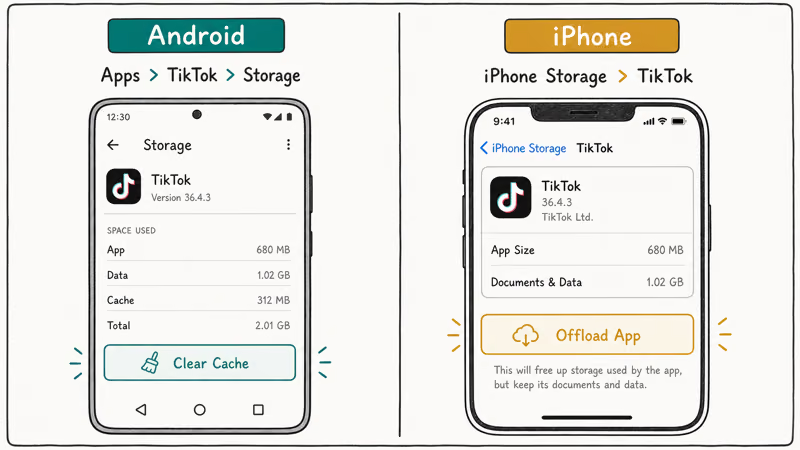
Go to Settings > Apps > TikTok > Storage and tap Clear Cache. This wipes only temporary files, not your account or drafts, so it’s safe to repeat as often as you like whenever the app starts misbehaving again.
iPhone works differently. iOS gives you no per-app cache button, so the equivalent is to offload the app. Apple’s guide to check and manage iPhone storage confirms that offloading frees the app’s storage while keeping its data, so go to Settings > General > iPhone Storage > TikTok > Offload App, then reinstall it.
If offloading doesn’t help, delete and reinstall TikTok outright. A reinstall replaces every app file with a fresh copy. Back up any drafts first, since they live in the app.
#Why Does TikTok Crash Only on Android?
If TikTok crashes on your Android phone but works fine for your iPhone friends, the culprit is usually Android System WebView. TikTok relies on this Google component to render in-app content, and when WebView falls out of date the app can crash even when everything else is current.
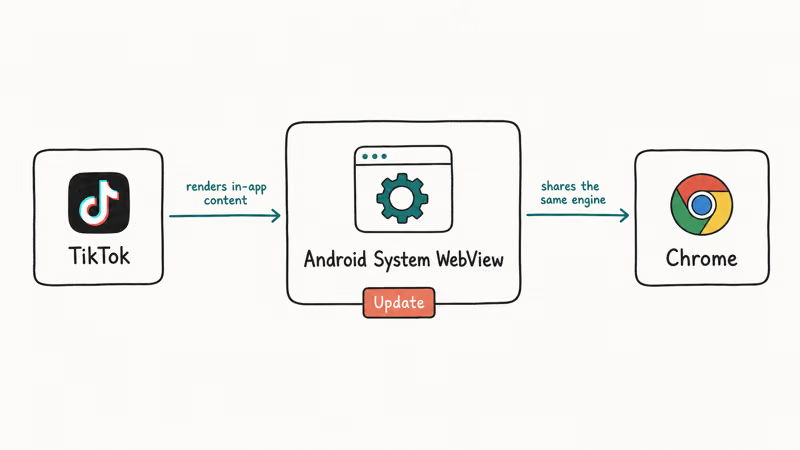
Google’s Android System WebView listing confirms that WebView is a Google component, so update it from the Play Store. Tap Update if a button shows, then also update Google Chrome, since the two share the same rendering engine on most devices.
This fix gets buried in most guides because it isn’t a TikTok setting at all. Google’s own component is doing the rendering, so a stale WebView stays invisible until you go looking for it in the Play Store rather than in TikTok. After updating both WebView and Chrome, restart the phone and relaunch TikTok, and the launch crashes that survived every other step will often stop for good.
#Free Up Storage and Check Your Connection
Low storage starves TikTok of working room and forces crashes, especially on long scrolling sessions. Check your free space under Settings > General > iPhone Storage or Settings > Storage on Android. Clear out old videos, photos, or unused apps until you have at least 1 to 2GB free, then relaunch the app and see whether the mid-scroll crashes stop happening.
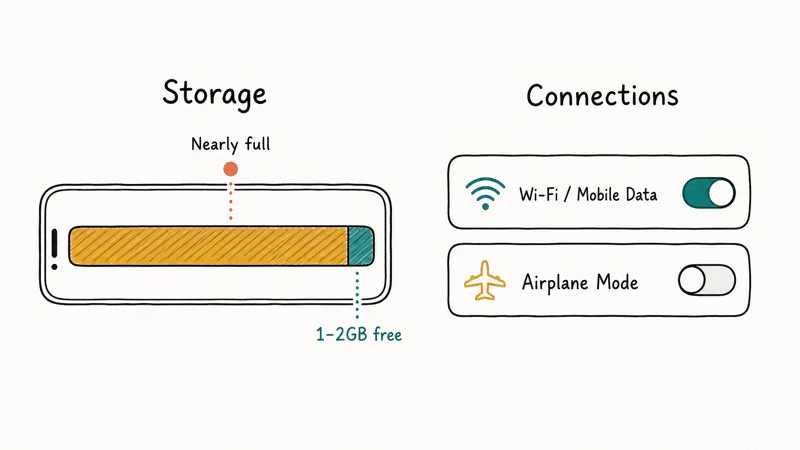
Your connection matters too. TikTok streams constantly, so a weak or dropping Wi-Fi signal can make the app hang and then close. Switch between Wi-Fi and mobile data to see if one is stable, and toggle airplane mode for 10 seconds to force a fresh connection.
Need TikTok working right now while you sort out the app? The site loads in any browser at tiktok.com, so you can keep watching or posting until the app is stable again.
For related app problems, our guides on Snapchat keeps crashing and YouTube not working use the same restart-cache-update playbook.
If your feed is the issue rather than crashes, see TikTok FYP not refreshing, and for streaming problems try TikTok Live not working.
#Bottom Line
Start with a restart and a server check, because a quick reboot clears most one-off crashes and an outage is something only TikTok can fix. If it keeps closing, update the app and your OS, then clear the cache on Android or offload and reinstall on iPhone.
On Android, the overlooked fix is updating Android System WebView, which TikTok relies on to render content, so a stale WebView crashes the app even when everything else is current. When you just need to watch or post in the meantime, the TikTok website works in any browser.
#Frequently Asked Questions
Why does TikTok crash right when I open it?
A crash on launch almost always points to a corrupt cache or a broken app build. Clear the cache on Android, or offload and reinstall on iPhone, then restart.
Is TikTok down or is it just my phone?
Check Downdetector or search “is TikTok down” to see if others are reporting problems. If reports are spiking, it’s a server outage and no local fix will help.
How do I clear the TikTok cache on iPhone?
iOS doesn’t have a per-app cache-clearing button. Instead, go to Settings > General > iPhone Storage > TikTok and tap Offload App, then reinstall it. Offloading clears the cache while keeping your documents and data, and a full delete-and-reinstall is the stronger version of the same fix.
Does updating Android System WebView really fix crashes?
Yes, on Android it’s one of the most reliable fixes. TikTok uses WebView to render in-app content, so an outdated version crashes the app. Update WebView and Chrome from the Play Store, then restart.
Will reinstalling TikTok delete my drafts?
It can. TikTok drafts are stored locally in the app rather than on TikTok’s servers, so deleting the app may remove any unsaved drafts along with it. Post or save any drafts you care about before you delete the app, then reinstall it and log back in. Your published videos, account, and saved content all live on the server, so those return as soon as you sign in again.
Can I use TikTok in a browser if the app keeps crashing?
Yes. The TikTok website at tiktok.com works in any mobile or desktop browser and lets you watch, search, and post without the app. It’s a useful stopgap while you work through the app fixes.

Is This Bank App Real? Spot a Fake App on Your Home Screen
A bank app can land on your home screen from a web page with no install warning. Learn the checks that tell a real banking app from a phishing web app.

Apps Crashing After iOS 27 Update? Fix Order (2026)
Apps crashing after the iOS 27 update? Update the app in the App Store first, then offload and reinstall to clear stale cache, then restart. The fix order.

Do AI Translation Earbuds Work Offline? What to Know
Do AI translation earbuds work offline? A few do with downloaded language packs, but most need the cloud. Here's what works offline and what you give up.
How to Set Up Translation Earbuds (Pairing and Modes)
How to set up translation earbuds: charge, install the app, pair over Bluetooth, pick two languages, and choose a mode. A step-by-step first-use guide.