Spotify Premium APK Risks and Safe Alternatives (2026)
Spotify Premium APK promises free perks but carries malware, ban, and legal risks. Here is why we skip it and the legitimate Spotify plans we use instead.
Quick AnswerSpotify Premium APK files are unofficial modded installers that violate Spotify's terms, often ship with malware, and put your account at risk of a permanent ban. Stick with Spotify Free, a real Premium plan, or another official streaming app.
A Spotify Premium APK is an unofficial, modified copy of the Spotify Android app that someone repackaged to unlock paid features for free. The pitch sounds attractive: no ads, offline downloads, unlimited skips, no monthly bill. The reality is messier. These installers bypass Spotify’s licensing, frequently bundle malware, and put your account, your data, and your phone at risk all at once.
We get the question a lot from readers, so this guide explains what a Spotify Premium APK actually is, why it isn’t worth the trouble, and the legitimate options we use when we want Premium features without an ongoing bill.
- A Spotify Premium APK is a tampered version of the official Android app and is not authorized by Spotify
- Modded music APKs are a common malware delivery method on Android, with credential theft and ad fraud as the usual payloads
- Spotify can detect modified clients and has the right to suspend or terminate the account, wiping playlists tied to it
- Spotify Free, the Premium 30-day trial, the Duo plan, and the Family plan are the four legal ways to lower or skip the Premium cost
- Apple Music, YouTube Music, and Tidal all offer 30-day free trials that match most of Spotify Premium’s headline features
#What a Spotify Premium APK Actually Is
A regular APK is the install file Android uses to add an app outside the Play Store. A Spotify Premium APK is the same file type, but someone has pulled apart the official Spotify build and patched it so the app behaves as if a Premium subscription is attached, whether or not the underlying account actually has one.
These builds usually show up on file-sharing sites with names like “Spotify Mod,” “Spotify Premium Cracked,” or “Spotify++.” A few carry version numbers that match real Spotify releases. Others lag several major versions behind, which matters once you understand the security trade-off.
None of these are made by Spotify.
The official Spotify Android app is distributed through the Google Play Store and Spotify’s own download page. Anything labeled Premium APK on a third-party site is, by definition, not the official app. Treat the label the same way you’d treat a “free designer handbag” stall outside a real store.
#Why Spotify Premium APK Files Are a Bad Idea
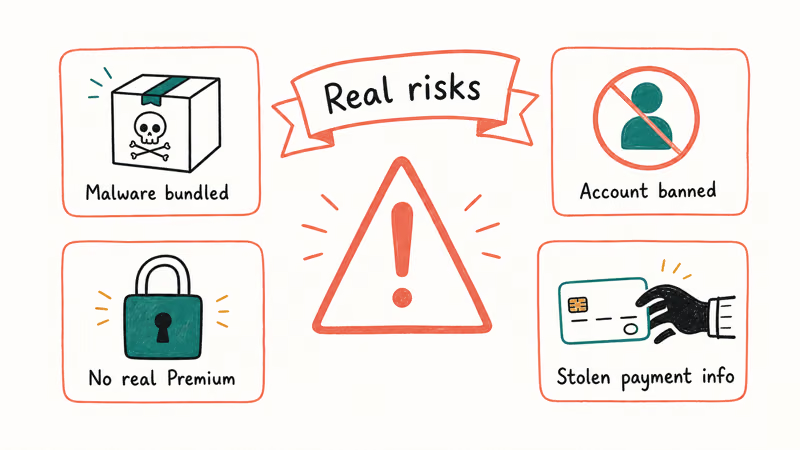
There are four overlapping problems with installing a modded Spotify build, and most users hit at least two of them.
#Malware Is the Default, Not the Exception
When a developer rebuilds an Android app to add Premium features, they have to repackage and re-sign the APK. That same process lets them insert anything else they want, and there is no review step.
Antivirus vendors have flagged music-related modded APKs as carriers of banking trojans, info-stealers, and ad-fraud SDKs for years. Google’s Play Protect documentation confirms that the service scans every app installed on the device against a database of known threats and warns users before installing apps it identifies as harmful. That is also why the most aggressive Premium APK installers ship with instructions telling you to disable Play Protect first. That instruction by itself is the warning.
Google Play Protect commonly blocks popular Spotify mod APKs at the verification step, labeling the file “potentially harmful.” Overriding that warning to install anyway is what puts your device and account at risk.
Neither should you.
#Spotify Can Detect Modded Clients
Spotify’s licensing agreements with record labels require the company to enforce platform integrity. Spotify’s Conditions of Use document states that users may not “modify, reverse-engineer, decompile or disassemble the Spotify Service,” and violations can result in suspension or termination.
In practice, modded clients send identifiable patterns back to Spotify, and accounts using them get flagged.
The result is sometimes a softer playback block. Other times the entire account is closed, taking saved music, followers, and history with it.
#iOS Sideloading Makes It Worse
On Android the install is one tap with sideloading enabled. On iPhone, every “Spotify++” tutorial relies on enterprise certificates that Apple revokes within days.
According to Apple’s App Store guidance, iPhone apps should come from the App Store, where every submission goes through an automated and human review process. The certificate revocation cycle means a sideloaded Spotify++ build is usually broken inside a week. The install flow also trains people to trust unsigned profiles, which is how phishing kits get onto phones.
#It Isn’t Free, Just Hidden Cost
The “free” in Premium APK refers to skipping the subscription. The cost shifts elsewhere: ad-fraud modules drain battery in the background, info-stealers grab the saved passwords your browser autofills, and a banned Spotify account ends years of listening data.
The Premium Individual plan costs $11.99 a month in the United States, per Spotify’s Premium plan page, which is far less than the recovery cost of a compromised phone.
A single password reset across 40 sites can take an afternoon. A drained checking account takes weeks.
#Can a Spotify Premium APK Get Your Account Banned?
Yes.
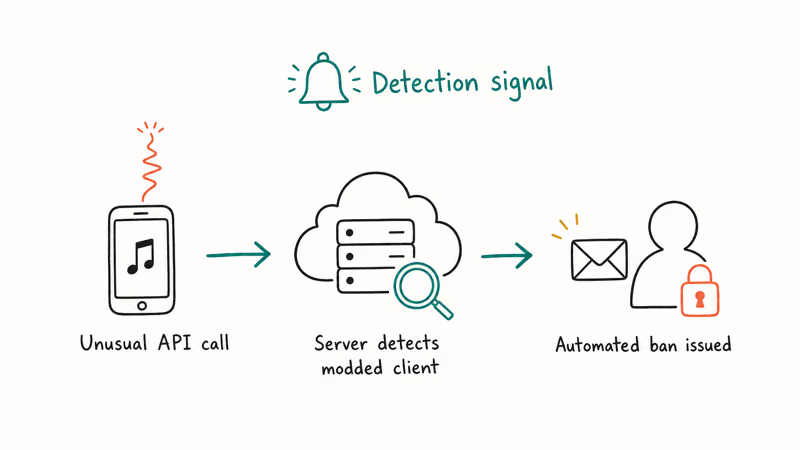
Spotify’s enforcement is uneven, but the company has the tools and the contractual obligation to act on it. Some users get away with a modded client for months. Others lose access within a single playback session.
The most common pattern is a three-step escalation.
First, a soft ban that locks playback for 24 to 48 hours. Second, a notification telling you to reinstall the official app. Third, a hard ban on a repeat offense, with no warning.
If a ban lands, the first thing Spotify support asks for is proof of identity plus a fresh screenshot of the official Spotify app installed on the same device. Anything less gets a templated denial within the hour, and you’re back to square one with no playlists and no leverage.
Spotify also closes accounts that share Premium credentials across regions or that abuse the free-trial system, so accounts already on thin ice get less leniency.
The honest answer: the risk is real, the consequences are permanent, the recovery path is narrow.
#Legitimate Ways to Get Spotify Premium Features
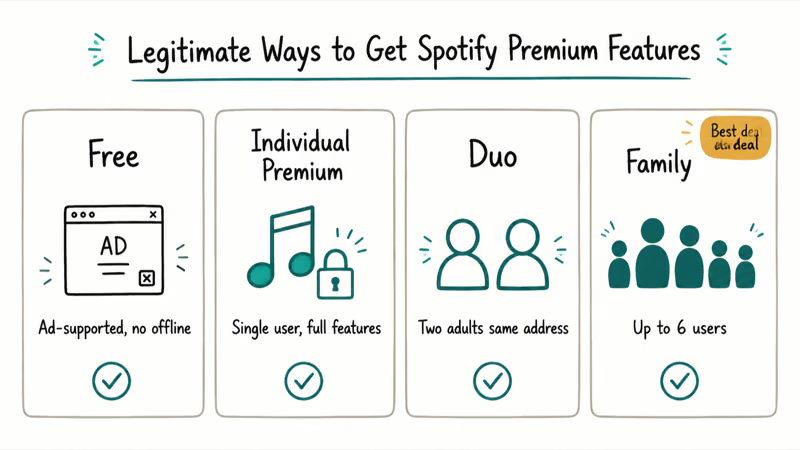
There are four official routes that get you Premium-equivalent listening without touching a modded APK. Each one is a real Spotify plan or a Spotify-sanctioned discount.
#Use the Free 30-Day Trial
According to Spotify, the trial runs 30 days for first-time subscribers, with the current terms on its Premium support pages. You enter a payment method, the trial activates instantly, and you cancel before day 30 to avoid the charge.
The trial unlocks every Premium feature: ad-free playback, on-demand selection, unlimited skips, and offline downloads on up to five devices.
Set a calendar reminder for day 28.
#Stay on Spotify Free and Trim the Friction
Spotify Free has more headroom than most people realize. You get full-catalog playback, playlist creation, and lyric support, all for nothing.
The trade-offs are ads every 15 minutes or so, no offline downloads, and shuffle-only on mobile for non-playlist albums. Spotify Free typically serves a handful of audio ads per hour, which is real friction but isn’t unlivable.
Our Spotify alternative guide has a side-by-side of free tiers across the major services if you want to compare.
#Share a Duo or Family Plan
Spotify Duo runs $16.99 a month for two people in one household, and Spotify Family covers up to six people for $19.99 a month. Per person, that works out to $8.49 and $3.33 respectively. Family works with anyone sharing your address, and the address check is fairly light. Family also includes the Kids app and an explicit-content filter you can toggle per profile.
#Pick a Different Streaming Service
If Spotify isn’t the right fit, the catalog gap is smaller than it used to be. Apple Music, YouTube Music Premium, Amazon Music Unlimited, and Tidal all match Spotify’s library size and pricing within a couple of dollars. YouTube Music Premium also strips ads from regular YouTube, which is the bundle to grab if you already pay for YouTube. We compared the lossless tiers in Tidal vs Apple Music.
| Plan | Price (US) | Best for |
|---|---|---|
| Spotify Free | $0 | Casual listening with ads |
| Spotify Premium Individual | $11.99 / month | One listener, full features |
| Spotify Duo | $16.99 / month | Two people, shared address |
| Spotify Family | $19.99 / month | Up to six profiles, kid-safe mode |
| Spotify Student | $5.99 / month | Verified college students |
Table 1: Spotify plan pricing in the United States as of May 2026, sourced from Spotify’s Premium plan page.
#What Should You Do if You Already Installed One?
If a Spotify Premium APK is on your phone right now, treat it like a security incident, not a hassle.
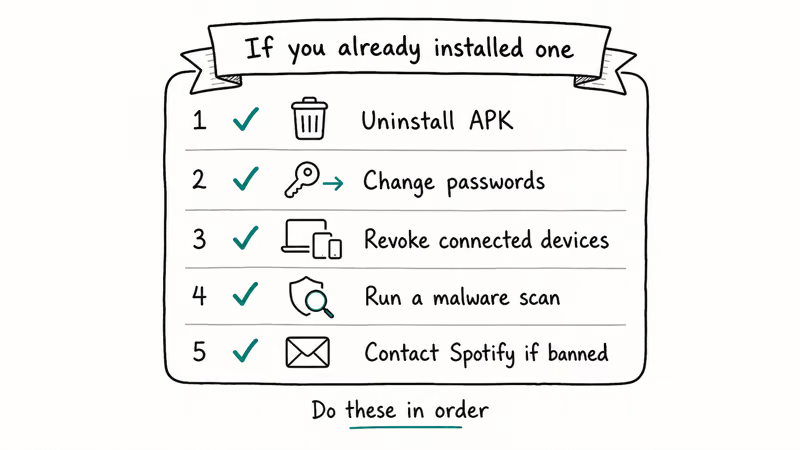
Step 1: Uninstall the modded build immediately. On Android, long-press the Spotify icon, tap App info, then Uninstall. On iPhone, delete the app and the configuration profile under Settings, then General, then VPN & Device Management. Our walkthrough for removing Spotify cleanly on desktop covers the macOS and Windows equivalents.
Step 2: Run Play Protect or a reputable scanner. Open the Play Store, tap your profile, then Play Protect, then Scan. If anything flags, accept the removal.
You’ll want a third-party scan from a vendor like Malwarebytes or Bitdefender as a second pass, since stealer payloads sometimes evade Play Protect.
Step 3: Reset your Spotify password and unlink third-party logins. Sign into spotify.com on a clean device, change the password, and review the Apps section under your account to revoke anything you don’t recognize. Recycled the password elsewhere? Change it on every site that shares it.
Step 4: Reinstall the official Spotify app. Download Spotify from the Play Store or App Store. Your playlists, saves, and history will reattach as soon as you sign in, assuming the account is still active.
Step 5: Watch for unauthorized activity. Check bank statements and email login alerts for the next 30 days. Info-stealers usually act within days, but some hold credentials for later resale.
If you can’t sign in after the cleanup, that’s a signal Spotify already flagged the account, and you’ll need to open a support ticket from spotify.com/contact with a description of what happened. Be specific in the message: name the modded build by version if you remember, list the rough dates you used it, and confirm you’ve removed it. Spotify rejects vague appeals quickly, so the more honest detail you provide up front, the better the chance of an actual reply.
#Legal Ways to Use Spotify Premium Across Regions
A common reason readers reach for a Premium APK is regional pricing. Spotify costs less in some markets, and bypassing the geo-check feels like the only way in. It isn’t.
Spotify lets you change your home country through your account page, provided you actually live in that country and can verify it with a local payment method. Our guide on how to change your Spotify location walks through the verification process and the limits Spotify enforces on travel-based switching.
A VPN is not a substitute. Spotify’s Conditions of Use prohibit using a VPN to mask your country, and the company can suspend accounts that do it persistently. Short trips are fine because Spotify allows a grace period of about 14 days before the account is asked to re-verify location.
#Bottom Line
Don’t install a Spotify Premium APK. The malware risk is high, the account ban is permanent, and the savings vanish the first time you have to reset your phone or close your Spotify account.
If the $11.99 Individual plan is too steep, the Family plan at $3.33 per person, the Student plan at $5.99, or simply staying on Spotify Free are all real options. If Spotify itself isn’t a fit, YouTube Music Premium and Apple Music both have 30-day trials that cost nothing to test.
Pick one of those before pulling an APK off a forum.
#Frequently Asked Questions
Is Spotify Premium APK legal?
No. It breaks Spotify’s Conditions of Use and US copyright law, since the app has been modified to bypass the licensing system that pays artists. The legal exposure for an individual user is usually low. The account-level exposure is not.
Will my playlists transfer back to the official Spotify app?
Yes, if the underlying Spotify account is still active. Playlists, saves, and listening history live on Spotify’s servers, not in the app itself, so a clean reinstall picks up right where you left off, complete with collaborative playlists and follower lists intact. If the account has been terminated, the data is gone with it, and recovery requests after termination almost never succeed.
Does a Spotify Premium APK work on iPhone?
No. Not in any reliable way. The “Spotify++” tutorials online lean on enterprise certificates Apple revokes within days, so the app stops working almost as fast as it gets installed.
Can Spotify detect that I’m using a modded APK?
Often, yes. Modded clients send identifiable network patterns and missing integrity checks back to Spotify, and that’s a hard fingerprint to scrub out without breaking the playback features the mod is selling in the first place. Detection isn’t instant, but the company has the data to act on it and does so periodically, sometimes in waves tied to label audits. Some accounts get banned weeks after install, others the same day they sign in.
How do I get Spotify Premium for free without a modded APK?
Use the 30-day Premium trial Spotify offers to new subscribers, then cancel before the trial ends. You can also test Premium through occasional promotional offers Spotify runs with carriers like Verizon and Cricket Wireless, and through bundles with services like PayPal and Hulu. Each promo has different eligibility rules, so read the fine print before signing up.
Is the free version of Spotify good enough?
For most people, yes.
You get the full catalog and full playlist creation, just with ads and shuffle-only mobile playback for albums.
What if I just want to listen offline?
Premium is the only way to download Spotify tracks for offline playback on a phone, but our guide on whether you can listen to Spotify on a plane covers the workarounds for free users. Pre-loading playlists over Wi-Fi before a flight and using podcast downloads, which are available on the free tier, will cover most short trips.

Google Messages Error 3100: Why RCS Is Broken on Galaxy
Google Messages RCS error 3100 hits Galaxy owners after phone or carrier switches. Google told 9to5Google a fix is coming. Here's what actually helps.

Is This Bank App Real? Spot a Fake App on Your Home Screen
A bank app can land on your home screen from a web page with no install warning. Learn the checks that tell a real banking app from a phishing web app.

Apps Crashing After iOS 27 Update? Fix Order (2026)
Apps crashing after the iOS 27 update? Update the app in the App Store first, then offload and reinstall to clear stale cache, then restart. The fix order.

Do AI Translation Earbuds Work Offline? What to Know
Do AI translation earbuds work offline? A few do with downloaded language packs, but most need the cloud. Here's what works offline and what you give up.