Spotify Keeps Pausing on Its Own? How to Fix It 2026
Spotify keeps pausing on its own? Check device handoff, battery optimization, Bluetooth, and data saver, plus account sharing, with a clear fix order.
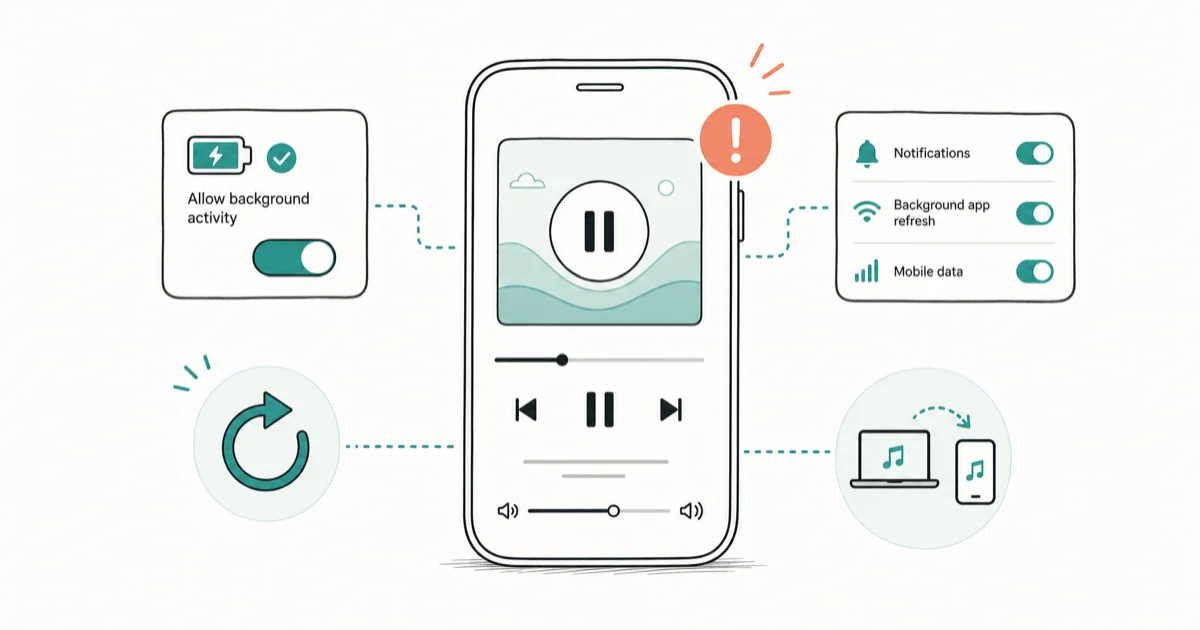
Quick AnswerSpotify keeps pausing mostly because another logged-in device grabbed playback or battery optimization is closing the app in the background. Stop playback elsewhere and exempt Spotify from battery limits.
Spotify keeps pausing when playback stops on its own every few minutes, usually with no error and no warning. Two causes account for most of it: another device signed into your account quietly took over playback, or your phone’s battery optimization is closing Spotify in the background. The generic “reinstall the app” advice buries both. This guide leads with them.
- A second logged-in device grabbing playback is the most-missed cause of random pauses
- Spotify plays on only one device at a time, so any other login can steal the stream
- Exempting Spotify from battery optimization stops the OS from killing it in the background
- Bluetooth auto-pause and Data Saver each cause their own distinct pausing pattern
- A clean reinstall is a last step, not a first one, for self-pausing playback
#Why Does Spotify Keep Pausing?
Spotify pausing on its own is almost never a bug in your library or playlist. It’s the app reacting to something outside the music: a competing device, the operating system, a Bluetooth handoff, or a data limit.
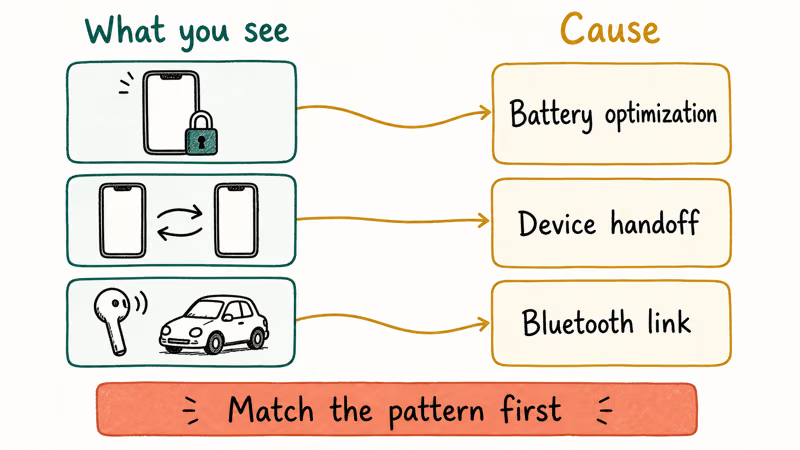
Name the pattern first. Screen-off pauses point to battery optimization, pauses the moment you start music elsewhere mean device handoff, and Bluetooth-only stutter in the car is a connection issue.
Screen-off pauses often happen when the OS suspends Spotify in the background. The practical fix is to stop battery optimization from treating Spotify like a normal idle app.
Matching the pattern to the cause saves you from running through ten unrelated fixes. The sections below follow the order that resolves the most cases first.
#Is Another Device Stealing Playback?
This is the cause people overlook most, and it has a clean test. Spotify’s support page confirms that only 1 device can play audio at a time per account, so any other login can quietly steal the stream. According to Spotify’s Connect support page, starting playback on a second logged-in device pauses the first one automatically, which is exactly what you see when music drops the instant someone else hits play.
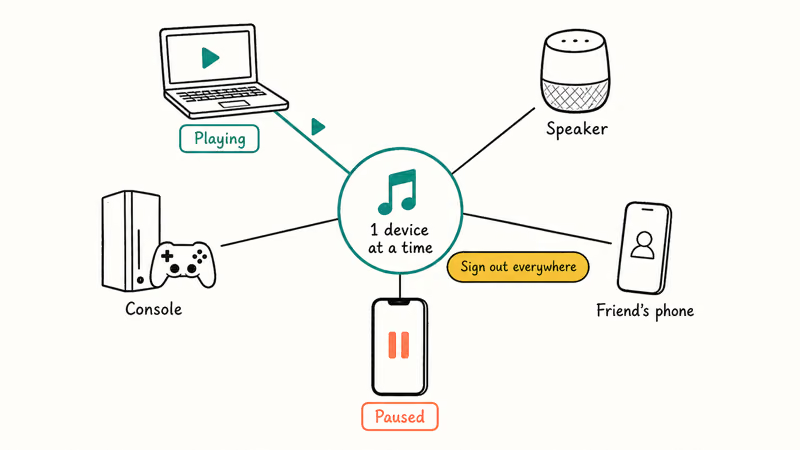
The usual suspects are a laptop left signed in, a smart speaker, a console, or a friend’s phone that still has your login. Sign out everywhere to clear them: open spotify.com, go to Account, and choose Sign out everywhere. Then sign back in on the device you actually use.
If pauses come with a “Spotify is playing on another device” banner, this is your answer. Multi-device handoff is a feature, not a fault, and it only becomes a problem when you don’t know which device is grabbing the stream. Once you’ve signed out the strays, the random handoff stops.
#Fix Battery Optimization and Background Limits
If Spotify pauses while the screen is off, the OS is suspending it to save power. This is the single most common cause on Android.
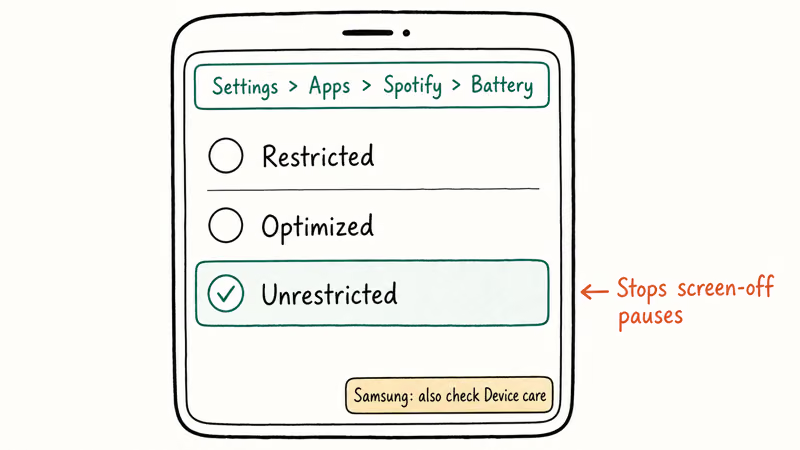
Exempt Spotify from battery optimization. On most Android phones, open Settings > Apps > Spotify > Battery, then set it to Unrestricted. According to Google’s Android battery guide, restricting an app’s background usage limits what it can do while you’re not actively using it, which is exactly what kills playback. Samsung phones add a second layer under Device care, so check there too if the first change doesn’t hold.
On iPhone, the equivalent is Background App Refresh and Low Power Mode. Low Power Mode can throttle background audio, so turn it off while you test. A draining battery makes this worse, and if your phone empties fast the guide on a Galaxy battery draining fast covers the deeper power settings that also govern background apps.
Switching Spotify to Unrestricted is the Android battery fix to try first when pauses happen after the screen locks.
#Check Bluetooth and Data Saver Settings
Two narrower causes produce their own signatures.
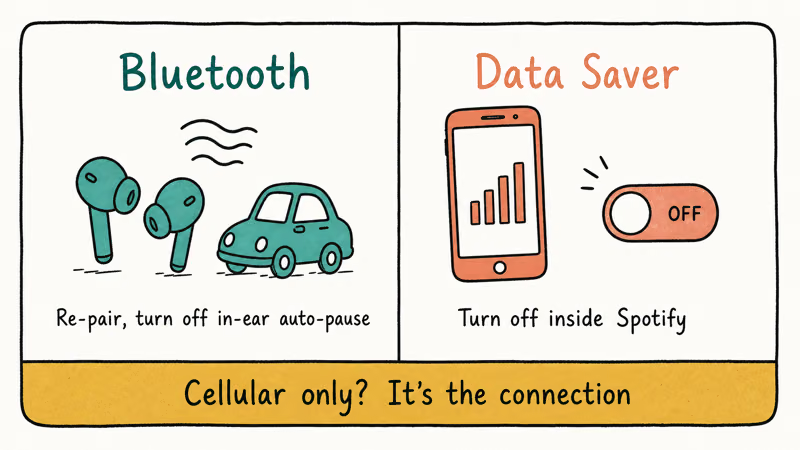
Bluetooth pausing usually happens in the car or with earbuds, where a weak link or an aggressive auto-pause sensor stops the track. Re-pair the device fresh, and disable any in-ear detection that pauses when it thinks the buds are out. If audio routes to the wrong place entirely, the guide on AirPods audio routing walks through fixing the output device. When the link itself keeps dropping on Android, the Bluetooth not working on Android fixes apply.
Data Saver is the other one. Spotify’s own Data Saver mode and your phone’s system Data Saver can both interrupt streaming on a weak mobile connection. Turn off Data Saver inside Spotify under Settings > Data Saver, and check your phone’s system data settings while you’re there.
If the pausing only happens on cellular and never on Wi-Fi, the connection is the real problem, not the app.
#Rule Out an Account or Subscription Issue
You reach this section only after device handoff, battery, and Bluetooth all check out.
If Spotify pauses and then logs you out, or shows a message about your account being used elsewhere, that’s account sharing, not a playback bug. Free accounts also behave differently from Premium. Free playback inserts ads and can pause more often on mobile, and that’s expected behavior rather than a fault.
A stuck queue can also cause odd stops that look like random pausing. The walkthrough on how to clear the Spotify queue fixes that narrower case before you touch anything heavier.
#Reinstall as a Last Resort
When nothing above works, a clean reinstall clears corrupted local data.
Tom’s Guide recommends force-closing and reinstalling Spotify as the reliable reset for playback that keeps stopping, in its Spotify crashing fix guide. On desktop, a full uninstall of Spotify gives you the cleanest slate.
After reinstalling, sign in only on the device you use, then re-check the battery and Data Saver settings. A fresh install can drop the Unrestricted exemption you set earlier, so confirm it’s still in place.
#Bottom Line
Sign other devices out of playback and exempt Spotify from battery optimization first, because device handoff and background limits cause most random pauses. Check Bluetooth re-pairing and Data Saver next if the stutter is tied to earbuds or cellular. If pauses come with logout prompts, look at account sharing rather than the app, and save the reinstall for last.
#Frequently Asked Questions
Why does Spotify keep pausing by itself?
Usually a second logged-in device grabbed playback, or battery optimization is suspending the app. Match the pattern to the cause.
Can another device pause my Spotify?
Yes. Spotify plays on only one device at a time, so any laptop, speaker, or phone still signed into your account can take over and pause your current device. Use Sign out everywhere on spotify.com to clear strays.
Does battery saver stop Spotify?
It can, and it’s a leading cause on Android. Battery optimization and Low Power Mode both throttle background apps, which stops audio when the screen is off. Set Spotify to Unrestricted under its battery settings, and turn off Low Power Mode while you test to confirm. Samsung phones add a second layer of background limits under Device care, so check there too if the first change alone doesn’t hold through a screen-off session.
Why does Spotify pause over Bluetooth?
A weak Bluetooth link or an auto-pause sensor in your earbuds is usually behind it. Re-pair the device and disable in-ear detection. Persistent car pausing often clears after a fresh pairing.
Does free Spotify pause more than Premium?
Yes, somewhat. Free accounts insert ads and apply tighter mobile limits, so occasional pauses are expected rather than a malfunction. Premium removes the ad breaks and the shuffle and skip restrictions, which is why the same phone feels far more stable on a paid plan than on the free tier.
When should I reinstall Spotify?
Only after device handoff, battery, Bluetooth, and Data Saver all check out. A reinstall clears corrupted local data, but it won’t fix a second device stealing playback or an aggressive battery setting, so try those first.

Is This Bank App Real? Spot a Fake App on Your Home Screen
A bank app can land on your home screen from a web page with no install warning. Learn the checks that tell a real banking app from a phishing web app.

Apps Crashing After iOS 27 Update? Fix Order (2026)
Apps crashing after the iOS 27 update? Update the app in the App Store first, then offload and reinstall to clear stale cache, then restart. The fix order.

Do AI Translation Earbuds Work Offline? What to Know
Do AI translation earbuds work offline? A few do with downloaded language packs, but most need the cloud. Here's what works offline and what you give up.
How to Set Up Translation Earbuds (Pairing and Modes)
How to set up translation earbuds: charge, install the app, pair over Bluetooth, pick two languages, and choose a mode. A step-by-step first-use guide.