How to Recover Deleted Voicemail on iPhone: 5 Honest Methods
Recover a deleted voicemail on your iPhone using the Deleted Messages folder, your carrier voicemail server, an iCloud or Finder backup, or paid tools.
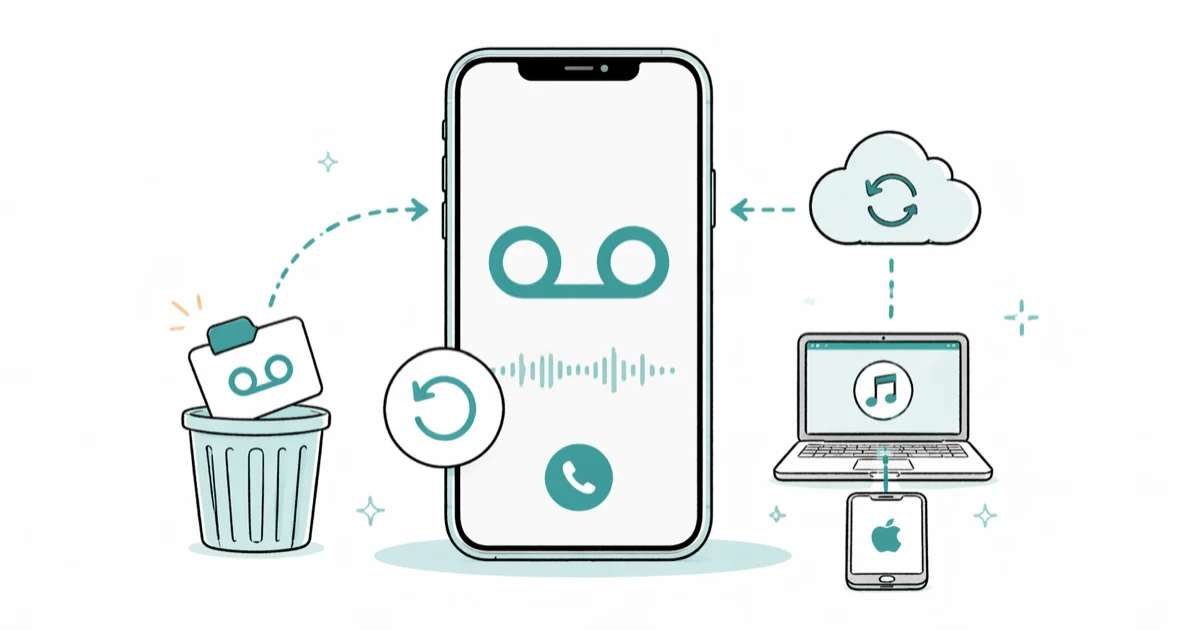
Quick AnswerOpen the Phone app, tap Voicemail, scroll to the Deleted Messages folder at the bottom, tap the recording, and tap Undelete. If that folder is empty, restore an iCloud or Finder backup made before the deletion.
You deleted a voicemail on your own iPhone and want it back. The fastest fix is the Deleted Messages folder inside the Phone app, and most people recover the recording in under a minute.
This guide covers your own device only. Start with the Deleted Messages folder, then check carrier voicemail and backups before considering paid recovery tools.
- Open Phone, tap Voicemail, then tap Deleted Messages at the bottom and tap Undelete next to the recording you want
- Visual Voicemail recordings live on your iPhone, so a backup made before the deletion is the only reliable second chance
- Carrier voicemail servers sometimes hold a deleted message for a short grace period, so call your carrier before erasing your phone
- Restoring an iCloud or Finder backup wipes everything created after that backup date, so use it as a last resort
- Save important voicemails by tapping the Share icon and exporting them to Files or iCloud Drive
#Where Did Your Deleted Voicemail Go?
Visual Voicemail on iPhone isn’t a hosted inbox. Each recording downloads from your carrier as a small .amr audio file and lives on the device, then mirrors into iCloud Backup if backups are turned on. According to Apple’s voicemail support article 125309, tapping the trash icon moves a voicemail into a Deleted Messages folder rather than wiping the audio immediately. That folder is your easiest recovery path.
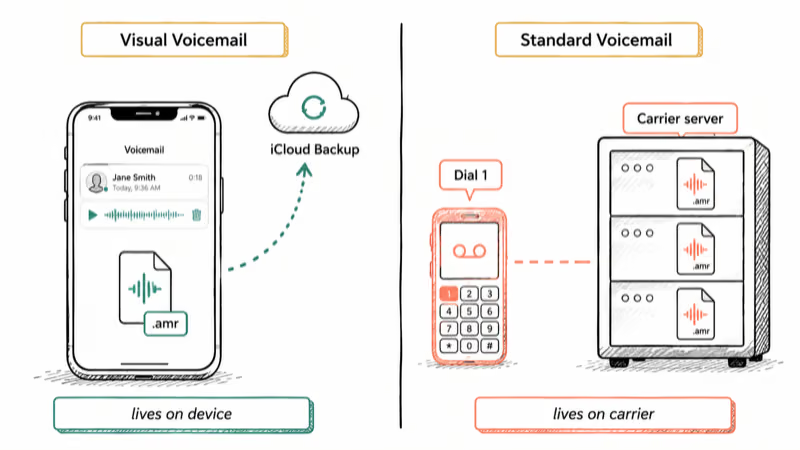
Standard voicemail without the visual interface is different. Older plans and some prepaid lines route voicemails to a carrier mailbox you reach by dialing 1 or pressing and holding 1. Those recordings live on the carrier server.
Check which kind you have. Open the Phone app, tap Voicemail. A list of messages means Visual Voicemail. A Call Voicemail button means standard voicemail.
#How to Restore a Voicemail From the Deleted Messages Folder
This is the first thing to try. It works on iPhone running iOS 14 through iOS 18.
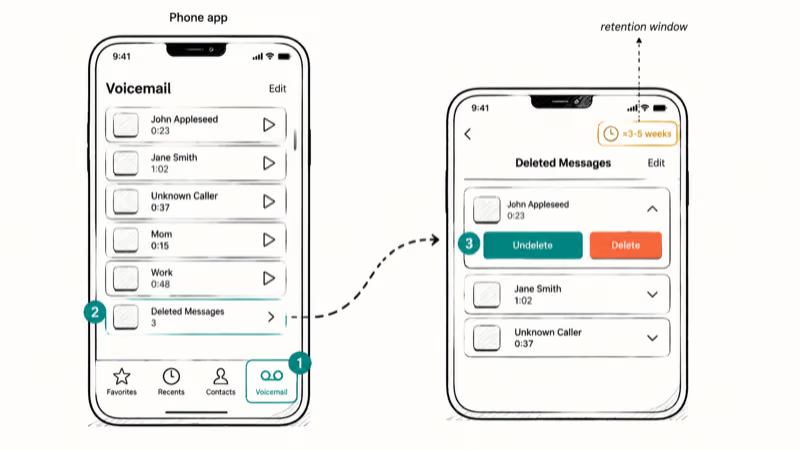
Open the Phone app. Tap the Voicemail tab on the bottom right. Scroll past the active recordings to the bottom of the list, then tap Deleted Messages. Find the recording you want, tap it once to expand, then tap Undelete.
The voicemail jumps back into your main list immediately. Deleted Messages retention varies by carrier and account state. Recently deleted recordings are more likely to remain visible than older ones.
Apple doesn’t publish an official retention window for the Deleted Messages folder, and carrier behavior can vary. If the recording is gone from this folder, don’t factory reset your iPhone yet. The next two methods sometimes work without touching your live data.
#What If Your Carrier Still Has the Voicemail?
Carrier voicemail servers sometimes keep deleted messages for a short grace window even after the device-side folder purges. This is the cheapest second attempt and worth trying before any backup restore.
Call carrier customer service from a different phone. Ask the agent to check whether your voicemail server has a recently deleted message archive, and provide the rough date and time of the call. AT&T, Verizon, and T-Mobile all route this through customer service. The answer depends on your specific plan.
Most US carriers tell us the retention window is several days at most, not weeks. Call quickly. If your line is on standard voicemail (not Visual Voicemail), you can also dial your own number from another phone, press the # or * key during your greeting, and enter your voicemail PIN to reach the server menu directly.
Plan changes can shift you between Visual Voicemail and standard. If you’re on Verizon and recently switched plans, our Verizon voicemail not working guide covers the carrier-side flags that flip during plan migrations.
A practical caveat. Even when your carrier finds the recording, they typically push it back as a new voicemail rather than restoring the original timestamp. Save it immediately once it lands.
#Restoring a Voicemail From iCloud Backup
Yes, but only by erasing your iPhone first. Read this section twice before you start.
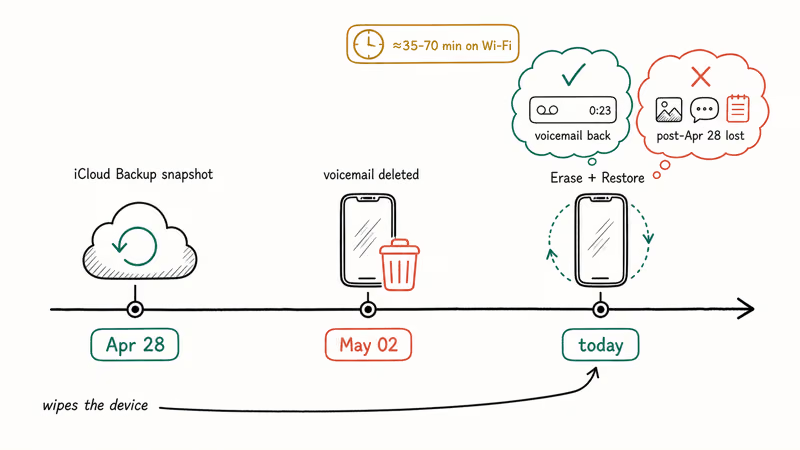
According to Apple’s iCloud Backup support article 108922, iCloud Backup includes Visual Voicemail audio when your phone is on Wi-Fi, charging, and locked overnight. Each backup snapshot captures everything on the phone at that moment. To use one, you wipe the phone and restore from the snapshot, which means anything created after the backup date disappears.
Confirm a usable backup exists first. Go to Settings > [Your Name] > iCloud > iCloud Backup and look at the most recent backup date. It must be from before you deleted the voicemail.
If the latest backup is from after the deletion, this method won’t help. Back up anything new you want to keep first: photos taken since that date, recent notes, recent messages. Then go to Settings > General > Transfer or Reset iPhone > Erase All Content and Settings and confirm with your Apple Account password.
The phone reboots into the setup flow. Choose Restore from iCloud Backup, sign in, pick the right backup, and wait. Large iCloud restores can take a while, especially over slower Wi-Fi.
When setup finishes, open Phone and check Voicemail. The recording should be back with its original timestamp.
#Restoring From a Finder or iTunes Backup
A local computer backup works the same way and is faster than iCloud. Connect your iPhone to your Mac and open Finder (macOS Catalina or later) or to a Windows PC and open iTunes. Click your device, click Restore Backup, pick a snapshot from before the deletion, and wait. The same trade-off applies: anything added after the backup date is gone.
If you don’t see a usable Finder or iTunes snapshot, that path is closed. Check for an iCloud backup instead.
#Paid Forensic Software With No Backup
Sometimes, on your own iPhone with your own Apple Account credentials, but the honest answer here matters. Since iOS 8.4, Apple’s file-based encryption and APFS make raw scans of “wiped” device storage close to useless. Reputable iOS forensic tools (Tenorshare UltData, iMyFone D-Back, Wondershare Dr.Fone) work mostly by extracting voicemail .amr fragments from existing local backups or iCloud snapshots after you authenticate.
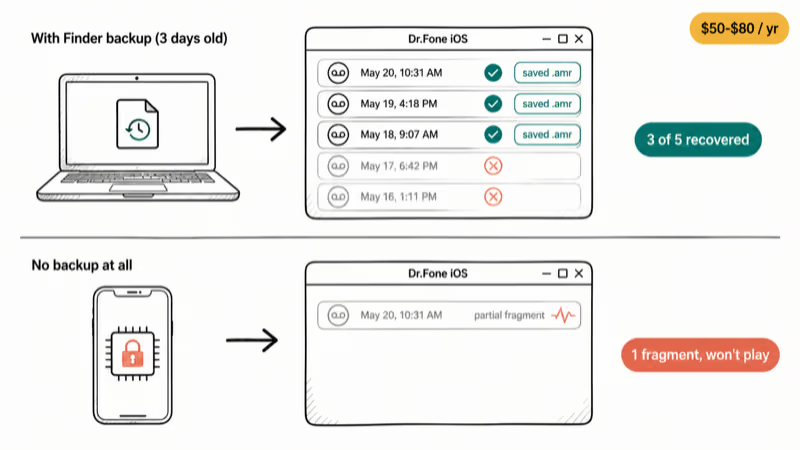
According to Dr.Fone iOS Data Recovery, backup-sourced recovery is the realistic use case after the Deleted Messages folder is empty. A recent Finder or iCloud backup gives the tool something to scan; with no backup at all, recovery is much less predictable.
Some links on this page are affiliate links, which means fone.tips may earn a commission at no extra cost to you.
If the built-in and carrier routes are exhausted, PhoneRescue is another backup-extraction option, but it still needs a usable Finder, iTunes, or iCloud snapshot.
If you want to try this route, expect a license cost in the $50 to $80 range for a 1-year personal plan. Free trials usually scan and preview without saving, so verify the recording is actually findable before paying.
A second option worth knowing: iMazing for iPhone backups can extract voicemail audio from existing local backups without restoring the whole device. If you have a Finder backup from before the deletion but don’t want to wipe your phone, that workflow saves time.
#Stopping Voicemail Loss in the Future
Three habits cover almost every case.
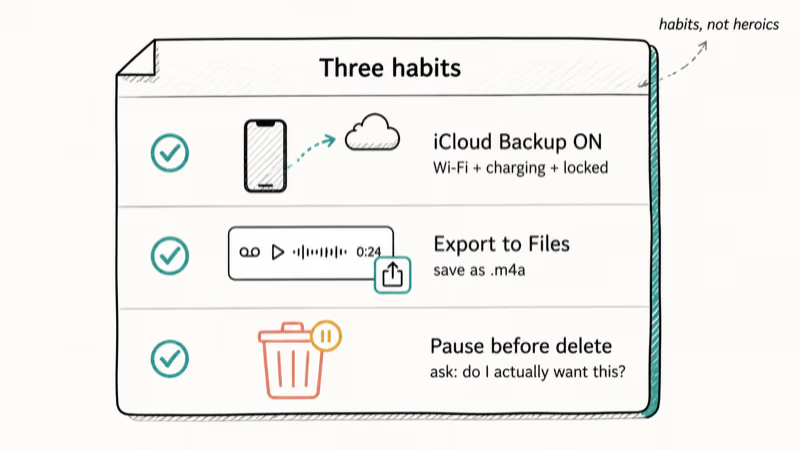
Turn iCloud Backup on. Go to Settings > [Your Name] > iCloud > iCloud Backup and confirm it shows enabled. Apple states that backups run automatically when your iPhone is on Wi-Fi, charging, and locked, which is usually overnight. Check the date occasionally to confirm it’s recent.
Export the recordings that matter. According to Apple’s iPhone user guide on sharing voicemail, the Share icon next to each recording lets you save it as an .m4a audio file to Files, iCloud Drive, AirDrop, or Mail in 1 tap. Once the audio leaves the Phone app, accidental deletion can’t touch it. Our guide on recovering deleted photos from iPhone walks through the same export-then-archive habit.
Slow down before tapping delete. Lost voicemails often happen when people clear the inbox quickly. The Deleted Messages folder catches that for a while, but a quick “do I actually want this?” pause prevents the problem.
A related issue worth knowing. If your iPhone goes straight to voicemail without ringing, that’s a separate Focus or call-forwarding problem and unrelated to recovering a deleted recording. The fix is in our dedicated guide.
#Legal Limits on Recovering Someone Else’s Voicemail
The answer is short. This guide covers your own line.
Accessing a voicemail box you don’t own, even a spouse’s or family member’s, can violate the federal Wiretap Act and most state electronic-privacy laws.
Any service that promises to “recover deleted voicemails from any number” without account ownership should be treated as a scam at best and a legal trap at worst. Vendors who advertise unauthenticated number-based recovery are usually selling a credential-phishing front, an SS7-exploit pitch dressed as a consumer tool, or simply a refund-resistant store. None of those are paths a normal person should pursue, and US carriers won’t assist a recovery request that lacks documented account ownership.
For probate, custody, or other legal scenarios, work through Apple Support and your carrier’s legal-compliance team. Both have documented preservation channels and won’t ship a recording without proper authorization.
#Bottom Line
Try the Deleted Messages folder first. It solves the problem for most people in under a minute. If that folder is empty, call your carrier and ask whether the voicemail server still has the recording.
Restoring an iCloud or Finder backup made before the deletion is the third option. It’s the only one that wipes your phone, so save anything new first. Paid forensic tools like Dr.Fone are realistic only when you already have a backup file to extract from. If none of those work and the recording matters, save the date and number and ask Apple Support whether their channel can help with anything carrier-side.
iPhone tips & tricks
#Frequently Asked Questions
How long do deleted voicemails stay in the Deleted Messages folder?
Apple doesn’t publish a fixed retention window. Deleted Messages can clear after several weeks depending on carrier and account state. Check the folder as soon as you realize a voicemail is missing.
Can I recover a voicemail without any backup at all?
The realistic odds are low. The Deleted Messages folder is your main shot.
If that folder is empty and you have no Finder, iTunes, or iCloud backup from before the deletion, your only remaining option is calling carrier customer service within their grace window, which most US carriers describe as a few days at most. Tools that promise no-backup recovery rarely deliver on iOS 8.4 and later because of file-based encryption: there are simply no readable bytes to carve back. Treat any “no-backup recovery in 30 seconds” pitch as marketing rather than engineering.
Will restoring an iCloud backup erase my current iPhone?
Yes, completely. The restore wipes the device and replaces everything with the backup’s contents. Photos, messages, app data, and notes added after the backup date are gone. Use this only after the Deleted Messages folder and your carrier have both come up empty, and back up anything recent you want to keep first.
Can I recover voicemails from a broken iPhone?
If it powers on, plug it in and try Finder. If it won’t power on, professional data recovery costs $300 to $1,500 and isn’t guaranteed.
What is the difference between Visual Voicemail and standard voicemail?
Visual Voicemail downloads each recording to your iPhone as a file, shows them as a list, and lets you tap any one to listen. Standard voicemail leaves the recordings on the carrier server and you reach them by calling in. Visual Voicemail recordings live on your device and in your backups; standard voicemail recordings live on the carrier server only.
How do I save a voicemail so it can’t be accidentally deleted?
Tap the voicemail. Tap the Share icon. Save it to Files or iCloud Drive. Done.
What if I forgot the PIN that unlocks my voicemail?
The PIN is separate from recovery. Our forgot voicemail password guide walks through the reset flow for AT&T, Verizon, T-Mobile, and the major prepaid carriers. Once the PIN is reset, the Deleted Messages folder and any backup-restore flow work normally.

How to Transfer Data to a New iPhone Without iCloud
Move everything to your new iPhone without iCloud: Quick Start device-to-device transfer, wired migration, and encrypted Finder or iTunes backups.
Best Wireless Earbuds for iPhone in 2026: USB-C Era Picks
Best wireless earbuds for iPhone in 2026, comparing AirPods Pro 3, Sony WF-1000XM6, Bose QC Ultra, and Anker Liberty 4 NC on the USB-C iPhone lineup.
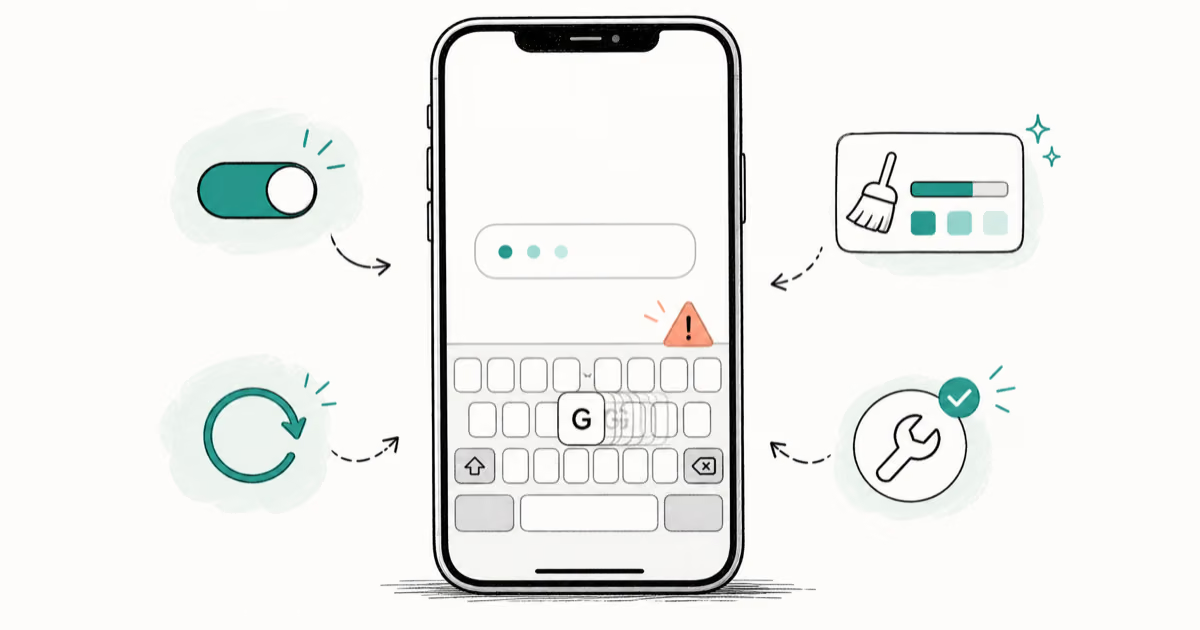
iPhone Keyboard Lag? 7 Proven Fixes for iOS 26 (2026)
Fix iPhone keyboard lag with 7 proven fixes for iOS 26. Covers restart, storage, predictive text, third-party keyboards, and dictionary reset.
How to Block Porn on an iPhone: A Guide for Parents
Learn how to block porn on iPhone using Screen Time, DNS filtering, and safe browsers. Step-by-step guide for parents to protect kids' devices.