Minecraft Low FPS Fix: 9 Ways to Boost Your Frame Rate
Minecraft low FPS fix: install Sodium, allocate the right RAM, lower render distance, and update drivers. 9 proven fixes for Java and Bedrock.
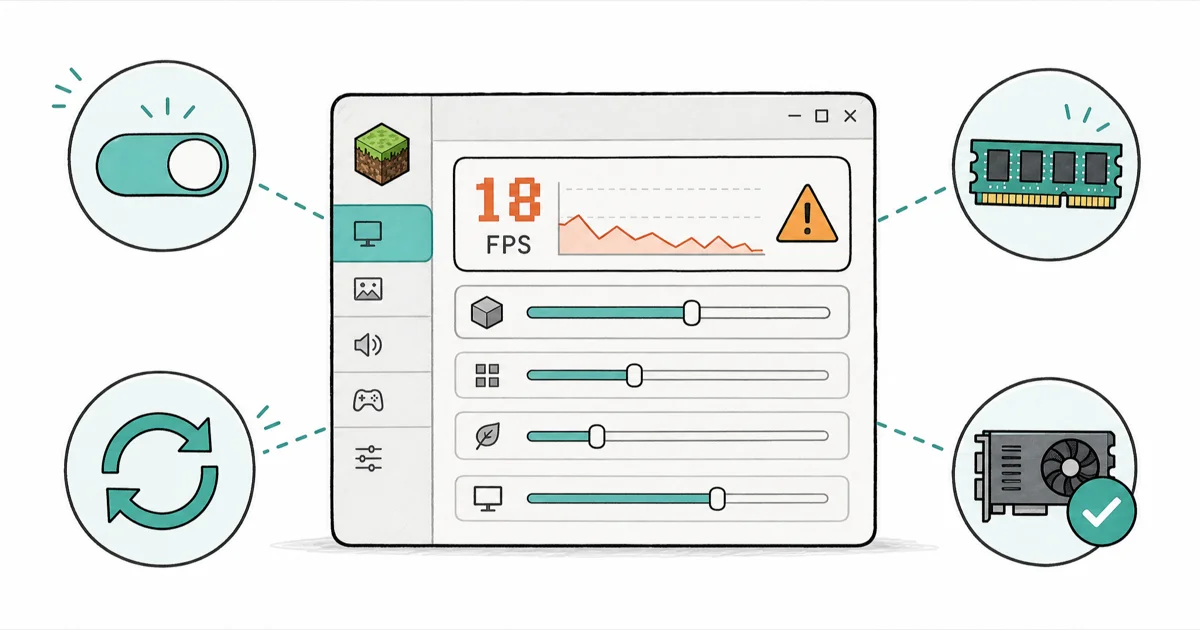
Quick AnswerMost Minecraft low FPS comes from the unoptimized vanilla engine. On Java, installing Sodium is the biggest single fix, then allocate 4 to 6 GB of RAM and lower your render distance.
A Minecraft low FPS fix almost always starts with the same culprit: the vanilla game is badly optimized, not your hardware. The biggest improvement usually comes from replacing Java Edition’s renderer, and the rest of this guide ranks the other fixes by impact.
- On Java Edition, installing the Sodium performance mod is the largest single FPS gain you can make, because it rewrites the game’s rendering engine instead of patching it
- More RAM is not better, since Java’s garbage collector pauses the game to clean larger memory pools, so 4 to 6 GB is the sweet spot for a modded setup
- Render distance is the most expensive video setting because its cost rises with the square of the radius, so dropping it a few chunks frees up huge headroom
- Bedrock Edition is written in C++ and usually runs smoother than Java on the same PC, but it has far fewer optimization mods
- Forcing your dedicated GPU and switching to a High Performance power plan fixes low FPS that no in-game setting can touch
#Why Is My Minecraft FPS So Low?
Vanilla Minecraft is the problem more often than your PC is. The game is single-threaded and CPU-bound, so your graphics card often sits idle waiting on the processor to feed it frames.
That changes the whole approach.
Because the bottleneck is usually the CPU and the unoptimized engine, the fixes that help most are mods and settings, not a new graphics card. A sudden drop right after installing a mod points to software, while steadily low FPS on a clean install points to hardware or settings. If your game also drops audio or stalls, treat that separately, since no sound in Minecraft is a different fault.
Work through the fixes below in order of impact.
#Install a Performance Mod for the Biggest Win
This is the one change that matters most on Java. The community has largely moved from OptiFine to Sodium, and the reason is architecture.
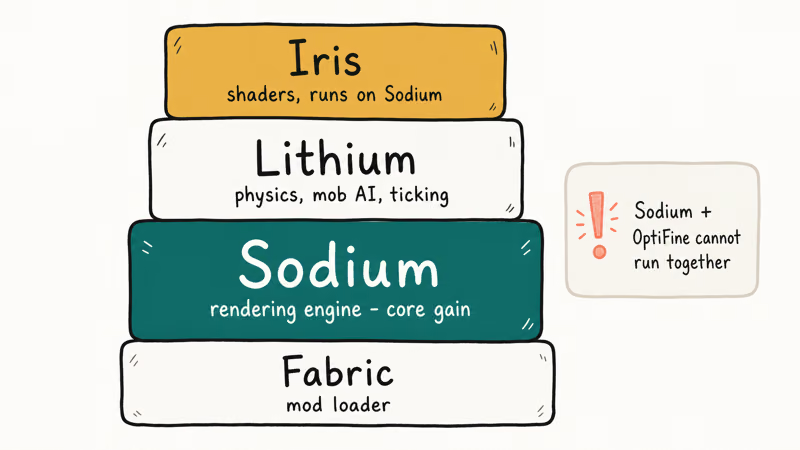
According to Sodium’s developers, it needs OpenGL 4.5 drivers or newer, a requirement its Modrinth page spells out clearly, and that page also explains how the mod replaces the rendering engine outright instead of patching it. For most Java players, switching to Fabric plus Sodium is the biggest frame-rate fix that doesn’t change how the game looks.
Here is the modern Java stack worth installing together:
- Fabric: the lightweight mod loader Sodium needs
- Sodium: the rendering engine replacement (the core gain)
- Lithium: optimizes physics, mob AI, and world ticking
- Iris: adds shader support and runs on top of Sodium
One catch: Sodium and OptiFine can’t run together, since both rewrite the renderer. Want shaders? Use Iris instead of OptiFine.
#How Much RAM Should You Give Minecraft?
Less than you think. The launcher often assigns only 1 to 2 GB by default, which is too low, but cranking it to the maximum backfires badly.
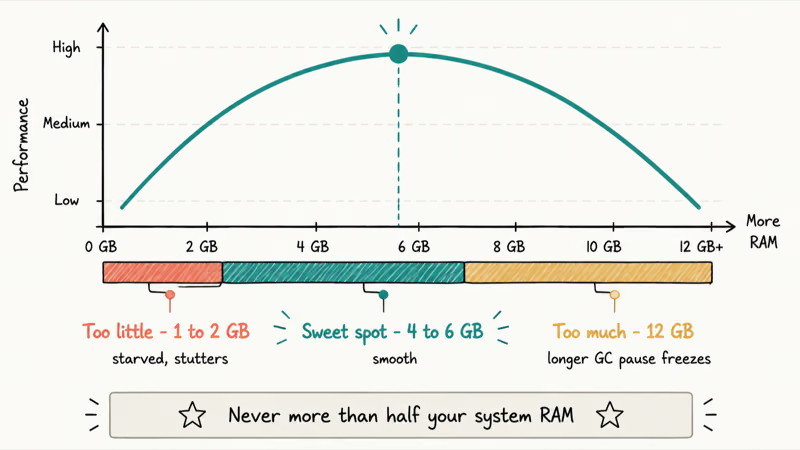
Here’s the counterintuitive part. Java’s garbage collector freezes the game to clean up memory, and the more RAM you allocate, the longer those freezes last. Allocating excessive RAM can make stutter worse instead of improving FPS. Aim for 4 GB for vanilla, 4 to 6 GB with performance mods, and never more than half your total system RAM.
To change it, open the Minecraft Launcher, go to Installations, edit your profile, click More Options, and find the JVM Arguments box. Change -Xmx2G to -Xmx4G for 4 GB, or -Xmx6G for 6 GB.
Save the profile and relaunch.
#Tune the Video Settings That Matter Most
A handful of settings move the needle, and the rest barely matter. The Minecraft Wiki’s frame rate guide recommends lowering render distance and switching graphics to Fast as the highest-impact changes you can make in seconds.
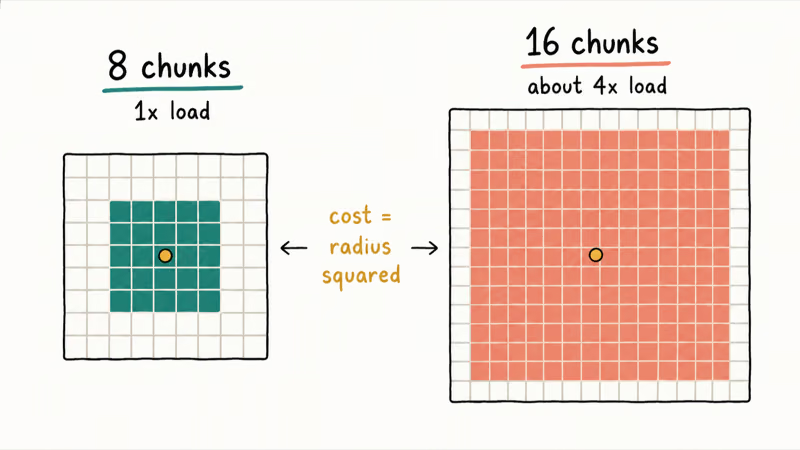
Render distance is the heavy hitter. Its cost rises with the square of the radius, so going from 8 to 16 chunks doesn’t double the load, it roughly quadruples it. Drop it to 8 to 12 chunks and you free up enormous headroom on a weak machine.
Then set Graphics to Fast, turn V-Sync off, set Smooth Lighting to Minimum, cut Particles to Minimal, and disable entity shadows. Press F11 for fullscreen, which hands Minecraft exclusive GPU access. Stacked together, these alone can rescue a stuttering game before you touch a single mod, the same approach that fixes a Valorant FPS drop on similar hardware.
#Update Your Drivers and Force the Right GPU
System-level issues quietly wreck performance, and laptops are the worst offenders. Many run Java on the integrated GPU instead of the dedicated one.
Force the right card. Open Windows Graphics Settings, add javaw.exe (not minecraft.exe), and set it to High Performance. As XDA’s guide to higher gaming FPS explains, picking the dedicated GPU and trimming background load are among the biggest wins outside the game itself.
NVIDIA recommends installing the latest Game Ready Driver for the best performance in current titles, so grab yours straight from NVIDIA’s driver page rather than Windows Update. Switch your Windows power plan to High Performance too, and close background apps like Chrome and Discord that eat CPU and RAM. A current OpenJDK build of Java helps as well.
#Java vs Bedrock Performance Differences
The edition you play changes the ceiling. Java runs on a resource-hungry runtime, while Bedrock is written in faster C++.
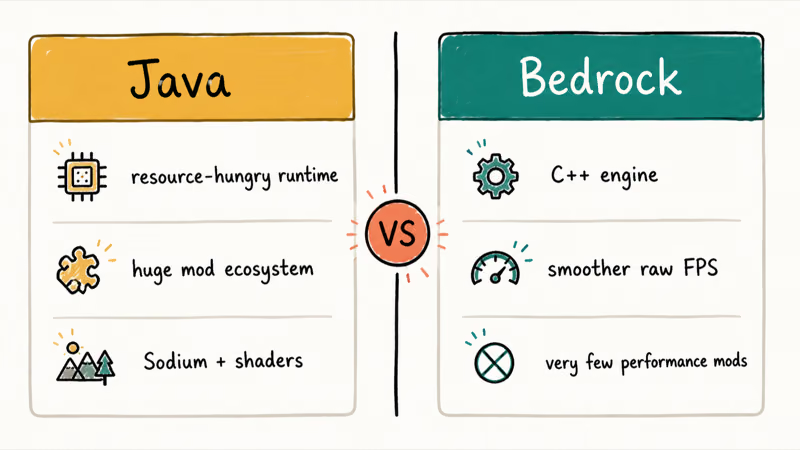
Many players report Bedrock running smoothly at high render distances where Java struggles. The trade-off is mods: Bedrock has very few performance add-ons, so you can’t Sodium your way out of a slow Bedrock setup the way you can on Java.
Own both? Test Bedrock when raw frame rate is your only concern. Stick with Java when you want Sodium, shaders, and the deep mod ecosystem, like the tools that help you make a saddle in Minecraft or plan bow enchantments for a long survival run.
#Bottom Line
If you play Java, install Fabric and Sodium first. It’s the largest single gain by a wide margin, it’s free, and it doesn’t change how the game looks.
Pair it with a sensible 4 to 6 GB RAM allocation and a render distance around 10 chunks, and most low-end PCs jump from a slideshow to smooth. If you only care about raw frame rate and don’t need mods, try Bedrock instead, since its C++ engine starts ahead of Java before you tweak a thing.
#Frequently Asked Questions
Why is my Minecraft FPS so low on a good PC?
Usually because vanilla Minecraft is poorly optimized and single-threaded, so a fast GPU sits idle waiting on the CPU. On a strong PC the fastest fix is installing Sodium on Java, then forcing the game onto your dedicated graphics card. Laptops especially default to the weaker integrated GPU, which alone can halve your frame rate.
Does adding more RAM increase Minecraft FPS?
No, and too much can lower it. Java’s garbage collector pauses the game to manage memory, so bigger pools mean longer pauses. Stick to 4 to 6 GB.
Is Sodium better than OptiFine?
For raw performance, yes, on most systems. Sodium replaces the rendering engine while OptiFine only patches it, so Sodium runs faster on the same hardware. The catch is that they can’t be installed together, and OptiFine still has a few unique features. If you want shaders with Sodium, add Iris instead.
What render distance should I use for better FPS?
Drop it to 8 to 12 chunks on a weaker PC. Its cost scales with the square of the radius, so small cuts free up a lot.
Does Bedrock have better FPS than Java?
Often, yes. Bedrock is built in C++ and tends to run smoother and more stably than Java on the same hardware, especially at high render distances. The downside is a much smaller pool of performance mods, so Java with Sodium can close or even beat that gap on a well-tuned setup.
Will updating my graphics drivers help Minecraft?
Yes. Outdated drivers cause stuttering, crashes, and lower frame rates. Download the latest one straight from NVIDIA, AMD, or Intel, then restart and test.
My FPS is fine but the game still lags, what now?
That’s usually a network or world-load issue, not frame rate. If you stutter only in multiplayer or struggle when connecting to a world in Minecraft, the bottleneck is your connection or the server, not your GPU. Lower your simulation distance and test in single-player to confirm where the lag really lives.
Fortnite Stuck on the Loading Screen? Fix It in 2026
Fortnite stuck on the loading screen? Check server status, fix the Windows N Media Pack and DirectX 11 on PC, clear the console cache, and verify files.
Minecraft Keeps Crashing? Java and Bedrock Fixes (2026)
Minecraft keeps crashing on startup or mid-game? Update your GPU driver, remove mods on Java, and reinstall Gaming Services on Bedrock. Fixes for both.
Pokemon GO Not Loading? Fix the Loading Screen 2026
Pokemon GO not loading or stuck on the Pokeball? Check server status, fix automatic date and time, grant location permission, clear the cache, and update.
PS5 Controller Not Charging? 9 Fixes That Work (2026)
DualSense not charging? Swap the cable, use a rear port in Rest Mode, clean the USB-C port, and check power settings. 9 fixes for a dead PS5 controller.